How to remove Windows 10 upgrade updates in Windows 7 and 8

Driver Updates

Using Windows Update, not MS Update, I had never seen driver updates appear under Optional Upgrades other than the WDM VAG driver on my lappie. However wife's machine last night popped up a driver for "Other Hardware - Microsoft Wieless Router Module" .... huh ?

What's this for ? To capture wireless router traffic ? :)

MS .... stay away from my Hardware Drivers !
 

My Computer My Computer

At a glance

Windows 7 - 64 biti7 920Mushkin 998692GTX 295 FTW Edition 1792MB
Computer Manufacturer/Model Number
Home Built
OS
Windows 7 - 64 bit
CPU
i7 920
Motherboard
Asus Rampage II Extreme
Memory
Mushkin 998692
Graphics Card(s)
GTX 295 FTW Edition 1792MB
Sound Card
Sounblaster Xi Fi Extreme
Monitor(s) Displays
Dekk U2410
Hard Drives
Seagate 7200.12
PSU
Antec SG-850
Case
Antec 1200
Cooling
Prolimatech Megashadow
Using Windows Update, not MS Update, I had never seen driver updates appear under Optional Upgrades other than the WDM VAG driver on my lappie. However wife's machine last night popped up a driver for "Other Hardware - Microsoft Wieless Router Module" .... huh ?

What's this for ? To capture wireless router traffic ? :)

MS .... stay away from my Hardware Drivers !

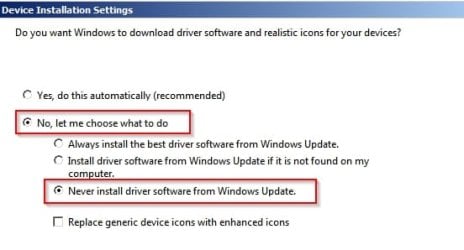
It might also be worth trying to disable windows update drivers search.

Start> Right click Computer

Choose "Properties"

On the left side choose "Advanced System Settings"

On the Hardware tab choose "Device Installation Settings"

Set it like this:

Device Installation Settings.jpg
 
Last edited:

My Computer My Computer

At a glance

Microsoft Windows 7 Home Premium 64-bit 7601 ...AMD C-60 APU with Radeon(tm) HD Graphics4.00 GBAMD Radeon HD 6290 Graphics
Computer type
Laptop
Computer Manufacturer/Model Number
ASUS
OS
Microsoft Windows 7 Home Premium 64-bit 7601 Multiprocessor Free Service Pack 1
CPU
AMD C-60 APU with Radeon(tm) HD Graphics
Motherboard
ASUSTeK COMPUTER INC. X501U
Memory
4.00 GB
Graphics Card(s)
AMD Radeon HD 6290 Graphics
Sound Card
(1) AMD High Definition Audio Device (2) Realtek High Defi
Screen Resolution
1366 x 768 x 32 bits (4294967296 colors) @ 60 Hz
Hard Drives
Hitachi HTS545050A7E380 SATA Disk Device
Antivirus
Comodo CIS & FW, SecureAplus App Whitelisting, Threatfire
Browser
Cyberfox 64bit, Opera 64bit, Airfox
Other Info
Spy-The-Spy, HitmanPro.Alert, Norton Connect Safe, MJRegWatcher, BitDefender TrafficLight, Voodoo Shield, Zemana AntiMalware
He Challender :)

That is very interesting, considering my audio drivers problem. So, if I would change the settings as you show above and I would uninstall drivers in the device manager, windows will not be able to re-install as always the same Bl""dy old drivers but look elsewhere or what? Or not at all and let me do the searching?

You see, I am afraid of that, know nothing about drivers and the like

Let me choose? From Dell, Realtek, what ever?
How would I know what to choose ........
 

My Computer My Computer

At a glance

windows 7 professional 64 bitCPU Genuine Intel (R) CPU [email protected]RAM 3 GBToshiba MK2555 GSX ATA
Computer type
Laptop
Computer Manufacturer/Model Number
HP Presario CQ70
OS
windows 7 professional 64 bit
CPU
CPU Genuine Intel (R) CPU [email protected]
Motherboard
APCI x 64 - based PC
Memory
RAM 3 GB
Graphics Card(s)
Toshiba MK2555 GSX ATA
Sound Card
Conexant High Def Smart Audio 221,
Monitor(s) Displays
monitor Generic PnP.
Screen Resolution
?
Hard Drives
HDAUDIO Soft Data Fax Modern with smart CP
PSU
?
Keyboard
Standard PS/2 keyboard
Mouse
PS/2 Compatible mouse
Antivirus
Hyjackthis and Superanti spyware, Mamb Ccleaner
Browser
Google Chrome
thelma,

For me I selected, Yes, do this automatically. However, I would remove any programs that downloads updates directly from dell. Before, I did a clean install I notice dell driver program conflicted with windows update driver. Ironically, the windows update drivers are provide to Microsoft by dell.
 

My Computer My Computer

At a glance

W10 32 bit, XUbuntu 18.xx 64 bitIntel(R) Celeron(R) CPU G1620T @ 2.40GHz, 240...4GBIntel HD graphics
Computer type
PC/Desktop
Computer Manufacturer/Model Number
Dell All in one Inspiron 2020
OS
W10 32 bit, XUbuntu 18.xx 64 bit
CPU
Intel(R) Celeron(R) CPU G1620T @ 2.40GHz, 2400 Mhz
Motherboard
Dell
Memory
4GB
Graphics Card(s)
Intel HD graphics
Sound Card
High Definition Audio Device
Monitor(s) Displays
20 inch Screen
Screen Resolution
W7=1280 x 720 & Linux Mint Xfce=1360 x 768
Hard Drives
500 GB hard drive
Keyboard
Usb
Mouse
Usb
Internet Speed
High-Speed
Antivirus
MSE
Browser
Main Browser Firefox
Other Info
I have done a clean install of Windows 7 using Dell re-installation disk (Dell sent me one). I also use Free Macrium reflect backup and restore.
Thanks Groze :), This is spinning my head :rolleyes:
 

My Computer My Computer

At a glance

windows 7 professional 64 bitCPU Genuine Intel (R) CPU [email protected]RAM 3 GBToshiba MK2555 GSX ATA
Computer type
Laptop
Computer Manufacturer/Model Number
HP Presario CQ70
OS
windows 7 professional 64 bit
CPU
CPU Genuine Intel (R) CPU [email protected]
Motherboard
APCI x 64 - based PC
Memory
RAM 3 GB
Graphics Card(s)
Toshiba MK2555 GSX ATA
Sound Card
Conexant High Def Smart Audio 221,
Monitor(s) Displays
monitor Generic PnP.
Screen Resolution
?
Hard Drives
HDAUDIO Soft Data Fax Modern with smart CP
PSU
?
Keyboard
Standard PS/2 keyboard
Mouse
PS/2 Compatible mouse
Antivirus
Hyjackthis and Superanti spyware, Mamb Ccleaner
Browser
Google Chrome
Sticky Thread and/or Tutorial

Perhaps we need a sticky thread/tutorial listing the known "Get W10" updates that have been delivered to W7.
Obviously it would need to be updated every month.

A single location would make it easier to find the information, as opposed to searching a 700+ post thread.

I'll suggest it to Brink, so the that all the necessary people can discuss the idea and take any action they think is appropriate. :)
 
Last edited:

My Computer My Computer

At a glance

W7 Ultimate SP1, LM19.2 MATE, W10 Home 1703, ...AMD Phenom II x6 1100T, 3.3 GHz12GB DDR3 1333 G-Skill (4GB x 2), G-Skill (2G...NVIDIA GeForce GTX 660
Computer type
PC/Desktop
Computer Manufacturer/Model Number
n/a
OS
W7 Ultimate SP1, LM19.2 MATE, W10 Home 1703, W10 Pro 1703 VM, #All 64 bit
CPU
AMD Phenom II x6 1100T, 3.3 GHz
Motherboard
ASUS M4A88T-M/USB3 (AM3)
Memory
12GB DDR3 1333 G-Skill (4GB x 2), G-Skill (2GB x 2)
Graphics Card(s)
NVIDIA GeForce GTX 660
Sound Card
Realtek?
Monitor(s) Displays
Samsung S23B350
Screen Resolution
1920x1080
Hard Drives
WD Green 2TB (SATA), WD Green 3TB (SATA), WD Blue 4TB (SATA), WD Blue 6TB (SATA)
PSU
Cooler Master
Case
Antec GX300 Tower
Cooling
3x Antec TRICOOL 120mm Fans
Mouse
Wired Optical
Internet Speed
DSL
Antivirus
Avast
Browser
Pale Moon (64 bit)
Other Info
2018-12-27 Upgraded HDDs
2015-12-10 Upgraded case, graphics card, storage
2015-08-15 Upgraded motherboard & RAM
2015-07-15 Upgraded LM17.1 to LM17.2
thelma,

For me I selected, Yes, do this automatically. However, I would remove any programs that downloads updates directly from dell. Before, I did a clean install I notice dell driver program conflicted with windows update driver. Ironically, the windows update drivers are provide to Microsoft by dell.

Ok Groze :), sorry I come back to what you posted earlier on.

I see in your sys specs that you have a Dell desktop,( I thought for some reason they only made laptops ) ,never mind, so you think I should not try to install drivers proposed by Dell system detect :shock:

Or do I get really mixed up here :(
 

My Computer My Computer

At a glance

windows 7 professional 64 bitCPU Genuine Intel (R) CPU [email protected]RAM 3 GBToshiba MK2555 GSX ATA
Computer type
Laptop
Computer Manufacturer/Model Number
HP Presario CQ70
OS
windows 7 professional 64 bit
CPU
CPU Genuine Intel (R) CPU [email protected]
Motherboard
APCI x 64 - based PC
Memory
RAM 3 GB
Graphics Card(s)
Toshiba MK2555 GSX ATA
Sound Card
Conexant High Def Smart Audio 221,
Monitor(s) Displays
monitor Generic PnP.
Screen Resolution
?
Hard Drives
HDAUDIO Soft Data Fax Modern with smart CP
PSU
?
Keyboard
Standard PS/2 keyboard
Mouse
PS/2 Compatible mouse
Antivirus
Hyjackthis and Superanti spyware, Mamb Ccleaner
Browser
Google Chrome
Using Windows Update, not MS Update, I had never seen driver updates appear under Optional Upgrades other than the WDM VAG driver on my lappie. However wife's machine last night popped up a driver for "Other Hardware - Microsoft Wieless Router Module" .... huh ?

What's this for ? To capture wireless router traffic ? :)

MS .... stay away from my Hardware Drivers !
That's the stupidest thing I've read here in a while.

Windows 7 has always delivered occasional hardware driver updates to a range of hardware, more commonly the video drivers, but not exclusively so. Its a well-known and proven fact that drivers issued & certified by Microsoft are far less likely to clash with the operating system and cause BSOD's. That's why they do it : to keep your system stable.

Some examples from my system:
1.png

2.png
 

My Computer My Computer

At a glance

Windows 10 Pro x64 ; Xubuntu x64Intel i7 860 @ 2.80 GHz O/C'ed to 4.0GHz16GB Corsair Vengance DDR3 @ 661 MHz Dual Cha...EVGA NVidia GTX 560 1024MB
Computer type
PC/Desktop
Computer Manufacturer/Model Number
Golden Mk. I.4
OS
Windows 10 Pro x64 ; Xubuntu x64
CPU
Intel i7 860 @ 2.80 GHz O/C'ed to 4.0GHz
Motherboard
Gigabyte P55A-UD3R Rev.1. Award BIOS F13
Memory
16GB Corsair Vengance DDR3 @ 661 MHz Dual Channel (9-9-9-24)
Graphics Card(s)
EVGA NVidia GTX 560 1024MB
Sound Card
Realtek Integrated
Monitor(s) Displays
Dual Samsung SyncMaster 2494HS
Screen Resolution
1920*1080 and 1920*1080
Hard Drives
1*Samsung 840 EVO 120GB SSD;
1*OCZ Vertex 2 60GB SSD;
2*Samsung F3 SpinPoint 1TB in RAID0;
1*Samsung F1 SpinPoint 1TB;
2*Western Digital 1TB External USB 3.0
1*Western Digital 500GB External USB 3.0
1*Seagate 500GB External USB 2.0
PSU
Thermaltake ToughPower QFan 750W
Case
Thermaltake Element S VK60001W2Z
Cooling
Corsair H60 Water Cooling, 2*230mm and 2*80mm case fans
Keyboard
Logitech G110
Mouse
Logitech MX518
Found in the tutorials " Nir Soft Driver View" designed by Arc.

Gonna use that I think, looks good and safe to use for a beginner like me:)
 

My Computer My Computer

At a glance

windows 7 professional 64 bitCPU Genuine Intel (R) CPU [email protected]RAM 3 GBToshiba MK2555 GSX ATA
Computer type
Laptop
Computer Manufacturer/Model Number
HP Presario CQ70
OS
windows 7 professional 64 bit
CPU
CPU Genuine Intel (R) CPU [email protected]
Motherboard
APCI x 64 - based PC
Memory
RAM 3 GB
Graphics Card(s)
Toshiba MK2555 GSX ATA
Sound Card
Conexant High Def Smart Audio 221,
Monitor(s) Displays
monitor Generic PnP.
Screen Resolution
?
Hard Drives
HDAUDIO Soft Data Fax Modern with smart CP
PSU
?
Keyboard
Standard PS/2 keyboard
Mouse
PS/2 Compatible mouse
Antivirus
Hyjackthis and Superanti spyware, Mamb Ccleaner
Browser
Google Chrome
Perhaps we need a sticky thread/tutorial listing the known "Get W10" updates that have been delivered to W7.
Obviously it would need to be updated every month.

A single location would make it easier to find the information, as opposed to searching a 700+ post thread.

I'll suggest it to Brink, so the that all the necessary people can discuss the idea and take any action they think is appropriate. :)

That is a great idea. == It is a shame that people who have paid money to Microsoft have to do this stuff to keep using something that was paid for.
 

My Computer My Computer

At a glance

Windows 7 Home Premium 32-Bit - Build 7600 SP1Intel Core i3-2120 3.30GhzKingston 4 GB DDR3 1333 mhzAMD Radeon HD6670
Computer type
PC/Desktop
Computer Manufacturer/Model Number
Custom Build
OS
Windows 7 Home Premium 32-Bit - Build 7600 SP1
CPU
Intel Core i3-2120 3.30Ghz
Motherboard
Asus P8Z68-V LX Intel Z68 Socket H2 ATX
Memory
Kingston 4 GB DDR3 1333 mhz
Graphics Card(s)
AMD Radeon HD6670
Sound Card
Sound Blaster Audigy SE 24-Bit
Monitor(s) Displays
Asus VE228
Screen Resolution
1440 X 900
Hard Drives
OCZ Vertex 3 120 GB Sata 3 SSD ==
Kingston SH103/S3 120 G Hyper X 120 GB SSD ==
Western Digital 500 GB Caviar Green 7200 RPM ==
PSU
Corsair CX600M == 600 Watt
Case
NZXT Apollo - Silver with Clear Side Panel
Cooling
Three 120 mm Fans
Keyboard
Microsoft Natural 4000
Mouse
Microsoft Custom Optical 3000
Internet Speed
AT&T Fiber Optic Wireless Network
Antivirus
Microsoft Security Essentials
Browser
Chrome
Other Info
120 mm Blue LED Fan -- Three Blue LED Lazer Light Sticks
Yea no telling what happened to Tookeri thread does need updating :(
 

My Computer My Computer

At a glance

Win-7-Pro64bit 7-H-Prem-64biti7-5930K 2nd i9-9940x both water blocked VRM'...Trident-z 3200C14 2nd Trident-z 3600C16EVGA 1080ti ftw3 2nd Titan Xp both water blocked
Computer type
PC/Desktop
Computer Manufacturer/Model Number
Custom assembled by me :}
OS
Win-7-Pro64bit 7-H-Prem-64bit
CPU
i7-5930K 2nd i9-9940x both water blocked VRM's too
Motherboard
ASUS SABERTOOTH X99 2nd ASUS x299 Apex
Memory
Trident-z 3200C14 2nd Trident-z 3600C16
Graphics Card(s)
EVGA 1080ti ftw3 2nd Titan Xp both water blocked
Sound Card
Built-in Realtek
Monitor(s) Displays
1-AOC G2460PG 24"G-Sync 144Hz/ 2nd 1-ASUS VG248QE 24" 144Hz
Screen Resolution
1920 x 1080 144Hz
Hard Drives
2-Samsung M.2 Evo & Evo Plus
2-Samsung 850 EVO 500GB SSD's/ 3-2.5 W.D. Black 1tb-&3-1tb/3-3.5 WD Black 1tb hdd's
PSU
EVGA SuperNOVA 1000-P2 2nd 1200-P2
Case
2-Corsair Obsidian Series 450D Black ATX Mid Tower
Cooling
Custom water loops
Keyboard
Logitech G710+/ 2nd Logitech G910
Mouse
2-RedDragon M901 Perdition 16400 dpi Gaming mouse = wired
Internet Speed
Comcast Ping 19ms 89.31mbps download speed 6.12mbps upload
Antivirus
Malwarebytes Pro/ Superantispyware Pro
Browser
FireFox & Pale moon
Other Info
2nd ASUS X299 Apex/Intel i9-9940x with Custom water loop/7H-Prem-x64/Corsair 450D case/Ram Trident-z 3600C16 4x8gb / Samsung970Evo plus 500gb SSD/Dual ssd EZ swap evo/PSU EVGA SuperNova 1200w-P2 80+Platinum/GPU Titan Xp /8-ML-140 on push-pull on 2-280GTX rads
This is Ceti Alpha Five!

Yea no telling what happened to Tookeri thread does need updating :(
This is the Tookeri thread.

It's just been moved to a new category. :)
 

My Computer My Computer

At a glance

W7 Ultimate SP1, LM19.2 MATE, W10 Home 1703, ...AMD Phenom II x6 1100T, 3.3 GHz12GB DDR3 1333 G-Skill (4GB x 2), G-Skill (2G...NVIDIA GeForce GTX 660
Computer type
PC/Desktop
Computer Manufacturer/Model Number
n/a
OS
W7 Ultimate SP1, LM19.2 MATE, W10 Home 1703, W10 Pro 1703 VM, #All 64 bit
CPU
AMD Phenom II x6 1100T, 3.3 GHz
Motherboard
ASUS M4A88T-M/USB3 (AM3)
Memory
12GB DDR3 1333 G-Skill (4GB x 2), G-Skill (2GB x 2)
Graphics Card(s)
NVIDIA GeForce GTX 660
Sound Card
Realtek?
Monitor(s) Displays
Samsung S23B350
Screen Resolution
1920x1080
Hard Drives
WD Green 2TB (SATA), WD Green 3TB (SATA), WD Blue 4TB (SATA), WD Blue 6TB (SATA)
PSU
Cooler Master
Case
Antec GX300 Tower
Cooling
3x Antec TRICOOL 120mm Fans
Mouse
Wired Optical
Internet Speed
DSL
Antivirus
Avast
Browser
Pale Moon (64 bit)
Other Info
2018-12-27 Upgraded HDDs
2015-12-10 Upgraded case, graphics card, storage
2015-08-15 Upgraded motherboard & RAM
2015-07-15 Upgraded LM17.1 to LM17.2
thelma,

For me I selected, Yes, do this automatically. However, I would remove any programs that downloads updates directly from dell. Before, I did a clean install I notice dell driver program conflicted with windows update driver. Ironically, the windows update drivers are provide to Microsoft by dell.

Ok Groze :), sorry I come back to what you posted earlier on.

I see in your sys specs that you have a Dell desktop,( I thought for some reason they only made laptops ) ,never mind, so you think I should not try to install drivers proposed by Dell system detect :shock:

Or do I get really mixed up here :(

thelma

Sorry I didn't mean to confuse you.

Actually, it is an all-in-one desktop but from seeing a dell repair person open it up, it works more like a laptop but that just my opinion. From what what I saw, the dvd/cd drive for example would also work in a laptop. I think the all-in-one uses laptop parts.

You can do what Callender said or do what I said. Whichever method works better for you. I was just giving you another option as what to do. I read some people do better with never install driver software from windows update and using the manufactures driver update program. I even used that option myself but I came across another problem but that might confuse you more.
 

My Computer My Computer

At a glance

W10 32 bit, XUbuntu 18.xx 64 bitIntel(R) Celeron(R) CPU G1620T @ 2.40GHz, 240...4GBIntel HD graphics
Computer type
PC/Desktop
Computer Manufacturer/Model Number
Dell All in one Inspiron 2020
OS
W10 32 bit, XUbuntu 18.xx 64 bit
CPU
Intel(R) Celeron(R) CPU G1620T @ 2.40GHz, 2400 Mhz
Motherboard
Dell
Memory
4GB
Graphics Card(s)
Intel HD graphics
Sound Card
High Definition Audio Device
Monitor(s) Displays
20 inch Screen
Screen Resolution
W7=1280 x 720 & Linux Mint Xfce=1360 x 768
Hard Drives
500 GB hard drive
Keyboard
Usb
Mouse
Usb
Internet Speed
High-Speed
Antivirus
MSE
Browser
Main Browser Firefox
Other Info
I have done a clean install of Windows 7 using Dell re-installation disk (Dell sent me one). I also use Free Macrium reflect backup and restore.
Using Windows Update, not MS Update, I had never seen driver updates appear under Optional Upgrades other than the WDM VAG driver on my lappie. However wife's machine last night popped up a driver for "Other Hardware - Microsoft Wieless Router Module" .... huh ?

What's this for ? To capture wireless router traffic ? :)

MS .... stay away from my Hardware Drivers !
That's the stupidest thing I've read here in a while.

Windows 7 has always delivered occasional hardware driver updates to a range of hardware, more commonly the video drivers, but not exclusively so. Its a well-known and proven fact that drivers issued & certified by Microsoft are far less likely to clash with the operating system and cause BSOD's. That's why they do it : to keep your system stable.

Some examples from my system:
View attachment 378373

View attachment 378374

Just watch out for the occasional wild hare. WU keeps offering me an "update" that is years older than what the vendor installs. I installed/tested the MS offer and it causes the CPU to max out when the laptop is undocked.

WU.PNG
 

My Computer My Computer

At a glance

W7 Pro SP1 64biti78GBIntel HD Graphics
Computer type
Laptop
Computer Manufacturer/Model Number
Employer provided Dell Latitude
OS
W7 Pro SP1 64bit
CPU
i7
Memory
8GB
Graphics Card(s)
Intel HD Graphics
Hard Drives
crappy SSD
Antivirus
Employer mandated Symantec Endpoint Protection
Browser
Pale Moon 64bit, IE11 64bit & Chrome 64bit
He Challender :)

That is very interesting, considering my audio drivers problem. So, if I would change the settings as you show above and I would uninstall drivers in the device manager, windows will not be able to re-install as always the same Bl""dy old drivers but look elsewhere or what? Or not at all and let me do the searching?

You see, I am afraid of that, know nothing about drivers and the like

Let me choose? From Dell, Realtek, what ever?
How would I know what to choose ........

It seems that everyone has their own take on the subject. What I personally do is:

After a clean install of windows download available drivers from the computer manufacturer's website and install them. For anything else I don't worry too much about updating drivers unless there's a performance issue or I see problems indicated by "Device Manager"

I do run driver update check software from time to time but if updates are available I note them down and search for them manually.

Generally Windows Update will provide you with a working driver but if you have a driver that works okay maybe you don't need to update it unless it offers new features that you actually need.

Re: Realtek drivers. I just stick with the driver that's available for download on the ASUS (for my machine) website.
 

My Computer My Computer

At a glance

Microsoft Windows 7 Home Premium 64-bit 7601 ...AMD C-60 APU with Radeon(tm) HD Graphics4.00 GBAMD Radeon HD 6290 Graphics
Computer type
Laptop
Computer Manufacturer/Model Number
ASUS
OS
Microsoft Windows 7 Home Premium 64-bit 7601 Multiprocessor Free Service Pack 1
CPU
AMD C-60 APU with Radeon(tm) HD Graphics
Motherboard
ASUSTeK COMPUTER INC. X501U
Memory
4.00 GB
Graphics Card(s)
AMD Radeon HD 6290 Graphics
Sound Card
(1) AMD High Definition Audio Device (2) Realtek High Defi
Screen Resolution
1366 x 768 x 32 bits (4294967296 colors) @ 60 Hz
Hard Drives
Hitachi HTS545050A7E380 SATA Disk Device
Antivirus
Comodo CIS & FW, SecureAplus App Whitelisting, Threatfire
Browser
Cyberfox 64bit, Opera 64bit, Airfox
Other Info
Spy-The-Spy, HitmanPro.Alert, Norton Connect Safe, MJRegWatcher, BitDefender TrafficLight, Voodoo Shield, Zemana AntiMalware
Yep realtek that one is coming out every darn week or 2
I too just leave that one alone asus's is fine.
 

My Computer My Computer

At a glance

Win-7-Pro64bit 7-H-Prem-64biti7-5930K 2nd i9-9940x both water blocked VRM'...Trident-z 3200C14 2nd Trident-z 3600C16EVGA 1080ti ftw3 2nd Titan Xp both water blocked
Computer type
PC/Desktop
Computer Manufacturer/Model Number
Custom assembled by me :}
OS
Win-7-Pro64bit 7-H-Prem-64bit
CPU
i7-5930K 2nd i9-9940x both water blocked VRM's too
Motherboard
ASUS SABERTOOTH X99 2nd ASUS x299 Apex
Memory
Trident-z 3200C14 2nd Trident-z 3600C16
Graphics Card(s)
EVGA 1080ti ftw3 2nd Titan Xp both water blocked
Sound Card
Built-in Realtek
Monitor(s) Displays
1-AOC G2460PG 24"G-Sync 144Hz/ 2nd 1-ASUS VG248QE 24" 144Hz
Screen Resolution
1920 x 1080 144Hz
Hard Drives
2-Samsung M.2 Evo & Evo Plus
2-Samsung 850 EVO 500GB SSD's/ 3-2.5 W.D. Black 1tb-&3-1tb/3-3.5 WD Black 1tb hdd's
PSU
EVGA SuperNOVA 1000-P2 2nd 1200-P2
Case
2-Corsair Obsidian Series 450D Black ATX Mid Tower
Cooling
Custom water loops
Keyboard
Logitech G710+/ 2nd Logitech G910
Mouse
2-RedDragon M901 Perdition 16400 dpi Gaming mouse = wired
Internet Speed
Comcast Ping 19ms 89.31mbps download speed 6.12mbps upload
Antivirus
Malwarebytes Pro/ Superantispyware Pro
Browser
FireFox & Pale moon
Other Info
2nd ASUS X299 Apex/Intel i9-9940x with Custom water loop/7H-Prem-x64/Corsair 450D case/Ram Trident-z 3600C16 4x8gb / Samsung970Evo plus 500gb SSD/Dual ssd EZ swap evo/PSU EVGA SuperNova 1200w-P2 80+Platinum/GPU Titan Xp /8-ML-140 on push-pull on 2-280GTX rads
It's really very easy to review updates before they download and install :/
No need to turn off the update system. This separates updates nicely :)
View attachment 372242

I guess you have not had my experience. I've tried many "solutions" even the one from Microsoft's own forum. I removed the recommended GWX keys (and a few others on my own) from the Registry using regedit. After 2 reboots, I no longer had a Win10 icon, but first thing I get after selecting some security updates is Win10 downloading - yet again!

I finally followed another forum's advise to block Updates completely but now my system is not getting any security updates. Plan B is the pain of reverting to an old system image - if I could only remember the date I agreed to the update!
 

My Computer My Computer

At a glance

Windows 7 Home Premium 64bitP73504 GBATI Mobility Radeon HD 4530
Computer Manufacturer/Model Number
HP Pavilion DV7-2157ca
OS
Windows 7 Home Premium 64bit
CPU
P7350
Memory
4 GB
Graphics Card(s)
ATI Mobility Radeon HD 4530
Sound Card
Altec Lansing
Monitor(s) Displays
1600x900 LED
Hard Drives
500 GB
The only part of this pushing it out to every computer is why, I've never felt a spam feeling from Windows and this just feels odd.
 

My Computer My Computer

At a glance

Windows 7 Home Premiumi5-3570k16 GB DDR3 G Skill SniperGIGABYTE GeForce GTX 970 GV-N970WF3OC-4GD
Computer type
PC/Desktop
Computer Manufacturer/Model Number
Custom build
OS
Windows 7 Home Premium
CPU
i5-3570k
Motherboard
ASUS Sabertooth z77
Memory
16 GB DDR3 G Skill Sniper
Graphics Card(s)
GIGABYTE GeForce GTX 970 GV-N970WF3OC-4GD
Monitor(s) Displays
ASUS ROG PG278Q
Screen Resolution
2560x1440@60Hz/120Hz/144Hz
Hard Drives
56GB KINGSTON SVP200S37A60G
512GB Crucial MX100
1863GB Seagate ST2000DM001-1CH164
2795GB Seagate ST3000DM001-9YN166
PSU
Corsair GS800
Case
Storm Trooper Stryker White
Keyboard
Logitech G910 Orion Spark
Mouse
Logitech G502
Antivirus
MSE
Browser
Firefox/Chrome
Other Info
Logitech G633
Logitech Mouse Matt
It's really very easy to review updates before they download and install :/
No need to turn off the update system. This separates updates nicely :)
View attachment 372242

I guess you have not had my experience. I've tried many "solutions" even the one from Microsoft's own forum. I removed the recommended GWX keys (and a few others on my own) from the Registry using regedit. After 2 reboots, I no longer had a Win10 icon, but first thing I get after selecting some security updates is Win10 downloading - yet again!

I finally followed another forum's advise to block Updates completely but now my system is not getting any security updates. Plan B is the pain of reverting to an old system image - if I could only remember the date I agreed to the update!

If you put your settings on " never check " but once in a fortnight change to " check but let me choose", you could quickly download the security updates and then turn back to never check settings.
 

My Computer My Computer

At a glance

windows 7 professional 64 bitCPU Genuine Intel (R) CPU [email protected]RAM 3 GBToshiba MK2555 GSX ATA
Computer type
Laptop
Computer Manufacturer/Model Number
HP Presario CQ70
OS
windows 7 professional 64 bit
CPU
CPU Genuine Intel (R) CPU [email protected]
Motherboard
APCI x 64 - based PC
Memory
RAM 3 GB
Graphics Card(s)
Toshiba MK2555 GSX ATA
Sound Card
Conexant High Def Smart Audio 221,
Monitor(s) Displays
monitor Generic PnP.
Screen Resolution
?
Hard Drives
HDAUDIO Soft Data Fax Modern with smart CP
PSU
?
Keyboard
Standard PS/2 keyboard
Mouse
PS/2 Compatible mouse
Antivirus
Hyjackthis and Superanti spyware, Mamb Ccleaner
Browser
Google Chrome
It's really very easy to review updates before they download and install :/
No need to turn off the update system. This separates updates nicely :)
View attachment 372242

I guess you have not had my experience. I've tried many "solutions" even the one from Microsoft's own forum. I removed the recommended GWX keys (and a few others on my own) from the Registry using regedit. After 2 reboots, I no longer had a Win10 icon, but first thing I get after selecting some security updates is Win10 downloading - yet again!

!
You might run this and see what returns,
http://www.sevenforums.com/windows-...ade-updates-windows-7-8-a-53.html#post3174719
 

My Computer My Computer

At a glance

Win-7-Pro64bit 7-H-Prem-64biti7-5930K 2nd i9-9940x both water blocked VRM'...Trident-z 3200C14 2nd Trident-z 3600C16EVGA 1080ti ftw3 2nd Titan Xp both water blocked
Computer type
PC/Desktop
Computer Manufacturer/Model Number
Custom assembled by me :}
OS
Win-7-Pro64bit 7-H-Prem-64bit
CPU
i7-5930K 2nd i9-9940x both water blocked VRM's too
Motherboard
ASUS SABERTOOTH X99 2nd ASUS x299 Apex
Memory
Trident-z 3200C14 2nd Trident-z 3600C16
Graphics Card(s)
EVGA 1080ti ftw3 2nd Titan Xp both water blocked
Sound Card
Built-in Realtek
Monitor(s) Displays
1-AOC G2460PG 24"G-Sync 144Hz/ 2nd 1-ASUS VG248QE 24" 144Hz
Screen Resolution
1920 x 1080 144Hz
Hard Drives
2-Samsung M.2 Evo & Evo Plus
2-Samsung 850 EVO 500GB SSD's/ 3-2.5 W.D. Black 1tb-&3-1tb/3-3.5 WD Black 1tb hdd's
PSU
EVGA SuperNOVA 1000-P2 2nd 1200-P2
Case
2-Corsair Obsidian Series 450D Black ATX Mid Tower
Cooling
Custom water loops
Keyboard
Logitech G710+/ 2nd Logitech G910
Mouse
2-RedDragon M901 Perdition 16400 dpi Gaming mouse = wired
Internet Speed
Comcast Ping 19ms 89.31mbps download speed 6.12mbps upload
Antivirus
Malwarebytes Pro/ Superantispyware Pro
Browser
FireFox & Pale moon
Other Info
2nd ASUS X299 Apex/Intel i9-9940x with Custom water loop/7H-Prem-x64/Corsair 450D case/Ram Trident-z 3600C16 4x8gb / Samsung970Evo plus 500gb SSD/Dual ssd EZ swap evo/PSU EVGA SuperNova 1200w-P2 80+Platinum/GPU Titan Xp /8-ML-140 on push-pull on 2-280GTX rads
Back
Top