Hello Forum
Before making Windows updates, I decided to make a whole backup of my system (C disk, then I started
from the "backup and restore" and finally got some image, and then created a repair disk on a CD.
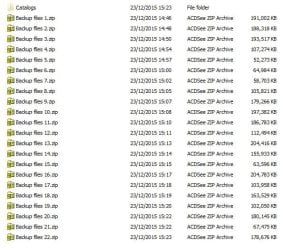
The "C" drive used space is 34.1 GB, and in the image there is a catalog folder with 22 zip files all to gather
3.04 GB, so I think it was not a whole backup of "C" drive (34.1 GB).
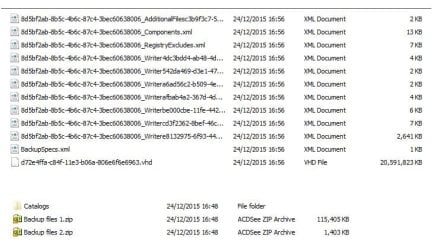
I searched the net and found this "How to" "http://www.nextofwindows.com/how-to-back-up-your-entire-hard-drive-in-windows-7-using-create-a-system-image", there I made my homework, and on the next day made the entire process again, got a new image, this time there was a VHD file 18.6 GB.
Now I am not sure if the second backup is right, do not know what is a VHD file with a very long name, and if this is a whole "C" drive backup.
Can you please enlight me what is the meaning of this and if the backups look OK before making updates.
(I remember the disaster I had with previous XP system updates).
Attached here screenshots of first backup folder and second backup folder (two folders), between these two days nothing was changed to the system.
Will appreciate your answers.
PS,
How do I search in this forum to find my post and if there are some answers.
Thanks
Moti
Before making Windows updates, I decided to make a whole backup of my system (C
disk, then I startedfrom the "backup and restore" and finally got some image, and then created a repair disk on a CD.
The "C" drive used space is 34.1 GB, and in the image there is a catalog folder with 22 zip files all to gather
3.04 GB, so I think it was not a whole backup of "C" drive (34.1 GB).
I searched the net and found this "How to" "http://www.nextofwindows.com/how-to-back-up-your-entire-hard-drive-in-windows-7-using-create-a-system-image", there I made my homework, and on the next day made the entire process again, got a new image, this time there was a VHD file 18.6 GB.
Now I am not sure if the second backup is right, do not know what is a VHD file with a very long name, and if this is a whole "C" drive backup.
Can you please enlight me what is the meaning of this and if the backups look OK before making updates.
(I remember the disaster I had with previous XP system updates).
Attached here screenshots of first backup folder and second backup folder (two folders), between these two days nothing was changed to the system.
Will appreciate your answers.
PS,
How do I search in this forum to find my post and if there are some answers.
Thanks
Moti
Attachments
My Computer
At a glance
Windows 7 Pro 32 bitintel celeron 2.66GH 2.56GH2.00 GBNvidia fx5500
- Computer type
- PC/Desktop
- Computer Manufacturer/Model Number
- custom built
- OS
- Windows 7 Pro 32 bit
- CPU
- intel celeron 2.66GH 2.56GH
- Memory
- 2.00 GB
- Graphics Card(s)
- Nvidia fx5500
- Hard Drives
- Western digital
- Antivirus
- AVG
- Browser
- firefox