
Local Group Policies - Apply to All Users Except Administrators

How to Apply Local Group Policies to All Users Except Administrators


   Information
This tutorial will show you how to apply Local Group Policies to all users except administrators in Vista, Windows 7, Windows 8, and Windows 10.

You must be logged in as an administrator to be able to do this tutorial.

   Warning
The Local Group Policy Editor is only available in:

  • Vista Business, Ultimate, and Enterprise editions.
  • Windows 7 Professional, Ultimate, and Enterprise editions
  • Windows 8/8.1 Pro and Enterprise editions.
  • Windows 10 Pro and Enterprise editions.


Here's How:
1. Open the Start Menu, type mmc.exe in the search box, and press Enter.
NOTE: In Windows 8, you could press Windows+R keys to open the Run dialog, then type mmc.exe, and click/tap on OK instead.

2. If prompted by UAC, then click on Yes (Windows 7/8/10) or Continue (Vista).

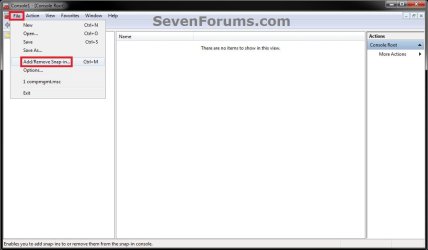
3. In the MMC Console window, click on File (Menu bar) and Add/Remove Snap-in. (see screenshot below)
Step1.jpg
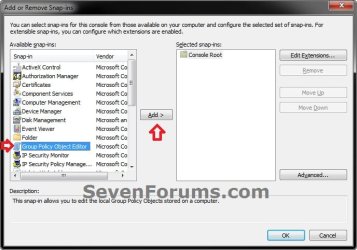
4. In the left pane, select Group Policy Object Editor, and click on the Add button. (see screenshot below)
Step2.jpg
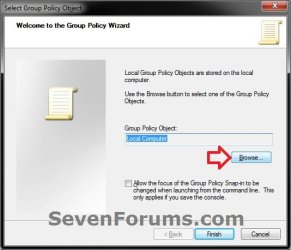
5. Click on the Browse button. (see screenshot below)
Step3.jpg
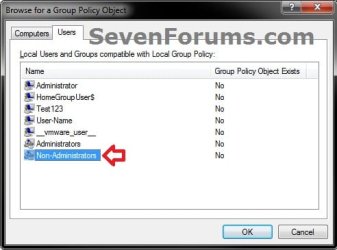
6. Click on the Users tab, select an Non-Administrators, and click on OK. (see screenshot below)
Step4.jpg
7. Click on the Finish button. (see screenshot below)
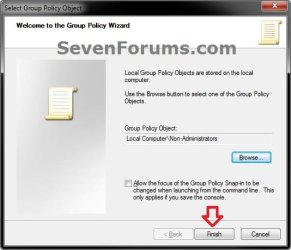
Step5.jpg
8. Click on OK. (see screenshot below)
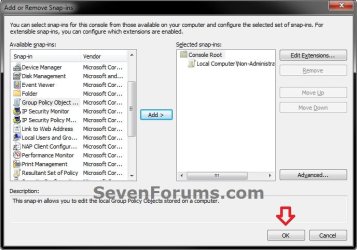
Step6.jpg
9. In the MMC Console window, click on File (Menu bar) and Save As. (see screenshot below)
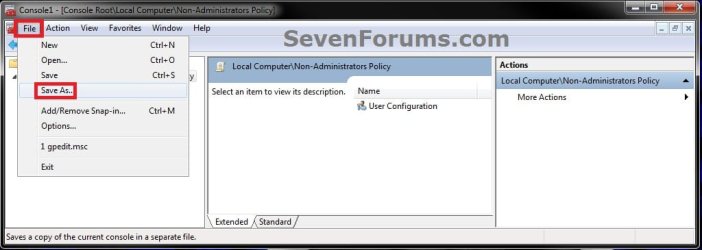
Step8.jpg
10. Select to save to your Desktop, type in a name (ex: Non-Administrators-Group-Policy) that you would like to have for this "all users except administrators" group policy MSC file, then click on the Save button. (see screenshot below)
NOTE: You can use any name you like, but it would make it easier for you to know what user (ex: Test) or group this "specific" group policy MMC console was for later if you included the user or group name.
Step9.jpg
11. Move the MSC file (ex: Non-Administrators-Group-Policy.msc) to where you would to keep it saved at. (see screenshot below)
NOTE: You can also Pin to Taskbar or Pin to Start Menu this MSC file.
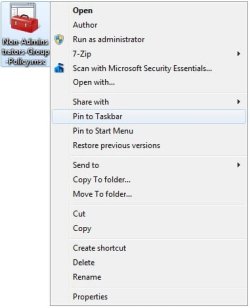
Step10.jpg
12. Whenever you open this MSC file (ex: Non-Administrators-Group-Policy.msc), it will only apply group policies to all users except administrators. (see screenshot below)
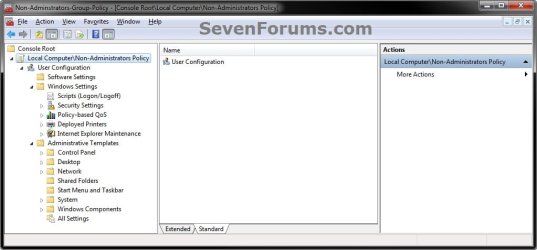
Step11.jpg
That's it,
Shawn


Last edited:
  • Like
Reactions: ryo
Confused about permanence of policy

Hi,
Thanks for the step-by-step, but I am a little confused by step #12:
Whenever you open this MSC file (ex: Non-Administrators-Group-Policy.msc), it will only apply group policies to all users except administrators. (see screenshot below)

I want the Group Policy I created to ALWAYS apply to limited user accounts automatically. How do I make that happen?

Thanks!
 

My Computer

OS
Windows 7 Professional 64-bit
Hello Pallipe,


The MSC file that you created doesn't need to be kept running for the policy changes you make in it to remain enforced. The MSC file acts just like your normal Local Group Policy Editor, but will only enforce policies for all user accounts except those in the administrators group instead. If you wanted to make changes to that policy, then you would just need to run the MMC, make the changes you like, and close it. Any changes will be enforced as applied in that MSC file. That's all. :)
 

My Computer

Computer type
PC/Desktop
Computer Manufacturer/Model Number
Self built custom
OS
64-bit Windows 11 Pro for Workstations
CPU
Intel i7-8700K OC'd to 5 GHz
Motherboard
ASUS ROG Maximus XI Formula Z390
Memory
64 GB (4x16GB) G.SKILL TridentZ RGB DDR4 3600 MHz
Graphics Card(s)
ASUS ROG-STRIX-GTX1080TI-O11G-GAMING
Sound Card
Integrated
Monitor(s) Displays
2 x Samsung Odyssey G7 27"
Screen Resolution
2560x1440
Hard Drives
1TB Samsung 990 PRO M.2,
4TB Samsung 990 PRO PRO M.2,
TerraMaster F8 SSD Plus NAS
PSU
Seasonic Prime Titanium 850W
Case
Thermaltake Core P3
Cooling
Corsair Hydro H115i
Keyboard
Logitech wireless K800
Mouse
Logitech MX Master 4
Internet Speed
2 Gb/s Download and 100 Mb/s Upload
Antivirus
Malwarebyte Anti-Malware Premium
Browser
Google Chrome
Other Info
Logitech Z625 speaker system,
Logitech BRIO 4K Pro webcam,
HP Color LaserJet Pro MFP M477fdn,
APC SMART-UPS RT 1000 XL - SURT1000XLI,
Galaxy S23 Plus phone
This is a great help indeed. Thanks.

But I am just a beginner in System Administration. I have created .msc file successfully but I don't know how to configure different policies. For example I do not want a student account:
1. to be able to install/unstall a program.
2. to read/write in c:drive
3. access to internet.

I don't know where to find these configuration in the .msc file. Please help.

Regards
 

My Computer

Computer Manufacturer/Model Number
HP Pavillion DV67000
OS
Windows 7 Ultimate 32bit
CPU
Interl(R) Pentium(R) Dual CPU T2390 @ 1.86GHz 1.87Ghz
Motherboard
Quanta 30D2
Memory
1024MBytes (DDR2)
Graphics Card(s)
NVIDIA GeForce 8400M GS
Sound Card
Realtek High Definition Audio
Monitor(s) Displays
Generic PnP Monitor (Mobile PC Display)
Screen Resolution
1200 x 800
Hard Drives
WDC WD120BEVS-60USTO ATA Device
Keyboard
HID Keyboard Device (Standard PS/2 Keyboard)
Mouse
Synaptics PS/2 Port TouchPad
Internet Speed
Down=0.93 Mb/s Up=0.21 Mb/s Ping=85 m/s (from speedtest.net)
Other Info
Batteries:
Microsoft AC Adapter
Microsoft ACPI-Compliant Control Method Battery
Microsoft Composite Battery
Hello mq15,

The link below can help you to search and find whatever you need in group policy.
Group Policy Search
If you like for #1, you could use the tutorial below to disable access to "Programs and Features".
http://www.sevenforums.com/tutorials/77679-programs-features-enable-disable.html
If you do #2, then the user will not be able to run Windows since that is on the C drive. They would at least need to have rights to read to be able to function.

It would be best to post a separate thread for #3 to get a variety of options that may work best for you for this.

Hope this helps some. :)
 

My Computer

Computer type
PC/Desktop
Computer Manufacturer/Model Number
Self built custom
OS
64-bit Windows 11 Pro for Workstations
CPU
Intel i7-8700K OC'd to 5 GHz
Motherboard
ASUS ROG Maximus XI Formula Z390
Memory
64 GB (4x16GB) G.SKILL TridentZ RGB DDR4 3600 MHz
Graphics Card(s)
ASUS ROG-STRIX-GTX1080TI-O11G-GAMING
Sound Card
Integrated
Monitor(s) Displays
2 x Samsung Odyssey G7 27"
Screen Resolution
2560x1440
Hard Drives
1TB Samsung 990 PRO M.2,
4TB Samsung 990 PRO PRO M.2,
TerraMaster F8 SSD Plus NAS
PSU
Seasonic Prime Titanium 850W
Case
Thermaltake Core P3
Cooling
Corsair Hydro H115i
Keyboard
Logitech wireless K800
Mouse
Logitech MX Master 4
Internet Speed
2 Gb/s Download and 100 Mb/s Upload
Antivirus
Malwarebyte Anti-Malware Premium
Browser
Google Chrome
Other Info
Logitech Z625 speaker system,
Logitech BRIO 4K Pro webcam,
HP Color LaserJet Pro MFP M477fdn,
APC SMART-UPS RT 1000 XL - SURT1000XLI,
Galaxy S23 Plus phone
Thanks a lot Brink.
I would start a separate thread if I could not find. Thanks again. :)
 

My Computer

Computer Manufacturer/Model Number
HP Pavillion DV67000
OS
Windows 7 Ultimate 32bit
CPU
Interl(R) Pentium(R) Dual CPU T2390 @ 1.86GHz 1.87Ghz
Motherboard
Quanta 30D2
Memory
1024MBytes (DDR2)
Graphics Card(s)
NVIDIA GeForce 8400M GS
Sound Card
Realtek High Definition Audio
Monitor(s) Displays
Generic PnP Monitor (Mobile PC Display)
Screen Resolution
1200 x 800
Hard Drives
WDC WD120BEVS-60USTO ATA Device
Keyboard
HID Keyboard Device (Standard PS/2 Keyboard)
Mouse
Synaptics PS/2 Port TouchPad
Internet Speed
Down=0.93 Mb/s Up=0.21 Mb/s Ping=85 m/s (from speedtest.net)
Other Info
Batteries:
Microsoft AC Adapter
Microsoft ACPI-Compliant Control Method Battery
Microsoft Composite Battery
You're most welcome. :)
 

My Computer

Computer type
PC/Desktop
Computer Manufacturer/Model Number
Self built custom
OS
64-bit Windows 11 Pro for Workstations
CPU
Intel i7-8700K OC'd to 5 GHz
Motherboard
ASUS ROG Maximus XI Formula Z390
Memory
64 GB (4x16GB) G.SKILL TridentZ RGB DDR4 3600 MHz
Graphics Card(s)
ASUS ROG-STRIX-GTX1080TI-O11G-GAMING
Sound Card
Integrated
Monitor(s) Displays
2 x Samsung Odyssey G7 27"
Screen Resolution
2560x1440
Hard Drives
1TB Samsung 990 PRO M.2,
4TB Samsung 990 PRO PRO M.2,
TerraMaster F8 SSD Plus NAS
PSU
Seasonic Prime Titanium 850W
Case
Thermaltake Core P3
Cooling
Corsair Hydro H115i
Keyboard
Logitech wireless K800
Mouse
Logitech MX Master 4
Internet Speed
2 Gb/s Download and 100 Mb/s Upload
Antivirus
Malwarebyte Anti-Malware Premium
Browser
Google Chrome
Other Info
Logitech Z625 speaker system,
Logitech BRIO 4K Pro webcam,
HP Color LaserJet Pro MFP M477fdn,
APC SMART-UPS RT 1000 XL - SURT1000XLI,
Galaxy S23 Plus phone
Hi,

Hi Brink, I have enabled RUN ONLY SPECIFIED APPLICATIONS IN WINDOWS 7 GROUP POLICY , but after this settings has been applied to administrator also, so i'm unable to revert back (unable to open gpedit or regedit ).. can u guys tell to how to revert this back ???

This operation has been cancelled to restrictions in effect on this computer . please contact your system administrator. ( This is the error shown)
 

My Computer

Computer type
PC/Desktop
OS
win 7 professional
Hello Globaluser, and welcome to Seven Forums.

Did you create the MSC for "Non-Administrators" before setting the policy with this MSC?

You could either do a system restore using a restore point created before this, or reset group policy back to default to undo this. :)
 
Last edited:

My Computer

Computer type
PC/Desktop
Computer Manufacturer/Model Number
Self built custom
OS
64-bit Windows 11 Pro for Workstations
CPU
Intel i7-8700K OC'd to 5 GHz
Motherboard
ASUS ROG Maximus XI Formula Z390
Memory
64 GB (4x16GB) G.SKILL TridentZ RGB DDR4 3600 MHz
Graphics Card(s)
ASUS ROG-STRIX-GTX1080TI-O11G-GAMING
Sound Card
Integrated
Monitor(s) Displays
2 x Samsung Odyssey G7 27"
Screen Resolution
2560x1440
Hard Drives
1TB Samsung 990 PRO M.2,
4TB Samsung 990 PRO PRO M.2,
TerraMaster F8 SSD Plus NAS
PSU
Seasonic Prime Titanium 850W
Case
Thermaltake Core P3
Cooling
Corsair Hydro H115i
Keyboard
Logitech wireless K800
Mouse
Logitech MX Master 4
Internet Speed
2 Gb/s Download and 100 Mb/s Upload
Antivirus
Malwarebyte Anti-Malware Premium
Browser
Google Chrome
Other Info
Logitech Z625 speaker system,
Logitech BRIO 4K Pro webcam,
HP Color LaserJet Pro MFP M477fdn,
APC SMART-UPS RT 1000 XL - SURT1000XLI,
Galaxy S23 Plus phone
Saving/Distributing

Hello,
This works GREAT for my application, but I have quite a few computers to push policies to as we're rolling out Win7 machines here, but won't be switching from AD2003 for a while yet.
I'd seen a suggestion for redeploying GP where an admin could copy the %SystemRoot%\Windows32\GroupPolicy folder from a configured computer to a new one, and run a gpupdate /force, and it's all set.
You've written a script to backup and restore (or redeploy if done right) the GP, but neither option work.
The GP must be stored elsewhere if it's only for non-admins, and I can't be chasing down workarounds if even Admins are denied access to the control panel, this method is the only way to apply GP at this time.
Do you have any suggestions for locating and copying the GP for non-admins?
Thanks!
 

My Computer

Computer type
PC/Desktop
Computer Manufacturer/Model Number
custom build
OS
Windows 7 Enterprise
CPU
AMD Phenom2 x4
Memory
6GB
Hard Drives
1-128GB -Primary Drive
4-500GB RAID5
1-250GB -secondary drive
Hello CovenStine, and welcome to Seven Forums.

It's been a while, but see if copying the custom MSC file for administrators to the other computer, import the exported group policies, open the MSC, and force update group policy to see if that may do the trick.
 

My Computer

Computer type
PC/Desktop
Computer Manufacturer/Model Number
Self built custom
OS
64-bit Windows 11 Pro for Workstations
CPU
Intel i7-8700K OC'd to 5 GHz
Motherboard
ASUS ROG Maximus XI Formula Z390
Memory
64 GB (4x16GB) G.SKILL TridentZ RGB DDR4 3600 MHz
Graphics Card(s)
ASUS ROG-STRIX-GTX1080TI-O11G-GAMING
Sound Card
Integrated
Monitor(s) Displays
2 x Samsung Odyssey G7 27"
Screen Resolution
2560x1440
Hard Drives
1TB Samsung 990 PRO M.2,
4TB Samsung 990 PRO PRO M.2,
TerraMaster F8 SSD Plus NAS
PSU
Seasonic Prime Titanium 850W
Case
Thermaltake Core P3
Cooling
Corsair Hydro H115i
Keyboard
Logitech wireless K800
Mouse
Logitech MX Master 4
Internet Speed
2 Gb/s Download and 100 Mb/s Upload
Antivirus
Malwarebyte Anti-Malware Premium
Browser
Google Chrome
Other Info
Logitech Z625 speaker system,
Logitech BRIO 4K Pro webcam,
HP Color LaserJet Pro MFP M477fdn,
APC SMART-UPS RT 1000 XL - SURT1000XLI,
Galaxy S23 Plus phone
Hello,
Unfortunately, I haven't been able to export or import non-administrator settings, although admittedly I've only been able to try the LocalGPO tool.
Any further suggestions?
 

My Computer

Computer type
PC/Desktop
Computer Manufacturer/Model Number
custom build
OS
Windows 7 Enterprise
CPU
AMD Phenom2 x4
Memory
6GB
Hard Drives
1-128GB -Primary Drive
4-500GB RAID5
1-250GB -secondary drive
SRP not Working with Domain Users

Thank you Shawn.
According to this post, SRP is working fine with me for all local (non-administrator) users, and not working with DOMAIN USERS.

But i want to take your attention into more depth.:geek:
In my scenario, my computer in under a DOMAIN also. I want to restrict all DOMAIN USERS as well as non-administrator users.
That means, how do i RESTRICT DOMAIN USERS from running a software (say chrome.exe) by applying SRP from local group/security policy?

NOTE:
I refer the MOTHER post of this post is from http://www.sevenforums.com/general-...n-policies-wrongly-applied-administrator.html.
 

My Computer

Computer type
Laptop
Computer Manufacturer/Model Number
Dell
OS
Windows 8.1 Enterprise x64
CPU
Intel Core i7
Motherboard
Dell Inc.
Memory
8 GB
Graphics Card(s)
Intel HD Graphics 3000
Hard Drives
500 GB
Antivirus
Kaspersky EndPoint Security
Browser
Internet Explorer, Chrome, Firefox

My Computer

Computer type
PC/Desktop
Computer Manufacturer/Model Number
Self built custom
OS
64-bit Windows 11 Pro for Workstations
CPU
Intel i7-8700K OC'd to 5 GHz
Motherboard
ASUS ROG Maximus XI Formula Z390
Memory
64 GB (4x16GB) G.SKILL TridentZ RGB DDR4 3600 MHz
Graphics Card(s)
ASUS ROG-STRIX-GTX1080TI-O11G-GAMING
Sound Card
Integrated
Monitor(s) Displays
2 x Samsung Odyssey G7 27"
Screen Resolution
2560x1440
Hard Drives
1TB Samsung 990 PRO M.2,
4TB Samsung 990 PRO PRO M.2,
TerraMaster F8 SSD Plus NAS
PSU
Seasonic Prime Titanium 850W
Case
Thermaltake Core P3
Cooling
Corsair Hydro H115i
Keyboard
Logitech wireless K800
Mouse
Logitech MX Master 4
Internet Speed
2 Gb/s Download and 100 Mb/s Upload
Antivirus
Malwarebyte Anti-Malware Premium
Browser
Google Chrome
Other Info
Logitech Z625 speaker system,
Logitech BRIO 4K Pro webcam,
HP Color LaserJet Pro MFP M477fdn,
APC SMART-UPS RT 1000 XL - SURT1000XLI,
Galaxy S23 Plus phone
Thank you. I appreciate your posts. This solution is for Local Users only.
What I need is to Restrict DOMAIN USERs as well.


My Computer

Computer type
Laptop
Computer Manufacturer/Model Number
Dell
OS
Windows 8.1 Enterprise x64
CPU
Intel Core i7
Motherboard
Dell Inc.
Memory
8 GB
Graphics Card(s)
Intel HD Graphics 3000
Hard Drives
500 GB
Antivirus
Kaspersky EndPoint Security
Browser
Internet Explorer, Chrome, Firefox
I don't have domain experience to verify, but you should be able to set this in Group Policy to have it applied to the domain.
 

My Computer

Computer type
PC/Desktop
Computer Manufacturer/Model Number
Self built custom
OS
64-bit Windows 11 Pro for Workstations
CPU
Intel i7-8700K OC'd to 5 GHz
Motherboard
ASUS ROG Maximus XI Formula Z390
Memory
64 GB (4x16GB) G.SKILL TridentZ RGB DDR4 3600 MHz
Graphics Card(s)
ASUS ROG-STRIX-GTX1080TI-O11G-GAMING
Sound Card
Integrated
Monitor(s) Displays
2 x Samsung Odyssey G7 27"
Screen Resolution
2560x1440
Hard Drives
1TB Samsung 990 PRO M.2,
4TB Samsung 990 PRO PRO M.2,
TerraMaster F8 SSD Plus NAS
PSU
Seasonic Prime Titanium 850W
Case
Thermaltake Core P3
Cooling
Corsair Hydro H115i
Keyboard
Logitech wireless K800
Mouse
Logitech MX Master 4
Internet Speed
2 Gb/s Download and 100 Mb/s Upload
Antivirus
Malwarebyte Anti-Malware Premium
Browser
Google Chrome
Other Info
Logitech Z625 speaker system,
Logitech BRIO 4K Pro webcam,
HP Color LaserJet Pro MFP M477fdn,
APC SMART-UPS RT 1000 XL - SURT1000XLI,
Galaxy S23 Plus phone
this is a great help thanks for posting. is there a way to change the users associated with this policy after it has been made. say you want to add or change users that are affected by this policy or remove the policy all together. i tried to delete the MSC file but the policy rules still affect those users. (thanks for any advise)
 

My Computer

Computer type
PC/Desktop
OS
win7 x64
Hello smo998, and welcome to Seven Forums. :)

The policy in this tutorial would be applied to all users except administrators. I'm afraid that you can't pick and choose users to apply it to. If you like, you could use the tutorial below to reset group policy to undo it though.

http://www.sevenforums.com/tutorials/214461-local-group-policy-reset-default.html

If you wanted to apply group policy to specific users, you could use the method in the tutorial below instead.

http://www.sevenforums.com/tutorials/151415-group-policy-apply-specific-user-group.html
 

My Computer

Computer type
PC/Desktop
Computer Manufacturer/Model Number
Self built custom
OS
64-bit Windows 11 Pro for Workstations
CPU
Intel i7-8700K OC'd to 5 GHz
Motherboard
ASUS ROG Maximus XI Formula Z390
Memory
64 GB (4x16GB) G.SKILL TridentZ RGB DDR4 3600 MHz
Graphics Card(s)
ASUS ROG-STRIX-GTX1080TI-O11G-GAMING
Sound Card
Integrated
Monitor(s) Displays
2 x Samsung Odyssey G7 27"
Screen Resolution
2560x1440
Hard Drives
1TB Samsung 990 PRO M.2,
4TB Samsung 990 PRO PRO M.2,
TerraMaster F8 SSD Plus NAS
PSU
Seasonic Prime Titanium 850W
Case
Thermaltake Core P3
Cooling
Corsair Hydro H115i
Keyboard
Logitech wireless K800
Mouse
Logitech MX Master 4
Internet Speed
2 Gb/s Download and 100 Mb/s Upload
Antivirus
Malwarebyte Anti-Malware Premium
Browser
Google Chrome
Other Info
Logitech Z625 speaker system,
Logitech BRIO 4K Pro webcam,
HP Color LaserJet Pro MFP M477fdn,
APC SMART-UPS RT 1000 XL - SURT1000XLI,
Galaxy S23 Plus phone
great procedure thanks a lot!!!

only a (very probably stupid) question: I have to set only the policies under "user configuration" section or may I act also under "computer configuration" section without involve the user administrator?

better: if I use this procedure and then modify some policies under "computer configuration", they will be applied also to administrator or not?

thanks again!
 

My Computer

Computer type
PC/Desktop
OS
Win7 Pro x64
Back
Top