
Local Group Policies - Apply to All Users Except Administrators

How to Apply Local Group Policies to All Users Except Administrators


   Information
This tutorial will show you how to apply Local Group Policies to all users except administrators in Vista, Windows 7, Windows 8, and Windows 10.

You must be logged in as an administrator to be able to do this tutorial.

   Warning
The Local Group Policy Editor is only available in:

  • Vista Business, Ultimate, and Enterprise editions.
  • Windows 7 Professional, Ultimate, and Enterprise editions
  • Windows 8/8.1 Pro and Enterprise editions.
  • Windows 10 Pro and Enterprise editions.


Here's How:
1. Open the Start Menu, type mmc.exe in the search box, and press Enter.
NOTE: In Windows 8, you could press Windows+R keys to open the Run dialog, then type mmc.exe, and click/tap on OK instead.

2. If prompted by UAC, then click on Yes (Windows 7/8/10) or Continue (Vista).

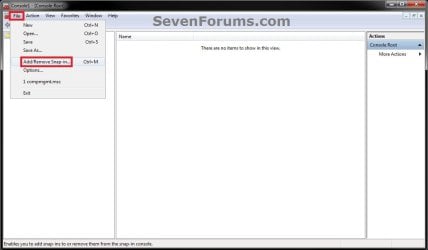
3. In the MMC Console window, click on File (Menu bar) and Add/Remove Snap-in. (see screenshot below)
Step1.jpg
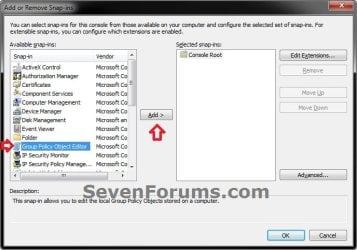
4. In the left pane, select Group Policy Object Editor, and click on the Add button. (see screenshot below)
Step2.jpg
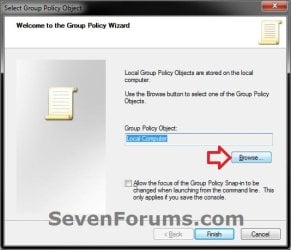
5. Click on the Browse button. (see screenshot below)
Step3.jpg
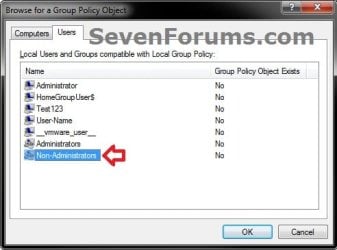
6. Click on the Users tab, select an Non-Administrators, and click on OK. (see screenshot below)
Step4.jpg
7. Click on the Finish button. (see screenshot below)
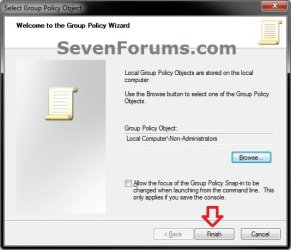
Step5.jpg
8. Click on OK. (see screenshot below)
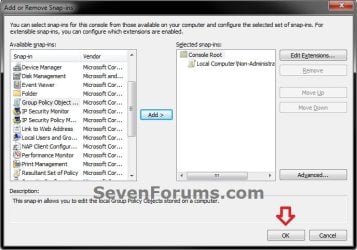
Step6.jpg
9. In the MMC Console window, click on File (Menu bar) and Save As. (see screenshot below)
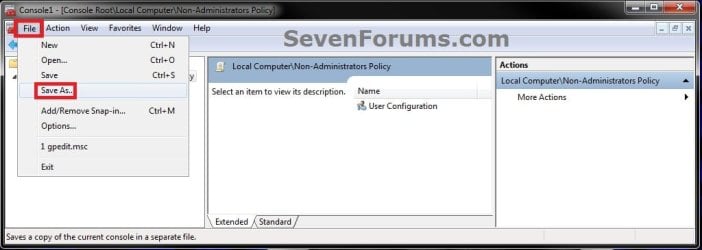
Step8.jpg
10. Select to save to your Desktop, type in a name (ex: Non-Administrators-Group-Policy) that you would like to have for this "all users except administrators" group policy MSC file, then click on the Save button. (see screenshot below)
NOTE: You can use any name you like, but it would make it easier for you to know what user (ex: Test) or group this "specific" group policy MMC console was for later if you included the user or group name.
Step9.jpg
11. Move the MSC file (ex: Non-Administrators-Group-Policy.msc) to where you would to keep it saved at. (see screenshot below)
NOTE: You can also Pin to Taskbar or Pin to Start Menu this MSC file.
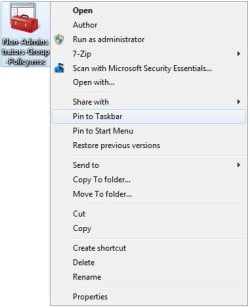
Step10.jpg
12. Whenever you open this MSC file (ex: Non-Administrators-Group-Policy.msc), it will only apply group policies to all users except administrators. (see screenshot below)
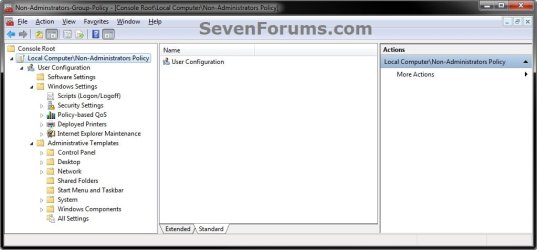
Step11.jpg
That's it,
Shawn


Last edited:
  • Like
Reactions: ryo
Hello mfran, :)

Configured policies under "Computer Configuration" would be applied to all users.

The procedure in the tutorial would only show policies under "User Configuration" though.
 

My Computer My Computer

At a glance

64-bit Windows 11 Pro for WorkstationsIntel i7-8700K OC'd to 5 GHz64 GB (4x16GB) G.SKILL TridentZ RGB DDR4 3600...ASUS ROG-STRIX-GTX1080TI-O11G-GAMING
Computer type
PC/Desktop
Computer Manufacturer/Model Number
Self built custom
OS
64-bit Windows 11 Pro for Workstations
CPU
Intel i7-8700K OC'd to 5 GHz
Motherboard
ASUS ROG Maximus XI Formula Z390
Memory
64 GB (4x16GB) G.SKILL TridentZ RGB DDR4 3600 MHz
Graphics Card(s)
ASUS ROG-STRIX-GTX1080TI-O11G-GAMING
Sound Card
Integrated
Monitor(s) Displays
2 x Samsung Odyssey G7 27"
Screen Resolution
2560x1440
Hard Drives
1TB Samsung 990 PRO M.2,
4TB Samsung 990 PRO PRO M.2,
TerraMaster F8 SSD Plus NAS
PSU
Seasonic Prime Titanium 850W
Case
Thermaltake Core P3
Cooling
Corsair Hydro H115i
Keyboard
Logitech wireless K800
Mouse
Logitech MX Master 4
Internet Speed
2 Gb/s Download and 100 Mb/s Upload
Antivirus
Malwarebyte Anti-Malware Premium
Browser
Google Chrome
Other Info
Logitech Z625 speaker system,
Logitech BRIO 4K Pro webcam,
HP Color LaserJet Pro MFP M477fdn,
APC SMART-UPS RT 1000 XL - SURT1000XLI,
Galaxy S23 Plus phone
Hi Brink and thans or your reply
you are right, but I should disable the user right to install programs.

I only thought to activate "disable windows installer" but it is under

"computer configuration - administrative templates - windows components - windows installer"

so I cannot use it...

do you know how I could do?

thanks a lot for your help
 

My Computer My Computer

At a glance

Win7 Pro x64
Computer type
PC/Desktop
OS
Win7 Pro x64
You could use it, but it would be applied for all users.

Depending on what your end goal is, you could make the user a Guest account that can't do anything other than the real basics. They wouldn't be able install anything.
 

My Computer My Computer

At a glance

64-bit Windows 11 Pro for WorkstationsIntel i7-8700K OC'd to 5 GHz64 GB (4x16GB) G.SKILL TridentZ RGB DDR4 3600...ASUS ROG-STRIX-GTX1080TI-O11G-GAMING
Computer type
PC/Desktop
Computer Manufacturer/Model Number
Self built custom
OS
64-bit Windows 11 Pro for Workstations
CPU
Intel i7-8700K OC'd to 5 GHz
Motherboard
ASUS ROG Maximus XI Formula Z390
Memory
64 GB (4x16GB) G.SKILL TridentZ RGB DDR4 3600 MHz
Graphics Card(s)
ASUS ROG-STRIX-GTX1080TI-O11G-GAMING
Sound Card
Integrated
Monitor(s) Displays
2 x Samsung Odyssey G7 27"
Screen Resolution
2560x1440
Hard Drives
1TB Samsung 990 PRO M.2,
4TB Samsung 990 PRO PRO M.2,
TerraMaster F8 SSD Plus NAS
PSU
Seasonic Prime Titanium 850W
Case
Thermaltake Core P3
Cooling
Corsair Hydro H115i
Keyboard
Logitech wireless K800
Mouse
Logitech MX Master 4
Internet Speed
2 Gb/s Download and 100 Mb/s Upload
Antivirus
Malwarebyte Anti-Malware Premium
Browser
Google Chrome
Other Info
Logitech Z625 speaker system,
Logitech BRIO 4K Pro webcam,
HP Color LaserJet Pro MFP M477fdn,
APC SMART-UPS RT 1000 XL - SURT1000XLI,
Galaxy S23 Plus phone
unfortunately the policies of my company push to include laptop users (they are the users I'm speaking now) into the Administrators group, but they should also have some restrictions.

For the other restrictions I'm ok, but for this one I'm struggling....

I really have no idea how to do...
 

My Computer My Computer

At a glance

Win7 Pro x64
Computer type
PC/Desktop
OS
Win7 Pro x64
It's hard to restrict an administrator since they have the rights to undo anything.
 

My Computer My Computer

At a glance

64-bit Windows 11 Pro for WorkstationsIntel i7-8700K OC'd to 5 GHz64 GB (4x16GB) G.SKILL TridentZ RGB DDR4 3600...ASUS ROG-STRIX-GTX1080TI-O11G-GAMING
Computer type
PC/Desktop
Computer Manufacturer/Model Number
Self built custom
OS
64-bit Windows 11 Pro for Workstations
CPU
Intel i7-8700K OC'd to 5 GHz
Motherboard
ASUS ROG Maximus XI Formula Z390
Memory
64 GB (4x16GB) G.SKILL TridentZ RGB DDR4 3600 MHz
Graphics Card(s)
ASUS ROG-STRIX-GTX1080TI-O11G-GAMING
Sound Card
Integrated
Monitor(s) Displays
2 x Samsung Odyssey G7 27"
Screen Resolution
2560x1440
Hard Drives
1TB Samsung 990 PRO M.2,
4TB Samsung 990 PRO PRO M.2,
TerraMaster F8 SSD Plus NAS
PSU
Seasonic Prime Titanium 850W
Case
Thermaltake Core P3
Cooling
Corsair Hydro H115i
Keyboard
Logitech wireless K800
Mouse
Logitech MX Master 4
Internet Speed
2 Gb/s Download and 100 Mb/s Upload
Antivirus
Malwarebyte Anti-Malware Premium
Browser
Google Chrome
Other Info
Logitech Z625 speaker system,
Logitech BRIO 4K Pro webcam,
HP Color LaserJet Pro MFP M477fdn,
APC SMART-UPS RT 1000 XL - SURT1000XLI,
Galaxy S23 Plus phone
mmmm...listen...weird workaround:

if I activate that policy under "computer configuration", it creates me the file:


C:\Windows\System32\GroupPolicy\Machine\Registry.pol


then, if I deny the access to that file at the user Administrator? is it an idiot idea or it could work?
:-/
 

My Computer My Computer

At a glance

Win7 Pro x64
Computer type
PC/Desktop
OS
Win7 Pro x64
It would work, but as administrator, they could go in an grant themselves access if wanted or if they know how to.
 

My Computer My Computer

At a glance

64-bit Windows 11 Pro for WorkstationsIntel i7-8700K OC'd to 5 GHz64 GB (4x16GB) G.SKILL TridentZ RGB DDR4 3600...ASUS ROG-STRIX-GTX1080TI-O11G-GAMING
Computer type
PC/Desktop
Computer Manufacturer/Model Number
Self built custom
OS
64-bit Windows 11 Pro for Workstations
CPU
Intel i7-8700K OC'd to 5 GHz
Motherboard
ASUS ROG Maximus XI Formula Z390
Memory
64 GB (4x16GB) G.SKILL TridentZ RGB DDR4 3600 MHz
Graphics Card(s)
ASUS ROG-STRIX-GTX1080TI-O11G-GAMING
Sound Card
Integrated
Monitor(s) Displays
2 x Samsung Odyssey G7 27"
Screen Resolution
2560x1440
Hard Drives
1TB Samsung 990 PRO M.2,
4TB Samsung 990 PRO PRO M.2,
TerraMaster F8 SSD Plus NAS
PSU
Seasonic Prime Titanium 850W
Case
Thermaltake Core P3
Cooling
Corsair Hydro H115i
Keyboard
Logitech wireless K800
Mouse
Logitech MX Master 4
Internet Speed
2 Gb/s Download and 100 Mb/s Upload
Antivirus
Malwarebyte Anti-Malware Premium
Browser
Google Chrome
Other Info
Logitech Z625 speaker system,
Logitech BRIO 4K Pro webcam,
HP Color LaserJet Pro MFP M477fdn,
APC SMART-UPS RT 1000 XL - SURT1000XLI,
Galaxy S23 Plus phone
import/export

I've been using your tutorial on 10 laptops and it works perfectly.
Now I need to setup another 20 laptops, is there a way to copy/paste the rules from one laptop to the other?
When I copy the file it does not take it with the rules that were set.
 

My Computer My Computer

At a glance

Windows 10 64bit
Computer type
Laptop
Computer Manufacturer/Model Number
HP
OS
Windows 10 64bit

My Computer My Computer

At a glance

64-bit Windows 11 Pro for WorkstationsIntel i7-8700K OC'd to 5 GHz64 GB (4x16GB) G.SKILL TridentZ RGB DDR4 3600...ASUS ROG-STRIX-GTX1080TI-O11G-GAMING
Computer type
PC/Desktop
Computer Manufacturer/Model Number
Self built custom
OS
64-bit Windows 11 Pro for Workstations
CPU
Intel i7-8700K OC'd to 5 GHz
Motherboard
ASUS ROG Maximus XI Formula Z390
Memory
64 GB (4x16GB) G.SKILL TridentZ RGB DDR4 3600 MHz
Graphics Card(s)
ASUS ROG-STRIX-GTX1080TI-O11G-GAMING
Sound Card
Integrated
Monitor(s) Displays
2 x Samsung Odyssey G7 27"
Screen Resolution
2560x1440
Hard Drives
1TB Samsung 990 PRO M.2,
4TB Samsung 990 PRO PRO M.2,
TerraMaster F8 SSD Plus NAS
PSU
Seasonic Prime Titanium 850W
Case
Thermaltake Core P3
Cooling
Corsair Hydro H115i
Keyboard
Logitech wireless K800
Mouse
Logitech MX Master 4
Internet Speed
2 Gb/s Download and 100 Mb/s Upload
Antivirus
Malwarebyte Anti-Malware Premium
Browser
Google Chrome
Other Info
Logitech Z625 speaker system,
Logitech BRIO 4K Pro webcam,
HP Color LaserJet Pro MFP M477fdn,
APC SMART-UPS RT 1000 XL - SURT1000XLI,
Galaxy S23 Plus phone
Back
Top