Worth upgrading from Win 7/64 Pro to Windows 10?

Vista32toWin7

New member
Member
VIP
Local time
8:19 AM
Messages
109
I purchased my laptop in 2009, which came with Vista 32 bit OS.

I had lots of issues with the Vista OS, so I upgraded to Win 7/64 Pro OS in October of 2014.

I haven't had any major issues with the Win 7/64 Pro OS as of date and it has been fairly consistent. So I'm kind of reluctant to just jump on the free MS Win 10 upgrade.

I haven't used Win 10 before, so I have no clue what advantages Win 10 has over Win 7/64 Pro, if any, to make it worth upgrading to Win 10?

Any thoughts or input on this subject appreciated, thanks.

================================================

Also my CPU is running at 62 degrees celcius or 143.6 degrees Fahrenheit.

My Motherboard is currently running at 143-150 degrees Fahrenheit.

Are these temps normal?

Thanks again.
 

My Computer My Computer

At a glance

64 bit OS?Intel Core 13 8th Generation4GB DDR2, 2 Crucial memory upgrade sticks
Computer type
Laptop
Computer Manufacturer/Model Number
HP Windows 10
OS
64 bit OS?
CPU
Intel Core 13 8th Generation
Motherboard
Acer, Inc. Chapala [U2E1]
Memory
4GB DDR2, 2 Crucial memory upgrade sticks
Hard Drives
128GB SSD
Cooling
Ice
Mouse
Laptop finger pad and mouse
Internet Speed
Embarq
Antivirus
MalewareBytes
Browser
Firefox
Millions of words have been written on the net about whether or not to upgrade to 10.

There's no over-riding reason to do it if you are happy with 7. 10 does have some new doodads that you may or may not appreciate. Sooner or later, you'll probably be forced into it unless you ditch Windows entirely, but Win 7 will be supported until Jan 2020, so many people are sitting tight.

There are some complaints about 10's intrusiveness, but many are indifferent to that.

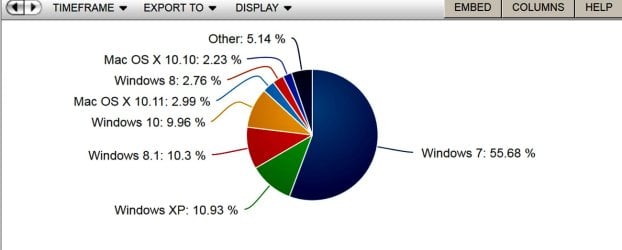
Windows 7 is still by far the most commonly used operating system at about 55%. Windows 10 is under 10%.

Many can't resist it because it's currently free.

Those temps are quite high if the PC is idling, but low to OK if the PC if under a severe load. You didn't say.

Ambient temp has a near 1:1 effect on reported internal temps, so that's important as well. A machine that idles at 29 when ambient is 22 might idle at 34 if ambient is 28.

And laptops are nearly always hotter than desktops.

Over 80 for an extended period is shaky, regardless of circumstances.

I'd have no qualms about running in the 70s at all, but a desktop would rarely get that hot. Laptops, more frequently.
 

Attachments

  • Untitled-1.jpg
    Untitled-1.jpg
    69.8 KB · Views: 2

My Computer My Computer

At a glance

Windows 7 Home Premium SP1, 64-bitIntel Skylake i5-6600K, not overclocked8 GB HyperX DDR4-2666 (2 x 4 GB)none; graphics are integrated on CPU
Computer type
PC/Desktop
Computer Manufacturer/Model Number
Ignatz Special; 4 speed manual gearbox; factory air conditioning; one of one
OS
Windows 7 Home Premium SP1, 64-bit
CPU
Intel Skylake i5-6600K, not overclocked
Motherboard
AsRock Z170M Extreme 4, micro ATX
Memory
8 GB HyperX DDR4-2666 (2 x 4 GB)
Graphics Card(s)
none; graphics are integrated on CPU
Sound Card
onboard: Realtek ALC1150; external: USB Behringer UF0-202
Monitor(s) Displays
Dell S2340M 23 inch IPS
Screen Resolution
1600 x 900
Hard Drives
System: Crucial MX100 series SSD, 128 GB;
Data: Samsung Spinpoint 103SJ, 1 TB;
Backup: WD Caviar Green WD30EZRX-00D8PB0, 3 TB
PSU
Rosewill SilentNight 500 watt fanless, semi-modular
Case
Antec Solo II
Cooling
Noctua NH-U12S; Noctua F12 intake, Noctua S12A exhaust
Keyboard
Microsoft 200 6JH-00001 USB
Mouse
Dell or Microsoft optical wired; USB
Antivirus
Microsoft Security Essentials and Malwarebytes Premium
Browser
Pale Moon
Other Info
All fans PWM; speeds at idle: CPU circa 500 rpm; intake circa 600 rpm; exhaust circa 600 rpm; CPU temps 27 idle and 47 C load in a warm room (27 C/81 F) when running Intel Extreme Tuning Utility stress test.
There are no advantages in Win10. If it ain't broke, don't fix it.
 

My Computer My Computer

At a glance

Vista, Windows7, Mint Mate, Zorin, Windows 8from 1.6GHz Duo to i7
Computer Manufacturer/Model Number
HP, Dell, Gateway, Toshiba - 4 laptops and 2 desktops
OS
Vista, Windows7, Mint Mate, Zorin, Windows 8
CPU
from 1.6GHz Duo to i7
Monitor(s) Displays
2x HP w2207
Hard Drives
5x HDD, 7x SSD, 12x Externals
Keyboard
with trackball - no mices
Mouse
Trackball mice
Internet Speed
DSL 6000
Well I also don't know why anybody would want W-10 but if your curious and want to try W-10 I suggest putting in on a separate hard drive or ssd so you don't mess up Windows 7.

Then you can look under the hood and kick the tires on W-10 and give it a test drive.
 

My Computer My Computer

At a glance

Windows 10 Pro. 64/ version 1709 Windows 7 Pr...Intel i7-6800K @ 4.3Corsair Platinum 16 gig @2400EVGA GTX 1070 OC
Computer type
PC/Desktop
Computer Manufacturer/Model Number
Home made Desktop
OS
Windows 10 Pro. 64/ version 1709 Windows 7 Pro/64
CPU
Intel i7-6800K @ 4.3
Motherboard
ASUS X-99 Deluxe II
Memory
Corsair Platinum 16 gig @2400
Graphics Card(s)
EVGA GTX 1070 OC
Monitor(s) Displays
Asus 27" LED LCD/VE278Q
Screen Resolution
1920-1080 or 1280-720 HDMI
Hard Drives
INTEL SSD 730-240 Gb Sata 3.0/
PSU
EVGA Platium 1200W
Case
Phanteks Luxe Tempered Glass 8 fans/ one radiator
Cooling
XSPC/ Water Cooled CPU
Keyboard
Das 4 Professional
Mouse
Logitech M705/MX Anywhere 2-S
Internet Speed
100 mbits
Antivirus
Microsoft Security Essentials/ Malwarebytes Premium 3.0/ SAS
Browser
I.E. 11 default/Firefox/ ISP Time Warner Cable/Spectrum
Other Info
LG BluRay Burner/
Sound system-KLipsch-THX/
Icy Dock ssd Hot Swap bays.

My Computer My Computer

At a glance

Vista, Windows7, Mint Mate, Zorin, Windows 8from 1.6GHz Duo to i7
Computer Manufacturer/Model Number
HP, Dell, Gateway, Toshiba - 4 laptops and 2 desktops
OS
Vista, Windows7, Mint Mate, Zorin, Windows 8
CPU
from 1.6GHz Duo to i7
Monitor(s) Displays
2x HP w2207
Hard Drives
5x HDD, 7x SSD, 12x Externals
Keyboard
with trackball - no mices
Mouse
Trackball mice
Internet Speed
DSL 6000
Millions of words have been written on the net about whether or not to upgrade to 10.

There's no over-riding reason to do it if you are happy with 7. 10 does have some new doodads that you may or may not appreciate. Sooner or later, you'll probably be forced into it unless you ditch Windows entirely, but Win 7 will be supported until Jan 2020, so many people are sitting tight.

There are some complaints about 10's intrusiveness, but many are indifferent to that.

Windows 7 is still by far the most commonly used operating system at about 55%. Windows 10 is under 10%.

Many can't resist it because it's currently free.

Those temps are quite high if the PC is idling, but low to OK if the PC if under a severe load. You didn't say.

Ambient temp has a near 1:1 effect on reported internal temps, so that's important as well. A machine that idles at 29 when ambient is 22 might idle at 34 if ambient is 28.

And laptops are nearly always hotter than desktops.

Over 80 for an extended period is shaky, regardless of circumstances.

I'd have no qualms about running in the 70s at all, but a desktop would rarely get that hot. Laptops, more frequently.

================================================

The last Windows 7 update I got was in July 2015.

The fact that the Win 10 upgrade is free, is the draw.

================================================

I currently have 3 Internet windows open, plus listening to iTunes radio, and 2 MS Works word processor pages open. Not sure this would be considered a severe load, but rather normal, at least for me it is. I don't do gaming or photo stuff. I do have it on for several hours at a time.

My apartment is at 74 degrees Fahrenheit, if that makes any difference?

My Wise Care 365 System Monitor says my Processor/CPU is at 145-155 degrees Fahrenheit.

My SSHD drive temp is 118 degrees Fahrenheit.

When you say over 80 I presume you are referring to Celcius? If so, then I also presume according to your answer, that my max CPU temp of 155 degrees Fahrenheit is within the 70's degree Celsius temps you say is within reason.

===========================================

On another note: Underneath my laptop is a vent located near the SSHD that is blocked. Not sure why it is, but can you think of any reason why I couldn't/shouldn't remove the blockage to help vent & reduce the heat buildup in that area?

I was also thinking of drilling some small holes in the bottom plastic laptop housing heat buildup areas. (With the cover off of course.) Any reason why I couldn't/shouldn't do this to alleviate the heat buildup?

Thanks again.
 

My Computer My Computer

At a glance

64 bit OS?Intel Core 13 8th Generation4GB DDR2, 2 Crucial memory upgrade sticks
Computer type
Laptop
Computer Manufacturer/Model Number
HP Windows 10
OS
64 bit OS?
CPU
Intel Core 13 8th Generation
Motherboard
Acer, Inc. Chapala [U2E1]
Memory
4GB DDR2, 2 Crucial memory upgrade sticks
Hard Drives
128GB SSD
Cooling
Ice
Mouse
Laptop finger pad and mouse
Internet Speed
Embarq
Antivirus
MalewareBytes
Browser
Firefox
There are no advantages in Win10. If it ain't broke, don't fix it.

I was going to say that in my OP: "If it ain't broke, don't fix it."

I'll take your word for it on Win 10.

Thanks.
 

My Computer My Computer

At a glance

64 bit OS?Intel Core 13 8th Generation4GB DDR2, 2 Crucial memory upgrade sticks
Computer type
Laptop
Computer Manufacturer/Model Number
HP Windows 10
OS
64 bit OS?
CPU
Intel Core 13 8th Generation
Motherboard
Acer, Inc. Chapala [U2E1]
Memory
4GB DDR2, 2 Crucial memory upgrade sticks
Hard Drives
128GB SSD
Cooling
Ice
Mouse
Laptop finger pad and mouse
Internet Speed
Embarq
Antivirus
MalewareBytes
Browser
Firefox
Well I also don't know why anybody would want W-10 but if your curious and want to try W-10 I suggest putting in on a separate hard drive or ssd so you don't mess up Windows 7.

Then you can look under the hood and kick the tires on W-10 and give it a test drive.

=======================================

Thanks for the info. My neighbor just bought a used laptop with a Win 10 upgrade, I'll test drive his Win 10 when he gets it running right? :rolleyes:
 

My Computer My Computer

At a glance

64 bit OS?Intel Core 13 8th Generation4GB DDR2, 2 Crucial memory upgrade sticks
Computer type
Laptop
Computer Manufacturer/Model Number
HP Windows 10
OS
64 bit OS?
CPU
Intel Core 13 8th Generation
Motherboard
Acer, Inc. Chapala [U2E1]
Memory
4GB DDR2, 2 Crucial memory upgrade sticks
Hard Drives
128GB SSD
Cooling
Ice
Mouse
Laptop finger pad and mouse
Internet Speed
Embarq
Antivirus
MalewareBytes
Browser
Firefox
I currently have 3 Internet windows open, plus listening to iTunes radio, and 2 MS Works word processor pages open. Not sure this would be considered a severe load, but rather normal, at least for me it is. I don't do gaming or photo stuff. I do have it on for several hours at a time.

My apartment is at 74 degrees Fahrenheit, if that makes any difference?

My Wise Care 365 System Monitor says my Processor/CPU is at 145-155 degrees Fahrenheit.

My SSHD drive temp is 118 degrees Fahrenheit.

When you say over 80 I presume you are referring to Celcius? If so, then I also presume according to your answer, that my max CPU temp of 155 degrees Fahrenheit is within the 70's degree Celsius temps you say is within reason.

===========================================

On another note: Underneath my laptop is a vent located near the SSHD that is blocked. Not sure why it is, but can you think of any reason why I couldn't/shouldn't remove the blockage to help vent & reduce the heat buildup in that area?

I was also thinking of drilling some small holes in the bottom plastic laptop housing heat buildup areas. (With the cover off of course.) Any reason why I couldn't/shouldn't do this to alleviate the heat buildup?

Thanks again.

Of course, you should clean out any clogged vent--as a matter of habit. Keep your eyes on it.

I wouldn't drill anything personally.

There are cooling pads if you think you need one.

Most people use Celsius when referring to PC temps. That's the convention.

74 F is about 23 C.

SSD at 118 F is about 48 C; that would be high in a desktop but may be OK in a laptop.

CPU of say 150 is 66 C. That's OK.

But you need to determine what's "normal" for you on your laptop at your standard room temp at your typical load.

Your Wise utility may tell you something about CPU load. If not, you can get it directly from Windows. You may be under 10 percent most of the time--relatively low load.

For all I know, your temps 2 weeks ago were much lower and are high only recently. That would point to a problem of some type.

But we don't know what your "normal" is because apparently you've been keeping track only recently and can't say what temps were last March or August.

Blow out the vents.

Confirm your fans are spinning.

Develop an idea of "normal" and check once a month or so. Look for any aberrations.

You can research the absolute max temp that CPU should withstand. It's likely 90 or higher.
 

My Computer My Computer

At a glance

Windows 7 Home Premium SP1, 64-bitIntel Skylake i5-6600K, not overclocked8 GB HyperX DDR4-2666 (2 x 4 GB)none; graphics are integrated on CPU
Computer type
PC/Desktop
Computer Manufacturer/Model Number
Ignatz Special; 4 speed manual gearbox; factory air conditioning; one of one
OS
Windows 7 Home Premium SP1, 64-bit
CPU
Intel Skylake i5-6600K, not overclocked
Motherboard
AsRock Z170M Extreme 4, micro ATX
Memory
8 GB HyperX DDR4-2666 (2 x 4 GB)
Graphics Card(s)
none; graphics are integrated on CPU
Sound Card
onboard: Realtek ALC1150; external: USB Behringer UF0-202
Monitor(s) Displays
Dell S2340M 23 inch IPS
Screen Resolution
1600 x 900
Hard Drives
System: Crucial MX100 series SSD, 128 GB;
Data: Samsung Spinpoint 103SJ, 1 TB;
Backup: WD Caviar Green WD30EZRX-00D8PB0, 3 TB
PSU
Rosewill SilentNight 500 watt fanless, semi-modular
Case
Antec Solo II
Cooling
Noctua NH-U12S; Noctua F12 intake, Noctua S12A exhaust
Keyboard
Microsoft 200 6JH-00001 USB
Mouse
Dell or Microsoft optical wired; USB
Antivirus
Microsoft Security Essentials and Malwarebytes Premium
Browser
Pale Moon
Other Info
All fans PWM; speeds at idle: CPU circa 500 rpm; intake circa 600 rpm; exhaust circa 600 rpm; CPU temps 27 idle and 47 C load in a warm room (27 C/81 F) when running Intel Extreme Tuning Utility stress test.
From post #6

================================================

The last Windows 7 update I got was in July 2015.

The fact that the Win 10 upgrade is free, is the draw.

================================================

Dog do-do is free but I don't go look for some to take home.
 

My Computer My Computer

At a glance

Windows 10 Pro. 64/ version 1709 Windows 7 Pr...Intel i7-6800K @ 4.3Corsair Platinum 16 gig @2400EVGA GTX 1070 OC
Computer type
PC/Desktop
Computer Manufacturer/Model Number
Home made Desktop
OS
Windows 10 Pro. 64/ version 1709 Windows 7 Pro/64
CPU
Intel i7-6800K @ 4.3
Motherboard
ASUS X-99 Deluxe II
Memory
Corsair Platinum 16 gig @2400
Graphics Card(s)
EVGA GTX 1070 OC
Monitor(s) Displays
Asus 27" LED LCD/VE278Q
Screen Resolution
1920-1080 or 1280-720 HDMI
Hard Drives
INTEL SSD 730-240 Gb Sata 3.0/
PSU
EVGA Platium 1200W
Case
Phanteks Luxe Tempered Glass 8 fans/ one radiator
Cooling
XSPC/ Water Cooled CPU
Keyboard
Das 4 Professional
Mouse
Logitech M705/MX Anywhere 2-S
Internet Speed
100 mbits
Antivirus
Microsoft Security Essentials/ Malwarebytes Premium 3.0/ SAS
Browser
I.E. 11 default/Firefox/ ISP Time Warner Cable/Spectrum
Other Info
LG BluRay Burner/
Sound system-KLipsch-THX/
Icy Dock ssd Hot Swap bays.
Dog do-do is free but I don't go look for some to take home.

R. I take it you don't like Win 10.
 

My Computer My Computer

At a glance

64 bit OS?Intel Core 13 8th Generation4GB DDR2, 2 Crucial memory upgrade sticks
Computer type
Laptop
Computer Manufacturer/Model Number
HP Windows 10
OS
64 bit OS?
CPU
Intel Core 13 8th Generation
Motherboard
Acer, Inc. Chapala [U2E1]
Memory
4GB DDR2, 2 Crucial memory upgrade sticks
Hard Drives
128GB SSD
Cooling
Ice
Mouse
Laptop finger pad and mouse
Internet Speed
Embarq
Antivirus
MalewareBytes
Browser
Firefox

My Computer My Computer

At a glance

64 bit OS?Intel Core 13 8th Generation4GB DDR2, 2 Crucial memory upgrade sticks
Computer type
Laptop
Computer Manufacturer/Model Number
HP Windows 10
OS
64 bit OS?
CPU
Intel Core 13 8th Generation
Motherboard
Acer, Inc. Chapala [U2E1]
Memory
4GB DDR2, 2 Crucial memory upgrade sticks
Hard Drives
128GB SSD
Cooling
Ice
Mouse
Laptop finger pad and mouse
Internet Speed
Embarq
Antivirus
MalewareBytes
Browser
Firefox
Of course, you should clean out any clogged vent--

R. Vents are cleaned with canned air and spinning freely.

I wouldn't drill anything personally.

R. Does sound a bit archaic for a computer, but its just a plastic cover.

But you need to determine what's "normal" for you on your laptop at your standard room temp at your typical load.
For all I know, your temps 2 weeks ago were much lower and are high only recently. That would point to a problem of some type.

R. The temps I listed have been fairly consistent in that range since I installed Win 7.

But we don't know what your "normal" is because apparently you've been keeping track only recently and can't say what temps were last March or August.

R. The temps I listed have been consistent.

Thanks again, appreciate your input.
 

My Computer My Computer

At a glance

64 bit OS?Intel Core 13 8th Generation4GB DDR2, 2 Crucial memory upgrade sticks
Computer type
Laptop
Computer Manufacturer/Model Number
HP Windows 10
OS
64 bit OS?
CPU
Intel Core 13 8th Generation
Motherboard
Acer, Inc. Chapala [U2E1]
Memory
4GB DDR2, 2 Crucial memory upgrade sticks
Hard Drives
128GB SSD
Cooling
Ice
Mouse
Laptop finger pad and mouse
Internet Speed
Embarq
Antivirus
MalewareBytes
Browser
Firefox
Hi,
Yep if you want to try 10 go for it
Just make a good system image first so you can reliably get back to where you started before the upgrade ;)
http://www.sevenforums.com/tutorials/73828-imaging-free-macrium.html

But yes v-m is a pretty safe way too.
Personally I hate to see anything go over 60c
Realtemp is pretty good to monitor temps.
Download Real Temp 3.70 | techPowerUp

I do have to say no updates since July is pretty whacky :/
The first windows 10 prep update was 1 day before April fools day 2015 :)
 

My Computer My Computer

At a glance

Win-7-Pro64bit 7-H-Prem-64biti7-5930K 2nd i9-9940x both water blocked VRM'...Trident-z 3200C14 2nd Trident-z 3600C16EVGA 1080ti ftw3 2nd Titan Xp both water blocked
Computer type
PC/Desktop
Computer Manufacturer/Model Number
Custom assembled by me :}
OS
Win-7-Pro64bit 7-H-Prem-64bit
CPU
i7-5930K 2nd i9-9940x both water blocked VRM's too
Motherboard
ASUS SABERTOOTH X99 2nd ASUS x299 Apex
Memory
Trident-z 3200C14 2nd Trident-z 3600C16
Graphics Card(s)
EVGA 1080ti ftw3 2nd Titan Xp both water blocked
Sound Card
Built-in Realtek
Monitor(s) Displays
1-AOC G2460PG 24"G-Sync 144Hz/ 2nd 1-ASUS VG248QE 24" 144Hz
Screen Resolution
1920 x 1080 144Hz
Hard Drives
2-Samsung M.2 Evo & Evo Plus
2-Samsung 850 EVO 500GB SSD's/ 3-2.5 W.D. Black 1tb-&3-1tb/3-3.5 WD Black 1tb hdd's
PSU
EVGA SuperNOVA 1000-P2 2nd 1200-P2
Case
2-Corsair Obsidian Series 450D Black ATX Mid Tower
Cooling
Custom water loops
Keyboard
Logitech G710+/ 2nd Logitech G910
Mouse
2-RedDragon M901 Perdition 16400 dpi Gaming mouse = wired
Internet Speed
Comcast Ping 19ms 89.31mbps download speed 6.12mbps upload
Antivirus
Malwarebytes Pro/ Superantispyware Pro
Browser
FireFox & Pale moon
Other Info
2nd ASUS X299 Apex/Intel i9-9940x with Custom water loop/7H-Prem-x64/Corsair 450D case/Ram Trident-z 3600C16 4x8gb / Samsung970Evo plus 500gb SSD/Dual ssd EZ swap evo/PSU EVGA SuperNova 1200w-P2 80+Platinum/GPU Titan Xp /8-ML-140 on push-pull on 2-280GTX rads
Below is the Windows 10 upgrade add I keep getting. Saying its faster, more reliable, more secure, etc. etc. than Windows 7.

Thoughts on this add, Windows 10?
__________________________________________________________________________________


See why Windows 10 is the best Windows ever. Windows 10 | Upgrade FAQs | Latest devices
hero.jpg
It’s the Windows you know, only better You’re already an expert with the familiar Start menu and taskbar. And you’ll get innovative features like Microsoft Edge, a new browser that lets you go beyond browsing. Learn more
module_1_left.jpg
Windows 10 starts up 28% faster on average than Windows 7¹ “That was the easiest OS install I’ve ever done.” Windows 10 user The most secure Windows ever With Windows 10, you’re covered by enhanced, built-in security features that help protect against viruses, malware, and even phishing attacks. Learn more
icon_1_double.png
Windows Hello² Login more securely without a password
icon_2_double.png
Windows Defender Scans what you download and run
icon_3_double.png
Smart*Screen Filter Checks the reputation of sites you visit “I really like Windows 10. It’s more secure…” Windows 10 user Make the most of your 24 hours
img_a.jpg
Snap apps Stay focused with easy ways to snap up to four apps into place. Learn more
img_b.jpg
Cortana Cortana³ is your truly personal digital assistant who works across your day and your devices to help you get more done. Learn more
img_c.jpg
Virtual desktops Create multiple desktops to organize your space and keep things separated. You could create one desktop for work and one for play. Learn more
img_d.jpg
Office The Office 2016 apps are built for getting things done, and include new features that take the work out of working together. Learn more More than 200 million have upgraded and are loving Windows 10 Upgrade to the best Windows ever for free⁴ More innovation. More devices. Only Windows gives you the most choice in innovative devices. Buy a new device with Windows 10 pre-installed, or buy a Windows 8.1 device and upgrade for free⁴.
hero_2.jpg
logo_win10_double.png
Do great things ¹ Testing conducted by Principled Technologies in July 2015 in a closed lab environment using OEM factory default images on a representative sample of Windows 7 devices. Each boot test was run 10 times and the averages compared. Average improvement in startup was 28%. ² Windows Hello requires specialized hardware, including fingerprint reader, illuminated IR sensor or other biometric sensors. ³ Cortana available in select regions; experience may vary by region and device; Cortana app required for Android and iOS devices (requires Android version 4.1.2 or higher, or iPhone 4 with iOS 8.0 or higher). ⁴ Yes, free! This upgrade offer is for a full version of Windows 10, not a trial. 3GB+ download required; Internet access fees may apply. To take advantage of this free offer, you must upgrade to Windows 10 within one year of availability. Once you upgrade, you have Windows 10 for free on that device. Windows 10 Upgrade Offer is valid for qualified Windows 7 and Windows 8.1 devices, including devices you already own. Some hardware/software requirements apply and feature availability may vary by region and device. The availability of Windows 10 upgrade for Windows Phone 8.1 devices may vary by OEM, mobile operator or carrier. Features vary by device. Devices must be connected to the Internet and have Windows Update enabled. Windows 7 SP1 and Windows 8.1 Update required. Some editions are excluded: Windows 7 Enterprise, Windows 8/8.1 Enterprise, and Windows RT/RT 8.1. Active Software Assurance customers in volume licensing have the benefit to upgrade to Windows 10 enterprise offerings outside of this offer. To check for compatibility and other important installation information, visit your device manufacturer’s website and the Windows 10 Specifications page. Windows 10 is automatically updated. Additional requirements may apply over time for updates. See the Windows 10 Upgrade page for details. Screens simulated, subject to change. Some apps sold separately. App availability and experience may vary by region. Microsoft respects your privacy. To learn more, please read our Privacy Statement. To set your contact preferences for Microsoft communications, click here. These settings will not affect any mandatory service communications that are considered part of certain Microsoft services. Microsoft Corporation
One Microsoft Way
Redmond, WA 98052


 

My Computer My Computer

At a glance

64 bit OS?Intel Core 13 8th Generation4GB DDR2, 2 Crucial memory upgrade sticks
Computer type
Laptop
Computer Manufacturer/Model Number
HP Windows 10
OS
64 bit OS?
CPU
Intel Core 13 8th Generation
Motherboard
Acer, Inc. Chapala [U2E1]
Memory
4GB DDR2, 2 Crucial memory upgrade sticks
Hard Drives
128GB SSD
Cooling
Ice
Mouse
Laptop finger pad and mouse
Internet Speed
Embarq
Antivirus
MalewareBytes
Browser
Firefox
If you depend on M$ security it might be true = namely MSE.
 

My Computer My Computer

At a glance

Win-7-Pro64bit 7-H-Prem-64biti7-5930K 2nd i9-9940x both water blocked VRM'...Trident-z 3200C14 2nd Trident-z 3600C16EVGA 1080ti ftw3 2nd Titan Xp both water blocked
Computer type
PC/Desktop
Computer Manufacturer/Model Number
Custom assembled by me :}
OS
Win-7-Pro64bit 7-H-Prem-64bit
CPU
i7-5930K 2nd i9-9940x both water blocked VRM's too
Motherboard
ASUS SABERTOOTH X99 2nd ASUS x299 Apex
Memory
Trident-z 3200C14 2nd Trident-z 3600C16
Graphics Card(s)
EVGA 1080ti ftw3 2nd Titan Xp both water blocked
Sound Card
Built-in Realtek
Monitor(s) Displays
1-AOC G2460PG 24"G-Sync 144Hz/ 2nd 1-ASUS VG248QE 24" 144Hz
Screen Resolution
1920 x 1080 144Hz
Hard Drives
2-Samsung M.2 Evo & Evo Plus
2-Samsung 850 EVO 500GB SSD's/ 3-2.5 W.D. Black 1tb-&3-1tb/3-3.5 WD Black 1tb hdd's
PSU
EVGA SuperNOVA 1000-P2 2nd 1200-P2
Case
2-Corsair Obsidian Series 450D Black ATX Mid Tower
Cooling
Custom water loops
Keyboard
Logitech G710+/ 2nd Logitech G910
Mouse
2-RedDragon M901 Perdition 16400 dpi Gaming mouse = wired
Internet Speed
Comcast Ping 19ms 89.31mbps download speed 6.12mbps upload
Antivirus
Malwarebytes Pro/ Superantispyware Pro
Browser
FireFox & Pale moon
Other Info
2nd ASUS X299 Apex/Intel i9-9940x with Custom water loop/7H-Prem-x64/Corsair 450D case/Ram Trident-z 3600C16 4x8gb / Samsung970Evo plus 500gb SSD/Dual ssd EZ swap evo/PSU EVGA SuperNova 1200w-P2 80+Platinum/GPU Titan Xp /8-ML-140 on push-pull on 2-280GTX rads
I do have MSE on my Windows 7 SP1 laptop, so no to sure what difference (security wise) it would be on Windows 10?
 

My Computer My Computer

At a glance

64 bit OS?Intel Core 13 8th Generation4GB DDR2, 2 Crucial memory upgrade sticks
Computer type
Laptop
Computer Manufacturer/Model Number
HP Windows 10
OS
64 bit OS?
CPU
Intel Core 13 8th Generation
Motherboard
Acer, Inc. Chapala [U2E1]
Memory
4GB DDR2, 2 Crucial memory upgrade sticks
Hard Drives
128GB SSD
Cooling
Ice
Mouse
Laptop finger pad and mouse
Internet Speed
Embarq
Antivirus
MalewareBytes
Browser
Firefox
Back
Top