How to remove Windows 10 upgrade updates in Windows 7 and 8

Thanks Thrashzone for referencing that list of "Bad Boys". I found six on my system. Is going back thru August 2015 far enough to go?
 

My Computer My Computer

At a glance

Windows 7 Home Premium 32-Bit - Build 7600 SP1Intel Core i3-2120 3.30GhzKingston 4 GB DDR3 1333 mhzAMD Radeon HD6670
Computer type
PC/Desktop
Computer Manufacturer/Model Number
Custom Build
OS
Windows 7 Home Premium 32-Bit - Build 7600 SP1
CPU
Intel Core i3-2120 3.30Ghz
Motherboard
Asus P8Z68-V LX Intel Z68 Socket H2 ATX
Memory
Kingston 4 GB DDR3 1333 mhz
Graphics Card(s)
AMD Radeon HD6670
Sound Card
Sound Blaster Audigy SE 24-Bit
Monitor(s) Displays
Asus VE228
Screen Resolution
1440 X 900
Hard Drives
OCZ Vertex 3 120 GB Sata 3 SSD ==
Kingston SH103/S3 120 G Hyper X 120 GB SSD ==
Western Digital 500 GB Caviar Green 7200 RPM ==
PSU
Corsair CX600M == 600 Watt
Case
NZXT Apollo - Silver with Clear Side Panel
Cooling
Three 120 mm Fans
Keyboard
Microsoft Natural 4000
Mouse
Microsoft Custom Optical 3000
Internet Speed
AT&T Fiber Optic Wireless Network
Antivirus
Microsoft Security Essentials
Browser
Chrome
Other Info
120 mm Blue LED Fan -- Three Blue LED Lazer Light Sticks

My Computer My Computer

At a glance

Win-7-Pro64bit 7-H-Prem-64biti7-5930K 2nd i9-9940x both water blocked VRM'...Trident-z 3200C14 2nd Trident-z 3600C16EVGA 1080ti ftw3 2nd Titan Xp both water blocked
Computer type
PC/Desktop
Computer Manufacturer/Model Number
Custom assembled by me :}
OS
Win-7-Pro64bit 7-H-Prem-64bit
CPU
i7-5930K 2nd i9-9940x both water blocked VRM's too
Motherboard
ASUS SABERTOOTH X99 2nd ASUS x299 Apex
Memory
Trident-z 3200C14 2nd Trident-z 3600C16
Graphics Card(s)
EVGA 1080ti ftw3 2nd Titan Xp both water blocked
Sound Card
Built-in Realtek
Monitor(s) Displays
1-AOC G2460PG 24"G-Sync 144Hz/ 2nd 1-ASUS VG248QE 24" 144Hz
Screen Resolution
1920 x 1080 144Hz
Hard Drives
2-Samsung M.2 Evo & Evo Plus
2-Samsung 850 EVO 500GB SSD's/ 3-2.5 W.D. Black 1tb-&3-1tb/3-3.5 WD Black 1tb hdd's
PSU
EVGA SuperNOVA 1000-P2 2nd 1200-P2
Case
2-Corsair Obsidian Series 450D Black ATX Mid Tower
Cooling
Custom water loops
Keyboard
Logitech G710+/ 2nd Logitech G910
Mouse
2-RedDragon M901 Perdition 16400 dpi Gaming mouse = wired
Internet Speed
Comcast Ping 19ms 89.31mbps download speed 6.12mbps upload
Antivirus
Malwarebytes Pro/ Superantispyware Pro
Browser
FireFox & Pale moon
Other Info
2nd ASUS X299 Apex/Intel i9-9940x with Custom water loop/7H-Prem-x64/Corsair 450D case/Ram Trident-z 3600C16 4x8gb / Samsung970Evo plus 500gb SSD/Dual ssd EZ swap evo/PSU EVGA SuperNova 1200w-P2 80+Platinum/GPU Titan Xp /8-ML-140 on push-pull on 2-280GTX rads
Now I have some free weeks so as to install the latest updates. I know this is a little late.:o

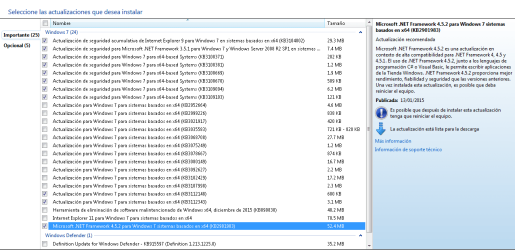
This is my list. Those marked are new. They are all well to be installed ?
I think the last two: KB311248, KB3112343 are related to W10.
WU_12list_.png

The last patch(November) KB3087877 possible causes audio problems is gone. It will have been replaced ?
The one below regarding Framework (KB2901983) after several months is now marked for download. Curious, right ?

Cheers.
 

My Computer My Computer

At a glance

64-bit Windows 7 ProfessionalIntel i5-3450 3.1 Ghz8 GB (2x4) Corsair Vengeance Red DDR3 1600MhzASUS HD 7770 DC 1.5GB
Computer type
PC/Desktop
Computer Manufacturer/Model Number
Assembled PC
OS
64-bit Windows 7 Professional
CPU
Intel i5-3450 3.1 Ghz
Motherboard
ASUS P8H77-M PRO
Memory
8 GB (2x4) Corsair Vengeance Red DDR3 1600Mhz
Graphics Card(s)
ASUS HD 7770 DC 1.5GB
Sound Card
Realtek HD Audio / Headphones Asus Orion Pro
Monitor(s) Displays
20" Samsung S20B300N
Screen Resolution
1600x900
Hard Drives
500GB SEAGATE HDD SATA
PSU
Corsair GS600 80PLUS Bronze Gaming
Case
Cooler Master Storm Enforcer
Cooling
Cooler Master Hyper 212 EVO
Keyboard
Logitech K200 USB
Mouse
Logitech M100 USB / Logitech G500 Gaming Mouse
Antivirus
ESET
Browser
Internet Explorer
Other Info
All the hardware selected by myself. I never imagined upgrade my PC :)
That's the stupidest thing I've read here in a while.

Windows 7 has always delivered occasional hardware driver updates to a range of hardware, more commonly the video drivers, but not exclusively so. Its a well-known and proven fact that drivers issued & certified by Microsoft are far less likely to clash with the operating system and cause BSOD's. That's why they do it : to keep your system stable.

Are you really that naive ? .... Do you ever read the trade mags / test sites ? How about Business trades ? Why ya think MS made the concession to business in the pro version at least allowing them to defer updates ? The reason this thread even exists is because one of the major reasons peeps don't want to go to Win 10 is the force feeding of potentially unreliable updates and drivers that destroy the functionality of their systems.

And as for the reliability of those MS drivers. I did trying installing that WDM driver.... over a year ago... and several times since. My thot was, it's an Intel driver, what are the chances that MS screwed it it up ? It's still appears in Windows Update. The update will not install, so much for the vaunted MS driver reliability. But as it's not affecting me in any way, I just don't care. I am using the "current" driver as listed on the manufacturer's web site and that's just fine w/ me.

I have been building PCs for 25 years and manage boxes on numerous sites. A relative who managed CitiBanks call center with over 2500 Windows machines followed the same practice. As to many others who I am regularly in contact with having built their workstations or gaming machines all follow the same routine. Laptop manuals and tech support advise not to install drivers via WU. Your "well known and proven fact" goes dead set against all of our experience as well as the advice from the component manufacturers themselves. MS does nothing that is not in MS interests and one of the main reasons people are avoiding Win10 is specifically because it does this.

Forbes Welcome

With just four days left before launch, Windows 10’s policy of automatic updates has run into its first major problem and it is causing many PCs to stop working correctly.


The flaw revolves around Nvidia graphics cards with users taking to Nvidia’s forums to report Windows Update is automatically installing new drivers which break multimonitor setups, SLI (dual card) configurations and can even stop PCs booting entirely which pushes Windows 10 into its emergency recovery mode.


“Please pull these off Windows update!!!” writes Nvidia forum poster slycoder. “It makes my second monitor not work and lots of flickering! Please. I roll back and Windows Update reinstalls them :/”
“I second this,” agrees ZabaZu. “For multi screen users, that driver is flat out broken and it is beyond annoying that windows auto updates to it.”

So much for your "well known and proven fact" about WU reliability".Users thot they were off the hook for a while... installing the nVidia driver from the nvidia site restored SLI functionality; and then on next reboot WU immediately fudged up the system again by reinstalling MS's non-functional driver. This scenarios has repeated numerous times already.

After outfitting an office with several IBM lappies several years back, I also installed BackUp Software to back up all the lappies to their server. Worked fine for several weeks than after a patch Tuesday, all machines were unfunctional. After working with IBM 2nd level Tech Support for a couple of days, we traced the problem to an updated network driver which even after uninstalling, did not return the systems to full function. OS reinstalls were required on all machines. Have also experienced the same issue with audio drivers and also DVD Player software.

Licensed DVD Player software became unfunctional after a WU so that when used it was asking for the license key which was embedded in the original CD that came w/ the drive. Installing an updated gfx driver on laptops can disable the power saving features which the manufacturer included in the design. This is especially true in custom laptops where desktop GPUs are used. With M series GPUs getting more powerful, this problem is getting less of a concern.

Or how about the XP Fix that disabled AutoCAD's licensing scheme. Thousands of CAD Operators sat around for three days twiddling their thumbs for, costing millions of dollars because when their machines were booted each day, the office server didn't recognize them and would not "grant a license" and allow the software to load. These are "concurrent use" licenses; a form might have AutoCAD installed on 30 machines but expects that not more than 25 will have AutoCAD in use at any given time. After the OS fix, 0 could load AutoCAD. Because my sites always "wait", none of them were affected.

Again, I very rarely see a hardware driver in WU, those who use MS Update seem to get a lot more. Your well known and proven fact is completely w/o any hint of support and contradicted by real life experiences of thousands of users and numerous articles. Do a little reading

Forbes Welcome

20 epic Microsoft Windows Automatic Update meltdowns | InfoWorld

Windows 10 forced updates: Don't panic | InfoWorld

Forbes Welcome

Mandatory Updates – Windows 10 may be more secure and up-to-date because of this, but Microsoft’s decision to force updates upon users also has significant downsides. This has included automatically installing a broken graphics driver which crashed displays, a security patch which crashed Windows Explorer and more.


By contrast Windows 8 and Windows 7 make all updates optional and you’re alerted to install them. I believe the ideal solution lies halfway between the two: make all updates automatic by default, but give users the option to stop or delay any update categories or individual updates they like. Right now this lack of flexibility makes Windows 10 a deal breaker for some.


Forbes Welcome

Windows 10 Automatic Updates Remove User Preferences

https://social.technet.microsoft.co...pdate-driver-conflict?forum=w7itpronetworking
trans.gif


In notebooks do not use drivers from MS. Always install drivers from notebook support page.

http://www.sevenforums.com/windows-...-7-update-causes-conflict-scanner-driver.html

Windows 8 update bombing? Sounds like a driver conflict | The Seattle Times

Windows 10 in head-on crash with Nvidia drivers as world watches launch • The Register

Windows 10 How To: blocking the automatic reinstall of a driver or update in Windows 10 ? WinBeta

http://answers.microsoft.com/en-us/...h/3279ab69-239b-4b1e-976b-30025180b3e0?auth=1

http://www.computerworld.com/articl...anges-windows-update-settings-on-its-pcs.html

Apparently Samsung, one of the world's largest companies, is stupid also. After expending inordinate amounts of TS time helping users uninstall bad WUs, they introduced their SW Update utility which changes the WU setting to "Let me choose". One issue that was noted was that an WU update driver install made the USB ports not work on Samsung machines

"When you enable Windows updates, it will install the default drivers for all the hardware on [the] laptop which may or may not work. For example, if there is USB 3.0 on [the] laptop, the ports may not work with the installation of updates. So to prevent this, SW Update will prevent the Windows updates,"

According to a transcript of an online chat with a Samsung technical support representative that Barker included in his blog, the company acknowledged it was monkeying with Windows Update, but said it was necessary to provide customers with the correct drivers for their systems.

SW Update software is used to consistently disable Windows Update [automatic installs] so Windows Update doesn't install any drivers," said Barker in an email late yesterday where he answered follow-up questions posed by Computerworld. "They [said they] didn't want Windows Update installing drivers to conflict with their SW Update software when it came to installing drivers for the system."

Samsung was eventually "convinced" by MS to stop the practice arguing that uneducated users might not remember to run / check WU with any frequency and by allowing them to choose they might not ever install security updates.... I don't agree with Samsung's approach either but it is a clear and unarguable indication that Samsung was affected to a significant negative extent from all the driver conflict issues that WU caused.

So the question that needs to be asked is why WU isn't configured with check boxes for :

Windows Security Updates
Windows OS Upgrades
Windows Related Programs
Manufacturer Drivers
Installed Software

Options would include:

Automatically Download and Install (Default)
Download and let me know but let me choose when / if to install
Let me know when / which updates are available and let me choose when / if to install.


Windows Security Updates - I would let these sit for a week to see if any contain major problems, before installing. No problems uncovered, all would be installed. If one had a problem reported, I'd wait till it was fixed, before installing fixed version.

Windows OS Upgrades - I would let these sit for a week to see if any contain major problems, before installing.

Windows Related Programs - I don't much care about these as I don't use any but would install as above.

Manufacturer Drivers - I'd welcome the notice that an upgrade was available, and then d/l install from component manufacturer's site.

Installed Software - As above.

Why doesn't MS want you to be able to stop any installs ? For the exact reason that this thread exists. They look at the money Google takes in by not selling anything but by using tracking information to provide targeted advertising. MS wants in and doesn't want users, making an educated choice on what to and what not to install. To do that they need to convince you that everything they install is fine. Not many educated users are that gullible and, as evidenced by the list above, their record is extremely poor in this regard.

The driver packages Windows automatically installs are different from the ones your device manufacturers provide. The core drivers are created by your device manufacturer and provided by Microsoft after they go through Microsoft’s WHQL (Windows Hardware Quality Labs) testing to ensure they’re stable.


However, Microsoft provides these drivers in stripped-down form. For example, when you get drivers for NVIDIA or AMD graphics cards from Windows Update, you’re getting a driver package without the NVIDIA Control Panel or the AMD Catalyst control panel. Connect a printer and the automatically provided drives won’t include the printer’s control panel. Plug in a wireless mouse and it will work immediately, but you’ll need the manufacturer’s control panel if you want to view the mouse’s battery level or customize what the buttons do. However, you may not always want these hardware utilities.


The versions of the drivers Microsoft provides are also a bit older. Microsoft doesn’t update these drivers as frequently, so your device manufacturer may have newer versions on their website. However, using older drivers often isn’t a problem


Often means, there are times that it is a problem. Furthermore.... when you experience any of the issues as described above, using the manufacturer's drivers, you have the option of calling the manufacturer's tech support. Good luck getting that from MS.

 

My Computer My Computer

At a glance

Windows 7 - 64 biti7 920Mushkin 998692GTX 295 FTW Edition 1792MB
Computer Manufacturer/Model Number
Home Built
OS
Windows 7 - 64 bit
CPU
i7 920
Motherboard
Asus Rampage II Extreme
Memory
Mushkin 998692
Graphics Card(s)
GTX 295 FTW Edition 1792MB
Sound Card
Sounblaster Xi Fi Extreme
Monitor(s) Displays
Dekk U2410
Hard Drives
Seagate 7200.12
PSU
Antec SG-850
Case
Antec 1200
Cooling
Prolimatech Megashadow
Using Windows Update, not MS Update, I had never seen driver updates appear under Optional Upgrades other than the WDM VAG driver on my lappie. However wife's machine last night popped up a driver for "Other Hardware - Microsoft Wieless Router Module" .... huh ?

What's this for ? To capture wireless router traffic ? :)

MS .... stay away from my Hardware Drivers !

It might also be worth trying to disable windows update drivers search.

Start> Right click Computer

Choose "Properties"

On the left side choose "Advanced System Settings"

On the Hardware tab choose "Device Installation Settings"

Thx much .... I just checked, and this is exactly how it is set. Can't remember if it was always that way tho.... I wonder if GWX Control Panel did this on this lappie.
 

My Computer My Computer

At a glance

Windows 7 - 64 biti7 920Mushkin 998692GTX 295 FTW Edition 1792MB
Computer Manufacturer/Model Number
Home Built
OS
Windows 7 - 64 bit
CPU
i7 920
Motherboard
Asus Rampage II Extreme
Memory
Mushkin 998692
Graphics Card(s)
GTX 295 FTW Edition 1792MB
Sound Card
Sounblaster Xi Fi Extreme
Monitor(s) Displays
Dekk U2410
Hard Drives
Seagate 7200.12
PSU
Antec SG-850
Case
Antec 1200
Cooling
Prolimatech Megashadow

My Computer My Computer

At a glance

Windows 10 Pro x64 ; Xubuntu x64Intel i7 860 @ 2.80 GHz O/C'ed to 4.0GHz16GB Corsair Vengance DDR3 @ 661 MHz Dual Cha...EVGA NVidia GTX 560 1024MB
Computer type
PC/Desktop
Computer Manufacturer/Model Number
Golden Mk. I.4
OS
Windows 10 Pro x64 ; Xubuntu x64
CPU
Intel i7 860 @ 2.80 GHz O/C'ed to 4.0GHz
Motherboard
Gigabyte P55A-UD3R Rev.1. Award BIOS F13
Memory
16GB Corsair Vengance DDR3 @ 661 MHz Dual Channel (9-9-9-24)
Graphics Card(s)
EVGA NVidia GTX 560 1024MB
Sound Card
Realtek Integrated
Monitor(s) Displays
Dual Samsung SyncMaster 2494HS
Screen Resolution
1920*1080 and 1920*1080
Hard Drives
1*Samsung 840 EVO 120GB SSD;
1*OCZ Vertex 2 60GB SSD;
2*Samsung F3 SpinPoint 1TB in RAID0;
1*Samsung F1 SpinPoint 1TB;
2*Western Digital 1TB External USB 3.0
1*Western Digital 500GB External USB 3.0
1*Seagate 500GB External USB 2.0
PSU
Thermaltake ToughPower QFan 750W
Case
Thermaltake Element S VK60001W2Z
Cooling
Corsair H60 Water Cooling, 2*230mm and 2*80mm case fans
Keyboard
Logitech G110
Mouse
Logitech MX518
Using Windows Update, not MS Update, I had never seen driver updates appear under Optional Upgrades other than the WDM VAG driver on my lappie. However wife's machine last night popped up a driver for "Other Hardware - Microsoft Wieless Router Module" .... huh ?

What's this for ? To capture wireless router traffic ? :)

MS .... stay away from my Hardware Drivers !
That's the stupidest thing I've read here in a while.

Windows 7 has always delivered occasional hardware driver updates to a range of hardware, more commonly the video drivers, but not exclusively so. Its a well-known and proven fact that drivers issued & certified by Microsoft are far less likely to clash with the operating system and cause BSOD's. That's why they do it : to keep your system stable.

Some examples from my system:
View attachment 378373

View attachment 378374

JackNaylorPE,
I've seen several different types of drivers come in via Windows Update. If I install the NIC driver shown bellow from Windows Update, one of the svchost processes will max out the CPU until the NIC is disabled. Using the NIC driver from Dell is newer and stable.

Capture.PNG


Golden,
There are several systems that I support which will not install the video drivers offered by Windows update. Just like the image above, these systems have newer drivers already installed. They came that way from Dell. The company that I work for does not install drivers from Windows Update as a matter of policy. As JackNaylorPE mentioned, there are many companies that do this.
 

My Computer My Computer

At a glance

W7 Pro SP1 64biti78GBIntel HD Graphics
Computer type
Laptop
Computer Manufacturer/Model Number
Employer provided Dell Latitude
OS
W7 Pro SP1 64bit
CPU
i7
Memory
8GB
Graphics Card(s)
Intel HD Graphics
Hard Drives
crappy SSD
Antivirus
Employer mandated Symantec Endpoint Protection
Browser
Pale Moon 64bit, IE11 64bit & Chrome 64bit
I don't install Windows delivered drivers especially video drivers. I would go to the manufacturer's site first and download from there. Also, if your drivers are stable then leave well enough alone. I accept that gamers do need to occasionally download an updated video driver.
 

My Computer My Computer

At a glance

Windows 7x64 Home Premium SP1Intel i7 2600kG.Skill Ripjaws (DDR3-1600) 2x4GBNvidia GeForce GTS 450; Intel HD Graphics 300...
Computer type
PC/Desktop
Computer Manufacturer/Model Number
Own build
OS
Windows 7x64 Home Premium SP1
CPU
Intel i7 2600k
Motherboard
ASUS P8Z68 Deluxe
Memory
G.Skill Ripjaws (DDR3-1600) 2x4GB
Graphics Card(s)
Nvidia GeForce GTS 450; Intel HD Graphics 3000(GT2+)
Monitor(s) Displays
Dell Ultrasharp IPS panel U2311H, Samsung SyncMaster P2350
Screen Resolution
1920x1080
Hard Drives
Samsung 850 Pro SSD 256GB, Samsung SSD 840 120GB, Seagates 1TB Barracuda ST31000528AS x2
PSU
Seasonic M12II 520W
Case
Lian Li Lancool PC-K60
Cooling
Case: 1x120mm, 3x140mm CPU: Hyper 212+
Keyboard
Logitech MK520 (wireless)
Mouse
Logitech MK520
Internet Speed
6-7 Mbps
Antivirus
Norton Security Premium, Malwarebytes on 2 (MSE on 3rd PC)
Browser
FireFox
Other Info
Audio: Logitech Z523 2.1
I do mine differently. For both windows 7 & 10.

When I did a clean install of windows 7
I installed the drivers using the drivers cd/dvd provided by manufacture.
I didn't install the driver update program provided by the manufacture.
I use windows update to update the driver and still do to this day.

When I did a clean install of windows 10.
I let windows 10 updated the drivers.
I didn't install the driver update program provided by the manufacture.
I use windows update to update the driver.


What I see (Which is just my opinion) the cause of driver update is having both driver update software enabled & Windows Update Driver installation also enabled. This will usually cause a conflict. The drivers in most cases are actually the same no matter where you get it from.
 
Last edited:

My Computer My Computer

At a glance

W10 32 bit, XUbuntu 18.xx 64 bitIntel(R) Celeron(R) CPU G1620T @ 2.40GHz, 240...4GBIntel HD graphics
Computer type
PC/Desktop
Computer Manufacturer/Model Number
Dell All in one Inspiron 2020
OS
W10 32 bit, XUbuntu 18.xx 64 bit
CPU
Intel(R) Celeron(R) CPU G1620T @ 2.40GHz, 2400 Mhz
Motherboard
Dell
Memory
4GB
Graphics Card(s)
Intel HD graphics
Sound Card
High Definition Audio Device
Monitor(s) Displays
20 inch Screen
Screen Resolution
W7=1280 x 720 & Linux Mint Xfce=1360 x 768
Hard Drives
500 GB hard drive
Keyboard
Usb
Mouse
Usb
Internet Speed
High-Speed
Antivirus
MSE
Browser
Main Browser Firefox
Other Info
I have done a clean install of Windows 7 using Dell re-installation disk (Dell sent me one). I also use Free Macrium reflect backup and restore.
When using on board graphic's you might be able to get by with just windows update drivers.
 

My Computer My Computer

At a glance

Win-7-Pro64bit 7-H-Prem-64biti7-5930K 2nd i9-9940x both water blocked VRM'...Trident-z 3200C14 2nd Trident-z 3600C16EVGA 1080ti ftw3 2nd Titan Xp both water blocked
Computer type
PC/Desktop
Computer Manufacturer/Model Number
Custom assembled by me :}
OS
Win-7-Pro64bit 7-H-Prem-64bit
CPU
i7-5930K 2nd i9-9940x both water blocked VRM's too
Motherboard
ASUS SABERTOOTH X99 2nd ASUS x299 Apex
Memory
Trident-z 3200C14 2nd Trident-z 3600C16
Graphics Card(s)
EVGA 1080ti ftw3 2nd Titan Xp both water blocked
Sound Card
Built-in Realtek
Monitor(s) Displays
1-AOC G2460PG 24"G-Sync 144Hz/ 2nd 1-ASUS VG248QE 24" 144Hz
Screen Resolution
1920 x 1080 144Hz
Hard Drives
2-Samsung M.2 Evo & Evo Plus
2-Samsung 850 EVO 500GB SSD's/ 3-2.5 W.D. Black 1tb-&3-1tb/3-3.5 WD Black 1tb hdd's
PSU
EVGA SuperNOVA 1000-P2 2nd 1200-P2
Case
2-Corsair Obsidian Series 450D Black ATX Mid Tower
Cooling
Custom water loops
Keyboard
Logitech G710+/ 2nd Logitech G910
Mouse
2-RedDragon M901 Perdition 16400 dpi Gaming mouse = wired
Internet Speed
Comcast Ping 19ms 89.31mbps download speed 6.12mbps upload
Antivirus
Malwarebytes Pro/ Superantispyware Pro
Browser
FireFox & Pale moon
Other Info
2nd ASUS X299 Apex/Intel i9-9940x with Custom water loop/7H-Prem-x64/Corsair 450D case/Ram Trident-z 3600C16 4x8gb / Samsung970Evo plus 500gb SSD/Dual ssd EZ swap evo/PSU EVGA SuperNova 1200w-P2 80+Platinum/GPU Titan Xp /8-ML-140 on push-pull on 2-280GTX rads
On another note about win-10 pro last round,
I transferred some files to a hdd to add to 10 pro
Fast start was of course disabled in win-10 so I shut down in win-10 with Win+X power shut down as usual.

I just connected the drive and win-7 showed the 80gb drive partition as Raw and has to be formatted before use :/
So it seems win-10 is still messing with secondary drives and not in a good way either
Before during testing 7 would prompt to initialize the drive = check disk this time it's raw Oh boy :)
Fortunately of course nothing important was lost but still win-10 is in the unreliable category for sharing drives.
 

My Computer My Computer

At a glance

Win-7-Pro64bit 7-H-Prem-64biti7-5930K 2nd i9-9940x both water blocked VRM'...Trident-z 3200C14 2nd Trident-z 3600C16EVGA 1080ti ftw3 2nd Titan Xp both water blocked
Computer type
PC/Desktop
Computer Manufacturer/Model Number
Custom assembled by me :}
OS
Win-7-Pro64bit 7-H-Prem-64bit
CPU
i7-5930K 2nd i9-9940x both water blocked VRM's too
Motherboard
ASUS SABERTOOTH X99 2nd ASUS x299 Apex
Memory
Trident-z 3200C14 2nd Trident-z 3600C16
Graphics Card(s)
EVGA 1080ti ftw3 2nd Titan Xp both water blocked
Sound Card
Built-in Realtek
Monitor(s) Displays
1-AOC G2460PG 24"G-Sync 144Hz/ 2nd 1-ASUS VG248QE 24" 144Hz
Screen Resolution
1920 x 1080 144Hz
Hard Drives
2-Samsung M.2 Evo & Evo Plus
2-Samsung 850 EVO 500GB SSD's/ 3-2.5 W.D. Black 1tb-&3-1tb/3-3.5 WD Black 1tb hdd's
PSU
EVGA SuperNOVA 1000-P2 2nd 1200-P2
Case
2-Corsair Obsidian Series 450D Black ATX Mid Tower
Cooling
Custom water loops
Keyboard
Logitech G710+/ 2nd Logitech G910
Mouse
2-RedDragon M901 Perdition 16400 dpi Gaming mouse = wired
Internet Speed
Comcast Ping 19ms 89.31mbps download speed 6.12mbps upload
Antivirus
Malwarebytes Pro/ Superantispyware Pro
Browser
FireFox & Pale moon
Other Info
2nd ASUS X299 Apex/Intel i9-9940x with Custom water loop/7H-Prem-x64/Corsair 450D case/Ram Trident-z 3600C16 4x8gb / Samsung970Evo plus 500gb SSD/Dual ssd EZ swap evo/PSU EVGA SuperNova 1200w-P2 80+Platinum/GPU Titan Xp /8-ML-140 on push-pull on 2-280GTX rads
I've seen several different types of drivers come in via Windows Update.
Agreed.

If I install the NIC driver shown bellow from Windows Update, one of the svchost processes will max out the CPU until the NIC is disabled. Using the NIC driver from Dell is newer and stable.
Windows Update offered me an update for my Fresco Logic USB 3 driver.
After installing it, all of my USB 2 and USB 3 ports stopped working. :mad:

Currently WU is offering me updates for a Brother multifunction printer and NVidia graphics card.

With the exception of an Intel graphics driver update, every graphics driver update I've installed has lowered my WEI score, so I don't install them any more (via Windows Update or from the manufacturers website).
 

My Computer My Computer

At a glance

W7 Ultimate SP1, LM19.2 MATE, W10 Home 1703, ...AMD Phenom II x6 1100T, 3.3 GHz12GB DDR3 1333 G-Skill (4GB x 2), G-Skill (2G...NVIDIA GeForce GTX 660
Computer type
PC/Desktop
Computer Manufacturer/Model Number
n/a
OS
W7 Ultimate SP1, LM19.2 MATE, W10 Home 1703, W10 Pro 1703 VM, #All 64 bit
CPU
AMD Phenom II x6 1100T, 3.3 GHz
Motherboard
ASUS M4A88T-M/USB3 (AM3)
Memory
12GB DDR3 1333 G-Skill (4GB x 2), G-Skill (2GB x 2)
Graphics Card(s)
NVIDIA GeForce GTX 660
Sound Card
Realtek?
Monitor(s) Displays
Samsung S23B350
Screen Resolution
1920x1080
Hard Drives
WD Green 2TB (SATA), WD Green 3TB (SATA), WD Blue 4TB (SATA), WD Blue 6TB (SATA)
PSU
Cooler Master
Case
Antec GX300 Tower
Cooling
3x Antec TRICOOL 120mm Fans
Mouse
Wired Optical
Internet Speed
DSL
Antivirus
Avast
Browser
Pale Moon (64 bit)
Other Info
2018-12-27 Upgraded HDDs
2015-12-10 Upgraded case, graphics card, storage
2015-08-15 Upgraded motherboard & RAM
2015-07-15 Upgraded LM17.1 to LM17.2
On another note about win-10 pro last round,
I transferred some files to a hdd to add to 10 pro
Fast start was of course disabled in win-10 so I shut down in win-10 with Win+X power shut down as usual.

I just connected the drive and win-7 showed the 80gb drive partition as Raw and has to be formatted before use :/
So it seems win-10 is still messing with secondary drives and not in a good way either
Before during testing 7 would prompt to initialize the drive = check disk this time it's raw Oh boy :)
Fortunately of course nothing important was lost but still win-10 is in the unreliable category for sharing drives.

Don't know if this will help for raw drives

How To Fix A Corrupted Windows NTFS Filesystem With Ubuntu

Hard drive no longer readable windows says RAW?
 

My Computer My Computer

At a glance

W10 32 bit, XUbuntu 18.xx 64 bitIntel(R) Celeron(R) CPU G1620T @ 2.40GHz, 240...4GBIntel HD graphics
Computer type
PC/Desktop
Computer Manufacturer/Model Number
Dell All in one Inspiron 2020
OS
W10 32 bit, XUbuntu 18.xx 64 bit
CPU
Intel(R) Celeron(R) CPU G1620T @ 2.40GHz, 2400 Mhz
Motherboard
Dell
Memory
4GB
Graphics Card(s)
Intel HD graphics
Sound Card
High Definition Audio Device
Monitor(s) Displays
20 inch Screen
Screen Resolution
W7=1280 x 720 & Linux Mint Xfce=1360 x 768
Hard Drives
500 GB hard drive
Keyboard
Usb
Mouse
Usb
Internet Speed
High-Speed
Antivirus
MSE
Browser
Main Browser Firefox
Other Info
I have done a clean install of Windows 7 using Dell re-installation disk (Dell sent me one). I also use Free Macrium reflect backup and restore.
Thanks I have a better policy
Don't share drives with win-10 and expect the files to still be there ;)
Expect to reformat every time and be surprised if you don't have to format the drive again.
Some thing I already knew ;)
 

My Computer My Computer

At a glance

Win-7-Pro64bit 7-H-Prem-64biti7-5930K 2nd i9-9940x both water blocked VRM'...Trident-z 3200C14 2nd Trident-z 3600C16EVGA 1080ti ftw3 2nd Titan Xp both water blocked
Computer type
PC/Desktop
Computer Manufacturer/Model Number
Custom assembled by me :}
OS
Win-7-Pro64bit 7-H-Prem-64bit
CPU
i7-5930K 2nd i9-9940x both water blocked VRM's too
Motherboard
ASUS SABERTOOTH X99 2nd ASUS x299 Apex
Memory
Trident-z 3200C14 2nd Trident-z 3600C16
Graphics Card(s)
EVGA 1080ti ftw3 2nd Titan Xp both water blocked
Sound Card
Built-in Realtek
Monitor(s) Displays
1-AOC G2460PG 24"G-Sync 144Hz/ 2nd 1-ASUS VG248QE 24" 144Hz
Screen Resolution
1920 x 1080 144Hz
Hard Drives
2-Samsung M.2 Evo & Evo Plus
2-Samsung 850 EVO 500GB SSD's/ 3-2.5 W.D. Black 1tb-&3-1tb/3-3.5 WD Black 1tb hdd's
PSU
EVGA SuperNOVA 1000-P2 2nd 1200-P2
Case
2-Corsair Obsidian Series 450D Black ATX Mid Tower
Cooling
Custom water loops
Keyboard
Logitech G710+/ 2nd Logitech G910
Mouse
2-RedDragon M901 Perdition 16400 dpi Gaming mouse = wired
Internet Speed
Comcast Ping 19ms 89.31mbps download speed 6.12mbps upload
Antivirus
Malwarebytes Pro/ Superantispyware Pro
Browser
FireFox & Pale moon
Other Info
2nd ASUS X299 Apex/Intel i9-9940x with Custom water loop/7H-Prem-x64/Corsair 450D case/Ram Trident-z 3600C16 4x8gb / Samsung970Evo plus 500gb SSD/Dual ssd EZ swap evo/PSU EVGA SuperNova 1200w-P2 80+Platinum/GPU Titan Xp /8-ML-140 on push-pull on 2-280GTX rads
There has been a definite change in the implementation of KB3035553, issued on Jan 1st 2016. Uninstalling the update makes the system fail at an early stage, sometimes the taskbar is irresponsive, sometimes a browser will not connect. System Restore fails. It looks as if we accept the update or have to restore a full system backup.
 

My Computer My Computer

At a glance

windows 7 x64
Computer type
PC/Desktop
Computer Manufacturer/Model Number
Lenovo
OS
windows 7 x64

My Computer My Computer

At a glance

Win-7-Pro64bit 7-H-Prem-64biti7-5930K 2nd i9-9940x both water blocked VRM'...Trident-z 3200C14 2nd Trident-z 3600C16EVGA 1080ti ftw3 2nd Titan Xp both water blocked
Computer type
PC/Desktop
Computer Manufacturer/Model Number
Custom assembled by me :}
OS
Win-7-Pro64bit 7-H-Prem-64bit
CPU
i7-5930K 2nd i9-9940x both water blocked VRM's too
Motherboard
ASUS SABERTOOTH X99 2nd ASUS x299 Apex
Memory
Trident-z 3200C14 2nd Trident-z 3600C16
Graphics Card(s)
EVGA 1080ti ftw3 2nd Titan Xp both water blocked
Sound Card
Built-in Realtek
Monitor(s) Displays
1-AOC G2460PG 24"G-Sync 144Hz/ 2nd 1-ASUS VG248QE 24" 144Hz
Screen Resolution
1920 x 1080 144Hz
Hard Drives
2-Samsung M.2 Evo & Evo Plus
2-Samsung 850 EVO 500GB SSD's/ 3-2.5 W.D. Black 1tb-&3-1tb/3-3.5 WD Black 1tb hdd's
PSU
EVGA SuperNOVA 1000-P2 2nd 1200-P2
Case
2-Corsair Obsidian Series 450D Black ATX Mid Tower
Cooling
Custom water loops
Keyboard
Logitech G710+/ 2nd Logitech G910
Mouse
2-RedDragon M901 Perdition 16400 dpi Gaming mouse = wired
Internet Speed
Comcast Ping 19ms 89.31mbps download speed 6.12mbps upload
Antivirus
Malwarebytes Pro/ Superantispyware Pro
Browser
FireFox & Pale moon
Other Info
2nd ASUS X299 Apex/Intel i9-9940x with Custom water loop/7H-Prem-x64/Corsair 450D case/Ram Trident-z 3600C16 4x8gb / Samsung970Evo plus 500gb SSD/Dual ssd EZ swap evo/PSU EVGA SuperNova 1200w-P2 80+Platinum/GPU Titan Xp /8-ML-140 on push-pull on 2-280GTX rads
Whoops! I mistyped - that should have been KB3035583. Good to know someone's reading anyway.
 

My Computer My Computer

At a glance

windows 7 x64
Computer type
PC/Desktop
Computer Manufacturer/Model Number
Lenovo
OS
windows 7 x64
No problem yes it's best if it never installs along with may others ;)
Everyone has there lists of updates to avoid like the plague
Always reading and welcome to SevenForums by the way :D
 

My Computer My Computer

At a glance

Win-7-Pro64bit 7-H-Prem-64biti7-5930K 2nd i9-9940x both water blocked VRM'...Trident-z 3200C14 2nd Trident-z 3600C16EVGA 1080ti ftw3 2nd Titan Xp both water blocked
Computer type
PC/Desktop
Computer Manufacturer/Model Number
Custom assembled by me :}
OS
Win-7-Pro64bit 7-H-Prem-64bit
CPU
i7-5930K 2nd i9-9940x both water blocked VRM's too
Motherboard
ASUS SABERTOOTH X99 2nd ASUS x299 Apex
Memory
Trident-z 3200C14 2nd Trident-z 3600C16
Graphics Card(s)
EVGA 1080ti ftw3 2nd Titan Xp both water blocked
Sound Card
Built-in Realtek
Monitor(s) Displays
1-AOC G2460PG 24"G-Sync 144Hz/ 2nd 1-ASUS VG248QE 24" 144Hz
Screen Resolution
1920 x 1080 144Hz
Hard Drives
2-Samsung M.2 Evo & Evo Plus
2-Samsung 850 EVO 500GB SSD's/ 3-2.5 W.D. Black 1tb-&3-1tb/3-3.5 WD Black 1tb hdd's
PSU
EVGA SuperNOVA 1000-P2 2nd 1200-P2
Case
2-Corsair Obsidian Series 450D Black ATX Mid Tower
Cooling
Custom water loops
Keyboard
Logitech G710+/ 2nd Logitech G910
Mouse
2-RedDragon M901 Perdition 16400 dpi Gaming mouse = wired
Internet Speed
Comcast Ping 19ms 89.31mbps download speed 6.12mbps upload
Antivirus
Malwarebytes Pro/ Superantispyware Pro
Browser
FireFox & Pale moon
Other Info
2nd ASUS X299 Apex/Intel i9-9940x with Custom water loop/7H-Prem-x64/Corsair 450D case/Ram Trident-z 3600C16 4x8gb / Samsung970Evo plus 500gb SSD/Dual ssd EZ swap evo/PSU EVGA SuperNova 1200w-P2 80+Platinum/GPU Titan Xp /8-ML-140 on push-pull on 2-280GTX rads
I can vouch for what Microsoft is doing to the Windows 7 OS users. This morning, MS decided to declare WAR on my and wife's computers. Both of our mouse's are "pulsating/vibrating" so badly we can hardly hold them in hand. Now, you might ask, why would both start this on both.. a Dell laptop with Windows 7 Home, and my HP with Windows 7 Home....on same day/time. It's not a hardware situation, as I have another HP PC with Windows 7 Professional, and it's not doing this gyration thing.
 

My Computer My Computer

At a glance

Windows 7 Home -64-bit
Computer type
PC/Desktop
Computer Manufacturer/Model Number
HP
OS
Windows 7 Home -64-bit
Whoops! I mistyped - that should have been KB3035583. Good to know someone's reading anyway.

Yep and the rest of us have that KB memorized.:D
 

My Computer My Computer

At a glance

Windows `10 Professional 64bitIntel i5 [email protected]Corsair Vengeance DDR3 1600 16GNVIDIA GeForce GT520 1GHz
Computer type
PC/Desktop
Computer Manufacturer/Model Number
Home Built
OS
Windows `10 Professional 64bit
CPU
Intel i5 [email protected]
Motherboard
MSI P67A-GD55 (MS7681)
Memory
Corsair Vengeance DDR3 1600 16G
Graphics Card(s)
NVIDIA GeForce GT520 1GHz
Sound Card
Realtek High Definition Audio
Monitor(s) Displays
Haans G 241
Screen Resolution
1600X1024
Hard Drives
Crucial MX100 256GB SSD
PSU
OCZ ModXStream Modular High Performance 500 Watt
Case
Rosewill Challenger-U3
Cooling
Just Fans
Keyboard
Kensington K64338B
Mouse
Microsoft wheel mouse 1.1A
Internet Speed
240.0 Mbps
Antivirus
ESET Internet Security
Browser
Firefox
Other Info
SuperAntiSpyware-Pro
Malwarebytes (Premium)
Kerish Doctor
Back
Top