Solved Hard disk not detected during Windows 7 installation.

avinashrawat

New member
Member
Local time
10:54 PM
Messages
93
I have facing problem that hard disk not find during Windows 7 or XP installation while shows in bios . I tried many solotions but don't got the success. Solutions which I tried are as :
1. Wipe hard drive from DBAN and wipe completed successfully but after this I am not able to see HDD during Windows installation
Second solution : scan HDD from segate seatools (dos version) , Acoustic and Advanced test completed successfully but basic test stuck at 10% (tried 2-3 times) and don't ahead after 10%. But till now HDD shown in bios. But not find on windows installation.

3. Reading similar problem article on seven forums, link is
http://www.sevenforums.com/installa...-7-installation-doesnt-detect-hard-drive.html

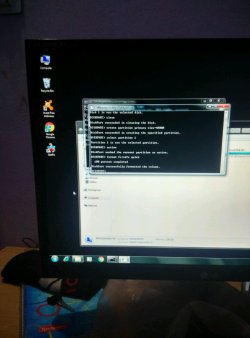
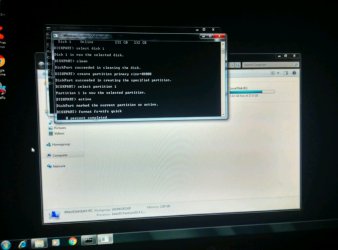
Find some commands in post that need to executed so attaching my HDD in another working computer. All the command executed successfully which capture I attached. So check this and tell me where I am wrong.

System Spec : mainboard is Mercury PIG31U
Product link : Mercury-pc.com

Hard drive : Segate ST3250310AS 250GB
 

Attachments
  • IMG_20160106_001944_HDR-1280x949.jpg
    IMG_20160106_001944_HDR-1280x949.jpg
    77.6 KB · Views: 4
  • IMG_20160106_002015_HDR-1024x1381.jpg
    IMG_20160106_002015_HDR-1024x1381.jpg
    84.7 KB · Views: 3

My Computer My Computer

OS
windows 7 ultimate 32 bit
Hi,
I would usually never create a partition for windows to be installed and use this,
Diskpart
List disk
Select disk n (where n is the number that was given for your SSD in List disk)
Clean
Create partition primary align=1024
Format fs=ntfs quick
Active (assuming you want to install an OS)
Exit

If i wanted to reduce the size of the disk I would use mini tool after the install
The objective is to Not have a 100mb system reserved partition and keep the disk as mbr especially on a small ssd or hdd like you have 250gb
Best Free Partition Manager for Windows | MiniTool Partition Free
 

My Computer My Computer

Computer type
PC/Desktop
Computer Manufacturer/Model Number
Custom assembled by me :}
OS
Win-7-Pro64bit 7-H-Prem-64bit
CPU
i7-5930K 2nd i9-9940x both water blocked VRM's too
Motherboard
ASUS SABERTOOTH X99 2nd ASUS x299 Apex
Memory
Trident-z 3200C14 2nd Trident-z 3600C16
Graphics Card(s)
EVGA 1080ti ftw3 2nd Titan Xp both water blocked
Sound Card
Built-in Realtek
Monitor(s) Displays
1-AOC G2460PG 24"G-Sync 144Hz/ 2nd 1-ASUS VG248QE 24" 144Hz
Screen Resolution
1920 x 1080 144Hz
Hard Drives
2-Samsung M.2 Evo & Evo Plus
2-Samsung 850 EVO 500GB SSD's/ 3-2.5 W.D. Black 1tb-&3-1tb/3-3.5 WD Black 1tb hdd's
PSU
EVGA SuperNOVA 1000-P2 2nd 1200-P2
Case
2-Corsair Obsidian Series 450D Black ATX Mid Tower
Cooling
Custom water loops
Keyboard
Logitech G710+/ 2nd Logitech G910
Mouse
2-RedDragon M901 Perdition 16400 dpi Gaming mouse = wired
Internet Speed
Comcast Ping 19ms 89.31mbps download speed 6.12mbps upload
Antivirus
Malwarebytes Pro/ Superantispyware Pro
Browser
FireFox & Pale moon
Other Info
2nd ASUS X299 Apex/Intel i9-9940x with Custom water loop/7H-Prem-x64/Corsair 450D case/Ram Trident-z 3600C16 4x8gb / Samsung970Evo plus 500gb SSD/Dual ssd EZ swap evo/PSU EVGA SuperNova 1200w-P2 80+Platinum/GPU Titan Xp /8-ML-140 on push-pull on 2-280GTX rads
Check your BIOS settings for the following parameters:
* SATA configuration -> Enhanced
* Configure SATA -> AHCI

See if it helps.
 

My Computer My Computer

Computer type
PC/Desktop
OS
windows 7 Home 64 bit
Try selecting "load driver" in the lower left corner. See attached. Do not choose whats in the red box. You want "Load Driver" located in the lower left.

2440d1379261910t-clean-install-windows-7-a-step7.jpg
 

My Computer My Computer

Computer type
PC/Desktop
Computer Manufacturer/Model Number
All
OS
Windows 7 Home Premium
Other Info
I work on many PCs/Laptops for people to get hands on experience. I am a student at a technical college learning about computers and networks.
Check your BIOS settings for the following parameters:
* SATA configuration -> Enhanced
* Configure SATA -> AHCI

See if it helps.


There is no any option in my mainboard bios. Mainboard model is Mercury PIG31U.
 

My Computer My Computer

OS
windows 7 ultimate 32 bit
Hi,
I would usually never create a partition for windows to be installed and use this,
Diskpart
List disk
Select disk n (where n is the number that was given for your SSD in List disk)
Clean
Create partition primary align=1024
Format fs=ntfs quick
Active (assuming you want to install an OS)
Exit

If i wanted to reduce the size of the disk I would use mini tool after the install
The objective is to Not have a 100mb system reserved partition and keep the disk as mbr especially on a small ssd or hdd like you have 250gb
Best Free Partition Manager for Windows | MiniTool Partition Free

What's the mean of "Create partition primary align=1024" .
What should write after "Active" command.
 

My Computer My Computer

OS
windows 7 ultimate 32 bit
That command tells the system to create a primary partition to install windows on and aligns it, pretty self explanatory.

After Active you hit enter, then you exit diskpart
 

My Computer My Computer

Computer type
PC/Desktop
Computer Manufacturer/Model Number
Skylake Special #666
OS
Windows 10 Pro x64
CPU
Intel Core i7 6700K
Motherboard
Asus Sabertooth Z170 Mark 1
Memory
GSkill TridentZ RGB 16GB 3600 16-16-16-36
Graphics Card(s)
EVGA GTX 980 Ti SC x2
Sound Card
Realtek High Definition
Monitor(s) Displays
AOC G2460PG
Screen Resolution
1920 x 1080 144Hz
Hard Drives
Samsung 860 Pro 256GB, Seagate Barracuda 4TB x2
PSU
EVGA 1000 P2, EVGA White Custom Braided Cables
Case
Corsair Vengeance C70 Gunmetal Black
Cooling
Corsair H100i v2, Corsair ML120 x2, Thermal Grizzly Kryonaut
Keyboard
Logitech G910 Orion Spectrum
Mouse
Logitech G700s
Internet Speed
Verizon Fios Quantum Gateway 75/75
Antivirus
Windows Defender, Malwarebytes Free 3.8.3
Browser
Chrome
Other Info
Corsair SP120 x4, LG Blu-ray Drive, Durabrand HT-395 100 Watt Dolby Digital Amp, Corsair H2100 Wireless 7.1 Headset
What's the mean of "Create partition primary align=1024".

Creating partitions on SSD/HDD drives during Windows 7/8/10 install automatically aligns properly (so you shouldn't have needed to do anything yourself).
 

My Computer My Computer

Computer type
PC/Desktop
OS
Windows 7/8/10 UEFI/GPT system
Yep, your wasting your time if the install disk doesn`t see the drive.
 

My Computer My Computer

Computer type
PC/Desktop
Computer Manufacturer/Model Number
Skylake Special #666
OS
Windows 10 Pro x64
CPU
Intel Core i7 6700K
Motherboard
Asus Sabertooth Z170 Mark 1
Memory
GSkill TridentZ RGB 16GB 3600 16-16-16-36
Graphics Card(s)
EVGA GTX 980 Ti SC x2
Sound Card
Realtek High Definition
Monitor(s) Displays
AOC G2460PG
Screen Resolution
1920 x 1080 144Hz
Hard Drives
Samsung 860 Pro 256GB, Seagate Barracuda 4TB x2
PSU
EVGA 1000 P2, EVGA White Custom Braided Cables
Case
Corsair Vengeance C70 Gunmetal Black
Cooling
Corsair H100i v2, Corsair ML120 x2, Thermal Grizzly Kryonaut
Keyboard
Logitech G910 Orion Spectrum
Mouse
Logitech G700s
Internet Speed
Verizon Fios Quantum Gateway 75/75
Antivirus
Windows Defender, Malwarebytes Free 3.8.3
Browser
Chrome
Other Info
Corsair SP120 x4, LG Blu-ray Drive, Durabrand HT-395 100 Watt Dolby Digital Amp, Corsair H2100 Wireless 7.1 Headset
Yep, your wasting your time if the install disk doesn`t see the drive.


What u want to say ,my HDD goes dead or is there any chance to recover HDD.
 

My Computer My Computer

OS
windows 7 ultimate 32 bit
I`m saying if the install disc doesn`t see the drive, it may be damaged.

How old is it ?
 

My Computer My Computer

Computer type
PC/Desktop
Computer Manufacturer/Model Number
Skylake Special #666
OS
Windows 10 Pro x64
CPU
Intel Core i7 6700K
Motherboard
Asus Sabertooth Z170 Mark 1
Memory
GSkill TridentZ RGB 16GB 3600 16-16-16-36
Graphics Card(s)
EVGA GTX 980 Ti SC x2
Sound Card
Realtek High Definition
Monitor(s) Displays
AOC G2460PG
Screen Resolution
1920 x 1080 144Hz
Hard Drives
Samsung 860 Pro 256GB, Seagate Barracuda 4TB x2
PSU
EVGA 1000 P2, EVGA White Custom Braided Cables
Case
Corsair Vengeance C70 Gunmetal Black
Cooling
Corsair H100i v2, Corsair ML120 x2, Thermal Grizzly Kryonaut
Keyboard
Logitech G910 Orion Spectrum
Mouse
Logitech G700s
Internet Speed
Verizon Fios Quantum Gateway 75/75
Antivirus
Windows Defender, Malwarebytes Free 3.8.3
Browser
Chrome
Other Info
Corsair SP120 x4, LG Blu-ray Drive, Durabrand HT-395 100 Watt Dolby Digital Amp, Corsair H2100 Wireless 7.1 Headset
I`m saying if the install disc doesn`t see the drive, it may be damaged.

How old is it ?


Approx. 6 Year old. Is there no any method to load driver externally mean slipstreaming driver with Windows installation disc. If HDD goes dead then why it shows in bios .
 

My Computer My Computer

OS
windows 7 ultimate 32 bit
Try selecting "load driver" in the lower left corner. See attached. Do not choose whats in the red box. You want "Load Driver" located in the lower left.

2440d1379261910t-clean-install-windows-7-a-step7.jpg

Have you tried this? When installing an OS and you get to this and your HDD is not in the list, this is what your next step should be. Give it a shot, it won't hurt anything.
 

My Computer My Computer

Computer type
PC/Desktop
Computer Manufacturer/Model Number
All
OS
Windows 7 Home Premium
Other Info
I work on many PCs/Laptops for people to get hands on experience. I am a student at a technical college learning about computers and networks.
Indeed enter and exit twice to close diskpart.

I would also use format to format the drive in the installer,

Might seem like a waste of time but what you would be doing is cleaning the drive with multiple passes which will not hurt anything at all
It's the for sure way I've found to Not have a 100mb system reserved partition created which I never want installed.

I would guess it's the bios setup that is stopping or as said possibly the drive it's self is weird
Post some boot and security bios screen shots
Installing a driver shouldn't be needed as you state cdm see's it and you can format it :confused:

Secure boot disabled
CSM enabled
Fast startup disables
os type other or windows uefi mode

Just make sure nothing says uefi only.
 

My Computer My Computer

Computer type
PC/Desktop
Computer Manufacturer/Model Number
Custom assembled by me :}
OS
Win-7-Pro64bit 7-H-Prem-64bit
CPU
i7-5930K 2nd i9-9940x both water blocked VRM's too
Motherboard
ASUS SABERTOOTH X99 2nd ASUS x299 Apex
Memory
Trident-z 3200C14 2nd Trident-z 3600C16
Graphics Card(s)
EVGA 1080ti ftw3 2nd Titan Xp both water blocked
Sound Card
Built-in Realtek
Monitor(s) Displays
1-AOC G2460PG 24"G-Sync 144Hz/ 2nd 1-ASUS VG248QE 24" 144Hz
Screen Resolution
1920 x 1080 144Hz
Hard Drives
2-Samsung M.2 Evo & Evo Plus
2-Samsung 850 EVO 500GB SSD's/ 3-2.5 W.D. Black 1tb-&3-1tb/3-3.5 WD Black 1tb hdd's
PSU
EVGA SuperNOVA 1000-P2 2nd 1200-P2
Case
2-Corsair Obsidian Series 450D Black ATX Mid Tower
Cooling
Custom water loops
Keyboard
Logitech G710+/ 2nd Logitech G910
Mouse
2-RedDragon M901 Perdition 16400 dpi Gaming mouse = wired
Internet Speed
Comcast Ping 19ms 89.31mbps download speed 6.12mbps upload
Antivirus
Malwarebytes Pro/ Superantispyware Pro
Browser
FireFox & Pale moon
Other Info
2nd ASUS X299 Apex/Intel i9-9940x with Custom water loop/7H-Prem-x64/Corsair 450D case/Ram Trident-z 3600C16 4x8gb / Samsung970Evo plus 500gb SSD/Dual ssd EZ swap evo/PSU EVGA SuperNova 1200w-P2 80+Platinum/GPU Titan Xp /8-ML-140 on push-pull on 2-280GTX rads
Indeed enter and exit twice to close diskpart.

I would also use format to format the drive in the installer,

Might seem like a waste of time but what you would be doing is cleaning the drive with multiple passes which will not hurt anything at all
It's the for sure way I've found to Not have a 100mb system reserved partition created which I never want installed.

I would guess it's the bios setup that is stopping or as said possibly the drive it's self is weird
Post some boot and security bios screen shots
Installing a driver shouldn't be needed as you state cdm see's it and you can format it :confused:

Secure boot disabled
CSM enabled
Fast startup disables
os type other or windows uefi mode

Just make sure nothing says uefi only.


Don' t able to understand your suggestion. How I enabled csm and os type other or windows uefi mode
 

My Computer My Computer

OS
windows 7 ultimate 32 bit
Try selecting "load driver" in the lower left corner. See attached. Do not choose whats in the red box. You want "Load Driver" located in the lower left.

2440d1379261910t-clean-install-windows-7-a-step7.jpg

Have you tried this? When installing an OS and you get to this and your HDD is not in the list, this is what your next step should be. Give it a shot, it won't hurt anything.


No drive listed during installation time. So no any option to load driver.
 

My Computer My Computer

OS
windows 7 ultimate 32 bit
I'm sorry. I should be more clear. If the driver is not loaded you will get the above screen with no hard drive showing up. You must then load the driver by clicking "Load Driver". You can get the driver from the manufacture if you don't have it and put it on a usb and navigate to it. I personally have not had to do this but this is what I learned when studying computers. That is why the "load driver" option is there.
 

My Computer My Computer

Computer type
PC/Desktop
Computer Manufacturer/Model Number
All
OS
Windows 7 Home Premium
Other Info
I work on many PCs/Laptops for people to get hands on experience. I am a student at a technical college learning about computers and networks.
I'm sorry. I should be more clear. If the driver is not loaded you will get the above screen with no hard drive showing up. You must then load the driver by clicking "Load Driver". You can get the driver from the manufacture if you don't have it and put it on a usb and navigate to it. I personally have not had to do this but this is what I learned when studying computers. That is why the "load driver" option is there.


So from where I can download the driver.
Mainboard manufacture and model : Mercury PIG31U
and HDD manufacture is : Segate ST3250310AS
For which one I need to download the driver.
 

My Computer My Computer

OS
windows 7 ultimate 32 bit
Most of what you questioned are in your mother board bios settings,
On powering up you get a flash screen showing the options,
Usually F2 is a common way to get into the bios
Could also be the Delete key

Check the Boot section and also security and advanced sections for anything that shows EUFI Only or Secure boot/ CSM..
Post any pictures you wish too for opinions on existing settings.
 

My Computer My Computer

Computer type
PC/Desktop
Computer Manufacturer/Model Number
Custom assembled by me :}
OS
Win-7-Pro64bit 7-H-Prem-64bit
CPU
i7-5930K 2nd i9-9940x both water blocked VRM's too
Motherboard
ASUS SABERTOOTH X99 2nd ASUS x299 Apex
Memory
Trident-z 3200C14 2nd Trident-z 3600C16
Graphics Card(s)
EVGA 1080ti ftw3 2nd Titan Xp both water blocked
Sound Card
Built-in Realtek
Monitor(s) Displays
1-AOC G2460PG 24"G-Sync 144Hz/ 2nd 1-ASUS VG248QE 24" 144Hz
Screen Resolution
1920 x 1080 144Hz
Hard Drives
2-Samsung M.2 Evo & Evo Plus
2-Samsung 850 EVO 500GB SSD's/ 3-2.5 W.D. Black 1tb-&3-1tb/3-3.5 WD Black 1tb hdd's
PSU
EVGA SuperNOVA 1000-P2 2nd 1200-P2
Case
2-Corsair Obsidian Series 450D Black ATX Mid Tower
Cooling
Custom water loops
Keyboard
Logitech G710+/ 2nd Logitech G910
Mouse
2-RedDragon M901 Perdition 16400 dpi Gaming mouse = wired
Internet Speed
Comcast Ping 19ms 89.31mbps download speed 6.12mbps upload
Antivirus
Malwarebytes Pro/ Superantispyware Pro
Browser
FireFox & Pale moon
Other Info
2nd ASUS X299 Apex/Intel i9-9940x with Custom water loop/7H-Prem-x64/Corsair 450D case/Ram Trident-z 3600C16 4x8gb / Samsung970Evo plus 500gb SSD/Dual ssd EZ swap evo/PSU EVGA SuperNova 1200w-P2 80+Platinum/GPU Titan Xp /8-ML-140 on push-pull on 2-280GTX rads
For now follow ThrashZone's directions. He has been around a lot longer than me. Then if you are still stuck, we can proceed with the driver issue. Normally you would not need to do the driver step. Like I said, I have never had to do it. In the mean time, if you could post your PC manufacture and complete model number, I will go ahead and find the driver just in case.
 

My Computer My Computer

Computer type
PC/Desktop
Computer Manufacturer/Model Number
All
OS
Windows 7 Home Premium
Other Info
I work on many PCs/Laptops for people to get hands on experience. I am a student at a technical college learning about computers and networks.
Back
Top