Hard disk not detected in windows 7 installation

rayban321

New member
Local time
3:05 AM
Messages
8
Hello I am trying to Install windows 7 64bit via a bootable USB on a Seagate Barracuda ES.2 1tb Hard disk that I formatted by ‘darik's boot and nuke’. When I get to the stage ‘where do you want to install windows activated?’ only the USB that has the ISO on appears not the hard disk. I have changed the BIOS setting to AHCI.
Any help greatly appreciated.
Thank You
 

My Computer My Computer

At a glance

Windows 7 Ultimate x64
Computer type
PC/Desktop
OS
Windows 7 Ultimate x64

My Computer My Computer

At a glance

Desk1 7 Home Prem / Desk2 10 Pro / Main lap A...Desk1 i5 3750K / Laptop i7 GTX 860M / Desk2 i...Desk1 8GB (1866) / Desk2 16GB (1333) / Laptop...Desk 1& 2NVidia GTX 650 & Laptops on board Intel
Computer type
PC/Desktop
Computer Manufacturer/Model Number
Own build (new) Desk1 / Asus ROG Win 7 / Desk2 1st build
OS
Desk1 7 Home Prem / Desk2 10 Pro / Main lap Asus ROG 10 Pro 2 laptop Toshiba 7 Pro Asus P2520 7 & 10
CPU
Desk1 i5 3750K / Laptop i7 GTX 860M / Desk2 i5 2500
Motherboard
Desk1 Asus P877-V / Desk2 Gigabyte H67 UD3H / Laptop ?
Memory
Desk1 8GB (1866) / Desk2 16GB (1333) / Laptop 8Gb DDR3
Graphics Card(s)
Desk 1& 2NVidia GTX 650 & Laptops on board Intel
Sound Card
Desk 1 & 2 -XONAR DG Realtek High Def audio Laptop
Monitor(s) Displays
Desk 1 Benq HD 2450 / Desk2 Philips 24" / Laptop 17.5"
Screen Resolution
1920x1080 D1 & D2 & Laptop 1
Hard Drives
Desk1 Samsung 120GB 830 SSD
Asus ROG 256GB 850 Pro SSD
Desk2 Samsung 840 256 SSD
Toshiba 120GB EVO
PSU
Desk 1 Corsair HX 1050/ Laptop ? / Desk 2 Corsair HX 650
Case
Desk 1 Cooler HAF XM ? Toshiba laptop / Desk2 Coolermaster
Cooling
Fans on all Desk1 -2 Desk2 - all Coolermasters 5 Laptop ?
Keyboard
Desk 1 MS Sidewinder X6 Desk 2 MS Sidewinder X 4
Mouse
Desk 1&2 - Gigabyte MS 900 gamer - laptop - Logitec wireless
Internet Speed
ADSL2+
Other Info
One other Desktop (tester) and spare Toshba laptop both with SSD's
Running Kaspersky 2016 ISS on all machines config'd identically
Logitec audio stereo systems on each machine (x3)
Canon MG5250MFC
Router/modem TP-Link running WPA2SK
hello,
thank you for your reply.
i dont know how to check the devices in bios, however when i use DISKPART the hard disk is not detected.
 

My Computer My Computer

At a glance

Windows 7 Ultimate x64
Computer type
PC/Desktop
OS
Windows 7 Ultimate x64
Ok well if you can get into the BIOS it should be listed as a device as should the optical drive for example.

I also would like to know why did you change the BIOS to ACHI - not that it is a bad thing but what prompted you? and also why Dariks nuke the DISKPART clean all although lengthy with large spinners would have been just as effective?

Oh and the system specs please.
 

My Computer My Computer

At a glance

Desk1 7 Home Prem / Desk2 10 Pro / Main lap A...Desk1 i5 3750K / Laptop i7 GTX 860M / Desk2 i...Desk1 8GB (1866) / Desk2 16GB (1333) / Laptop...Desk 1& 2NVidia GTX 650 & Laptops on board Intel
Computer type
PC/Desktop
Computer Manufacturer/Model Number
Own build (new) Desk1 / Asus ROG Win 7 / Desk2 1st build
OS
Desk1 7 Home Prem / Desk2 10 Pro / Main lap Asus ROG 10 Pro 2 laptop Toshiba 7 Pro Asus P2520 7 & 10
CPU
Desk1 i5 3750K / Laptop i7 GTX 860M / Desk2 i5 2500
Motherboard
Desk1 Asus P877-V / Desk2 Gigabyte H67 UD3H / Laptop ?
Memory
Desk1 8GB (1866) / Desk2 16GB (1333) / Laptop 8Gb DDR3
Graphics Card(s)
Desk 1& 2NVidia GTX 650 & Laptops on board Intel
Sound Card
Desk 1 & 2 -XONAR DG Realtek High Def audio Laptop
Monitor(s) Displays
Desk 1 Benq HD 2450 / Desk2 Philips 24" / Laptop 17.5"
Screen Resolution
1920x1080 D1 & D2 & Laptop 1
Hard Drives
Desk1 Samsung 120GB 830 SSD
Asus ROG 256GB 850 Pro SSD
Desk2 Samsung 840 256 SSD
Toshiba 120GB EVO
PSU
Desk 1 Corsair HX 1050/ Laptop ? / Desk 2 Corsair HX 650
Case
Desk 1 Cooler HAF XM ? Toshiba laptop / Desk2 Coolermaster
Cooling
Fans on all Desk1 -2 Desk2 - all Coolermasters 5 Laptop ?
Keyboard
Desk 1 MS Sidewinder X6 Desk 2 MS Sidewinder X 4
Mouse
Desk 1&2 - Gigabyte MS 900 gamer - laptop - Logitec wireless
Internet Speed
ADSL2+
Other Info
One other Desktop (tester) and spare Toshba laptop both with SSD's
Running Kaspersky 2016 ISS on all machines config'd identically
Logitec audio stereo systems on each machine (x3)
Canon MG5250MFC
Router/modem TP-Link running WPA2SK
i changed to ACHI as i was looking for a solution and changing to ACHI was suggested. i used as it seemed to be the program to use to completely wipe the hard disk.
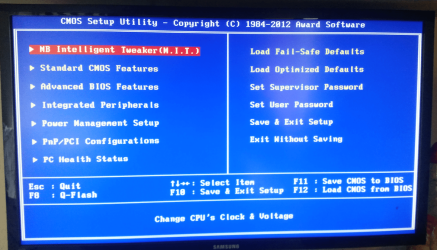
i cant find the listed devices & system specs in the BIOS. I will upload a picture of the BIOS main menu.
4ed31800ec1785a85e9a8310221e05be
 

Attachments

  • Screen Shot 2015-10-21 at 11.29.53.png
    Screen Shot 2015-10-21 at 11.29.53.png
    296.3 KB · Views: 2

My Computer My Computer

At a glance

Windows 7 Ultimate x64
Computer type
PC/Desktop
OS
Windows 7 Ultimate x64
the BIOS does not detect the hard drive.
 

My Computer My Computer

At a glance

Windows 7 Ultimate x64
Computer type
PC/Desktop
OS
Windows 7 Ultimate x64
i changed to ACHI as i was looking for a solution and changing to ACHI was suggested. i used as it seemed to be the program to use to completely wipe the hard disk.
i cant find the listed devices & system specs in the BIOS. I will upload a picture of the BIOS main menu.
4ed31800ec1785a85e9a8310221e05be


To find your system specs, follow what ICIT2LOL posted in post #2. This is very important for those who are trying to help you. Not to mention I have taken an interest in your issue. I learn a lot just by visiting this site and every now and then maybe helping someone. Click on the link in post #2 and follow the directions. It quite easy.
 

My Computer My Computer

At a glance

Windows 7 Home Premium
Computer type
PC/Desktop
Computer Manufacturer/Model Number
All
OS
Windows 7 Home Premium
Other Info
I work on many PCs/Laptops for people to get hands on experience. I am a student at a technical college learning about computers and networks.
Thank you for taking a interest. However how can I use the program to find my system specs when i don't have windows installed?
 

My Computer My Computer

At a glance

Windows 7 Ultimate x64
Computer type
PC/Desktop
OS
Windows 7 Ultimate x64
Hi rayban321

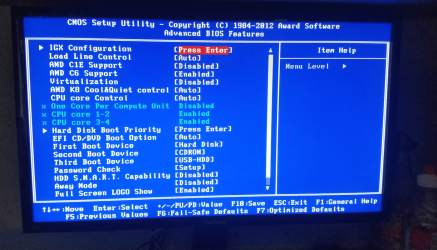
can you go into advanced bios features and post another pic please
 

My Computer My Computer

At a glance

Windows 7 32 bit
Computer type
Laptop
Computer Manufacturer/Model Number
Acer
OS
Windows 7 32 bit
Hello, I am currently away from the computer I will post pic when I'm back.
 

My Computer My Computer

At a glance

Windows 7 Ultimate x64
Computer type
PC/Desktop
OS
Windows 7 Ultimate x64
this is a photo of the advanced settings
 

Attachments

  • Screen Shot 2015-10-21 at 17.11.02.png
    Screen Shot 2015-10-21 at 17.11.02.png
    324.3 KB · Views: 1

My Computer My Computer

At a glance

Windows 7 Ultimate x64
Computer type
PC/Desktop
OS
Windows 7 Ultimate x64
Thank you for taking a interest. However how can I use the program to find my system specs when i don't have windows installed?

Your right. I guess I need to re-read. Sorry about that. One thing you could do is list the manufacture and complete model number. That way everyone would be able to get the specs online. Also have you altered any hardware since it was new? If so what.
 

My Computer My Computer

At a glance

Windows 7 Home Premium
Computer type
PC/Desktop
Computer Manufacturer/Model Number
All
OS
Windows 7 Home Premium
Other Info
I work on many PCs/Laptops for people to get hands on experience. I am a student at a technical college learning about computers and networks.
Do you have access to another computer you may have to download the motherboards sata drivers

Have you tried the diskpart command in CMD?

if not try this

once prompt to install windows select repair this computer insted

select cmd

once in cmd

diskpart then enter

list disk then enter

you will get a lit of all drives

type select disk and the number your disk is

you will be see disk number is now selected

then type list partition and post pic please

pic bellow of how it should look

Untitled.png
 
Last edited:

My Computer My Computer

At a glance

Windows 7 32 bit
Computer type
Laptop
Computer Manufacturer/Model Number
Acer
OS
Windows 7 32 bit
i haven't altered any hardware.
i have access to another, i think i have downloaded the SATA drivers however when i search for drivers on installation nothing appears.
i have tried the diskpart, but it doesn't show the hdd.
 

My Computer My Computer

At a glance

Windows 7 Ultimate x64
Computer type
PC/Desktop
OS
Windows 7 Ultimate x64
i haven't altered any hardware.
i have access to another, i think i have downloaded the SATA drivers however when i search for drivers on installation nothing appears.
i have tried the diskpart, but it doesn't show the hdd.

try configuring RAID

1, In the BIOS Setup utility dialog, select Advanced --> IDE Configuration.

The IDE Configuration menu appears.

2,. In the IDE Configuration menu, select Configure SATA AS, then press Enter.

A menu appears listing the SATA options: IDE, RAID, and AHCI. AHCI is set by default.

3, In the SATA Options menu, select RAID, then press Enter.

4, Press F10 to save your changes, exit the BIOS utility.


then try and install again
 

My Computer My Computer

At a glance

Windows 7 32 bit
Computer type
Laptop
Computer Manufacturer/Model Number
Acer
OS
Windows 7 32 bit
Yep just got up and as Thomas has said you needed to go through the BIOS headings as you have done and the DVD is still set to EFI [auto] and I think you said you had set the BIOS to ACHI?? Am no expert but if you are booting from the DVD I am not sure if this would not cause a bit of a mix up - I stand to be corrected of course.

Thank you for taking a interest. However how can I use the program to find my system specs when i don't have windows installed?

Not being sarcy but you could have had a look at a Google on a friends machine for that model ;)
 

My Computer My Computer

At a glance

Desk1 7 Home Prem / Desk2 10 Pro / Main lap A...Desk1 i5 3750K / Laptop i7 GTX 860M / Desk2 i...Desk1 8GB (1866) / Desk2 16GB (1333) / Laptop...Desk 1& 2NVidia GTX 650 & Laptops on board Intel
Computer type
PC/Desktop
Computer Manufacturer/Model Number
Own build (new) Desk1 / Asus ROG Win 7 / Desk2 1st build
OS
Desk1 7 Home Prem / Desk2 10 Pro / Main lap Asus ROG 10 Pro 2 laptop Toshiba 7 Pro Asus P2520 7 & 10
CPU
Desk1 i5 3750K / Laptop i7 GTX 860M / Desk2 i5 2500
Motherboard
Desk1 Asus P877-V / Desk2 Gigabyte H67 UD3H / Laptop ?
Memory
Desk1 8GB (1866) / Desk2 16GB (1333) / Laptop 8Gb DDR3
Graphics Card(s)
Desk 1& 2NVidia GTX 650 & Laptops on board Intel
Sound Card
Desk 1 & 2 -XONAR DG Realtek High Def audio Laptop
Monitor(s) Displays
Desk 1 Benq HD 2450 / Desk2 Philips 24" / Laptop 17.5"
Screen Resolution
1920x1080 D1 & D2 & Laptop 1
Hard Drives
Desk1 Samsung 120GB 830 SSD
Asus ROG 256GB 850 Pro SSD
Desk2 Samsung 840 256 SSD
Toshiba 120GB EVO
PSU
Desk 1 Corsair HX 1050/ Laptop ? / Desk 2 Corsair HX 650
Case
Desk 1 Cooler HAF XM ? Toshiba laptop / Desk2 Coolermaster
Cooling
Fans on all Desk1 -2 Desk2 - all Coolermasters 5 Laptop ?
Keyboard
Desk 1 MS Sidewinder X6 Desk 2 MS Sidewinder X 4
Mouse
Desk 1&2 - Gigabyte MS 900 gamer - laptop - Logitec wireless
Internet Speed
ADSL2+
Other Info
One other Desktop (tester) and spare Toshba laptop both with SSD's
Running Kaspersky 2016 ISS on all machines config'd identically
Logitec audio stereo systems on each machine (x3)
Canon MG5250MFC
Router/modem TP-Link running WPA2SK
Hi Rayban

any luck with problem
 

My Computer My Computer

At a glance

Windows 7 32 bit
Computer type
Laptop
Computer Manufacturer/Model Number
Acer
OS
Windows 7 32 bit
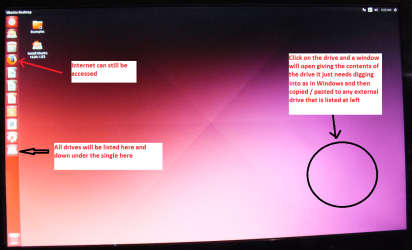
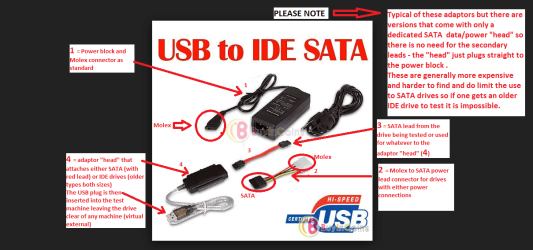
Hey rayban mate we need some answers reasonably soon now an option for delving into that drive is this if you like either by leaving it hooked up SATA or use a USB / SATA adaptor to another machine see pic.

BOOTABLE UBUNTU

Make a bootable Ubuntu disk http://www.ubuntu.com/download

Set the BIOS to boot from the optical when themachine boots it will show you a screen with TRY or INSTALL >select TRY not INSTALL

When it is finished - it takes very little time youwill get a screen like in the pic .

Open the drive you want > User and dig downuntil you get to the data / settings you may be able to copy / paste thematerial you want to an external source or other installed drive doing this.

I am not sure if it will but I have recovered tonsof data etc using this method both on "dead" or just plain drivesthat you cannot get data from using Windows.

As you can see the net is still available and as well as getting the data off you can set it to test with one of the drive testers ie Seatools SeaTools for Windows | Seagate this one I know is for Windows and I have never tried it via the Ubuntu boot but I do think there is a DOS version that will.
 

Attachments

  • UBUNTU SCREEN X2.PNG
    UBUNTU SCREEN X2.PNG
    272.7 KB · Views: 0
  • ADAPTOR _ USB_SATA.PNG
    ADAPTOR _ USB_SATA.PNG
    85.5 KB · Views: 1

My Computer My Computer

At a glance

Desk1 7 Home Prem / Desk2 10 Pro / Main lap A...Desk1 i5 3750K / Laptop i7 GTX 860M / Desk2 i...Desk1 8GB (1866) / Desk2 16GB (1333) / Laptop...Desk 1& 2NVidia GTX 650 & Laptops on board Intel
Computer type
PC/Desktop
Computer Manufacturer/Model Number
Own build (new) Desk1 / Asus ROG Win 7 / Desk2 1st build
OS
Desk1 7 Home Prem / Desk2 10 Pro / Main lap Asus ROG 10 Pro 2 laptop Toshiba 7 Pro Asus P2520 7 & 10
CPU
Desk1 i5 3750K / Laptop i7 GTX 860M / Desk2 i5 2500
Motherboard
Desk1 Asus P877-V / Desk2 Gigabyte H67 UD3H / Laptop ?
Memory
Desk1 8GB (1866) / Desk2 16GB (1333) / Laptop 8Gb DDR3
Graphics Card(s)
Desk 1& 2NVidia GTX 650 & Laptops on board Intel
Sound Card
Desk 1 & 2 -XONAR DG Realtek High Def audio Laptop
Monitor(s) Displays
Desk 1 Benq HD 2450 / Desk2 Philips 24" / Laptop 17.5"
Screen Resolution
1920x1080 D1 & D2 & Laptop 1
Hard Drives
Desk1 Samsung 120GB 830 SSD
Asus ROG 256GB 850 Pro SSD
Desk2 Samsung 840 256 SSD
Toshiba 120GB EVO
PSU
Desk 1 Corsair HX 1050/ Laptop ? / Desk 2 Corsair HX 650
Case
Desk 1 Cooler HAF XM ? Toshiba laptop / Desk2 Coolermaster
Cooling
Fans on all Desk1 -2 Desk2 - all Coolermasters 5 Laptop ?
Keyboard
Desk 1 MS Sidewinder X6 Desk 2 MS Sidewinder X 4
Mouse
Desk 1&2 - Gigabyte MS 900 gamer - laptop - Logitec wireless
Internet Speed
ADSL2+
Other Info
One other Desktop (tester) and spare Toshba laptop both with SSD's
Running Kaspersky 2016 ISS on all machines config'd identically
Logitec audio stereo systems on each machine (x3)
Canon MG5250MFC
Router/modem TP-Link running WPA2SK
Back
Top