Application start error message

m1964

New member
Local time
5:30 PM
Messages
9
When I start my laptop, or, after logging off and logging back on, I get the following message:

"Cannot start Application. Contact the application vendor."

When I click on "Details", I get the following:

PLATFORM VERSION INFO
Windows : 6.1.7601.65536 (Win32NT)
Common Language Runtime : 4.0.30319.34209
System.Deployment.dll : 4.0.30319.34280 built by: FX452RTMGDR
clr.dll : 4.0.30319.34209 built by: FX452RTMGDR
dfdll.dll : 4.0.30319.34280 built by: FX452RTMGDR
dfshim.dll : 4.0.41209.0 (Main.041209-0000)

SOURCES Deployment url : file:///C:/Users/Yuri/AppData/Roaming/Microsoft/Windows/Start%20Menu/Programs/Lenovo/Lenovo%20Service%20Bridge.appref-ms

ERROR SUMMARY
Below is a summary of the errors, details of these errors are listed later in the log.
* Activation of C:\Users\Yuri\AppData\Roaming\Microsoft\Windows\Start Menu\Programs\Lenovo\Lenovo Service Bridge.appref-ms resulted in exception. Following failure messages were detected:
+ Could not find file 'C:\Users\Yuri\AppData\Roaming\Microsoft\Windows\Start Menu\Programs\Lenovo\Lenovo Service Bridge.appref-ms'.

COMPONENT STORE TRANSACTION FAILURE SUMMARY
No transaction error was detected.
WARNINGS
There were no warnings during this operation.
OPERATION PROGRESS STATUS
* [1/6/2016 11:20:16 PM] : Activation of C:\Users\Yuri\AppData\Roaming\Microsoft\Windows\Start Menu\Programs\Lenovo\Lenovo Service Bridge.appref-ms has started.
ERROR DETAILS
Following errors were detected during this operation.
* [1/6/2016 11:20:18 PM] System.IO.FileNotFoundException
- Could not find file 'C:\Users\Yuri\AppData\Roaming\Microsoft\Windows\Start Menu\Programs\Lenovo\Lenovo Service Bridge.appref-ms'.
- Source: mscorlib
- Stack trace:
at System.IO.__Error.WinIOError(Int32 errorCode, String maybeFullPath)
at System.IO.FileInfo.get_Length()
at System.Deployment.Application.ShellExposure.ParseAppShortcut(String shortcutFile, DefinitionIdentity& subId, Uri& providerUri)
at System.Deployment.Application.ApplicationActivator.ProcessOrFollowShortcut(String shortcutFile, String& errorPageUrl, TempFile& deployFile)
at System.Deployment.Application.ApplicationActivator.PerformDeploymentActivation(Uri activationUri, Boolean isShortcut, String textualSubId, String deploymentProviderUrlFromExtension, BrowserSettings browserSettings, String& errorPageUrl)
at System.Deployment.Application.ApplicationActivator.ActivateDeploymentWorker(Object state)

COMPONENT STORE TRANSACTION DETAILS
No transaction information is available.
From my (very limited) understanding, the process is trying to start Lenovo Service Bridge which I never installed. Otherwise, the laptop appears to be functioning fine.

Thanks a lot for your help.
 

My Computer

Computer type
Laptop
Computer Manufacturer/Model Number
lenovo T540p
OS
Windows 7 Professional 64bit
CPU
Intel Core i-4700MQ
Memory
4 x 2 GB
Graphics Card(s)
Nvidia GT730M
Hard Drives
500 GB
Antivirus
Norton
Browser
IE, Firefox
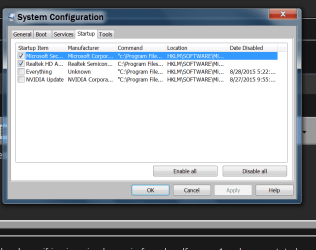
Check mscomfig/Start up and see if that program is checked.

Then check in msconfig/Services.

Example:


msconfig STARTUP.PNG
 

My Computer

Computer type
PC/Desktop
Computer Manufacturer/Model Number
Home made Desktop
OS
Windows 10 Pro. 64/ version 1709 Windows 7 Pro/64
CPU
Intel i7-6800K @ 4.3
Motherboard
ASUS X-99 Deluxe II
Memory
Corsair Platinum 16 gig @2400
Graphics Card(s)
EVGA GTX 1070 OC
Monitor(s) Displays
Asus 27" LED LCD/VE278Q
Screen Resolution
1920-1080 or 1280-720 HDMI
Hard Drives
INTEL SSD 730-240 Gb Sata 3.0/
PSU
EVGA Platium 1200W
Case
Phanteks Luxe Tempered Glass 8 fans/ one radiator
Cooling
XSPC/ Water Cooled CPU
Keyboard
Das 4 Professional
Mouse
Logitech M705/MX Anywhere 2-S
Internet Speed
100 mbits
Antivirus
Microsoft Security Essentials/ Malwarebytes Premium 3.0/ SAS
Browser
I.E. 11 default/Firefox/ ISP Time Warner Cable/Spectrum
Other Info
LG BluRay Burner/
Sound system-KLipsch-THX/
Icy Dock ssd Hot Swap bays.
Check mscomfig/Start up and see if that program is checked.

Then check in msconfig/Services.

...

Hi,

Thank you for quick reply- the problem is that there is no program installed, it is some kind of Lenovo service or process that is trying to execute/ start the non-existent program on start up.
 

My Computer

Computer type
Laptop
Computer Manufacturer/Model Number
lenovo T540p
OS
Windows 7 Professional 64bit
CPU
Intel Core i-4700MQ
Memory
4 x 2 GB
Graphics Card(s)
Nvidia GT730M
Hard Drives
500 GB
Antivirus
Norton
Browser
IE, Firefox
Is that non-existent program listed in the two place I recommended to inspect?
 

My Computer

Computer type
PC/Desktop
Computer Manufacturer/Model Number
Home made Desktop
OS
Windows 10 Pro. 64/ version 1709 Windows 7 Pro/64
CPU
Intel i7-6800K @ 4.3
Motherboard
ASUS X-99 Deluxe II
Memory
Corsair Platinum 16 gig @2400
Graphics Card(s)
EVGA GTX 1070 OC
Monitor(s) Displays
Asus 27" LED LCD/VE278Q
Screen Resolution
1920-1080 or 1280-720 HDMI
Hard Drives
INTEL SSD 730-240 Gb Sata 3.0/
PSU
EVGA Platium 1200W
Case
Phanteks Luxe Tempered Glass 8 fans/ one radiator
Cooling
XSPC/ Water Cooled CPU
Keyboard
Das 4 Professional
Mouse
Logitech M705/MX Anywhere 2-S
Internet Speed
100 mbits
Antivirus
Microsoft Security Essentials/ Malwarebytes Premium 3.0/ SAS
Browser
I.E. 11 default/Firefox/ ISP Time Warner Cable/Spectrum
Other Info
LG BluRay Burner/
Sound system-KLipsch-THX/
Icy Dock ssd Hot Swap bays.
Is that non-existent program listed in the two place I recommended to inspect?

No, the program itself is not listed under either start-up or services, and I never installed it.
The problem is that there are other Lenovo programs like update service, "system health and diagnostic'' that may have this execution command embedded into them.
The problem is that there is no "Lenovo" sub-folder in the C:/Users/Yuri/AppData/Roaming/Microsoft/Windows/Start%20Menu/Programs/

so when the system is trying to start the file, it cannot find it:

SOURCES Deployment url : file:///C:/Users/Yuri/AppData/Roaming/Microsoft/Windows/Start%20Menu/Programs/Lenovo/Lenovo%20Service%20Bridge.appref-ms

I wonder if it is possible to find the command/service that is trying to execute the above path and delete it. I checked the system schedule library but there is nothing there that executes the above command.

Thank again,

Yuri


My Computer

Computer type
Laptop
Computer Manufacturer/Model Number
lenovo T540p
OS
Windows 7 Professional 64bit
CPU
Intel Core i-4700MQ
Memory
4 x 2 GB
Graphics Card(s)
Nvidia GT730M
Hard Drives
500 GB
Antivirus
Norton
Browser
IE, Firefox
Sorry Yuri I have no idea what Lenovo programs might or might not be installed, or what they do.
If you are getting a pop up message something is installed causing the pop up.

It's very difficult to read your post with all the colors with my SF Dark Wide.
 

My Computer

Computer type
PC/Desktop
Computer Manufacturer/Model Number
Home made Desktop
OS
Windows 10 Pro. 64/ version 1709 Windows 7 Pro/64
CPU
Intel i7-6800K @ 4.3
Motherboard
ASUS X-99 Deluxe II
Memory
Corsair Platinum 16 gig @2400
Graphics Card(s)
EVGA GTX 1070 OC
Monitor(s) Displays
Asus 27" LED LCD/VE278Q
Screen Resolution
1920-1080 or 1280-720 HDMI
Hard Drives
INTEL SSD 730-240 Gb Sata 3.0/
PSU
EVGA Platium 1200W
Case
Phanteks Luxe Tempered Glass 8 fans/ one radiator
Cooling
XSPC/ Water Cooled CPU
Keyboard
Das 4 Professional
Mouse
Logitech M705/MX Anywhere 2-S
Internet Speed
100 mbits
Antivirus
Microsoft Security Essentials/ Malwarebytes Premium 3.0/ SAS
Browser
I.E. 11 default/Firefox/ ISP Time Warner Cable/Spectrum
Other Info
LG BluRay Burner/
Sound system-KLipsch-THX/
Icy Dock ssd Hot Swap bays.
Sorry Yuri I have no idea what Lenovo programs might or might not be installed, or what they do.
If you are getting a pop up message something is installed causing the pop up.

It's very difficult to read your post with all the colors with my SF Dark Wide.

maybe some one else will chime in; anyway thanks for trying to help
 

My Computer

Computer type
Laptop
Computer Manufacturer/Model Number
lenovo T540p
OS
Windows 7 Professional 64bit
CPU
Intel Core i-4700MQ
Memory
4 x 2 GB
Graphics Card(s)
Nvidia GT730M
Hard Drives
500 GB
Antivirus
Norton
Browser
IE, Firefox
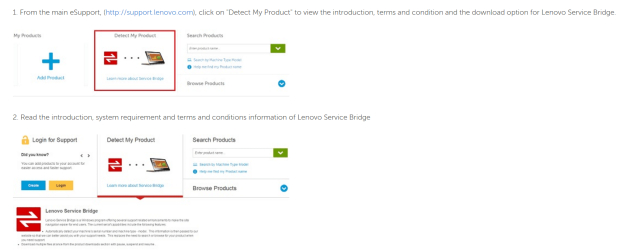
I noticed you said you never installed that program, according to Lenovo it can be installed if you use the detect my product on their site,

2016-01-07_21h38_26.png

https://support.lenovo.com/us/en/documents/ht104055

It's really only a benefit for using their site,

The data we collect is used for several purposes to help you get the best support for your product:
Instead of manually searching or browsing for your product, Lenovo Service Bridge will automatically detect your product, saving you time.
Personalize your support experience by showing you content and support options for your specific product. When you come back to our support website in the future, we can quickly show you support options for your product.
Use the serial number to tell you if your product is under warranty, and the warranty expiration date.
If you need to contact our call center, our support personnel will need this information to better assist you. Lenovo Service Bridge will save you time by giving you the information you need to pass along to them.
Provide you the capability to start/pause/resume downloads of multiple files at once.

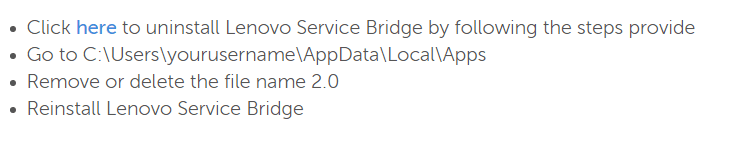
Try uninstalling it, it's not a necessary program.
 

My Computer

Computer type
PC/Desktop
Computer Manufacturer/Model Number
Self Built
OS
Win 10 Pro x64
CPU
Intel I5-2500K @3.3GHz
Motherboard
Asrock P67 Extreme4
Memory
16GB G.Skill Ripjaws X (4x4GB)
Graphics Card(s)
EVGA GeForce 750 Ti SC 2GB
Sound Card
ASUS Xonar DG 5.1 Channels 24-bit 96KHz PCI Interface Sound
Monitor(s) Displays
auria eq2367
Screen Resolution
1920 x 1080
Hard Drives
250GB Samsung 850 EVO SSD
1TB WD Blue
1TB Hitachi
PSU
SeaSonic X 650W 80 Plus Gold
Case
Corsair Obsidian 750D
Cooling
Corsair H60, Three 140mm case fans
Keyboard
Logitech Wireless Keyboard K520
Mouse
Logitech Wireless Mouse M310
Internet Speed
Wave Broadband ~ 100 dn 5 up
Antivirus
Windows Defender, Malwarebytes Premium
Browser
Edge, IE11, Chrome
Other Info
Laptop specs: HP g7-1365dx /
CPU: AMD A6-3420M APU with Radeon(tm) HD Graphics /
RAM: Crucial 8Gb (2x4Gb) /
SSD: Crucial M4-CT128M4SSD2 ATA Device/ FW 000F /
GFX: AMD Radeon HD 6520G /
OS: Windows 10 Pro x64
I noticed you said you never installed that program, according to Lenovo it can be installed if you use the detect my product on their site,

...

Try uninstalling it, it's not a necessary program.

Hi Derekimo,

Thanks for your reply - I never installed it because it is not necessary; it is not listed in "Programs and futures" in Control Panel, it does not show up if I use the search box.
 

My Computer

Computer type
Laptop
Computer Manufacturer/Model Number
lenovo T540p
OS
Windows 7 Professional 64bit
CPU
Intel Core i-4700MQ
Memory
4 x 2 GB
Graphics Card(s)
Nvidia GT730M
Hard Drives
500 GB
Antivirus
Norton
Browser
IE, Firefox

My Computer

Computer type
PC/Desktop
Computer Manufacturer/Model Number
Self Built
OS
Win 10 Pro x64
CPU
Intel I5-2500K @3.3GHz
Motherboard
Asrock P67 Extreme4
Memory
16GB G.Skill Ripjaws X (4x4GB)
Graphics Card(s)
EVGA GeForce 750 Ti SC 2GB
Sound Card
ASUS Xonar DG 5.1 Channels 24-bit 96KHz PCI Interface Sound
Monitor(s) Displays
auria eq2367
Screen Resolution
1920 x 1080
Hard Drives
250GB Samsung 850 EVO SSD
1TB WD Blue
1TB Hitachi
PSU
SeaSonic X 650W 80 Plus Gold
Case
Corsair Obsidian 750D
Cooling
Corsair H60, Three 140mm case fans
Keyboard
Logitech Wireless Keyboard K520
Mouse
Logitech Wireless Mouse M310
Internet Speed
Wave Broadband ~ 100 dn 5 up
Antivirus
Windows Defender, Malwarebytes Premium
Browser
Edge, IE11, Chrome
Other Info
Laptop specs: HP g7-1365dx /
CPU: AMD A6-3420M APU with Radeon(tm) HD Graphics /
RAM: Crucial 8Gb (2x4Gb) /
SSD: Crucial M4-CT128M4SSD2 ATA Device/ FW 000F /
GFX: AMD Radeon HD 6520G /
OS: Windows 10 Pro x64
Back
Top