January 12th 2016 Security Update Release Summary

When I launched Windows Update, I immediately got an error message (can't remember the code). Internet research led me to find out that BITS (Background Intelligent Transfer Service) was set to Disabled instead of Manual. Very strange.
My BITS is set to Auto (Delayed) so I'm not sure what you're saying here.

I've had no problems at all updating to the recent batch of security updates, though I have NOT installed KB2952664.
 

My Computer My Computer

Computer type
Laptop
Computer Manufacturer/Model Number
Dell Latitude E6540 Laptop
OS
Windows 7 Professional 64bit
CPU
Intel Core i7 4600M @ 2.90GHz
Motherboard
Dell Inc. 0CYT5F (SOCKET 0)
Memory
16.0GB Dual-Channel DDR3 @ 797MHz (11-11-11-28)
Graphics Card(s)
Intel HD Graphics 4600 (Dell) 2048MB ATI AMD Radeon HD 8790M
Sound Card
Realtek High Definition Audio
Monitor(s) Displays
HP ZR30w (2560x1600@60Hz)
Hard Drives
256GB LITEONIT LMT-256M6M-41 mm SATA (SSD)
1TB Samsung SSD 860 EVO mSATA SATA (SSD)
2TB USB 3.0 USB Device
115GB SanDisk Ultra Fit USB
Other Info
Multiple Dell E-Port Plus II Port Replicator/Docking Stations 0Y72NH USB 3.0 + 130W AC Adapters
I've noticed the same long loooong delay in d/l ing updates. Something I have penned down, it seems to only be happening on my 7 64, at least on my end. Win 7 32 has had no problems updating, 8.1 on my Wife's lappy has had no problems. The 7 64 on my PC was hanging at "searching for updates" & I thought this might be a fluke or a problem caused by something I installed until I went & tried to update 7 64 on a lappy & encountered the same problem.

I tried several fixes for the 7 64 on the PC & finally got it to d/l, rather slowly (but at least it started working again), by going to Windows/software distribution/data store & as per MS instructions, cleared the entire folder.

https://support.microsoft.com/en-us/kb/958046

Updater has been exhibiting some strange behavior for a bit now, such as after running for 45 mins, one moment showing 0% downloaded & the next moment showing 80% downloaded. I'm wondering if this instability in the updater agent is caused on my 7 64 machines because of my refusal to allow any patch related to Win 10 or disallowing anything telemetry related on the machine.:confused:
 

My Computer My Computer

Computer type
PC/Desktop
Computer Manufacturer/Model Number
Dell Hell oh Well
OS
Win 7 32 Home Premium, Win 7 64 Pro, Win 8.1, Win 10
CPU
Intel Core 2 Duo 2.93GHz
Memory
Not much with my ADHD
Graphics Card(s)
ATI Radeon HD 4350
Monitor(s) Displays
24" HDTV/Monitor
Screen Resolution
Blurry after a Scotch or 2
Hard Drives
1 HDD 250 GB, 1 HDD 1 TB, 3 - 1 TB Externals
Case
Don't get on my case...man :D
Cooling
I have an Air Conditioner & Diet Pepsi
Keyboard
Saitek Cyborg
Mouse
10 yr old MS optical mouse that still works
Internet Speed
Never fast enough
Antivirus
Various
Browser
Various
Updater has been exhibiting some strange behavior for a bit now, such as after running for 45 mins, one moment showing 0% downloaded & the next moment showing 80% downloaded. I'm wondering if this instability in the updater agent is caused on my 7 64 machines because of my refusal to allow any patch related to Win 10 or disallowing anything telemetry related on the machine.:confused:

That's my experience on both my Windows 7 64 machines, not always but quite often. It sits at 0% for a while so I nip out the room and when I come back a moment later it's starting to install. I agree with your theory in that some of the updates I suspect we both hide are partly related to "enabling MS to improve the upgrade experience" so we don't want them, but they are also related to upgrading the normal update procedure. I'd rather have the intermittently slow updates than install any Windows 10 nagware or send more data to MS.
 

My Computer My Computer

Computer type
PC/Desktop
Computer Manufacturer/Model Number
Custom build by PC Specialist
OS
Windows 7 Home Premium 64
CPU
AMD Phenom II X4 955
Motherboard
Asus M4A78T-E
Memory
8GB Corsair XMS3 DDR3
Graphics Card(s)
Gigabyte Geforce GTX 960 2GB
Sound Card
SB Audigy
Monitor(s) Displays
BenQ 24"
Screen Resolution
1920 x 1080
Hard Drives
500GB Serial ATA
PSU
1010W Quiet Quad Rail
Case
Antec 900
Cooling
Fenrir
Keyboard
Corsair
Mouse
Logitech
Internet Speed
20mbps
Antivirus
MSE plus MBAM 2.x Free
Browser
Chrome
Other Info
Second desktop different spec but similar level.
Not sure about everyone else, but I haven't had any issues with slow updates since installing this:

https://support.microsoft.com/en-gb/kb/3102810

I know a lot of people have opted to skip the newer Windows update clients because of Windows 10. But it's worked for me. And testing in newly installed VM's it also works. The scan time for all updates went from hours to around 5-10 minutes.
 

My Computer My Computer

Computer type
PC/Desktop
Computer Manufacturer/Model Number
Custom Build
OS
Win 7 Ultimate, Win 8.1 Pro, Linux Mint 19 Cinnamon (All 64-Bit)
CPU
Intel i5 4690K
Motherboard
Gigabyte Z97X-UD3H
Memory
Corsair Vengeance LP 32GB DDR3
Graphics Card(s)
MSI GTX 1060 GAMING X 6GB
Sound Card
Onboard
Hard Drives
Samsung 850 EVO 250GB SSD (x2)
Samsung 860 EVO 1TB SSD (x2)
Crucial MX300 525GB SSD
WD Blue 2TB 5400rpm Intellipark Disabled (x2)
PSU
Corsair HX750i
Case
Phanteks Enthoo Pro
Cooling
CM Hyper 212 EVO on CPU, Noctua Redux NF-P14S 1500rpm (x6)
Keyboard
Corsair K70 RGB LUX
Mouse
Corsair Sabre RGB
Antivirus
Avast Free, MalwareBytes, SAS & CryptoPrevent
Browser
Chrome
Other Info
StarTech PEXESAT322I 2 Port PCI-E SATA Card
ASUS PCE-AC56 Dual-band AC1300 Wireless Card
Akasa FC.Six Manual Fan Controller
And a Partridge in a Pear Tree!
That's my experience on both my Windows 7 64 machines, not always but quite often. It sits at 0% for a while so I nip out the room and when I come back a moment later it's starting to install. I agree with your theory in that some of the updates I suspect we both hide are partly related to "enabling MS to improve the upgrade experience" so we don't want them, but they are also related to upgrading the normal update procedure. I'd rather have the intermittently slow updates than install any Windows 10 nagware or send more data to MS.

Well, that last part was just speculation on my part. I've disallowed any telemetry/Win 10 patches on the 7 32 & 8.1, so I would think that those would be effected by that too were that the case. Yet for some odd reason, 7 64 seems to be the OS with all the updater problems for me.

Thanks for the link Brds7t7, I believe I may have tried that, but I'll review my logs & see if I did & if not, give that a shot.
 

My Computer My Computer

Computer type
PC/Desktop
Computer Manufacturer/Model Number
Dell Hell oh Well
OS
Win 7 32 Home Premium, Win 7 64 Pro, Win 8.1, Win 10
CPU
Intel Core 2 Duo 2.93GHz
Memory
Not much with my ADHD
Graphics Card(s)
ATI Radeon HD 4350
Monitor(s) Displays
24" HDTV/Monitor
Screen Resolution
Blurry after a Scotch or 2
Hard Drives
1 HDD 250 GB, 1 HDD 1 TB, 3 - 1 TB Externals
Case
Don't get on my case...man :D
Cooling
I have an Air Conditioner & Diet Pepsi
Keyboard
Saitek Cyborg
Mouse
10 yr old MS optical mouse that still works
Internet Speed
Never fast enough
Antivirus
Various
Browser
Various
Brds,

What is your d/l'd time now compared to before you installed 3102810? I've had 3102810 installed since the November patch on 11/15/15, and this is my experience.

Excerpt is from the: Internet Explorer 8, 9, 10 support ends on January 12, 2016 thread:
My January patches went okay except for the download/install time that seems to take forever, I start the process then walk away and work at something else around the house, come back in a half an hour and I'm ready for a restart. Any other 101MB download site would only take me about 2 maybe 3 minutes, not 15 to 20 through WU.
Yes, I do understand the millions of machines banging on the update servers at one time, but there's gotta be a better way.

I guess I shouldn't complain though, a half hour isn't as bad a time as some I've heard.
 

My Computer My Computer

Computer type
PC/Desktop
Computer Manufacturer/Model Number
Gateway DX4831-01e (Mid-Tower Desktop)
OS
Originally Win 7 Hm Prem x64 Ver 6.1.7600 Build 7601-SP1 | Upgraded to Windows 10 December 14, 2019
CPU
Intel i3 530 2.93GHz, 2933MHz 2 Cores 4 Logical Processors
Motherboard
Gateway H57M01 133 megahertz
Memory
6GB of 1,333MHz DDR3 SDRAM
Graphics Card(s)
32MB Intel Graphics Media Accelerator HD IGChip
Sound Card
Realtek High Definition Audio
Monitor(s) Displays
Gateway HX2000 20inch TFT active matrix TN
Screen Resolution
1600 x 900 x 59 hertz
Hard Drives
WDC WD10EADS-00M2B0 [HDD] (1000.20 GB) -- drive 0,
HL-DT-ST DVDRAM GH41N [CD-ROM dr]
Four card readers, and Four USB 2.0
PSU
300watts.
Case
Mid-Tower Desktop
Cooling
Stock from Gateway
Keyboard
Natural Ergonomic Keyboard 4000, see Other Info
Mouse
Orig. Gateway wore out now using Insignia USB wired optical
Internet Speed
Vz FIOS 10ms png 57.64Mbps down 65.53Mbps up Speedtest.org
Antivirus
Zamana Anti-logger with Anti-malware, MSE, Windows Firewall,
Browser
IE11.0.9600.19399-Upd ver11.0.135, Firefox 68.0.1 x64
Other Info
System Specs by Belarc.

BIOS: American Megatrends Inc. P01-A0 11/17/2009

Replaced the MS 'Natural' Standard PS/2 Enhanced 101-102 Keyboard with a new Natural Ergonomic Keyboard 4000 on August 1st 2014.

Canon Pixma MG3222 Printer.

Updated to IE11 on 12102015 | Fios Quantum Router g1100

Additional AV: SpywareBlaster, manual Mbam, SAS
One other theory I had about the recent change in download times was that MS have reduced the download server support for Windows 7 patches by switching some of the server hardware to Windows 10 downloads. For me the actual downloading is fine, as is the prompting that there are updates when I switch the computers on, it's simply beginning the downloading that seems to take longer these days. It sits on 0% for a while, after that it's pretty quick.
 

My Computer My Computer

Computer type
PC/Desktop
Computer Manufacturer/Model Number
Custom build by PC Specialist
OS
Windows 7 Home Premium 64
CPU
AMD Phenom II X4 955
Motherboard
Asus M4A78T-E
Memory
8GB Corsair XMS3 DDR3
Graphics Card(s)
Gigabyte Geforce GTX 960 2GB
Sound Card
SB Audigy
Monitor(s) Displays
BenQ 24"
Screen Resolution
1920 x 1080
Hard Drives
500GB Serial ATA
PSU
1010W Quiet Quad Rail
Case
Antec 900
Cooling
Fenrir
Keyboard
Corsair
Mouse
Logitech
Internet Speed
20mbps
Antivirus
MSE plus MBAM 2.x Free
Browser
Chrome
Other Info
Second desktop different spec but similar level.
Hey Anak, well I've noticed that it does vary depending on the time of day I check for updates. Morning always seems to be a lot faster for me than at night. I'm in England though so it could be different over on your side of the world.
In my VM tests without the update installed I've gone from as little as 2 hours to as much as 8+ hours.
After installing that update the maximum I've waited is around 20 minutes for it to pick up all the updates. Usually though it's around 5-10 minutes to pick them all up.
 

My Computer My Computer

Computer type
PC/Desktop
Computer Manufacturer/Model Number
Custom Build
OS
Win 7 Ultimate, Win 8.1 Pro, Linux Mint 19 Cinnamon (All 64-Bit)
CPU
Intel i5 4690K
Motherboard
Gigabyte Z97X-UD3H
Memory
Corsair Vengeance LP 32GB DDR3
Graphics Card(s)
MSI GTX 1060 GAMING X 6GB
Sound Card
Onboard
Hard Drives
Samsung 850 EVO 250GB SSD (x2)
Samsung 860 EVO 1TB SSD (x2)
Crucial MX300 525GB SSD
WD Blue 2TB 5400rpm Intellipark Disabled (x2)
PSU
Corsair HX750i
Case
Phanteks Enthoo Pro
Cooling
CM Hyper 212 EVO on CPU, Noctua Redux NF-P14S 1500rpm (x6)
Keyboard
Corsair K70 RGB LUX
Mouse
Corsair Sabre RGB
Antivirus
Avast Free, MalwareBytes, SAS & CryptoPrevent
Browser
Chrome
Other Info
StarTech PEXESAT322I 2 Port PCI-E SATA Card
ASUS PCE-AC56 Dual-band AC1300 Wireless Card
Akasa FC.Six Manual Fan Controller
And a Partridge in a Pear Tree!
One other theory I had about the recent change in download times was that MS have reduced the download server support for Windows 7 patches by switching some of the server hardware to Windows 10 downloads. For me the actual downloading is fine, as is the prompting that there are updates when I switch the computers on, it's simply beginning the downloading that seems to take longer these days. It sits on 0% for a while, after that it's pretty quick.

That's actually a very good theory because I know that this debacle with the updater being slow started right around the time of Win 10 release & went on from there. About 2 weeks into it, some of the 10 users were stating that updating was taking forever. Haven't seen any complaints about 10 updates being slow, but I have seen plenty from 7 users. So that might just be the case.
 

My Computer My Computer

Computer type
PC/Desktop
Computer Manufacturer/Model Number
Dell Hell oh Well
OS
Win 7 32 Home Premium, Win 7 64 Pro, Win 8.1, Win 10
CPU
Intel Core 2 Duo 2.93GHz
Memory
Not much with my ADHD
Graphics Card(s)
ATI Radeon HD 4350
Monitor(s) Displays
24" HDTV/Monitor
Screen Resolution
Blurry after a Scotch or 2
Hard Drives
1 HDD 250 GB, 1 HDD 1 TB, 3 - 1 TB Externals
Case
Don't get on my case...man :D
Cooling
I have an Air Conditioner & Diet Pepsi
Keyboard
Saitek Cyborg
Mouse
10 yr old MS optical mouse that still works
Internet Speed
Never fast enough
Antivirus
Various
Browser
Various
Thanks Brds!

Borg, I've also heard of the server shifting as described by Seffrid.
 

My Computer My Computer

Computer type
PC/Desktop
Computer Manufacturer/Model Number
Gateway DX4831-01e (Mid-Tower Desktop)
OS
Originally Win 7 Hm Prem x64 Ver 6.1.7600 Build 7601-SP1 | Upgraded to Windows 10 December 14, 2019
CPU
Intel i3 530 2.93GHz, 2933MHz 2 Cores 4 Logical Processors
Motherboard
Gateway H57M01 133 megahertz
Memory
6GB of 1,333MHz DDR3 SDRAM
Graphics Card(s)
32MB Intel Graphics Media Accelerator HD IGChip
Sound Card
Realtek High Definition Audio
Monitor(s) Displays
Gateway HX2000 20inch TFT active matrix TN
Screen Resolution
1600 x 900 x 59 hertz
Hard Drives
WDC WD10EADS-00M2B0 [HDD] (1000.20 GB) -- drive 0,
HL-DT-ST DVDRAM GH41N [CD-ROM dr]
Four card readers, and Four USB 2.0
PSU
300watts.
Case
Mid-Tower Desktop
Cooling
Stock from Gateway
Keyboard
Natural Ergonomic Keyboard 4000, see Other Info
Mouse
Orig. Gateway wore out now using Insignia USB wired optical
Internet Speed
Vz FIOS 10ms png 57.64Mbps down 65.53Mbps up Speedtest.org
Antivirus
Zamana Anti-logger with Anti-malware, MSE, Windows Firewall,
Browser
IE11.0.9600.19399-Upd ver11.0.135, Firefox 68.0.1 x64
Other Info
System Specs by Belarc.

BIOS: American Megatrends Inc. P01-A0 11/17/2009

Replaced the MS 'Natural' Standard PS/2 Enhanced 101-102 Keyboard with a new Natural Ergonomic Keyboard 4000 on August 1st 2014.

Canon Pixma MG3222 Printer.

Updated to IE11 on 12102015 | Fios Quantum Router g1100

Additional AV: SpywareBlaster, manual Mbam, SAS
Thanks Brds!

Borg, I've also heard of the server shifting as described by Seffrid.

So, anyone not using 10 got put on the back burner:sarc:

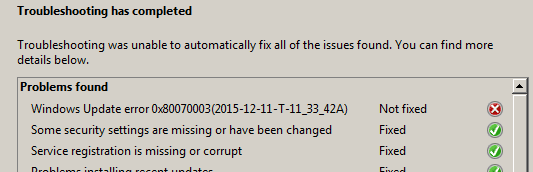
While running a fix it for the updater, I came across some MS mixed messages.

The first pic was the message I got after the updater agent fix it ran. The second was what I saw when I scrolled on down the log. Soo....does that mean it THINKS it fixed it? :confused:

(No, it didn't fix it BTW)
 

Attachments

  • Capture.PNG
    Capture.PNG
    4.8 KB · Views: 82
  • Capture2.PNG
    Capture2.PNG
    2.4 KB · Views: 82

My Computer My Computer

Computer type
PC/Desktop
Computer Manufacturer/Model Number
Dell Hell oh Well
OS
Win 7 32 Home Premium, Win 7 64 Pro, Win 8.1, Win 10
CPU
Intel Core 2 Duo 2.93GHz
Memory
Not much with my ADHD
Graphics Card(s)
ATI Radeon HD 4350
Monitor(s) Displays
24" HDTV/Monitor
Screen Resolution
Blurry after a Scotch or 2
Hard Drives
1 HDD 250 GB, 1 HDD 1 TB, 3 - 1 TB Externals
Case
Don't get on my case...man :D
Cooling
I have an Air Conditioner & Diet Pepsi
Keyboard
Saitek Cyborg
Mouse
10 yr old MS optical mouse that still works
Internet Speed
Never fast enough
Antivirus
Various
Browser
Various
Updater has been exhibiting some strange behavior for a bit now, such as after running for 45 mins, one moment showing 0% downloaded & the next moment showing 80% downloaded. I'm wondering if this instability in the updater agent is caused on my 7 64 machines because of my refusal to allow any patch related to Win 10 or disallowing anything telemetry related on the machine.:confused:

I had been experiencing Windows Update problems for at least a year and have attempted numerous fixes.

Symptoms have included:

Windows could not check for updates
High RAM usage by svchost.exe (netsvcs) when daily update check runs) with datastore.edb read/ write issues.
BITS service not starting when called.

Not all symptoms occurred at the same time.

Anyway I fixed problems many times and everything seemed okay but eventually there would be another problem.

I do not have any Windows 10 upgrade or any telemetry updates installed and currently Windows Updates works just fine.

The problem with running automated fixes - MS Fixit or batch files to reset WU

Some services may need to be stopped before running fixes. Some fixes work better without an internet connection. Some automated fixes are supposed to delete certain directories and file but do not always succeed and manual confirmation of deletion is required. Even resorting to force deleting problem files may be necessary.

It may be necessary to force install a particular version of Windows Update Agent / Client.

There is an MS Fixit that is supposed to completely remove then reinstall Windows Update Agent/ Client but even then it does not work exactly as intended.

After running fixes I have found it better to keep Windows Update service disabled for 24 hours (until well after the next automatically scheduled update check) before enabling Windows Update service then immediately rebooting and then running an update check.

EDIT:

Forgot to mention that after fixing - Windows Updates has been working just fine for me for the last few months with no issues at all.
 
Last edited:

My Computer My Computer

Computer type
Laptop
Computer Manufacturer/Model Number
ASUS
OS
Microsoft Windows 7 Home Premium 64-bit 7601 Multiprocessor Free Service Pack 1
CPU
AMD C-60 APU with Radeon(tm) HD Graphics
Motherboard
ASUSTeK COMPUTER INC. X501U
Memory
4.00 GB
Graphics Card(s)
AMD Radeon HD 6290 Graphics
Sound Card
(1) AMD High Definition Audio Device (2) Realtek High Defi
Screen Resolution
1366 x 768 x 32 bits (4294967296 colors) @ 60 Hz
Hard Drives
Hitachi HTS545050A7E380 SATA Disk Device
Antivirus
Comodo CIS & FW, SecureAplus App Whitelisting, Threatfire
Browser
Cyberfox 64bit, Opera 64bit, Airfox
Other Info
Spy-The-Spy, HitmanPro.Alert, Norton Connect Safe, MJRegWatcher, BitDefender TrafficLight, Voodoo Shield, Zemana AntiMalware
I had been experiencing Windows Update problems for at least a year and have attempted numerous fixes.

Some services may need to be stopped before running fixes. Some fixes work better without an internet connection. Some automated fixes are supposed to delete certain directories and file but do not always succeed and manual confirmation of deletion is required. Even resorting to force deleting problem files may be necessary.

All my updater issues started around the release of 10. All my Win versions were slow for about a month, but then 7 32 & 8.1 straightened out. 7 64 for some reason stayed problematic & got worse.

I noticed that various fixes involved certain steps. My Wife was happy because she said it was keeping me busy :p. The step that worked was the one I tried in post 22. Today wasn't so bad, 64 took 20 mins to d/l the updates. Not bad considering last time it ran 2 hrs looking for updates & I shut it off. Win 7 32 took 4 mins to d/l the updates & 8.1 about the same time.
 

My Computer My Computer

Computer type
PC/Desktop
Computer Manufacturer/Model Number
Dell Hell oh Well
OS
Win 7 32 Home Premium, Win 7 64 Pro, Win 8.1, Win 10
CPU
Intel Core 2 Duo 2.93GHz
Memory
Not much with my ADHD
Graphics Card(s)
ATI Radeon HD 4350
Monitor(s) Displays
24" HDTV/Monitor
Screen Resolution
Blurry after a Scotch or 2
Hard Drives
1 HDD 250 GB, 1 HDD 1 TB, 3 - 1 TB Externals
Case
Don't get on my case...man :D
Cooling
I have an Air Conditioner & Diet Pepsi
Keyboard
Saitek Cyborg
Mouse
10 yr old MS optical mouse that still works
Internet Speed
Never fast enough
Antivirus
Various
Browser
Various
Made an image before D/L this morning. Noticed that the "folders" ~BT & ~WS appeared, the software distribution/download had a crap load of files in it. Cleanmgr got rid of them. Hid 2664 again.
 

My Computer My Computer

Computer type
PC/Desktop
Computer Manufacturer/Model Number
Self Build
OS
Windows 7 Professional X64 Service Pack 1
CPU
AMD Phenom II X4 955 3.20GHz
Motherboard
Gigabyte GA-MA790X-UD4P
Memory
8G
Graphics Card(s)
GX550 Ti
Sound Card
On board
Monitor(s) Displays
Asus VW246H & Syncmaster 2243swx
Screen Resolution
1920x1080 & 1920x1080
Hard Drives
M4-CT128 SSD2, Samsung 840 256GB, 1 WDC 1TB
PSU
Corsair TX750W-V2
Case
Antec
Cooling
2 120mm fan
Keyboard
Microsoft Wireless 3050
Mouse
Microsoft Wireless 5000
Internet Speed
72/6Mbs (Cable)
Other Info
Asus AC1900 router, 8 port Trendnet Switch - Logitech Webcam Pro 9000
I've noticed the same long loooong delay in d/l ing updates. Something I have penned down, it seems to only be happening on my 7 64, at least on my end.
....
I'm wondering if this instability in the updater agent is caused on my 7 64 machines because of my refusal to allow any patch related to Win 10 or disallowing anything telemetry related on the machine.:confused:

I too have hidden all the W10 and telemetry updates on my W7 64 machine. And back in the summer, I had similar experiences of slowness and instability after I had installed 2 Windows Update Client updates: KB2990214 in June and KB3075851 in Aug.

After uninstalling both of them, Windows Update behaved normally again. Since then, I've made sure all the WUC updates released since April remain hidden.
 

My Computer My Computer

Computer type
PC/Desktop
OS
Win7 Ult x64
CPU
AMD Phenon II Black 955
Motherboard
Asus M5A99X EVO
Memory
8 GB DDR3 1600
Graphics Card(s)
MSI GTX 550-Ti
Hard Drives
Samsung 850 Pro 512 GB (system)
WD 1 TB Black (data)
PSU
Seasonic G-650 Gold
Cooling
Cooler Master 212+; positive pressure sys: (3) 200mm fans
Other Info
Imaging programs: Image for Windows & Drive Snapshot
Back
Top