
Hi guys,
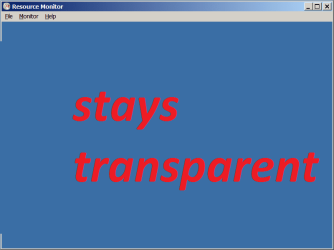
I'm on win7 x64 pro and when I open the Resource Monitor I get the error as displayed in the attachmenthttp://imgur.com/b9mObGw. The File and Help menu are clickable and working ... so the GUI is sorta functioning but the main window where i am supposed to see stuff remains transparent. However, this is the case ONLY when I disable Visual Styles in System properties / Performance options dialog. So, when the 'Use visual styles ...' is unchecked I get the problem as seen in the above screen. But when I enable the 'Use visual styles ...' menu, then Resource Monitor works fine. I would really like to use the Resouce Monitor, but I really don't wanna use 'Use visual styles ...' How can I achieve that?
I'm on win7 x64 pro and when I open the Resource Monitor I get the error as displayed in the attachmenthttp://imgur.com/b9mObGw. The File and Help menu are clickable and working ... so the GUI is sorta functioning but the main window where i am supposed to see stuff remains transparent. However, this is the case ONLY when I disable Visual Styles in System properties / Performance options dialog. So, when the 'Use visual styles ...' is unchecked I get the problem as seen in the above screen. But when I enable the 'Use visual styles ...' menu, then Resource Monitor works fine. I would really like to use the Resouce Monitor, but I really don't wanna use 'Use visual styles ...' How can I achieve that?
Attachments
Last edited:
My Computer
- Computer type
- Laptop
- Computer Manufacturer/Model Number
- HP
- OS
- Win 7 x64


