PwrCfg/Sleep Mode Issue

Doesn't matter which USB 3.0 port is used- EP or Standard.

'Just as a matter of interest are you shutting the computer down & then changing the USB port connections & then powering up again. This will trigger the loading of new drivers if necessary, so that might be worth trying.'

No on that.
 

My Computer My Computer

Computer type
PC/Desktop
Computer Manufacturer/Model Number
HP ENVY 700-515xt CTO, with more cam, headers, and 4.11 gears.
OS
Windows 7 Pro SP1 x64
CPU
Intel Haswell i7-4770 3.4GHz
Motherboard
OEM Kaili2 (MSI MS-7826 v2.0)
Memory
G. SKILLS 32GB Ripjaws X Series DDR3 1600 SDRAM
Graphics Card(s)
Integrated HD4600- upgrade coming!
Sound Card
Integrated...for now.
Monitor(s) Displays
Dell ST-2310 Digital
Screen Resolution
I like 1920x1080
Hard Drives
C\:-Samsung 850PRO SSD-256gb, D:\-SG Barracuda 7200 HDD 1 TB (Storage)
PSU
350w OEM (About to become a display in the aquarium!)
Case
ENVY OEM
Cooling
FANS
Keyboard
Logitech and HP- USB.
Mouse
Logitech LS1 (Alltime favorite of mine!) and HP- both USB
Internet Speed
65Mbps Down (min)/4.5Mbps UP- Charter Comm HS cable
Antivirus
avast! Internet Security 2015/MBAM
Browser
Opera, at present. Love that Chromium horsepower!
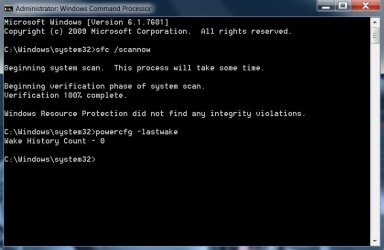
This is getting more weird by the minute. Tried to power down, as you recommended, R4, and connected the printer, machine does the same thing- monitor shuts down as it should, then the pc starts to go to sleep as set, but then it restarts. Now, I'm not even getting a 'lastwake' path in 'cmd'!...what the heck's going on here?
SFC /SCANNOW' is good to go... just can't wrap my head around this. :(
 

Attachments

  • CMD_SFC_lastwake.jpg
    CMD_SFC_lastwake.jpg
    37.8 KB · Views: 0

My Computer My Computer

Computer type
PC/Desktop
Computer Manufacturer/Model Number
HP ENVY 700-515xt CTO, with more cam, headers, and 4.11 gears.
OS
Windows 7 Pro SP1 x64
CPU
Intel Haswell i7-4770 3.4GHz
Motherboard
OEM Kaili2 (MSI MS-7826 v2.0)
Memory
G. SKILLS 32GB Ripjaws X Series DDR3 1600 SDRAM
Graphics Card(s)
Integrated HD4600- upgrade coming!
Sound Card
Integrated...for now.
Monitor(s) Displays
Dell ST-2310 Digital
Screen Resolution
I like 1920x1080
Hard Drives
C\:-Samsung 850PRO SSD-256gb, D:\-SG Barracuda 7200 HDD 1 TB (Storage)
PSU
350w OEM (About to become a display in the aquarium!)
Case
ENVY OEM
Cooling
FANS
Keyboard
Logitech and HP- USB.
Mouse
Logitech LS1 (Alltime favorite of mine!) and HP- both USB
Internet Speed
65Mbps Down (min)/4.5Mbps UP- Charter Comm HS cable
Antivirus
avast! Internet Security 2015/MBAM
Browser
Opera, at present. Love that Chromium horsepower!

My Computer My Computer

Computer type
PC/Desktop
Computer Manufacturer/Model Number
Self built using existing case
OS
Windows 7 Home Premium 64 bit sp1
CPU
Intel i5 3570 3.4Ghz Ivy Bridge SKT 1155 quad core
Motherboard
Gigabyte Z77-HD3 SKT 1155 2xSata 3, 4x USB 3.0
Memory
G-Skill Rip Jaws 16Gb (8x2) DDR3 -1600 PC3 12800 CL 10 red
Graphics Card(s)
Gigabyte NVIDIA GT610 1Gb DDR3 810/1200 PCI-E 2.0 Silent
Sound Card
NVIDIA High Definition & Realtech High Definition Audio
Monitor(s) Displays
2 x Philips 226V4L 16:9 aspect ratio
Screen Resolution
1920 x 1080 HD
Hard Drives
Samsung 840 Pro 256gb SSD, SATA 3.
Hitachi Touro Portable 1tb, USB 3.0 HDD used for image b/ups.
PSU
Corsair VS450
Case
Codeng
Cooling
PSU fan & CPU fan
Keyboard
Logitech
Mouse
Logitech Wireless trackball M570
Internet Speed
Wireless 3G. 3mg down & 550kb up.
Antivirus
Bitdefender Internet Security 2020
Browser
Opera (Current Version) & Firefox
Other Info
MS Office 2013 Pro. Davis weather station software. MGE Nova 600 avr UPS.

My Computer My Computer

Computer type
PC/Desktop
Computer Manufacturer/Model Number
Self built custom
OS
64-bit Windows 11 Pro for Workstations
CPU
Intel i7-8700K OC'd to 5 GHz
Motherboard
ASUS ROG Maximus XI Formula Z390
Memory
64 GB (4x16GB) G.SKILL TridentZ RGB DDR4 3600 MHz
Graphics Card(s)
ASUS ROG-STRIX-GTX1080TI-O11G-GAMING
Sound Card
Integrated
Monitor(s) Displays
2 x Samsung Odyssey G7 27"
Screen Resolution
2560x1440
Hard Drives
1TB Samsung 990 PRO M.2,
4TB Samsung 990 PRO PRO M.2,
TerraMaster F8 SSD Plus NAS
PSU
Seasonic Prime Titanium 850W
Case
Thermaltake Core P3
Cooling
Corsair Hydro H115i
Keyboard
Logitech wireless K800
Mouse
Logitech MX Master 4
Internet Speed
2 Gb/s Download and 100 Mb/s Upload
Antivirus
Malwarebyte Anti-Malware Premium
Browser
Google Chrome
Other Info
Logitech Z625 speaker system,
Logitech BRIO 4K Pro webcam,
HP Color LaserJet Pro MFP M477fdn,
APC SMART-UPS RT 1000 XL - SURT1000XLI,
Galaxy S23 Plus phone
Have a look at this website, there might be a few ideas here worth checking. Particularly the section on network adapters. I noticed a lot of Bluetooth items you have there, so might be worth checking out all of those as well.

How to Fix a Computer that Keeps Waking Up | Gizmo's Freeware

Thanks for that, R4- Yeah, they are not the issue, as we've already disqualified them. Truly, I simply need to uninstall that stuff, as we never use them.

Thanks for the link, we'll look into it.

tim
 

My Computer My Computer

Computer type
PC/Desktop
Computer Manufacturer/Model Number
HP ENVY 700-515xt CTO, with more cam, headers, and 4.11 gears.
OS
Windows 7 Pro SP1 x64
CPU
Intel Haswell i7-4770 3.4GHz
Motherboard
OEM Kaili2 (MSI MS-7826 v2.0)
Memory
G. SKILLS 32GB Ripjaws X Series DDR3 1600 SDRAM
Graphics Card(s)
Integrated HD4600- upgrade coming!
Sound Card
Integrated...for now.
Monitor(s) Displays
Dell ST-2310 Digital
Screen Resolution
I like 1920x1080
Hard Drives
C\:-Samsung 850PRO SSD-256gb, D:\-SG Barracuda 7200 HDD 1 TB (Storage)
PSU
350w OEM (About to become a display in the aquarium!)
Case
ENVY OEM
Cooling
FANS
Keyboard
Logitech and HP- USB.
Mouse
Logitech LS1 (Alltime favorite of mine!) and HP- both USB
Internet Speed
65Mbps Down (min)/4.5Mbps UP- Charter Comm HS cable
Antivirus
avast! Internet Security 2015/MBAM
Browser
Opera, at present. Love that Chromium horsepower!
Hello Tim,

I haven't read the whole thread, so forgive me if this has already been mentioned.

Have you already tried having the printer connected via Ethernet cable to your network (ex: router) instead of vis USB to see how it does.

Epson WorkForce WF-3640 All-in-One Printer - Product Information - Epson America, Inc.

Thanks for having a look-see, Brink. No, actually I haven't...truthfully, I never crossed my mind. Have to think that out a bit, but first thought makes me wonder how I would have print control at the keyboard then.

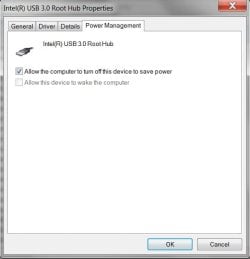
The first shot below shows that the keyboard is the only device set up to wake, and it shows the the Intel USB 3.0 Extensible Host Controller as device causing the restarts entering into sleep. The 3.0 Root Hub is where the power management is controlled (2nd shot below), and it's set to have the pc shut it down.
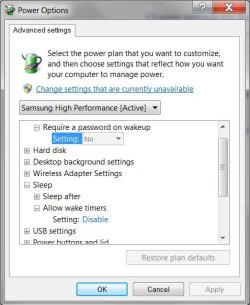
Timers are disengaged within PwrOpts_Advcd (3rd shot below).
 

Attachments

  • Powercfg scheme.jpg
    Powercfg scheme.jpg
    46.3 KB · Views: 1
  • USB 3.0 Root Hub prop.jpg
    USB 3.0 Root Hub prop.jpg
    18.3 KB · Views: 15
  • Sleep Timers.jpg
    Sleep Timers.jpg
    40.7 KB · Views: 15

My Computer My Computer

Computer type
PC/Desktop
Computer Manufacturer/Model Number
HP ENVY 700-515xt CTO, with more cam, headers, and 4.11 gears.
OS
Windows 7 Pro SP1 x64
CPU
Intel Haswell i7-4770 3.4GHz
Motherboard
OEM Kaili2 (MSI MS-7826 v2.0)
Memory
G. SKILLS 32GB Ripjaws X Series DDR3 1600 SDRAM
Graphics Card(s)
Integrated HD4600- upgrade coming!
Sound Card
Integrated...for now.
Monitor(s) Displays
Dell ST-2310 Digital
Screen Resolution
I like 1920x1080
Hard Drives
C\:-Samsung 850PRO SSD-256gb, D:\-SG Barracuda 7200 HDD 1 TB (Storage)
PSU
350w OEM (About to become a display in the aquarium!)
Case
ENVY OEM
Cooling
FANS
Keyboard
Logitech and HP- USB.
Mouse
Logitech LS1 (Alltime favorite of mine!) and HP- both USB
Internet Speed
65Mbps Down (min)/4.5Mbps UP- Charter Comm HS cable
Antivirus
avast! Internet Security 2015/MBAM
Browser
Opera, at present. Love that Chromium horsepower!

My Computer My Computer

Computer type
PC/Desktop
Computer Manufacturer/Model Number
Self built using existing case
OS
Windows 7 Home Premium 64 bit sp1
CPU
Intel i5 3570 3.4Ghz Ivy Bridge SKT 1155 quad core
Motherboard
Gigabyte Z77-HD3 SKT 1155 2xSata 3, 4x USB 3.0
Memory
G-Skill Rip Jaws 16Gb (8x2) DDR3 -1600 PC3 12800 CL 10 red
Graphics Card(s)
Gigabyte NVIDIA GT610 1Gb DDR3 810/1200 PCI-E 2.0 Silent
Sound Card
NVIDIA High Definition & Realtech High Definition Audio
Monitor(s) Displays
2 x Philips 226V4L 16:9 aspect ratio
Screen Resolution
1920 x 1080 HD
Hard Drives
Samsung 840 Pro 256gb SSD, SATA 3.
Hitachi Touro Portable 1tb, USB 3.0 HDD used for image b/ups.
PSU
Corsair VS450
Case
Codeng
Cooling
PSU fan & CPU fan
Keyboard
Logitech
Mouse
Logitech Wireless trackball M570
Internet Speed
Wireless 3G. 3mg down & 550kb up.
Antivirus
Bitdefender Internet Security 2020
Browser
Opera (Current Version) & Firefox
Other Info
MS Office 2013 Pro. Davis weather station software. MGE Nova 600 avr UPS.
Do you get any new info from "powercfg –devicequery wake_from_any" ?
 

My Computer My Computer

Computer type
PC/Desktop
Computer Manufacturer/Model Number
Custom
OS
10 Pro x64
CPU
Ryzen 9 3900X
Motherboard
Asrock x370 Tachi
Memory
64GB(4x16GB) DDR4
Graphics Card(s)
EVGA 1080ti FTW3
Sound Card
ASUS Xonar Essence STX (V4 Bursons), ODAC rev B, NFB-11, O2
Monitor(s) Displays
3xASUS PB278Q/R, Optoma HD142X
Screen Resolution
3x1440p, 1080p
Hard Drives
512GB 850 EVO(OS, Programs)
4TB (Movies)
3TB (Downloads)
3TB (Programs)
1TB HDD (Games)
2x6TB R1 (videos)
PSU
AX760
Case
Fractal Define R5
Cooling
NH-D15S
Keyboard
Massdrop Ctrl with Box Navy's
Mouse
G903, Alioth XXL Mat
Internet Speed
280/40
Antivirus
MBAM, ESET
Browser
Canary 64 Bit
Other Info
I also own a Thinkpad P50 Xeon 4K, X220T, X1C5
This HP website lists most of what we have tried, but it might be worth reading through the waking computer from sleep mode section & see if you have looked into all possibilities.

HP PCs - Troubleshooting sleep and hibernate issues (Windows 7) | HP® Customer Support

Thanks, R4...I'll look into that. I uninstalled/reinstalled printer again, but with just the printer and scanner driver, and event manager, thinking that something in one of the 3 other items were streaming something back at machine- but that wouldn't matter if the 3.0 Root Hub were checked to shut down in AdvOpts.
 

My Computer My Computer

Computer type
PC/Desktop
Computer Manufacturer/Model Number
HP ENVY 700-515xt CTO, with more cam, headers, and 4.11 gears.
OS
Windows 7 Pro SP1 x64
CPU
Intel Haswell i7-4770 3.4GHz
Motherboard
OEM Kaili2 (MSI MS-7826 v2.0)
Memory
G. SKILLS 32GB Ripjaws X Series DDR3 1600 SDRAM
Graphics Card(s)
Integrated HD4600- upgrade coming!
Sound Card
Integrated...for now.
Monitor(s) Displays
Dell ST-2310 Digital
Screen Resolution
I like 1920x1080
Hard Drives
C\:-Samsung 850PRO SSD-256gb, D:\-SG Barracuda 7200 HDD 1 TB (Storage)
PSU
350w OEM (About to become a display in the aquarium!)
Case
ENVY OEM
Cooling
FANS
Keyboard
Logitech and HP- USB.
Mouse
Logitech LS1 (Alltime favorite of mine!) and HP- both USB
Internet Speed
65Mbps Down (min)/4.5Mbps UP- Charter Comm HS cable
Antivirus
avast! Internet Security 2015/MBAM
Browser
Opera, at present. Love that Chromium horsepower!

Attachments

  • Untitled.jpg
    Untitled.jpg
    26.2 KB · Views: 10

My Computer My Computer

Computer type
PC/Desktop
Computer Manufacturer/Model Number
HP ENVY 700-515xt CTO, with more cam, headers, and 4.11 gears.
OS
Windows 7 Pro SP1 x64
CPU
Intel Haswell i7-4770 3.4GHz
Motherboard
OEM Kaili2 (MSI MS-7826 v2.0)
Memory
G. SKILLS 32GB Ripjaws X Series DDR3 1600 SDRAM
Graphics Card(s)
Integrated HD4600- upgrade coming!
Sound Card
Integrated...for now.
Monitor(s) Displays
Dell ST-2310 Digital
Screen Resolution
I like 1920x1080
Hard Drives
C\:-Samsung 850PRO SSD-256gb, D:\-SG Barracuda 7200 HDD 1 TB (Storage)
PSU
350w OEM (About to become a display in the aquarium!)
Case
ENVY OEM
Cooling
FANS
Keyboard
Logitech and HP- USB.
Mouse
Logitech LS1 (Alltime favorite of mine!) and HP- both USB
Internet Speed
65Mbps Down (min)/4.5Mbps UP- Charter Comm HS cable
Antivirus
avast! Internet Security 2015/MBAM
Browser
Opera, at present. Love that Chromium horsepower!
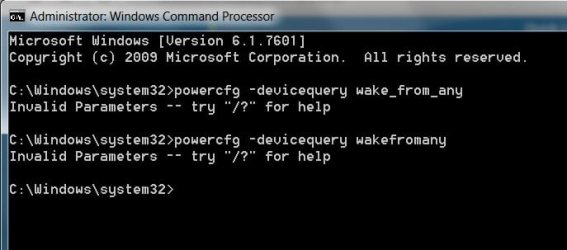
Do you get any new info from "powercfg –devicequery wake_from_any" ?


According to my CMD, that's an invalid-

Yeah you have to type it the paste does not work cause is bold or something. I ran into that too. It might list your printer so you can disable it's wake ability.
 

My Computer My Computer

Computer type
PC/Desktop
Computer Manufacturer/Model Number
Custom
OS
10 Pro x64
CPU
Ryzen 9 3900X
Motherboard
Asrock x370 Tachi
Memory
64GB(4x16GB) DDR4
Graphics Card(s)
EVGA 1080ti FTW3
Sound Card
ASUS Xonar Essence STX (V4 Bursons), ODAC rev B, NFB-11, O2
Monitor(s) Displays
3xASUS PB278Q/R, Optoma HD142X
Screen Resolution
3x1440p, 1080p
Hard Drives
512GB 850 EVO(OS, Programs)
4TB (Movies)
3TB (Downloads)
3TB (Programs)
1TB HDD (Games)
2x6TB R1 (videos)
PSU
AX760
Case
Fractal Define R5
Cooling
NH-D15S
Keyboard
Massdrop Ctrl with Box Navy's
Mouse
G903, Alioth XXL Mat
Internet Speed
280/40
Antivirus
MBAM, ESET
Browser
Canary 64 Bit
Other Info
I also own a Thinkpad P50 Xeon 4K, X220T, X1C5
Yeah you have to type it the paste does not work cause is bold or something. I ran into that too. It might list your printer so you can disable it's wake ability.

Right you are, rvcjew!... whole list of stuff, but didn't see the printer listed. However, there are some USB Input Devices (xxx), and HID-compliant consumer control device (xxx).

Thanks for that...think I am going to give Epson Support a jingle-jingle this afternoon and see what they have to say. Really don't know what else to do. I have no idea how to identify that specific device, although it does show up in Control Panel>Hardware and Sound>Devices and Printers, and it is set to Default.

Again, thanks!
 

My Computer My Computer

Computer type
PC/Desktop
Computer Manufacturer/Model Number
HP ENVY 700-515xt CTO, with more cam, headers, and 4.11 gears.
OS
Windows 7 Pro SP1 x64
CPU
Intel Haswell i7-4770 3.4GHz
Motherboard
OEM Kaili2 (MSI MS-7826 v2.0)
Memory
G. SKILLS 32GB Ripjaws X Series DDR3 1600 SDRAM
Graphics Card(s)
Integrated HD4600- upgrade coming!
Sound Card
Integrated...for now.
Monitor(s) Displays
Dell ST-2310 Digital
Screen Resolution
I like 1920x1080
Hard Drives
C\:-Samsung 850PRO SSD-256gb, D:\-SG Barracuda 7200 HDD 1 TB (Storage)
PSU
350w OEM (About to become a display in the aquarium!)
Case
ENVY OEM
Cooling
FANS
Keyboard
Logitech and HP- USB.
Mouse
Logitech LS1 (Alltime favorite of mine!) and HP- both USB
Internet Speed
65Mbps Down (min)/4.5Mbps UP- Charter Comm HS cable
Antivirus
avast! Internet Security 2015/MBAM
Browser
Opera, at present. Love that Chromium horsepower!
OK, now I'm thinking the issue stems from an IRQ conflict... will report back.
 

My Computer My Computer

Computer type
PC/Desktop
Computer Manufacturer/Model Number
HP ENVY 700-515xt CTO, with more cam, headers, and 4.11 gears.
OS
Windows 7 Pro SP1 x64
CPU
Intel Haswell i7-4770 3.4GHz
Motherboard
OEM Kaili2 (MSI MS-7826 v2.0)
Memory
G. SKILLS 32GB Ripjaws X Series DDR3 1600 SDRAM
Graphics Card(s)
Integrated HD4600- upgrade coming!
Sound Card
Integrated...for now.
Monitor(s) Displays
Dell ST-2310 Digital
Screen Resolution
I like 1920x1080
Hard Drives
C\:-Samsung 850PRO SSD-256gb, D:\-SG Barracuda 7200 HDD 1 TB (Storage)
PSU
350w OEM (About to become a display in the aquarium!)
Case
ENVY OEM
Cooling
FANS
Keyboard
Logitech and HP- USB.
Mouse
Logitech LS1 (Alltime favorite of mine!) and HP- both USB
Internet Speed
65Mbps Down (min)/4.5Mbps UP- Charter Comm HS cable
Antivirus
avast! Internet Security 2015/MBAM
Browser
Opera, at present. Love that Chromium horsepower!
OK, now I'm thinking the issue stems from an IRQ conflict... will report back.

Ew, that can be nasty to troubleshoot. Device Manger might help by showing the attached by irqs but idk it it will narrow it down enough what did Epson say?
 

My Computer My Computer

Computer type
PC/Desktop
Computer Manufacturer/Model Number
Custom
OS
10 Pro x64
CPU
Ryzen 9 3900X
Motherboard
Asrock x370 Tachi
Memory
64GB(4x16GB) DDR4
Graphics Card(s)
EVGA 1080ti FTW3
Sound Card
ASUS Xonar Essence STX (V4 Bursons), ODAC rev B, NFB-11, O2
Monitor(s) Displays
3xASUS PB278Q/R, Optoma HD142X
Screen Resolution
3x1440p, 1080p
Hard Drives
512GB 850 EVO(OS, Programs)
4TB (Movies)
3TB (Downloads)
3TB (Programs)
1TB HDD (Games)
2x6TB R1 (videos)
PSU
AX760
Case
Fractal Define R5
Cooling
NH-D15S
Keyboard
Massdrop Ctrl with Box Navy's
Mouse
G903, Alioth XXL Mat
Internet Speed
280/40
Antivirus
MBAM, ESET
Browser
Canary 64 Bit
Other Info
I also own a Thinkpad P50 Xeon 4K, X220T, X1C5
Ew, that can be nasty to troubleshoot. Device Manger might help by showing the attached by irqs but idk it it will narrow it down enough what did Epson say?


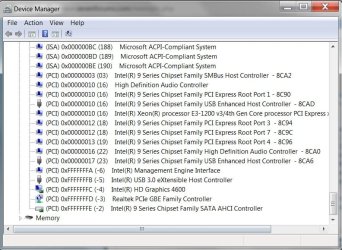
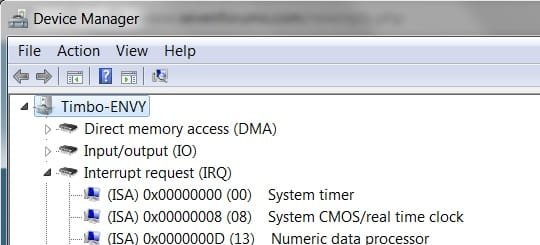
Exactly, rcvjew... all looks well within DvcMgr properties, soooo, it was off to BIOS. What I noticed there was that UEFI was disabled, and Legacy was enabled. I forgot that when I reinstalled Windows 7 that I had to disable UEFI to get it to work from the installation CD. I have since re-enabled both Legacy and UEFI, as that's how the machine came from HP. I have absolutely no experience with UEFI up to this point. As mentioned previously, prior to the last clean install of Windows, the printer functioned fine via the USB 3.0 port, not interfering with the sleep mode function. I have not tested this theory yet, though. If it's incorrect, well, it's back to IRQ conflict troubleshooting. My supposition is that if HP had both Legacy and UEFI enabled, there must be a qualified reason.
Epson suggested using a dedicated USB 3.0 cable at first, but I explained that 2.0 and 3.0 are reciprocally compatible- their response then was the possibility of an IRQ conflict. A search within DvcMgr illustrated that all was well, there, Windows wise. Please note that the Intel USB 3.0 Extensible Host Controller qualifies in the Interrupt Request list attached.

Thanks for the response.

tim
 

Attachments

  • IRQ.jpg
    IRQ.jpg
    93 KB · Views: 1
  • IRQ2.jpg
    IRQ2.jpg
    20.8 KB · Views: 12

My Computer My Computer

Computer type
PC/Desktop
Computer Manufacturer/Model Number
HP ENVY 700-515xt CTO, with more cam, headers, and 4.11 gears.
OS
Windows 7 Pro SP1 x64
CPU
Intel Haswell i7-4770 3.4GHz
Motherboard
OEM Kaili2 (MSI MS-7826 v2.0)
Memory
G. SKILLS 32GB Ripjaws X Series DDR3 1600 SDRAM
Graphics Card(s)
Integrated HD4600- upgrade coming!
Sound Card
Integrated...for now.
Monitor(s) Displays
Dell ST-2310 Digital
Screen Resolution
I like 1920x1080
Hard Drives
C\:-Samsung 850PRO SSD-256gb, D:\-SG Barracuda 7200 HDD 1 TB (Storage)
PSU
350w OEM (About to become a display in the aquarium!)
Case
ENVY OEM
Cooling
FANS
Keyboard
Logitech and HP- USB.
Mouse
Logitech LS1 (Alltime favorite of mine!) and HP- both USB
Internet Speed
65Mbps Down (min)/4.5Mbps UP- Charter Comm HS cable
Antivirus
avast! Internet Security 2015/MBAM
Browser
Opera, at present. Love that Chromium horsepower!
Tim. You can check IRQ conflicts/sharing by click on the Start Button, type in System Information in the Search slot & when that opens select Hardware Resources, then Conflicts/Sharing & see what is displayed there. There are other items within the System Information that you can check as well.

IRQ conflicts are virtually unheard of these days & are generally allocated by the BIOS.
 
Last edited:

My Computer My Computer

Computer type
PC/Desktop
Computer Manufacturer/Model Number
Self built using existing case
OS
Windows 7 Home Premium 64 bit sp1
CPU
Intel i5 3570 3.4Ghz Ivy Bridge SKT 1155 quad core
Motherboard
Gigabyte Z77-HD3 SKT 1155 2xSata 3, 4x USB 3.0
Memory
G-Skill Rip Jaws 16Gb (8x2) DDR3 -1600 PC3 12800 CL 10 red
Graphics Card(s)
Gigabyte NVIDIA GT610 1Gb DDR3 810/1200 PCI-E 2.0 Silent
Sound Card
NVIDIA High Definition & Realtech High Definition Audio
Monitor(s) Displays
2 x Philips 226V4L 16:9 aspect ratio
Screen Resolution
1920 x 1080 HD
Hard Drives
Samsung 840 Pro 256gb SSD, SATA 3.
Hitachi Touro Portable 1tb, USB 3.0 HDD used for image b/ups.
PSU
Corsair VS450
Case
Codeng
Cooling
PSU fan & CPU fan
Keyboard
Logitech
Mouse
Logitech Wireless trackball M570
Internet Speed
Wireless 3G. 3mg down & 550kb up.
Antivirus
Bitdefender Internet Security 2020
Browser
Opera (Current Version) & Firefox
Other Info
MS Office 2013 Pro. Davis weather station software. MGE Nova 600 avr UPS.
Tim. You can check IRQ conflicts/sharing by click on the Start Button, type in System Information in the Search slot & when that opens select Hardware Resources, then Conflicts/Sharing & see what is displayed there. There are other items within the System Information that you can check as well.

IRQ conflicts are virtually unheard of these days & are generally allocated by the BIOS.

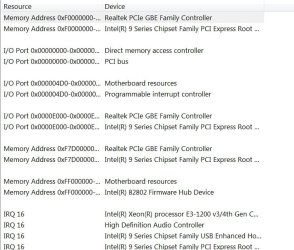
No conflicts noted, just shares... I still haven't verified if that disabled UEFI caused the issue. Either way, we'll post back... to be honest, I'm not sure what to look for in the Legacy side...to the best of my recollection, the only thing I changed was boot order, and disabled UEFI, to install Windows. I don't know how to screen shoot the BIOS screen...any suggestions?...

Thanks, R4... this is unbelievable!...and the machine has never run this good, and only on half the memory I had installed- waiting on the other 16gb kit from G. SKILL that's warrantied.

Regards-

tim
 

Attachments

  • ac.jpg
    ac.jpg
    65 KB · Views: 2

My Computer My Computer

Computer type
PC/Desktop
Computer Manufacturer/Model Number
HP ENVY 700-515xt CTO, with more cam, headers, and 4.11 gears.
OS
Windows 7 Pro SP1 x64
CPU
Intel Haswell i7-4770 3.4GHz
Motherboard
OEM Kaili2 (MSI MS-7826 v2.0)
Memory
G. SKILLS 32GB Ripjaws X Series DDR3 1600 SDRAM
Graphics Card(s)
Integrated HD4600- upgrade coming!
Sound Card
Integrated...for now.
Monitor(s) Displays
Dell ST-2310 Digital
Screen Resolution
I like 1920x1080
Hard Drives
C\:-Samsung 850PRO SSD-256gb, D:\-SG Barracuda 7200 HDD 1 TB (Storage)
PSU
350w OEM (About to become a display in the aquarium!)
Case
ENVY OEM
Cooling
FANS
Keyboard
Logitech and HP- USB.
Mouse
Logitech LS1 (Alltime favorite of mine!) and HP- both USB
Internet Speed
65Mbps Down (min)/4.5Mbps UP- Charter Comm HS cable
Antivirus
avast! Internet Security 2015/MBAM
Browser
Opera, at present. Love that Chromium horsepower!
The only way I know of to do a screen shot of the BIOS is with a camera & photograph it, which can be difficult.

With UEFI & legacy it's either one or the other. Normally you would select either UEFI or Legacy mode before installing Windows, it's not possible to have both at the same time. Refer to the motherboard manual for this setting.

Your screen shot of Sharing/Conflicts is very similar to mine which shows IRQ16 shared by a few items. Did you check other items in System Information as you can also see what other IRQs are used for. You can also see what USB your printer is using as well, so click on each of the + signs on the menu & follow through.
 

My Computer My Computer

Computer type
PC/Desktop
Computer Manufacturer/Model Number
Self built using existing case
OS
Windows 7 Home Premium 64 bit sp1
CPU
Intel i5 3570 3.4Ghz Ivy Bridge SKT 1155 quad core
Motherboard
Gigabyte Z77-HD3 SKT 1155 2xSata 3, 4x USB 3.0
Memory
G-Skill Rip Jaws 16Gb (8x2) DDR3 -1600 PC3 12800 CL 10 red
Graphics Card(s)
Gigabyte NVIDIA GT610 1Gb DDR3 810/1200 PCI-E 2.0 Silent
Sound Card
NVIDIA High Definition & Realtech High Definition Audio
Monitor(s) Displays
2 x Philips 226V4L 16:9 aspect ratio
Screen Resolution
1920 x 1080 HD
Hard Drives
Samsung 840 Pro 256gb SSD, SATA 3.
Hitachi Touro Portable 1tb, USB 3.0 HDD used for image b/ups.
PSU
Corsair VS450
Case
Codeng
Cooling
PSU fan & CPU fan
Keyboard
Logitech
Mouse
Logitech Wireless trackball M570
Internet Speed
Wireless 3G. 3mg down & 550kb up.
Antivirus
Bitdefender Internet Security 2020
Browser
Opera (Current Version) & Firefox
Other Info
MS Office 2013 Pro. Davis weather station software. MGE Nova 600 avr UPS.
The only way I know of to do a screen shot of the BIOS is with a camera & photograph it, which can be difficult.

With UEFI & legacy it's either one or the other. Normally you would select either UEFI or Legacy mode before installing Windows, it's not possible to have both at the same time. Refer to the motherboard manual for this setting.

Your screen shot of Sharing/Conflicts is very similar to mine which shows IRQ16 shared by a few items. Did you check other items in System Information as you can also see what other IRQs are used for. You can also see what USB your printer is using as well, so click on each of the + signs on the menu & follow through.

Bligh, I didn't get that far in SysInfo yet...regarding the mobo, my machine is an Envy 700-515xt CTO from HP. MSI made the mobo to HP spec. The machine arrived to me with both UEFI and Legacy enabled. I actually familiarized myself with it before I did anything. Now, when I went and did this fresh install of Windows 7 Pro on the SSD, first I set the SSD up with Partition Wizard. Then, we ejected that disk and loaded Windows installation disk. Everything went fine, at that point. Well, a bit down the road, a memory module was misbehaving off and on, causing a series of BSOD's. It messed the File System up, so we used Magician and cleaned the drive and went to reinstall Windows. Well, on the the 2nd pane of the installation, a warning came up and indicated Windows couldn't be installed. So, I went and disabled UEFI and it installed just fine in Legacy mode. As mentioned previously, the machine was delivered to me with both UEFI and Legacy enabled. I had installed the printer while I was running on the factory OEM Windows installation. So, I guess what I am trying to say, at this point, is that the only variable that has changed just prior to the printer anomalies with the USB 3.0 port is that UEFI was disabled. At this very moment, both UEFI and Legacy are enabled, but I have not tested the printer in the USB 3.0 port to see if that was the issue.
OK, on the BIOS screen... Yeah, I have a terrible camera, and a cheapo smartphone. The BIOS is American Megatrends-AMI 80.11 dated 4/1/2015 with SIMBIOS ver. 2.8. If you have an in depth understanding of that, possibly you could make a suggestion or two as to what I need to check. I understand the basics within, but it's nothing like the American Megatrends BIOS in my old XP machine. That was easy to comprehend- even as much as changing settings for a graphics card. This one, I don't know...a lot of it seems strange to me. Perhaps I need to do some Googling on the matter. Time has been short as of late, though.
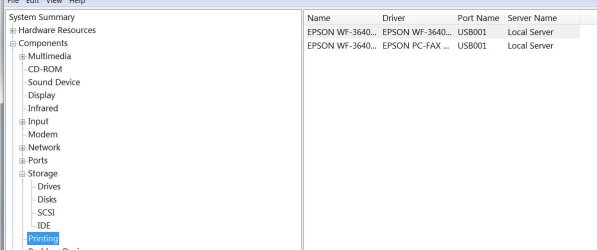
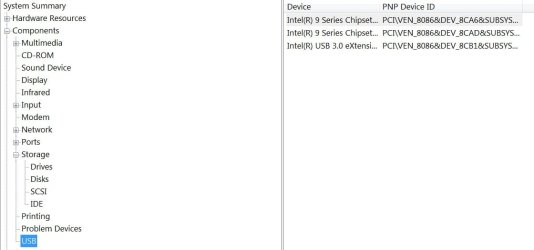
SysInfo>Hardware Resources>Conflicts/Sharing, DMA, I/O, IRQ's, Memory- all OK. Nothing listed in Forced Hardware. In all the categories, nothing seems amiss. Please refer to the attached graphics. The two items that show up are disconnected intentionally.

I appreciate the help you've afforded me on the matter, for sure- Thanks!

Regards-

tim

 

Attachments

  • Problems.jpg
    Problems.jpg
    29 KB · Views: 2
  • Printing.jpg
    Printing.jpg
    32.9 KB · Views: 2
  • USB.jpg
    USB.jpg
    33.3 KB · Views: 2

My Computer My Computer

Computer type
PC/Desktop
Computer Manufacturer/Model Number
HP ENVY 700-515xt CTO, with more cam, headers, and 4.11 gears.
OS
Windows 7 Pro SP1 x64
CPU
Intel Haswell i7-4770 3.4GHz
Motherboard
OEM Kaili2 (MSI MS-7826 v2.0)
Memory
G. SKILLS 32GB Ripjaws X Series DDR3 1600 SDRAM
Graphics Card(s)
Integrated HD4600- upgrade coming!
Sound Card
Integrated...for now.
Monitor(s) Displays
Dell ST-2310 Digital
Screen Resolution
I like 1920x1080
Hard Drives
C\:-Samsung 850PRO SSD-256gb, D:\-SG Barracuda 7200 HDD 1 TB (Storage)
PSU
350w OEM (About to become a display in the aquarium!)
Case
ENVY OEM
Cooling
FANS
Keyboard
Logitech and HP- USB.
Mouse
Logitech LS1 (Alltime favorite of mine!) and HP- both USB
Internet Speed
65Mbps Down (min)/4.5Mbps UP- Charter Comm HS cable
Antivirus
avast! Internet Security 2015/MBAM
Browser
Opera, at present. Love that Chromium horsepower!
Tim. You have 2 Problem Devices showing in your System Info. From what I can find out these are related to the Broadcom Bluetooth device.
Are these part on your HP computer or have you added it.
In my Sysinfo there is nothing listed in my Problem Devices, which I think is what we should be aiming for.

As you can see this is related to USB as well.

I may be on the wrong track here, but those Problem Devices have me concerned.

Just as a test, untick the Broadcom Bluetooth Device in your msconfig Services. In your screen shot of this it shows that device as running, so untick it. Restart your computer, then make sure it's not running, by checking in Services again & see if the computer still has the waking up problem.
 

My Computer My Computer

Computer type
PC/Desktop
Computer Manufacturer/Model Number
Self built using existing case
OS
Windows 7 Home Premium 64 bit sp1
CPU
Intel i5 3570 3.4Ghz Ivy Bridge SKT 1155 quad core
Motherboard
Gigabyte Z77-HD3 SKT 1155 2xSata 3, 4x USB 3.0
Memory
G-Skill Rip Jaws 16Gb (8x2) DDR3 -1600 PC3 12800 CL 10 red
Graphics Card(s)
Gigabyte NVIDIA GT610 1Gb DDR3 810/1200 PCI-E 2.0 Silent
Sound Card
NVIDIA High Definition & Realtech High Definition Audio
Monitor(s) Displays
2 x Philips 226V4L 16:9 aspect ratio
Screen Resolution
1920 x 1080 HD
Hard Drives
Samsung 840 Pro 256gb SSD, SATA 3.
Hitachi Touro Portable 1tb, USB 3.0 HDD used for image b/ups.
PSU
Corsair VS450
Case
Codeng
Cooling
PSU fan & CPU fan
Keyboard
Logitech
Mouse
Logitech Wireless trackball M570
Internet Speed
Wireless 3G. 3mg down & 550kb up.
Antivirus
Bitdefender Internet Security 2020
Browser
Opera (Current Version) & Firefox
Other Info
MS Office 2013 Pro. Davis weather station software. MGE Nova 600 avr UPS.
Back
Top