IE 11 This page cannot be displayed/Other server connect issues

combatfishinggu

New member
Local time
4:33 AM
Messages
6
I’m getting internet related software update errors on multiple programs. The internet on my Toshiba laptop runs fine; use it all the time. Firefox is my default browser and that works fine as well.
Can someone tell me what is blocking these programs from accessing the internet? My guess is that there is a common problem to all of these issues.
I am running Windows 7 Home Premium 64bit on WIFI

Problems

  • I.E.11 – “This page can’t be displayed” Windows Network Diagnostics says, “Troubleshooting couldn’t identify the problem.”
  • New software registration – “Error connecting to the activation server” “Please insure that your internet connection is active and try again.”
  • Malewarebytes – “Unable to access update server”
  • Adobe Flash Player Update – “Connection failed. Click the finish button and restart the installation process.”

Fixes Tried
For I.E. 11 I’ve tried a reset, tried setting TLS 1.0, No Add Ons Mode, unchecked LAN settings, Enable enhanced protected mode on and off…nothing worked.
Thank you in advance…I’ve had Malewarebytes work on this for weeks, I’ve worked on it and am at a total loss as what to do next.
 

My Computer My Computer

At a glance

Windows 7 Home x64ACPI x64-based PC
Computer type
Laptop
Computer Manufacturer/Model Number
Toshiba Satellite
OS
Windows 7 Home x64
CPU
ACPI x64-based PC
Hard Drives
JMCR SD SCSI
Antivirus
Malewarebytes
Browser
Firefox
Eset

Hi Combat,
Malwarebytes is not an antivirus, you need one.
If you can get internet access, try running the ESET online scanner to start off with.
We'll go from there, post any results.

Roy
 

My Computer My Computer

At a glance

W7 home premium 32bit/W7HP 64bit/w10 tp insid...E5300 dual core3gbNvidia Geforce 7100 Nforce 630i
Computer type
PC/Desktop
Computer Manufacturer/Model Number
medionl/Aspire 6930G/acer x55a
OS
W7 home premium 32bit/W7HP 64bit/w10 tp insider ring
CPU
E5300 dual core
Motherboard
medion MS7366
Memory
3gb
Graphics Card(s)
Nvidia Geforce 7100 Nforce 630i
Monitor(s) Displays
avixc
Internet Speed
n (isp resticted to 72)
Antivirus
mse/pands
Browser
palemoon
Other Info
Belkin Fd7050 n USB using Railink RT2870 drivers, more upto date
Hi Roy:

Thanks for getting with me so quickly. I tried to run the online scanner and got this message:

"Can not get update, is proxy configured?"

No real surprise there I guess...same issue as all the other internet connection problems that I am having. My browser is set to operate with system proxy settings.

Wayne
 

My Computer My Computer

At a glance

Windows 7 Home x64ACPI x64-based PC
Computer type
Laptop
Computer Manufacturer/Model Number
Toshiba Satellite
OS
Windows 7 Home x64
CPU
ACPI x64-based PC
Hard Drives
JMCR SD SCSI
Antivirus
Malewarebytes
Browser
Firefox
proxy

turn the proxy off, try again

Roy
 

My Computer My Computer

At a glance

W7 home premium 32bit/W7HP 64bit/w10 tp insid...E5300 dual core3gbNvidia Geforce 7100 Nforce 630i
Computer type
PC/Desktop
Computer Manufacturer/Model Number
medionl/Aspire 6930G/acer x55a
OS
W7 home premium 32bit/W7HP 64bit/w10 tp insider ring
CPU
E5300 dual core
Motherboard
medion MS7366
Memory
3gb
Graphics Card(s)
Nvidia Geforce 7100 Nforce 630i
Monitor(s) Displays
avixc
Internet Speed
n (isp resticted to 72)
Antivirus
mse/pands
Browser
palemoon
Other Info
Belkin Fd7050 n USB using Railink RT2870 drivers, more upto date
Proxy

Hi Roy:

Thanks for hanging with me on this.

I changed the proxy setting to "no proxy," shut down Firefox and brought it back up then ran the Eset online scanner and got the same result:

"Can not get update, is proxy configured?"

For kicks I checked the IE Proxy setting and it is off too.

Wayne
 

My Computer My Computer

At a glance

Windows 7 Home x64ACPI x64-based PC
Computer type
Laptop
Computer Manufacturer/Model Number
Toshiba Satellite
OS
Windows 7 Home x64
CPU
ACPI x64-based PC
Hard Drives
JMCR SD SCSI
Antivirus
Malewarebytes
Browser
Firefox
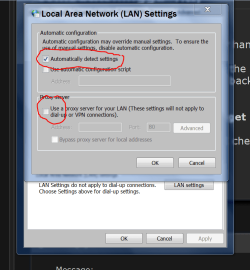
Verify these settings. Then reboot and give it a try.

Proxy settings.PNG
 

My Computer My Computer

At a glance

Windows 10 Pro. 64/ version 1709 Windows 7 Pr...Intel i7-6800K @ 4.3Corsair Platinum 16 gig @2400EVGA GTX 1070 OC
Computer type
PC/Desktop
Computer Manufacturer/Model Number
Home made Desktop
OS
Windows 10 Pro. 64/ version 1709 Windows 7 Pro/64
CPU
Intel i7-6800K @ 4.3
Motherboard
ASUS X-99 Deluxe II
Memory
Corsair Platinum 16 gig @2400
Graphics Card(s)
EVGA GTX 1070 OC
Monitor(s) Displays
Asus 27" LED LCD/VE278Q
Screen Resolution
1920-1080 or 1280-720 HDMI
Hard Drives
INTEL SSD 730-240 Gb Sata 3.0/
PSU
EVGA Platium 1200W
Case
Phanteks Luxe Tempered Glass 8 fans/ one radiator
Cooling
XSPC/ Water Cooled CPU
Keyboard
Das 4 Professional
Mouse
Logitech M705/MX Anywhere 2-S
Internet Speed
100 mbits
Antivirus
Microsoft Security Essentials/ Malwarebytes Premium 3.0/ SAS
Browser
I.E. 11 default/Firefox/ ISP Time Warner Cable/Spectrum
Other Info
LG BluRay Burner/
Sound system-KLipsch-THX/
Icy Dock ssd Hot Swap bays.

My Computer My Computer

At a glance

Win-7-Pro64bit 7-H-Prem-64biti7-5930K 2nd i9-9940x both water blocked VRM'...Trident-z 3200C14 2nd Trident-z 3600C16EVGA 1080ti ftw3 2nd Titan Xp both water blocked
Computer type
PC/Desktop
Computer Manufacturer/Model Number
Custom assembled by me :}
OS
Win-7-Pro64bit 7-H-Prem-64bit
CPU
i7-5930K 2nd i9-9940x both water blocked VRM's too
Motherboard
ASUS SABERTOOTH X99 2nd ASUS x299 Apex
Memory
Trident-z 3200C14 2nd Trident-z 3600C16
Graphics Card(s)
EVGA 1080ti ftw3 2nd Titan Xp both water blocked
Sound Card
Built-in Realtek
Monitor(s) Displays
1-AOC G2460PG 24"G-Sync 144Hz/ 2nd 1-ASUS VG248QE 24" 144Hz
Screen Resolution
1920 x 1080 144Hz
Hard Drives
2-Samsung M.2 Evo & Evo Plus
2-Samsung 850 EVO 500GB SSD's/ 3-2.5 W.D. Black 1tb-&3-1tb/3-3.5 WD Black 1tb hdd's
PSU
EVGA SuperNOVA 1000-P2 2nd 1200-P2
Case
2-Corsair Obsidian Series 450D Black ATX Mid Tower
Cooling
Custom water loops
Keyboard
Logitech G710+/ 2nd Logitech G910
Mouse
2-RedDragon M901 Perdition 16400 dpi Gaming mouse = wired
Internet Speed
Comcast Ping 19ms 89.31mbps download speed 6.12mbps upload
Antivirus
Malwarebytes Pro/ Superantispyware Pro
Browser
FireFox & Pale moon
Other Info
2nd ASUS X299 Apex/Intel i9-9940x with Custom water loop/7H-Prem-x64/Corsair 450D case/Ram Trident-z 3600C16 4x8gb / Samsung970Evo plus 500gb SSD/Dual ssd EZ swap evo/PSU EVGA SuperNova 1200w-P2 80+Platinum/GPU Titan Xp /8-ML-140 on push-pull on 2-280GTX rads
Thanks for the suggestion Ladyback but no joy after the reboot:( That was the original setting before I got caught up in this problem and one troubleshooting tip I ran in to had me uncheck all of that. Neither option worked. Still, appreciate the support!
BTW - Nice work with the screen shots!
 
Last edited:

My Computer My Computer

At a glance

Windows 7 Home x64ACPI x64-based PC
Computer type
Laptop
Computer Manufacturer/Model Number
Toshiba Satellite
OS
Windows 7 Home x64
CPU
ACPI x64-based PC
Hard Drives
JMCR SD SCSI
Antivirus
Malewarebytes
Browser
Firefox
Fixes Tried
For I.E. 11 I’ve tried a reset,
There are a few ways to reset IE.
You might want to try these steps...
http://www.sevenforums.com/tutorials/1222-internet-explorer-reset.html
...including step 5.

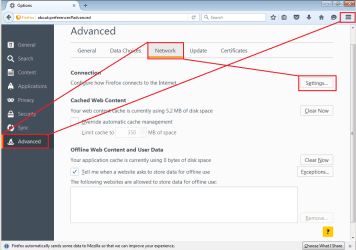
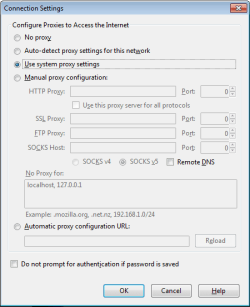
Also, do your Advanced Network settings within Firefox look like this:

FF1.PNG

FF2.PNG

I am not suggesting that you change any settings within Firefox. I'm just asking.


Does IE work when you boot into the Safe Mode with Networking?


Does IE work when you clean boot?
http://www.sevenforums.com/tutorial...ation-conflicts-performing-clean-startup.html
 

My Computer My Computer

At a glance

W7 Pro SP1 64biti78GBIntel HD Graphics
Computer type
Laptop
Computer Manufacturer/Model Number
Employer provided Dell Latitude
OS
W7 Pro SP1 64bit
CPU
i7
Memory
8GB
Graphics Card(s)
Intel HD Graphics
Hard Drives
crappy SSD
Antivirus
Employer mandated Symantec Endpoint Protection
Browser
Pale Moon 64bit, IE11 64bit & Chrome 64bit
Thanks usernameissues. Yes, my Firefox settings do look like that. A fresh boot didn't have any effect on IE and I never did go in to safe mode to run IE but your idea of different ways to reset IE was a good one.

I took the advice from ThrashZone and used the SF IE Restorator tool which go me back up and running. I did several of the resets that the tool recommended but the one that probably worked was resetting the winsock.
 

My Computer My Computer

At a glance

Windows 7 Home x64ACPI x64-based PC
Computer type
Laptop
Computer Manufacturer/Model Number
Toshiba Satellite
OS
Windows 7 Home x64
CPU
ACPI x64-based PC
Hard Drives
JMCR SD SCSI
Antivirus
Malewarebytes
Browser
Firefox
Thank you ThrashZone!

The SF IE Restorator tool did it. I'm guessing the reset that was the one that worked was resetting winsock.

Funny thing though...

Right after the fix hell was unleashed on my laptop with a flood of maleware.

It took me a couple of hours to clean it all up and get the system stable but everything is locked down now. I'm a happy camper!


  • Malewarebytes is updating
  • My new software install has gone through
  • Adobe Flash is updating
  • IE is working although I don't use it
Thank you and God bless all of you at SevenForums! This was my first visit and you all helped me with an issue that I had been struggling with for months.
 

My Computer My Computer

At a glance

Windows 7 Home x64ACPI x64-based PC
Computer type
Laptop
Computer Manufacturer/Model Number
Toshiba Satellite
OS
Windows 7 Home x64
CPU
ACPI x64-based PC
Hard Drives
JMCR SD SCSI
Antivirus
Malewarebytes
Browser
Firefox
Good to hear :)
Yep most issues you need to do all of the suggestions there for best results and most likely a restart.
 

My Computer My Computer

At a glance

Win-7-Pro64bit 7-H-Prem-64biti7-5930K 2nd i9-9940x both water blocked VRM'...Trident-z 3200C14 2nd Trident-z 3600C16EVGA 1080ti ftw3 2nd Titan Xp both water blocked
Computer type
PC/Desktop
Computer Manufacturer/Model Number
Custom assembled by me :}
OS
Win-7-Pro64bit 7-H-Prem-64bit
CPU
i7-5930K 2nd i9-9940x both water blocked VRM's too
Motherboard
ASUS SABERTOOTH X99 2nd ASUS x299 Apex
Memory
Trident-z 3200C14 2nd Trident-z 3600C16
Graphics Card(s)
EVGA 1080ti ftw3 2nd Titan Xp both water blocked
Sound Card
Built-in Realtek
Monitor(s) Displays
1-AOC G2460PG 24"G-Sync 144Hz/ 2nd 1-ASUS VG248QE 24" 144Hz
Screen Resolution
1920 x 1080 144Hz
Hard Drives
2-Samsung M.2 Evo & Evo Plus
2-Samsung 850 EVO 500GB SSD's/ 3-2.5 W.D. Black 1tb-&3-1tb/3-3.5 WD Black 1tb hdd's
PSU
EVGA SuperNOVA 1000-P2 2nd 1200-P2
Case
2-Corsair Obsidian Series 450D Black ATX Mid Tower
Cooling
Custom water loops
Keyboard
Logitech G710+/ 2nd Logitech G910
Mouse
2-RedDragon M901 Perdition 16400 dpi Gaming mouse = wired
Internet Speed
Comcast Ping 19ms 89.31mbps download speed 6.12mbps upload
Antivirus
Malwarebytes Pro/ Superantispyware Pro
Browser
FireFox & Pale moon
Other Info
2nd ASUS X299 Apex/Intel i9-9940x with Custom water loop/7H-Prem-x64/Corsair 450D case/Ram Trident-z 3600C16 4x8gb / Samsung970Evo plus 500gb SSD/Dual ssd EZ swap evo/PSU EVGA SuperNova 1200w-P2 80+Platinum/GPU Titan Xp /8-ML-140 on push-pull on 2-280GTX rads
I've been having this issue as well, after reading this thread and others I narrowed it down to the LAN settings. This advice seems to fix it in the short term and allows me to navigate the web with no problems.

turn the proxy off, try again

Roy

My problem is that the changed setting keep reverting back to using the proxy. There is an address in the advanced field in the LAN settings (127.0.0.1 port 13901) that keeps coming back after I remove them from the field as well.

I have also gone into advanced settings in internet options and unchecked the "Use HTTP 1.1 through proxy connections" setting, but it reverts back too.

I traced the port to a service called "jsip.exe" but cannot find a way to stop the service. The only thing close I could find in googling the file was Jjsip which is a java library. Could this be ...something?

This is very frustrating and I appreciate any advice I can get here.
 

My Computer My Computer

At a glance

Win 7 Pro 64-bit (6.1, build 7601)intel core i7-4770 cpu @ 3,40 GHz (8 cpu's), ...16384 MB RamNVIDIA GeForce GTX 660
Computer type
PC/Desktop
Computer Manufacturer/Model Number
Dell XPS 8700
OS
Win 7 Pro 64-bit (6.1, build 7601)
CPU
intel core i7-4770 cpu @ 3,40 GHz (8 cpu's), ~ 3,4GHz
Memory
16384 MB Ram
Graphics Card(s)
NVIDIA GeForce GTX 660
Antivirus
Microsoft Security Essentials
Browser
IE 11
Hi and welcome to SevenForums,
Seems that is associated with a program called TODO which might be listed in your programs and features list :/
 

My Computer My Computer

At a glance

Win-7-Pro64bit 7-H-Prem-64biti7-5930K 2nd i9-9940x both water blocked VRM'...Trident-z 3200C14 2nd Trident-z 3600C16EVGA 1080ti ftw3 2nd Titan Xp both water blocked
Computer type
PC/Desktop
Computer Manufacturer/Model Number
Custom assembled by me :}
OS
Win-7-Pro64bit 7-H-Prem-64bit
CPU
i7-5930K 2nd i9-9940x both water blocked VRM's too
Motherboard
ASUS SABERTOOTH X99 2nd ASUS x299 Apex
Memory
Trident-z 3200C14 2nd Trident-z 3600C16
Graphics Card(s)
EVGA 1080ti ftw3 2nd Titan Xp both water blocked
Sound Card
Built-in Realtek
Monitor(s) Displays
1-AOC G2460PG 24"G-Sync 144Hz/ 2nd 1-ASUS VG248QE 24" 144Hz
Screen Resolution
1920 x 1080 144Hz
Hard Drives
2-Samsung M.2 Evo & Evo Plus
2-Samsung 850 EVO 500GB SSD's/ 3-2.5 W.D. Black 1tb-&3-1tb/3-3.5 WD Black 1tb hdd's
PSU
EVGA SuperNOVA 1000-P2 2nd 1200-P2
Case
2-Corsair Obsidian Series 450D Black ATX Mid Tower
Cooling
Custom water loops
Keyboard
Logitech G710+/ 2nd Logitech G910
Mouse
2-RedDragon M901 Perdition 16400 dpi Gaming mouse = wired
Internet Speed
Comcast Ping 19ms 89.31mbps download speed 6.12mbps upload
Antivirus
Malwarebytes Pro/ Superantispyware Pro
Browser
FireFox & Pale moon
Other Info
2nd ASUS X299 Apex/Intel i9-9940x with Custom water loop/7H-Prem-x64/Corsair 450D case/Ram Trident-z 3600C16 4x8gb / Samsung970Evo plus 500gb SSD/Dual ssd EZ swap evo/PSU EVGA SuperNova 1200w-P2 80+Platinum/GPU Titan Xp /8-ML-140 on push-pull on 2-280GTX rads
Hello, thank you for the welcome and the reply.

I do not see a listing called TODO in Programs and features. Although I do see jsip there.

In doing a little more digging with the name and not the extension I found this ..

jSIP

It seems it is a file written for use in chat rooms and other IM programs. The dependencies say that it is not dependent on anything nor did it show anything dependent on it.

As it is in programs and features and the option to uninstall/change is open, do you think it would be safe to do so?

The option to stop the program in "services" is on, but when I choose it says access denied.
 

My Computer My Computer

At a glance

Win 7 Pro 64-bit (6.1, build 7601)intel core i7-4770 cpu @ 3,40 GHz (8 cpu's), ...16384 MB RamNVIDIA GeForce GTX 660
Computer type
PC/Desktop
Computer Manufacturer/Model Number
Dell XPS 8700
OS
Win 7 Pro 64-bit (6.1, build 7601)
CPU
intel core i7-4770 cpu @ 3,40 GHz (8 cpu's), ~ 3,4GHz
Memory
16384 MB Ram
Graphics Card(s)
NVIDIA GeForce GTX 660
Antivirus
Microsoft Security Essentials
Browser
IE 11
Hi,
Use clean boot to disable everything except your security which is what by the way ?
Use Clean boot,
http://www.sevenforums.com/tutorial...ation-conflicts-performing-clean-startup.html

If you joy uninstalling it with clean boot use safe mode with networking
http://www.sevenforums.com/tutorials/69585-safe-mode.html

After wards review Jacee’s instructions to run Adwcleaner here post #7,
Ignore the title of the thread,
http://www.sevenforums.com/system-security/316404-instant-savings-app.html
On the BleepingComputer site use the button that looks like this,
adwcleaner-button.JPG

You can use these free tools to see if they find anything,
Manually Update them before running full scans,
Try not to use your computer while the scans are running, (one at a time of course).
See this tutorial on how to download and run Malwarebytes,
http://www.sevenforums.com/tutorials/338716-malwarebytes-anti-malware-free.html

Also use the Custom scan option not the Threat scan,
Malwarebytes | Free Anti-Malware Detection & Removal Software
SAS is safe to remove anything it finds ;)
SUPERAntiSpyware | Remove Malware | Remove Spyware - AntiMalware, AntiSpyware, AntiAdware!
 

My Computer My Computer

At a glance

Win-7-Pro64bit 7-H-Prem-64biti7-5930K 2nd i9-9940x both water blocked VRM'...Trident-z 3200C14 2nd Trident-z 3600C16EVGA 1080ti ftw3 2nd Titan Xp both water blocked
Computer type
PC/Desktop
Computer Manufacturer/Model Number
Custom assembled by me :}
OS
Win-7-Pro64bit 7-H-Prem-64bit
CPU
i7-5930K 2nd i9-9940x both water blocked VRM's too
Motherboard
ASUS SABERTOOTH X99 2nd ASUS x299 Apex
Memory
Trident-z 3200C14 2nd Trident-z 3600C16
Graphics Card(s)
EVGA 1080ti ftw3 2nd Titan Xp both water blocked
Sound Card
Built-in Realtek
Monitor(s) Displays
1-AOC G2460PG 24"G-Sync 144Hz/ 2nd 1-ASUS VG248QE 24" 144Hz
Screen Resolution
1920 x 1080 144Hz
Hard Drives
2-Samsung M.2 Evo & Evo Plus
2-Samsung 850 EVO 500GB SSD's/ 3-2.5 W.D. Black 1tb-&3-1tb/3-3.5 WD Black 1tb hdd's
PSU
EVGA SuperNOVA 1000-P2 2nd 1200-P2
Case
2-Corsair Obsidian Series 450D Black ATX Mid Tower
Cooling
Custom water loops
Keyboard
Logitech G710+/ 2nd Logitech G910
Mouse
2-RedDragon M901 Perdition 16400 dpi Gaming mouse = wired
Internet Speed
Comcast Ping 19ms 89.31mbps download speed 6.12mbps upload
Antivirus
Malwarebytes Pro/ Superantispyware Pro
Browser
FireFox & Pale moon
Other Info
2nd ASUS X299 Apex/Intel i9-9940x with Custom water loop/7H-Prem-x64/Corsair 450D case/Ram Trident-z 3600C16 4x8gb / Samsung970Evo plus 500gb SSD/Dual ssd EZ swap evo/PSU EVGA SuperNova 1200w-P2 80+Platinum/GPU Titan Xp /8-ML-140 on push-pull on 2-280GTX rads
I use Microsoft Security Essentials for my security.

I tried to uninstall via Programs and Features but it took me to a long defunct uninstall page. Attempting to stop jsip in processes said that it was in use by another program. I thought it may be an old Ventrillo install that I don't use anymore so I tried to remove that only to find that I don't have admin access to the folder even though I am the admin on this PC and network. (home system)

With that I downloaded SF IE Restorator and ran it. I then ran a full scan and uncovered 5 malicious java files which were then fixed by quarantining 3 and removing 2. It did not fix the issue as far as I can tell. I had to reset LAN right away but have not had a problem with the last few pages I navigated thru.

I will monitor the issue tonight and see if it reoccurs. If it does I will run thru the instructions you have posted.

I'll be back tomorrow, hopefully with good news.

tyvm :)
 
Last edited:

My Computer My Computer

At a glance

Win 7 Pro 64-bit (6.1, build 7601)intel core i7-4770 cpu @ 3,40 GHz (8 cpu's), ...16384 MB RamNVIDIA GeForce GTX 660
Computer type
PC/Desktop
Computer Manufacturer/Model Number
Dell XPS 8700
OS
Win 7 Pro 64-bit (6.1, build 7601)
CPU
intel core i7-4770 cpu @ 3,40 GHz (8 cpu's), ~ 3,4GHz
Memory
16384 MB Ram
Graphics Card(s)
NVIDIA GeForce GTX 660
Antivirus
Microsoft Security Essentials
Browser
IE 11
Ok, Although LF IE Restorer was able to uncover some malicious files that several previous scans didn't see, it still did not fix the issue.

I asked my night owl brother (my IT guy) to go over the instructions in your post. It took him all night but he was able to find a solution.

He took one of the programs (farbar) and modified it to look for the jsip.exe file and the proxy address it was using and with that was able to isolate them and remove them. My browser is now faster than it has ever been.

Thank you very much for the help. It was timely and on the spot.

On a related note. I discovered that the reason there were files that I had no admin control over was because they were on my E drive. Which is my hard drive from my old PC, which I had simply installed in this one to make it easy to transfer stuff over. ...it was looking for the credentials from that computer.
 

My Computer My Computer

At a glance

Win 7 Pro 64-bit (6.1, build 7601)intel core i7-4770 cpu @ 3,40 GHz (8 cpu's), ...16384 MB RamNVIDIA GeForce GTX 660
Computer type
PC/Desktop
Computer Manufacturer/Model Number
Dell XPS 8700
OS
Win 7 Pro 64-bit (6.1, build 7601)
CPU
intel core i7-4770 cpu @ 3,40 GHz (8 cpu's), ~ 3,4GHz
Memory
16384 MB Ram
Graphics Card(s)
NVIDIA GeForce GTX 660
Antivirus
Microsoft Security Essentials
Browser
IE 11
Back
Top