28,542 TMP files and Disk Cleaner no help.

Stevekir.

Those .FFS_TMP files are associated with your Free File Sync program. Refer to this website.

FreeFileSync / Discussion / Help:Orphaned .FFS_TMP files in target directories

Unfortunately they don't say how to delete them.

What version of FFS are you running, it seems that later versions permanently delete the .ffs_tmp files. I think from what I read on the web it was version 5.21.

It might be worth using the FFS support or help to see if they can help you.
 

My Computer My Computer

At a glance

Windows 7 Home Premium 64 bit sp1Intel i5 3570 3.4Ghz Ivy Bridge SKT 1155 quad...G-Skill Rip Jaws 16Gb (8x2) DDR3 -1600 PC3 12...Gigabyte NVIDIA GT610 1Gb DDR3 810/1200 PCI-E...
Computer type
PC/Desktop
Computer Manufacturer/Model Number
Self built using existing case
OS
Windows 7 Home Premium 64 bit sp1
CPU
Intel i5 3570 3.4Ghz Ivy Bridge SKT 1155 quad core
Motherboard
Gigabyte Z77-HD3 SKT 1155 2xSata 3, 4x USB 3.0
Memory
G-Skill Rip Jaws 16Gb (8x2) DDR3 -1600 PC3 12800 CL 10 red
Graphics Card(s)
Gigabyte NVIDIA GT610 1Gb DDR3 810/1200 PCI-E 2.0 Silent
Sound Card
NVIDIA High Definition & Realtech High Definition Audio
Monitor(s) Displays
2 x Philips 226V4L 16:9 aspect ratio
Screen Resolution
1920 x 1080 HD
Hard Drives
Samsung 840 Pro 256gb SSD, SATA 3.
Hitachi Touro Portable 1tb, USB 3.0 HDD used for image b/ups.
PSU
Corsair VS450
Case
Codeng
Cooling
PSU fan & CPU fan
Keyboard
Logitech
Mouse
Logitech Wireless trackball M570
Internet Speed
Wireless 3G. 3mg down & 550kb up.
Antivirus
Bitdefender Internet Security 2020
Browser
Opera (Current Version) & Firefox
Other Info
MS Office 2013 Pro. Davis weather station software. MGE Nova 600 avr UPS.
From post #1:
About 95% of the 28,542 files are of type FFS_TMP and are on the X: drive. The earliest Mod. Date of these is 11/06/2002. I have FreeFileSync (a backup program). Surely these don’t belong to it?

Therefore, why are all these files still there and how can I delete them?


In post #4 (which the OP might has missed), I try to convince Stevekir that they are from FreeFileSync:
See this info:
FreeFileSync / Discussion / Help:Orphaned .FFS_TMP files in target directories

Also, your screenshots indicate that you have Windows 10 installation files. Those take up 3GB to 6GB of hard drive space. If you do not plan in installing W10, You can use the Disk Cleanup tool to remove them or use this tool.
That link theorizes about how the files can be left behind.


In post #10, Stevekir is still not convinced of the origin of these files:
I am sure that nearly all these FFS temporary files have nothing to do with FreeFileSync.


Ranger4,
Maybe you can convince Stevekir that they are from FreeFileSync with the same link :-)
[You raise some good questions about FreeFileSync versions.]
Stevekir.

Those .FFS_TMP files are associated with your Free File Sync program. Refer to this website.

FreeFileSync / Discussion / Help:Orphaned .FFS_TMP files in target directories

Unfortunately they don't say how to delete them.

What version of FFS are you running, it seems that later versions permanently delete the .ffs_tmp files. I think from what I read on the web it was version 5.21.

It might be worth using the FFS support or help to see if they can help you.


My point of going thru this history is:
Stevekir has not mentioned dealing with the W10 files that show in his screenshots. Given how unstable his computer is, I doubt that he wants to install W10 over top of this W7 install.


Stevekir,
Please see post #4 or the info quoted above to deal with those W10 files. They are probably 3GB to 6GB of files that you probably don't want. Callender has corrected posts #16. That should get rid of those ffs_tmp files. Or, use Callender's info in post #20. If you are now convinced that these thousands of files are indeed on your computer because of FreeFileSync, then work with Ranger4 to make sure you have a good version of that app.


...just trying to help you remove those W10 files...
 

My Computer My Computer

At a glance

W7 Pro SP1 64biti78GBIntel HD Graphics
Computer type
Laptop
Computer Manufacturer/Model Number
Employer provided Dell Latitude
OS
W7 Pro SP1 64bit
CPU
i7
Memory
8GB
Graphics Card(s)
Intel HD Graphics
Hard Drives
crappy SSD
Antivirus
Employer mandated Symantec Endpoint Protection
Browser
Pale Moon 64bit, IE11 64bit & Chrome 64bit
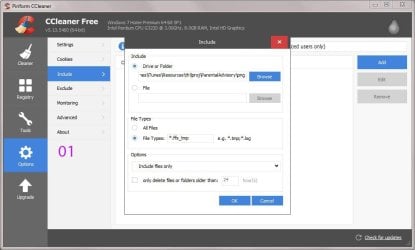
You have to specify the directory. You can't just point Ccleaner a drive X and expect it to find and clear all temp files.

Example - but make sure you get the full path to the folder. It's not clear from your screenshot.Ccleaner only removes what you specify in the settings. It's wise to click on "Analyze" then preview the results.

Edit:

You need to type *.ffs_tmp rather than what is shown in the screenshot.
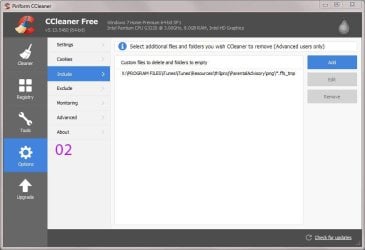
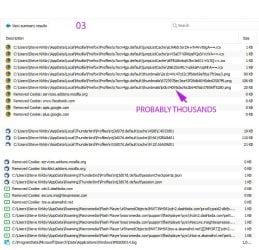
OK. Here goes again. I did the above, (without excluding C drive and got a load of files in C: ! Images 01 to 03.


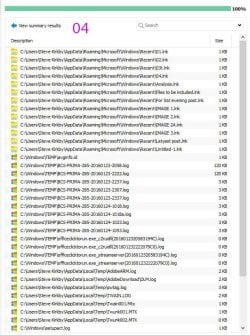
I excluded C drive (I typed "C:", no quotes, and it chose "C:\*.*" no quotes. It produced a load of files in C: ! (Image 05).

In both cases, Ccleaner has once again not confirmed that they are all files of type *.FFF_tmp which does not give me confidence that these would be safe to delete.

>> Would they be safe to delete anyway?

>> Why is Ccleaner ignoring the X drive?

I am digesting the other posts.
 

Attachments

  • 01.JPG
    01.JPG
    71.2 KB · Views: 2
  • 02.JPG
    02.JPG
    62.7 KB · Views: 2
  • 03.jpg
    03.jpg
    137.5 KB · Views: 2
  • 04.JPG
    04.JPG
    138.8 KB · Views: 2

My Computer My Computer

At a glance

Windows 7 Home Premium 64bitIntel Pentium Edition G3220 3.0 GHz8 GB DDR3 1600 MHz DIMMNot Known
Computer type
PC/Desktop
Computer Manufacturer/Model Number
Gigabyte ATX case with 500 W power supply GZ-M1
OS
Windows 7 Home Premium 64bit
CPU
Intel Pentium Edition G3220 3.0 GHz
Motherboard
Gigabyte Socket 1150 MicroATX Mot Ultra Durable, GA-H81M-S2H
Memory
8 GB DDR3 1600 MHz DIMM
Graphics Card(s)
Not Known
Sound Card
Not known
Monitor(s) Displays
Samsung LS24D590 23.6"
Screen Resolution
1920 x 1080
Hard Drives
256 GB Solid State Drive (C: on which Windows 7 is installed)-
1 TB internal conventional HD (X:)-
Two WD "Elements" " 2TB USB drives as backups
PSU
500 W
Case
Gigabyte ATX case
Cooling
Several fans!
Keyboard
Accuratus 301 USB Compact, white.
Mouse
Microsoft Basic Optical Mouse v2.0, two-button, tethered
Internet Speed
10 to 12 Mb per second
Antivirus
Kaspersky Internet Security 2016, Malwarebytes (paid)
Browser
Firefox (ocassionally Safari)
Other Info
The 256 GB SSD (C:) also has Adobe Photoshop CS6 and InDesign CS6, MS Office, Adobe Lightroom, and other small programs.
FYI:

The file extension that the OP has thousands of is [dot]FFS[underscore]TMP

The suggestions posted above do not seem to be searching for that.

Post #14 claims to be looking for _tmp, but the screenshots show [dot][underscore]tmp.

Searching for [dot]TMP is not going to find [dot]FFS[underscore]TMP

Searching for [dot][underscore]TMP is not going to find [dot]FFS[underscore]TMP

Try searching for [dot]FFS[underscore]TMP
(e.g. .ffs_tmp)
Ccleaner refused to accept [dot]FFS[underscore]TMP, stating it was "unsafe", so I had to include the [asterisk].
 

My Computer My Computer

At a glance

Windows 7 Home Premium 64bitIntel Pentium Edition G3220 3.0 GHz8 GB DDR3 1600 MHz DIMMNot Known
Computer type
PC/Desktop
Computer Manufacturer/Model Number
Gigabyte ATX case with 500 W power supply GZ-M1
OS
Windows 7 Home Premium 64bit
CPU
Intel Pentium Edition G3220 3.0 GHz
Motherboard
Gigabyte Socket 1150 MicroATX Mot Ultra Durable, GA-H81M-S2H
Memory
8 GB DDR3 1600 MHz DIMM
Graphics Card(s)
Not Known
Sound Card
Not known
Monitor(s) Displays
Samsung LS24D590 23.6"
Screen Resolution
1920 x 1080
Hard Drives
256 GB Solid State Drive (C: on which Windows 7 is installed)-
1 TB internal conventional HD (X:)-
Two WD "Elements" " 2TB USB drives as backups
PSU
500 W
Case
Gigabyte ATX case
Cooling
Several fans!
Keyboard
Accuratus 301 USB Compact, white.
Mouse
Microsoft Basic Optical Mouse v2.0, two-button, tethered
Internet Speed
10 to 12 Mb per second
Antivirus
Kaspersky Internet Security 2016, Malwarebytes (paid)
Browser
Firefox (ocassionally Safari)
Other Info
The 256 GB SSD (C:) also has Adobe Photoshop CS6 and InDesign CS6, MS Office, Adobe Lightroom, and other small programs.
Forget Ccleaner for the moment. It's primarily for deleting junk files on your windows partition and I did not read your original post properly and appreciate that the problem files are located on a different drive.

See Post #16

Okay so maybe this would be a better solution if you are okay with running commands.

Click "Computer" and highlight drive X then hold [Shift+Right Click] when clicking Drive X

Choose "Open Command Window Here"

In the command prompt window type:

attrib -a -r -s -h X:\*.ffs_tmp /s

Press Enter

wait for it to finish - you see a new command prompt

Type:

del /s X:\*.ffs_tmp

Press Enter

That should hopefully sort it.

Or see Post #20 for another method.
 

My Computer My Computer

At a glance

Microsoft Windows 7 Home Premium 64-bit 7601 ...AMD C-60 APU with Radeon(tm) HD Graphics4.00 GBAMD Radeon HD 6290 Graphics
Computer type
Laptop
Computer Manufacturer/Model Number
ASUS
OS
Microsoft Windows 7 Home Premium 64-bit 7601 Multiprocessor Free Service Pack 1
CPU
AMD C-60 APU with Radeon(tm) HD Graphics
Motherboard
ASUSTeK COMPUTER INC. X501U
Memory
4.00 GB
Graphics Card(s)
AMD Radeon HD 6290 Graphics
Sound Card
(1) AMD High Definition Audio Device (2) Realtek High Defi
Screen Resolution
1366 x 768 x 32 bits (4294967296 colors) @ 60 Hz
Hard Drives
Hitachi HTS545050A7E380 SATA Disk Device
Antivirus
Comodo CIS & FW, SecureAplus App Whitelisting, Threatfire
Browser
Cyberfox 64bit, Opera 64bit, Airfox
Other Info
Spy-The-Spy, HitmanPro.Alert, Norton Connect Safe, MJRegWatcher, BitDefender TrafficLight, Voodoo Shield, Zemana AntiMalware
I excluded C drive (I typed "C:", no quotes, and it chose "C:\*.*" no quotes. It produced a load of files in C: ! (Image 05).

In both cases, Ccleaner has once again not confirmed that they are all files of type *.FFF_tmp which does not give me confidence that these would be safe to delete.

>> Would they be safe to delete anyway?

>> Why is Ccleaner ignoring the X drive?

I am digesting the other posts.

Forget Ccleaner for now. If you want to delete stuff using it then you need to understand how to configure it - particularly regarding cookies that you maight want to keep.

It ignores X drive because it's main purpose is to clean junk files on your windows partition.

You can add custom files and folders on drive X and specify particular file extensions or just choose to delete folders/ subfolders but that would require some effort.

Also see the tutorial here:

http://www.sevenforums.com/tutorials/306648-ccleaner-delete-junk-files.html
 

My Computer My Computer

At a glance

Microsoft Windows 7 Home Premium 64-bit 7601 ...AMD C-60 APU with Radeon(tm) HD Graphics4.00 GBAMD Radeon HD 6290 Graphics
Computer type
Laptop
Computer Manufacturer/Model Number
ASUS
OS
Microsoft Windows 7 Home Premium 64-bit 7601 Multiprocessor Free Service Pack 1
CPU
AMD C-60 APU with Radeon(tm) HD Graphics
Motherboard
ASUSTeK COMPUTER INC. X501U
Memory
4.00 GB
Graphics Card(s)
AMD Radeon HD 6290 Graphics
Sound Card
(1) AMD High Definition Audio Device (2) Realtek High Defi
Screen Resolution
1366 x 768 x 32 bits (4294967296 colors) @ 60 Hz
Hard Drives
Hitachi HTS545050A7E380 SATA Disk Device
Antivirus
Comodo CIS & FW, SecureAplus App Whitelisting, Threatfire
Browser
Cyberfox 64bit, Opera 64bit, Airfox
Other Info
Spy-The-Spy, HitmanPro.Alert, Norton Connect Safe, MJRegWatcher, BitDefender TrafficLight, Voodoo Shield, Zemana AntiMalware
Stevekir.

What version of FreeFileSync are you using. pleas refer to my Post #21 concerning the information on FFS.

I think the reason these .ffs_tmp files are being so hard to delete is that they are related to actual files that they have synchronised with, as part of the back up scheme.

As I suggested it might be best to contact the FFS support or help section to find out how you can delete these files.
 

My Computer My Computer

At a glance

Windows 7 Home Premium 64 bit sp1Intel i5 3570 3.4Ghz Ivy Bridge SKT 1155 quad...G-Skill Rip Jaws 16Gb (8x2) DDR3 -1600 PC3 12...Gigabyte NVIDIA GT610 1Gb DDR3 810/1200 PCI-E...
Computer type
PC/Desktop
Computer Manufacturer/Model Number
Self built using existing case
OS
Windows 7 Home Premium 64 bit sp1
CPU
Intel i5 3570 3.4Ghz Ivy Bridge SKT 1155 quad core
Motherboard
Gigabyte Z77-HD3 SKT 1155 2xSata 3, 4x USB 3.0
Memory
G-Skill Rip Jaws 16Gb (8x2) DDR3 -1600 PC3 12800 CL 10 red
Graphics Card(s)
Gigabyte NVIDIA GT610 1Gb DDR3 810/1200 PCI-E 2.0 Silent
Sound Card
NVIDIA High Definition & Realtech High Definition Audio
Monitor(s) Displays
2 x Philips 226V4L 16:9 aspect ratio
Screen Resolution
1920 x 1080 HD
Hard Drives
Samsung 840 Pro 256gb SSD, SATA 3.
Hitachi Touro Portable 1tb, USB 3.0 HDD used for image b/ups.
PSU
Corsair VS450
Case
Codeng
Cooling
PSU fan & CPU fan
Keyboard
Logitech
Mouse
Logitech Wireless trackball M570
Internet Speed
Wireless 3G. 3mg down & 550kb up.
Antivirus
Bitdefender Internet Security 2020
Browser
Opera (Current Version) & Firefox
Other Info
MS Office 2013 Pro. Davis weather station software. MGE Nova 600 avr UPS.
PROGRESS !

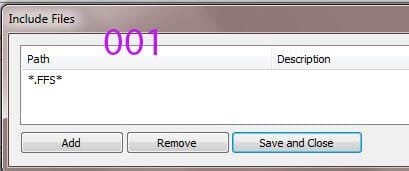
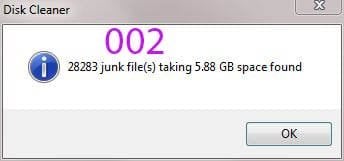
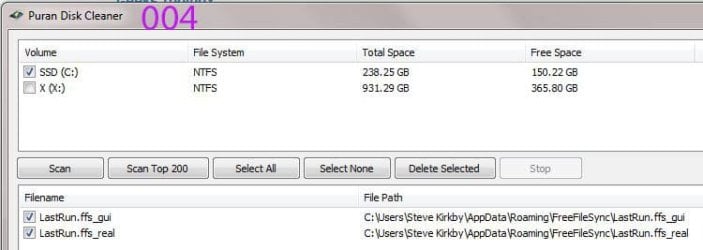
Please see images 001, 002, 003 (003 shows part only). 003 has corralled all my FFS files. 004 shows a similar run but for the C drive and the two files there are clearly associated with FreeFileSync. So Ranger 4 looks correct. usernameissues referred me to the FreeFileSync discussion site and it is now clear to me that the ffs_tmp files are from that program. (I couldn't believe that a program could spew out so much stuff.) That discussion was posted using FFS v. 5.12. Mine (the current) is 7.8 but it clearly has not bee modified.

It now seems safe to delete all of these in one go but for safety's sake I will start by selecting 10% and see how it goes, then the whole lot. If you don't hear from me for a while, its because my comp. is in dock!
 

Attachments

  • 001jpg.JPG
    001jpg.JPG
    25.7 KB · Views: 30
  • 002jpg.jpg
    002jpg.jpg
    23.6 KB · Views: 15
  • 003jpg.jpg
    003jpg.jpg
    99.7 KB · Views: 6
  • 004jpg.jpg
    004jpg.jpg
    39.7 KB · Views: 2

My Computer My Computer

At a glance

Windows 7 Home Premium 64bitIntel Pentium Edition G3220 3.0 GHz8 GB DDR3 1600 MHz DIMMNot Known
Computer type
PC/Desktop
Computer Manufacturer/Model Number
Gigabyte ATX case with 500 W power supply GZ-M1
OS
Windows 7 Home Premium 64bit
CPU
Intel Pentium Edition G3220 3.0 GHz
Motherboard
Gigabyte Socket 1150 MicroATX Mot Ultra Durable, GA-H81M-S2H
Memory
8 GB DDR3 1600 MHz DIMM
Graphics Card(s)
Not Known
Sound Card
Not known
Monitor(s) Displays
Samsung LS24D590 23.6"
Screen Resolution
1920 x 1080
Hard Drives
256 GB Solid State Drive (C: on which Windows 7 is installed)-
1 TB internal conventional HD (X:)-
Two WD "Elements" " 2TB USB drives as backups
PSU
500 W
Case
Gigabyte ATX case
Cooling
Several fans!
Keyboard
Accuratus 301 USB Compact, white.
Mouse
Microsoft Basic Optical Mouse v2.0, two-button, tethered
Internet Speed
10 to 12 Mb per second
Antivirus
Kaspersky Internet Security 2016, Malwarebytes (paid)
Browser
Firefox (ocassionally Safari)
Other Info
The 256 GB SSD (C:) also has Adobe Photoshop CS6 and InDesign CS6, MS Office, Adobe Lightroom, and other small programs.
Well if you get any message like "cannot delete files as it is in use" then leave those ones alone.
 

My Computer My Computer

At a glance

Microsoft Windows 7 Home Premium 64-bit 7601 ...AMD C-60 APU with Radeon(tm) HD Graphics4.00 GBAMD Radeon HD 6290 Graphics
Computer type
Laptop
Computer Manufacturer/Model Number
ASUS
OS
Microsoft Windows 7 Home Premium 64-bit 7601 Multiprocessor Free Service Pack 1
CPU
AMD C-60 APU with Radeon(tm) HD Graphics
Motherboard
ASUSTeK COMPUTER INC. X501U
Memory
4.00 GB
Graphics Card(s)
AMD Radeon HD 6290 Graphics
Sound Card
(1) AMD High Definition Audio Device (2) Realtek High Defi
Screen Resolution
1366 x 768 x 32 bits (4294967296 colors) @ 60 Hz
Hard Drives
Hitachi HTS545050A7E380 SATA Disk Device
Antivirus
Comodo CIS & FW, SecureAplus App Whitelisting, Threatfire
Browser
Cyberfox 64bit, Opera 64bit, Airfox
Other Info
Spy-The-Spy, HitmanPro.Alert, Norton Connect Safe, MJRegWatcher, BitDefender TrafficLight, Voodoo Shield, Zemana AntiMalware
Also your approach is good. Just test delete a few files rather than 10% which seems a lot to risk.
 

My Computer My Computer

At a glance

Microsoft Windows 7 Home Premium 64-bit 7601 ...AMD C-60 APU with Radeon(tm) HD Graphics4.00 GBAMD Radeon HD 6290 Graphics
Computer type
Laptop
Computer Manufacturer/Model Number
ASUS
OS
Microsoft Windows 7 Home Premium 64-bit 7601 Multiprocessor Free Service Pack 1
CPU
AMD C-60 APU with Radeon(tm) HD Graphics
Motherboard
ASUSTeK COMPUTER INC. X501U
Memory
4.00 GB
Graphics Card(s)
AMD Radeon HD 6290 Graphics
Sound Card
(1) AMD High Definition Audio Device (2) Realtek High Defi
Screen Resolution
1366 x 768 x 32 bits (4294967296 colors) @ 60 Hz
Hard Drives
Hitachi HTS545050A7E380 SATA Disk Device
Antivirus
Comodo CIS & FW, SecureAplus App Whitelisting, Threatfire
Browser
Cyberfox 64bit, Opera 64bit, Airfox
Other Info
Spy-The-Spy, HitmanPro.Alert, Norton Connect Safe, MJRegWatcher, BitDefender TrafficLight, Voodoo Shield, Zemana AntiMalware
Re: your image:

380431d1453667664-28-542-tmp-files-disk-cleaner-no-help-001jpg.jpg


You should modify that to *.ffs_tmp otherwise you will delete ALL files with the .ffs extension.
 
Last edited:

My Computer My Computer

At a glance

Microsoft Windows 7 Home Premium 64-bit 7601 ...AMD C-60 APU with Radeon(tm) HD Graphics4.00 GBAMD Radeon HD 6290 Graphics
Computer type
Laptop
Computer Manufacturer/Model Number
ASUS
OS
Microsoft Windows 7 Home Premium 64-bit 7601 Multiprocessor Free Service Pack 1
CPU
AMD C-60 APU with Radeon(tm) HD Graphics
Motherboard
ASUSTeK COMPUTER INC. X501U
Memory
4.00 GB
Graphics Card(s)
AMD Radeon HD 6290 Graphics
Sound Card
(1) AMD High Definition Audio Device (2) Realtek High Defi
Screen Resolution
1366 x 768 x 32 bits (4294967296 colors) @ 60 Hz
Hard Drives
Hitachi HTS545050A7E380 SATA Disk Device
Antivirus
Comodo CIS & FW, SecureAplus App Whitelisting, Threatfire
Browser
Cyberfox 64bit, Opera 64bit, Airfox
Other Info
Spy-The-Spy, HitmanPro.Alert, Norton Connect Safe, MJRegWatcher, BitDefender TrafficLight, Voodoo Shield, Zemana AntiMalware
Re: your image:

380431d1453667664-28-542-tmp-files-disk-cleaner-no-help-001jpg.jpg


You should modify that to *.ffs_tmp otherwise you will delete ALL files with the .ffs extension.
SUCCESS! I searched for *.ffs_tmp during four tests of 50 each, testing my main programs, then all the rest. It took over 20 minutes and everything works.

Many thanks to you and the others for getting me through this.
............................................................
However, there is a mystery. Many of the deleted files have in their names major programs like Photoshop, Bridge, Lightroom and MS Office. (Image 1)

>> What on Earth was FreeFileSync doing accessing bits of these files? Surely backing up is a simple copy operation of the files produced by these programs.
............................................................
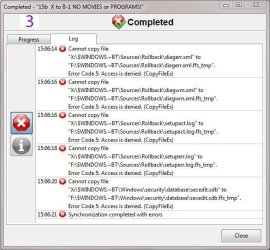
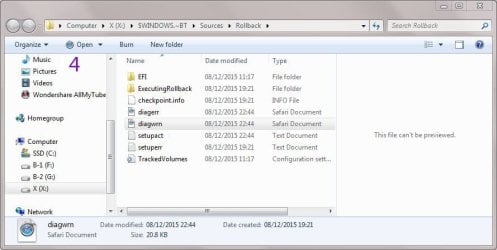
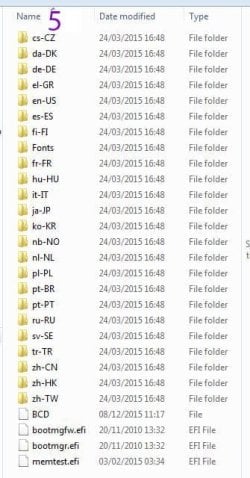
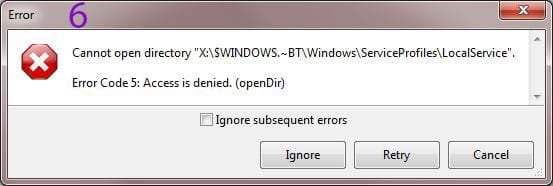
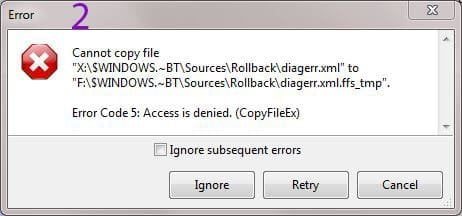
Returning to temporary files, when FreeFileSync starts every backup, it says it can't copy 6 files. Image 2 shows the particular error message for one of these, and image 3 a list of all of them. Image 4 shows the contents of the Rollback subfolder of one of them, image 5 the contents of a sub sub folder, and image 6 another window about an open directory. FFS offers to ignore these 6 files and I do so each time.

>> Should I delete these? If so, how?. And what do they mean?

Thanks again.

(This seems the last of this saga.)
 

Attachments

  • 1.jpg
    1.jpg
    34.3 KB · Views: 5
  • 3.JPG
    3.JPG
    88.6 KB · Views: 23
  • 4.jpg
    4.jpg
    61.4 KB · Views: 4
  • 5.JPG
    5.JPG
    58.7 KB · Views: 22
  • 6.JPG
    6.JPG
    36.7 KB · Views: 23
  • 2.JPG
    2.JPG
    32.9 KB · Views: 22

My Computer My Computer

At a glance

Windows 7 Home Premium 64bitIntel Pentium Edition G3220 3.0 GHz8 GB DDR3 1600 MHz DIMMNot Known
Computer type
PC/Desktop
Computer Manufacturer/Model Number
Gigabyte ATX case with 500 W power supply GZ-M1
OS
Windows 7 Home Premium 64bit
CPU
Intel Pentium Edition G3220 3.0 GHz
Motherboard
Gigabyte Socket 1150 MicroATX Mot Ultra Durable, GA-H81M-S2H
Memory
8 GB DDR3 1600 MHz DIMM
Graphics Card(s)
Not Known
Sound Card
Not known
Monitor(s) Displays
Samsung LS24D590 23.6"
Screen Resolution
1920 x 1080
Hard Drives
256 GB Solid State Drive (C: on which Windows 7 is installed)-
1 TB internal conventional HD (X:)-
Two WD "Elements" " 2TB USB drives as backups
PSU
500 W
Case
Gigabyte ATX case
Cooling
Several fans!
Keyboard
Accuratus 301 USB Compact, white.
Mouse
Microsoft Basic Optical Mouse v2.0, two-button, tethered
Internet Speed
10 to 12 Mb per second
Antivirus
Kaspersky Internet Security 2016, Malwarebytes (paid)
Browser
Firefox (ocassionally Safari)
Other Info
The 256 GB SSD (C:) also has Adobe Photoshop CS6 and InDesign CS6, MS Office, Adobe Lightroom, and other small programs.
Re: your image:

380431d1453667664-28-542-tmp-files-disk-cleaner-no-help-001jpg.jpg


You should modify that to *.ffs_tmp otherwise you will delete ALL files with the .ffs extension.
SUCCESS! I searched for *.ffs_tmp during four tests of 50 each, testing my main programs, then all the rest. It took over 20 minutes and everything works.

Many thanks to you and the others for getting me through this.
............................................................
However, there is a mystery. Many of the deleted files have in their names major programs like Photoshop, Bridge, Lightroom and MS Office. (Image 1)

>> What on Earth was FreeFileSync doing accessing bits of these files? Surely backing up is a simple copy operation of the files produced by these programs.

I know nothing about Free File Sync or it's settings as I have never used it. I'd guess that it's set to backup the directory where those original files are located.
............................................................
Returning to temporary files, when FreeFileSync starts every backup, it says it can't copy 6 files. Image 2 shows the particular error message for one of these, and image 3 a list of all of them. Image 4 shows the contents of the Rollback subfolder of one of them, image 5 the contents of a sub sub folder, and image 6 another window about an open directory. FFS offers to ignore these 6 files and I do so each time.

>> Should I delete these? If so, how?. And what do they mean?

They are Windows 10 Upgrade files that allow you to upgrade to Windows 10. They should not be removed if you are considering the free upgrade to Windows 10. However I'd say that it's probably wise to stick with Windows 7 at the moment until Windows 10 has become more stable.

Re: Windows 10 upgrade files removal. I'll leave that one for other members to help you with.

There is some info here - just read it for now:

Ultimate Outsider: Using GWX Control Panel to Permanently Remove the 'Get Windows 10' Icon

Ultimate Outsider: The GWX Control Panel FAQ (Frequently Asked Questions)
 
Last edited:

My Computer My Computer

At a glance

Microsoft Windows 7 Home Premium 64-bit 7601 ...AMD C-60 APU with Radeon(tm) HD Graphics4.00 GBAMD Radeon HD 6290 Graphics
Computer type
Laptop
Computer Manufacturer/Model Number
ASUS
OS
Microsoft Windows 7 Home Premium 64-bit 7601 Multiprocessor Free Service Pack 1
CPU
AMD C-60 APU with Radeon(tm) HD Graphics
Motherboard
ASUSTeK COMPUTER INC. X501U
Memory
4.00 GB
Graphics Card(s)
AMD Radeon HD 6290 Graphics
Sound Card
(1) AMD High Definition Audio Device (2) Realtek High Defi
Screen Resolution
1366 x 768 x 32 bits (4294967296 colors) @ 60 Hz
Hard Drives
Hitachi HTS545050A7E380 SATA Disk Device
Antivirus
Comodo CIS & FW, SecureAplus App Whitelisting, Threatfire
Browser
Cyberfox 64bit, Opera 64bit, Airfox
Other Info
Spy-The-Spy, HitmanPro.Alert, Norton Connect Safe, MJRegWatcher, BitDefender TrafficLight, Voodoo Shield, Zemana AntiMalware
Thank you.
 

My Computer My Computer

At a glance

Windows 7 Home Premium 64bitIntel Pentium Edition G3220 3.0 GHz8 GB DDR3 1600 MHz DIMMNot Known
Computer type
PC/Desktop
Computer Manufacturer/Model Number
Gigabyte ATX case with 500 W power supply GZ-M1
OS
Windows 7 Home Premium 64bit
CPU
Intel Pentium Edition G3220 3.0 GHz
Motherboard
Gigabyte Socket 1150 MicroATX Mot Ultra Durable, GA-H81M-S2H
Memory
8 GB DDR3 1600 MHz DIMM
Graphics Card(s)
Not Known
Sound Card
Not known
Monitor(s) Displays
Samsung LS24D590 23.6"
Screen Resolution
1920 x 1080
Hard Drives
256 GB Solid State Drive (C: on which Windows 7 is installed)-
1 TB internal conventional HD (X:)-
Two WD "Elements" " 2TB USB drives as backups
PSU
500 W
Case
Gigabyte ATX case
Cooling
Several fans!
Keyboard
Accuratus 301 USB Compact, white.
Mouse
Microsoft Basic Optical Mouse v2.0, two-button, tethered
Internet Speed
10 to 12 Mb per second
Antivirus
Kaspersky Internet Security 2016, Malwarebytes (paid)
Browser
Firefox (ocassionally Safari)
Other Info
The 256 GB SSD (C:) also has Adobe Photoshop CS6 and InDesign CS6, MS Office, Adobe Lightroom, and other small programs.
Back
Top