28,542 TMP files and Disk Cleaner no help.

Stevekir

New member
Member
VIP
Local time
4:40 PM
Messages
231
Layback Bear posted on:

Why do people get BSODs

concerning my problems about TMP files, and the topic boss told me off, but I want to reply to Layback Bear's helpful reply, which was:
----------------------------------------
"Just a suggestion to try.

You use AVG CloudCare Anti virus. AVG has a poor reputation from people on this forum.
From your specs..

Quote:
USB drives as backups
Internet Speed 10 to 12 Mb per second
Antivirus AVG CloudCare AntiVirus 2015 (Paid) Windows Defender (off)

Remove AVG, everything AVG from you system using their online tool and install MSE.

Then do a Disk Cleanup using this tutorial by Brink.

Disk Cleanup - Open and Use

Give it a try for awhile.
---------------------------------
My reply is:

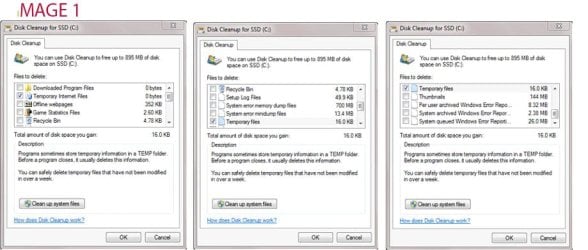
I still have 28,542 temporary files! After restarting my computer (no programs therefore running) I followed Brink's tutorial and ran Cleanmgr. It told me that I had about 8 GB of files. (I can’t remember whether these included the Wastebasket - it probably did.) I asked it to remove Temporary Internet Files and Temporary Files in my C: drive (an SSD) and my X: drive (an internal rotational drive holding all my Documents, Pictures etc. etc.) I also asked it to “Clean up system files” (by pressing the button). Image 1 shows the resulting cleanmgr window for the C: drive.

Cleanmgr was also asked to remove files from the X: drive and the results are at Image 2.

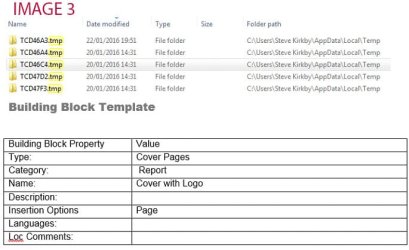
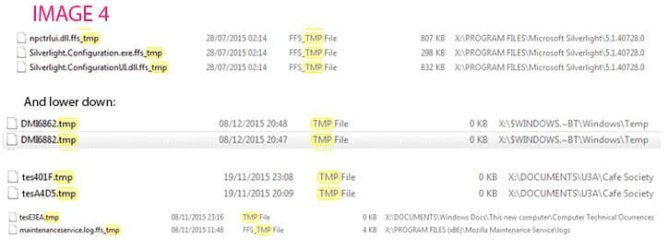
I used Cleanup several times. I restarted the computer but I still have 28,542 files, 95% whose titles end in TMP (after searching the computer for ”TMP”). Here are some examples.

There are about 40 folders and some are in Image 3. The TCD46A3.TMP contains a Word file in which is the Building Bloc Template image. The second has a file “sist02.xsl; the third “ieee2006officeonline.xsl

Further down the list are files shown in Image 4.

About 95% of the 28,542 files are of type FFS_TMP and are on the X: drive. The earliest Mod. Date of these is 11/06/2002. I have FreeFileSync (a backup program). Surely these don’t belong to it?

Therefore, why are all these files still there and how can I delete them?

Thanks
 

Attachments
  • Image 1t.jpg
    Image 1t.jpg
    70.5 KB · Views: 5
  • Image 2.jpg
    Image 2.jpg
    33.9 KB · Views: 53
  • Image 3.jpg
    Image 3.jpg
    53.7 KB · Views: 53
  • Image 4.jpg
    Image 4.jpg
    37.6 KB · Views: 5

My Computer My Computer

Computer type
PC/Desktop
Computer Manufacturer/Model Number
Gigabyte ATX case with 500 W power supply GZ-M1
OS
Windows 7 Home Premium 64bit
CPU
Intel Pentium Edition G3220 3.0 GHz
Motherboard
Gigabyte Socket 1150 MicroATX Mot Ultra Durable, GA-H81M-S2H
Memory
8 GB DDR3 1600 MHz DIMM
Graphics Card(s)
Not Known
Sound Card
Not known
Monitor(s) Displays
Samsung LS24D590 23.6"
Screen Resolution
1920 x 1080
Hard Drives
256 GB Solid State Drive (C: on which Windows 7 is installed)-
1 TB internal conventional HD (X:)-
Two WD "Elements" " 2TB USB drives as backups
PSU
500 W
Case
Gigabyte ATX case
Cooling
Several fans!
Keyboard
Accuratus 301 USB Compact, white.
Mouse
Microsoft Basic Optical Mouse v2.0, two-button, tethered
Internet Speed
10 to 12 Mb per second
Antivirus
Kaspersky Internet Security 2016, Malwarebytes (paid)
Browser
Firefox (ocassionally Safari)
Other Info
The 256 GB SSD (C:) also has Adobe Photoshop CS6 and InDesign CS6, MS Office, Adobe Lightroom, and other small programs.

My Computer My Computer

Computer type
PC/Desktop
Computer Manufacturer/Model Number
Custom assembled by me :}
OS
Win-7-Pro64bit 7-H-Prem-64bit
CPU
i7-5930K 2nd i9-9940x both water blocked VRM's too
Motherboard
ASUS SABERTOOTH X99 2nd ASUS x299 Apex
Memory
Trident-z 3200C14 2nd Trident-z 3600C16
Graphics Card(s)
EVGA 1080ti ftw3 2nd Titan Xp both water blocked
Sound Card
Built-in Realtek
Monitor(s) Displays
1-AOC G2460PG 24"G-Sync 144Hz/ 2nd 1-ASUS VG248QE 24" 144Hz
Screen Resolution
1920 x 1080 144Hz
Hard Drives
2-Samsung M.2 Evo & Evo Plus
2-Samsung 850 EVO 500GB SSD's/ 3-2.5 W.D. Black 1tb-&3-1tb/3-3.5 WD Black 1tb hdd's
PSU
EVGA SuperNOVA 1000-P2 2nd 1200-P2
Case
2-Corsair Obsidian Series 450D Black ATX Mid Tower
Cooling
Custom water loops
Keyboard
Logitech G710+/ 2nd Logitech G910
Mouse
2-RedDragon M901 Perdition 16400 dpi Gaming mouse = wired
Internet Speed
Comcast Ping 19ms 89.31mbps download speed 6.12mbps upload
Antivirus
Malwarebytes Pro/ Superantispyware Pro
Browser
FireFox & Pale moon
Other Info
2nd ASUS X299 Apex/Intel i9-9940x with Custom water loop/7H-Prem-x64/Corsair 450D case/Ram Trident-z 3600C16 4x8gb / Samsung970Evo plus 500gb SSD/Dual ssd EZ swap evo/PSU EVGA SuperNova 1200w-P2 80+Platinum/GPU Titan Xp /8-ML-140 on push-pull on 2-280GTX rads
Stevekir.

Win Disc Clean Up only deletes files when you actually shut down the computer. So reboot your computer after you have run Disc Clean Up. The reason it only deletes files on shut down is because some of the files might actually be in use & deleting those files could cause problems.

As a useful hint you can run Win Disc Clean Up as Administrator & that will remove old Windows Update files & Windows Error Reporting if you tick the boxes for those. To Run as Administrator, right click on Win Disc Clean Up & select Run as Administrator.
 

My Computer My Computer

Computer type
PC/Desktop
Computer Manufacturer/Model Number
Self built using existing case
OS
Windows 7 Home Premium 64 bit sp1
CPU
Intel i5 3570 3.4Ghz Ivy Bridge SKT 1155 quad core
Motherboard
Gigabyte Z77-HD3 SKT 1155 2xSata 3, 4x USB 3.0
Memory
G-Skill Rip Jaws 16Gb (8x2) DDR3 -1600 PC3 12800 CL 10 red
Graphics Card(s)
Gigabyte NVIDIA GT610 1Gb DDR3 810/1200 PCI-E 2.0 Silent
Sound Card
NVIDIA High Definition & Realtech High Definition Audio
Monitor(s) Displays
2 x Philips 226V4L 16:9 aspect ratio
Screen Resolution
1920 x 1080 HD
Hard Drives
Samsung 840 Pro 256gb SSD, SATA 3.
Hitachi Touro Portable 1tb, USB 3.0 HDD used for image b/ups.
PSU
Corsair VS450
Case
Codeng
Cooling
PSU fan & CPU fan
Keyboard
Logitech
Mouse
Logitech Wireless trackball M570
Internet Speed
Wireless 3G. 3mg down & 550kb up.
Antivirus
Bitdefender Internet Security 2020
Browser
Opera (Current Version) & Firefox
Other Info
MS Office 2013 Pro. Davis weather station software. MGE Nova 600 avr UPS.
About 95% of the 28,542 files are of type FFS_TMP and are on the X: drive. The earliest Mod. Date of these is 11/06/2002. I have FreeFileSync (a backup program). Surely these don’t belong to it?

Therefore, why are all these files still there and how can I delete them?

Thanks
See this info:
FreeFileSync / Discussion / Help:Orphaned .FFS_TMP files in target directories

Also, your screenshots indicate that you have Windows 10 installation files. Those take up 3GB to 6GB of hard drive space. If you do not plan in installing W10, You can use the Disk Cleanup tool to remove them or use this tool.
 

My Computer My Computer

Computer type
Laptop
Computer Manufacturer/Model Number
Employer provided Dell Latitude
OS
W7 Pro SP1 64bit
CPU
i7
Memory
8GB
Graphics Card(s)
Intel HD Graphics
Hard Drives
crappy SSD
Antivirus
Employer mandated Symantec Endpoint Protection
Browser
Pale Moon 64bit, IE11 64bit & Chrome 64bit

My Computer My Computer

Computer Manufacturer/Model Number
HP, Dell, Gateway, Toshiba - 4 laptops and 2 desktops
OS
Vista, Windows7, Mint Mate, Zorin, Windows 8
CPU
from 1.6GHz Duo to i7
Monitor(s) Displays
2x HP w2207
Hard Drives
5x HDD, 7x SSD, 12x Externals
Keyboard
with trackball - no mices
Mouse
Trackball mice
Internet Speed
DSL 6000

My Computer My Computer

Computer type
Laptop
Computer Manufacturer/Model Number
ASUS
OS
Microsoft Windows 7 Home Premium 64-bit 7601 Multiprocessor Free Service Pack 1
CPU
AMD C-60 APU with Radeon(tm) HD Graphics
Motherboard
ASUSTeK COMPUTER INC. X501U
Memory
4.00 GB
Graphics Card(s)
AMD Radeon HD 6290 Graphics
Sound Card
(1) AMD High Definition Audio Device (2) Realtek High Defi
Screen Resolution
1366 x 768 x 32 bits (4294967296 colors) @ 60 Hz
Hard Drives
Hitachi HTS545050A7E380 SATA Disk Device
Antivirus
Comodo CIS & FW, SecureAplus App Whitelisting, Threatfire
Browser
Cyberfox 64bit, Opera 64bit, Airfox
Other Info
Spy-The-Spy, HitmanPro.Alert, Norton Connect Safe, MJRegWatcher, BitDefender TrafficLight, Voodoo Shield, Zemana AntiMalware
If you attempt to have the temp file folder completely clean you will most certainly have problems.

Windows does have files there, that are used for various operations. It also stores some files in there that are necessary for Windows Updates, as I have found out trying to Update Windows Security Essentials, after removing what I thought was an unnecessary file. I had to Uninstall MSE, download & reinstall it to fix the problem.

Some MS Office files are also stored there, which I think are something to do with indexing.
 

My Computer My Computer

Computer type
PC/Desktop
Computer Manufacturer/Model Number
Self built using existing case
OS
Windows 7 Home Premium 64 bit sp1
CPU
Intel i5 3570 3.4Ghz Ivy Bridge SKT 1155 quad core
Motherboard
Gigabyte Z77-HD3 SKT 1155 2xSata 3, 4x USB 3.0
Memory
G-Skill Rip Jaws 16Gb (8x2) DDR3 -1600 PC3 12800 CL 10 red
Graphics Card(s)
Gigabyte NVIDIA GT610 1Gb DDR3 810/1200 PCI-E 2.0 Silent
Sound Card
NVIDIA High Definition & Realtech High Definition Audio
Monitor(s) Displays
2 x Philips 226V4L 16:9 aspect ratio
Screen Resolution
1920 x 1080 HD
Hard Drives
Samsung 840 Pro 256gb SSD, SATA 3.
Hitachi Touro Portable 1tb, USB 3.0 HDD used for image b/ups.
PSU
Corsair VS450
Case
Codeng
Cooling
PSU fan & CPU fan
Keyboard
Logitech
Mouse
Logitech Wireless trackball M570
Internet Speed
Wireless 3G. 3mg down & 550kb up.
Antivirus
Bitdefender Internet Security 2020
Browser
Opera (Current Version) & Firefox
Other Info
MS Office 2013 Pro. Davis weather station software. MGE Nova 600 avr UPS.
I would not worry about the temps that are really being used. If they have disappeared, they will be recreated.
 

My Computer My Computer

Computer Manufacturer/Model Number
HP, Dell, Gateway, Toshiba - 4 laptops and 2 desktops
OS
Vista, Windows7, Mint Mate, Zorin, Windows 8
CPU
from 1.6GHz Duo to i7
Monitor(s) Displays
2x HP w2207
Hard Drives
5x HDD, 7x SSD, 12x Externals
Keyboard
with trackball - no mices
Mouse
Trackball mice
Internet Speed
DSL 6000
I use Disk Cleanup, Ccleaner, and TFC on my systems for temp files. I don't have problems. Yes a reboot is necessary to make a better clean job.
If their are a few temp files left after doing this just leave them alone. Windows must like them.

This also works. By Bare Foot Kid.

http://www.sevenforums.com/tutorials/76383-disk-cleanup-extended.html
 

My Computer My Computer

Computer type
PC/Desktop
Computer Manufacturer/Model Number
Home made Desktop
OS
Windows 10 Pro. 64/ version 1709 Windows 7 Pro/64
CPU
Intel i7-6800K @ 4.3
Motherboard
ASUS X-99 Deluxe II
Memory
Corsair Platinum 16 gig @2400
Graphics Card(s)
EVGA GTX 1070 OC
Monitor(s) Displays
Asus 27" LED LCD/VE278Q
Screen Resolution
1920-1080 or 1280-720 HDMI
Hard Drives
INTEL SSD 730-240 Gb Sata 3.0/
PSU
EVGA Platium 1200W
Case
Phanteks Luxe Tempered Glass 8 fans/ one radiator
Cooling
XSPC/ Water Cooled CPU
Keyboard
Das 4 Professional
Mouse
Logitech M705/MX Anywhere 2-S
Internet Speed
100 mbits
Antivirus
Microsoft Security Essentials/ Malwarebytes Premium 3.0/ SAS
Browser
I.E. 11 default/Firefox/ ISP Time Warner Cable/Spectrum
Other Info
LG BluRay Burner/
Sound system-KLipsch-THX/
Icy Dock ssd Hot Swap bays.
I use Disk Cleanup, Ccleaner, and TFC on my systems for temp files. I don't have problems. Yes a reboot is necessary to make a better clean job.
If their are a few temp files left after doing this just leave them alone. Windows must like them.

This also works. By Bare Foot Kid.

http://www.sevenforums.com/tutorials/76383-disk-cleanup-extended.html

I used TFC Temp Cleanup. It reduced the number of files from 28,536 to 28,342. The ones deleted seem to be the ones previously in folders (please see my earlier post).

Of the 28,342 TMP files, 99.99% have FFS in their names.

I am sure that nearly all these FFS temporary files have nothing to do with FreeFileSync. Please see the attached Word file which has a selection of clips of the list in W7 produced by searching for FFS. Some seem to be associated with Internet Explorer which I have never installed on this computer (which is 10 months old). One variety has 22,000 similar files!! (Please see the attached Word file.)

You say "If their are a few temp files left after doing this just leave them alone. Windows must like them." But 28,342 are hardly a few!

I am continuing to have glitches every few days. Their nature varies from week to week. For example, Photoshop failed to run until I went back to a Restore Point two days earlier; the computer, once out of about every 4 restarts, takes up to three automatic startups to get the machine running; two Gadgets disappeared twice; about once every 6 times Startup fails and I have to pull the mains plug; until recently the machine failed to waken during a couple of weeks if in sleep for more than two hours and I had to pull the mains plug (I lost work); sometimes for a couple of months, on startup the machine hung at the Gigabyte splash screen but I have been free of this during the last two weeks. Yesterday and so far today I have had no glitches but they will return tomorrow.

I don't think it is at all normal to have 28,342 ffs_tmp files. Something seems wrong, especially because I can't get rid of them and I am having glitches.

Has anyone any comments on this latest post please? (I'm not keen on entering the world of the Command Line. I don't have the technical expertise to cure what might go wrong). I have attached a Word file to this post.

Should I just do a clean install of Windows and re install all my programs and hope? Or buy a new machine? I need a computer that works reliably.

Thanks for any further help.
 

Attachments

My Computer My Computer

Computer type
PC/Desktop
Computer Manufacturer/Model Number
Gigabyte ATX case with 500 W power supply GZ-M1
OS
Windows 7 Home Premium 64bit
CPU
Intel Pentium Edition G3220 3.0 GHz
Motherboard
Gigabyte Socket 1150 MicroATX Mot Ultra Durable, GA-H81M-S2H
Memory
8 GB DDR3 1600 MHz DIMM
Graphics Card(s)
Not Known
Sound Card
Not known
Monitor(s) Displays
Samsung LS24D590 23.6"
Screen Resolution
1920 x 1080
Hard Drives
256 GB Solid State Drive (C: on which Windows 7 is installed)-
1 TB internal conventional HD (X:)-
Two WD "Elements" " 2TB USB drives as backups
PSU
500 W
Case
Gigabyte ATX case
Cooling
Several fans!
Keyboard
Accuratus 301 USB Compact, white.
Mouse
Microsoft Basic Optical Mouse v2.0, two-button, tethered
Internet Speed
10 to 12 Mb per second
Antivirus
Kaspersky Internet Security 2016, Malwarebytes (paid)
Browser
Firefox (ocassionally Safari)
Other Info
The 256 GB SSD (C:) also has Adobe Photoshop CS6 and InDesign CS6, MS Office, Adobe Lightroom, and other small programs.
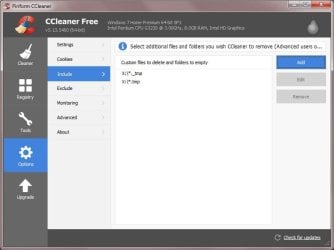
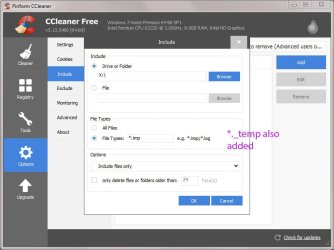
Well Ccleaner should be enough to safely clear most temp files but you can add CCEnhancer for additional program detection (advanced users only)

As for other temp files - if you really want to attempt to clear them from X

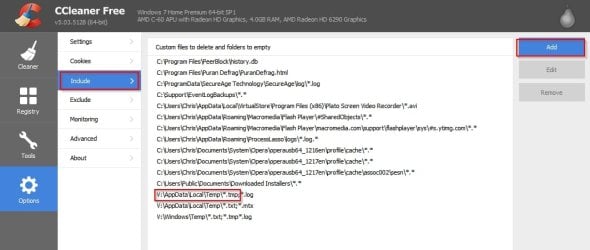
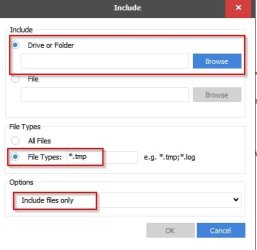
Add location to Ccleaner with the option to include only certain file types.

Example:

CCleaner.jpg

Add custom location (folder where your problem temp files reside) for files to clean:

CCleaner 2.jpg

EDIT:
As pointed out in your case you should include *.ffs_tmp
 
Last edited:

My Computer My Computer

Computer type
Laptop
Computer Manufacturer/Model Number
ASUS
OS
Microsoft Windows 7 Home Premium 64-bit 7601 Multiprocessor Free Service Pack 1
CPU
AMD C-60 APU with Radeon(tm) HD Graphics
Motherboard
ASUSTeK COMPUTER INC. X501U
Memory
4.00 GB
Graphics Card(s)
AMD Radeon HD 6290 Graphics
Sound Card
(1) AMD High Definition Audio Device (2) Realtek High Defi
Screen Resolution
1366 x 768 x 32 bits (4294967296 colors) @ 60 Hz
Hard Drives
Hitachi HTS545050A7E380 SATA Disk Device
Antivirus
Comodo CIS & FW, SecureAplus App Whitelisting, Threatfire
Browser
Cyberfox 64bit, Opera 64bit, Airfox
Other Info
Spy-The-Spy, HitmanPro.Alert, Norton Connect Safe, MJRegWatcher, BitDefender TrafficLight, Voodoo Shield, Zemana AntiMalware
Link:

CCleaner - Builds - need Ccleaner Slim Build in order to avoid installing unwanted toolbars.
 

My Computer My Computer

Computer type
Laptop
Computer Manufacturer/Model Number
ASUS
OS
Microsoft Windows 7 Home Premium 64-bit 7601 Multiprocessor Free Service Pack 1
CPU
AMD C-60 APU with Radeon(tm) HD Graphics
Motherboard
ASUSTeK COMPUTER INC. X501U
Memory
4.00 GB
Graphics Card(s)
AMD Radeon HD 6290 Graphics
Sound Card
(1) AMD High Definition Audio Device (2) Realtek High Defi
Screen Resolution
1366 x 768 x 32 bits (4294967296 colors) @ 60 Hz
Hard Drives
Hitachi HTS545050A7E380 SATA Disk Device
Antivirus
Comodo CIS & FW, SecureAplus App Whitelisting, Threatfire
Browser
Cyberfox 64bit, Opera 64bit, Airfox
Other Info
Spy-The-Spy, HitmanPro.Alert, Norton Connect Safe, MJRegWatcher, BitDefender TrafficLight, Voodoo Shield, Zemana AntiMalware
I use Disk Cleanup, Ccleaner, and TFC on my systems for temp files. I don't have problems. Yes a reboot is necessary to make a better clean job.
If their are a few temp files left after doing this just leave them alone. Windows must like them.

This also works. By Bare Foot Kid.

http://www.sevenforums.com/tutorials/76383-disk-cleanup-extended.html

I used TFC Temp Cleanup. It reduced the number of files from 28,536 to 28,342. The ones deleted seem to be the ones previously in folders (please see my earlier post).

Of the 28,342 TMP files, 99.99% have FFS in their names.

I am sure that nearly all these FFS temporary files have nothing to do with FreeFileSync. Please see the attached Word file which has a selection of clips of the list in W7 produced by searching for FFS. Some seem to be associated with Internet Explorer which I have never installed on this computer (which is 10 months old). One variety has 22,000 similar files!! (Please see the attached Word file.)

You say "If their are a few temp files left after doing this just leave them alone. Windows must like them." But 28,342 are hardly a few!

I am continuing to have glitches every few days. Their nature varies from week to week. For example, Photoshop failed to run until I went back to a Restore Point two days earlier; the computer, once out of about every 4 restarts, takes up to three automatic startups to get the machine running; two Gadgets disappeared twice; about once every 6 times Startup fails and I have to pull the mains plug; until recently the machine failed to waken during a couple of weeks if in sleep for more than two hours and I had to pull the mains plug (I lost work); sometimes for a couple of months, on startup the machine hung at the Gigabyte splash screen but I have been free of this during the last two weeks. Yesterday and so far today I have had no glitches but they will return tomorrow.

I don't think it is at all normal to have 28,342 ffs_tmp files. Something seems wrong, especially because I can't get rid of them and I am having glitches.

Has anyone any comments on this latest post please? (I'm not keen on entering the world of the Command Line. I don't have the technical expertise to cure what might go wrong). I have attached a Word file to this post.

Should I just do a clean install of Windows and re install all my programs and hope? Or buy a new machine? I need a computer that works reliably.

Thanks for any further help.

It seems that the .ffs files are associated with a program called FME. The website below might help describe what FME is.

Do you have FME installed on your computer?.

https://www.safe.com/fme/format-search/fme-feature-store-ffs/index.php
 

My Computer My Computer

Computer type
PC/Desktop
Computer Manufacturer/Model Number
Self built using existing case
OS
Windows 7 Home Premium 64 bit sp1
CPU
Intel i5 3570 3.4Ghz Ivy Bridge SKT 1155 quad core
Motherboard
Gigabyte Z77-HD3 SKT 1155 2xSata 3, 4x USB 3.0
Memory
G-Skill Rip Jaws 16Gb (8x2) DDR3 -1600 PC3 12800 CL 10 red
Graphics Card(s)
Gigabyte NVIDIA GT610 1Gb DDR3 810/1200 PCI-E 2.0 Silent
Sound Card
NVIDIA High Definition & Realtech High Definition Audio
Monitor(s) Displays
2 x Philips 226V4L 16:9 aspect ratio
Screen Resolution
1920 x 1080 HD
Hard Drives
Samsung 840 Pro 256gb SSD, SATA 3.
Hitachi Touro Portable 1tb, USB 3.0 HDD used for image b/ups.
PSU
Corsair VS450
Case
Codeng
Cooling
PSU fan & CPU fan
Keyboard
Logitech
Mouse
Logitech Wireless trackball M570
Internet Speed
Wireless 3G. 3mg down & 550kb up.
Antivirus
Bitdefender Internet Security 2020
Browser
Opera (Current Version) & Firefox
Other Info
MS Office 2013 Pro. Davis weather station software. MGE Nova 600 avr UPS.
Well Ccleaner should be enough to safely clear most temp files but you can add CCEnhancer for additional program detection (advanced users only)

As for other temp files - if you really want to attempt to clear them from X

Add location to Ccleaner with the option to include only certain file types.

Example:Add custom location (folder where your problem temp files reside) for files to clean:
Thanks. I have run Ccleaner exactly as you said, but it won't do what I tell it to do, which is to search for all files on my X: disk (which is a rotational drive holding all my Documents, Pictures etc., my C: drive being an SSD). As I listed in an earlier post, that is the drive where the 28,000 or so files are with names ending in FFS_tmp. But Ccleaner, in its Analysis window, see Image 1):

A) finds only a handful of files; and

B) only on my C: drive which I did not ask it to do; and

C) no files that I specified (_tmp.)

Disobedient or what!

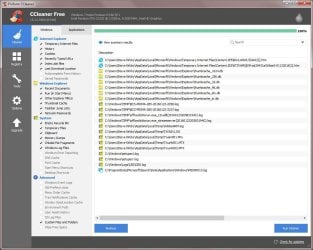
Image 1 also shows the settings I used (the settings under the right hand column, "Applications" are at default). Image 2 shows the list of file types asked to be included, and Image 3 the window just before selecting "Cleaner" (top left) which runs it and produced Image 1. Not a _tmp to be seen!

This is the third program I have used, the others did nothing. Ccleaner is getting somewhere but nowhere near what I specified. Frustrating. I wonder why I am having such difficulty in doing a simple operation.

Any ideas please? Thanks.

No, I don't have FME installed.
 

Attachments

  • IMAGE 3.JPG
    IMAGE 3.JPG
    41.8 KB · Views: 2
  • IMAGE 2.jpg
    IMAGE 2.jpg
    62.3 KB · Views: 2
  • IMAGE 1.JPG
    IMAGE 1.JPG
    129.4 KB · Views: 4

My Computer My Computer

Computer type
PC/Desktop
Computer Manufacturer/Model Number
Gigabyte ATX case with 500 W power supply GZ-M1
OS
Windows 7 Home Premium 64bit
CPU
Intel Pentium Edition G3220 3.0 GHz
Motherboard
Gigabyte Socket 1150 MicroATX Mot Ultra Durable, GA-H81M-S2H
Memory
8 GB DDR3 1600 MHz DIMM
Graphics Card(s)
Not Known
Sound Card
Not known
Monitor(s) Displays
Samsung LS24D590 23.6"
Screen Resolution
1920 x 1080
Hard Drives
256 GB Solid State Drive (C: on which Windows 7 is installed)-
1 TB internal conventional HD (X:)-
Two WD "Elements" " 2TB USB drives as backups
PSU
500 W
Case
Gigabyte ATX case
Cooling
Several fans!
Keyboard
Accuratus 301 USB Compact, white.
Mouse
Microsoft Basic Optical Mouse v2.0, two-button, tethered
Internet Speed
10 to 12 Mb per second
Antivirus
Kaspersky Internet Security 2016, Malwarebytes (paid)
Browser
Firefox (ocassionally Safari)
Other Info
The 256 GB SSD (C:) also has Adobe Photoshop CS6 and InDesign CS6, MS Office, Adobe Lightroom, and other small programs.
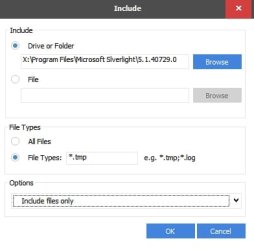
You have to specify the directory. You can't just point Ccleaner a drive X and expect it to find and clear all temp files.

Example - but make sure you get the full path to the folder. It's not clear from your screenshot.

Include.jpg

Ccleaner only removes what you specify in the settings. It's wise to click on "Analyze" then preview the results.

Edit:

You need to type *.ffs_tmp rather than what is shown in the screenshot.
 
Last edited:

My Computer My Computer

Computer type
Laptop
Computer Manufacturer/Model Number
ASUS
OS
Microsoft Windows 7 Home Premium 64-bit 7601 Multiprocessor Free Service Pack 1
CPU
AMD C-60 APU with Radeon(tm) HD Graphics
Motherboard
ASUSTeK COMPUTER INC. X501U
Memory
4.00 GB
Graphics Card(s)
AMD Radeon HD 6290 Graphics
Sound Card
(1) AMD High Definition Audio Device (2) Realtek High Defi
Screen Resolution
1366 x 768 x 32 bits (4294967296 colors) @ 60 Hz
Hard Drives
Hitachi HTS545050A7E380 SATA Disk Device
Antivirus
Comodo CIS & FW, SecureAplus App Whitelisting, Threatfire
Browser
Cyberfox 64bit, Opera 64bit, Airfox
Other Info
Spy-The-Spy, HitmanPro.Alert, Norton Connect Safe, MJRegWatcher, BitDefender TrafficLight, Voodoo Shield, Zemana AntiMalware
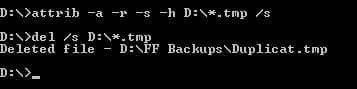
Okay so maybe this would be a better solution if you are okay with running commands.

Click "Computer" and highlight drive X then hold [Shift+Right Click] when clicking Drive X

Choose "Open Command Window Here"

In the command prompt window type:

attrib -a -r -s -h X:\*.ffs_tmp /s

Press Enter

wait for it to finish - you see a new command prompt

Type:

del /s X:\*.ffs_tmp

Press Enter

That should hopefully sort it.

Tested and found and deleted .tmp file that I placed in a directory on drive D on my machine so it finds temp files regarless of which folder they are in.

Command Prompt.jpg

Edit: Changed drive letter above to "X" - I accidentally typed D originally.

Edit 2: Changed file extension from *.tmp to *.ffs_tmp as poited out by UserNameIssues
 
Last edited:

My Computer My Computer

Computer type
Laptop
Computer Manufacturer/Model Number
ASUS
OS
Microsoft Windows 7 Home Premium 64-bit 7601 Multiprocessor Free Service Pack 1
CPU
AMD C-60 APU with Radeon(tm) HD Graphics
Motherboard
ASUSTeK COMPUTER INC. X501U
Memory
4.00 GB
Graphics Card(s)
AMD Radeon HD 6290 Graphics
Sound Card
(1) AMD High Definition Audio Device (2) Realtek High Defi
Screen Resolution
1366 x 768 x 32 bits (4294967296 colors) @ 60 Hz
Hard Drives
Hitachi HTS545050A7E380 SATA Disk Device
Antivirus
Comodo CIS & FW, SecureAplus App Whitelisting, Threatfire
Browser
Cyberfox 64bit, Opera 64bit, Airfox
Other Info
Spy-The-Spy, HitmanPro.Alert, Norton Connect Safe, MJRegWatcher, BitDefender TrafficLight, Voodoo Shield, Zemana AntiMalware
Sorry but assuming you want to exclude everything on drive C: - you would have to set it as an exluded drive in Ccleaner.

It's the same window that you used before.
 

My Computer My Computer

Computer type
Laptop
Computer Manufacturer/Model Number
ASUS
OS
Microsoft Windows 7 Home Premium 64-bit 7601 Multiprocessor Free Service Pack 1
CPU
AMD C-60 APU with Radeon(tm) HD Graphics
Motherboard
ASUSTeK COMPUTER INC. X501U
Memory
4.00 GB
Graphics Card(s)
AMD Radeon HD 6290 Graphics
Sound Card
(1) AMD High Definition Audio Device (2) Realtek High Defi
Screen Resolution
1366 x 768 x 32 bits (4294967296 colors) @ 60 Hz
Hard Drives
Hitachi HTS545050A7E380 SATA Disk Device
Antivirus
Comodo CIS & FW, SecureAplus App Whitelisting, Threatfire
Browser
Cyberfox 64bit, Opera 64bit, Airfox
Other Info
Spy-The-Spy, HitmanPro.Alert, Norton Connect Safe, MJRegWatcher, BitDefender TrafficLight, Voodoo Shield, Zemana AntiMalware
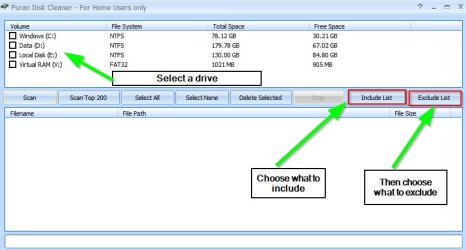
Well I've found that I have a portable disk cleaner that will do the job if you prefer:

Puran Diskclean. I have it as one of the utilities that comes with GEGeek Toolkit so I've zipped it up and attached it.

View attachment Disk Cleaner.zip

Extract the executable and run it.

Configure it to scan only drive X and only to include *.tmp and *.temp files but exclude everything else.

Results are shown before cleaning and you can select/ de-select any item.
 

My Computer My Computer

Computer type
Laptop
Computer Manufacturer/Model Number
ASUS
OS
Microsoft Windows 7 Home Premium 64-bit 7601 Multiprocessor Free Service Pack 1
CPU
AMD C-60 APU with Radeon(tm) HD Graphics
Motherboard
ASUSTeK COMPUTER INC. X501U
Memory
4.00 GB
Graphics Card(s)
AMD Radeon HD 6290 Graphics
Sound Card
(1) AMD High Definition Audio Device (2) Realtek High Defi
Screen Resolution
1366 x 768 x 32 bits (4294967296 colors) @ 60 Hz
Hard Drives
Hitachi HTS545050A7E380 SATA Disk Device
Antivirus
Comodo CIS & FW, SecureAplus App Whitelisting, Threatfire
Browser
Cyberfox 64bit, Opera 64bit, Airfox
Other Info
Spy-The-Spy, HitmanPro.Alert, Norton Connect Safe, MJRegWatcher, BitDefender TrafficLight, Voodoo Shield, Zemana AntiMalware
FYI:

The file extension that the OP has thousands of is [dot]FFS[underscore]TMP

The suggestions posted above do not seem to be searching for that.

Post #14 claims to be looking for _tmp, but the screenshots show [dot][underscore]tmp.

Searching for [dot]TMP is not going to find [dot]FFS[underscore]TMP

Searching for [dot][underscore]TMP is not going to find [dot]FFS[underscore]TMP

Try searching for [dot]FFS[underscore]TMP
(e.g. .ffs_tmp)
 
Last edited:

My Computer My Computer

Computer type
Laptop
Computer Manufacturer/Model Number
Employer provided Dell Latitude
OS
W7 Pro SP1 64bit
CPU
i7
Memory
8GB
Graphics Card(s)
Intel HD Graphics
Hard Drives
crappy SSD
Antivirus
Employer mandated Symantec Endpoint Protection
Browser
Pale Moon 64bit, IE11 64bit & Chrome 64bit
Download disk cleaner from Post 18 and run it.

Thanks to Usernameissues for pointing out what you are actually looking for (see post above)

Then from the programs GUI select drive X and uncheck any other drives.

Review what is included/ excluded and modify selections if needed. Suggest removing all entries from the include list other than *.tmp and *.temp at your discretion.

Puran Disk Cleaner1.jpg

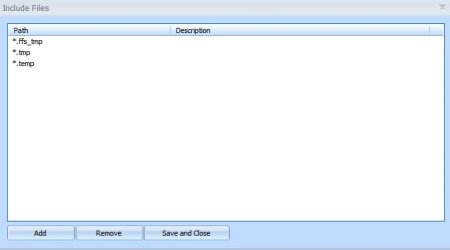
For the include list type *.ffs_tmp and click OK then save and close.

Puran Disk Cleaner3.jpg

So if you look at the include list it should now look like this.

Puran Disk Cleaner2.jpg

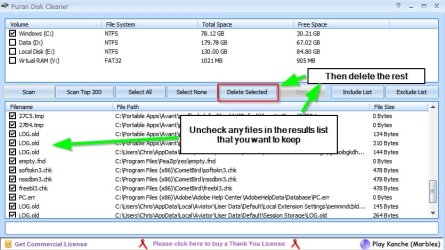
Run the scan (click the scan button) and review the results list when finished. Uncheck any entry where you wish to keep the detected file. Then delete the rest.

Puran Disk Cleaner4.jpg
 

My Computer My Computer

Computer type
Laptop
Computer Manufacturer/Model Number
ASUS
OS
Microsoft Windows 7 Home Premium 64-bit 7601 Multiprocessor Free Service Pack 1
CPU
AMD C-60 APU with Radeon(tm) HD Graphics
Motherboard
ASUSTeK COMPUTER INC. X501U
Memory
4.00 GB
Graphics Card(s)
AMD Radeon HD 6290 Graphics
Sound Card
(1) AMD High Definition Audio Device (2) Realtek High Defi
Screen Resolution
1366 x 768 x 32 bits (4294967296 colors) @ 60 Hz
Hard Drives
Hitachi HTS545050A7E380 SATA Disk Device
Antivirus
Comodo CIS & FW, SecureAplus App Whitelisting, Threatfire
Browser
Cyberfox 64bit, Opera 64bit, Airfox
Other Info
Spy-The-Spy, HitmanPro.Alert, Norton Connect Safe, MJRegWatcher, BitDefender TrafficLight, Voodoo Shield, Zemana AntiMalware
Back
Top