Blocked by Group Policy, unsolved through various solutions

dyoungc

New member
Local time
3:59 PM
Messages
5
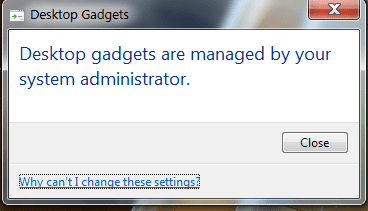
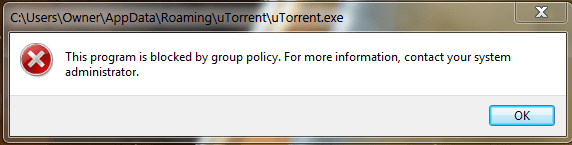
I've just got my computer back from a mechanic after reinstalling Microsoft OS, and I'm currently installing my old programs. However, some programs/functions are blocked by group policy.
I am the owner/admin, personal home computer, private network, not part of domain.
I've tried some methods mentioned in other threads such as running as admin, changing security policy to prompt for credentials, checking blocked programs in AppLocker. I've also tried resetting local group policy using BAT and VBS file, but none have worked so far.

There is one method I've been looking into before using, which is going into regedit and deleting some registries, but I've read that deleting the wrong file can wreck the OS. I'm hesitant about this because I'm not very proficient with computers.
Are there other solutions to this issue?
If not, perhaps someone could provide advice on how to modify registries.
 

My Computer My Computer

At a glance

Windows 7 professional x64Intel i5 4440k2x 4GB SamsungEVGA Geforce GTX 760
Computer type
PC/Desktop
Computer Manufacturer/Model Number
Custom Build
OS
Windows 7 professional x64
CPU
Intel i5 4440k
Motherboard
ASRock H81M-DGS
Memory
2x 4GB Samsung
Graphics Card(s)
EVGA Geforce GTX 760
Hard Drives
-256 GB Samsung Solid State
-500 GB Seagate HDD
Antivirus
N/A
Browser
Chrome

My Computer My Computer

At a glance

W7 Pro SP1 64biti78GBIntel HD Graphics
Computer type
Laptop
Computer Manufacturer/Model Number
Employer provided Dell Latitude
OS
W7 Pro SP1 64bit
CPU
i7
Memory
8GB
Graphics Card(s)
Intel HD Graphics
Hard Drives
crappy SSD
Antivirus
Employer mandated Symantec Endpoint Protection
Browser
Pale Moon 64bit, IE11 64bit & Chrome 64bit
Yes, but I had already tried the solutions he suggested, and none of them have worked. I've also tried resetting group policy through command prompt at boot, but it "could not find the file path specified".
 

Attachments

  • 1.PNG
    1.PNG
    8.8 KB · Views: 14
  • 2.PNG
    2.PNG
    11.8 KB · Views: 14

My Computer My Computer

At a glance

Windows 7 professional x64Intel i5 4440k2x 4GB SamsungEVGA Geforce GTX 760
Computer type
PC/Desktop
Computer Manufacturer/Model Number
Custom Build
OS
Windows 7 professional x64
CPU
Intel i5 4440k
Motherboard
ASRock H81M-DGS
Memory
2x 4GB Samsung
Graphics Card(s)
EVGA Geforce GTX 760
Hard Drives
-256 GB Samsung Solid State
-500 GB Seagate HDD
Antivirus
N/A
Browser
Chrome

My Computer My Computer

At a glance

W10 32 bit, XUbuntu 18.xx 64 bitIntel(R) Celeron(R) CPU G1620T @ 2.40GHz, 240...4GBIntel HD graphics
Computer type
PC/Desktop
Computer Manufacturer/Model Number
Dell All in one Inspiron 2020
OS
W10 32 bit, XUbuntu 18.xx 64 bit
CPU
Intel(R) Celeron(R) CPU G1620T @ 2.40GHz, 2400 Mhz
Motherboard
Dell
Memory
4GB
Graphics Card(s)
Intel HD graphics
Sound Card
High Definition Audio Device
Monitor(s) Displays
20 inch Screen
Screen Resolution
W7=1280 x 720 & Linux Mint Xfce=1360 x 768
Hard Drives
500 GB hard drive
Keyboard
Usb
Mouse
Usb
Internet Speed
High-Speed
Antivirus
MSE
Browser
Main Browser Firefox
Other Info
I have done a clean install of Windows 7 using Dell re-installation disk (Dell sent me one). I also use Free Macrium reflect backup and restore.
Yes, but I had already tried the solutions he suggested, and none of them have worked. I've also tried resetting group policy through command prompt at boot, but it "could not find the file path specified".
A fresh install of W7 should not have group policies set. I would not trust the install to be free of malware.
 

My Computer My Computer

At a glance

W7 Pro SP1 64biti78GBIntel HD Graphics
Computer type
Laptop
Computer Manufacturer/Model Number
Employer provided Dell Latitude
OS
W7 Pro SP1 64bit
CPU
i7
Memory
8GB
Graphics Card(s)
Intel HD Graphics
Hard Drives
crappy SSD
Antivirus
Employer mandated Symantec Endpoint Protection
Browser
Pale Moon 64bit, IE11 64bit & Chrome 64bit
A fresh install of W7 should not have group policies set. I would not trust the install to be free of malware.

Agree.
Highly suspicious for malware, thanks to the "mechanic".

(Also, this appears to be a duplicate of this thread?)

MM
 

My Computer My Computer

At a glance

OEM Windows 7 Ult (x64) SP1Intel Core-i7 3770 @ 3.4 GHz16 GB DDR3 SDRAM @ 1333 MHzNVidia GeForce GT620 1 GB
Computer type
PC/Desktop
Computer Manufacturer/Model Number
Dell Studio XPS 8500
OS
OEM Windows 7 Ult (x64) SP1
CPU
Intel Core-i7 3770 @ 3.4 GHz
Motherboard
"Dell" branded
Memory
16 GB DDR3 SDRAM @ 1333 MHz
Graphics Card(s)
NVidia GeForce GT620 1 GB
Sound Card
THX TruStudio PC
Monitor(s) Displays
Dell U2410 Full HD
Hard Drives
2.0 TB SATA2 @ 7200 RPM
PSU
350W
Keyboard
MS 4000 Ergon - Wired
Mouse
Logitech Anywhere MX
Internet Speed
Cable HSI w/Turbo (router)
Antivirus
KIS-MBAM Premium-MBAE Premium
Browser
Fx (current version); IE
Other Info
And a Win7/64 Pro laptop; And a Win10/64 Pro desktop.
A fresh install of W7 should not have group policies set. I would not trust the install to be free of malware.

Agree.
Highly suspicious for malware, thanks to the "mechanic".

(Also, this appears to be a duplicate of this thread?)

MM

MoxieMomma,

It is a duplicate of that thread but he lost his helper. Maybe the other thread should be closed, this one stay open.
 

My Computer My Computer

At a glance

W10 32 bit, XUbuntu 18.xx 64 bitIntel(R) Celeron(R) CPU G1620T @ 2.40GHz, 240...4GBIntel HD graphics
Computer type
PC/Desktop
Computer Manufacturer/Model Number
Dell All in one Inspiron 2020
OS
W10 32 bit, XUbuntu 18.xx 64 bit
CPU
Intel(R) Celeron(R) CPU G1620T @ 2.40GHz, 2400 Mhz
Motherboard
Dell
Memory
4GB
Graphics Card(s)
Intel HD graphics
Sound Card
High Definition Audio Device
Monitor(s) Displays
20 inch Screen
Screen Resolution
W7=1280 x 720 & Linux Mint Xfce=1360 x 768
Hard Drives
500 GB hard drive
Keyboard
Usb
Mouse
Usb
Internet Speed
High-Speed
Antivirus
MSE
Browser
Main Browser Firefox
Other Info
I have done a clean install of Windows 7 using Dell re-installation disk (Dell sent me one). I also use Free Macrium reflect backup and restore.
A fresh install of W7 should not have group policies set. I would not trust the install to be free of malware.

Agree.
Highly suspicious for malware, thanks to the "mechanic".

(Also, this appears to be a duplicate of this thread?)

MM

MoxieMomma,

It is a duplicate of that thread but he lost his helper. Maybe the other thread should be closed, this one stay open.

Understood.
I only mention it, so that the forum Mods/Admins might either merge the threads or close the other one, to minimize clutter and confusion.

Nothing more.

MM
 

My Computer My Computer

At a glance

OEM Windows 7 Ult (x64) SP1Intel Core-i7 3770 @ 3.4 GHz16 GB DDR3 SDRAM @ 1333 MHzNVidia GeForce GT620 1 GB
Computer type
PC/Desktop
Computer Manufacturer/Model Number
Dell Studio XPS 8500
OS
OEM Windows 7 Ult (x64) SP1
CPU
Intel Core-i7 3770 @ 3.4 GHz
Motherboard
"Dell" branded
Memory
16 GB DDR3 SDRAM @ 1333 MHz
Graphics Card(s)
NVidia GeForce GT620 1 GB
Sound Card
THX TruStudio PC
Monitor(s) Displays
Dell U2410 Full HD
Hard Drives
2.0 TB SATA2 @ 7200 RPM
PSU
350W
Keyboard
MS 4000 Ergon - Wired
Mouse
Logitech Anywhere MX
Internet Speed
Cable HSI w/Turbo (router)
Antivirus
KIS-MBAM Premium-MBAE Premium
Browser
Fx (current version); IE
Other Info
And a Win7/64 Pro laptop; And a Win10/64 Pro desktop.
Back
Top