
Windows Sort of Stops Working From Time to Time

RC5000

New member
Local time
7:37 AM
Messages
39
I previously started a thread about this at:

http://www.sevenforums.com/general-...ermine-what-happens-start-up.html#post3204455

But that's 9 days ago. I apologize if I should NOT start a new thread instead of adding to the old one.

The issue is that from time to time, say at least once an hour or more, certain functions on the computer stop. I cannot access the Internet. I cannot ping. I cannot launch a new application. If I am already in, say, Word, I can continue to edit that file. But of course I cannot print. Originally when this started, it seemed to last as much as 20 minutes. Now it lasts about 1 minute. I've tried to write a batch file which will ping Google endlessly and note the times but that didn't work (it echoed the time, then pinged, then echoed the time, but the time didn't change:

echo off
set i=
FOR /L %%i IN (1,1,3) DO (

echo %time%
ping Google
echo %time%
)

Anyway, a friend of mine who is in IT Support thinks this is an SMM virus. That would be very bad news (I think). I've run MalwareBytes and Kaspersky and also Combofix and they all report no problems.

Does anyone have an idea where to go from here?

As for the ping failure, the cable modem appears to continue to work in that my WiFi is not affected by this.

I am running an app called AirAndroid (just started about 3 days ago, so well after this problem started). And even though just now my session seemed to freeze, this app correctly popped up a message (it does when I get a text message on my phone). So 1) the Internet connection is working and 2) apps can work. Just not when they are initiated by user action.


(10:18AM) And this morning seems much worse. It's happened 6 times (at least), already. The last one at least 4 minutes.)


RON
 
Last edited:

My Computer My Computer

At a glance

Microsoft Windows 7 Home Premium 64-bit 7601 ...Intel(R) Core(TM) i3-2100 CPU @ 3.10GHz4.00 GBIntel(R) HD Graphics Family
Computer type
PC/Desktop
Computer Manufacturer/Model Number
Dell
OS
Microsoft Windows 7 Home Premium 64-bit 7601 Multiproc; build: 7601 Multiprocessor Free
CPU
Intel(R) Core(TM) i3-2100 CPU @ 3.10GHz
Motherboard
Dell Inc. 0GDG8Y
Memory
4.00 GB
Graphics Card(s)
Intel(R) HD Graphics Family
Sound Card
(1) Conexant HD Audio (2) Intel(R) Display Audio
Monitor(s) Displays
Nothing appears in systeminfo for Monitor.
Screen Resolution
1920 x 1080 x 32 bits (4294967296 colors) @ 60 Hz
Hard Drives
WDC WD10EALX-759BA1 ATA Device, 3 partitions, size: 931.51 GB; Generic- Multi-Card USB Device: 0 GB, 0 Partitions; Seagate Expansion Desk USB Device, 1 partition, External hard disk media, 1.82TB
Antivirus
Kaspersky
Browser
Chrome; IE, Mozilla
Other Info
SystemInfo took < 1 sec to download but then 5 min to come up (due to the problem)

My Computer My Computer

At a glance

Windows 10x64 Build 1709Intel i7 7700HQ Kaby Lake16 GB DDR4 @2400Nvidia Geforce GTX 1060
Computer type
Laptop
Computer Manufacturer/Model Number
MSI GE72VR Apache Pro-416
OS
Windows 10x64 Build 1709
CPU
Intel i7 7700HQ Kaby Lake
Motherboard
Micro-Star Intl. MS-179B (U3C1)
Memory
16 GB DDR4 @2400
Graphics Card(s)
Nvidia Geforce GTX 1060
Screen Resolution
1920x1080 120Hz
Hard Drives
256 GB Nvme M.2 SSD

1TB HDD@7200
Cooling
Cooler Blast 4
Keyboard
Steel Series
Antivirus
Bit Defender Free
Browser
Edge
I haven't tried that. I ran a Kaspersky log utility and sent them the log. I noticed that it *seems* that when I run that batch file the system doesn't stop. Just a guess on my part as I can only know this happens from the symptoms. Right now I'm running 2500 pings of google and redirecting the output to a txt file and then examining the times for large jumps, like several minutes and so far haven't found any. When the problem starts, ping doesn't work. In fact user-initiated program start ups do not work. Like I cannot click on anything. The browser (Chrome) is the worst affected but everything is affected.

Again a friend of mine is sure it's some SMM virus but I haven't found a utility that could find a general SMM virus, let alone remove it.

IF for any reason the constant pinging somehow stops this problem then I will set the pings to run permanently. My friend thought the main symptom of the SMM was when I switched users the system went into sleep mode, but I don't see that. Then again, I'm not a sys admin.
 

My Computer My Computer

At a glance

Microsoft Windows 7 Home Premium 64-bit 7601 ...Intel(R) Core(TM) i3-2100 CPU @ 3.10GHz4.00 GBIntel(R) HD Graphics Family
Computer type
PC/Desktop
Computer Manufacturer/Model Number
Dell
OS
Microsoft Windows 7 Home Premium 64-bit 7601 Multiproc; build: 7601 Multiprocessor Free
CPU
Intel(R) Core(TM) i3-2100 CPU @ 3.10GHz
Motherboard
Dell Inc. 0GDG8Y
Memory
4.00 GB
Graphics Card(s)
Intel(R) HD Graphics Family
Sound Card
(1) Conexant HD Audio (2) Intel(R) Display Audio
Monitor(s) Displays
Nothing appears in systeminfo for Monitor.
Screen Resolution
1920 x 1080 x 32 bits (4294967296 colors) @ 60 Hz
Hard Drives
WDC WD10EALX-759BA1 ATA Device, 3 partitions, size: 931.51 GB; Generic- Multi-Card USB Device: 0 GB, 0 Partitions; Seagate Expansion Desk USB Device, 1 partition, External hard disk media, 1.82TB
Antivirus
Kaspersky
Browser
Chrome; IE, Mozilla
Other Info
SystemInfo took < 1 sec to download but then 5 min to come up (due to the problem)

My Computer My Computer

At a glance

Windows 10x64 Build 1709Intel i7 7700HQ Kaby Lake16 GB DDR4 @2400Nvidia Geforce GTX 1060
Computer type
Laptop
Computer Manufacturer/Model Number
MSI GE72VR Apache Pro-416
OS
Windows 10x64 Build 1709
CPU
Intel i7 7700HQ Kaby Lake
Motherboard
Micro-Star Intl. MS-179B (U3C1)
Memory
16 GB DDR4 @2400
Graphics Card(s)
Nvidia Geforce GTX 1060
Screen Resolution
1920x1080 120Hz
Hard Drives
256 GB Nvme M.2 SSD

1TB HDD@7200
Cooling
Cooler Blast 4
Keyboard
Steel Series
Antivirus
Bit Defender Free
Browser
Edge
I will try them all!! THANKS!!!! And if I find something interesting I'll definitely report back.
 

My Computer My Computer

At a glance

Microsoft Windows 7 Home Premium 64-bit 7601 ...Intel(R) Core(TM) i3-2100 CPU @ 3.10GHz4.00 GBIntel(R) HD Graphics Family
Computer type
PC/Desktop
Computer Manufacturer/Model Number
Dell
OS
Microsoft Windows 7 Home Premium 64-bit 7601 Multiproc; build: 7601 Multiprocessor Free
CPU
Intel(R) Core(TM) i3-2100 CPU @ 3.10GHz
Motherboard
Dell Inc. 0GDG8Y
Memory
4.00 GB
Graphics Card(s)
Intel(R) HD Graphics Family
Sound Card
(1) Conexant HD Audio (2) Intel(R) Display Audio
Monitor(s) Displays
Nothing appears in systeminfo for Monitor.
Screen Resolution
1920 x 1080 x 32 bits (4294967296 colors) @ 60 Hz
Hard Drives
WDC WD10EALX-759BA1 ATA Device, 3 partitions, size: 931.51 GB; Generic- Multi-Card USB Device: 0 GB, 0 Partitions; Seagate Expansion Desk USB Device, 1 partition, External hard disk media, 1.82TB
Antivirus
Kaspersky
Browser
Chrome; IE, Mozilla
Other Info
SystemInfo took < 1 sec to download but then 5 min to come up (due to the problem)
Nothing seems to help

Kaspesky said uninstall one version and install a new one. I did but no help. I thought briefly it might be GWX but today the interruptions happened rather frequently. Almost exactly 3 minutes each time and GWX wasn't running. I rebooted into a regular session but the reboot just sort of hung there, black screen, for a few minutes. So I turned the machine off and back on in Safe Mode with Networking, which I'm in now. That session came up quickly.

I am really at a loss, apart from buying a new computer.

I also note that in Safe Mode, other browsers (like Mozilla) come up rather quickly. When in regular mode, Mozilla can take about 30 sec to a 1 minute to come up.

RON
 
Last edited:

My Computer My Computer

At a glance

Microsoft Windows 7 Home Premium 64-bit 7601 ...Intel(R) Core(TM) i3-2100 CPU @ 3.10GHz4.00 GBIntel(R) HD Graphics Family
Computer type
PC/Desktop
Computer Manufacturer/Model Number
Dell
OS
Microsoft Windows 7 Home Premium 64-bit 7601 Multiproc; build: 7601 Multiprocessor Free
CPU
Intel(R) Core(TM) i3-2100 CPU @ 3.10GHz
Motherboard
Dell Inc. 0GDG8Y
Memory
4.00 GB
Graphics Card(s)
Intel(R) HD Graphics Family
Sound Card
(1) Conexant HD Audio (2) Intel(R) Display Audio
Monitor(s) Displays
Nothing appears in systeminfo for Monitor.
Screen Resolution
1920 x 1080 x 32 bits (4294967296 colors) @ 60 Hz
Hard Drives
WDC WD10EALX-759BA1 ATA Device, 3 partitions, size: 931.51 GB; Generic- Multi-Card USB Device: 0 GB, 0 Partitions; Seagate Expansion Desk USB Device, 1 partition, External hard disk media, 1.82TB
Antivirus
Kaspersky
Browser
Chrome; IE, Mozilla
Other Info
SystemInfo took < 1 sec to download but then 5 min to come up (due to the problem)
I ran sfc/scannow. No issues; ran chkdsk; no issues.

Again it seems like the big difference is in normal mode, the problem occurs. Many computer functions are frozen for about 3 minutes; in Safe Mode with Networking, this problem does NOT seem to occur.

RON

Additional info: In Safe Mode, apps come up "normally" fast, like fast. In Normal Mode, they take a long time. Like Firefox, in Safe Mode, it's up and running in like 2 seconds. In normal mode, could be a minute.
 
Last edited:

My Computer My Computer

At a glance

Microsoft Windows 7 Home Premium 64-bit 7601 ...Intel(R) Core(TM) i3-2100 CPU @ 3.10GHz4.00 GBIntel(R) HD Graphics Family
Computer type
PC/Desktop
Computer Manufacturer/Model Number
Dell
OS
Microsoft Windows 7 Home Premium 64-bit 7601 Multiproc; build: 7601 Multiprocessor Free
CPU
Intel(R) Core(TM) i3-2100 CPU @ 3.10GHz
Motherboard
Dell Inc. 0GDG8Y
Memory
4.00 GB
Graphics Card(s)
Intel(R) HD Graphics Family
Sound Card
(1) Conexant HD Audio (2) Intel(R) Display Audio
Monitor(s) Displays
Nothing appears in systeminfo for Monitor.
Screen Resolution
1920 x 1080 x 32 bits (4294967296 colors) @ 60 Hz
Hard Drives
WDC WD10EALX-759BA1 ATA Device, 3 partitions, size: 931.51 GB; Generic- Multi-Card USB Device: 0 GB, 0 Partitions; Seagate Expansion Desk USB Device, 1 partition, External hard disk media, 1.82TB
Antivirus
Kaspersky
Browser
Chrome; IE, Mozilla
Other Info
SystemInfo took < 1 sec to download but then 5 min to come up (due to the problem)
My Computer My Computer

At a glance

Multi-Boot W7_Pro_x64 W8.1_Pro_x64 W10_Pro_x6...AMD Athlon II x4 6206GB GSkill DDR2 800AMD 4670 GPU + AMD 4200 IGP
Computer type
PC/Desktop
Computer Manufacturer/Model Number
home built
OS
Multi-Boot W7_Pro_x64 W8.1_Pro_x64 W10_Pro_x64 +Linux_VMs +Chromium_VM
CPU
AMD Athlon II x4 620
Motherboard
Gigabyte GA-MA785G-UD3H
Memory
6GB GSkill DDR2 800
Graphics Card(s)
AMD 4670 GPU + AMD 4200 IGP
Sound Card
on board Realtek ALC889A
Monitor(s) Displays
RCA 40" LCD TV, Insignia 32" LCD TV, HP 15" LCD monitor
Screen Resolution
1680 x 1050
Hard Drives
OCZ Vertex 3 120GB,
Samsung F3 1TB (3),
Several others - WD, Seagate, Hitachi, ...
PSU
Corsair 500 W
Case
Rosewill mid tower
Cooling
CM 90mm rifle
Keyboard
Gyration wireless, Logitech wireless, Dell USB wired
Mouse
Gyration wireless, Logitech wireless, V7 USB wired
Internet Speed
Spectrum - 100Mbps D / 10Mbps U
Antivirus
Avast, MBAM3, EMET, WinPatrol
Browser
Pale Moon, Firefox, IE
Other Info
2 multi-boot PC's
Mainly HTPC/Office/Gen purpose (no gaming).
Trendnet USB KVM.
LG DVD burner/Blue Ray Player.
Tray system for removable SATA backup drives.

Not currently OCd, under-volted.
I use Hybrid sleep, rarely re-boot or shutdown.

Hauppauge HD-PVR, Avermedia PCIe TV Tuner, Hauppauge PCI TV Tuner.
Already done. All services are unchecked except anti-Virus (Kaspersky)
 

My Computer My Computer

At a glance

Microsoft Windows 7 Home Premium 64-bit 7601 ...Intel(R) Core(TM) i3-2100 CPU @ 3.10GHz4.00 GBIntel(R) HD Graphics Family
Computer type
PC/Desktop
Computer Manufacturer/Model Number
Dell
OS
Microsoft Windows 7 Home Premium 64-bit 7601 Multiproc; build: 7601 Multiprocessor Free
CPU
Intel(R) Core(TM) i3-2100 CPU @ 3.10GHz
Motherboard
Dell Inc. 0GDG8Y
Memory
4.00 GB
Graphics Card(s)
Intel(R) HD Graphics Family
Sound Card
(1) Conexant HD Audio (2) Intel(R) Display Audio
Monitor(s) Displays
Nothing appears in systeminfo for Monitor.
Screen Resolution
1920 x 1080 x 32 bits (4294967296 colors) @ 60 Hz
Hard Drives
WDC WD10EALX-759BA1 ATA Device, 3 partitions, size: 931.51 GB; Generic- Multi-Card USB Device: 0 GB, 0 Partitions; Seagate Expansion Desk USB Device, 1 partition, External hard disk media, 1.82TB
Antivirus
Kaspersky
Browser
Chrome; IE, Mozilla
Other Info
SystemInfo took < 1 sec to download but then 5 min to come up (due to the problem)

My Computer My Computer

At a glance

Multi-Boot W7_Pro_x64 W8.1_Pro_x64 W10_Pro_x6...AMD Athlon II x4 6206GB GSkill DDR2 800AMD 4670 GPU + AMD 4200 IGP
Computer type
PC/Desktop
Computer Manufacturer/Model Number
home built
OS
Multi-Boot W7_Pro_x64 W8.1_Pro_x64 W10_Pro_x64 +Linux_VMs +Chromium_VM
CPU
AMD Athlon II x4 620
Motherboard
Gigabyte GA-MA785G-UD3H
Memory
6GB GSkill DDR2 800
Graphics Card(s)
AMD 4670 GPU + AMD 4200 IGP
Sound Card
on board Realtek ALC889A
Monitor(s) Displays
RCA 40" LCD TV, Insignia 32" LCD TV, HP 15" LCD monitor
Screen Resolution
1680 x 1050
Hard Drives
OCZ Vertex 3 120GB,
Samsung F3 1TB (3),
Several others - WD, Seagate, Hitachi, ...
PSU
Corsair 500 W
Case
Rosewill mid tower
Cooling
CM 90mm rifle
Keyboard
Gyration wireless, Logitech wireless, Dell USB wired
Mouse
Gyration wireless, Logitech wireless, V7 USB wired
Internet Speed
Spectrum - 100Mbps D / 10Mbps U
Antivirus
Avast, MBAM3, EMET, WinPatrol
Browser
Pale Moon, Firefox, IE
Other Info
2 multi-boot PC's
Mainly HTPC/Office/Gen purpose (no gaming).
Trendnet USB KVM.
LG DVD burner/Blue Ray Player.
Tray system for removable SATA backup drives.

Not currently OCd, under-volted.
I use Hybrid sleep, rarely re-boot or shutdown.

Hauppauge HD-PVR, Avermedia PCIe TV Tuner, Hauppauge PCI TV Tuner.
But there are a ton of filters with Procmon. Not sure which ones I should use. Won't any significant data be lost in the torrent of info, like all the tcpip stuff?
 

My Computer My Computer

At a glance

Microsoft Windows 7 Home Premium 64-bit 7601 ...Intel(R) Core(TM) i3-2100 CPU @ 3.10GHz4.00 GBIntel(R) HD Graphics Family
Computer type
PC/Desktop
Computer Manufacturer/Model Number
Dell
OS
Microsoft Windows 7 Home Premium 64-bit 7601 Multiproc; build: 7601 Multiprocessor Free
CPU
Intel(R) Core(TM) i3-2100 CPU @ 3.10GHz
Motherboard
Dell Inc. 0GDG8Y
Memory
4.00 GB
Graphics Card(s)
Intel(R) HD Graphics Family
Sound Card
(1) Conexant HD Audio (2) Intel(R) Display Audio
Monitor(s) Displays
Nothing appears in systeminfo for Monitor.
Screen Resolution
1920 x 1080 x 32 bits (4294967296 colors) @ 60 Hz
Hard Drives
WDC WD10EALX-759BA1 ATA Device, 3 partitions, size: 931.51 GB; Generic- Multi-Card USB Device: 0 GB, 0 Partitions; Seagate Expansion Desk USB Device, 1 partition, External hard disk media, 1.82TB
Antivirus
Kaspersky
Browser
Chrome; IE, Mozilla
Other Info
SystemInfo took < 1 sec to download but then 5 min to come up (due to the problem)
I really don't know, it's something you could play with to see if it can help find what causes the delay.
I'm not a Process Monitor expert, I'll ask to see if others can help with using it.
 

My Computer My Computer

At a glance

Multi-Boot W7_Pro_x64 W8.1_Pro_x64 W10_Pro_x6...AMD Athlon II x4 6206GB GSkill DDR2 800AMD 4670 GPU + AMD 4200 IGP
Computer type
PC/Desktop
Computer Manufacturer/Model Number
home built
OS
Multi-Boot W7_Pro_x64 W8.1_Pro_x64 W10_Pro_x64 +Linux_VMs +Chromium_VM
CPU
AMD Athlon II x4 620
Motherboard
Gigabyte GA-MA785G-UD3H
Memory
6GB GSkill DDR2 800
Graphics Card(s)
AMD 4670 GPU + AMD 4200 IGP
Sound Card
on board Realtek ALC889A
Monitor(s) Displays
RCA 40" LCD TV, Insignia 32" LCD TV, HP 15" LCD monitor
Screen Resolution
1680 x 1050
Hard Drives
OCZ Vertex 3 120GB,
Samsung F3 1TB (3),
Several others - WD, Seagate, Hitachi, ...
PSU
Corsair 500 W
Case
Rosewill mid tower
Cooling
CM 90mm rifle
Keyboard
Gyration wireless, Logitech wireless, Dell USB wired
Mouse
Gyration wireless, Logitech wireless, V7 USB wired
Internet Speed
Spectrum - 100Mbps D / 10Mbps U
Antivirus
Avast, MBAM3, EMET, WinPatrol
Browser
Pale Moon, Firefox, IE
Other Info
2 multi-boot PC's
Mainly HTPC/Office/Gen purpose (no gaming).
Trendnet USB KVM.
LG DVD burner/Blue Ray Player.
Tray system for removable SATA backup drives.

Not currently OCd, under-volted.
I use Hybrid sleep, rarely re-boot or shutdown.

Hauppauge HD-PVR, Avermedia PCIe TV Tuner, Hauppauge PCI TV Tuner.
My guess is: you have a bad/flawed/broken installation of Kaspersky.

Just as a test, disconnect from the Internet and uninstall Kaspersky. Then try opening and closing Word every few minutes until you see the lockup or until you are convinced that it is no longer happening. (Maybe you can think of better test - other than opening/closing Word.) If you want, you can temporarily install MSE and spend time online again.


As for Process Monitor:
Since you might need to let Process Monitor run for a relatively long time, set a local backing file.
(Menu bar > Files > Backing Files...)

When you start Process Monitor, you might be shown the filter dialog box. If you see this, press Reset.

Let Process Monitor run while you go about normal usage of the computer. Take note of the time if/when the computer acts up. You can stop the data collection by Process Monitor and work your way up from the bottom of the data looking for anything that jumps out at you. You can stop looking if you get past the time of the lockup. Unfortunately, I cannot tell you what to look for in the data.

You might try the steps above after a clean boot. The fewer things running, the less data to sift thru.
 

My Computer My Computer

At a glance

W7 Pro SP1 64biti78GBIntel HD Graphics
Computer type
Laptop
Computer Manufacturer/Model Number
Employer provided Dell Latitude
OS
W7 Pro SP1 64bit
CPU
i7
Memory
8GB
Graphics Card(s)
Intel HD Graphics
Hard Drives
crappy SSD
Antivirus
Employer mandated Symantec Endpoint Protection
Browser
Pale Moon 64bit, IE11 64bit & Chrome 64bit
But there are a ton of filters with Procmon. Not sure which ones I should use. Won't any significant data be lost in the torrent of info, like all the tcpip stuff?

I use procmon if my disk LED is flickering constantly. So I'm only interested in disk reads/writes.

Here's what I do.

By default, File > Capture Events is checked.
  1. Ctrl+E to stop capture
  2. Ctrl+X to clear screen
  3. Ctrl+E to restart capture. Count to 10 seconds (or whatever)
  4. Ctrl+E to stop capture.
Tools > File Summary tells me everything I need to know.

"By Path" is the default tab. "By Folder" might be more useful.
.
 

My Computer My Computer

At a glance

Win 7 64-bit Home Premium4 GB
Computer type
Laptop
Computer Manufacturer/Model Number
Dell Inspiron 17R
OS
Win 7 64-bit Home Premium
Memory
4 GB
Process Monitor logs are huge and hard to decipher. If it doesn't help here's another idea.

Read through this:

Use Windows 7 Event Viewer to track down issues that cause slower boot times - TechRepublic

Create the Custom View in Event Viewer by carefully following the steps mentioned. Then create a second Custom View - details further down the page:

"You'll now repeat these steps and create another Custom View, and this time, you'll type 101-110 in the Includes/Excludes Event IDs box and name it Boot Degradation."

See if you can spot any obvious problems using the Event ID's.

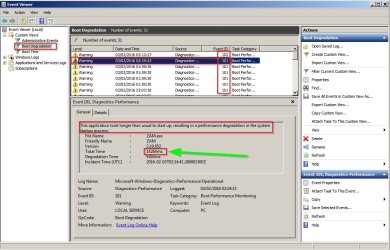
Look for something like this:

   Note
This application took longer than usual to start up, resulting in a performance degradation in the system startup process:


Check mostly Event Id 101 & 102

Investigate and look for anything that stands out and looks as if the time measured in ms is too long.

Event Viewer.jpg

What you might need to look for:

Security software load time issues or driver load time issues.

EDIT:

Reading your first post in this thread again I notice that you say that your original boot time problem is improved. Perhaps you could look back through the dates in Event Viewer logs to see if anything shows up.
 
Last edited:

My Computer My Computer

At a glance

Microsoft Windows 7 Home Premium 64-bit 7601 ...AMD C-60 APU with Radeon(tm) HD Graphics4.00 GBAMD Radeon HD 6290 Graphics
Computer type
Laptop
Computer Manufacturer/Model Number
ASUS
OS
Microsoft Windows 7 Home Premium 64-bit 7601 Multiprocessor Free Service Pack 1
CPU
AMD C-60 APU with Radeon(tm) HD Graphics
Motherboard
ASUSTeK COMPUTER INC. X501U
Memory
4.00 GB
Graphics Card(s)
AMD Radeon HD 6290 Graphics
Sound Card
(1) AMD High Definition Audio Device (2) Realtek High Defi
Screen Resolution
1366 x 768 x 32 bits (4294967296 colors) @ 60 Hz
Hard Drives
Hitachi HTS545050A7E380 SATA Disk Device
Antivirus
Comodo CIS & FW, SecureAplus App Whitelisting, Threatfire
Browser
Cyberfox 64bit, Opera 64bit, Airfox
Other Info
Spy-The-Spy, HitmanPro.Alert, Norton Connect Safe, MJRegWatcher, BitDefender TrafficLight, Voodoo Shield, Zemana AntiMalware
An IT technician I know examined the machine yesterday and felt it was severely compromised. He thought, for instance, that recent Windows updates were not installed (or failed) but the log files said otherwise. He wondered about a volume listed under Computer Management-Disk Management. The Volume has no name (like OS (C:)), but its status is the OEM Partition); it's 39 MB. Also, the name of a laptop I have appeared in a log file for yesterday but the laptop only connects via WiFi. I am not sure what that means.

As another note,it seems that the problem has abated. Since I don't know what causes it or why, a few days ago it happened every few minutes (for about 3 minutes at a time), but today and late yesterday it seems to not occur.

One other thing: Yesterday, Taskmgr showed EFS running. (Encrypting File System). I am not sure why as I did not start it and I am pretty sure I have never seen it before in Taskmgr. I haven't run cipher.exe and never used it. I have Windows 7 Home Premium and never got keys from anywhere.
 

My Computer My Computer

At a glance

Microsoft Windows 7 Home Premium 64-bit 7601 ...Intel(R) Core(TM) i3-2100 CPU @ 3.10GHz4.00 GBIntel(R) HD Graphics Family
Computer type
PC/Desktop
Computer Manufacturer/Model Number
Dell
OS
Microsoft Windows 7 Home Premium 64-bit 7601 Multiproc; build: 7601 Multiprocessor Free
CPU
Intel(R) Core(TM) i3-2100 CPU @ 3.10GHz
Motherboard
Dell Inc. 0GDG8Y
Memory
4.00 GB
Graphics Card(s)
Intel(R) HD Graphics Family
Sound Card
(1) Conexant HD Audio (2) Intel(R) Display Audio
Monitor(s) Displays
Nothing appears in systeminfo for Monitor.
Screen Resolution
1920 x 1080 x 32 bits (4294967296 colors) @ 60 Hz
Hard Drives
WDC WD10EALX-759BA1 ATA Device, 3 partitions, size: 931.51 GB; Generic- Multi-Card USB Device: 0 GB, 0 Partitions; Seagate Expansion Desk USB Device, 1 partition, External hard disk media, 1.82TB
Antivirus
Kaspersky
Browser
Chrome; IE, Mozilla
Other Info
SystemInfo took < 1 sec to download but then 5 min to come up (due to the problem)
I have Windows 7 Home Premium and never got keys from anywhere.
If the PC came from Dell with pre-installed Windows 7 it should have a COA sticker.

The COA sticker looks like this:

202840d1331785878-clean-reinstall-factory-oem-windows-7-a-coa-stickers.gif


You need a valid readable COA key (or purchase a new Win 7) to do a clean install of Win 7.

Here is a tutorial for a clean install:
http://www.sevenforums.com/tutorials/219487-clean-reinstall-factory-oem-windows-7-a.html

You could also consider a factory recovery.
If you don't have factory recovery media you could contact Dell and see if they can send you recovery media.
 

My Computer My Computer

At a glance

Multi-Boot W7_Pro_x64 W8.1_Pro_x64 W10_Pro_x6...AMD Athlon II x4 6206GB GSkill DDR2 800AMD 4670 GPU + AMD 4200 IGP
Computer type
PC/Desktop
Computer Manufacturer/Model Number
home built
OS
Multi-Boot W7_Pro_x64 W8.1_Pro_x64 W10_Pro_x64 +Linux_VMs +Chromium_VM
CPU
AMD Athlon II x4 620
Motherboard
Gigabyte GA-MA785G-UD3H
Memory
6GB GSkill DDR2 800
Graphics Card(s)
AMD 4670 GPU + AMD 4200 IGP
Sound Card
on board Realtek ALC889A
Monitor(s) Displays
RCA 40" LCD TV, Insignia 32" LCD TV, HP 15" LCD monitor
Screen Resolution
1680 x 1050
Hard Drives
OCZ Vertex 3 120GB,
Samsung F3 1TB (3),
Several others - WD, Seagate, Hitachi, ...
PSU
Corsair 500 W
Case
Rosewill mid tower
Cooling
CM 90mm rifle
Keyboard
Gyration wireless, Logitech wireless, Dell USB wired
Mouse
Gyration wireless, Logitech wireless, V7 USB wired
Internet Speed
Spectrum - 100Mbps D / 10Mbps U
Antivirus
Avast, MBAM3, EMET, WinPatrol
Browser
Pale Moon, Firefox, IE
Other Info
2 multi-boot PC's
Mainly HTPC/Office/Gen purpose (no gaming).
Trendnet USB KVM.
LG DVD burner/Blue Ray Player.
Tray system for removable SATA backup drives.

Not currently OCd, under-volted.
I use Hybrid sleep, rarely re-boot or shutdown.

Hauppauge HD-PVR, Avermedia PCIe TV Tuner, Hauppauge PCI TV Tuner.
That's not a bad idea. I'm sure there's such a sticker on my machine. But if this is an SMM virus, would a clean install make a difference?
 

My Computer My Computer

At a glance

Microsoft Windows 7 Home Premium 64-bit 7601 ...Intel(R) Core(TM) i3-2100 CPU @ 3.10GHz4.00 GBIntel(R) HD Graphics Family
Computer type
PC/Desktop
Computer Manufacturer/Model Number
Dell
OS
Microsoft Windows 7 Home Premium 64-bit 7601 Multiproc; build: 7601 Multiprocessor Free
CPU
Intel(R) Core(TM) i3-2100 CPU @ 3.10GHz
Motherboard
Dell Inc. 0GDG8Y
Memory
4.00 GB
Graphics Card(s)
Intel(R) HD Graphics Family
Sound Card
(1) Conexant HD Audio (2) Intel(R) Display Audio
Monitor(s) Displays
Nothing appears in systeminfo for Monitor.
Screen Resolution
1920 x 1080 x 32 bits (4294967296 colors) @ 60 Hz
Hard Drives
WDC WD10EALX-759BA1 ATA Device, 3 partitions, size: 931.51 GB; Generic- Multi-Card USB Device: 0 GB, 0 Partitions; Seagate Expansion Desk USB Device, 1 partition, External hard disk media, 1.82TB
Antivirus
Kaspersky
Browser
Chrome; IE, Mozilla
Other Info
SystemInfo took < 1 sec to download but then 5 min to come up (due to the problem)
That's a good question.
I'm not a security expert so i can't answer.
It would be best to ask that question in a new thread in the Security sub-forum here:
http://www.sevenforums.com/system-security/

You could include a link to this thread so security experts there can see what has been tried so far.
 

My Computer My Computer

At a glance

Multi-Boot W7_Pro_x64 W8.1_Pro_x64 W10_Pro_x6...AMD Athlon II x4 6206GB GSkill DDR2 800AMD 4670 GPU + AMD 4200 IGP
Computer type
PC/Desktop
Computer Manufacturer/Model Number
home built
OS
Multi-Boot W7_Pro_x64 W8.1_Pro_x64 W10_Pro_x64 +Linux_VMs +Chromium_VM
CPU
AMD Athlon II x4 620
Motherboard
Gigabyte GA-MA785G-UD3H
Memory
6GB GSkill DDR2 800
Graphics Card(s)
AMD 4670 GPU + AMD 4200 IGP
Sound Card
on board Realtek ALC889A
Monitor(s) Displays
RCA 40" LCD TV, Insignia 32" LCD TV, HP 15" LCD monitor
Screen Resolution
1680 x 1050
Hard Drives
OCZ Vertex 3 120GB,
Samsung F3 1TB (3),
Several others - WD, Seagate, Hitachi, ...
PSU
Corsair 500 W
Case
Rosewill mid tower
Cooling
CM 90mm rifle
Keyboard
Gyration wireless, Logitech wireless, Dell USB wired
Mouse
Gyration wireless, Logitech wireless, V7 USB wired
Internet Speed
Spectrum - 100Mbps D / 10Mbps U
Antivirus
Avast, MBAM3, EMET, WinPatrol
Browser
Pale Moon, Firefox, IE
Other Info
2 multi-boot PC's
Mainly HTPC/Office/Gen purpose (no gaming).
Trendnet USB KVM.
LG DVD burner/Blue Ray Player.
Tray system for removable SATA backup drives.

Not currently OCd, under-volted.
I use Hybrid sleep, rarely re-boot or shutdown.

Hauppauge HD-PVR, Avermedia PCIe TV Tuner, Hauppauge PCI TV Tuner.
One person answered so far. He didn't think it was a problem.
 

My Computer My Computer

At a glance

Microsoft Windows 7 Home Premium 64-bit 7601 ...Intel(R) Core(TM) i3-2100 CPU @ 3.10GHz4.00 GBIntel(R) HD Graphics Family
Computer type
PC/Desktop
Computer Manufacturer/Model Number
Dell
OS
Microsoft Windows 7 Home Premium 64-bit 7601 Multiproc; build: 7601 Multiprocessor Free
CPU
Intel(R) Core(TM) i3-2100 CPU @ 3.10GHz
Motherboard
Dell Inc. 0GDG8Y
Memory
4.00 GB
Graphics Card(s)
Intel(R) HD Graphics Family
Sound Card
(1) Conexant HD Audio (2) Intel(R) Display Audio
Monitor(s) Displays
Nothing appears in systeminfo for Monitor.
Screen Resolution
1920 x 1080 x 32 bits (4294967296 colors) @ 60 Hz
Hard Drives
WDC WD10EALX-759BA1 ATA Device, 3 partitions, size: 931.51 GB; Generic- Multi-Card USB Device: 0 GB, 0 Partitions; Seagate Expansion Desk USB Device, 1 partition, External hard disk media, 1.82TB
Antivirus
Kaspersky
Browser
Chrome; IE, Mozilla
Other Info
SystemInfo took < 1 sec to download but then 5 min to come up (due to the problem)
Back
Top