Can't do a fresh install of Windows 7.

dsscottage

New member
Member
Local time
12:19 PM
Messages
49
My problem is that I am unable to do a fresh install of Windows 7 over and existing installation.

I've been working on this problem for over 2 weeks and can't make any progress. I won't bore you with all the details but here's a brief summary of the background:

-I'm working on an older computer that was being used as a back up.
-It had Win 7 Ultimate and Win XP installed in a dual boot arrangement
-After a Win 7 crash, the system wouldn't boot past the Boot Manger screen (it froze)
-After a lot of different attempts, It finally would boot to Win 7 but the Boot Manager screen was still frozen. (It timed out to Win 7)
-Win 7 operated like it was stuck in molasses (CPU usage at 100%)
-I removed Win XP and formatted that partition and using tutorials from this forum and changed the bootmgr to remove XP as a choice
-Win 7 boots but still runs like molasses.

I decided to give up and reinstall Windows.
-I have the BIOS set to boot first from the DVD drive, 2nd from the HDD
-When I try to boot from the Windows DVD, I get the message "Searching for boot record from CD"
-Then I get the message, "Press any key to boot from CD". I do this but the system still boots from the HDD to Win 7

I have attempted F11 & F12 from the POST screen but the system seems to ignore this and still boots to Win 7.

I have searched for suggestions but most recommend booting from a system restore disk or the Win 7 disk which doesn't work.

I suspect that my problem is a corrupted bootmgr file but I'm getting a little out of my depth here.

Does anyone have any suggestions on how I can force this system to boot from the DVD drive or to examine the bootmgr file is that is really the problem.
 

My Computer My Computer

At a glance

Windows 10 ProIntel Core i7-377016MBNVIDIA GeForce GT 640
Computer type
PC/Desktop
Computer Manufacturer/Model Number
ASUS
OS
Windows 10 Pro
CPU
Intel Core i7-3770
Motherboard
ASUS CM6870
Memory
16MB
Graphics Card(s)
NVIDIA GeForce GT 640
Sound Card
Onboard HD Audio
Monitor(s) Displays
Hanns.G HZ281
Screen Resolution
1920x1200
Hard Drives
Samsung 850 EVO 512GB SSD and
ST2000DM 2TB HDD
Internet Speed
Gigabit
Antivirus
Windows Defender
Browser
Chrome
Other Info
Second desktop computer - Intel Core 2 Duo - Win 7 Ultimate,
Laptop - ASUS Intel Core i5-3317U - Win 10 Home
Can you get to a working PC with a cd burner ?

Make and use a Partition Wizard boot cd.

Boot from the cd.

Delete the entire drive down to unallocated space.

Then create a Primary Partition, then align, format and mark it active ( all done with PW cd)

Click apply in the top left corner.

Remove the cd, put your install disc in and restart the PC.

Use the 1 time boot menu key to bring up the boot menu and choose your cd/dvd drive.

Post your results.

Bootable Partition Manger | MiniTool Partition Wizard Bootable Edition
 

My Computer My Computer

At a glance

Windows 10 Pro x64Intel Core i7 6700KGSkill TridentZ RGB 16GB 3600 16-16-16-36EVGA GTX 980 Ti SC x2
Computer type
PC/Desktop
Computer Manufacturer/Model Number
Skylake Special #666
OS
Windows 10 Pro x64
CPU
Intel Core i7 6700K
Motherboard
Asus Sabertooth Z170 Mark 1
Memory
GSkill TridentZ RGB 16GB 3600 16-16-16-36
Graphics Card(s)
EVGA GTX 980 Ti SC x2
Sound Card
Realtek High Definition
Monitor(s) Displays
AOC G2460PG
Screen Resolution
1920 x 1080 144Hz
Hard Drives
Samsung 860 Pro 256GB, Seagate Barracuda 4TB x2
PSU
EVGA 1000 P2, EVGA White Custom Braided Cables
Case
Corsair Vengeance C70 Gunmetal Black
Cooling
Corsair H100i v2, Corsair ML120 x2, Thermal Grizzly Kryonaut
Keyboard
Logitech G910 Orion Spectrum
Mouse
Logitech G700s
Internet Speed
Verizon Fios Quantum Gateway 75/75
Antivirus
Windows Defender, Malwarebytes Free 3.8.3
Browser
Chrome
Other Info
Corsair SP120 x4, LG Blu-ray Drive, Durabrand HT-395 100 Watt Dolby Digital Amp, Corsair H2100 Wireless 7.1 Headset
Can you get to a working PC with a cd burner ?

Make and use a Partition Wizard boot cd.

Boot from the cd.

Delete the entire drive down to unallocated space.

Then create a Primary Partition, then align, format and mark it active ( all done with PW cd)

Click apply in the top left corner.

Remove the cd, put your install disc in and restart the PC.

Use the 1 time boot menu key to bring up the boot menu and choose your cd/dvd drive.

Post your results.

Bootable Partition Manger | MiniTool Partition Wizard Bootable Edition

My problem is that I can't boot from the DVD/CD drive. I have a bootable DVD with partition magic on it but it won't boot. The computer insists on booting to Win 7 no matter what I do.
 

My Computer My Computer

At a glance

Windows 10 ProIntel Core i7-377016MBNVIDIA GeForce GT 640
Computer type
PC/Desktop
Computer Manufacturer/Model Number
ASUS
OS
Windows 10 Pro
CPU
Intel Core i7-3770
Motherboard
ASUS CM6870
Memory
16MB
Graphics Card(s)
NVIDIA GeForce GT 640
Sound Card
Onboard HD Audio
Monitor(s) Displays
Hanns.G HZ281
Screen Resolution
1920x1200
Hard Drives
Samsung 850 EVO 512GB SSD and
ST2000DM 2TB HDD
Internet Speed
Gigabit
Antivirus
Windows Defender
Browser
Chrome
Other Info
Second desktop computer - Intel Core 2 Duo - Win 7 Ultimate,
Laptop - ASUS Intel Core i5-3317U - Win 10 Home
OK then you need to replace your dvd drive.
 

My Computer My Computer

At a glance

Windows 10 Pro x64Intel Core i7 6700KGSkill TridentZ RGB 16GB 3600 16-16-16-36EVGA GTX 980 Ti SC x2
Computer type
PC/Desktop
Computer Manufacturer/Model Number
Skylake Special #666
OS
Windows 10 Pro x64
CPU
Intel Core i7 6700K
Motherboard
Asus Sabertooth Z170 Mark 1
Memory
GSkill TridentZ RGB 16GB 3600 16-16-16-36
Graphics Card(s)
EVGA GTX 980 Ti SC x2
Sound Card
Realtek High Definition
Monitor(s) Displays
AOC G2460PG
Screen Resolution
1920 x 1080 144Hz
Hard Drives
Samsung 860 Pro 256GB, Seagate Barracuda 4TB x2
PSU
EVGA 1000 P2, EVGA White Custom Braided Cables
Case
Corsair Vengeance C70 Gunmetal Black
Cooling
Corsair H100i v2, Corsair ML120 x2, Thermal Grizzly Kryonaut
Keyboard
Logitech G910 Orion Spectrum
Mouse
Logitech G700s
Internet Speed
Verizon Fios Quantum Gateway 75/75
Antivirus
Windows Defender, Malwarebytes Free 3.8.3
Browser
Chrome
Other Info
Corsair SP120 x4, LG Blu-ray Drive, Durabrand HT-395 100 Watt Dolby Digital Amp, Corsair H2100 Wireless 7.1 Headset
OK then you need to replace your dvd drive.

Well, maybe I'm missing something....

The DVD drive works. I can insert a DVD or CD, read the contents and open any file.

To me, it seems like Windows will not react to the boot information on the DVD.
 

My Computer My Computer

At a glance

Windows 10 ProIntel Core i7-377016MBNVIDIA GeForce GT 640
Computer type
PC/Desktop
Computer Manufacturer/Model Number
ASUS
OS
Windows 10 Pro
CPU
Intel Core i7-3770
Motherboard
ASUS CM6870
Memory
16MB
Graphics Card(s)
NVIDIA GeForce GT 640
Sound Card
Onboard HD Audio
Monitor(s) Displays
Hanns.G HZ281
Screen Resolution
1920x1200
Hard Drives
Samsung 850 EVO 512GB SSD and
ST2000DM 2TB HDD
Internet Speed
Gigabit
Antivirus
Windows Defender
Browser
Chrome
Other Info
Second desktop computer - Intel Core 2 Duo - Win 7 Ultimate,
Laptop - ASUS Intel Core i5-3317U - Win 10 Home
Test your boot-able CD/DVD discs on another PC and see if they work.
 

My Computer My Computer

At a glance

Multi-Boot W7_Pro_x64 W8.1_Pro_x64 W10_Pro_x6...AMD Athlon II x4 6206GB GSkill DDR2 800AMD 4670 GPU + AMD 4200 IGP
Computer type
PC/Desktop
Computer Manufacturer/Model Number
home built
OS
Multi-Boot W7_Pro_x64 W8.1_Pro_x64 W10_Pro_x64 +Linux_VMs +Chromium_VM
CPU
AMD Athlon II x4 620
Motherboard
Gigabyte GA-MA785G-UD3H
Memory
6GB GSkill DDR2 800
Graphics Card(s)
AMD 4670 GPU + AMD 4200 IGP
Sound Card
on board Realtek ALC889A
Monitor(s) Displays
RCA 40" LCD TV, Insignia 32" LCD TV, HP 15" LCD monitor
Screen Resolution
1680 x 1050
Hard Drives
OCZ Vertex 3 120GB,
Samsung F3 1TB (3),
Several others - WD, Seagate, Hitachi, ...
PSU
Corsair 500 W
Case
Rosewill mid tower
Cooling
CM 90mm rifle
Keyboard
Gyration wireless, Logitech wireless, Dell USB wired
Mouse
Gyration wireless, Logitech wireless, V7 USB wired
Internet Speed
Spectrum - 100Mbps D / 10Mbps U
Antivirus
Avast, MBAM3, EMET, WinPatrol
Browser
Pale Moon, Firefox, IE
Other Info
2 multi-boot PC's
Mainly HTPC/Office/Gen purpose (no gaming).
Trendnet USB KVM.
LG DVD burner/Blue Ray Player.
Tray system for removable SATA backup drives.

Not currently OCd, under-volted.
I use Hybrid sleep, rarely re-boot or shutdown.

Hauppauge HD-PVR, Avermedia PCIe TV Tuner, Hauppauge PCI TV Tuner.
Well then, if you`re confident the dvd drive works, then you must have a bad installer.

Test your disc as David has suggested.

Or create a new one while you have a chance.

Microsoft DigitalRiver Mirror

Free ISO Burner
 

My Computer My Computer

At a glance

Windows 10 Pro x64Intel Core i7 6700KGSkill TridentZ RGB 16GB 3600 16-16-16-36EVGA GTX 980 Ti SC x2
Computer type
PC/Desktop
Computer Manufacturer/Model Number
Skylake Special #666
OS
Windows 10 Pro x64
CPU
Intel Core i7 6700K
Motherboard
Asus Sabertooth Z170 Mark 1
Memory
GSkill TridentZ RGB 16GB 3600 16-16-16-36
Graphics Card(s)
EVGA GTX 980 Ti SC x2
Sound Card
Realtek High Definition
Monitor(s) Displays
AOC G2460PG
Screen Resolution
1920 x 1080 144Hz
Hard Drives
Samsung 860 Pro 256GB, Seagate Barracuda 4TB x2
PSU
EVGA 1000 P2, EVGA White Custom Braided Cables
Case
Corsair Vengeance C70 Gunmetal Black
Cooling
Corsair H100i v2, Corsair ML120 x2, Thermal Grizzly Kryonaut
Keyboard
Logitech G910 Orion Spectrum
Mouse
Logitech G700s
Internet Speed
Verizon Fios Quantum Gateway 75/75
Antivirus
Windows Defender, Malwarebytes Free 3.8.3
Browser
Chrome
Other Info
Corsair SP120 x4, LG Blu-ray Drive, Durabrand HT-395 100 Watt Dolby Digital Amp, Corsair H2100 Wireless 7.1 Headset
Well then, if you`re confident the dvd drive works, then you must have a bad installer.

Test your disc as David has suggested.

Or create a new one while you have a chance.

Microsoft DigitalRiver Mirror

Free ISO Burner

I've tested the disk on another system and it boots correctly.

I downloaded an ISO of Win 7 and burned it to a DVD using the DVD drive on the problem computer. It also won't boot on the problem computer but will boot on another computer.

Although I admit that I'm getting out of my depth, I believe that my problem is the bootloader (or start up process). I believe that I need to repair the startup. Here is what I'm experiencing that makes me believe that:
1. I have removed a dual boot using the guide in this forum. (Win 7 & XP)
2. When booting I still get the black dual boot screen but am unable to do anything on that screen. (Enter, Tab or arrow don't work. I have to wait until the screen times out to default.)
3. If I boot and press F11 or F12 at POST, it has no effect. The system still boots to Win 7.
4. If I press F8 during POST, I get the black screen with options for Safe mode, normal boot, etc. Again Enter, Tab or arrow keys are unresponsive. I have to wait until it times out to Win 7 boot.
5. I'm thrashing about looking for a solution so I ran the Win 7 disk setup file from Windows Explorer within Windows 7. When I tried to reinstall over the existing Windows on partition C, it failed and gave me a BSOD. Then I tried to install it in the empty partition F: and it installed correctly. Now, when I boot, I still get the black bootmgr screen (with 2 Win 7 options) but it is still unresponsive. It ultimately times out and boots to the new Windows on partition F: This new Windows on partition F works as it should. Interestingly enough, it created a "windows.old" file on the C partition:
6. When I look at the Disk Management console, the C drive is shown as active. Therefore, the old bootmgr file resides there and is likely still causing me the problem.

I've searched for "startup repair", "fix bootmgr" and similar search terms and every result tells me to boot to the Repair Console from the Windows DVD. I obviously can't do this.

If all of my assumptions are correct, I need to fix the startup process without a DVD boot. I'm tempted to delete the C partition from the Disk management console to see if that will allow me too boot from the Win 7 DVD and recreate the bootmger file.

Any thoughts on this line of logic?
 

My Computer My Computer

At a glance

Windows 10 ProIntel Core i7-377016MBNVIDIA GeForce GT 640
Computer type
PC/Desktop
Computer Manufacturer/Model Number
ASUS
OS
Windows 10 Pro
CPU
Intel Core i7-3770
Motherboard
ASUS CM6870
Memory
16MB
Graphics Card(s)
NVIDIA GeForce GT 640
Sound Card
Onboard HD Audio
Monitor(s) Displays
Hanns.G HZ281
Screen Resolution
1920x1200
Hard Drives
Samsung 850 EVO 512GB SSD and
ST2000DM 2TB HDD
Internet Speed
Gigabit
Antivirus
Windows Defender
Browser
Chrome
Other Info
Second desktop computer - Intel Core 2 Duo - Win 7 Ultimate,
Laptop - ASUS Intel Core i5-3317U - Win 10 Home
Can you get into your BIOS settings when booting the PC ?
You might need to do a BIOS reset.

Your specs show a Custom Build Desktop with W7 Ultimate.
Who built the PC and installed the OS ?
 
Last edited:

My Computer My Computer

At a glance

Multi-Boot W7_Pro_x64 W8.1_Pro_x64 W10_Pro_x6...AMD Athlon II x4 6206GB GSkill DDR2 800AMD 4670 GPU + AMD 4200 IGP
Computer type
PC/Desktop
Computer Manufacturer/Model Number
home built
OS
Multi-Boot W7_Pro_x64 W8.1_Pro_x64 W10_Pro_x64 +Linux_VMs +Chromium_VM
CPU
AMD Athlon II x4 620
Motherboard
Gigabyte GA-MA785G-UD3H
Memory
6GB GSkill DDR2 800
Graphics Card(s)
AMD 4670 GPU + AMD 4200 IGP
Sound Card
on board Realtek ALC889A
Monitor(s) Displays
RCA 40" LCD TV, Insignia 32" LCD TV, HP 15" LCD monitor
Screen Resolution
1680 x 1050
Hard Drives
OCZ Vertex 3 120GB,
Samsung F3 1TB (3),
Several others - WD, Seagate, Hitachi, ...
PSU
Corsair 500 W
Case
Rosewill mid tower
Cooling
CM 90mm rifle
Keyboard
Gyration wireless, Logitech wireless, Dell USB wired
Mouse
Gyration wireless, Logitech wireless, V7 USB wired
Internet Speed
Spectrum - 100Mbps D / 10Mbps U
Antivirus
Avast, MBAM3, EMET, WinPatrol
Browser
Pale Moon, Firefox, IE
Other Info
2 multi-boot PC's
Mainly HTPC/Office/Gen purpose (no gaming).
Trendnet USB KVM.
LG DVD burner/Blue Ray Player.
Tray system for removable SATA backup drives.

Not currently OCd, under-volted.
I use Hybrid sleep, rarely re-boot or shutdown.

Hauppauge HD-PVR, Avermedia PCIe TV Tuner, Hauppauge PCI TV Tuner.
I don`t understand, if you delete the drive to unallocated space, there is no bootloader.

Maybe you should try the clean command, or try another drive.

And if you haven`t yet, set the bios to defaults (F5) as David has suggested.
 

My Computer My Computer

At a glance

Windows 10 Pro x64Intel Core i7 6700KGSkill TridentZ RGB 16GB 3600 16-16-16-36EVGA GTX 980 Ti SC x2
Computer type
PC/Desktop
Computer Manufacturer/Model Number
Skylake Special #666
OS
Windows 10 Pro x64
CPU
Intel Core i7 6700K
Motherboard
Asus Sabertooth Z170 Mark 1
Memory
GSkill TridentZ RGB 16GB 3600 16-16-16-36
Graphics Card(s)
EVGA GTX 980 Ti SC x2
Sound Card
Realtek High Definition
Monitor(s) Displays
AOC G2460PG
Screen Resolution
1920 x 1080 144Hz
Hard Drives
Samsung 860 Pro 256GB, Seagate Barracuda 4TB x2
PSU
EVGA 1000 P2, EVGA White Custom Braided Cables
Case
Corsair Vengeance C70 Gunmetal Black
Cooling
Corsair H100i v2, Corsair ML120 x2, Thermal Grizzly Kryonaut
Keyboard
Logitech G910 Orion Spectrum
Mouse
Logitech G700s
Internet Speed
Verizon Fios Quantum Gateway 75/75
Antivirus
Windows Defender, Malwarebytes Free 3.8.3
Browser
Chrome
Other Info
Corsair SP120 x4, LG Blu-ray Drive, Durabrand HT-395 100 Watt Dolby Digital Amp, Corsair H2100 Wireless 7.1 Headset
How old is your hard drive. (WDC WD1200JB-00CRA1 120 GB)?

If it was my compute I would start with a new SSD and cables.
 

My Computer My Computer

At a glance

Windows 10 Pro. 64/ version 1709 Windows 7 Pr...Intel i7-6800K @ 4.3Corsair Platinum 16 gig @2400EVGA GTX 1070 OC
Computer type
PC/Desktop
Computer Manufacturer/Model Number
Home made Desktop
OS
Windows 10 Pro. 64/ version 1709 Windows 7 Pro/64
CPU
Intel i7-6800K @ 4.3
Motherboard
ASUS X-99 Deluxe II
Memory
Corsair Platinum 16 gig @2400
Graphics Card(s)
EVGA GTX 1070 OC
Monitor(s) Displays
Asus 27" LED LCD/VE278Q
Screen Resolution
1920-1080 or 1280-720 HDMI
Hard Drives
INTEL SSD 730-240 Gb Sata 3.0/
PSU
EVGA Platium 1200W
Case
Phanteks Luxe Tempered Glass 8 fans/ one radiator
Cooling
XSPC/ Water Cooled CPU
Keyboard
Das 4 Professional
Mouse
Logitech M705/MX Anywhere 2-S
Internet Speed
100 mbits
Antivirus
Microsoft Security Essentials/ Malwarebytes Premium 3.0/ SAS
Browser
I.E. 11 default/Firefox/ ISP Time Warner Cable/Spectrum
Other Info
LG BluRay Burner/
Sound system-KLipsch-THX/
Icy Dock ssd Hot Swap bays.
Or maybe even just disconnect the hard drive, and see if it will boot from the DVD when no HD is connected.
 

My Computer My Computer

At a glance

Multi-Boot W7_Pro_x64 W8.1_Pro_x64 W10_Pro_x6...AMD Athlon II x4 6206GB GSkill DDR2 800AMD 4670 GPU + AMD 4200 IGP
Computer type
PC/Desktop
Computer Manufacturer/Model Number
home built
OS
Multi-Boot W7_Pro_x64 W8.1_Pro_x64 W10_Pro_x64 +Linux_VMs +Chromium_VM
CPU
AMD Athlon II x4 620
Motherboard
Gigabyte GA-MA785G-UD3H
Memory
6GB GSkill DDR2 800
Graphics Card(s)
AMD 4670 GPU + AMD 4200 IGP
Sound Card
on board Realtek ALC889A
Monitor(s) Displays
RCA 40" LCD TV, Insignia 32" LCD TV, HP 15" LCD monitor
Screen Resolution
1680 x 1050
Hard Drives
OCZ Vertex 3 120GB,
Samsung F3 1TB (3),
Several others - WD, Seagate, Hitachi, ...
PSU
Corsair 500 W
Case
Rosewill mid tower
Cooling
CM 90mm rifle
Keyboard
Gyration wireless, Logitech wireless, Dell USB wired
Mouse
Gyration wireless, Logitech wireless, V7 USB wired
Internet Speed
Spectrum - 100Mbps D / 10Mbps U
Antivirus
Avast, MBAM3, EMET, WinPatrol
Browser
Pale Moon, Firefox, IE
Other Info
2 multi-boot PC's
Mainly HTPC/Office/Gen purpose (no gaming).
Trendnet USB KVM.
LG DVD burner/Blue Ray Player.
Tray system for removable SATA backup drives.

Not currently OCd, under-volted.
I use Hybrid sleep, rarely re-boot or shutdown.

Hauppauge HD-PVR, Avermedia PCIe TV Tuner, Hauppauge PCI TV Tuner.
David that is a very good, (or maybe).
 

My Computer My Computer

At a glance

Windows 10 Pro. 64/ version 1709 Windows 7 Pr...Intel i7-6800K @ 4.3Corsair Platinum 16 gig @2400EVGA GTX 1070 OC
Computer type
PC/Desktop
Computer Manufacturer/Model Number
Home made Desktop
OS
Windows 10 Pro. 64/ version 1709 Windows 7 Pro/64
CPU
Intel i7-6800K @ 4.3
Motherboard
ASUS X-99 Deluxe II
Memory
Corsair Platinum 16 gig @2400
Graphics Card(s)
EVGA GTX 1070 OC
Monitor(s) Displays
Asus 27" LED LCD/VE278Q
Screen Resolution
1920-1080 or 1280-720 HDMI
Hard Drives
INTEL SSD 730-240 Gb Sata 3.0/
PSU
EVGA Platium 1200W
Case
Phanteks Luxe Tempered Glass 8 fans/ one radiator
Cooling
XSPC/ Water Cooled CPU
Keyboard
Das 4 Professional
Mouse
Logitech M705/MX Anywhere 2-S
Internet Speed
100 mbits
Antivirus
Microsoft Security Essentials/ Malwarebytes Premium 3.0/ SAS
Browser
I.E. 11 default/Firefox/ ISP Time Warner Cable/Spectrum
Other Info
LG BluRay Burner/
Sound system-KLipsch-THX/
Icy Dock ssd Hot Swap bays.
Can you get into your BIOS settings when booting the PC ?
You might need to do a BIOS reset.

Your specs show a Custom Build Desktop with W7 Ultimate.
Who built the PC and installed the OS ?

One of the many things that I have done is to replace the MB battery. (I once received a strange error report that made it seem like the MB had forgotten the HD configuration.) Therefore, I replaced he battery and reset the BIOS to default.


How old is your hard drive. (WDC WD1200JB-00CRA1 120 GB)?

If it was my computer I would start with a new SSD and cables.

If this was my production computer, I would have done something like that. Actually, I did. I have previously replaced this computer with a newer model. Even that replacement has been replaced by an even newer model. The Win 7 computer that is giving me trouble is a backup computer that I use to test new software just to make sure that software doesn't screw up my production computer. As such, I'd rather not spend any significant amount of money on it. However, if I put a dollar value on my time, it probably would have been cheaper to replace the computer. Anyway, this is a challenge!

Or maybe even just disconnect the hard drive, and see if it will boot from the DVD when no HD is connected.

I like that idea! I'm going to try it and will post back.
 

My Computer My Computer

At a glance

Windows 10 ProIntel Core i7-377016MBNVIDIA GeForce GT 640
Computer type
PC/Desktop
Computer Manufacturer/Model Number
ASUS
OS
Windows 10 Pro
CPU
Intel Core i7-3770
Motherboard
ASUS CM6870
Memory
16MB
Graphics Card(s)
NVIDIA GeForce GT 640
Sound Card
Onboard HD Audio
Monitor(s) Displays
Hanns.G HZ281
Screen Resolution
1920x1200
Hard Drives
Samsung 850 EVO 512GB SSD and
ST2000DM 2TB HDD
Internet Speed
Gigabit
Antivirus
Windows Defender
Browser
Chrome
Other Info
Second desktop computer - Intel Core 2 Duo - Win 7 Ultimate,
Laptop - ASUS Intel Core i5-3317U - Win 10 Home
This problem gets more curious by the moment!

As suggested, I disconnected the HDD and attempted to boot from the DVD drive. Here are the results:

1. Commercial OEM Windows XP CD:
Boots correctly

2. Bootable CD (with utilities originally burned on this computer)
Boots correctly...
...but accessing the utilities on this disk requires using the keyboard arrow keys to navigate. They don't work.

3. Bootable Win 7 DVD (This is my original Win 7 DVD. I had to download it when I upgraded from XP to Win 7)
-Boots correctly in another computer
-Will not boot on on my problem computer
-The DVD can be correctly read from Windows Explorer

4. New Bootabe Win 7 DVD (a few days ago this ISO was downloaded and burned to a DVD on the problem computer)
-Boots correctly in another computer
-Will not boot on on my problem computer
-The DVD can be correctly read from Windows Explorer

Therefore, it seems that I have two problems:
1. My problem computer will boot CDs but not DVDs
-I don't have a commercially produced bootable DVD to see if that would work.
-There is an EFI folder on both Win 7 DVDs. My computer does not have a UEFI BIOS. Is that the reason? If so, how can I make the DVD non EFI?

2. Once booted into a non-windows environment the keyboard keys doesn't work.
-The only thing I can think of is that there is some BIOS setting that was reset when I restored the default BIOS settings and that caused the keyboard to be inactive before Windows loads. I searched through all the BIOS setting and didn't see anything that would be obvious to enable the keyboard (it's a USB keyboard)

Any ideas?
 

My Computer My Computer

At a glance

Windows 10 ProIntel Core i7-377016MBNVIDIA GeForce GT 640
Computer type
PC/Desktop
Computer Manufacturer/Model Number
ASUS
OS
Windows 10 Pro
CPU
Intel Core i7-3770
Motherboard
ASUS CM6870
Memory
16MB
Graphics Card(s)
NVIDIA GeForce GT 640
Sound Card
Onboard HD Audio
Monitor(s) Displays
Hanns.G HZ281
Screen Resolution
1920x1200
Hard Drives
Samsung 850 EVO 512GB SSD and
ST2000DM 2TB HDD
Internet Speed
Gigabit
Antivirus
Windows Defender
Browser
Chrome
Other Info
Second desktop computer - Intel Core 2 Duo - Win 7 Ultimate,
Laptop - ASUS Intel Core i5-3317U - Win 10 Home
Can you try using a PS2 keyboard ?
You would need to have or borrow a PS2 keyboard, and have a PS2 keyboard port on the MB.

Your specs show
Motherboard AMI MS-6380E 1.0
I couldn't find anything to help for that MB, so i can't find a manual that might explain BIOS settings.
Did you check BIOS settings for something like Enable Legacy USB devices ?

Try Speccy and make sure it shows the same motherboard as your specs.
A portable version is available here:
Speccy - Builds
 

My Computer My Computer

At a glance

Multi-Boot W7_Pro_x64 W8.1_Pro_x64 W10_Pro_x6...AMD Athlon II x4 6206GB GSkill DDR2 800AMD 4670 GPU + AMD 4200 IGP
Computer type
PC/Desktop
Computer Manufacturer/Model Number
home built
OS
Multi-Boot W7_Pro_x64 W8.1_Pro_x64 W10_Pro_x64 +Linux_VMs +Chromium_VM
CPU
AMD Athlon II x4 620
Motherboard
Gigabyte GA-MA785G-UD3H
Memory
6GB GSkill DDR2 800
Graphics Card(s)
AMD 4670 GPU + AMD 4200 IGP
Sound Card
on board Realtek ALC889A
Monitor(s) Displays
RCA 40" LCD TV, Insignia 32" LCD TV, HP 15" LCD monitor
Screen Resolution
1680 x 1050
Hard Drives
OCZ Vertex 3 120GB,
Samsung F3 1TB (3),
Several others - WD, Seagate, Hitachi, ...
PSU
Corsair 500 W
Case
Rosewill mid tower
Cooling
CM 90mm rifle
Keyboard
Gyration wireless, Logitech wireless, Dell USB wired
Mouse
Gyration wireless, Logitech wireless, V7 USB wired
Internet Speed
Spectrum - 100Mbps D / 10Mbps U
Antivirus
Avast, MBAM3, EMET, WinPatrol
Browser
Pale Moon, Firefox, IE
Other Info
2 multi-boot PC's
Mainly HTPC/Office/Gen purpose (no gaming).
Trendnet USB KVM.
LG DVD burner/Blue Ray Player.
Tray system for removable SATA backup drives.

Not currently OCd, under-volted.
I use Hybrid sleep, rarely re-boot or shutdown.

Hauppauge HD-PVR, Avermedia PCIe TV Tuner, Hauppauge PCI TV Tuner.
Can you try using a PS2 keyboard ?
You would need to have or borrow a PS2 keyboard, and have a PS2 keyboard port on the MB.

Your specs show
Motherboard AMI MS-6380E 1.0
I couldn't find anything to help for that MB, so i can't find a manual that might explain BIOS settings.
Did you check BIOS settings for something like Enable Legacy USB devices ?

Try Speccy and make sure it shows the same motherboard as your specs.
A portable version is available here:
Speccy - Builds

Problem 1:
Yup! That did it. The BIOS has an option called "USB Legacy Support". The options were "disabled" (default), "No Mice" and "all Devices". I set it to All Devices and now the keyboard works in the non-windows environment.
Thank-you, thank-you, thank-you!

I'm still left with problem #2 - A DVD will not boot in the DVD drive but a CD will.
I've been searching the net for terms like "booting UEFI DVD in a non-UEFI system". So far I haven't found anything that relates to my issue. Still looking.

Thank-you again!
 

My Computer My Computer

At a glance

Windows 10 ProIntel Core i7-377016MBNVIDIA GeForce GT 640
Computer type
PC/Desktop
Computer Manufacturer/Model Number
ASUS
OS
Windows 10 Pro
CPU
Intel Core i7-3770
Motherboard
ASUS CM6870
Memory
16MB
Graphics Card(s)
NVIDIA GeForce GT 640
Sound Card
Onboard HD Audio
Monitor(s) Displays
Hanns.G HZ281
Screen Resolution
1920x1200
Hard Drives
Samsung 850 EVO 512GB SSD and
ST2000DM 2TB HDD
Internet Speed
Gigabit
Antivirus
Windows Defender
Browser
Chrome
Other Info
Second desktop computer - Intel Core 2 Duo - Win 7 Ultimate,
Laptop - ASUS Intel Core i5-3317U - Win 10 Home
-There is an EFI folder on both Win 7 DVDs. My computer does not have a UEFI BIOS. Is that the reason? If so, how can I make the DVD non EFI?

I don't think the EFI folder on the DVD is the problem.
I have an EFI folder on my Win 7 Pro x64 w/SP1 disc, and it boots my Legacy MBR PC fine.

Just guessing, but i would look through BIOS settings, especially anything about Boot options.
The Bios reset changed one setting that you fixed, maybe there is another setting that needs to be changed.

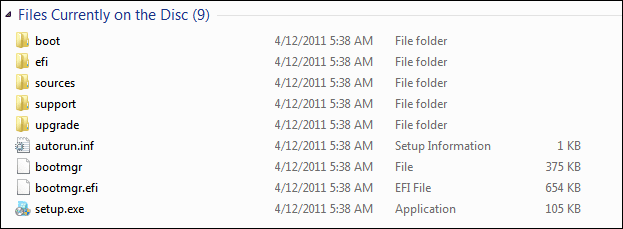
Here is a pic of what i see on my Win 7 DVD in Windows Explorer.

Win7_Boot_DVD.png
 

My Computer My Computer

At a glance

Multi-Boot W7_Pro_x64 W8.1_Pro_x64 W10_Pro_x6...AMD Athlon II x4 6206GB GSkill DDR2 800AMD 4670 GPU + AMD 4200 IGP
Computer type
PC/Desktop
Computer Manufacturer/Model Number
home built
OS
Multi-Boot W7_Pro_x64 W8.1_Pro_x64 W10_Pro_x64 +Linux_VMs +Chromium_VM
CPU
AMD Athlon II x4 620
Motherboard
Gigabyte GA-MA785G-UD3H
Memory
6GB GSkill DDR2 800
Graphics Card(s)
AMD 4670 GPU + AMD 4200 IGP
Sound Card
on board Realtek ALC889A
Monitor(s) Displays
RCA 40" LCD TV, Insignia 32" LCD TV, HP 15" LCD monitor
Screen Resolution
1680 x 1050
Hard Drives
OCZ Vertex 3 120GB,
Samsung F3 1TB (3),
Several others - WD, Seagate, Hitachi, ...
PSU
Corsair 500 W
Case
Rosewill mid tower
Cooling
CM 90mm rifle
Keyboard
Gyration wireless, Logitech wireless, Dell USB wired
Mouse
Gyration wireless, Logitech wireless, V7 USB wired
Internet Speed
Spectrum - 100Mbps D / 10Mbps U
Antivirus
Avast, MBAM3, EMET, WinPatrol
Browser
Pale Moon, Firefox, IE
Other Info
2 multi-boot PC's
Mainly HTPC/Office/Gen purpose (no gaming).
Trendnet USB KVM.
LG DVD burner/Blue Ray Player.
Tray system for removable SATA backup drives.

Not currently OCd, under-volted.
I use Hybrid sleep, rarely re-boot or shutdown.

Hauppauge HD-PVR, Avermedia PCIe TV Tuner, Hauppauge PCI TV Tuner.
-There is an EFI folder on both Win 7 DVDs. My computer does not have a UEFI BIOS. Is that the reason? If so, how can I make the DVD non EFI?

I don't think the EFI folder on the DVD is the problem.
I have an EFI folder on my Win 7 Pro x64 w/SP1 disc, and it boots my Legacy MBR PC fine.

Just guessing, but i would look through BIOS settings, especially anything about Boot options.
The Bios reset changed one setting that you fixed, maybe there is another setting that needs to be changed.

Here is a pic of what i see on my Win 7 DVD in Windows Explorer.

View attachment 381177
My disk folder structure is exactly the same.

I managed to get to another computer that does not have UEFI and the disk does boot on that computer.

Therefore, there has to be something in my configuration that is allowing a CD to boot but not a DVD.

Out of curiosity I took AddRAMs suggestion in the second post. I downloaded minitool partition and burned it to a DVD rather than a CD and it boots correctly.

Just to frustrate myself further, I copied the boot folder from the minitool partition DVD and all the files & folders from the Win 7 DVD (except Boot & EFI) and burned them to a DVD - didn't work.

I also looked at my BIOS again and can't see anything that looks like it might enable DVD booting.

My BIOS setup program is AMIBIOS Version 3.31a. I searched for a manual and found a few that were designed for other systems. Their settings were similar to mine but not exact. Even so, I didn't see anything that looked like it would solve the DVD boot issue.
 

My Computer My Computer

At a glance

Windows 10 ProIntel Core i7-377016MBNVIDIA GeForce GT 640
Computer type
PC/Desktop
Computer Manufacturer/Model Number
ASUS
OS
Windows 10 Pro
CPU
Intel Core i7-3770
Motherboard
ASUS CM6870
Memory
16MB
Graphics Card(s)
NVIDIA GeForce GT 640
Sound Card
Onboard HD Audio
Monitor(s) Displays
Hanns.G HZ281
Screen Resolution
1920x1200
Hard Drives
Samsung 850 EVO 512GB SSD and
ST2000DM 2TB HDD
Internet Speed
Gigabit
Antivirus
Windows Defender
Browser
Chrome
Other Info
Second desktop computer - Intel Core 2 Duo - Win 7 Ultimate,
Laptop - ASUS Intel Core i5-3317U - Win 10 Home

My Computer My Computer

At a glance

Multi-Boot W7_Pro_x64 W8.1_Pro_x64 W10_Pro_x6...AMD Athlon II x4 6206GB GSkill DDR2 800AMD 4670 GPU + AMD 4200 IGP
Computer type
PC/Desktop
Computer Manufacturer/Model Number
home built
OS
Multi-Boot W7_Pro_x64 W8.1_Pro_x64 W10_Pro_x64 +Linux_VMs +Chromium_VM
CPU
AMD Athlon II x4 620
Motherboard
Gigabyte GA-MA785G-UD3H
Memory
6GB GSkill DDR2 800
Graphics Card(s)
AMD 4670 GPU + AMD 4200 IGP
Sound Card
on board Realtek ALC889A
Monitor(s) Displays
RCA 40" LCD TV, Insignia 32" LCD TV, HP 15" LCD monitor
Screen Resolution
1680 x 1050
Hard Drives
OCZ Vertex 3 120GB,
Samsung F3 1TB (3),
Several others - WD, Seagate, Hitachi, ...
PSU
Corsair 500 W
Case
Rosewill mid tower
Cooling
CM 90mm rifle
Keyboard
Gyration wireless, Logitech wireless, Dell USB wired
Mouse
Gyration wireless, Logitech wireless, V7 USB wired
Internet Speed
Spectrum - 100Mbps D / 10Mbps U
Antivirus
Avast, MBAM3, EMET, WinPatrol
Browser
Pale Moon, Firefox, IE
Other Info
2 multi-boot PC's
Mainly HTPC/Office/Gen purpose (no gaming).
Trendnet USB KVM.
LG DVD burner/Blue Ray Player.
Tray system for removable SATA backup drives.

Not currently OCd, under-volted.
I use Hybrid sleep, rarely re-boot or shutdown.

Hauppauge HD-PVR, Avermedia PCIe TV Tuner, Hauppauge PCI TV Tuner.
Back
Top