

So I noticed on my Samsung Magician that it says
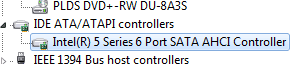
I opened my device manager and noticed that it says I have Intel series 6 port SATA AHCI Controller, but wasn't sure if that was what the magician was not recognizing of it what it was telling me is accurate. Drivers aren't my specialty, so I thought I asked the gurus for a little advice. If this is correct, than so be it, but of course, if this can be corrected would this require entering the BIOS to do so?
Your SSD will not deliver its maximum performance because your system does not support a SATA 6 Gb/s (SATA3) port. Your SSD is connected with SATA 3GB/s (SATA2) port)
I opened my device manager and noticed that it says I have Intel series 6 port SATA AHCI Controller, but wasn't sure if that was what the magician was not recognizing of it what it was telling me is accurate. Drivers aren't my specialty, so I thought I asked the gurus for a little advice. If this is correct, than so be it, but of course, if this can be corrected would this require entering the BIOS to do so?
Attachments
My Computer
- Computer type
- PC/Desktop
- OS
- Microsoft Windows 7 Professional 64-bit SP1
- CPU
- Intel(R) Core(TM) i5 CPU M 520 @ 2.40GHz
- Motherboard
- Dell Inc. 0K42JR
- Memory
- 8.00 GB
- Graphics Card(s)
- NVIDIA NVS 3100M
- Sound Card
- (1) NVIDIA High Definition Audio (2) IDT High Definition A
- Monitor(s) Displays
- 1
- Screen Resolution
- 1440 x 900 x 32 bits (4294967296 colors) @ 59 Hz
- Hard Drives
- Samsung SSD 840 PRO Series ATA Device
