
Solved Samsung 840 Pro not recognizing Intel SATA 6?

Berkey

Lost In Space
Power User
VIP
Local time
12:17 PM
Messages
328
Location
Cybertron
So I noticed on my Samsung Magician that it says

Your SSD will not deliver its maximum performance because your system does not support a SATA 6 Gb/s (SATA3) port. Your SSD is connected with SATA 3GB/s (SATA2) port)

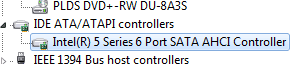
I opened my device manager and noticed that it says I have Intel series 6 port SATA AHCI Controller, but wasn't sure if that was what the magician was not recognizing of it what it was telling me is accurate. Drivers aren't my specialty, so I thought I asked the gurus for a little advice. If this is correct, than so be it, but of course, if this can be corrected would this require entering the BIOS to do so?
 

Attachments
  • drive.png
    drive.png
    2.9 KB · Views: 9

My Computer My Computer

Computer type
PC/Desktop
OS
Microsoft Windows 7 Professional 64-bit SP1
CPU
Intel(R) Core(TM) i5 CPU M 520 @ 2.40GHz
Motherboard
Dell Inc. 0K42JR
Memory
8.00 GB
Graphics Card(s)
NVIDIA NVS 3100M
Sound Card
(1) NVIDIA High Definition Audio (2) IDT High Definition A
Monitor(s) Displays
1
Screen Resolution
1440 x 900 x 32 bits (4294967296 colors) @ 59 Hz
Hard Drives
Samsung SSD 840 PRO Series ATA Device
The answer is in your motherboard specs, boards of just a few years ago only had sata 2 3Gbps ports, or a combination of sata2 and sata3 and nowadays all sata 3 6Gbps ports.

Your motherboard specs will tell you what speed each and every sata port on your board will run at.

As far as the bios goes, you always want the sata controller set to AHCI

Dell Official Site - The Power To Do More | Dell
 

My Computer My Computer

Computer type
PC/Desktop
Computer Manufacturer/Model Number
Skylake Special #666
OS
Windows 10 Pro x64
CPU
Intel Core i7 6700K
Motherboard
Asus Sabertooth Z170 Mark 1
Memory
GSkill TridentZ RGB 16GB 3600 16-16-16-36
Graphics Card(s)
EVGA GTX 980 Ti SC x2
Sound Card
Realtek High Definition
Monitor(s) Displays
AOC G2460PG
Screen Resolution
1920 x 1080 144Hz
Hard Drives
Samsung 860 Pro 256GB, Seagate Barracuda 4TB x2
PSU
EVGA 1000 P2, EVGA White Custom Braided Cables
Case
Corsair Vengeance C70 Gunmetal Black
Cooling
Corsair H100i v2, Corsair ML120 x2, Thermal Grizzly Kryonaut
Keyboard
Logitech G910 Orion Spectrum
Mouse
Logitech G700s
Internet Speed
Verizon Fios Quantum Gateway 75/75
Antivirus
Windows Defender, Malwarebytes Free 3.8.3
Browser
Chrome
Other Info
Corsair SP120 x4, LG Blu-ray Drive, Durabrand HT-395 100 Watt Dolby Digital Amp, Corsair H2100 Wireless 7.1 Headset
The answer is in your motherboard specs, boards of just a few years ago only had sata 2 3Gbps ports, or a combination of sata2 and sata3 and nowadays all sata 3 6Gbps ports.

Your motherboard specs will tell you what speed each and every sata port on your board will run at.

As far as the bios goes, you always want the sata controller set to AHCI

Dell Official Site - The Power To Do More | Dell

Yup, its a 2012 MOBO, so I'd say you're right. I figured I'd double check. AHCI is enabled so all is well, just an older MOBO. Thanks for the info.
 

My Computer My Computer

Computer type
PC/Desktop
OS
Microsoft Windows 7 Professional 64-bit SP1
CPU
Intel(R) Core(TM) i5 CPU M 520 @ 2.40GHz
Motherboard
Dell Inc. 0K42JR
Memory
8.00 GB
Graphics Card(s)
NVIDIA NVS 3100M
Sound Card
(1) NVIDIA High Definition Audio (2) IDT High Definition A
Monitor(s) Displays
1
Screen Resolution
1440 x 900 x 32 bits (4294967296 colors) @ 59 Hz
Hard Drives
Samsung SSD 840 PRO Series ATA Device
Back
Top