Video Card Failing - How do I diagnose?

A320

New member
Power User
VIP
Local time
9:35 AM
Messages
353
Over the last few days I have been getting random and very intermittent BSOD's for the first time with Win7 x64.

Each BSOD during the memory dump before rebooting was making a reference that it couldn't start up my video driver or something in that nature. I have a nVidia evga 9800 GX2 with 190.37 drivers.

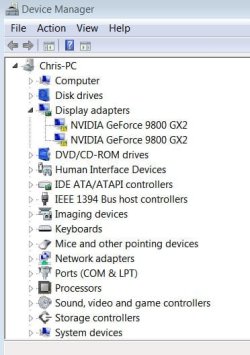
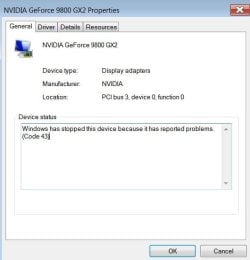
After a BSOD this morning, same reference as above, windows rebooted but resolution was 640x480, a quick look under device manager showed both GPU's on my 9800 GX2 had been stopped due to a problem with exclamation marks beside them but oddly I still had a display.

After the next reboot, I couldn't get into windows anymore. Not windows 7, or XP, or leopard (I am Triple Booting) I CAN however get in via safemode but my troubleshooting is not revealing much cause in safe mode, those drivers are naturally disabled.

The event viewer under administrative tools, showed a kernel-power reference during my last couple BSOD's which I believe is just me hitting the reset button when the computer was freezing up. There are no other critical references.

My initial thoughts is that something in the video card was slowly beginning to go, hence the casual BSOD's over the past couple days and now that's it. BUT the odd thing is that ALL the LED's on my video card are showing correctly, ie, if there was some kind of internal problem, there are a couple of them that should be showing red or yellow, but they are not.

Anyone have anyway of diagnosing that it is indeed my video card that is failing? Could it be the motherboard? Also, in safe mode in Win7, I tried reinstalling the 190.37 drivers but no changes.

Thoughts? Questions?

Thanks a bunch.

PS - I have tried startup (repair) and I have tried restoring to an earlier point. No changes. I am still in safe mode.
 

My Computer My Computer

At a glance

Win 7 Ultimate x64Intel i7 950 OC'd @ 4.0Ghz (SpeedStep ON)3x2GB Patriot Extreme Viper II Sector 7 DDR3 ...ATI MSI 5870 900mhz/1300mhz
OS
Win 7 Ultimate x64
CPU
Intel i7 950 OC'd @ 4.0Ghz (SpeedStep ON)
Motherboard
ASUS P6X58D-E BIOS 0303
Memory
3x2GB Patriot Extreme Viper II Sector 7 DDR3 @ 1600mhz
Graphics Card(s)
ATI MSI 5870 900mhz/1300mhz
Sound Card
Onboard Realtek ALC889
Monitor(s) Displays
2 X 24" BenQ G2412HD
Screen Resolution
1920x1080p
Hard Drives
Intel X25-M 80 GB (SSD)
W.D. Caviar Black 1TB (SATA)
Seagate Barricuda 1TB (SATA)
Seagate Barricuda 80GB (SATA)
PSU
Corsair AX850
Case
Antec 1200
Cooling
Lots and Lots of Air!
Keyboard
Razer Lycosa
Mouse
Microsoft Sidewinder
Internet Speed
25Mbps/1Mbps
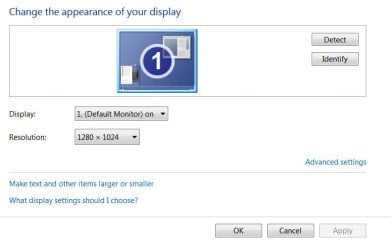
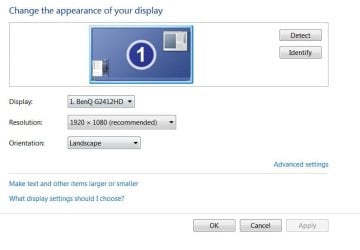
After shutting it down and letting it cool off for about an hour I was able to get back into windows 7 with a normal boot BUT with the issues I described above, low resolution, device manager shows 9800 GX2 has been turned off, the highest res I can get is 1280x1024 and my monitor is not recognized as a BenQ anymore, it just says default.
 

Attachments

  • devmgr.JPG
    devmgr.JPG
    39.1 KB · Views: 51
  • dvgmgr2.JPG
    dvgmgr2.JPG
    31.3 KB · Views: 53
  • res.JPG
    res.JPG
    32.2 KB · Views: 24
  • gpuz.JPG
    gpuz.JPG
    59.1 KB · Views: 47

My Computer My Computer

At a glance

Win 7 Ultimate x64Intel i7 950 OC'd @ 4.0Ghz (SpeedStep ON)3x2GB Patriot Extreme Viper II Sector 7 DDR3 ...ATI MSI 5870 900mhz/1300mhz
OS
Win 7 Ultimate x64
CPU
Intel i7 950 OC'd @ 4.0Ghz (SpeedStep ON)
Motherboard
ASUS P6X58D-E BIOS 0303
Memory
3x2GB Patriot Extreme Viper II Sector 7 DDR3 @ 1600mhz
Graphics Card(s)
ATI MSI 5870 900mhz/1300mhz
Sound Card
Onboard Realtek ALC889
Monitor(s) Displays
2 X 24" BenQ G2412HD
Screen Resolution
1920x1080p
Hard Drives
Intel X25-M 80 GB (SSD)
W.D. Caviar Black 1TB (SATA)
Seagate Barricuda 1TB (SATA)
Seagate Barricuda 80GB (SATA)
PSU
Corsair AX850
Case
Antec 1200
Cooling
Lots and Lots of Air!
Keyboard
Razer Lycosa
Mouse
Microsoft Sidewinder
Internet Speed
25Mbps/1Mbps
I'm having a similar problem as you, but I think that Mine may be a little more advanced -- my card isn't showing up at ALL. My advice, test your cards on another machine, and move forward extremely gingerly.
 

My Computer My Computer

At a glance

Windows 7IntelDual nVidia 8800 Ultras
Computer Manufacturer/Model Number
Dell XPS 720 H2C
OS
Windows 7
CPU
Intel
Graphics Card(s)
Dual nVidia 8800 Ultras
Sound Card
X-fi sound blaster
Monitor(s) Displays
24" Flatscreen
Thanks for the reply. I don't have another machine handy to give it a try but I have tried switching PCI-E slots (my mobo has 4) and still the same result. Also as previously mentioned, I have tried booting into all 3 of my OS's with no success so I think this rules out the chance of a driver or software issue.

Thing is, it could also be my motherboard, or PSU, but I don't think it's likely considering everything else works normally and windows will boot up in Safe mode or boot up as I previously described.

Like I said, all the LED's on the card itself are normal and there are 6 of them I believe! This is what is kind of throwing me for a loop.
 

My Computer My Computer

At a glance

Win 7 Ultimate x64Intel i7 950 OC'd @ 4.0Ghz (SpeedStep ON)3x2GB Patriot Extreme Viper II Sector 7 DDR3 ...ATI MSI 5870 900mhz/1300mhz
OS
Win 7 Ultimate x64
CPU
Intel i7 950 OC'd @ 4.0Ghz (SpeedStep ON)
Motherboard
ASUS P6X58D-E BIOS 0303
Memory
3x2GB Patriot Extreme Viper II Sector 7 DDR3 @ 1600mhz
Graphics Card(s)
ATI MSI 5870 900mhz/1300mhz
Sound Card
Onboard Realtek ALC889
Monitor(s) Displays
2 X 24" BenQ G2412HD
Screen Resolution
1920x1080p
Hard Drives
Intel X25-M 80 GB (SSD)
W.D. Caviar Black 1TB (SATA)
Seagate Barricuda 1TB (SATA)
Seagate Barricuda 80GB (SATA)
PSU
Corsair AX850
Case
Antec 1200
Cooling
Lots and Lots of Air!
Keyboard
Razer Lycosa
Mouse
Microsoft Sidewinder
Internet Speed
25Mbps/1Mbps
You'd be surprise what a bad mobo or ram could do to a system. The only way you're going to be sure that it's the card itself is to test it on another machine. Good luck mate.
 

My Computer My Computer

At a glance

Windows 7IntelDual nVidia 8800 Ultras
Computer Manufacturer/Model Number
Dell XPS 720 H2C
OS
Windows 7
CPU
Intel
Graphics Card(s)
Dual nVidia 8800 Ultras
Sound Card
X-fi sound blaster
Monitor(s) Displays
24" Flatscreen
You'd be surprise what a bad mobo or ram could do to a system. The only way you're going to be sure that it's the card itself is to test it on another machine. Good luck mate.

Actually I wouldn't I have experienced and troubleshooted tons of tricky and incognito ram related issues in my past.

If it was my ram I would still be having issues running my computer in safe mode but I am currently not.
 

My Computer My Computer

At a glance

Win 7 Ultimate x64Intel i7 950 OC'd @ 4.0Ghz (SpeedStep ON)3x2GB Patriot Extreme Viper II Sector 7 DDR3 ...ATI MSI 5870 900mhz/1300mhz
OS
Win 7 Ultimate x64
CPU
Intel i7 950 OC'd @ 4.0Ghz (SpeedStep ON)
Motherboard
ASUS P6X58D-E BIOS 0303
Memory
3x2GB Patriot Extreme Viper II Sector 7 DDR3 @ 1600mhz
Graphics Card(s)
ATI MSI 5870 900mhz/1300mhz
Sound Card
Onboard Realtek ALC889
Monitor(s) Displays
2 X 24" BenQ G2412HD
Screen Resolution
1920x1080p
Hard Drives
Intel X25-M 80 GB (SSD)
W.D. Caviar Black 1TB (SATA)
Seagate Barricuda 1TB (SATA)
Seagate Barricuda 80GB (SATA)
PSU
Corsair AX850
Case
Antec 1200
Cooling
Lots and Lots of Air!
Keyboard
Razer Lycosa
Mouse
Microsoft Sidewinder
Internet Speed
25Mbps/1Mbps
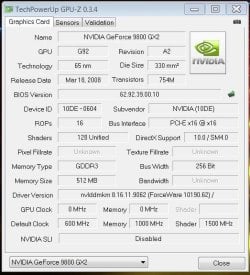
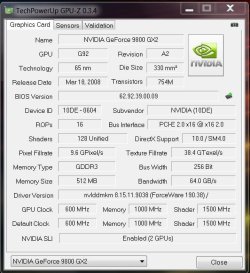
Have you set it back to the normal clock speeds? If you can do this in safe mode. Never mind I didn't look at your pics in link #2 GPU-z reports 600/1000. OH you stated your monitor is now reconized as VGA PNP? Which can cause resolution problems if the driver for your monitor (LCD) isin't installed. You also might have borked it with your overclock, or heat related but I've found out when it comes to video cards when they go they just go. Hardly ever any rime or reason except overcloked and or over heated. Fortunetly, if you registered it in the 30 day period after purchase they will replace it but in the mean time you'll need a card or pay the cross shipping fee. I'd try fixing the monitor driver situation first.
 

My Computer My Computer

At a glance

Windows 7 ultimate 64 bit / XP Home sp3intel Core 2 Duo E8400 3.0ghz8 gigs 1066 OCZ Fata1tyEVGA GTX 580 Call of Duty Black Ops Edition
Computer Manufacturer/Model Number
Self Built
OS
Windows 7 ultimate 64 bit / XP Home sp3
CPU
intel Core 2 Duo E8400 3.0ghz
Motherboard
Asus P5ND bios 1401
Memory
8 gigs 1066 OCZ Fata1ty
Graphics Card(s)
EVGA GTX 580 Call of Duty Black Ops Edition
Sound Card
Creative Soundblaster Audigy 2zs
Monitor(s) Displays
Asus 24in LCD's 2MS X2
Screen Resolution
1920x1080p @60Hz
Hard Drives
WD Caviar 500 Black/ WD Caviar 200 Blue
PSU
OCZ 700W GameXtreme
Case
NZXT Apollo
Cooling
Corsair H50 CPU/120mm x3 /60mm x2 /Corsair Dominator Ram
Keyboard
Logitech Bluetooth Wireless MX5000
Mouse
Logitech Bluetooth Wireless MX1000
Internet Speed
Download 19.83 Upload 0.97
Other Info
Logitech Z2300 Speakers/ Bose Noise Cancelling Headphones/Avermedia PCI-e Hybrid TV Bravo/Epson NX415 all in one/ 4 Port Powered USB Hub/ LG 10x Bluray Burner /TSST Corp DVDRW External
Ok few things.

I always keep it stock speed and only OC it when needed as you say you saw in the pic but in the pic, not sure if you noticed, it showed the 'default' clock as 600 and the actual at that time as zero! (compare with the new one below but read first).

The monitor was not recognized only AFTER I had BSOD and GPU issue.

Here's the strange part, as stated earlier, I have tried booting into various OS's and stated I could only get in via SAFE mode with it SOMETIMES booting up normally but with no video drivers or good resolutions functioning.

I booted back to Win7 safemode and decided to completely uninstall the drivers, and then run NFR (nasty file remover), cleaned out all traces of Nvidia stuff and reinstalled 190.37 64bit.

I am now rebooted and back into windows 7 with my video card functioning it would appear normally?!?! (see attached) with my BenQ monitor showing up as well under the resolution window.

I did the same under WinXP, and progressed as well but didn't quite get the same results, device manager under XP reports 1 of the 2 GPU's not functioning but oddly Windows 7 does not.

Before all this I had finished running memtest86+ for hours and it passed 3 loops so my ram is definitely not an issue just to rule this one out.

Also, I had already called evga and gotten an RMA with a free upgrade to the GTX 280! Not sure how exactly the 280 fairs against the 9800 GX2 so I don't know if I should keep the card if it's functioning, or just do the RMA.

Bottom line, is this an intermittent problem that is just unstable and ready to give eventually with one of the card's GPU's or is it possible that somehow the drivers got corrupted and needed a reinstall. But if the latter is the case, how is it possible that it was required for both Win7 and XP???
 

Attachments

  • res2.JPG
    res2.JPG
    35.8 KB · Views: 26
  • normal.JPG
    normal.JPG
    83.9 KB · Views: 47
  • gpuznormal.JPG
    gpuznormal.JPG
    62.2 KB · Views: 74

My Computer My Computer

At a glance

Win 7 Ultimate x64Intel i7 950 OC'd @ 4.0Ghz (SpeedStep ON)3x2GB Patriot Extreme Viper II Sector 7 DDR3 ...ATI MSI 5870 900mhz/1300mhz
OS
Win 7 Ultimate x64
CPU
Intel i7 950 OC'd @ 4.0Ghz (SpeedStep ON)
Motherboard
ASUS P6X58D-E BIOS 0303
Memory
3x2GB Patriot Extreme Viper II Sector 7 DDR3 @ 1600mhz
Graphics Card(s)
ATI MSI 5870 900mhz/1300mhz
Sound Card
Onboard Realtek ALC889
Monitor(s) Displays
2 X 24" BenQ G2412HD
Screen Resolution
1920x1080p
Hard Drives
Intel X25-M 80 GB (SSD)
W.D. Caviar Black 1TB (SATA)
Seagate Barricuda 1TB (SATA)
Seagate Barricuda 80GB (SATA)
PSU
Corsair AX850
Case
Antec 1200
Cooling
Lots and Lots of Air!
Keyboard
Razer Lycosa
Mouse
Microsoft Sidewinder
Internet Speed
25Mbps/1Mbps
If it were my card I would stress it by playing a game on high settings and see if it starts to artifact or act up. this would give you a good idea if one of the gpu's is failing or run some benchmarks on it, get it hot. If it is stable then keep it. or do some research on a comparison to the two cards and decide that question. The 280 is a totally different core and from what I have read on Toms it out preforms the card you have. So it's up to you. If the problem occurs again then try and zip a minidump file and post it. I switched from 2 9800 gt's to a 260 superclocked and it's awesome. Fabe
 

My Computer My Computer

At a glance

Windows 7 ultimate 64 bit / XP Home sp3intel Core 2 Duo E8400 3.0ghz8 gigs 1066 OCZ Fata1tyEVGA GTX 580 Call of Duty Black Ops Edition
Computer Manufacturer/Model Number
Self Built
OS
Windows 7 ultimate 64 bit / XP Home sp3
CPU
intel Core 2 Duo E8400 3.0ghz
Motherboard
Asus P5ND bios 1401
Memory
8 gigs 1066 OCZ Fata1ty
Graphics Card(s)
EVGA GTX 580 Call of Duty Black Ops Edition
Sound Card
Creative Soundblaster Audigy 2zs
Monitor(s) Displays
Asus 24in LCD's 2MS X2
Screen Resolution
1920x1080p @60Hz
Hard Drives
WD Caviar 500 Black/ WD Caviar 200 Blue
PSU
OCZ 700W GameXtreme
Case
NZXT Apollo
Cooling
Corsair H50 CPU/120mm x3 /60mm x2 /Corsair Dominator Ram
Keyboard
Logitech Bluetooth Wireless MX5000
Mouse
Logitech Bluetooth Wireless MX1000
Internet Speed
Download 19.83 Upload 0.97
Other Info
Logitech Z2300 Speakers/ Bose Noise Cancelling Headphones/Avermedia PCI-e Hybrid TV Bravo/Epson NX415 all in one/ 4 Port Powered USB Hub/ LG 10x Bluray Burner /TSST Corp DVDRW External
Before suspecting one of the GPUs, I'd look at the cards' capacitors. Ensure the tops are flat and not rounded. Make sure there's no brownish or discolored substance leaking from any of them, near the base and top. If so, that's the electrolyte leaking out. Not good.

The caps are partially responsible for regulating power. If one or more of them go, Windows can exhibit all sorts of behavior.

The plus side to this is that caps are easily replaced with basic soldering. Nothing difficult, if this is indeed the case.

If you do replace any capacitors, purchase ones with the same capacitance of course but also make sure they are the low esr type. Your card will enjoy the efficiency. And when installing, make sure the colored part of the capacitor lines up with the colored part on the board. That's for correct polarity.
 

My Computer My Computer

At a glance

7600.20510 x86P4 550 3.4 GHz HT running at 3.5 GHzOCZ 2 GB(2x1GB) DDR400mHz running @ 414 mHzHIS Radeon HD 3850 IceQ 3 Turbo HDMI Dual DL-...
Computer Manufacturer/Model Number
self built
OS
7600.20510 x86
CPU
P4 550 3.4 GHz HT running at 3.5 GHz
Motherboard
MSI PM8M3-V (MS-7211 v1.x) Micro-ATX mainboard
Memory
OCZ 2 GB(2x1GB) DDR400mHz running @ 414 mHz
Graphics Card(s)
HIS Radeon HD 3850 IceQ 3 Turbo HDMI Dual DL-DVI AGP
Sound Card
MOTU Traveler firewire studio interface 192 kHz 24 bit
Monitor(s) Displays
22" widescreen Acer X223W LCD, 17" Compaq P75 CRT
Screen Resolution
1680x1050 and 1280x1024
Hard Drives
SATA I x2 WD, 400 GB and 120 GB, SATA 2 WD Caviar Black 1 TB
PSU
350W generic
Case
Cybertronpc, it glows blue
Cooling
stock cpu fan, Ice-Q 3 gpu and system, many case fans
Keyboard
Logitch Classical Keyboard 200
Mouse
Logitech Mediaplay cordless
Internet Speed
1792/448 kbits/sec
Other Info
SATA II PCI fake RAID adapter, 1 GB Readyboost, original ATI Remote Wonder (even works with WMC perfectly), Logitech Rumblepad 2 game controller x2
Thanks for the replies.

I just got the BSOD again, blue screen stated it 'tried to restart my video driver but failed' (Just like all the previous ones).

It occured while in screensaver. I went to shake the mouse to get to my desktop and that's when I was BSOD'd.

How do I ZIP a minidump file?

I think I am going to end up sending this one in.
 

My Computer My Computer

At a glance

Win 7 Ultimate x64Intel i7 950 OC'd @ 4.0Ghz (SpeedStep ON)3x2GB Patriot Extreme Viper II Sector 7 DDR3 ...ATI MSI 5870 900mhz/1300mhz
OS
Win 7 Ultimate x64
CPU
Intel i7 950 OC'd @ 4.0Ghz (SpeedStep ON)
Motherboard
ASUS P6X58D-E BIOS 0303
Memory
3x2GB Patriot Extreme Viper II Sector 7 DDR3 @ 1600mhz
Graphics Card(s)
ATI MSI 5870 900mhz/1300mhz
Sound Card
Onboard Realtek ALC889
Monitor(s) Displays
2 X 24" BenQ G2412HD
Screen Resolution
1920x1080p
Hard Drives
Intel X25-M 80 GB (SSD)
W.D. Caviar Black 1TB (SATA)
Seagate Barricuda 1TB (SATA)
Seagate Barricuda 80GB (SATA)
PSU
Corsair AX850
Case
Antec 1200
Cooling
Lots and Lots of Air!
Keyboard
Razer Lycosa
Mouse
Microsoft Sidewinder
Internet Speed
25Mbps/1Mbps
Go into C:\windows\minidump. Once you have located the file(s) put them in a zip folder and use the paper clip on the post to attach the file. As for the suggestion to look for bulged or leaking caps this is a good idea, however since you have a lifetime guarentee and a stepup program I advise you against doing any cap replacement on your own.
 

My Computer My Computer

At a glance

Windows 7 ultimate 64 bit / XP Home sp3intel Core 2 Duo E8400 3.0ghz8 gigs 1066 OCZ Fata1tyEVGA GTX 580 Call of Duty Black Ops Edition
Computer Manufacturer/Model Number
Self Built
OS
Windows 7 ultimate 64 bit / XP Home sp3
CPU
intel Core 2 Duo E8400 3.0ghz
Motherboard
Asus P5ND bios 1401
Memory
8 gigs 1066 OCZ Fata1ty
Graphics Card(s)
EVGA GTX 580 Call of Duty Black Ops Edition
Sound Card
Creative Soundblaster Audigy 2zs
Monitor(s) Displays
Asus 24in LCD's 2MS X2
Screen Resolution
1920x1080p @60Hz
Hard Drives
WD Caviar 500 Black/ WD Caviar 200 Blue
PSU
OCZ 700W GameXtreme
Case
NZXT Apollo
Cooling
Corsair H50 CPU/120mm x3 /60mm x2 /Corsair Dominator Ram
Keyboard
Logitech Bluetooth Wireless MX5000
Mouse
Logitech Bluetooth Wireless MX1000
Internet Speed
Download 19.83 Upload 0.97
Other Info
Logitech Z2300 Speakers/ Bose Noise Cancelling Headphones/Avermedia PCI-e Hybrid TV Bravo/Epson NX415 all in one/ 4 Port Powered USB Hub/ LG 10x Bluray Burner /TSST Corp DVDRW External
After shutting it down and letting it cool off for about an hour I was able to get back into windows 7 with a normal boot BUT with the issues I described above, low resolution, device manager shows 9800 GX2 has been turned off, the highest res I can get is 1280x1024 and my monitor is not recognized as a BenQ anymore, it just says default.

By all indications your Video card is failing.... normally I'd think it is the COOLING FAN(s). shutdown, remove the card, check the fan for link, dirt, crud, clean - clean.
with the case off, after you reinstall the video card.... start the computer.
when booted.... take a piece of wood, dowel rod works GREAT.
place one end on the video card.... next put you ear to the other end...
if it purrs like a well tuned car you ok, if you hear ticking you need a new FAN.
I usually carefully take the fans out.... from the bottom side, lift the foil gently, then remove the small magnetic disk, then the small graphite disk,
place two drops of sewing machine oil . replace all removed items in reverse order. replace the fan. then either find a new FAN or replacement CARD. FANS are CHEAPER and 99.5% are the cause of Video Cards failure.
 
Go into C:\windows\minidump. Once you have located the file(s) put them in a zip folder and use the paper clip on the post to attach the file. As for the suggestion to look for bulged or leaking caps this is a good idea, however since you have a lifetime guarentee and a stepup program I advise you against doing any cap replacement on your own.

Minidumps below. How do I use/view them?

I have already sent the card to EVGA, I wasn't about to open it up and play with the caps considering they are sending me a GTX 280 instead as a replacement.

In the mean time I have put in a GTS 250 to keep my PC running, I was looking for something that I could just pop in without doing anything with the drivers.

I am picking up an MSI 5870 in Calgary on Saturday at Memory Express (last one left at any of there stores in western Canada)

So when the GTX 280 arrives I guess it'll be for sale:p

I was just waiting for an excuse to get a 5870 and here it was I guess :o
 

My Computer My Computer

At a glance

Win 7 Ultimate x64Intel i7 950 OC'd @ 4.0Ghz (SpeedStep ON)3x2GB Patriot Extreme Viper II Sector 7 DDR3 ...ATI MSI 5870 900mhz/1300mhz
OS
Win 7 Ultimate x64
CPU
Intel i7 950 OC'd @ 4.0Ghz (SpeedStep ON)
Motherboard
ASUS P6X58D-E BIOS 0303
Memory
3x2GB Patriot Extreme Viper II Sector 7 DDR3 @ 1600mhz
Graphics Card(s)
ATI MSI 5870 900mhz/1300mhz
Sound Card
Onboard Realtek ALC889
Monitor(s) Displays
2 X 24" BenQ G2412HD
Screen Resolution
1920x1080p
Hard Drives
Intel X25-M 80 GB (SSD)
W.D. Caviar Black 1TB (SATA)
Seagate Barricuda 1TB (SATA)
Seagate Barricuda 80GB (SATA)
PSU
Corsair AX850
Case
Antec 1200
Cooling
Lots and Lots of Air!
Keyboard
Razer Lycosa
Mouse
Microsoft Sidewinder
Internet Speed
25Mbps/1Mbps
I'm not all that verused in reading the minidump file but I will find someone and direct them to this thread. Fabe
 

My Computer My Computer

At a glance

Windows 7 ultimate 64 bit / XP Home sp3intel Core 2 Duo E8400 3.0ghz8 gigs 1066 OCZ Fata1tyEVGA GTX 580 Call of Duty Black Ops Edition
Computer Manufacturer/Model Number
Self Built
OS
Windows 7 ultimate 64 bit / XP Home sp3
CPU
intel Core 2 Duo E8400 3.0ghz
Motherboard
Asus P5ND bios 1401
Memory
8 gigs 1066 OCZ Fata1ty
Graphics Card(s)
EVGA GTX 580 Call of Duty Black Ops Edition
Sound Card
Creative Soundblaster Audigy 2zs
Monitor(s) Displays
Asus 24in LCD's 2MS X2
Screen Resolution
1920x1080p @60Hz
Hard Drives
WD Caviar 500 Black/ WD Caviar 200 Blue
PSU
OCZ 700W GameXtreme
Case
NZXT Apollo
Cooling
Corsair H50 CPU/120mm x3 /60mm x2 /Corsair Dominator Ram
Keyboard
Logitech Bluetooth Wireless MX5000
Mouse
Logitech Bluetooth Wireless MX1000
Internet Speed
Download 19.83 Upload 0.97
Other Info
Logitech Z2300 Speakers/ Bose Noise Cancelling Headphones/Avermedia PCI-e Hybrid TV Bravo/Epson NX415 all in one/ 4 Port Powered USB Hub/ LG 10x Bluray Burner /TSST Corp DVDRW External
Thanks
 

My Computer My Computer

At a glance

Win 7 Ultimate x64Intel i7 950 OC'd @ 4.0Ghz (SpeedStep ON)3x2GB Patriot Extreme Viper II Sector 7 DDR3 ...ATI MSI 5870 900mhz/1300mhz
OS
Win 7 Ultimate x64
CPU
Intel i7 950 OC'd @ 4.0Ghz (SpeedStep ON)
Motherboard
ASUS P6X58D-E BIOS 0303
Memory
3x2GB Patriot Extreme Viper II Sector 7 DDR3 @ 1600mhz
Graphics Card(s)
ATI MSI 5870 900mhz/1300mhz
Sound Card
Onboard Realtek ALC889
Monitor(s) Displays
2 X 24" BenQ G2412HD
Screen Resolution
1920x1080p
Hard Drives
Intel X25-M 80 GB (SSD)
W.D. Caviar Black 1TB (SATA)
Seagate Barricuda 1TB (SATA)
Seagate Barricuda 80GB (SATA)
PSU
Corsair AX850
Case
Antec 1200
Cooling
Lots and Lots of Air!
Keyboard
Razer Lycosa
Mouse
Microsoft Sidewinder
Internet Speed
25Mbps/1Mbps
After shutting it down and letting it cool off for about an hour I was able to get back into windows 7 with a normal boot BUT with the issues I described above, low resolution, device manager shows 9800 GX2 has been turned off, the highest res I can get is 1280x1024 and my monitor is not recognized as a BenQ anymore, it just says default.

By all indications your Video card is failing.... normally I'd think it is the COOLING FAN(s). shutdown, remove the card, check the fan for link, dirt, crud, clean - clean.
with the case off, after you reinstall the video card.... start the computer.
when booted.... take a piece of wood, dowel rod works GREAT.
place one end on the video card.... next put you ear to the other end...
if it purrs like a well tuned car you ok, if you hear ticking you need a new FAN.
I usually carefully take the fans out.... from the bottom side, lift the foil gently, then remove the small magnetic disk, then the small graphite disk,
place two drops of sewing machine oil . replace all removed items in reverse order. replace the fan. then either find a new FAN or replacement CARD. FANS are CHEAPER and 99.5% are the cause of Video Cards failure.

Thanks for the great fan checking tips. I had checked the fan previously and it appears to be functioning normally with no bearing noises emanating from it. Using 'evga precision' I ran the fun up and down from full to default speeds and it seemed all normal.
 

My Computer My Computer

At a glance

Win 7 Ultimate x64Intel i7 950 OC'd @ 4.0Ghz (SpeedStep ON)3x2GB Patriot Extreme Viper II Sector 7 DDR3 ...ATI MSI 5870 900mhz/1300mhz
OS
Win 7 Ultimate x64
CPU
Intel i7 950 OC'd @ 4.0Ghz (SpeedStep ON)
Motherboard
ASUS P6X58D-E BIOS 0303
Memory
3x2GB Patriot Extreme Viper II Sector 7 DDR3 @ 1600mhz
Graphics Card(s)
ATI MSI 5870 900mhz/1300mhz
Sound Card
Onboard Realtek ALC889
Monitor(s) Displays
2 X 24" BenQ G2412HD
Screen Resolution
1920x1080p
Hard Drives
Intel X25-M 80 GB (SSD)
W.D. Caviar Black 1TB (SATA)
Seagate Barricuda 1TB (SATA)
Seagate Barricuda 80GB (SATA)
PSU
Corsair AX850
Case
Antec 1200
Cooling
Lots and Lots of Air!
Keyboard
Razer Lycosa
Mouse
Microsoft Sidewinder
Internet Speed
25Mbps/1Mbps
Let us hope that the failure in short was caused then by only a small piece of ******* to cause a heat failure, which is now gone.

I have had the failure to "Name the Monitor correctly" in all versions of Windows... for some time... I simply delete the "default" then move to the
driver for the actual Monitor. This also allows the "Name Monitor" to work at full Resolution.
some times this takes a REBOOT other times it simply takes -desktop and refresh in a blank spot.
 
Ok, I removed the graphics card, plugged the monitor into the other one, and it booted up fine, no problemos.

I switched their PCIe locations on the mobo, put the 'bad' card back in, and it booted up, fine.

However, there was video lag on the desktop. When I engaged SLi, I bsod'd from nv4_disp.

Its definately the card then. Sounded fine on boot up, so my plan is to remove all plastic and heatsinks, and toss it in the oven at 380 for a few minutes to reflow the tiny solder points on the card and see if that works. Supposedly, it does.
 

My Computer My Computer

At a glance

Windows 7IntelDual nVidia 8800 Ultras
Computer Manufacturer/Model Number
Dell XPS 720 H2C
OS
Windows 7
CPU
Intel
Graphics Card(s)
Dual nVidia 8800 Ultras
Sound Card
X-fi sound blaster
Monitor(s) Displays
24" Flatscreen
Back
Top