How do I diagnose damaged Ram?

Mudcrab Moffatt

New member
Local time
2:46 PM
Messages
3
Hello,

Lately I have been having performance issues with my computer that I have been trying to diagnose. I have an HP EliteBook 8560W (i7, 8 GB RAM (two 4 gig sticks), Graphics: AMD firepro 5950 mobility) that when I first bought, could do anything from run StarCraft II on high settings with around 60 fps to seamless SolidWorks modeling.

I recently booted up SC2 for old time sake and was only able to get about 30 fps on the lowest settings, so I started to try to resolve the issue. I ran virus scan, defragged the hard disk, updated graphics drivers, chipset drivers and bios. Still no luck even though my task manager says I am only using 20-35% of my ram and less than 10% of my processor. It seemed like my graphics card was shot or my computer was just being lazy!

So the next step I took was to open a ton of applications (itunes, windows media player, chrome with youtube and pandora, and started running a virus scan). I was curious to see how hard I could make my computer work. I got it to use about 50% of the ram and had the processor at 15% or more. I then proceed to boot up SC2 and to my surprise I was able to get 60 fps on high settings!

Could it be possible that I used up all the memory on a damaged RAM stick and started to tap into the other 4 gig stick? or is there something else I am not considering.

Thanks!
 

My Computer My Computer

Computer type
Laptop
Computer Manufacturer/Model Number
HP Elitebook 8560W
OS
Windows 7 Professional
CPU
Intel Core i7-2630QM (4 cores)
Memory
8 GB
Graphics Card(s)
AMD FirePro M5950 (FireGL V)
Hard Drives
Hitachi HTS725050A9A364
Memtest86+ - Advanced Memory Diagnostic Tool

Above is a link to the most commonly used RAM testing application.

Let it run all of its tests 6 or 8 times. Might take overnight.

Windows 7 has a built-in RAM testing app of some kind, but I don't know how effective it is.
 

My Computer My Computer

Computer type
PC/Desktop
Computer Manufacturer/Model Number
Ignatz Special; 4 speed manual gearbox; factory air conditioning; one of one
OS
Windows 7 Home Premium SP1, 64-bit
CPU
Intel Skylake i5-6600K, not overclocked
Motherboard
AsRock Z170M Extreme 4, micro ATX
Memory
8 GB HyperX DDR4-2666 (2 x 4 GB)
Graphics Card(s)
none; graphics are integrated on CPU
Sound Card
onboard: Realtek ALC1150; external: USB Behringer UF0-202
Monitor(s) Displays
Dell S2340M 23 inch IPS
Screen Resolution
1600 x 900
Hard Drives
System: Crucial MX100 series SSD, 128 GB;
Data: Samsung Spinpoint 103SJ, 1 TB;
Backup: WD Caviar Green WD30EZRX-00D8PB0, 3 TB
PSU
Rosewill SilentNight 500 watt fanless, semi-modular
Case
Antec Solo II
Cooling
Noctua NH-U12S; Noctua F12 intake, Noctua S12A exhaust
Keyboard
Microsoft 200 6JH-00001 USB
Mouse
Dell or Microsoft optical wired; USB
Antivirus
Microsoft Security Essentials and Malwarebytes Premium
Browser
Pale Moon
Other Info
All fans PWM; speeds at idle: CPU circa 500 rpm; intake circa 600 rpm; exhaust circa 600 rpm; CPU temps 27 idle and 47 C load in a warm room (27 C/81 F) when running Intel Extreme Tuning Utility stress test.
May I add this

MEMTEST

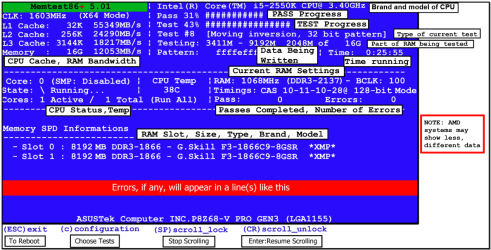
http://www.sevenforums.com/tutorials/105647-ram-test-memtest86.html this one you will need to make abootable disk set the BIOS to optical(or USB if preferred) boot the machine and let it run for at LEAST 8 passes unless the errors come up straight away. Takesfair time to complete and some leave itrunning overnight.

NB

When you run the memtest if the errors come up straight away as in my pic then you will need to test each stick if you havemore than one and if it is only onethen test again in another slot because it could also be a fault on the board.

So for example two slots A & B /sticks 1 & 2 if the errors come up remove all sticks

Then try stick 1 in slot A if noerrors install stick 1 in slot B if no errors then install stick 2 inslot A if no errors then install stick 2in slot B. If there were errors to start with one of these combinations will have to show errors.

Doing this will narrow down the problemslot as it could be the slot and not the stick or even a specific slot andstick combination. A lengthy process but only necessary if you get errors.
some pics so you can see what you are after -
 

Attachments

  • MEMTEST INFO.PNG
    MEMTEST INFO.PNG
    108.1 KB · Views: 2
  • MEMTEST-ERROR.PNG
    MEMTEST-ERROR.PNG
    237.1 KB · Views: 2

My Computer My Computer

Computer type
PC/Desktop
Computer Manufacturer/Model Number
Own build (new) Desk1 / Asus ROG Win 7 / Desk2 1st build
OS
Desk1 7 Home Prem / Desk2 10 Pro / Main lap Asus ROG 10 Pro 2 laptop Toshiba 7 Pro Asus P2520 7 & 10
CPU
Desk1 i5 3750K / Laptop i7 GTX 860M / Desk2 i5 2500
Motherboard
Desk1 Asus P877-V / Desk2 Gigabyte H67 UD3H / Laptop ?
Memory
Desk1 8GB (1866) / Desk2 16GB (1333) / Laptop 8Gb DDR3
Graphics Card(s)
Desk 1& 2NVidia GTX 650 & Laptops on board Intel
Sound Card
Desk 1 & 2 -XONAR DG Realtek High Def audio Laptop
Monitor(s) Displays
Desk 1 Benq HD 2450 / Desk2 Philips 24" / Laptop 17.5"
Screen Resolution
1920x1080 D1 & D2 & Laptop 1
Hard Drives
Desk1 Samsung 120GB 830 SSD
Asus ROG 256GB 850 Pro SSD
Desk2 Samsung 840 256 SSD
Toshiba 120GB EVO
PSU
Desk 1 Corsair HX 1050/ Laptop ? / Desk 2 Corsair HX 650
Case
Desk 1 Cooler HAF XM ? Toshiba laptop / Desk2 Coolermaster
Cooling
Fans on all Desk1 -2 Desk2 - all Coolermasters 5 Laptop ?
Keyboard
Desk 1 MS Sidewinder X6 Desk 2 MS Sidewinder X 4
Mouse
Desk 1&2 - Gigabyte MS 900 gamer - laptop - Logitec wireless
Internet Speed
ADSL2+
Other Info
One other Desktop (tester) and spare Toshba laptop both with SSD's
Running Kaspersky 2016 ISS on all machines config'd identically
Logitec audio stereo systems on each machine (x3)
Canon MG5250MFC
Router/modem TP-Link running WPA2SK
Note that no software based RAM tester is conclusive. If they report the RAM is bad, it probably is bad. But these testers can, and often do report no errors but the RAM still fails when installed, or when paired with other RAM. So often the best test is to swap in known good RAM, or run with 1 stick at a time to see what happens.

Note to conclusively test your RAM, you need to use sophisticated and very expensive test equipment, like this Eureka Express DDR3 DIMM Memory Module Tester.

But I don't think your RAM is bad. Bad RAM does not normally result is "poor" performance - it results in no performance - that is, you BSOD (lock up with blue-screen errors), or the system just crashes, reboots, or shuts down.

So the next step I took was to open a ton of applications (itunes, windows media player, chrome with youtube and pandora, and started running a virus scan). I was curious to see how hard I could make my computer work. I got it to use about 50% of the ram and had the processor at 15% or more. I then proceed to boot up SC2 and to my surprise I was able to get 60 fps on high settings!

Could it be possible that I used up all the memory on a damaged RAM stick and started to tap into the other 4 gig stick? or is there something else I am not considering.
Opening a "ton of applications" does not really tax the system unless you are actively using those programs - otherwise, they go idle and move into the background. Windows 7 (and W8.x) is excellent at memory management.

So my question is this, how does SC2 run now - after you have done all this experimenting?
 

My Computer My Computer

Computer Manufacturer/Model Number
BrightWorks Systems B4
OS
Windows 7 Profession 64-bit
CPU
Intel Core i7-860 Quad
Motherboard
Gigabyte P55-UD4P
Memory
Mushkin 4x2Gb PC12800
Graphics Card(s)
Gigabyte GTX260 896Mb
Sound Card
Integrated 7.1 HD Dolby
Monitor(s) Displays
2 Samsung 2220wm-HAS 22"
Screen Resolution
1680 x 1050 | 1680 x 1050
Hard Drives
WD HE 1Tb
PSU
Corsair TX-750W
Case
Ultra M998
Cooling
OEM
Keyboard
MS Wireless Comfort 5000
Mouse
MS Wireless 5000
Internet Speed
Cable and pretty darn fast
This does not sound like a RAM problem at all. The only way that bad RAM could cause performance problems is if one module failed leaving you with only 4 GB RAM. You check for this in the system properties. If it shows more than 4 GB that is not your problem.
 

My Computer My Computer

Computer type
PC/Desktop
Computer Manufacturer/Model Number
HP
OS
Windows 7 Pro 64 bit
CPU
Xeon W3520
Memory
8 GB
Graphics Card(s)
Nvidia Geforce 210
Yep well the memtest was just a suggestion because it seems the P has done a fair but already. Anyway I'll leave you fellows to it.
 

My Computer My Computer

Computer type
PC/Desktop
Computer Manufacturer/Model Number
Own build (new) Desk1 / Asus ROG Win 7 / Desk2 1st build
OS
Desk1 7 Home Prem / Desk2 10 Pro / Main lap Asus ROG 10 Pro 2 laptop Toshiba 7 Pro Asus P2520 7 & 10
CPU
Desk1 i5 3750K / Laptop i7 GTX 860M / Desk2 i5 2500
Motherboard
Desk1 Asus P877-V / Desk2 Gigabyte H67 UD3H / Laptop ?
Memory
Desk1 8GB (1866) / Desk2 16GB (1333) / Laptop 8Gb DDR3
Graphics Card(s)
Desk 1& 2NVidia GTX 650 & Laptops on board Intel
Sound Card
Desk 1 & 2 -XONAR DG Realtek High Def audio Laptop
Monitor(s) Displays
Desk 1 Benq HD 2450 / Desk2 Philips 24" / Laptop 17.5"
Screen Resolution
1920x1080 D1 & D2 & Laptop 1
Hard Drives
Desk1 Samsung 120GB 830 SSD
Asus ROG 256GB 850 Pro SSD
Desk2 Samsung 840 256 SSD
Toshiba 120GB EVO
PSU
Desk 1 Corsair HX 1050/ Laptop ? / Desk 2 Corsair HX 650
Case
Desk 1 Cooler HAF XM ? Toshiba laptop / Desk2 Coolermaster
Cooling
Fans on all Desk1 -2 Desk2 - all Coolermasters 5 Laptop ?
Keyboard
Desk 1 MS Sidewinder X6 Desk 2 MS Sidewinder X 4
Mouse
Desk 1&2 - Gigabyte MS 900 gamer - laptop - Logitec wireless
Internet Speed
ADSL2+
Other Info
One other Desktop (tester) and spare Toshba laptop both with SSD's
Running Kaspersky 2016 ISS on all machines config'd identically
Logitec audio stereo systems on each machine (x3)
Canon MG5250MFC
Router/modem TP-Link running WPA2SK
Thanks for the all of the suggestions. I ran memtest86 + and some hp hardware test tools. According to all of the results, everything is working perfectly.

I am still unable to run SC2 with 60 fps (on high settings) without all of my other applications open and running (i.e. youtube playing multiple videos, virus scan scanning, itunes playing music) - CPU around 20-30 % and physical memory around 50%. It is one of the strangest things I have ever seen, it seems that I need to really get the cpu running and use up some more ram before I am able to play SC2 at 60 fps - a bit counter intuitive.

Any other suggestions?
 

My Computer My Computer

Computer type
Laptop
Computer Manufacturer/Model Number
HP Elitebook 8560W
OS
Windows 7 Professional
CPU
Intel Core i7-2630QM (4 cores)
Memory
8 GB
Graphics Card(s)
AMD FirePro M5950 (FireGL V)
Hard Drives
Hitachi HTS725050A9A364
Upon further investigation, it seems that simply using up the physical memory doesn't always resolve the problem. For instance, I opened programs that didn't require a video card (instead of running things like youtube videos), used up over 50% of my physical memory, and tried SC2, but it only had 9 fps. Could it be possible that when no other video card intensive programs are open, my computer uses the graphics processor built into the motherboard? Alternatively when I open graphics intensive programs such as videos and then SC2, is the motherboard graphics card busy and SC2 boots on the other one?
 

My Computer My Computer

Computer type
Laptop
Computer Manufacturer/Model Number
HP Elitebook 8560W
OS
Windows 7 Professional
CPU
Intel Core i7-2630QM (4 cores)
Memory
8 GB
Graphics Card(s)
AMD FirePro M5950 (FireGL V)
Hard Drives
Hitachi HTS725050A9A364
it seems that simply using up the physical memory doesn't always resolve the problem.
Sorry, but I am confused with that as I don't see how using up memory would resolve any problem.

Note that in spite of what the notebook marketeers would like us to believe, there is no such thing as a good gaming notebook! Why? While notebook makers can pack PC power in those "tiny and thin" notebook cases, there is NO WAY they can pack the necessary cooling (or cleaning capabilities) in there too.

Considering full tower gaming PC cases are challenged to provide a sufficient supply of cool air flowing through the case, it is no wonder notebooks MUST frequently toggle down in speed (and performance) to keep from burning up due to a lack of cool air flowing through the "tiny and thin" notebook case.

These "tiny and thin" notebook cases prevent the use of fans with wide blades - essential to catch and hurl large volumes of cool air.

Also, because there is no industry standard for notebooks like the ATX Form Factor standards for PCs, and due to consumer demands for notebooks to be thinner and lighter, notebook designs are very proprietary, and consequently, there is no simple-to-remove "side panel" as used on PC cases to allow user access for easy and thorough cleaning of all the heat-trapping dust that WILL be drawn in by the fans.

Do you monitor your temps?

Also, while integrated graphics have come a long way in recent years, they are still best for general office work, surfing the Internet, or watching HD content via DVDs or Blu-Ray - not for the extensive graphics crunching demands of modern 3D animated games.
 

My Computer My Computer

Computer Manufacturer/Model Number
BrightWorks Systems B4
OS
Windows 7 Profession 64-bit
CPU
Intel Core i7-860 Quad
Motherboard
Gigabyte P55-UD4P
Memory
Mushkin 4x2Gb PC12800
Graphics Card(s)
Gigabyte GTX260 896Mb
Sound Card
Integrated 7.1 HD Dolby
Monitor(s) Displays
2 Samsung 2220wm-HAS 22"
Screen Resolution
1680 x 1050 | 1680 x 1050
Hard Drives
WD HE 1Tb
PSU
Corsair TX-750W
Case
Ultra M998
Cooling
OEM
Keyboard
MS Wireless Comfort 5000
Mouse
MS Wireless 5000
Internet Speed
Cable and pretty darn fast
Back
Top