Solved Macrium Reflect Recovery Boot Menu entries

omnescient

New member
Local time
11:12 PM
Messages
18
A Q or more for anyone familiar with MR.

I'm dual-booting W7 & 10 (both Pro x64) on separate SSDs.
Reflect Free v6.1 (same build) is installed on each OS (my first experience with Macrium software).
If I select W7 as the default OS, I get the legacy boot loader (Windows Boot Manager).
If I select W10 as default, it's the graphical Boot Options Menu.
This is not an issue for me, as I'll be changing the default OS for periods in the future, and so will be using the associated boot loading mode during those periods.

I've created a USB Rescue medium (in W7 using WinPE 5).
As yet, I haven't created a Recovery Boot Menu entry in either OS.

My intention is to create a Recovery Boot Menu option in both the legacy W7 Manager and the ('standard') W10 Boot Options Menu, so that it will be available whichever menu is displayed at the time, and I'm assuming I'll be doing this in each OS when set as default.

If that's a reasonable plan(?), should the W7 entry use WinPE 5 and the W10 entry WinPE 10?

As the PE options show as 'not built' in MR on W10, do I need to create a USB Rescue utility in W10 before creating the Boot Menu entry, or will the PE environment be built 'on demand' for the menu entry only?

I'm not enthralled by the prospect of dealing with potential booting/menu issues, so thanks in advance for appeasing my OCD/paranoid tendencies.
 

My Computer My Computer

Computer type
PC/Desktop
Computer Manufacturer/Model Number
Custom
OS
Windows 7 Pro x64/10 Pro x64
CPU
i5 4670K
Motherboard
GA-Z87-HD3
Memory
16GB Corsair Vengeance DDR3 1600
Graphics Card(s)
GTX 760
Sound Card
Onboard
Monitor(s) Displays
Samsung SM173P
Screen Resolution
1280 x 1024
Hard Drives
SSD Samsung 840 Pro 256GB
SSD Samsung 850 Pro 256GB
HDD Seagate 500GB
PSU
Corsair AX 760i
Case
CM Storm II
Internet Speed
VM 50 Mbps
Antivirus
MSE/Malwarebytes
Browser
Firefox 43.0.4 (01/Feb/16)

My Computer My Computer

Computer Manufacturer/Model Number
HP, Dell, Gateway, Toshiba - 4 laptops and 2 desktops
OS
Vista, Windows7, Mint Mate, Zorin, Windows 8
CPU
from 1.6GHz Duo to i7
Monitor(s) Displays
2x HP w2207
Hard Drives
5x HDD, 7x SSD, 12x Externals
Keyboard
with trackball - no mices
Mouse
Trackball mice
Internet Speed
DSL 6000
Hi and welcome to SevenForums,
I would expect it would be more difficult to boot to the WinPE in win-10 more than 7 so I'd say you'd only have to do it in win-10
Once booted to the recovery it's just a matter of selecting an image and drive to recover so the 7 entry might not be needed.

Win-10 has been known to highjack the default os :)
 

My Computer My Computer

Computer type
PC/Desktop
Computer Manufacturer/Model Number
Custom assembled by me :}
OS
Win-7-Pro64bit 7-H-Prem-64bit
CPU
i7-5930K 2nd i9-9940x both water blocked VRM's too
Motherboard
ASUS SABERTOOTH X99 2nd ASUS x299 Apex
Memory
Trident-z 3200C14 2nd Trident-z 3600C16
Graphics Card(s)
EVGA 1080ti ftw3 2nd Titan Xp both water blocked
Sound Card
Built-in Realtek
Monitor(s) Displays
1-AOC G2460PG 24"G-Sync 144Hz/ 2nd 1-ASUS VG248QE 24" 144Hz
Screen Resolution
1920 x 1080 144Hz
Hard Drives
2-Samsung M.2 Evo & Evo Plus
2-Samsung 850 EVO 500GB SSD's/ 3-2.5 W.D. Black 1tb-&3-1tb/3-3.5 WD Black 1tb hdd's
PSU
EVGA SuperNOVA 1000-P2 2nd 1200-P2
Case
2-Corsair Obsidian Series 450D Black ATX Mid Tower
Cooling
Custom water loops
Keyboard
Logitech G710+/ 2nd Logitech G910
Mouse
2-RedDragon M901 Perdition 16400 dpi Gaming mouse = wired
Internet Speed
Comcast Ping 19ms 89.31mbps download speed 6.12mbps upload
Antivirus
Malwarebytes Pro/ Superantispyware Pro
Browser
FireFox & Pale moon
Other Info
2nd ASUS X299 Apex/Intel i9-9940x with Custom water loop/7H-Prem-x64/Corsair 450D case/Ram Trident-z 3600C16 4x8gb / Samsung970Evo plus 500gb SSD/Dual ssd EZ swap evo/PSU EVGA SuperNova 1200w-P2 80+Platinum/GPU Titan Xp /8-ML-140 on push-pull on 2-280GTX rads
I would keep the bootmgr with the OS rather than in a separate active partition.

http://www.sevenforums.com/tutorials/209885-bootmgr-move-c-easybcd.html

Hi whs

Win 7 C: or W10 C:?

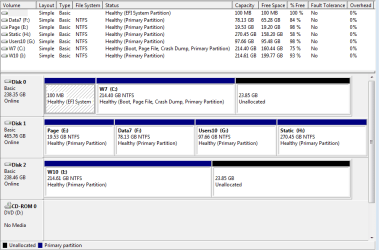
I have Win 7 on Disk 0 and Win 10 on Disk 2 (Disk 1 is data)

When Win 7 is default OS, Win7 Disk management shows:
Disk 0 (C:) as Boot/Page/Crash/Primary.

When Win 10 is default OS, Win 10 Disk Management shows:
Disk 2: (C:) as Boot/Page/Crash/Primary.

(EFI System Partition is on Disk 0; 100MB Capacity & Free Space)
 
Last edited:

My Computer My Computer

Computer type
PC/Desktop
Computer Manufacturer/Model Number
Custom
OS
Windows 7 Pro x64/10 Pro x64
CPU
i5 4670K
Motherboard
GA-Z87-HD3
Memory
16GB Corsair Vengeance DDR3 1600
Graphics Card(s)
GTX 760
Sound Card
Onboard
Monitor(s) Displays
Samsung SM173P
Screen Resolution
1280 x 1024
Hard Drives
SSD Samsung 840 Pro 256GB
SSD Samsung 850 Pro 256GB
HDD Seagate 500GB
PSU
Corsair AX 760i
Case
CM Storm II
Internet Speed
VM 50 Mbps
Antivirus
MSE/Malwarebytes
Browser
Firefox 43.0.4 (01/Feb/16)
You'd have to copy it to both.
 

My Computer My Computer

Computer type
PC/Desktop
Computer Manufacturer/Model Number
Custom assembled by me :}
OS
Win-7-Pro64bit 7-H-Prem-64bit
CPU
i7-5930K 2nd i9-9940x both water blocked VRM's too
Motherboard
ASUS SABERTOOTH X99 2nd ASUS x299 Apex
Memory
Trident-z 3200C14 2nd Trident-z 3600C16
Graphics Card(s)
EVGA 1080ti ftw3 2nd Titan Xp both water blocked
Sound Card
Built-in Realtek
Monitor(s) Displays
1-AOC G2460PG 24"G-Sync 144Hz/ 2nd 1-ASUS VG248QE 24" 144Hz
Screen Resolution
1920 x 1080 144Hz
Hard Drives
2-Samsung M.2 Evo & Evo Plus
2-Samsung 850 EVO 500GB SSD's/ 3-2.5 W.D. Black 1tb-&3-1tb/3-3.5 WD Black 1tb hdd's
PSU
EVGA SuperNOVA 1000-P2 2nd 1200-P2
Case
2-Corsair Obsidian Series 450D Black ATX Mid Tower
Cooling
Custom water loops
Keyboard
Logitech G710+/ 2nd Logitech G910
Mouse
2-RedDragon M901 Perdition 16400 dpi Gaming mouse = wired
Internet Speed
Comcast Ping 19ms 89.31mbps download speed 6.12mbps upload
Antivirus
Malwarebytes Pro/ Superantispyware Pro
Browser
FireFox & Pale moon
Other Info
2nd ASUS X299 Apex/Intel i9-9940x with Custom water loop/7H-Prem-x64/Corsair 450D case/Ram Trident-z 3600C16 4x8gb / Samsung970Evo plus 500gb SSD/Dual ssd EZ swap evo/PSU EVGA SuperNova 1200w-P2 80+Platinum/GPU Titan Xp /8-ML-140 on push-pull on 2-280GTX rads
Hi and welcome to SevenForums,
I would expect it would be more difficult to boot to the WinPE in win-10 more than 7 so I'd say you'd only have to do it in win-10
Once booted to the recovery it's just a matter of selecting an image and drive to recover so the 7 entry might not be needed.

Win-10 has been known to highjack the default os :)

Hi Thrash

Thanks for your reply; I may have to sort the dual boot environment before I deal with the MR menu entry.

I'll wait for whs's assessment before doing anything that might go spiral on me.
 

My Computer My Computer

Computer type
PC/Desktop
Computer Manufacturer/Model Number
Custom
OS
Windows 7 Pro x64/10 Pro x64
CPU
i5 4670K
Motherboard
GA-Z87-HD3
Memory
16GB Corsair Vengeance DDR3 1600
Graphics Card(s)
GTX 760
Sound Card
Onboard
Monitor(s) Displays
Samsung SM173P
Screen Resolution
1280 x 1024
Hard Drives
SSD Samsung 840 Pro 256GB
SSD Samsung 850 Pro 256GB
HDD Seagate 500GB
PSU
Corsair AX 760i
Case
CM Storm II
Internet Speed
VM 50 Mbps
Antivirus
MSE/Malwarebytes
Browser
Firefox 43.0.4 (01/Feb/16)
I don't seem to have a partition marked as 'Active' (?)
 

Attachments

  • DiskMan7_28-02-16.PNG
    DiskMan7_28-02-16.PNG
    17.7 KB · Views: 0

My Computer My Computer

Computer type
PC/Desktop
Computer Manufacturer/Model Number
Custom
OS
Windows 7 Pro x64/10 Pro x64
CPU
i5 4670K
Motherboard
GA-Z87-HD3
Memory
16GB Corsair Vengeance DDR3 1600
Graphics Card(s)
GTX 760
Sound Card
Onboard
Monitor(s) Displays
Samsung SM173P
Screen Resolution
1280 x 1024
Hard Drives
SSD Samsung 840 Pro 256GB
SSD Samsung 850 Pro 256GB
HDD Seagate 500GB
PSU
Corsair AX 760i
Case
CM Storm II
Internet Speed
VM 50 Mbps
Antivirus
MSE/Malwarebytes
Browser
Firefox 43.0.4 (01/Feb/16)
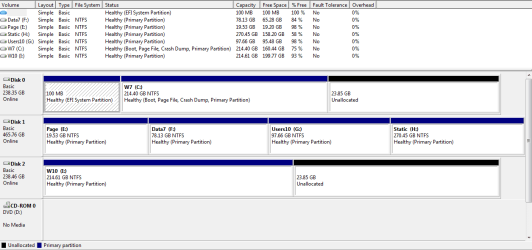
Win7 C would be my choice for the bootmgr. You do have an active partition. It is the EFI partition. Just another name to confuse us.
 

My Computer My Computer

Computer Manufacturer/Model Number
HP, Dell, Gateway, Toshiba - 4 laptops and 2 desktops
OS
Vista, Windows7, Mint Mate, Zorin, Windows 8
CPU
from 1.6GHz Duo to i7
Monitor(s) Displays
2x HP w2207
Hard Drives
5x HDD, 7x SSD, 12x Externals
Keyboard
with trackball - no mices
Mouse
Trackball mice
Internet Speed
DSL 6000
@whs
I wondered, because I've seen other DM screenshots that label the EFI partition as active.
For instance (from your EasyBCD tutorial):
http://www.sevenforums.com/2976683-post122.html

Any idea why that one is, and mine isn't labelled 'active'?

As for your suggestion regarding the location for the bootmgr, can you say why 7 would be your preference? I can imagine one reason might be that the text-based 7 menu 'keeps it as simple as possible'. Are there any other differences, significant or otherwise?

I may have other questions, so I thought I'd let you know that I appreciate your time here, given there's more than a fleeting possibility that I prove to be a complete PITA. [I'm not easily confused, but then again I am terminally delusional :]
 

My Computer My Computer

Computer type
PC/Desktop
Computer Manufacturer/Model Number
Custom
OS
Windows 7 Pro x64/10 Pro x64
CPU
i5 4670K
Motherboard
GA-Z87-HD3
Memory
16GB Corsair Vengeance DDR3 1600
Graphics Card(s)
GTX 760
Sound Card
Onboard
Monitor(s) Displays
Samsung SM173P
Screen Resolution
1280 x 1024
Hard Drives
SSD Samsung 840 Pro 256GB
SSD Samsung 850 Pro 256GB
HDD Seagate 500GB
PSU
Corsair AX 760i
Case
CM Storm II
Internet Speed
VM 50 Mbps
Antivirus
MSE/Malwarebytes
Browser
Firefox 43.0.4 (01/Feb/16)
Any idea why that one is, and mine isn't labelled 'active'?
It probably was but you cannot see it because the box is too small.

Regarding the location of the bootmgr - Win7 is my personal preference. No real compelling reason.
 

My Computer My Computer

Computer Manufacturer/Model Number
HP, Dell, Gateway, Toshiba - 4 laptops and 2 desktops
OS
Vista, Windows7, Mint Mate, Zorin, Windows 8
CPU
from 1.6GHz Duo to i7
Monitor(s) Displays
2x HP w2207
Hard Drives
5x HDD, 7x SSD, 12x Externals
Keyboard
with trackball - no mices
Mouse
Trackball mice
Internet Speed
DSL 6000
@whs
I wondered, because I've seen other DM screenshots that label the EFI partition as active.
For instance (from your EasyBCD tutorial):
http://www.sevenforums.com/2976683-post122.html

Any idea why that one is, and mine isn't labelled 'active'?

The screen print in your link isn't for an EFI partition.
The active partition in that screen print looks like it's for an MBR (not EFI) PC.
There is no label on that partition, but usually it's labeled System Reserved, and is where the boot-loader is stored.

Looking at your DM screen print I think you installed Win 10 on Disk 2 with the Win 7 Disk 0 connected.
If that's true, then Win 10 updated the existing boot-loader on Disk 0.

What this means is if Disk 0 crashes, you won't be able boot Win 10.
There is nothing wrong with that setup, you should just be aware of this.
You would need to boot with Rescue Media such as a Macrium bootable CD or flash stick to fix things if Disk 0 crashes.

If Disk 0 was disconnected when you installed Win 10, it would have created another boot-loader for Win 10.
When installing Windows it's best to disconnect all storage drives except the drive you are installing Windows to, and the device you are installing Windows from.

I can post a screen print of a triple-boot PC where each OS is on a different physical drive and each have their own boot-loader, if you want to see what it looks like.
I can disconnect any 2 drives, and still boot the PC with any single drive/OS connected.
 

My Computer My Computer

Computer type
PC/Desktop
Computer Manufacturer/Model Number
home built
OS
Multi-Boot W7_Pro_x64 W8.1_Pro_x64 W10_Pro_x64 +Linux_VMs +Chromium_VM
CPU
AMD Athlon II x4 620
Motherboard
Gigabyte GA-MA785G-UD3H
Memory
6GB GSkill DDR2 800
Graphics Card(s)
AMD 4670 GPU + AMD 4200 IGP
Sound Card
on board Realtek ALC889A
Monitor(s) Displays
RCA 40" LCD TV, Insignia 32" LCD TV, HP 15" LCD monitor
Screen Resolution
1680 x 1050
Hard Drives
OCZ Vertex 3 120GB,
Samsung F3 1TB (3),
Several others - WD, Seagate, Hitachi, ...
PSU
Corsair 500 W
Case
Rosewill mid tower
Cooling
CM 90mm rifle
Keyboard
Gyration wireless, Logitech wireless, Dell USB wired
Mouse
Gyration wireless, Logitech wireless, V7 USB wired
Internet Speed
Spectrum - 100Mbps D / 10Mbps U
Antivirus
Avast, MBAM3, EMET, WinPatrol
Browser
Pale Moon, Firefox, IE
Other Info
2 multi-boot PC's
Mainly HTPC/Office/Gen purpose (no gaming).
Trendnet USB KVM.
LG DVD burner/Blue Ray Player.
Tray system for removable SATA backup drives.

Not currently OCd, under-volted.
I use Hybrid sleep, rarely re-boot or shutdown.

Hauppauge HD-PVR, Avermedia PCIe TV Tuner, Hauppauge PCI TV Tuner.
Any idea why that one is, and mine isn't labelled 'active'?
It probably was but you cannot see it because the box is too small.

Regarding the location of the bootmgr - Win7 is my personal preference. No real compelling reason.

I've become partial to the grotesque blue graphical 10 menu, and I guess I only need one.

This seems to be the bootmgr location:
\EFI\Microsoft\Boot\bootmgfw.efi (the EFI partition?)

this the boot loader location in W7:
device partition=C:
path \Windows\system32\winload.efi
description Windows 7


and this in W10:
device partition=I:
path \Windows\system32\winload.efi
description Windows 10


according to EasyBCD when running in W7.

I would tell EasyBCD to copy the bootmgr from the EFI partition, and put the copy in either C: or I: (as above).
In practice, I'd run EasyBCD in either 7 or 10, and copy it to C:, depending on my preferred location.

Is that how it works?

If I copied it to the 10 system partition, would that result in me having the 10 menu regardless of the OS I select as default?

Presumably I could use EasyBCD to revert my changes and/or select the other location at some point in the future(?)

Let me know if I'm talking out of the wrong orifice here :>)

Regarding the 'small' box, here's an extended screenshot to show the entire EFI partition label:
 

Attachments

  • EFI_Partition28-02-16.PNG
    EFI_Partition28-02-16.PNG
    18.6 KB · Views: 3

My Computer My Computer

Computer type
PC/Desktop
Computer Manufacturer/Model Number
Custom
OS
Windows 7 Pro x64/10 Pro x64
CPU
i5 4670K
Motherboard
GA-Z87-HD3
Memory
16GB Corsair Vengeance DDR3 1600
Graphics Card(s)
GTX 760
Sound Card
Onboard
Monitor(s) Displays
Samsung SM173P
Screen Resolution
1280 x 1024
Hard Drives
SSD Samsung 840 Pro 256GB
SSD Samsung 850 Pro 256GB
HDD Seagate 500GB
PSU
Corsair AX 760i
Case
CM Storm II
Internet Speed
VM 50 Mbps
Antivirus
MSE/Malwarebytes
Browser
Firefox 43.0.4 (01/Feb/16)
@DavidE

Yes, I did that, and I can see it would be an issue if that disk failed.
I haven't invested my whole world in the W10 install, so would you advise wiping the drive and reinstalling with the other disks disconnected?

I assume I could use EasyBCD to deal with the dual booting issue once the reinstallation had been done(?).

How would that affect my W10 Users folder on Disk 1? I imagine I'd have to move all the data off that partition, run the sysprep routine as per kari's tutorial (at install-method 1, or after-method 2) and copy personal data back once those folders had been re-established.

Thanks for the warning.
 

My Computer My Computer

Computer type
PC/Desktop
Computer Manufacturer/Model Number
Custom
OS
Windows 7 Pro x64/10 Pro x64
CPU
i5 4670K
Motherboard
GA-Z87-HD3
Memory
16GB Corsair Vengeance DDR3 1600
Graphics Card(s)
GTX 760
Sound Card
Onboard
Monitor(s) Displays
Samsung SM173P
Screen Resolution
1280 x 1024
Hard Drives
SSD Samsung 840 Pro 256GB
SSD Samsung 850 Pro 256GB
HDD Seagate 500GB
PSU
Corsair AX 760i
Case
CM Storm II
Internet Speed
VM 50 Mbps
Antivirus
MSE/Malwarebytes
Browser
Firefox 43.0.4 (01/Feb/16)
That's a tough call, i don't know if there's a right or wrong answer for everyone with every scenario.
I see Pro's and Con's with each, and i think it's a personal preference for some of this.

If you are happy with your current setup, and it does what you need, i suggest using it as-is.

You are now aware of the risk in losing both OS's if Disk 0 crashes, so make sure you can boot from Rescue Media, so you can recover/restore if needed.

imho, it would be a lot of "iffy" changes now to reinstall Win 10 considering moving/copying personal W10 user data, sysprep, etc.
I haven't done that, and it would take me a lot of time to verify everything if i did, so is it worth it ?
 

My Computer My Computer

Computer type
PC/Desktop
Computer Manufacturer/Model Number
home built
OS
Multi-Boot W7_Pro_x64 W8.1_Pro_x64 W10_Pro_x64 +Linux_VMs +Chromium_VM
CPU
AMD Athlon II x4 620
Motherboard
Gigabyte GA-MA785G-UD3H
Memory
6GB GSkill DDR2 800
Graphics Card(s)
AMD 4670 GPU + AMD 4200 IGP
Sound Card
on board Realtek ALC889A
Monitor(s) Displays
RCA 40" LCD TV, Insignia 32" LCD TV, HP 15" LCD monitor
Screen Resolution
1680 x 1050
Hard Drives
OCZ Vertex 3 120GB,
Samsung F3 1TB (3),
Several others - WD, Seagate, Hitachi, ...
PSU
Corsair 500 W
Case
Rosewill mid tower
Cooling
CM 90mm rifle
Keyboard
Gyration wireless, Logitech wireless, Dell USB wired
Mouse
Gyration wireless, Logitech wireless, V7 USB wired
Internet Speed
Spectrum - 100Mbps D / 10Mbps U
Antivirus
Avast, MBAM3, EMET, WinPatrol
Browser
Pale Moon, Firefox, IE
Other Info
2 multi-boot PC's
Mainly HTPC/Office/Gen purpose (no gaming).
Trendnet USB KVM.
LG DVD burner/Blue Ray Player.
Tray system for removable SATA backup drives.

Not currently OCd, under-volted.
I use Hybrid sleep, rarely re-boot or shutdown.

Hauppauge HD-PVR, Avermedia PCIe TV Tuner, Hauppauge PCI TV Tuner.
Another warning, your Disk 1 has 4 Primary partitions.

If that disk is initialized as MBR that's the max number of partitions it can have before converting to Dynamic for more partitions.
If you try to create a new partition on that drive don't let it convert to Dynamic, that could cause problems.
You can have 4 Primary, or 3 Primary and unlimited Logical on a MBR initialized disk.

If it's initialized as GPT, the rules are different.
 

My Computer My Computer

Computer type
PC/Desktop
Computer Manufacturer/Model Number
home built
OS
Multi-Boot W7_Pro_x64 W8.1_Pro_x64 W10_Pro_x64 +Linux_VMs +Chromium_VM
CPU
AMD Athlon II x4 620
Motherboard
Gigabyte GA-MA785G-UD3H
Memory
6GB GSkill DDR2 800
Graphics Card(s)
AMD 4670 GPU + AMD 4200 IGP
Sound Card
on board Realtek ALC889A
Monitor(s) Displays
RCA 40" LCD TV, Insignia 32" LCD TV, HP 15" LCD monitor
Screen Resolution
1680 x 1050
Hard Drives
OCZ Vertex 3 120GB,
Samsung F3 1TB (3),
Several others - WD, Seagate, Hitachi, ...
PSU
Corsair 500 W
Case
Rosewill mid tower
Cooling
CM 90mm rifle
Keyboard
Gyration wireless, Logitech wireless, Dell USB wired
Mouse
Gyration wireless, Logitech wireless, V7 USB wired
Internet Speed
Spectrum - 100Mbps D / 10Mbps U
Antivirus
Avast, MBAM3, EMET, WinPatrol
Browser
Pale Moon, Firefox, IE
Other Info
2 multi-boot PC's
Mainly HTPC/Office/Gen purpose (no gaming).
Trendnet USB KVM.
LG DVD burner/Blue Ray Player.
Tray system for removable SATA backup drives.

Not currently OCd, under-volted.
I use Hybrid sleep, rarely re-boot or shutdown.

Hauppauge HD-PVR, Avermedia PCIe TV Tuner, Hauppauge PCI TV Tuner.
Another warning, your Disk 1 has 4 Primary partitions.

If that disk is initialized as MBR that's the max number of partitions it can have before converting to Dynamic for more partitions.
If you try to create a new partition on that drive don't let it convert to Dynamic, that could cause problems.
You can have 4 Primary, or 3 Primary and unlimited Logical on a MBR initialized disk.

If it's initialized as GPT, the rules are different.

Yes, it's MBR, a disk that went back to late XP days, and one I'll probably replace with a vast terror-bitten chimera drive subjected to GPT partitioning. That'll give me the opportunity to indulge in more sysprepping activity when I'm feeling particularly masochistic.

There are four primary partitions for the reason you alluded to above, a lesson learnt during the XP era.
 

My Computer My Computer

Computer type
PC/Desktop
Computer Manufacturer/Model Number
Custom
OS
Windows 7 Pro x64/10 Pro x64
CPU
i5 4670K
Motherboard
GA-Z87-HD3
Memory
16GB Corsair Vengeance DDR3 1600
Graphics Card(s)
GTX 760
Sound Card
Onboard
Monitor(s) Displays
Samsung SM173P
Screen Resolution
1280 x 1024
Hard Drives
SSD Samsung 840 Pro 256GB
SSD Samsung 850 Pro 256GB
HDD Seagate 500GB
PSU
Corsair AX 760i
Case
CM Storm II
Internet Speed
VM 50 Mbps
Antivirus
MSE/Malwarebytes
Browser
Firefox 43.0.4 (01/Feb/16)
That's a tough call, i don't know if there's a right or wrong answer for everyone with every scenario.
I see Pro's and Con's with each, and i think it's a personal preference for some of this.

If you are happy with your current setup, and it does what you need, i suggest using it as-is.

You are now aware of the risk in losing both OS's if Disk 0 crashes, so make sure you can boot from Rescue Media, so you can recover/restore if needed.

imho, it would be a lot of "iffy" changes now to reinstall Win 10 considering moving/copying personal W10 user data, sysprep, etc.
I haven't done that, and it would take me a lot of time to verify everything if i did, so is it worth it ?

Well, I'm never completely happy with any current setup, and there are things I'd change if/when doing a new installation. I do everything I want/need to on 7; the idea is to familiarize myself with 10 so that by the time 7 becomes essentially obsolete (critical updates etc.) in 2020, I won't need it for anything but sentimental software reasons. 10 is, for me at present, an experimental plaything, and I enjoy the research into strategies and techniques for achieving things about which I know little or nothing, just to be perverse :}

I should also remind myself that moving the Users folder to another disk/partition would be done after installation, given that I intend to disconnect the other drives, though I am curious about completing it 'audit mode'.

David: on that subject (disconnecting drives), I'm tempted to disable the drives in the (entity that used to be known as) BIOS, rather than physically removing the power and/or data cables. Is that something you'd recommend?
(I suspect the answer is probably 'no', but then I never thought I'd see BBC News quoting Twitter as a credible source).
 

My Computer My Computer

Computer type
PC/Desktop
Computer Manufacturer/Model Number
Custom
OS
Windows 7 Pro x64/10 Pro x64
CPU
i5 4670K
Motherboard
GA-Z87-HD3
Memory
16GB Corsair Vengeance DDR3 1600
Graphics Card(s)
GTX 760
Sound Card
Onboard
Monitor(s) Displays
Samsung SM173P
Screen Resolution
1280 x 1024
Hard Drives
SSD Samsung 840 Pro 256GB
SSD Samsung 850 Pro 256GB
HDD Seagate 500GB
PSU
Corsair AX 760i
Case
CM Storm II
Internet Speed
VM 50 Mbps
Antivirus
MSE/Malwarebytes
Browser
Firefox 43.0.4 (01/Feb/16)

My Computer My Computer

Computer type
PC/Desktop
Computer Manufacturer/Model Number
Custom assembled by me :}
OS
Win-7-Pro64bit 7-H-Prem-64bit
CPU
i7-5930K 2nd i9-9940x both water blocked VRM's too
Motherboard
ASUS SABERTOOTH X99 2nd ASUS x299 Apex
Memory
Trident-z 3200C14 2nd Trident-z 3600C16
Graphics Card(s)
EVGA 1080ti ftw3 2nd Titan Xp both water blocked
Sound Card
Built-in Realtek
Monitor(s) Displays
1-AOC G2460PG 24"G-Sync 144Hz/ 2nd 1-ASUS VG248QE 24" 144Hz
Screen Resolution
1920 x 1080 144Hz
Hard Drives
2-Samsung M.2 Evo & Evo Plus
2-Samsung 850 EVO 500GB SSD's/ 3-2.5 W.D. Black 1tb-&3-1tb/3-3.5 WD Black 1tb hdd's
PSU
EVGA SuperNOVA 1000-P2 2nd 1200-P2
Case
2-Corsair Obsidian Series 450D Black ATX Mid Tower
Cooling
Custom water loops
Keyboard
Logitech G710+/ 2nd Logitech G910
Mouse
2-RedDragon M901 Perdition 16400 dpi Gaming mouse = wired
Internet Speed
Comcast Ping 19ms 89.31mbps download speed 6.12mbps upload
Antivirus
Malwarebytes Pro/ Superantispyware Pro
Browser
FireFox & Pale moon
Other Info
2nd ASUS X299 Apex/Intel i9-9940x with Custom water loop/7H-Prem-x64/Corsair 450D case/Ram Trident-z 3600C16 4x8gb / Samsung970Evo plus 500gb SSD/Dual ssd EZ swap evo/PSU EVGA SuperNova 1200w-P2 80+Platinum/GPU Titan Xp /8-ML-140 on push-pull on 2-280GTX rads
David: on that subject (disconnecting drives), I'm tempted to disable the drives in the (entity that used to be known as) BIOS, rather than physically removing the power and/or data cables. Is that something you'd recommend?
(I suspect the answer is probably 'no', but then I never thought I'd see BBC News quoting Twitter as a credible source).

I've never disabled drives in BIOS, so i don't know.
If you can disable individual drives, you could try it and see how it works.
Just make sure you keep notes of what you change so you can change it back.

Hi,
Personally when win-10 testing started or at least soon after I decided to use one of these to dual boot :)
Amazon.com: Vantec 2.5-Inch Dual Bay Trayless SATA III - 6G Mobile Rack (MRK-225S6-BK): Computers & Accessories
And have never had an issue since
I also found out sharing drives is not a good idea either
Windows 10 fast start can be problematic with other drives.

I agree, Windows 10 fast start can be problematic with other drives (OS), i learned the hard way :(
I use a similar tray device but they are for a single 3.5 drive.
I got them mainly for "offline" Backup drives, but i do have a W10 Insider Fast Ring OS on a drive that i use occasionally in the tray.
I do share drives and partitions with multiple OS's, and so far it works well for me, other than the W10 Fast Startup issue.
 

My Computer My Computer

Computer type
PC/Desktop
Computer Manufacturer/Model Number
home built
OS
Multi-Boot W7_Pro_x64 W8.1_Pro_x64 W10_Pro_x64 +Linux_VMs +Chromium_VM
CPU
AMD Athlon II x4 620
Motherboard
Gigabyte GA-MA785G-UD3H
Memory
6GB GSkill DDR2 800
Graphics Card(s)
AMD 4670 GPU + AMD 4200 IGP
Sound Card
on board Realtek ALC889A
Monitor(s) Displays
RCA 40" LCD TV, Insignia 32" LCD TV, HP 15" LCD monitor
Screen Resolution
1680 x 1050
Hard Drives
OCZ Vertex 3 120GB,
Samsung F3 1TB (3),
Several others - WD, Seagate, Hitachi, ...
PSU
Corsair 500 W
Case
Rosewill mid tower
Cooling
CM 90mm rifle
Keyboard
Gyration wireless, Logitech wireless, Dell USB wired
Mouse
Gyration wireless, Logitech wireless, V7 USB wired
Internet Speed
Spectrum - 100Mbps D / 10Mbps U
Antivirus
Avast, MBAM3, EMET, WinPatrol
Browser
Pale Moon, Firefox, IE
Other Info
2 multi-boot PC's
Mainly HTPC/Office/Gen purpose (no gaming).
Trendnet USB KVM.
LG DVD burner/Blue Ray Player.
Tray system for removable SATA backup drives.

Not currently OCd, under-volted.
I use Hybrid sleep, rarely re-boot or shutdown.

Hauppauge HD-PVR, Avermedia PCIe TV Tuner, Hauppauge PCI TV Tuner.
Hi,
Personally when win-10 testing started or at least soon after I decided to use one of these to dual boot :)
Amazon.com: Vantec 2.5-Inch Dual Bay Trayless SATA III - 6G Mobile Rack (MRK-225S6-BK): Computers & Accessories
And have never had an issue since
I also found out sharing drives is not a good idea either
Windows 10 fast start can be problematic with other drives.

Yes, I did look at a similar swap bay on Amazon UK: Akasa AK-IEN-03 Lokstor M21 2.5 inch 2 Bay Mobile Rack: Amazon.co.uk: Computers & Accessories I've never used one, but I can see that it's a useful device. I don't have a 3.5in external faced bay in my case, but I guess there are ways round that situation.

Since I installed W10, I've moved the 10 Users folder to one partition on the data disk, and have always had the W7 'libraries' (Documents, Pictures, Music & stuff) on another, and so far I haven't encountered any issues. However, I don't think I'd feel comfortable with a set up that had 2+ system and data storage partitions on one physical drive, especially where 10 is concerned.

Disabling fast startup was the first thing I did after 10 was installed.

Thanks for that drive bay ref--it's something I'll consider if/when unnatural disaster strikes, or even if everything goes well and boredom set in :>}
 

My Computer My Computer

Computer type
PC/Desktop
Computer Manufacturer/Model Number
Custom
OS
Windows 7 Pro x64/10 Pro x64
CPU
i5 4670K
Motherboard
GA-Z87-HD3
Memory
16GB Corsair Vengeance DDR3 1600
Graphics Card(s)
GTX 760
Sound Card
Onboard
Monitor(s) Displays
Samsung SM173P
Screen Resolution
1280 x 1024
Hard Drives
SSD Samsung 840 Pro 256GB
SSD Samsung 850 Pro 256GB
HDD Seagate 500GB
PSU
Corsair AX 760i
Case
CM Storm II
Internet Speed
VM 50 Mbps
Antivirus
MSE/Malwarebytes
Browser
Firefox 43.0.4 (01/Feb/16)
Back
Top