Solved Winsock alteration and Carbonite install failure?

Yes, Bonjour service is another that adds it's own LSP. Well, the service is automatic, and started. Assuming you confirmed the dependencies are also started? Does the service run in Safe Mode? Or can it be started if not? If so, testing in Safe Mode to see if it connects will let you know if a 3rd part program is blocking. You can also perform a Clean Start, and leave that service enabled.

http://www.sevenforums.com/tutorial...ation-conflicts-performing-clean-startup.html

A Guy
 

My Computer My Computer

At a glance

Windows 10 Home x64INTEL Core i5-750 Quad-Core 3.37GHzHyperX Fury Black Series 8GB (2 x 4GB) 1866MhzEVGA GeForce GTX 750 Superclocked 1GB 128-Bit...
Computer type
PC/Desktop
OS
Windows 10 Home x64
CPU
INTEL Core i5-750 Quad-Core 3.37GHz
Motherboard
ASUS P7P55D
Memory
HyperX Fury Black Series 8GB (2 x 4GB) 1866Mhz
Graphics Card(s)
EVGA GeForce GTX 750 Superclocked 1GB 128-Bit GDDR5
Monitor(s) Displays
LG 32MA68HY 32" IPS
Screen Resolution
1920 x 1080
Hard Drives
Samsung 840 Evo 120GB, SEAGATE 500GB Barracuda® 7200.12, SATA 3 Gb/s, 7200 RPM, 16MB cache
PSU
ANTEC TruePower New TP-550, 80 PLUS, 550W
Case
ANTEC Three Hundred Illusion
Cooling
COOLER MASTER Hyper 212 Plus, 4 x 120mm 1 x 140mm Noctua's
Internet Speed
85 + Mbps
Antivirus
Avast
Browser
Vivaldi
You're over my head. I don't understand dependencies? But I'm not sure I need to know that (plus whether it runs in safe mode) since, if I understood your post, both questions were related to whether there was a problem restarting Bonjour. There was no problem other than I did need to reboot.

An interesting tidbit--I reinstalled Lavasoft and it did not change the name/value as did the install in '15. I have no idea what hair brained, misconceived thinking led me to install the darn thing anyway since I knew for years ago that the program was bad news. That said, I can't get the thing off my machine now. I'm currently talking with one of their technical people in that regard.
 

My Computer My Computer

At a glance

Windows 7 & Windows 10
Computer type
PC/Desktop
OS
Windows 7 & Windows 10
Just for information.

@markg2
Because you use Everything Search you can delete just about everything it finds on your system.
You must be careful when doing so. When it deletes something it is gone just the way when you use regedit to delete things. Just a lot quicker.

If it was my computer I would use Everything Search and delete everything found of LavaSoft. I would first make a restore point and backup and then go for it.
 

My Computer My Computer

At a glance

Windows 10 Pro. 64/ version 1709 Windows 7 Pr...Intel i7-6800K @ 4.3Corsair Platinum 16 gig @2400EVGA GTX 1070 OC
Computer type
PC/Desktop
Computer Manufacturer/Model Number
Home made Desktop
OS
Windows 10 Pro. 64/ version 1709 Windows 7 Pro/64
CPU
Intel i7-6800K @ 4.3
Motherboard
ASUS X-99 Deluxe II
Memory
Corsair Platinum 16 gig @2400
Graphics Card(s)
EVGA GTX 1070 OC
Monitor(s) Displays
Asus 27" LED LCD/VE278Q
Screen Resolution
1920-1080 or 1280-720 HDMI
Hard Drives
INTEL SSD 730-240 Gb Sata 3.0/
PSU
EVGA Platium 1200W
Case
Phanteks Luxe Tempered Glass 8 fans/ one radiator
Cooling
XSPC/ Water Cooled CPU
Keyboard
Das 4 Professional
Mouse
Logitech M705/MX Anywhere 2-S
Internet Speed
100 mbits
Antivirus
Microsoft Security Essentials/ Malwarebytes Premium 3.0/ SAS
Browser
I.E. 11 default/Firefox/ ISP Time Warner Cable/Spectrum
Other Info
LG BluRay Burner/
Sound system-KLipsch-THX/
Icy Dock ssd Hot Swap bays.
Just for information.

@markg2
Because you use Everything Search you can delete just about everything it finds on your system.
You must be careful when doing so. When it deletes something it is gone just the way when you use regedit to delete things. Just a lot quicker.

If it was my computer I would use Everything Search and delete everything found of LavaSoft. I would first make a restore point and backup and then go for it.

This exactly +1.
 

My Computer My Computer

At a glance

10 Pro x64Ryzen 9 3900X64GB(4x16GB) DDR4EVGA 1080ti FTW3
Computer type
PC/Desktop
Computer Manufacturer/Model Number
Custom
OS
10 Pro x64
CPU
Ryzen 9 3900X
Motherboard
Asrock x370 Tachi
Memory
64GB(4x16GB) DDR4
Graphics Card(s)
EVGA 1080ti FTW3
Sound Card
ASUS Xonar Essence STX (V4 Bursons), ODAC rev B, NFB-11, O2
Monitor(s) Displays
3xASUS PB278Q/R, Optoma HD142X
Screen Resolution
3x1440p, 1080p
Hard Drives
512GB 850 EVO(OS, Programs)
4TB (Movies)
3TB (Downloads)
3TB (Programs)
1TB HDD (Games)
2x6TB R1 (videos)
PSU
AX760
Case
Fractal Define R5
Cooling
NH-D15S
Keyboard
Massdrop Ctrl with Box Navy's
Mouse
G903, Alioth XXL Mat
Internet Speed
280/40
Antivirus
MBAM, ESET
Browser
Canary 64 Bit
Other Info
I also own a Thinkpad P50 Xeon 4K, X220T, X1C5
You're over my head. I don't understand dependencies? But I'm not sure I need to know that (plus whether it runs in safe mode) since, if I understood your post, both questions were related to whether there was a problem restarting Bonjour. There was no problem other than I did need to reboot.

I'm sorry, I meant the dependencies for Carbonite service, you posted the screenshot

382647d1456681869-winsock-alteration-carbonite-install-failure-service-1.png


Those three servcies should be started and running for the Carbonite service to work. My suggestions for the Clean Start were also in an attempt to figure out the Carbonite issue.

Instructions to remove Ad Aware

How to uninstall | Lavasoft

A Guy
 

My Computer My Computer

At a glance

Windows 10 Home x64INTEL Core i5-750 Quad-Core 3.37GHzHyperX Fury Black Series 8GB (2 x 4GB) 1866MhzEVGA GeForce GTX 750 Superclocked 1GB 128-Bit...
Computer type
PC/Desktop
OS
Windows 10 Home x64
CPU
INTEL Core i5-750 Quad-Core 3.37GHz
Motherboard
ASUS P7P55D
Memory
HyperX Fury Black Series 8GB (2 x 4GB) 1866Mhz
Graphics Card(s)
EVGA GeForce GTX 750 Superclocked 1GB 128-Bit GDDR5
Monitor(s) Displays
LG 32MA68HY 32" IPS
Screen Resolution
1920 x 1080
Hard Drives
Samsung 840 Evo 120GB, SEAGATE 500GB Barracuda® 7200.12, SATA 3 Gb/s, 7200 RPM, 16MB cache
PSU
ANTEC TruePower New TP-550, 80 PLUS, 550W
Case
ANTEC Three Hundred Illusion
Cooling
COOLER MASTER Hyper 212 Plus, 4 x 120mm 1 x 140mm Noctua's
Internet Speed
85 + Mbps
Antivirus
Avast
Browser
Vivaldi
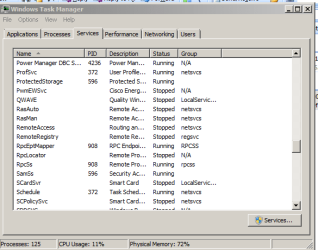
Per the attached, I don't seem to have the RPC mapper running.

Given that getting rid of the LS entry in protocol didn't resolve the problem, Carbonite isn't sure the server registration problem may be at their end. The Carbonite escalation guy is remoting in this a.m. to collect some more information to turn the case over to their engineers.

I didn't bother with safe mode since if Carbonite did successfully register I'd be left going through the tedious process of elimination. I'd rather chuck Carbonite and just rely on my various USB data backups.

As for getting rid of LS--I know how to do it but can't because LS will not. They know it's a problem at their end and I'm waiting on their support person to provide the answer.

I'm afraid just deleting all associated LS files/folders that Everything locates could get me in more trouble if LS hasn't first properly uninstalled to remove all its registry entries and connections.
 

Attachments

  • RPC Mapper.PNG
    RPC Mapper.PNG
    13.3 KB · Views: 24

My Computer My Computer

At a glance

Windows 7 & Windows 10
Computer type
PC/Desktop
OS
Windows 7 & Windows 10
Per the attached, I don't seem to have the RPC mapper running.

Given that getting rid of the LS entry in protocol didn't resolve the problem, Carbonite isn't sure the server registration problem may be at their end. The Carbonite escalation guy is remoting in this a.m. to collect some more information to turn the case over to their engineers.

I didn't bother with safe mode since if Carbonite did successfully register I'd be left going through the tedious process of elimination. I'd rather chuck Carbonite and just rely on my various USB data backups.

As for getting rid of LS--I know how to do it but can't because LS will not. They know it's a problem at their end and I'm waiting on their support person to provide the answer.

I'm afraid just deleting all associated LS files/folders that Everything locates could get me in more trouble if LS hasn't first properly uninstalled to remove all its registry entries and connections.

I believe that everything search will find registry entries also as per Layback Bear's post. I also agree that it would be better to wait to see if LS can help you first. If you want to try I would at this point image your whole drive if you have space(size of used space on the disk to image) on an external with macrium reflect free (in my signature) then if something happens you can just go back, system restore might work but I just find reflect gives piece of mind and protects you if LS manages to make it worse.

Just for information.

@markg2
Because you use Everything Search you can delete just about everything it finds on your system.
You must be careful when doing so. When it deletes something it is gone just the way when you use regedit to delete things. Just a lot quicker.

If it was my computer I would use Everything Search and delete everything found of LavaSoft. I would first make a restore point and backup and then go for it.
 

My Computer My Computer

At a glance

10 Pro x64Ryzen 9 3900X64GB(4x16GB) DDR4EVGA 1080ti FTW3
Computer type
PC/Desktop
Computer Manufacturer/Model Number
Custom
OS
10 Pro x64
CPU
Ryzen 9 3900X
Motherboard
Asrock x370 Tachi
Memory
64GB(4x16GB) DDR4
Graphics Card(s)
EVGA 1080ti FTW3
Sound Card
ASUS Xonar Essence STX (V4 Bursons), ODAC rev B, NFB-11, O2
Monitor(s) Displays
3xASUS PB278Q/R, Optoma HD142X
Screen Resolution
3x1440p, 1080p
Hard Drives
512GB 850 EVO(OS, Programs)
4TB (Movies)
3TB (Downloads)
3TB (Programs)
1TB HDD (Games)
2x6TB R1 (videos)
PSU
AX760
Case
Fractal Define R5
Cooling
NH-D15S
Keyboard
Massdrop Ctrl with Box Navy's
Mouse
G903, Alioth XXL Mat
Internet Speed
280/40
Antivirus
MBAM, ESET
Browser
Canary 64 Bit
Other Info
I also own a Thinkpad P50 Xeon 4K, X220T, X1C5
LS must have just altered their code. Their uninstaller worked this time and Everywhere removed the remaining.

Case closed :-)
 

My Computer My Computer

At a glance

Windows 7 & Windows 10
Computer type
PC/Desktop
OS
Windows 7 & Windows 10
LS must have just altered their code. Their uninstaller worked this time and Everywhere removed the remaining.

Case closed :-)

Good to hear it, but no Carbonite in the end?
 

My Computer My Computer

At a glance

10 Pro x64Ryzen 9 3900X64GB(4x16GB) DDR4EVGA 1080ti FTW3
Computer type
PC/Desktop
Computer Manufacturer/Model Number
Custom
OS
10 Pro x64
CPU
Ryzen 9 3900X
Motherboard
Asrock x370 Tachi
Memory
64GB(4x16GB) DDR4
Graphics Card(s)
EVGA 1080ti FTW3
Sound Card
ASUS Xonar Essence STX (V4 Bursons), ODAC rev B, NFB-11, O2
Monitor(s) Displays
3xASUS PB278Q/R, Optoma HD142X
Screen Resolution
3x1440p, 1080p
Hard Drives
512GB 850 EVO(OS, Programs)
4TB (Movies)
3TB (Downloads)
3TB (Programs)
1TB HDD (Games)
2x6TB R1 (videos)
PSU
AX760
Case
Fractal Define R5
Cooling
NH-D15S
Keyboard
Massdrop Ctrl with Box Navy's
Mouse
G903, Alioth XXL Mat
Internet Speed
280/40
Antivirus
MBAM, ESET
Browser
Canary 64 Bit
Other Info
I also own a Thinkpad P50 Xeon 4K, X220T, X1C5
Sorry, wasn't clear. Case is closed on LS. The Carbonite escalation guy tried a few more ideas that didn't work, collected more system info and logs and was handing all over to the next and last level--their engineers.
 

My Computer My Computer

At a glance

Windows 7 & Windows 10
Computer type
PC/Desktop
OS
Windows 7 & Windows 10
Sorry, wasn't clear. Case is closed on LS. The Carbonite escalation guy tried a few more ideas that didn't work, collected more system info and logs and was handing all over to the next and last level--their engineers.

Ah, okay be sure to let us know if they figure it out.
 

My Computer My Computer

At a glance

10 Pro x64Ryzen 9 3900X64GB(4x16GB) DDR4EVGA 1080ti FTW3
Computer type
PC/Desktop
Computer Manufacturer/Model Number
Custom
OS
10 Pro x64
CPU
Ryzen 9 3900X
Motherboard
Asrock x370 Tachi
Memory
64GB(4x16GB) DDR4
Graphics Card(s)
EVGA 1080ti FTW3
Sound Card
ASUS Xonar Essence STX (V4 Bursons), ODAC rev B, NFB-11, O2
Monitor(s) Displays
3xASUS PB278Q/R, Optoma HD142X
Screen Resolution
3x1440p, 1080p
Hard Drives
512GB 850 EVO(OS, Programs)
4TB (Movies)
3TB (Downloads)
3TB (Programs)
1TB HDD (Games)
2x6TB R1 (videos)
PSU
AX760
Case
Fractal Define R5
Cooling
NH-D15S
Keyboard
Massdrop Ctrl with Box Navy's
Mouse
G903, Alioth XXL Mat
Internet Speed
280/40
Antivirus
MBAM, ESET
Browser
Canary 64 Bit
Other Info
I also own a Thinkpad P50 Xeon 4K, X220T, X1C5
Back
Top