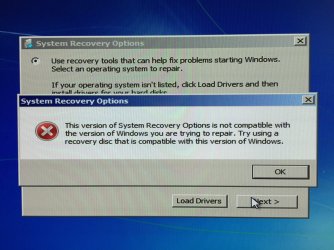
This version of System Recovery Options is not compatible...

AstaLaVista

Lost in Cyberspace
Guru
Local time
1:53 PM
Messages
1,962
Location
Miami, Florida
WOW, talk about having a bad year and a really bad week. :eek: :(

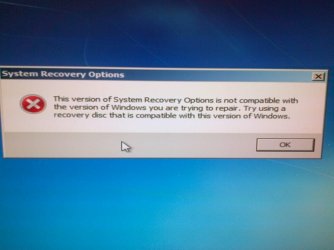
Long story short, use Migrate Easy to move the Windows 7 OS (w/Sp1) to a newer SSD drive and everything seemed to worked fine as this morning I still had Windows Desktop on the PC, for some reason I did a restart and it did not wanted to start so I pulled the old Win 7 DVD and got the following error: see image 01

So of course I suspected a corrupt registry or MBR when I did the migration and/or swap... no biggie I thought, let me pull out my Win 7 DVD and do a system repair, it should take but a few minutes. :confused:

Well, here I am 5 to 6 hours later with a doozy of a problem. No matter what I do or try I keep coming up with the same error (see Image02)... I have tried my Original Win 7 Ultimate 64bit DVD. I have also downloaded a clean copy of Win 7 Ultimate 64bit w/SP1 ISO and burn it to a DVD and last but not least... tried the Win7 USB/DVD Tool and tried to recover from a USB stick. I have also swapped back to the original SSD and same issue and error. I have tried disconnecting the 1.5TB Data HDD just in case that was causing all the commotion but to no avail.

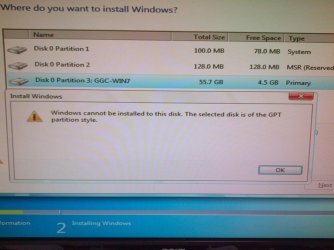
So finally I decide to give up the ghost, throw the towel and make, yet, a new installation of the Win 7 OS and I can not even do that as I get the following error when I do... see FullInstall-Error image

NO, I can not get into Windows or use Safe Mode or even get to the options screen where you can go to the Command Prompt or check the Memory or do a system restore AT ALL.


EDIT:

I have plugged in the SSD to my own PC with a USB/SATA adapter and I am trying to initialize the SSD but I get the error "The Device is not Ready" so now, I can not even format the drive to do a full install... WTH, what kind of bad ju-ju voo doo have I gotten myself into ;)

False Alarm, it appears the front usb port was the culprit... plugged into a back usb port and the ssd is 100% clean and in good condition
 

Attachments

  • Image01.jpg
    Image01.jpg
    82.9 KB · Views: 1
  • Image02.jpg
    Image02.jpg
    55.4 KB · Views: 2
  • FullInstall-Error.jpg
    FullInstall-Error.jpg
    68.4 KB · Views: 1
Last edited:

My Computer My Computer

At a glance

Windows 7 x64 (Ultimate)Intel i5-4670K8GBs Ripjaws 2133MhzAsus GTX660 (2GBs)
Computer type
PC/Desktop
Computer Manufacturer/Model Number
Custom Built... Intel/Nvidia/ASRock
OS
Windows 7 x64 (Ultimate)
CPU
Intel i5-4670K
Motherboard
ASRock Z87 Extreme 6
Memory
8GBs Ripjaws 2133Mhz
Graphics Card(s)
Asus GTX660 (2GBs)
Sound Card
Onboard Realtek HD
Monitor(s) Displays
Acer AL2216W
Screen Resolution
1680 x 1050
Hard Drives
Samsung 840 SSD 120GBs
Samsung 750GB 32MB cache
1.5 TB
PSU
PC Cooling 750w Silencer
Case
Thermaltake Spedo Advance
Cooling
Std Cooler
Keyboard
Logitech G15
Mouse
Logitech G9
Internet Speed
Comcast 20Mbit
Antivirus
Avast
Browser
Firefox
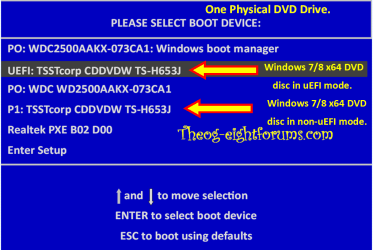
You need to boot the DVD in UEFI mode, screenshot 3 is Windows 7 x64 installed in UEFI mode.

Windows 8 Downgrade-006 SB for posting.PNG
 

My Computer My Computer

At a glance

ME/XP/Vista/Win7
OS
ME/XP/Vista/Win7
I don't think my Gigabyte Z68MA-D2H-B3 has those options in the BIOS but I am going to go check... I just don't recall changing anything on the BIOS to make it changed like that.
 
Last edited:

My Computer My Computer

At a glance

Windows 7 x64 (Ultimate)Intel i5-4670K8GBs Ripjaws 2133MhzAsus GTX660 (2GBs)
Computer type
PC/Desktop
Computer Manufacturer/Model Number
Custom Built... Intel/Nvidia/ASRock
OS
Windows 7 x64 (Ultimate)
CPU
Intel i5-4670K
Motherboard
ASRock Z87 Extreme 6
Memory
8GBs Ripjaws 2133Mhz
Graphics Card(s)
Asus GTX660 (2GBs)
Sound Card
Onboard Realtek HD
Monitor(s) Displays
Acer AL2216W
Screen Resolution
1680 x 1050
Hard Drives
Samsung 840 SSD 120GBs
Samsung 750GB 32MB cache
1.5 TB
PSU
PC Cooling 750w Silencer
Case
Thermaltake Spedo Advance
Cooling
Std Cooler
Keyboard
Logitech G15
Mouse
Logitech G9
Internet Speed
Comcast 20Mbit
Antivirus
Avast
Browser
Firefox
There's no question you have a UEFI system as evidenced by the MSR partition. The problem then with the Repairs is that you needed to boot the DVD as a UEFI disk as shown in Theog's Boot Manager above.

Is it possible the first boot priority had also slipped from Windows Boot Manager which must be the case to boot a UEFI system?

To reinstall in UEFI you'd need to follow these steps for http://www.sevenforums.com/tutorial...e-firmware-interface-install-windows-7-a.html

If you don't want to mess with UEFI going forward then you can Bypass UEFI to Install WIn7. This will give you a normal MBR disk install repaired in the normal way. Most of the repair protocols for Win7 were developed here in beta and are for MBR installs. There are many mysteries still remaining about UEFI since every mobo model is different. It really doesn't confer enough benefit to mess with. It's starting to look alot like crapware.
 
I have Bios F10 on that board and it does not have the UEFI Bios, only the new Beta U1C bios does but I did not want to update to it for obvious reasons (BETA). I know my way around computers but Betas scare me a bit because I am not a guru and if something went to go wrong with it I would have a harder time fixing it.

I did solved the Issue though, in a way that is, somehow, while playing with the Bios to allow me to use system recover, I switched from EFI to Non-EFI DVD ROM and this caused some sort of ruckus because as soon as I switched back, the SSD drive started normally and I was able to get back into windows... go figure! :eek:

Now, I was unable to make the System Recovery worked but since I had already solved the primary issue (bring windows back online) I stopped while I was ahead and let it be. I hate doing that but at my age, I have learn not to question the why-nots any more, I just choose my battles carefully and take my Wins whenever I can get them :o ;)

I do appreciate all the help from you guys though.
 

My Computer My Computer

At a glance

Windows 7 x64 (Ultimate)Intel i5-4670K8GBs Ripjaws 2133MhzAsus GTX660 (2GBs)
Computer type
PC/Desktop
Computer Manufacturer/Model Number
Custom Built... Intel/Nvidia/ASRock
OS
Windows 7 x64 (Ultimate)
CPU
Intel i5-4670K
Motherboard
ASRock Z87 Extreme 6
Memory
8GBs Ripjaws 2133Mhz
Graphics Card(s)
Asus GTX660 (2GBs)
Sound Card
Onboard Realtek HD
Monitor(s) Displays
Acer AL2216W
Screen Resolution
1680 x 1050
Hard Drives
Samsung 840 SSD 120GBs
Samsung 750GB 32MB cache
1.5 TB
PSU
PC Cooling 750w Silencer
Case
Thermaltake Spedo Advance
Cooling
Std Cooler
Keyboard
Logitech G15
Mouse
Logitech G9
Internet Speed
Comcast 20Mbit
Antivirus
Avast
Browser
Firefox
The only way that MSR partition would be there is if it was installed in UEFI mode. The error showing also means that the disk was not being booted as a UEFI disk as it must be to install to a GPT disk. You could have deleted all partitions and it should have cleared the formatting and changed the disk to an MBR disk to continue with the install, however.

313917d1397588660t-version-system-recovery-options-not-compatible-fullinstall-error.jpg


You said you were able to do the repairs by changing to non-UEFI disk which allowed it to boot to repair. This is the exact solution I gave you above, so there is no need to "go figure." Did you even read my explanation of what you were encountering? We deal with it every day here.
 
Last edited:
Sorry, even though I know my way around computers and I am not afraid to make changes, understanding the lingo (UEFI, EFI, etc) of the BIOS is not my forte and sometimes I get confused, I apologize for that but thank you nonetheless for the patience and help.
 

My Computer My Computer

At a glance

Windows 7 x64 (Ultimate)Intel i5-4670K8GBs Ripjaws 2133MhzAsus GTX660 (2GBs)
Computer type
PC/Desktop
Computer Manufacturer/Model Number
Custom Built... Intel/Nvidia/ASRock
OS
Windows 7 x64 (Ultimate)
CPU
Intel i5-4670K
Motherboard
ASRock Z87 Extreme 6
Memory
8GBs Ripjaws 2133Mhz
Graphics Card(s)
Asus GTX660 (2GBs)
Sound Card
Onboard Realtek HD
Monitor(s) Displays
Acer AL2216W
Screen Resolution
1680 x 1050
Hard Drives
Samsung 840 SSD 120GBs
Samsung 750GB 32MB cache
1.5 TB
PSU
PC Cooling 750w Silencer
Case
Thermaltake Spedo Advance
Cooling
Std Cooler
Keyboard
Logitech G15
Mouse
Logitech G9
Internet Speed
Comcast 20Mbit
Antivirus
Avast
Browser
Firefox
Oem7grub

image1.jpeg

image2.jpegGreetings, I am new, I have an issue that has completely got me stumped:
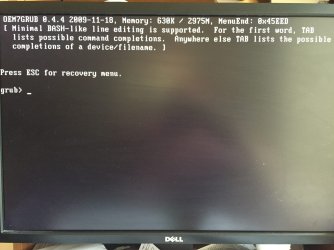
My Windows 7 PC won't boot into Windows, instead I get a screen with: OEM7GRUB 0.4.4 and system recovery won't work, which is why I dug up this old thread.

It started after downloading and installing Windows updates, about 175 updates, 6 of these it told me couldn't installed until restarted, and from then it never got past the GRUB screen.
Please help, I'm sorry if I've posted incorrectly
 

My Computer My Computer

At a glance

Windows 7 ultimate 64 bitintel8gb
Computer type
PC/Desktop
Computer Manufacturer/Model Number
Custom
OS
Windows 7 ultimate 64 bit
CPU
intel
Motherboard
ASRock
Memory
8gb
Hard Drives
Samsung SSD
Hello and welcome to Seven Forums,

Did you install Win 7 from a USB device ?
Do you gave a USB device plugged into your PC at the time of your re-boot or boot?
If so please take out and boot.

Wayne
 

My Computer My Computer

At a glance

Windows 7 Ultimate x64 SP1 OEMIntel i7 3930KKingston Genesis KHX2133C11D3K4/32GAsus RTX 2070 Ti Turbo fan series
Computer type
PC/Desktop
Computer Manufacturer/Model Number
Owner Builder
OS
Windows 7 Ultimate x64 SP1 OEM
CPU
Intel i7 3930K
Motherboard
Asus X79 Deluxe
Memory
Kingston Genesis KHX2133C11D3K4/32G
Graphics Card(s)
Asus RTX 2070 Ti Turbo fan series
Sound Card
Creative Sound Blaster ZXR
Monitor(s) Displays
Samsung U32J39 UHD
Screen Resolution
3840 x 2160
Hard Drives
Samsung 860 Pro 256 GB
OCZ Vertex 4 512GB
Western Digital Black 4TB
PSU
Corsair AX850
Case
Gigabyte
Cooling
Push - Pull 120 mm Noctua PWM, Scythe Big Shuriken 2 Rev. B
Keyboard
Logitech K800 Backlit
Mouse
Logitech MX2 Master
Internet Speed
NBN 25 Mbps
Antivirus
Kaspersky Internet Security
Browser
Mozilla FireFox
Other Info
TP-Link Archer VR600v
Sennheiser TR220 WiFi Head Phones.
No usb device was used , no usb device was plugged in; everything was running fine for about 18 months , until I decided to update, it appeared that all the updates installed fine, it said 5 updates would be installed after re boot or words to that effect, I let it do it's thing , but it never again booted up; I've actually paid Microsoft as I wanted to give it a red hot effort before giving up; but nothing came of it; I've just decided to format and start again, I wish I had been more vigilant with backing up! Everything seems to work fine with the fresh Windows install, thank you.
 

My Computer My Computer

At a glance

Windows 7 ultimate 64 bitintel8gb
Computer type
PC/Desktop
Computer Manufacturer/Model Number
Custom
OS
Windows 7 ultimate 64 bit
CPU
intel
Motherboard
ASRock
Memory
8gb
Hard Drives
Samsung SSD
Oh OK.
My next line of attack was to boot into Safe Mode and run a system restore to before the updates.
However, too late.
For Back Up try Macrium Reflect free.
There are tutorials on how to use here.

Best of luck

Wayne
 

My Computer My Computer

At a glance

Windows 7 Ultimate x64 SP1 OEMIntel i7 3930KKingston Genesis KHX2133C11D3K4/32GAsus RTX 2070 Ti Turbo fan series
Computer type
PC/Desktop
Computer Manufacturer/Model Number
Owner Builder
OS
Windows 7 Ultimate x64 SP1 OEM
CPU
Intel i7 3930K
Motherboard
Asus X79 Deluxe
Memory
Kingston Genesis KHX2133C11D3K4/32G
Graphics Card(s)
Asus RTX 2070 Ti Turbo fan series
Sound Card
Creative Sound Blaster ZXR
Monitor(s) Displays
Samsung U32J39 UHD
Screen Resolution
3840 x 2160
Hard Drives
Samsung 860 Pro 256 GB
OCZ Vertex 4 512GB
Western Digital Black 4TB
PSU
Corsair AX850
Case
Gigabyte
Cooling
Push - Pull 120 mm Noctua PWM, Scythe Big Shuriken 2 Rev. B
Keyboard
Logitech K800 Backlit
Mouse
Logitech MX2 Master
Internet Speed
NBN 25 Mbps
Antivirus
Kaspersky Internet Security
Browser
Mozilla FireFox
Other Info
TP-Link Archer VR600v
Sennheiser TR220 WiFi Head Phones.
Really, why didn`t you do that before you reinstalled ???

Or boot from your install dvd, click repair your pc, then choose system restore.
 

My Computer My Computer

At a glance

Windows 10 Pro x64Intel Core i7 6700KGSkill TridentZ RGB 16GB 3600 16-16-16-36EVGA GTX 980 Ti SC x2
Computer type
PC/Desktop
Computer Manufacturer/Model Number
Skylake Special #666
OS
Windows 10 Pro x64
CPU
Intel Core i7 6700K
Motherboard
Asus Sabertooth Z170 Mark 1
Memory
GSkill TridentZ RGB 16GB 3600 16-16-16-36
Graphics Card(s)
EVGA GTX 980 Ti SC x2
Sound Card
Realtek High Definition
Monitor(s) Displays
AOC G2460PG
Screen Resolution
1920 x 1080 144Hz
Hard Drives
Samsung 860 Pro 256GB, Seagate Barracuda 4TB x2
PSU
EVGA 1000 P2, EVGA White Custom Braided Cables
Case
Corsair Vengeance C70 Gunmetal Black
Cooling
Corsair H100i v2, Corsair ML120 x2, Thermal Grizzly Kryonaut
Keyboard
Logitech G910 Orion Spectrum
Mouse
Logitech G700s
Internet Speed
Verizon Fios Quantum Gateway 75/75
Antivirus
Windows Defender, Malwarebytes Free 3.8.3
Browser
Chrome
Other Info
Corsair SP120 x4, LG Blu-ray Drive, Durabrand HT-395 100 Watt Dolby Digital Amp, Corsair H2100 Wireless 7.1 Headset
Really, why didn`t you do that before you reinstalled ???

Or boot from your install dvd, click repair your pc, then choose system restore.

It would not boot into safe mode, and system restore didn't work-
 

My Computer My Computer

At a glance

Windows 7 ultimate 64 bitintel8gb
Computer type
PC/Desktop
Computer Manufacturer/Model Number
Custom
OS
Windows 7 ultimate 64 bit
CPU
intel
Motherboard
ASRock
Memory
8gb
Hard Drives
Samsung SSD
Back
Top