Windows 7 service pack 1 slowed down my computer?

MajorFoley

New member
Member
VIP
Local time
4:24 PM
Messages
254
Hey guys, while this isn't my main computer I use it from time to time at my mums place, now when I first installed service pack 1 it started chewing up my memory like hell. always when booting it had 60% memory and I couldn't even run anything. Apparently some other update fixed this "memory leak" issue but now my computer just feels down right sluggish. And worst of all it seems that the 5 restore points I had just the other day are no longer there... They just... deleted themselves. I want to recover them somehow. So now I can't even restore to an earlier point in time. And I cant even play games on this anymore. Despite being an old computer it should be able to run games like Warframe just fine but instead I get massive frame drop issues that aren't related to the game.

CPU: AMD Athlon x4 630 2.8ghz
GPU: NVidia GTS 450
RAM: 4GB 1333

I've always hated windows updates... They screw more than they fix
 

My Computer My Computer

Computer type
PC/Desktop
OS
windows 7 Ultimate Service pack 1 x64
CPU
intel i5 2500k
Motherboard
Asus p8z68-v motherboard
Memory
8gb Ram
Graphics Card(s)
Sapphire AMD 6950 2gb
Screen Resolution
1920x1080
Hard Drives
2x samsung hd103SJ
1x ST2000DL003-9VT166
PSU
Silverstone silver 850watt power supply (ST85F-P)
Case
silverstone raven RV02-E
Keyboard
microsoft side winder x4
Mouse
Razer death adder v2
Updates

There are 200+ updates to be installed once SP1 is installed.
Thats why its bogging down, MS issued a "speed up my downloads" kb, but as your already trawling thru them you might as well just leave it. 12hours+ is not unusuall.

Once there in it will perform better.

Roy

are your Nvidia drivers up to date?
 

My Computer My Computer

Computer type
PC/Desktop
Computer Manufacturer/Model Number
medionl/Aspire 6930G/acer x55a
OS
W7 home premium 32bit/W7HP 64bit/w10 tp insider ring
CPU
E5300 dual core
Motherboard
medion MS7366
Memory
3gb
Graphics Card(s)
Nvidia Geforce 7100 Nforce 630i
Monitor(s) Displays
avixc
Internet Speed
n (isp resticted to 72)
Antivirus
mse/pands
Browser
palemoon
Other Info
Belkin Fd7050 n USB using Railink RT2870 drivers, more upto date
Restore Points will be deleted after a service pack install as they would be incompatible with the new system files.
 

My Computer My Computer

Computer type
PC/Desktop
Computer Manufacturer/Model Number
HP
OS
Windows 7 Pro 64 bit
CPU
Xeon W3520
Memory
8 GB
Graphics Card(s)
Nvidia Geforce 210
There are 200+ updates to be installed once SP1 is installed.
Thats why its bogging down, MS issued a "speed up my downloads" kb, but as your already trawling thru them you might as well just leave it. 12hours+ is not unusuall.

Once there in it will perform better.

Roy

are your Nvidia drivers up to date?

I updated them earlier the same day gave a small increase and fixed my GeForce problem. I plan on doing the updates tonight when I go to bed.

Restore Points will be deleted after a service pack install as they would be incompatible with the new system files.
These were new restore points, I think it might be because the drive ran out of space trying to install some other updates on steam origin etc because when they patch the patch takes the same space as the game until the update finishes and there was quite a bit that needed updating so, to get some space during that I think it removed the system restores.

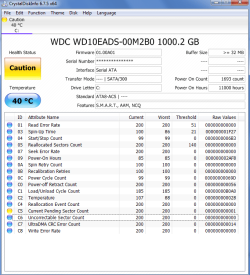
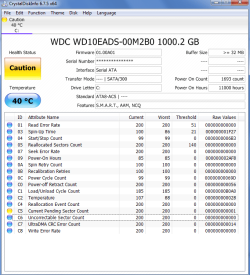
Anyway i downloaded crystal info and it said my HDD is actually in the caution stage now, might be time to replace it? I mean that could be causing the slow down right? Bad sectors?

The plan for the moment is to create a new restore point and get whatever windows updates i can, if the slow down continues to happen, im going to roll back with the system restore, and then uninstall sp1, if uninstalling sp1 didn't fix i will just reinstall it i guess.
 

My Computer My Computer

Computer type
PC/Desktop
OS
windows 7 Ultimate Service pack 1 x64
CPU
intel i5 2500k
Motherboard
Asus p8z68-v motherboard
Memory
8gb Ram
Graphics Card(s)
Sapphire AMD 6950 2gb
Screen Resolution
1920x1080
Hard Drives
2x samsung hd103SJ
1x ST2000DL003-9VT166
PSU
Silverstone silver 850watt power supply (ST85F-P)
Case
silverstone raven RV02-E
Keyboard
microsoft side winder x4
Mouse
Razer death adder v2
Space

Hi Major,
The loss of space, ie a nearly full drive, will cause major problems. min advised is 10%
Basically when you install anything it creates Temporary files before it fully processes the the new file, if it cant do that then the install will fail.
Back up your personnal files to an external medium now.

Roy
 

My Computer My Computer

Computer type
PC/Desktop
Computer Manufacturer/Model Number
medionl/Aspire 6930G/acer x55a
OS
W7 home premium 32bit/W7HP 64bit/w10 tp insider ring
CPU
E5300 dual core
Motherboard
medion MS7366
Memory
3gb
Graphics Card(s)
Nvidia Geforce 7100 Nforce 630i
Monitor(s) Displays
avixc
Internet Speed
n (isp resticted to 72)
Antivirus
mse/pands
Browser
palemoon
Other Info
Belkin Fd7050 n USB using Railink RT2870 drivers, more upto date
Hi Major,
The loss of space, ie a nearly full drive, will cause major problems. min advised is 10%
Basically when you install anything it creates Temporary files before it fully processes the the new file, if it cant do that then the install will fail.
Back up your personnal files to an external medium now.

Roy

I don't think its 100% that. The hard drive is at least 7-9 years old. Heres a screenshot of crystalinfo.

My main computer has HDD's with less than 10% not OS drives but still and they run fine, I even checked them and it says they are still healthy.
 

Attachments

  • HDD.png
    HDD.png
    34 KB · Views: 0

My Computer My Computer

Computer type
PC/Desktop
OS
windows 7 Ultimate Service pack 1 x64
CPU
intel i5 2500k
Motherboard
Asus p8z68-v motherboard
Memory
8gb Ram
Graphics Card(s)
Sapphire AMD 6950 2gb
Screen Resolution
1920x1080
Hard Drives
2x samsung hd103SJ
1x ST2000DL003-9VT166
PSU
Silverstone silver 850watt power supply (ST85F-P)
Case
silverstone raven RV02-E
Keyboard
microsoft side winder x4
Mouse
Razer death adder v2
Hi Major,
The loss of space, ie a nearly full drive, will cause major problems. min advised is 10%
Basically when you install anything it creates Temporary files before it fully processes the the new file, if it cant do that then the install will fail.
Back up your personnal files to an external medium now.

Roy

I don't think that's 100% the problem, this computers hard drives are at least 7-9 years old I know that much, wouldn't surprise me if it started failing. Heres a screenshot of crystal info.

My other HDD's in my main computer are probably less than 10% , granted they are not OS HDDs but my SSD is and that being only a 120 is under 10% as well but all come up as healthy and fine.
 

Attachments

  • HDD.png
    HDD.png
    34 KB · Views: 0

My Computer My Computer

Computer type
PC/Desktop
OS
windows 7 Ultimate Service pack 1 x64
CPU
intel i5 2500k
Motherboard
Asus p8z68-v motherboard
Memory
8gb Ram
Graphics Card(s)
Sapphire AMD 6950 2gb
Screen Resolution
1920x1080
Hard Drives
2x samsung hd103SJ
1x ST2000DL003-9VT166
PSU
Silverstone silver 850watt power supply (ST85F-P)
Case
silverstone raven RV02-E
Keyboard
microsoft side winder x4
Mouse
Razer death adder v2

My Computer My Computer

Computer type
PC/Desktop
OS
windows 7 Ultimate Service pack 1 x64
CPU
intel i5 2500k
Motherboard
Asus p8z68-v motherboard
Memory
8gb Ram
Graphics Card(s)
Sapphire AMD 6950 2gb
Screen Resolution
1920x1080
Hard Drives
2x samsung hd103SJ
1x ST2000DL003-9VT166
PSU
Silverstone silver 850watt power supply (ST85F-P)
Case
silverstone raven RV02-E
Keyboard
microsoft side winder x4
Mouse
Razer death adder v2
See this post:

http://www.sevenforums.com/news/394...windows-7-update-slowdowns-5.html#post3240594

and this one:

http://www.sevenforums.com/news/394...update-slowdowns-post3240523.html#post3240523

If you install SP1 it installs Windows Update Client KB2990214 and that's the one that causes problems.

Suggest downloading the standalone installer for KB3102810 then while offline remove KB2990214 and reboot. Then (stay offline) and run the installer for KB3102810.

Reboot and see what happens.

For more info and alternatives see ThrashZone's post here:

http://www.sevenforums.com/windows-...ut-windows-still-wont-update.html#post3237782

You should be able to search for and download standalone update installers from this link using IE:

Microsoft Update Catalog
 
Last edited:

My Computer My Computer

Computer type
Laptop
Computer Manufacturer/Model Number
ASUS
OS
Microsoft Windows 7 Home Premium 64-bit 7601 Multiprocessor Free Service Pack 1
CPU
AMD C-60 APU with Radeon(tm) HD Graphics
Motherboard
ASUSTeK COMPUTER INC. X501U
Memory
4.00 GB
Graphics Card(s)
AMD Radeon HD 6290 Graphics
Sound Card
(1) AMD High Definition Audio Device (2) Realtek High Defi
Screen Resolution
1366 x 768 x 32 bits (4294967296 colors) @ 60 Hz
Hard Drives
Hitachi HTS545050A7E380 SATA Disk Device
Antivirus
Comodo CIS & FW, SecureAplus App Whitelisting, Threatfire
Browser
Cyberfox 64bit, Opera 64bit, Airfox
Other Info
Spy-The-Spy, HitmanPro.Alert, Norton Connect Safe, MJRegWatcher, BitDefender TrafficLight, Voodoo Shield, Zemana AntiMalware
Back
Top