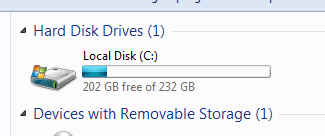
i have no more free space on my drive

shyroey1

New member
Local time
12:20 AM
Messages
5
Hello
i have got 2 partitions one with 800GB (D) and one with 130GB (C) and here is also where the windows is installed,now i have only got 8GB of space left on C and as i looked whats taking all the space there because i got only one game mode installed there that take 9GB of space (In "Users" folder) and i found out that my windows folder weigh is almost 80GB that crazy.
someone have good options of how to clear some space?
I am also using Ccleaner and Disk Cleanup from the properties on the partition.
between the last time i formatted my computer was before 4-5 years so i think this is the only solution but i would like to hear other options before i will do that.
Thanks for helping :D

KebRBz5.jpg


ETI6B4E.png
 
Last edited:

My Computer My Computer

At a glance

Windows 7 Ultimate x64
Computer type
PC/Desktop
OS
Windows 7 Ultimate x64
Can I ask why you put Windows on the smaller partition? And why make the partition for Windows so small? I'm not being mean, I'm just simply inquiring. What do you put on the other partition? Can you just buy another 1TB HDD to throw in there(around $40), and just unpartition the first HDD and dedicate that one to Windows and the 2nd one to storage?
 

My Computer My Computer

At a glance

Microsoft Windows 10 Professional 64-bitIntel(R) Core(TM) i7-4790 CPU @ 3.60GHz8.00 GBNVIDIA GeForce GT 720
Computer type
PC/Desktop
Computer Manufacturer/Model Number
Dell XPS 8700
OS
Microsoft Windows 10 Professional 64-bit
CPU
Intel(R) Core(TM) i7-4790 CPU @ 3.60GHz
Motherboard
Dell Inc.
Memory
8.00 GB
Graphics Card(s)
NVIDIA GeForce GT 720
Monitor(s) Displays
3 x LG Flatron E2350
Screen Resolution
1920 x 1080 x 32 bits (4294967296 colors) @ 60 Hz
Hard Drives
1 TB Seagate
Keyboard
Dell Wired Keyboard
Mouse
Logitech M705
Antivirus
Trend Micro
Definetly somthing not quite right there i think,
see my w7, fair enough its only home prem

roy
 

Attachments

  • syssize.PNG
    syssize.PNG
    3.6 KB · Views: 28

My Computer My Computer

At a glance

W7 home premium 32bit/W7HP 64bit/w10 tp insid...E5300 dual core3gbNvidia Geforce 7100 Nforce 630i
Computer type
PC/Desktop
Computer Manufacturer/Model Number
medionl/Aspire 6930G/acer x55a
OS
W7 home premium 32bit/W7HP 64bit/w10 tp insider ring
CPU
E5300 dual core
Motherboard
medion MS7366
Memory
3gb
Graphics Card(s)
Nvidia Geforce 7100 Nforce 630i
Monitor(s) Displays
avixc
Internet Speed
n (isp resticted to 72)
Antivirus
mse/pands
Browser
palemoon
Other Info
Belkin Fd7050 n USB using Railink RT2870 drivers, more upto date
Can I ask why you put Windows on the smaller partition? And why make the partition for Windows so small? I'm not being mean, I'm just simply inquiring. What do you put on the other partition? Can you just buy another 1TB HDD to throw in there(around $40), and just unpartition the first HDD and dedicate that one to Windows and the 2nd one to storage?

i got 1TB that when i installed the windows i divided as i wanted, i thought that 130GB for only windows and programs will be fine,and it was like that until now.
about the other 800GB is most for games,music,images,installer of programs,Steam and Origin.
and if i will format i will change the amount of each partition like 700/230 or something like that i can play with it.
 

My Computer My Computer

At a glance

Windows 7 Ultimate x64
Computer type
PC/Desktop
OS
Windows 7 Ultimate x64
It looks like something is using a LOT of space in your System32 and SysWOW64 folders that i don't see on my PC.
My screen print is for a Win 7 64 Bit OS that was installed over 6 years ago.

i.e.
For the System32 folder you use apx. 31 GB, and I use 3 GB.
For the SysWOW64 folder you use apx. 15 GB, and I use 1 GB.

You can click on the [+] next to your System32 folder to expand it and compare to mine.

I use CCleaner regularly for temp files cleanup.

Win7_Space+-1.png
 

My Computer My Computer

At a glance

Multi-Boot W7_Pro_x64 W8.1_Pro_x64 W10_Pro_x6...AMD Athlon II x4 6206GB GSkill DDR2 800AMD 4670 GPU + AMD 4200 IGP
Computer type
PC/Desktop
Computer Manufacturer/Model Number
home built
OS
Multi-Boot W7_Pro_x64 W8.1_Pro_x64 W10_Pro_x64 +Linux_VMs +Chromium_VM
CPU
AMD Athlon II x4 620
Motherboard
Gigabyte GA-MA785G-UD3H
Memory
6GB GSkill DDR2 800
Graphics Card(s)
AMD 4670 GPU + AMD 4200 IGP
Sound Card
on board Realtek ALC889A
Monitor(s) Displays
RCA 40" LCD TV, Insignia 32" LCD TV, HP 15" LCD monitor
Screen Resolution
1680 x 1050
Hard Drives
OCZ Vertex 3 120GB,
Samsung F3 1TB (3),
Several others - WD, Seagate, Hitachi, ...
PSU
Corsair 500 W
Case
Rosewill mid tower
Cooling
CM 90mm rifle
Keyboard
Gyration wireless, Logitech wireless, Dell USB wired
Mouse
Gyration wireless, Logitech wireless, V7 USB wired
Internet Speed
Spectrum - 100Mbps D / 10Mbps U
Antivirus
Avast, MBAM3, EMET, WinPatrol
Browser
Pale Moon, Firefox, IE
Other Info
2 multi-boot PC's
Mainly HTPC/Office/Gen purpose (no gaming).
Trendnet USB KVM.
LG DVD burner/Blue Ray Player.
Tray system for removable SATA backup drives.

Not currently OCd, under-volted.
I use Hybrid sleep, rarely re-boot or shutdown.

Hauppauge HD-PVR, Avermedia PCIe TV Tuner, Hauppauge PCI TV Tuner.
It looks like something is using a LOT of space in your System32 and SysWOW64 folders that i don't see on my PC.
My screen print is for a Win 7 64 Bit OS that was installed over 6 years ago.

i.e.
For the System32 folder you use apx. 31 GB, and I use 3 GB.
For the SysWOW64 folder you use apx. 15 GB, and I use 1 GB.

You can click on the [+] next to your System32 folder to expand it and compare to mine.

I use CCleaner regularly for temp files cleanup.

View attachment 383282

there is something completely weird here, my anti virus (nod32) is taking 30GB: 15GB in System32 and 15GB in SysWOW64
and my Nvidia drivers take anther 15GB, and as i read in google i understand that some of the files are old driver version of nvidia.
so maybe you know which one of them i can delete?
and someone know what the hell is this? and how to fix it? about the nod32 and all other

UPDATE:
i removed all the old drivers that was on my computer and i cleared around 28GB so now the nvidia drivers is not a problem.
the DriverStore folder reduce from 15.5GB to 1.3GB
and i now have 36.5GB of space but i still want to know what are the other files that takes so much space (the nod32 files is one of them)
wt22Njy.jpg


VgEQf8r.jpg


ZNXBjmZ.png
 
Last edited:

My Computer My Computer

At a glance

Windows 7 Ultimate x64
Computer type
PC/Desktop
OS
Windows 7 Ultimate x64
It looks like something is using a LOT of space in your System32 and SysWOW64 folders that i don't see on my PC.
My screen print is for a Win 7 64 Bit OS that was installed over 6 years ago.

i.e.
For the System32 folder you use apx. 31 GB, and I use 3 GB.
For the SysWOW64 folder you use apx. 15 GB, and I use 1 GB.

You can click on the [+] next to your System32 folder to expand it and compare to mine.

I use CCleaner regularly for temp files cleanup.

View attachment 383282
last update:
so i finish and cleanup around 43GB of space from my computer so now i got 51.6GB of free space :)
29GB from old Nvidia drivers that left on my computer (from the following folders: "DriverStore","Program Files\NVIDIA Corporation\Installer2" , "ProgramData\NVIDIA Corporation\NetService")
and another 14GB from quarantined file in ESET Smart Security
so now its look more like your "windows" folder?
and one last question the following folder should weight that high? "winsxs"(15GB) and "Installer"(10GB)

6ulNJpE.jpg
 

My Computer My Computer

At a glance

Windows 7 Ultimate x64
Computer type
PC/Desktop
OS
Windows 7 Ultimate x64

My Computer My Computer

At a glance

Vista, Windows7, Mint Mate, Zorin, Windows 8from 1.6GHz Duo to i7
Computer Manufacturer/Model Number
HP, Dell, Gateway, Toshiba - 4 laptops and 2 desktops
OS
Vista, Windows7, Mint Mate, Zorin, Windows 8
CPU
from 1.6GHz Duo to i7
Monitor(s) Displays
2x HP w2207
Hard Drives
5x HDD, 7x SSD, 12x Externals
Keyboard
with trackball - no mices
Mouse
Trackball mice
Internet Speed
DSL 6000
if eset found malware, i would also advise running Malwarebytes free, uncheck the free trial, and in the dashboard check the rootkit option.

Roy
 

My Computer My Computer

At a glance

W7 home premium 32bit/W7HP 64bit/w10 tp insid...E5300 dual core3gbNvidia Geforce 7100 Nforce 630i
Computer type
PC/Desktop
Computer Manufacturer/Model Number
medionl/Aspire 6930G/acer x55a
OS
W7 home premium 32bit/W7HP 64bit/w10 tp insider ring
CPU
E5300 dual core
Motherboard
medion MS7366
Memory
3gb
Graphics Card(s)
Nvidia Geforce 7100 Nforce 630i
Monitor(s) Displays
avixc
Internet Speed
n (isp resticted to 72)
Antivirus
mse/pands
Browser
palemoon
Other Info
Belkin Fd7050 n USB using Railink RT2870 drivers, more upto date
Back
Top