Help restoring alt keys to original functions

wombatpete

New member
Local time
6:58 AM
Messages
37
Hello!

I did something - a long time ago, I don't remember what it was, unfortunately.

I haven't been able to use the alt keys for all that time. They exhibit erratic behavior - I think the left one functions like alt-f4 and the right one... sometimes opens the right-click mouse menu then a sub-menu?

It's hard to pin down, especially when it tends to fool with (or shut down) the file you're in when you're trying to test it.

What I'd really appreciate would be instructions on how to firmly establish what the keys are currently set to and how to compel them to do what they ordinarily do.

My thanks in advance!
 

My Computer My Computer

Computer Manufacturer/Model Number
Lenovo thinkpad W520
OS
Windows 7 Pro SP1 64 bit
CPU
i7-2720
Memory
8GB 1600GHz
Hard Drives
80gb mini ssd
300gb hdd

My Computer My Computer

Computer type
PC/Desktop
Computer Manufacturer/Model Number
Custom Built By Me.
OS
Windows 10 Pro 64 bit
CPU
AMD FX 9590 8 Core Black Edition
Motherboard
MSI 990FXA GAMING (MS-7893)
Memory
Corsair Vengeance 16GB DDR3
Graphics Card(s)
AMD Radeon (TM) R9 380 Gaming Series
Sound Card
AMD High Definition
Monitor(s) Displays
Samsung 32" 60Hz 4ms Curved PLS LED
Screen Resolution
1920 X 1080
Hard Drives
C: 223 GB SSD = E: 465 GB HDD = F: 931 GB HDD = G: 149 GB HDD = H: 931 GB HDD
PSU
EVGA Supernova NEX750B 750W ATX EPS12V 80PLUS Bronze
Case
Cool Master
Cooling
Noctua NH-D15 Premium Cooler with 2x NF-A15 PWM 140mm Fan
Internet Speed
Fiber Optic: Download 332.7 Mbps / Upload 331.5 Mbps
Antivirus
Windows Defender
Browser
Slimjet (64bit)
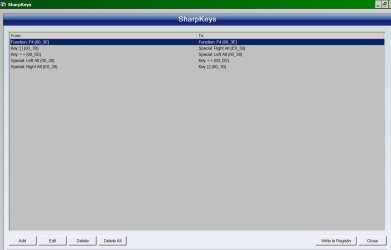
Thanks, but - no, that doesn't fix the problem. I tried sharpkeys, too - not sure I used it correctly. These are the inputs I'm trying - just to see whether I can get the alt keys to do SOMETHING identifiable (and non-destructive).
 

Attachments

  • SharpKeys.jpg
    SharpKeys.jpg
    37.4 KB · Views: 1

My Computer My Computer

Computer Manufacturer/Model Number
Lenovo thinkpad W520
OS
Windows 7 Pro SP1 64 bit
CPU
i7-2720
Memory
8GB 1600GHz
Hard Drives
80gb mini ssd
300gb hdd
After using Sharpkeys as above, I find that the left alt prints this:
=12:40 AM 3/13/2016'hg\
I think there's more to it than that - moving the cursor up a line?
In windows explorer, it does something I can't identify and whatever's in the address bar.

The right alt? In notepad I wrote

ss
ss
ss

I put the cursor between the two s' in the middle. The first few times I pressed right-alt, nothing. Then, after a few more:

ss
s]s
ss /nb] /nb] /nb] /nb] /nb
...and then just keeps adding "] /nb"

In windows explorer, if I select a file or folder, right-alt just moves me one file/folder down the list.
 

My Computer My Computer

Computer Manufacturer/Model Number
Lenovo thinkpad W520
OS
Windows 7 Pro SP1 64 bit
CPU
i7-2720
Memory
8GB 1600GHz
Hard Drives
80gb mini ssd
300gb hdd

My Computer My Computer

Computer type
PC/Desktop
Computer Manufacturer/Model Number
Custom Built By Me.
OS
Windows 10 Pro 64 bit
CPU
AMD FX 9590 8 Core Black Edition
Motherboard
MSI 990FXA GAMING (MS-7893)
Memory
Corsair Vengeance 16GB DDR3
Graphics Card(s)
AMD Radeon (TM) R9 380 Gaming Series
Sound Card
AMD High Definition
Monitor(s) Displays
Samsung 32" 60Hz 4ms Curved PLS LED
Screen Resolution
1920 X 1080
Hard Drives
C: 223 GB SSD = E: 465 GB HDD = F: 931 GB HDD = G: 149 GB HDD = H: 931 GB HDD
PSU
EVGA Supernova NEX750B 750W ATX EPS12V 80PLUS Bronze
Case
Cool Master
Cooling
Noctua NH-D15 Premium Cooler with 2x NF-A15 PWM 140mm Fan
Internet Speed
Fiber Optic: Download 332.7 Mbps / Upload 331.5 Mbps
Antivirus
Windows Defender
Browser
Slimjet (64bit)
Update: Replaced the keyboard itself. The alt functions DO work properly - when assigned to another key!
Then I used sharpkeys to eliminate any key changes.
Result (in notepad): the left alt works like alt-F4 (to close a program); the right-alt minimizes the notepad window.
Reassigned left-alt to left alt and right-alt to right-alt, just to be sure - same thing.
Weird.

I'll try keytweak and report!
 

My Computer My Computer

Computer Manufacturer/Model Number
Lenovo thinkpad W520
OS
Windows 7 Pro SP1 64 bit
CPU
i7-2720
Memory
8GB 1600GHz
Hard Drives
80gb mini ssd
300gb hdd
I would do a complete scan with Malwarebytes just to see if it picks up anything. Although I would think a prankware would keep changing the keys at random times. Also you could look through your startup programs with AutoRuns to look for something sneaky.
 

My Computer My Computer

Computer Manufacturer/Model Number
HP Media Center
OS
Windows 7 32 bit
CPU
AMD 5200+ dual core
Memory
2 GB
Graphics Card(s)
NVidia GeForce 6150SE 128 MB
Monitor(s) Displays
CRT
Screen Resolution
1280x1024
Hard Drives
500 GB Sata internal :

SIIG USB 3.0 docking stations w/WD Caviar Black 6 Gb/s drives
Keyboard
PS/2
Mouse
PS/2 Wheel Mouse
Other Info
SIIG USB 3.0 PCIexpress card.
Update: Replaced the keyboard itself. The alt functions DO work properly - when assigned to another key!
Then I used sharpkeys to eliminate any key changes.
Result (in notepad): the left alt works like alt-F4 (to close a program); the right-alt minimizes the notepad window.
Reassigned left-alt to left alt and right-alt to right-alt, just to be sure - same thing.
Weird.

I'll try keytweak and report!... ok, tried it. Much like Sharpkeys.
Results: I can reassign the left-alt function to the left windows key, which I need less.
I tried reassigning the left windows key function to the right windows key - it won't change.
I can't even turn off the left alt key. When I try, it does: one line up plus "1:27 PM 3/13/2016'hg\"
The set of keystrokes DOES change when I assign different things to it.

I think it's clearly a REGISTRY problem - one that Sharpkeys or Keytweak aren't seeing.

Help?
 

My Computer My Computer

Computer Manufacturer/Model Number
Lenovo thinkpad W520
OS
Windows 7 Pro SP1 64 bit
CPU
i7-2720
Memory
8GB 1600GHz
Hard Drives
80gb mini ssd
300gb hdd
What might be best is this: can anyone tell me the registry keys that affect the function of the alt keys, and what they should be set to, and possibly how to set them to that?
Although it's odd - the left-alt function works PERFECTLY when reassigned. The more I think about it... it must be physical, yes? But not in the keyboard, which I've changed out for a new one. Bizarre...
 

My Computer My Computer

Computer Manufacturer/Model Number
Lenovo thinkpad W520
OS
Windows 7 Pro SP1 64 bit
CPU
i7-2720
Memory
8GB 1600GHz
Hard Drives
80gb mini ssd
300gb hdd
What might be best is this: can anyone tell me the registry keys that affect the function of the alt keys, and what they should be set to, and possibly how to set them to that?
Although it's odd - the left-alt function works PERFECTLY when reassigned. The more I think about it... it must be physical, yes? But not in the keyboard, which I've changed out for a new one. Bizarre...

That would be:

HKEY_LOCAL_MACHINE\SYSTEM\CurrentControlSet\Control\Keyboard Layout

Here's a link of interest. Keyboard Remapping: CAPSLOCK to Ctrl and Beyond Google it and you may find what your looking for. BUT! A word of CAUTION!! Please before you do anything in the registry. Backup Backup backup... The registry. This is all I have to offer on the post. Good Luck!
 
Last edited:

My Computer My Computer

Computer type
PC/Desktop
Computer Manufacturer/Model Number
Custom Built By Me.
OS
Windows 10 Pro 64 bit
CPU
AMD FX 9590 8 Core Black Edition
Motherboard
MSI 990FXA GAMING (MS-7893)
Memory
Corsair Vengeance 16GB DDR3
Graphics Card(s)
AMD Radeon (TM) R9 380 Gaming Series
Sound Card
AMD High Definition
Monitor(s) Displays
Samsung 32" 60Hz 4ms Curved PLS LED
Screen Resolution
1920 X 1080
Hard Drives
C: 223 GB SSD = E: 465 GB HDD = F: 931 GB HDD = G: 149 GB HDD = H: 931 GB HDD
PSU
EVGA Supernova NEX750B 750W ATX EPS12V 80PLUS Bronze
Case
Cool Master
Cooling
Noctua NH-D15 Premium Cooler with 2x NF-A15 PWM 140mm Fan
Internet Speed
Fiber Optic: Download 332.7 Mbps / Upload 331.5 Mbps
Antivirus
Windows Defender
Browser
Slimjet (64bit)
Lance1, thank you. Reading the last thing, though - does it look like a registry problem at all? I'm having doubts. If I can assign the left-alt function to another key and it works, then whatever has the functionality is intact. The problem is assigning it to THAT key. And it's not the keyboard, as I replaced it. It's something in the middle, somewhere after the keyboard but before the registry section containing left-alt functionality.
What could that be?
And why would I be having trouble re-mapping something onto the right-windows key?
 

My Computer My Computer

Computer Manufacturer/Model Number
Lenovo thinkpad W520
OS
Windows 7 Pro SP1 64 bit
CPU
i7-2720
Memory
8GB 1600GHz
Hard Drives
80gb mini ssd
300gb hdd
Back
Top