
How to clone bootable floppy to an HDD?

dc2000

New member
Member
VIP
Local time
4:05 PM
Messages
153
Let me explain my dilemma. In the office we have an old computer that is currently running off a bootable floppy to run custom-made software. The problem is that the floppy disk is running on the last leg, so I decided to clone it to a hard drive. (Otherwise it'd be a very expensive repair if that floppy dies.)

The question is how?

So I did some research and found out that one can use WinImage to clone it. Which I did. But my issue is how to write it to a hard drive and make it bootable. For some reason when I try to do it in WinImage and then boot off of that hard drive I get this error:

Invalid System Disk
Replace the disk, and then press any key

I'm sure I'm doing something wrong, since Windows 7 probably doesn't even know what that old floppy is.

Here's the contents of the floppy that I'm trying to clone. I believe it runs off a DOS system:
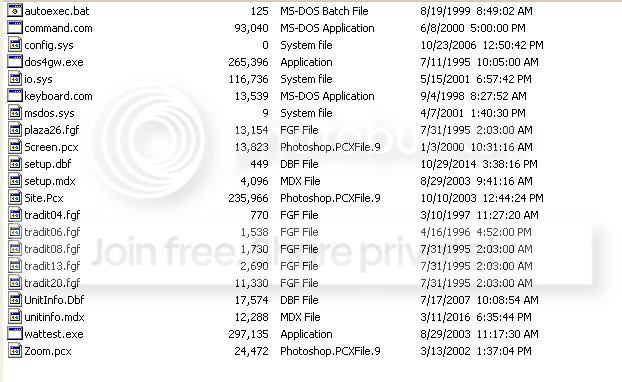
1_zpsrhqtmwop.png


So I'd appreciate any input on this? Maybe a different method to copy/clone that floppy to an HDD?
 

My Computer My Computer

OS
Windows
Thanks. I thought of that too. Unfortunately that PC box is so old that it doesn't have an option to boot from a USB. Can I make a bootable HDD instead of a USB?
 

My Computer My Computer

OS
Windows
I may be way out in left field here, but perhaps you could install the whole thing in a virtual machine then use a virtual floppy to boot ?
Art.
 

My Computer My Computer

Computer type
PC/Desktop
Computer Manufacturer/Model Number
Home built
OS
Win7 sp1 Pro 64bit / XP sp2 Pro (games only)
CPU
Intel Core 2 Duo E8400 @ 3.00GHz
Motherboard
Intel Corporation DP35DP (CPU1)
Memory
8.00 GB Dual-Channel DDR2 @ 400MHz (5-5-5-18)
Graphics Card(s)
1024MB GeForce GTX 560
Sound Card
NVIDIA High Definition Audio
Monitor(s) Displays
SyncMaster (2048x1152@60Hz)
Hard Drives
240GB Sandisc Extreme Pro SSD
244GB Seagate ST3250410AS
488GB Seagate ST500DM002-1BD142
931GB Western Digital WDC WD1003FZEX
PSU
Corsair 720
Case
ATX
Keyboard
HID Keyboard Device Logitech
Mouse
HID-compliant mouse Microsoft
Other Info
TSSTcorp CDDVDW SH-S223L

HL-DT-ST BD-RE BH12LS35
First thing you should do is make a duplicate copy of the floppy disk using the diskcopy command. That way, you'll be sure your floppy disk is backed up so if the original dies you can use the backup. In order to do that though, you're going to need a DOS boot disk. Are you able to exit from the program and get to a DOS prompt? At a DOS prompt, type ver and press Enter. This will tell you what version of DOS you need. Once you know what version of DOS you need, you can then go to this link: MS-DOS Boot Disk Download | AllBootDisks - Providing Free Boot Disk Downloads. MS-DOS to Windows XP. and download the boot disk that corresponds to the version of DOS you need. That disk will be able to boot and should have the diskcopy command on it that will let you make a backup copy of the disk.

A backup disk should keep you going short term until you figure out how to proceed further. One caveat though. Lots of times custom software has some kind of copy protection and, if that's the case, you won't be able to copy it or create any other way of booting it unless you can get around the copy protection.

Long term solution would be to create a bootable VM running the required DOS version, then copy the files from the floppy to the VM in order to boot and run the software in a VM.
 

My Computer My Computer

Computer type
PC/Desktop
Computer Manufacturer/Model Number
Home Built desktop, Dell G15 5511 Gaming laptop,MS Surface Pro 7 tablet
OS
W10 Pro desktop, W11 laptop, W11 Pro tablet (all 64-bit)
CPU
3.7Ghz 8700K i7, i7-11800H, i7-1065G7
Motherboard
ASUS TUF Z370-Pro Gaming in desktop
Memory
16G desktop, 16G laptop, 4G tablet
Graphics Card(s)
AMD Radeon RX580, RTX 3060, Intel Iris Plus
Sound Card
High Definition Audio (Built-in to mobo)
Monitor(s) Displays
Samsung U32J59 32" (2x), 15.6", 12"
Screen Resolution
3840x2160, 3840x2160, 1920x1080, 2160x1440
Hard Drives
500G SSD for OS; 2T, 10T & 15T HDDs for Data on Desktop, 1TB SSD laptop, 128G SSD tablet.
PSU
Corsair CX 750M
Case
Antec 100
Cooling
CM 212+
Keyboard
IBM Model M - used continuously since 1986
Mouse
Microsoft Pro IntelliMouse
Internet Speed
400M down 8M up
Antivirus
Windows Defender
Browser
FireFox
Other Info
Built my first computer (8Mhz 8088cpu, 640K RAM, 20MB HDD, 2 360K floppy drives) in 1985 and have been building them for myself, relatives and friends ever since.
Thanks, strollin, for your detailed explanation. Unfortunately I cannot exit from the program. In a normal operation that PC doesn't even have a keyboard. (I managed to connect one, but the only thing it does, it beeps when I press keys.) Is there a way to force an app to close in DOS? Something like Task Manager? I'm assuming I need this to get the DOS version, correct?

As disk protection goes, I hope not. Because this company is long out of business. It's been sold and resold and the new owner wants us to buy it all (hardware and software, or in other words, $50K minimum.) So I don't know what I would do.... hope not!

As for the VM, I guess that would be one way, except that I will need to purchase a new Windows box to run that VM. That comes with its own caveat of being able to use hardware used by this custom software. It interfaces with the hardware using an old COM port, so I'm not sure how that would work on a new machine.

One thing I'm curious about, guys -- why is it so difficult to clone that floppy to a disk C?
 

My Computer My Computer

OS
Windows
If the program doesn't have a button or menu selection to exit itself then you might be out of luck. You could try booting the disk and try timing for the point where DOS has booted but the software program hasn't loaded yet. If you can hit Ctrl-Break at that time you should be able to interrupt the autoexec.bat and drop to a DOS prompt.
 

My Computer My Computer

Computer type
PC/Desktop
Computer Manufacturer/Model Number
Home Built desktop, Dell G15 5511 Gaming laptop,MS Surface Pro 7 tablet
OS
W10 Pro desktop, W11 laptop, W11 Pro tablet (all 64-bit)
CPU
3.7Ghz 8700K i7, i7-11800H, i7-1065G7
Motherboard
ASUS TUF Z370-Pro Gaming in desktop
Memory
16G desktop, 16G laptop, 4G tablet
Graphics Card(s)
AMD Radeon RX580, RTX 3060, Intel Iris Plus
Sound Card
High Definition Audio (Built-in to mobo)
Monitor(s) Displays
Samsung U32J59 32" (2x), 15.6", 12"
Screen Resolution
3840x2160, 3840x2160, 1920x1080, 2160x1440
Hard Drives
500G SSD for OS; 2T, 10T & 15T HDDs for Data on Desktop, 1TB SSD laptop, 128G SSD tablet.
PSU
Corsair CX 750M
Case
Antec 100
Cooling
CM 212+
Keyboard
IBM Model M - used continuously since 1986
Mouse
Microsoft Pro IntelliMouse
Internet Speed
400M down 8M up
Antivirus
Windows Defender
Browser
FireFox
Other Info
Built my first computer (8Mhz 8088cpu, 640K RAM, 20MB HDD, 2 360K floppy drives) in 1985 and have been building them for myself, relatives and friends ever since.

My Computer My Computer

Computer type
PC/Desktop
Computer Manufacturer/Model Number
Custom Built
OS
Windows 10 Pro x64, Windows 8.1 Pro x64, Windows 7 Ultimate x64 SP1,
CPU
INTEL i9-7920X LGA 2066
Motherboard
Gigabyte X299-WU8 F3
Memory
64 GB (4 X 16 GB) G-Skill V Series DDR4 3200 Quad Channel
Graphics Card(s)
EVGA GTX 1060 SC 3 GB
Sound Card
Realtek Onboard ALC1220
Monitor(s) Displays
2 x Samsung S27E310
Screen Resolution
1920x1080
Hard Drives
Samsung 2 x 970 EVO Plus 500 GB NVMe
1 x 6TB WD 6003FZBX SATA
1 x 6TB WD 60EFRX SATA
12 x 3TB WD 30EFRX SATA
PSU
Seasonic X-1050
Case
Thermaltake Armor+
Cooling
Corsair H80i V2 Liquid AOI Cooler
Keyboard
Logitech G510s
Mouse
Logitech MX Master 2S
Internet Speed
200 Mb/s
Antivirus
ESET NOD32 13.1
Browser
EDGE (Dev, Canary, Beta), Chrome
Other Info
ASUS RT-AC68U router
Malwarebytes 4.0.4
... I'm not sure what you mean by "(Otherwise it'd be a very expensive repair if that floppy dies.)" ...http://www.newegg.com/Product/Produ...lmC_yxRuvc2KYM7y4riJIaAi538P8HAQ&gclsrc=aw.ds
The floppy itself isn't the issue, it's the software on it that's important. If the one and only copy of the software is on that floppy and the floppy is lost, stolen, damaged or just plain fails, it may not be replaceable. It could also make it so data that can only be accessed via that software is lost as well since it may no longer be accessible.
 

My Computer My Computer

Computer type
PC/Desktop
Computer Manufacturer/Model Number
Home Built desktop, Dell G15 5511 Gaming laptop,MS Surface Pro 7 tablet
OS
W10 Pro desktop, W11 laptop, W11 Pro tablet (all 64-bit)
CPU
3.7Ghz 8700K i7, i7-11800H, i7-1065G7
Motherboard
ASUS TUF Z370-Pro Gaming in desktop
Memory
16G desktop, 16G laptop, 4G tablet
Graphics Card(s)
AMD Radeon RX580, RTX 3060, Intel Iris Plus
Sound Card
High Definition Audio (Built-in to mobo)
Monitor(s) Displays
Samsung U32J59 32" (2x), 15.6", 12"
Screen Resolution
3840x2160, 3840x2160, 1920x1080, 2160x1440
Hard Drives
500G SSD for OS; 2T, 10T & 15T HDDs for Data on Desktop, 1TB SSD laptop, 128G SSD tablet.
PSU
Corsair CX 750M
Case
Antec 100
Cooling
CM 212+
Keyboard
IBM Model M - used continuously since 1986
Mouse
Microsoft Pro IntelliMouse
Internet Speed
400M down 8M up
Antivirus
Windows Defender
Browser
FireFox
Other Info
Built my first computer (8Mhz 8088cpu, 640K RAM, 20MB HDD, 2 360K floppy drives) in 1985 and have been building them for myself, relatives and friends ever since.
From the sounds of it, your software has a copy protection scheme - I've seen it numerous times in the early to mid 1990s. I'll wager that DISKCOPY will not work...you need a more modern utility to copies at a bit level - even then it may not work.

Protections schemes from back then ran the gamut of road blocks including uniques ID numbers read from the floppy and entered in the application, time stamps that get written, deliberate bad blocks written at a specific address (makes copying difficult), etc.

Your vendor is holding you hostage. You should consider a serious upgrade in software and hardware before the device goes down.

Best of luck.

Regards,
GEWB
 

My Computer My Computer

Computer type
PC/Desktop
Computer Manufacturer/Model Number
(7 different computers booting up to 10 systems)
OS
Linux Mint / XP / Win7 Home, Pro, Ultimate / Win8.1 / Win10
Other Info
Four desktops, two laptops, one notebook and one tablet
Take the boot floppy to a professional computer place in your area, pay them to make another boot floppy.
They just might know how to solve your situation, and they may not: explain fully what you want and why you want it, and ask if either usb or dvd boot is possible to make from your boot floppy before paying.
 

My Computer My Computer

Computer type
PC/Desktop
Computer Manufacturer/Model Number
Antec desktop; Acer Aspire laptops
OS
Windows 7 Professional 64-bit
CPU
Desktop i5; Acers i5 & i7
Memory
desktop 16GB; 1 Acer 8GB & 1 Acer 16GB
Hard Drives
1TB split into 2 equal partitions [OS and data] usable by RJS
Internet Speed
AT&T DSL
Browser
FF, GChrome, msIE
Other Info
Windows 7 Firewall, Emsisoft AM/AV, MSE [scan-only], SpywareBlaster, Ruiware/BillP combine
... I'm not sure what you mean by "(Otherwise it'd be a very expensive repair if that floppy dies.)" ...http://www.newegg.com/Product/Produ...lmC_yxRuvc2KYM7y4riJIaAi538P8HAQ&gclsrc=aw.ds
The floppy itself isn't the issue, it's the software on it that's important. If the one and only copy of the software is on that floppy and the floppy is lost, stolen, damaged or just plain fails, it may not be replaceable. It could also make it so data that can only be accessed via that software is lost as well since it may no longer be accessible.

He said he was able to clone it. I don't understand why he can't duplicate the floppy if that is true.
 

My Computer My Computer

Computer type
PC/Desktop
Computer Manufacturer/Model Number
Custom Built
OS
Windows 10 Pro x64, Windows 8.1 Pro x64, Windows 7 Ultimate x64 SP1,
CPU
INTEL i9-7920X LGA 2066
Motherboard
Gigabyte X299-WU8 F3
Memory
64 GB (4 X 16 GB) G-Skill V Series DDR4 3200 Quad Channel
Graphics Card(s)
EVGA GTX 1060 SC 3 GB
Sound Card
Realtek Onboard ALC1220
Monitor(s) Displays
2 x Samsung S27E310
Screen Resolution
1920x1080
Hard Drives
Samsung 2 x 970 EVO Plus 500 GB NVMe
1 x 6TB WD 6003FZBX SATA
1 x 6TB WD 60EFRX SATA
12 x 3TB WD 30EFRX SATA
PSU
Seasonic X-1050
Case
Thermaltake Armor+
Cooling
Corsair H80i V2 Liquid AOI Cooler
Keyboard
Logitech G510s
Mouse
Logitech MX Master 2S
Internet Speed
200 Mb/s
Antivirus
ESET NOD32 13.1
Browser
EDGE (Dev, Canary, Beta), Chrome
Other Info
ASUS RT-AC68U router
Malwarebytes 4.0.4
Yes, guys, I can clone it to another floppy using WinImage. What I need to know is how to clone it to a hard drive?
 

My Computer My Computer

OS
Windows
First off, what's on the hard drive at the moment? If there's anything on it, what I'm about to suggest might do more harm than good. I'm assuming you're somewhat familiar with working at a command prompt.

The contents of your floppy look like they're from the Win ME era with minimum required boot files and your application files. For the sake of this discussion we will assume your application requires a Win ME environment.

The first step is to make the hard drive bootable. Again, assuming your existing disk is a Win ME boot environment, you need a full Win ME boot disk. You can get that here:

Bootdisk.Com - Free Windows Bootdisks, Free DOS boot disk

After making the boot floppy, use it to start the computer you're working on. You'll end up at an A:\> prompt, preceded by a message that gives you the drive letter where the diagnostic tools were loaded - make a note of that drive letter.

The next step is to SYS the hard drive or, in other words, copy the files that will make it bootable. That is done with the SYS command as described here:

https://support.microsoft.com/en-us/kb/66530

I know the article specifies it as a DOS command but it is available on the boot disk. You'll have to navigate to the previously noted diagnostic tools drive letter to find the SYS command.

So, if the boot disk is able to see your hard drive and the SYS command executes without error, your computer should be bootable from the hard drive, leaving you at a C:\> prompt.

The next step is to copy your application files from your floppy to the hard drive - just do a straight file copy, no cloning or other processes. Do not overwrite any system files that are already on the hard drive.

If you need your application to run automagically when you start the computer, add its start command to the AUTOEXEC.BAT file on the hard drive. Hopefully your application is not hard-coded to run on a floppy.

Kevin
 

My Computer My Computer

Computer type
PC/Desktop
Computer Manufacturer/Model Number
Gateway DX4850
OS
Windows 7
Unless you wish to dedicate an entire hard drive to that single piece of software, you're better off using a VM.

Regardless, you need to determine what version of DOS is required, then format the hdd (physical or virtual) along with the system files in order to make it bootable using that version of DOS. Once you have a booting drive, then you should be able to copy the files from the floppy onto the drive.
 

My Computer My Computer

Computer type
PC/Desktop
Computer Manufacturer/Model Number
Home Built desktop, Dell G15 5511 Gaming laptop,MS Surface Pro 7 tablet
OS
W10 Pro desktop, W11 laptop, W11 Pro tablet (all 64-bit)
CPU
3.7Ghz 8700K i7, i7-11800H, i7-1065G7
Motherboard
ASUS TUF Z370-Pro Gaming in desktop
Memory
16G desktop, 16G laptop, 4G tablet
Graphics Card(s)
AMD Radeon RX580, RTX 3060, Intel Iris Plus
Sound Card
High Definition Audio (Built-in to mobo)
Monitor(s) Displays
Samsung U32J59 32" (2x), 15.6", 12"
Screen Resolution
3840x2160, 3840x2160, 1920x1080, 2160x1440
Hard Drives
500G SSD for OS; 2T, 10T & 15T HDDs for Data on Desktop, 1TB SSD laptop, 128G SSD tablet.
PSU
Corsair CX 750M
Case
Antec 100
Cooling
CM 212+
Keyboard
IBM Model M - used continuously since 1986
Mouse
Microsoft Pro IntelliMouse
Internet Speed
400M down 8M up
Antivirus
Windows Defender
Browser
FireFox
Other Info
Built my first computer (8Mhz 8088cpu, 640K RAM, 20MB HDD, 2 360K floppy drives) in 1985 and have been building them for myself, relatives and friends ever since.
I'd also think running DOS in a VM would be my initial approach. The batch file autoexec.bat should tell you what is being run at boot (maybe the wattest.exe program). You may be able to copy all the non Dos stuff from the floppy plus the relevant hard disk contents to a modern PC. Of course the old PC is going to fail one day so a longer term solution may be worth the effort.

I don't know how you do anything without a keyboard. Maybe explain a bit more about the application and how it runs.
 

My Computer My Computer

Computer type
PC/Desktop
Computer Manufacturer/Model Number
Own build
OS
Windows 7x64 Home Premium SP1
CPU
Intel i7 2600k
Motherboard
ASUS P8Z68 Deluxe
Memory
G.Skill Ripjaws (DDR3-1600) 2x4GB
Graphics Card(s)
Nvidia GeForce GTS 450; Intel HD Graphics 3000(GT2+)
Monitor(s) Displays
Dell Ultrasharp IPS panel U2311H, Samsung SyncMaster P2350
Screen Resolution
1920x1080
Hard Drives
Samsung 850 Pro SSD 256GB, Samsung SSD 840 120GB, Seagates 1TB Barracuda ST31000528AS x2
PSU
Seasonic M12II 520W
Case
Lian Li Lancool PC-K60
Cooling
Case: 1x120mm, 3x140mm CPU: Hyper 212+
Keyboard
Logitech MK520 (wireless)
Mouse
Logitech MK520
Internet Speed
6-7 Mbps
Antivirus
Norton Security Premium, Malwarebytes on 2 (MSE on 3rd PC)
Browser
FireFox
Other Info
Audio: Logitech Z523 2.1
First off, really quick, let me answer this -- the reason this PC doesn't have a keyboard is because it has a special IR remote control.

Secondly, thank you, kkehoe, for your detailed instructions!

First off, what's on the hard drive at the moment?
Right now I have Windows XP on it. But I don't need it.

I'm assuming you're somewhat familiar with working at a command prompt.
Yes, in the most part.

The contents of your floppy look like they're from the Win ME era with minimum required boot files and your application files.
Yes, what I realized is that if I edit the original autoexec.bat and remove all stuff from it, the original floppy disk boots up into a command prompt. So when I did ver on it, it gives me this:

Windows Millennium [Version 4.90.3000]

On the side note, they must have hacked something in there. Because I can't imagine that they were able to put Windows on a 1.4MB floppy in those two dozen files that I showed. But, nonetheless, this is what original floppy gives me.

you need a full Win ME boot disk.
Thanks. Downloaded it from your link and burned it into a floppy. It boots up, so if I choose "Start w/o DVD support" it gives me command prompt and the same version as above. I'm still puzzled how it could be Windows, but, anyway...

Now the tricky part. when I tried running SYS C: like you suggested (with the target HDD plugged into computer as drive C: ) I get this error (see attached.) Moreover when I tried to do FORMAT C:/S it still refused to do it.

IMG_2342_zps3dvclac6.jpg


Then if I do SYS C: if I boot up from the original floppy, it gives me:

Incorrect DOS version

Any idea where to go from there? I can see that I'm really close!!!!

And thanks again for all your help!
 

My Computer My Computer

OS
Windows
The boot floppy is not really Windows ME with a GUI, but rather just a command line interpreter.

If XP is on the HDD then the partition might be NTFS, which ME will not recognize. Actually, if XP is bootable I would take a stab at running your application under XP. It might work!

Otherwise, perhaps you could wipe the partition off, recreate it, format it (without /s), then SYS it?

I'm kind of guessing here because this is a 16-year-old operating system that I didn't much work with back in the day because one tended to avoid it in the same way one avoided Vista/8 in recent years. :( Perhaps the SYS command functionality is a bit different in ME?

It was around about the 9x/ME/XP era that drive management became tricky because drives were increasing in size to where other hardware/software could not deal with them without special overlay software installed on the drive. If you boot without that overlay being loaded, you couldn't see the drive correctly.

This KB mentions your error as part of a different scenario:

https://support.microsoft.com/EN-US/kb/314057

Perhaps you could run Step 3, up to and including e, after doing the format. Of course you'd have to manually create the C:\WINDOWS\COMMAND\EBD folder structure. In step d, the source of your IO.SYS file would be your floppy since the HDD is empty.

Failing all that, you could go back to bootdisk.com and get a DOS 6.22 bootdisk, make the HDD bootable, and see if your app will run under DOS 6.22.

Kevin
 

My Computer My Computer

Computer type
PC/Desktop
Computer Manufacturer/Model Number
Gateway DX4850
OS
Windows 7
... Now the tricky part. when I tried running SYS C: like you suggested (with the target HDD plugged into computer as drive C: ) I get this error (see attached.) Moreover when I tried to do FORMAT C:/S it still refused to do it.

... Then if I do SYS C: if I boot up from the original floppy, it gives me:

Incorrect DOS version
Any idea where to go from there? I can see that I'm really close!!!!

And thanks again for all your help!
Assuming you have a full ME boot disk, try running fdisk and delete the existing XP partition, then create a new partition and see if you can format it with the format /s command.
 

My Computer My Computer

Computer type
PC/Desktop
Computer Manufacturer/Model Number
Home Built desktop, Dell G15 5511 Gaming laptop,MS Surface Pro 7 tablet
OS
W10 Pro desktop, W11 laptop, W11 Pro tablet (all 64-bit)
CPU
3.7Ghz 8700K i7, i7-11800H, i7-1065G7
Motherboard
ASUS TUF Z370-Pro Gaming in desktop
Memory
16G desktop, 16G laptop, 4G tablet
Graphics Card(s)
AMD Radeon RX580, RTX 3060, Intel Iris Plus
Sound Card
High Definition Audio (Built-in to mobo)
Monitor(s) Displays
Samsung U32J59 32" (2x), 15.6", 12"
Screen Resolution
3840x2160, 3840x2160, 1920x1080, 2160x1440
Hard Drives
500G SSD for OS; 2T, 10T & 15T HDDs for Data on Desktop, 1TB SSD laptop, 128G SSD tablet.
PSU
Corsair CX 750M
Case
Antec 100
Cooling
CM 212+
Keyboard
IBM Model M - used continuously since 1986
Mouse
Microsoft Pro IntelliMouse
Internet Speed
400M down 8M up
Antivirus
Windows Defender
Browser
FireFox
Other Info
Built my first computer (8Mhz 8088cpu, 640K RAM, 20MB HDD, 2 360K floppy drives) in 1985 and have been building them for myself, relatives and friends ever since.
Assuming you have a full ME boot disk, try running fdisk and delete the existing XP partition, then create a new partition and see if you can format it with the format /s command.

Sorry for the delay. I'm back now... it took me a while to find Windows ME disk. I eventually happened to borrow it from an old friend. I then booted off of it and ran FDISK on it, then deleted the primary partition off the HDD (the one that was used by XP) and then formatted it.

Unfortunately I was not able to run FORMAT C: \S - it told me that \S parameter is not supported. So I just did FORMAT C: which erased everything.

At this point I'm lost. If I run WinME setup, it simply installs it on that disk C:. I didn't see any option to just make disk C: bootable.

Is there something else I need to do?

PS. Again, all I'm trying to do is clone a floppy to that HDD. There must be some software to do this???
 

My Computer My Computer

OS
Windows
Back
Top