External HDD is no longer available

ipaulog

New member
Local time
7:25 AM
Messages
6
First ever post and yes I have a problem. I have read threads all over the place before coming across this one:
http://www.sevenforums.com/hardware-devices/288692-disk-1-unknown-not-initialized-unallocated.html
I will read it again if someone can confirm that somewhere in here is the way to solve my issue.

My Seagate 1TB USB 3.0 external hard disk drive is notrecognised by my computer. It is less than a couple of years old – no physical damage. I remember it being at about 10% of its capacity(mainly photographs and music files some of which it seems I have no backup elsewhere).
I tried the drive on my laptop machine as well and I got the message that it was installing drivers but this failed.
I have also followed all the troubleshooting advice on the Seagate UK website. I tried the contact page but it doesnot recognise the serial number on the back of the case so there is no way to contact anyone (how convenient).
When I plug my external HDD into my Windows 7 PC it seems to start up fine as I can feel the disc spinning. The blue light flashes and then comes on solid. When I unplug the HD the light goes off. If I try to restart the computer with the expansion drive in, it causes the computer to hang in the "shutting down" mode/screen.
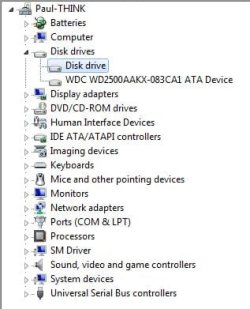
It now shows in device manager simply as “disk drive” and all the volumes information is missing.
In disk management Disc 1 unknown not initialized
It has appeared (after a long wait)in safely eject as ASMT1053

Any help would be much appreciated,
Paul.


Attachments
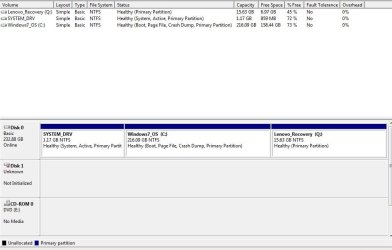
  • Seagate 1TB Unknown and Not Initialized.JPG
    Seagate 1TB Unknown and Not Initialized.JPG
    56.8 KB · Views: 3
  • Device Manager.JPG
    Device Manager.JPG
    27.7 KB · Views: 33

My Computer My Computer

At a glance

Windows 7 Professional x64
Computer type
PC/Desktop
Computer Manufacturer/Model Number
Lenovo Think Center Edge
OS
Windows 7 Professional x64
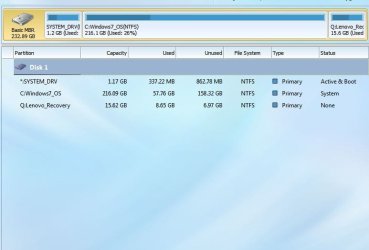
I thought I would add that even though something is showing under disk management when I just downloaded and launched Partition Wizard it only shows the c drive. Is there anything else I can do to search for my external drive?
 

Attachments

  • PW 1.JPG
    PW 1.JPG
    39.7 KB · Views: 1

My Computer My Computer

At a glance

Windows 7 Professional x64
Computer type
PC/Desktop
Computer Manufacturer/Model Number
Lenovo Think Center Edge
OS
Windows 7 Professional x64

My Computer My Computer

At a glance

Win-7-Pro64bit 7-H-Prem-64biti7-5930K 2nd i9-9940x both water blocked VRM'...Trident-z 3200C14 2nd Trident-z 3600C16EVGA 1080ti ftw3 2nd Titan Xp both water blocked
Computer type
PC/Desktop
Computer Manufacturer/Model Number
Custom assembled by me :}
OS
Win-7-Pro64bit 7-H-Prem-64bit
CPU
i7-5930K 2nd i9-9940x both water blocked VRM's too
Motherboard
ASUS SABERTOOTH X99 2nd ASUS x299 Apex
Memory
Trident-z 3200C14 2nd Trident-z 3600C16
Graphics Card(s)
EVGA 1080ti ftw3 2nd Titan Xp both water blocked
Sound Card
Built-in Realtek
Monitor(s) Displays
1-AOC G2460PG 24"G-Sync 144Hz/ 2nd 1-ASUS VG248QE 24" 144Hz
Screen Resolution
1920 x 1080 144Hz
Hard Drives
2-Samsung M.2 Evo & Evo Plus
2-Samsung 850 EVO 500GB SSD's/ 3-2.5 W.D. Black 1tb-&3-1tb/3-3.5 WD Black 1tb hdd's
PSU
EVGA SuperNOVA 1000-P2 2nd 1200-P2
Case
2-Corsair Obsidian Series 450D Black ATX Mid Tower
Cooling
Custom water loops
Keyboard
Logitech G710+/ 2nd Logitech G910
Mouse
2-RedDragon M901 Perdition 16400 dpi Gaming mouse = wired
Internet Speed
Comcast Ping 19ms 89.31mbps download speed 6.12mbps upload
Antivirus
Malwarebytes Pro/ Superantispyware Pro
Browser
FireFox & Pale moon
Other Info
2nd ASUS X299 Apex/Intel i9-9940x with Custom water loop/7H-Prem-x64/Corsair 450D case/Ram Trident-z 3600C16 4x8gb / Samsung970Evo plus 500gb SSD/Dual ssd EZ swap evo/PSU EVGA SuperNova 1200w-P2 80+Platinum/GPU Titan Xp /8-ML-140 on push-pull on 2-280GTX rads

My Computer My Computer

At a glance

Windows 7 Professional x64
Computer type
PC/Desktop
Computer Manufacturer/Model Number
Lenovo Think Center Edge
OS
Windows 7 Professional x64

My Computer My Computer

At a glance

Win-7-Pro64bit 7-H-Prem-64biti7-5930K 2nd i9-9940x both water blocked VRM'...Trident-z 3200C14 2nd Trident-z 3600C16EVGA 1080ti ftw3 2nd Titan Xp both water blocked
Computer type
PC/Desktop
Computer Manufacturer/Model Number
Custom assembled by me :}
OS
Win-7-Pro64bit 7-H-Prem-64bit
CPU
i7-5930K 2nd i9-9940x both water blocked VRM's too
Motherboard
ASUS SABERTOOTH X99 2nd ASUS x299 Apex
Memory
Trident-z 3200C14 2nd Trident-z 3600C16
Graphics Card(s)
EVGA 1080ti ftw3 2nd Titan Xp both water blocked
Sound Card
Built-in Realtek
Monitor(s) Displays
1-AOC G2460PG 24"G-Sync 144Hz/ 2nd 1-ASUS VG248QE 24" 144Hz
Screen Resolution
1920 x 1080 144Hz
Hard Drives
2-Samsung M.2 Evo & Evo Plus
2-Samsung 850 EVO 500GB SSD's/ 3-2.5 W.D. Black 1tb-&3-1tb/3-3.5 WD Black 1tb hdd's
PSU
EVGA SuperNOVA 1000-P2 2nd 1200-P2
Case
2-Corsair Obsidian Series 450D Black ATX Mid Tower
Cooling
Custom water loops
Keyboard
Logitech G710+/ 2nd Logitech G910
Mouse
2-RedDragon M901 Perdition 16400 dpi Gaming mouse = wired
Internet Speed
Comcast Ping 19ms 89.31mbps download speed 6.12mbps upload
Antivirus
Malwarebytes Pro/ Superantispyware Pro
Browser
FireFox & Pale moon
Other Info
2nd ASUS X299 Apex/Intel i9-9940x with Custom water loop/7H-Prem-x64/Corsair 450D case/Ram Trident-z 3600C16 4x8gb / Samsung970Evo plus 500gb SSD/Dual ssd EZ swap evo/PSU EVGA SuperNova 1200w-P2 80+Platinum/GPU Titan Xp /8-ML-140 on push-pull on 2-280GTX rads

My Computer My Computer

At a glance

Windows 7 Professional x64
Computer type
PC/Desktop
Computer Manufacturer/Model Number
Lenovo Think Center Edge
OS
Windows 7 Professional x64
Hi,
Your not set to auto update are you ?
 

My Computer My Computer

At a glance

Win-7-Pro64bit 7-H-Prem-64biti7-5930K 2nd i9-9940x both water blocked VRM'...Trident-z 3200C14 2nd Trident-z 3600C16EVGA 1080ti ftw3 2nd Titan Xp both water blocked
Computer type
PC/Desktop
Computer Manufacturer/Model Number
Custom assembled by me :}
OS
Win-7-Pro64bit 7-H-Prem-64bit
CPU
i7-5930K 2nd i9-9940x both water blocked VRM's too
Motherboard
ASUS SABERTOOTH X99 2nd ASUS x299 Apex
Memory
Trident-z 3200C14 2nd Trident-z 3600C16
Graphics Card(s)
EVGA 1080ti ftw3 2nd Titan Xp both water blocked
Sound Card
Built-in Realtek
Monitor(s) Displays
1-AOC G2460PG 24"G-Sync 144Hz/ 2nd 1-ASUS VG248QE 24" 144Hz
Screen Resolution
1920 x 1080 144Hz
Hard Drives
2-Samsung M.2 Evo & Evo Plus
2-Samsung 850 EVO 500GB SSD's/ 3-2.5 W.D. Black 1tb-&3-1tb/3-3.5 WD Black 1tb hdd's
PSU
EVGA SuperNOVA 1000-P2 2nd 1200-P2
Case
2-Corsair Obsidian Series 450D Black ATX Mid Tower
Cooling
Custom water loops
Keyboard
Logitech G710+/ 2nd Logitech G910
Mouse
2-RedDragon M901 Perdition 16400 dpi Gaming mouse = wired
Internet Speed
Comcast Ping 19ms 89.31mbps download speed 6.12mbps upload
Antivirus
Malwarebytes Pro/ Superantispyware Pro
Browser
FireFox & Pale moon
Other Info
2nd ASUS X299 Apex/Intel i9-9940x with Custom water loop/7H-Prem-x64/Corsair 450D case/Ram Trident-z 3600C16 4x8gb / Samsung970Evo plus 500gb SSD/Dual ssd EZ swap evo/PSU EVGA SuperNova 1200w-P2 80+Platinum/GPU Titan Xp /8-ML-140 on push-pull on 2-280GTX rads
Last edited:

My Computer My Computer

At a glance

Windows 7 Home Premium 32 bit
OS
Windows 7 Home Premium 32 bit
Automatic updates is turned off.

Just to say I am not highly skilled in this area but I am willing to learn to try and save my data. This is completely new to me so is everything I need to know in #8 of the thread? Do I just need an empty pen drive?

Since yesterday I have carefully removed the drive from its case and plugged it in through a new usb 3.0 sata adapter and it is still not seen.

What I cannot understand is how this has happened when it was left plugged in to a usb port. Working one day and not the next.

Thank you for the help,
Paul.
 

My Computer My Computer

At a glance

Windows 7 Professional x64
Computer type
PC/Desktop
Computer Manufacturer/Model Number
Lenovo Think Center Edge
OS
Windows 7 Professional x64
This is completely new to me so is everything I need to know in #8 of the thread? Do I just need an empty pen drive?

Since yesterday I have carefully removed the drive from its case and plugged it in through a new usb 3.0 sata adapter and it is still not seen........Paul.

Yes, It has to be an empty pendrive. Since Rufus formats the pendrive before writing Lucid Puppy in it, you will lose all data in it. Rufus itself will warn you that all data in it will be lost and whether you want to proceed.

Next, the instruction I gave to try Lucid Puppy was for the Seagate External drive. Now that you have taken out the HDD from its enclosure on your own without anyone of us suggesting it, that instruction is no longer valid and is hereby withdrawn.

You have now introduced another "Unknown" interface between the HDD and your PC in the form of a USB3 Sata to USB adapter. It may be new but what is the guarantee that it works? If it is DOA - dead on arrival, which can happen - you will be getting the same result as you have got now. So check it by connecting a known to be good HDD and confirm that it can be read with the adapter, before proceeding further.

You have only complicated the troubleshooting process by taking the HDD out of its original enclosure. If Lucid Puppy was unable to read your External drive, the next thing I would have suggested is try to ascertain the status of the external HDD by running Seatools for Windows.If it says your drive is dead whatever you have done now becomes infructuous.

If you had taken out the HDD, the best thing to do is to connect it as a secondary drive in a Desktop with direct SATA connection to the motherboard without any other interface between the HDD and the PC.

I would like to add that when you have come here asking for help, you should stop doing things on your own.
 

My Computer My Computer

At a glance

Windows 7 Home Premium 32 bit
OS
Windows 7 Home Premium 32 bit
Sorry for the delay I have had a busy holiday period and have been unable to work on the problem.
I take your point. So is the next action to connect the drive directly into the motherboard of the PC?
If so I will do that later today.
 

My Computer My Computer

At a glance

Windows 7 Professional x64
Computer type
PC/Desktop
Computer Manufacturer/Model Number
Lenovo Think Center Edge
OS
Windows 7 Professional x64
HI I have the same drive

I thought I would add that even though something is showing under disk management when I just downloaded and launched Partition Wizard it only shows the c drive. Is there anything else I can do to search for my external drive?
HI I have the same drive. Would not work with windows 7 or windows 8.1 the drive kept shutting down. but windows 10 recognized it right away. It did change the name though. it calls it local drive and its properties are asmt 2105 usb device but in actuality its the same number as yours. no problems yet.
 

My Computers My Computers

  • At a glance

    windows 7 home 64 bit
    OS
    windows 7 home 64 bit
  • Computer type
    PC/Desktop
Back
Top