Stuttery, laggy computer that used to be good

Regrettage

New member
Local time
4:38 PM
Messages
7
I'm not sure if this is what caused it, but one day I opened discord(a communication program) and everything on my computer functioned in slow motion all of a sudden. Scrolling became slow motion on websites, and even my CSGO game was in very laggy slow motion. Even my friends could notice it when they spectated me(weird). I restarted, and suddenly my computer acted... slow? The audio stutters and the computer itself lags once about every 3 or 2 seconds or so, it's very noticeable in skype calls, videos, or video games. Also, if it is worth to mention, steam is very very laggy and responds very late to my input. It was all very strange, and I have tried:
updating my drivers(all of them through device manager)
system check through cmd
antivirus scans with malwarebytes
registry and clean with ccleaner
clean startup(did no good, everything remained the same after disabling all services on startup*

This computer used to be good, very very good. At least to my standards. It could run csgo at a constant smooth 60fps and league of legends at a constant 90-120 fps or so. I could also video edit with adobe after effects and make multilayered big projects (which got laggier over time, but still worked fine even though it was a laptop).

I've really wanted to do a factory reinstall, but I was stupid and during a time where I tried to clean up space on my laptop because my perfectionist self wouldn't allow less than 200GB free on my laptop, I deleted everything within the HP_RECOVERY part of my computer. Yup. I've been thinking of doing a clean install of windows or whatever it's called. But I'm not sure if HP needs it's own specific installation or anything like that, but whenever I try to contact them in any other way besides calling (which on their website, the only way is to chat with them. "chat" as I get stuck in identifying my product, because even though it is the same product identified it still tells me I'm wrong, I pick the "right" one which is the same exact product and nothing happens after that, and I go back to entering my serial number and it tells me the product is wrong and I select and over and over and over.) Is it possible to order or ask to order hp recovery disks through calling? Has anyone tried?

If I am able to do a clean install of windows, I'm very scared of messing up and not being able to install drivers. I've been thinking of putting the setups of the drivers in a separate usb, but I'm not sure if it will work, and since there are drivers for USBs, I'm scared that with no drivers it won't be able to detect my USBs. If I am able to clean install windows, can anyone help me on how to backup drivers?

Oh, and here are my specs (haha sorry)
Computer is a HP Elitebook 8760w
Intel Core i7-2620M CPU @ 2.70GHz
RAM 8.00 GB
Windows professional 64 bit
Graphics card is a nvidia quadro 3000m

I know this is a lot to ask and thats why I didn't really have a specific forum to put it on and therefore I put it in general, but if you could answer or help with any one of these questions it'd be a great help. And I don't know whether or not if this is a CPU usage issue, it never goes to 100% or spike to anything around that area so I'm not exactly sure, but the performance is similar to performance of computers that do have CPU overusage(is that a word). Sorry if I sound annoying and stupid, I really am. This is a lot to ask and it be nice to fix this one way or the other.
 

My Computer My Computer

At a glance

Windows Professional 64 BitIntel i7 2620M CPU @ 2.70GHz8.0 GB ramNVIDIA Quadro 3000M
Computer type
PC/Desktop
Computer Manufacturer/Model Number
HP
OS
Windows Professional 64 Bit
CPU
Intel i7 2620M CPU @ 2.70GHz
Memory
8.0 GB ram
Graphics Card(s)
NVIDIA Quadro 3000M
Antivirus
Malwarebytes, Microsoft Security Essentials
Browser
Google Chrome
Do you have any available "System Restore" points?

I'd guess HP will sell you a set of recovery disks, but I don't know the details.

As a general proposition, drivers are provided by your Windows installation disc during a clean install. The only one I'd try to make sure I had before I began the install would be the Internet (NIC) driver, which you'd need to establish an Internet connection. It should be supplied by Windows during the installation, but I'd try to download it beforehand in case you have problems getting Internet going. If you have the Internet going, you should be able to eventually run down any additional drivers you might need if they are not supplied directly by Windows.

For future reference, the standard way out of a mess like this is to restore a previously made image file---using an app such as Macrium Reflect, Acronis, or Aomei Backupper. That won't help you now, but it's a 30 minute fix that you could have employed.
 
Last edited:

My Computer My Computer

At a glance

Windows 7 Home Premium SP1, 64-bitIntel Skylake i5-6600K, not overclocked8 GB HyperX DDR4-2666 (2 x 4 GB)none; graphics are integrated on CPU
Computer type
PC/Desktop
Computer Manufacturer/Model Number
Ignatz Special; 4 speed manual gearbox; factory air conditioning; one of one
OS
Windows 7 Home Premium SP1, 64-bit
CPU
Intel Skylake i5-6600K, not overclocked
Motherboard
AsRock Z170M Extreme 4, micro ATX
Memory
8 GB HyperX DDR4-2666 (2 x 4 GB)
Graphics Card(s)
none; graphics are integrated on CPU
Sound Card
onboard: Realtek ALC1150; external: USB Behringer UF0-202
Monitor(s) Displays
Dell S2340M 23 inch IPS
Screen Resolution
1600 x 900
Hard Drives
System: Crucial MX100 series SSD, 128 GB;
Data: Samsung Spinpoint 103SJ, 1 TB;
Backup: WD Caviar Green WD30EZRX-00D8PB0, 3 TB
PSU
Rosewill SilentNight 500 watt fanless, semi-modular
Case
Antec Solo II
Cooling
Noctua NH-U12S; Noctua F12 intake, Noctua S12A exhaust
Keyboard
Microsoft 200 6JH-00001 USB
Mouse
Dell or Microsoft optical wired; USB
Antivirus
Microsoft Security Essentials and Malwarebytes Premium
Browser
Pale Moon
Other Info
All fans PWM; speeds at idle: CPU circa 500 rpm; intake circa 600 rpm; exhaust circa 600 rpm; CPU temps 27 idle and 47 C load in a warm room (27 C/81 F) when running Intel Extreme Tuning Utility stress test.
Hi and welcome to SevenForums,
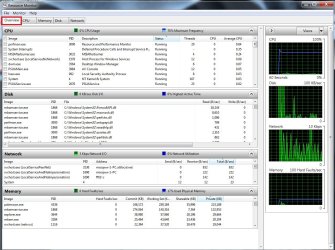
Use resource monitor and the Overview section to see what all is going on
Just click Start and type
resource monitor
In the search box,

Also use realtemp to monitor the core temps and load when it lags...
Download Real Temp 3.70 | techPowerUp
 

My Computer My Computer

At a glance

Win-7-Pro64bit 7-H-Prem-64biti7-5930K 2nd i9-9940x both water blocked VRM'...Trident-z 3200C14 2nd Trident-z 3600C16EVGA 1080ti ftw3 2nd Titan Xp both water blocked
Computer type
PC/Desktop
Computer Manufacturer/Model Number
Custom assembled by me :}
OS
Win-7-Pro64bit 7-H-Prem-64bit
CPU
i7-5930K 2nd i9-9940x both water blocked VRM's too
Motherboard
ASUS SABERTOOTH X99 2nd ASUS x299 Apex
Memory
Trident-z 3200C14 2nd Trident-z 3600C16
Graphics Card(s)
EVGA 1080ti ftw3 2nd Titan Xp both water blocked
Sound Card
Built-in Realtek
Monitor(s) Displays
1-AOC G2460PG 24"G-Sync 144Hz/ 2nd 1-ASUS VG248QE 24" 144Hz
Screen Resolution
1920 x 1080 144Hz
Hard Drives
2-Samsung M.2 Evo & Evo Plus
2-Samsung 850 EVO 500GB SSD's/ 3-2.5 W.D. Black 1tb-&3-1tb/3-3.5 WD Black 1tb hdd's
PSU
EVGA SuperNOVA 1000-P2 2nd 1200-P2
Case
2-Corsair Obsidian Series 450D Black ATX Mid Tower
Cooling
Custom water loops
Keyboard
Logitech G710+/ 2nd Logitech G910
Mouse
2-RedDragon M901 Perdition 16400 dpi Gaming mouse = wired
Internet Speed
Comcast Ping 19ms 89.31mbps download speed 6.12mbps upload
Antivirus
Malwarebytes Pro/ Superantispyware Pro
Browser
FireFox & Pale moon
Other Info
2nd ASUS X299 Apex/Intel i9-9940x with Custom water loop/7H-Prem-x64/Corsair 450D case/Ram Trident-z 3600C16 4x8gb / Samsung970Evo plus 500gb SSD/Dual ssd EZ swap evo/PSU EVGA SuperNova 1200w-P2 80+Platinum/GPU Titan Xp /8-ML-140 on push-pull on 2-280GTX rads
Do you have any available "System Restore" points?

I'd guess HP will sell you a set of recovery disks, but I don't know the details.

As a general proposition, drivers are provided by your Windows installation disc during a clean install. The only one I'd try to make sure I had before I began the install would be the Internet (NIC) driver, which you'd need to establish an Internet connection. It should be supplied by Windows during the installation, but I'd try to download it beforehand in case you have problems getting Internet going. If you have the Internet going, you should be able to eventually run down any additional drivers you might need if they are not supplied directly by Windows.

For future reference, the standard way out of a mess like this is to restore a previously made image file---using an app such as Macrium Reflect, Acronis, or Aomei Backupper. That won't help you now, but it's a 30 minute fix that you could have employed.

Could you tell me a way to install the Network driver on a computer that I freshly installed windows on via burning the windows sp onto a USB? Do I put the setup into a separate USB, or...

I checked and there were no system restore points. Guess I should've done that, oops. I'll definitely back up my computer in the future.
 

My Computer My Computer

At a glance

Windows Professional 64 BitIntel i7 2620M CPU @ 2.70GHz8.0 GB ramNVIDIA Quadro 3000M
Computer type
PC/Desktop
Computer Manufacturer/Model Number
HP
OS
Windows Professional 64 Bit
CPU
Intel i7 2620M CPU @ 2.70GHz
Memory
8.0 GB ram
Graphics Card(s)
NVIDIA Quadro 3000M
Antivirus
Malwarebytes, Microsoft Security Essentials
Browser
Google Chrome

Attachments

  • Screenshot_2.png
    Screenshot_2.png
    33.2 KB · Views: 1

My Computer My Computer

At a glance

Windows Professional 64 BitIntel i7 2620M CPU @ 2.70GHz8.0 GB ramNVIDIA Quadro 3000M
Computer type
PC/Desktop
Computer Manufacturer/Model Number
HP
OS
Windows Professional 64 Bit
CPU
Intel i7 2620M CPU @ 2.70GHz
Memory
8.0 GB ram
Graphics Card(s)
NVIDIA Quadro 3000M
Antivirus
Malwarebytes, Microsoft Security Essentials
Browser
Google Chrome
Hi,
No not unless you have an invisible machine :)

Close it on the top right,
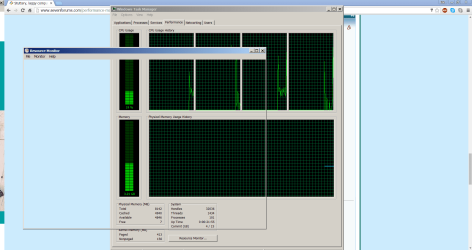
Right click your Taskbar and select Start task manager.
Performance section across the top and on the bottom click on Resource monitor.
resource monitor overview.jpg
 

My Computer My Computer

At a glance

Win-7-Pro64bit 7-H-Prem-64biti7-5930K 2nd i9-9940x both water blocked VRM'...Trident-z 3200C14 2nd Trident-z 3600C16EVGA 1080ti ftw3 2nd Titan Xp both water blocked
Computer type
PC/Desktop
Computer Manufacturer/Model Number
Custom assembled by me :}
OS
Win-7-Pro64bit 7-H-Prem-64bit
CPU
i7-5930K 2nd i9-9940x both water blocked VRM's too
Motherboard
ASUS SABERTOOTH X99 2nd ASUS x299 Apex
Memory
Trident-z 3200C14 2nd Trident-z 3600C16
Graphics Card(s)
EVGA 1080ti ftw3 2nd Titan Xp both water blocked
Sound Card
Built-in Realtek
Monitor(s) Displays
1-AOC G2460PG 24"G-Sync 144Hz/ 2nd 1-ASUS VG248QE 24" 144Hz
Screen Resolution
1920 x 1080 144Hz
Hard Drives
2-Samsung M.2 Evo & Evo Plus
2-Samsung 850 EVO 500GB SSD's/ 3-2.5 W.D. Black 1tb-&3-1tb/3-3.5 WD Black 1tb hdd's
PSU
EVGA SuperNOVA 1000-P2 2nd 1200-P2
Case
2-Corsair Obsidian Series 450D Black ATX Mid Tower
Cooling
Custom water loops
Keyboard
Logitech G710+/ 2nd Logitech G910
Mouse
2-RedDragon M901 Perdition 16400 dpi Gaming mouse = wired
Internet Speed
Comcast Ping 19ms 89.31mbps download speed 6.12mbps upload
Antivirus
Malwarebytes Pro/ Superantispyware Pro
Browser
FireFox & Pale moon
Other Info
2nd ASUS X299 Apex/Intel i9-9940x with Custom water loop/7H-Prem-x64/Corsair 450D case/Ram Trident-z 3600C16 4x8gb / Samsung970Evo plus 500gb SSD/Dual ssd EZ swap evo/PSU EVGA SuperNova 1200w-P2 80+Platinum/GPU Titan Xp /8-ML-140 on push-pull on 2-280GTX rads
Could you tell me a way to install the Network driver on a computer that I freshly installed windows on via burning the windows sp onto a USB? Do I put the setup into a separate USB, or...

I'd probably go to the HP support site for your particular model and download all available drivers and put them on a separate small flash drive.

But, I'd try not to use them unless I had troubles with the drivers provided by Windows. The most important one to get is the NIC driver because a working Internet connection is so important, but you may as well get them all if you are going to bother to go to the HP site at all.

Some people are obsessed with always having the latest drivers, but I'm more of a "if it ain't broke, don't fix it" type. Suit yourself.
 

My Computer My Computer

At a glance

Windows 7 Home Premium SP1, 64-bitIntel Skylake i5-6600K, not overclocked8 GB HyperX DDR4-2666 (2 x 4 GB)none; graphics are integrated on CPU
Computer type
PC/Desktop
Computer Manufacturer/Model Number
Ignatz Special; 4 speed manual gearbox; factory air conditioning; one of one
OS
Windows 7 Home Premium SP1, 64-bit
CPU
Intel Skylake i5-6600K, not overclocked
Motherboard
AsRock Z170M Extreme 4, micro ATX
Memory
8 GB HyperX DDR4-2666 (2 x 4 GB)
Graphics Card(s)
none; graphics are integrated on CPU
Sound Card
onboard: Realtek ALC1150; external: USB Behringer UF0-202
Monitor(s) Displays
Dell S2340M 23 inch IPS
Screen Resolution
1600 x 900
Hard Drives
System: Crucial MX100 series SSD, 128 GB;
Data: Samsung Spinpoint 103SJ, 1 TB;
Backup: WD Caviar Green WD30EZRX-00D8PB0, 3 TB
PSU
Rosewill SilentNight 500 watt fanless, semi-modular
Case
Antec Solo II
Cooling
Noctua NH-U12S; Noctua F12 intake, Noctua S12A exhaust
Keyboard
Microsoft 200 6JH-00001 USB
Mouse
Dell or Microsoft optical wired; USB
Antivirus
Microsoft Security Essentials and Malwarebytes Premium
Browser
Pale Moon
Other Info
All fans PWM; speeds at idle: CPU circa 500 rpm; intake circa 600 rpm; exhaust circa 600 rpm; CPU temps 27 idle and 47 C load in a warm room (27 C/81 F) when running Intel Extreme Tuning Utility stress test.
Could you tell me a way to install the Network driver on a computer that I freshly installed windows on via burning the windows sp onto a USB? Do I put the setup into a separate USB, or...

I'd probably go to the HP support site for your particular model and download all available drivers and put them on a separate small flash drive.

But, I'd try not to use them unless I had troubles with the drivers provided by Windows. The most important one to get is the NIC driver because a working Internet connection is so important, but you may as well get them all if you are going to bother to go to the HP site at all.

Some people are obsessed with always having the latest drivers, but I'm more of a "if it ain't broke, don't fix it" type. Suit yourself.

I'm very fearful of wrecking myself if I don't check myself so could you tell me specifically how to back up drivers haha sorry
 

My Computer My Computer

At a glance

Windows Professional 64 BitIntel i7 2620M CPU @ 2.70GHz8.0 GB ramNVIDIA Quadro 3000M
Computer type
PC/Desktop
Computer Manufacturer/Model Number
HP
OS
Windows Professional 64 Bit
CPU
Intel i7 2620M CPU @ 2.70GHz
Memory
8.0 GB ram
Graphics Card(s)
NVIDIA Quadro 3000M
Antivirus
Malwarebytes, Microsoft Security Essentials
Browser
Google Chrome
Hi,
No not unless you have an invisible machine :)

Close it on the top right,
Right click your Taskbar and select Start task manager.
Performance section across the top and on the bottom click on Resource monitor.
View attachment 385726

Hey sorry, school's been busy lately so I haven't been checking, but I guess I have an invisible computer

Sorry for the inactivity, hope you're still here to help, thanks!
 

Attachments

  • Screenshot_3.png
    Screenshot_3.png
    35.6 KB · Views: 1

My Computer My Computer

At a glance

Windows Professional 64 BitIntel i7 2620M CPU @ 2.70GHz8.0 GB ramNVIDIA Quadro 3000M
Computer type
PC/Desktop
Computer Manufacturer/Model Number
HP
OS
Windows Professional 64 Bit
CPU
Intel i7 2620M CPU @ 2.70GHz
Memory
8.0 GB ram
Graphics Card(s)
NVIDIA Quadro 3000M
Antivirus
Malwarebytes, Microsoft Security Essentials
Browser
Google Chrome
Your PC does not look the best but I would suggest perhaps to try and re-configure it.
See if you can run sfc.
You will need to run it 3 times and it will correct issues with windows.
If you are unsuccessful find the Tutorial to run it in Safe Mode.
 

My Computer My Computer

At a glance

Windows 7 Ultimate x64 SP1 OEMIntel i7 3930KKingston Genesis KHX2133C11D3K4/32GAsus RTX 2070 Ti Turbo fan series
Computer type
PC/Desktop
Computer Manufacturer/Model Number
Owner Builder
OS
Windows 7 Ultimate x64 SP1 OEM
CPU
Intel i7 3930K
Motherboard
Asus X79 Deluxe
Memory
Kingston Genesis KHX2133C11D3K4/32G
Graphics Card(s)
Asus RTX 2070 Ti Turbo fan series
Sound Card
Creative Sound Blaster ZXR
Monitor(s) Displays
Samsung U32J39 UHD
Screen Resolution
3840 x 2160
Hard Drives
Samsung 860 Pro 256 GB
OCZ Vertex 4 512GB
Western Digital Black 4TB
PSU
Corsair AX850
Case
Gigabyte
Cooling
Push - Pull 120 mm Noctua PWM, Scythe Big Shuriken 2 Rev. B
Keyboard
Logitech K800 Backlit
Mouse
Logitech MX2 Master
Internet Speed
NBN 25 Mbps
Antivirus
Kaspersky Internet Security
Browser
Mozilla FireFox
Other Info
TP-Link Archer VR600v
Sennheiser TR220 WiFi Head Phones.
Your PC does not look the best but I would suggest perhaps to try and re-configure it.
See if you can run sfc.
You will need to run it 3 times and it will correct issues with windows.
If you are unsuccessful find the Tutorial to run it in Safe Mode.

I'm doing so right now, would you like to have the logs afterwards by any chance?
Thanks by the way. Couldn't find the tutorial because of I forgot the name. It says the that sfc won't work if I have KB(numbernumbernumbernumber), how can I check for that?
Also, do I need to path cmd to a specific directory? Or is C:\Users\(user) fine?
 

My Computer My Computer

At a glance

Windows Professional 64 BitIntel i7 2620M CPU @ 2.70GHz8.0 GB ramNVIDIA Quadro 3000M
Computer type
PC/Desktop
Computer Manufacturer/Model Number
HP
OS
Windows Professional 64 Bit
CPU
Intel i7 2620M CPU @ 2.70GHz
Memory
8.0 GB ram
Graphics Card(s)
NVIDIA Quadro 3000M
Antivirus
Malwarebytes, Microsoft Security Essentials
Browser
Google Chrome
Hello any success !
If the log is not too big you can Zip it up and post it.
I will take a look but there are better people here that will see more than I.
In the Log it will mention the difficult KB's. It may even show you in the CMD window at the end.
To remove the difficult KB's - Windows start-all programs-Windows Updates-view update history-Installed Updates.
Now copy paste one KB at a time into the search window.
If it appears you right click and select Uninstall, you may need to re-boot if asked but re-boot anyway at the end of the uninstalls.

Wayne
 

My Computer My Computer

At a glance

Windows 7 Ultimate x64 SP1 OEMIntel i7 3930KKingston Genesis KHX2133C11D3K4/32GAsus RTX 2070 Ti Turbo fan series
Computer type
PC/Desktop
Computer Manufacturer/Model Number
Owner Builder
OS
Windows 7 Ultimate x64 SP1 OEM
CPU
Intel i7 3930K
Motherboard
Asus X79 Deluxe
Memory
Kingston Genesis KHX2133C11D3K4/32G
Graphics Card(s)
Asus RTX 2070 Ti Turbo fan series
Sound Card
Creative Sound Blaster ZXR
Monitor(s) Displays
Samsung U32J39 UHD
Screen Resolution
3840 x 2160
Hard Drives
Samsung 860 Pro 256 GB
OCZ Vertex 4 512GB
Western Digital Black 4TB
PSU
Corsair AX850
Case
Gigabyte
Cooling
Push - Pull 120 mm Noctua PWM, Scythe Big Shuriken 2 Rev. B
Keyboard
Logitech K800 Backlit
Mouse
Logitech MX2 Master
Internet Speed
NBN 25 Mbps
Antivirus
Kaspersky Internet Security
Browser
Mozilla FireFox
Other Info
TP-Link Archer VR600v
Sennheiser TR220 WiFi Head Phones.
Hello any success !
If the log is not too big you can Zip it up and post it.
I will take a look but there are better people here that will see more than I.
In the Log it will mention the difficult KB's. It may even show you in the CMD window at the end.
To remove the difficult KB's - Windows start-all programs-Windows Updates-view update history-Installed Updates.
Now copy paste one KB at a time into the search window.
If it appears you right click and select Uninstall, you may need to re-boot if asked but re-boot anyway at the end of the uninstalls.

Wayne

Here is the log, I think I saw another way to do it but I didn't know what %windir% meant in the tutorial so I just got CBS.
 

My Computer My Computer

At a glance

Windows Professional 64 BitIntel i7 2620M CPU @ 2.70GHz8.0 GB ramNVIDIA Quadro 3000M
Computer type
PC/Desktop
Computer Manufacturer/Model Number
HP
OS
Windows Professional 64 Bit
CPU
Intel i7 2620M CPU @ 2.70GHz
Memory
8.0 GB ram
Graphics Card(s)
NVIDIA Quadro 3000M
Antivirus
Malwarebytes, Microsoft Security Essentials
Browser
Google Chrome
Back
Top