Update problem wauserv eating 50% cpu can't change updates settings

Okay,
Can you verify if you have KB3112343 installed.
 

My Computer My Computer

At a glance

Win-7-Pro64bit 7-H-Prem-64biti7-5930K 2nd i9-9940x both water blocked VRM'...Trident-z 3200C14 2nd Trident-z 3600C16EVGA 1080ti ftw3 2nd Titan Xp both water blocked
Computer type
PC/Desktop
Computer Manufacturer/Model Number
Custom assembled by me :}
OS
Win-7-Pro64bit 7-H-Prem-64bit
CPU
i7-5930K 2nd i9-9940x both water blocked VRM's too
Motherboard
ASUS SABERTOOTH X99 2nd ASUS x299 Apex
Memory
Trident-z 3200C14 2nd Trident-z 3600C16
Graphics Card(s)
EVGA 1080ti ftw3 2nd Titan Xp both water blocked
Sound Card
Built-in Realtek
Monitor(s) Displays
1-AOC G2460PG 24"G-Sync 144Hz/ 2nd 1-ASUS VG248QE 24" 144Hz
Screen Resolution
1920 x 1080 144Hz
Hard Drives
2-Samsung M.2 Evo & Evo Plus
2-Samsung 850 EVO 500GB SSD's/ 3-2.5 W.D. Black 1tb-&3-1tb/3-3.5 WD Black 1tb hdd's
PSU
EVGA SuperNOVA 1000-P2 2nd 1200-P2
Case
2-Corsair Obsidian Series 450D Black ATX Mid Tower
Cooling
Custom water loops
Keyboard
Logitech G710+/ 2nd Logitech G910
Mouse
2-RedDragon M901 Perdition 16400 dpi Gaming mouse = wired
Internet Speed
Comcast Ping 19ms 89.31mbps download speed 6.12mbps upload
Antivirus
Malwarebytes Pro/ Superantispyware Pro
Browser
FireFox & Pale moon
Other Info
2nd ASUS X299 Apex/Intel i9-9940x with Custom water loop/7H-Prem-x64/Corsair 450D case/Ram Trident-z 3600C16 4x8gb / Samsung970Evo plus 500gb SSD/Dual ssd EZ swap evo/PSU EVGA SuperNova 1200w-P2 80+Platinum/GPU Titan Xp /8-ML-140 on push-pull on 2-280GTX rads
Okay,
Can you verify if you have KB3112343 installed.

Nope.

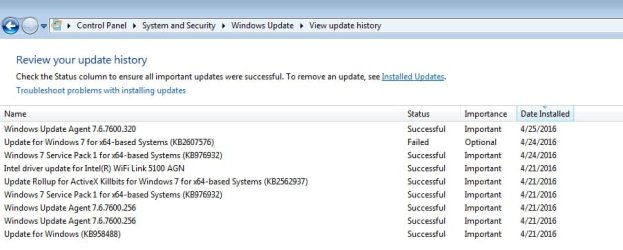
See below a list of the few updates I got since I upgraded to Windows 7.
 

Attachments

  • Untitled2.jpg
    Untitled2.jpg
    46.6 KB · Views: 0

My Computer My Computer

At a glance

Windows 7 Home Premium 64Intel T6400 Core 2 Duo4GBIntel 4500MHD
Computer type
Laptop
Computer Manufacturer/Model Number
Toshiba
OS
Windows 7 Home Premium 64
CPU
Intel T6400 Core 2 Duo
Memory
4GB
Graphics Card(s)
Intel 4500MHD

My Computer My Computer

At a glance

Win-7-Pro64bit 7-H-Prem-64biti7-5930K 2nd i9-9940x both water blocked VRM'...Trident-z 3200C14 2nd Trident-z 3600C16EVGA 1080ti ftw3 2nd Titan Xp both water blocked
Computer type
PC/Desktop
Computer Manufacturer/Model Number
Custom assembled by me :}
OS
Win-7-Pro64bit 7-H-Prem-64bit
CPU
i7-5930K 2nd i9-9940x both water blocked VRM's too
Motherboard
ASUS SABERTOOTH X99 2nd ASUS x299 Apex
Memory
Trident-z 3200C14 2nd Trident-z 3600C16
Graphics Card(s)
EVGA 1080ti ftw3 2nd Titan Xp both water blocked
Sound Card
Built-in Realtek
Monitor(s) Displays
1-AOC G2460PG 24"G-Sync 144Hz/ 2nd 1-ASUS VG248QE 24" 144Hz
Screen Resolution
1920 x 1080 144Hz
Hard Drives
2-Samsung M.2 Evo & Evo Plus
2-Samsung 850 EVO 500GB SSD's/ 3-2.5 W.D. Black 1tb-&3-1tb/3-3.5 WD Black 1tb hdd's
PSU
EVGA SuperNOVA 1000-P2 2nd 1200-P2
Case
2-Corsair Obsidian Series 450D Black ATX Mid Tower
Cooling
Custom water loops
Keyboard
Logitech G710+/ 2nd Logitech G910
Mouse
2-RedDragon M901 Perdition 16400 dpi Gaming mouse = wired
Internet Speed
Comcast Ping 19ms 89.31mbps download speed 6.12mbps upload
Antivirus
Malwarebytes Pro/ Superantispyware Pro
Browser
FireFox & Pale moon
Other Info
2nd ASUS X299 Apex/Intel i9-9940x with Custom water loop/7H-Prem-x64/Corsair 450D case/Ram Trident-z 3600C16 4x8gb / Samsung970Evo plus 500gb SSD/Dual ssd EZ swap evo/PSU EVGA SuperNova 1200w-P2 80+Platinum/GPU Titan Xp /8-ML-140 on push-pull on 2-280GTX rads
Thank you, will that allow to change settings in win updates? Why do you think it is saying some settings can only be changed by admin since I am the admin already?

Those settings are nothing to do with you being "admin" - they are Group Policy Settings that take precedence.

If you want to delete those keys - export them first so that you've got backup in case it doesn't work as expected. Right click each key and export.

What is with the wuauserv taking up 50 percent of my CPU? Will deleting as instructed above help solve this?

Deleting those keys will not solve the high RAM usage problem. That's down to read/ write issues with datastore.edb and also possible problems with a faulty WUC. There may also be problem updates in your software distribution download folder.
 

My Computer My Computer

At a glance

Microsoft Windows 7 Home Premium 64-bit 7601 ...AMD C-60 APU with Radeon(tm) HD Graphics4.00 GBAMD Radeon HD 6290 Graphics
Computer type
Laptop
Computer Manufacturer/Model Number
ASUS
OS
Microsoft Windows 7 Home Premium 64-bit 7601 Multiprocessor Free Service Pack 1
CPU
AMD C-60 APU with Radeon(tm) HD Graphics
Motherboard
ASUSTeK COMPUTER INC. X501U
Memory
4.00 GB
Graphics Card(s)
AMD Radeon HD 6290 Graphics
Sound Card
(1) AMD High Definition Audio Device (2) Realtek High Defi
Screen Resolution
1366 x 768 x 32 bits (4294967296 colors) @ 60 Hz
Hard Drives
Hitachi HTS545050A7E380 SATA Disk Device
Antivirus
Comodo CIS & FW, SecureAplus App Whitelisting, Threatfire
Browser
Cyberfox 64bit, Opera 64bit, Airfox
Other Info
Spy-The-Spy, HitmanPro.Alert, Norton Connect Safe, MJRegWatcher, BitDefender TrafficLight, Voodoo Shield, Zemana AntiMalware
I deleted the datastore edb and now updates show up!!
 

My Computer My Computer

At a glance

Windows 7 Home Premium 64Intel T6400 Core 2 Duo4GBIntel 4500MHD
Computer type
Laptop
Computer Manufacturer/Model Number
Toshiba
OS
Windows 7 Home Premium 64
CPU
Intel T6400 Core 2 Duo
Memory
4GB
Graphics Card(s)
Intel 4500MHD
Okay forget what I have posted. It's a fresh install right?

385831d1461880086t-update-problem-wauserv-eating-50-cpu-cant-change-updates-settings-untitled2.jpg

KB 2990214 - Apr 2015 - WUC: enables ability to upgrade to Win10

KB 2990214 is a known to cause problems after installing SP1

ThrashZone should be able to help you with that.
 

My Computer My Computer

At a glance

Microsoft Windows 7 Home Premium 64-bit 7601 ...AMD C-60 APU with Radeon(tm) HD Graphics4.00 GBAMD Radeon HD 6290 Graphics
Computer type
Laptop
Computer Manufacturer/Model Number
ASUS
OS
Microsoft Windows 7 Home Premium 64-bit 7601 Multiprocessor Free Service Pack 1
CPU
AMD C-60 APU with Radeon(tm) HD Graphics
Motherboard
ASUSTeK COMPUTER INC. X501U
Memory
4.00 GB
Graphics Card(s)
AMD Radeon HD 6290 Graphics
Sound Card
(1) AMD High Definition Audio Device (2) Realtek High Defi
Screen Resolution
1366 x 768 x 32 bits (4294967296 colors) @ 60 Hz
Hard Drives
Hitachi HTS545050A7E380 SATA Disk Device
Antivirus
Comodo CIS & FW, SecureAplus App Whitelisting, Threatfire
Browser
Cyberfox 64bit, Opera 64bit, Airfox
Other Info
Spy-The-Spy, HitmanPro.Alert, Norton Connect Safe, MJRegWatcher, BitDefender TrafficLight, Voodoo Shield, Zemana AntiMalware
I deleted the datastore edb and now updates show up!!

Why did you do that? Well anyway I suppose that you can download updates but it's likely you will have further problems. Maybe you'll get lucky.
 

My Computer My Computer

At a glance

Microsoft Windows 7 Home Premium 64-bit 7601 ...AMD C-60 APU with Radeon(tm) HD Graphics4.00 GBAMD Radeon HD 6290 Graphics
Computer type
Laptop
Computer Manufacturer/Model Number
ASUS
OS
Microsoft Windows 7 Home Premium 64-bit 7601 Multiprocessor Free Service Pack 1
CPU
AMD C-60 APU with Radeon(tm) HD Graphics
Motherboard
ASUSTeK COMPUTER INC. X501U
Memory
4.00 GB
Graphics Card(s)
AMD Radeon HD 6290 Graphics
Sound Card
(1) AMD High Definition Audio Device (2) Realtek High Defi
Screen Resolution
1366 x 768 x 32 bits (4294967296 colors) @ 60 Hz
Hard Drives
Hitachi HTS545050A7E380 SATA Disk Device
Antivirus
Comodo CIS & FW, SecureAplus App Whitelisting, Threatfire
Browser
Cyberfox 64bit, Opera 64bit, Airfox
Other Info
Spy-The-Spy, HitmanPro.Alert, Norton Connect Safe, MJRegWatcher, BitDefender TrafficLight, Voodoo Shield, Zemana AntiMalware
Not really I would of used media with sp1 already on it :)
 

My Computer My Computer

At a glance

Win-7-Pro64bit 7-H-Prem-64biti7-5930K 2nd i9-9940x both water blocked VRM'...Trident-z 3200C14 2nd Trident-z 3600C16EVGA 1080ti ftw3 2nd Titan Xp both water blocked
Computer type
PC/Desktop
Computer Manufacturer/Model Number
Custom assembled by me :}
OS
Win-7-Pro64bit 7-H-Prem-64bit
CPU
i7-5930K 2nd i9-9940x both water blocked VRM's too
Motherboard
ASUS SABERTOOTH X99 2nd ASUS x299 Apex
Memory
Trident-z 3200C14 2nd Trident-z 3600C16
Graphics Card(s)
EVGA 1080ti ftw3 2nd Titan Xp both water blocked
Sound Card
Built-in Realtek
Monitor(s) Displays
1-AOC G2460PG 24"G-Sync 144Hz/ 2nd 1-ASUS VG248QE 24" 144Hz
Screen Resolution
1920 x 1080 144Hz
Hard Drives
2-Samsung M.2 Evo & Evo Plus
2-Samsung 850 EVO 500GB SSD's/ 3-2.5 W.D. Black 1tb-&3-1tb/3-3.5 WD Black 1tb hdd's
PSU
EVGA SuperNOVA 1000-P2 2nd 1200-P2
Case
2-Corsair Obsidian Series 450D Black ATX Mid Tower
Cooling
Custom water loops
Keyboard
Logitech G710+/ 2nd Logitech G910
Mouse
2-RedDragon M901 Perdition 16400 dpi Gaming mouse = wired
Internet Speed
Comcast Ping 19ms 89.31mbps download speed 6.12mbps upload
Antivirus
Malwarebytes Pro/ Superantispyware Pro
Browser
FireFox & Pale moon
Other Info
2nd ASUS X299 Apex/Intel i9-9940x with Custom water loop/7H-Prem-x64/Corsair 450D case/Ram Trident-z 3600C16 4x8gb / Samsung970Evo plus 500gb SSD/Dual ssd EZ swap evo/PSU EVGA SuperNova 1200w-P2 80+Platinum/GPU Titan Xp /8-ML-140 on push-pull on 2-280GTX rads
I don't know but wuauserve is now silent.

Old edb was over 1gb, now I see a new edb is in place at 0.2 gb.

I am not usually lucky so it won't last long.
 

My Computer My Computer

At a glance

Windows 7 Home Premium 64Intel T6400 Core 2 Duo4GBIntel 4500MHD
Computer type
Laptop
Computer Manufacturer/Model Number
Toshiba
OS
Windows 7 Home Premium 64
CPU
Intel T6400 Core 2 Duo
Memory
4GB
Graphics Card(s)
Intel 4500MHD
Deleting the registry subkeys you mentioned removed the silly admin option. I am now in full control. Thank you so much.

Now let's see what the edb deleting did.
 

My Computer My Computer

At a glance

Windows 7 Home Premium 64Intel T6400 Core 2 Duo4GBIntel 4500MHD
Computer type
Laptop
Computer Manufacturer/Model Number
Toshiba
OS
Windows 7 Home Premium 64
CPU
Intel T6400 Core 2 Duo
Memory
4GB
Graphics Card(s)
Intel 4500MHD
Old edb was over 1gb, now I see a new edb is in place at 0.2 gb.

That should get rebuilt with tomorrow's scheduled update check. It might take hours. Then you'll have to wait another 24 hours for yet another scheduled update check before you can really tell if there will be more problems.
 

My Computer My Computer

At a glance

Microsoft Windows 7 Home Premium 64-bit 7601 ...AMD C-60 APU with Radeon(tm) HD Graphics4.00 GBAMD Radeon HD 6290 Graphics
Computer type
Laptop
Computer Manufacturer/Model Number
ASUS
OS
Microsoft Windows 7 Home Premium 64-bit 7601 Multiprocessor Free Service Pack 1
CPU
AMD C-60 APU with Radeon(tm) HD Graphics
Motherboard
ASUSTeK COMPUTER INC. X501U
Memory
4.00 GB
Graphics Card(s)
AMD Radeon HD 6290 Graphics
Sound Card
(1) AMD High Definition Audio Device (2) Realtek High Defi
Screen Resolution
1366 x 768 x 32 bits (4294967296 colors) @ 60 Hz
Hard Drives
Hitachi HTS545050A7E380 SATA Disk Device
Antivirus
Comodo CIS & FW, SecureAplus App Whitelisting, Threatfire
Browser
Cyberfox 64bit, Opera 64bit, Airfox
Other Info
Spy-The-Spy, HitmanPro.Alert, Norton Connect Safe, MJRegWatcher, BitDefender TrafficLight, Voodoo Shield, Zemana AntiMalware
Old edb was over 1gb, now I see a new edb is in place at 0.2 gb.

That should get rebuilt with tomorrow's scheduled update check. It might take hours. Then you'll have to wait another 24 hours for yet another scheduled update check before you can really tell if there will be more problems.


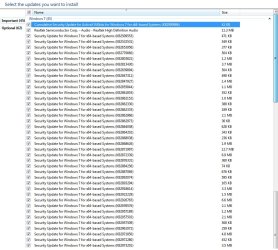
Does it check daily for updates? No check today so far. My laptop is now the fastest I've ever seen it go. I hope this will last. Here is my update list after it checked for updates last night. I haven't installed any yet, it works so fast I just want to enjoy this before something goes wrong.
 

Attachments

  • Untitled.jpg
    Untitled.jpg
    130.8 KB · Views: 2

My Computer My Computer

At a glance

Windows 7 Home Premium 64Intel T6400 Core 2 Duo4GBIntel 4500MHD
Computer type
Laptop
Computer Manufacturer/Model Number
Toshiba
OS
Windows 7 Home Premium 64
CPU
Intel T6400 Core 2 Duo
Memory
4GB
Graphics Card(s)
Intel 4500MHD
Update - upon checking for updates, db file size increased again to 1gb. I let it run but nothing happened, checking for updates hangs again and wuauserv eats CPU.

I deleted db again, cpu is fine again. Disabled updates.

I can't believe Win7 has this kind of errors. In seven years of running Vista (probably the most unpopular Win ever), I never had a single problem.
 

My Computer My Computer

At a glance

Windows 7 Home Premium 64Intel T6400 Core 2 Duo4GBIntel 4500MHD
Computer type
Laptop
Computer Manufacturer/Model Number
Toshiba
OS
Windows 7 Home Premium 64
CPU
Intel T6400 Core 2 Duo
Memory
4GB
Graphics Card(s)
Intel 4500MHD
I've had the same problem a few times during the last year. Fixed it each time only for problems to return a few months later. The only fix that works (for me) is a complete removal and reinstall of Windows Updates. That takes around three days at least and doesn't always work first time and it's a complicated fix.
 

My Computer My Computer

At a glance

Microsoft Windows 7 Home Premium 64-bit 7601 ...AMD C-60 APU with Radeon(tm) HD Graphics4.00 GBAMD Radeon HD 6290 Graphics
Computer type
Laptop
Computer Manufacturer/Model Number
ASUS
OS
Microsoft Windows 7 Home Premium 64-bit 7601 Multiprocessor Free Service Pack 1
CPU
AMD C-60 APU with Radeon(tm) HD Graphics
Motherboard
ASUSTeK COMPUTER INC. X501U
Memory
4.00 GB
Graphics Card(s)
AMD Radeon HD 6290 Graphics
Sound Card
(1) AMD High Definition Audio Device (2) Realtek High Defi
Screen Resolution
1366 x 768 x 32 bits (4294967296 colors) @ 60 Hz
Hard Drives
Hitachi HTS545050A7E380 SATA Disk Device
Antivirus
Comodo CIS & FW, SecureAplus App Whitelisting, Threatfire
Browser
Cyberfox 64bit, Opera 64bit, Airfox
Other Info
Spy-The-Spy, HitmanPro.Alert, Norton Connect Safe, MJRegWatcher, BitDefender TrafficLight, Voodoo Shield, Zemana AntiMalware
Update - upon checking for updates, db file size increased again to 1gb. I let it run but nothing happened, checking for updates hangs again and wuauserv eats CPU.

I deleted db again, cpu is fine again. Disabled updates.

I can't believe Win7 has this kind of errors. In seven years of running Vista (probably the most unpopular Win ever), I never had a single problem.
Did you try the suggestions in post 20?
 

My Computer My Computer

At a glance

W7 Pro SP1 64biti78GBIntel HD Graphics
Computer type
Laptop
Computer Manufacturer/Model Number
Employer provided Dell Latitude
OS
W7 Pro SP1 64bit
CPU
i7
Memory
8GB
Graphics Card(s)
Intel HD Graphics
Hard Drives
crappy SSD
Antivirus
Employer mandated Symantec Endpoint Protection
Browser
Pale Moon 64bit, IE11 64bit & Chrome 64bit
Update - upon checking for updates, db file size increased again to 1gb. I let it run but nothing happened, checking for updates hangs again and wuauserv eats CPU.

I deleted db again, cpu is fine again. Disabled updates.

I can't believe Win7 has this kind of errors. In seven years of running Vista (probably the most unpopular Win ever), I never had a single problem.
Did you try the suggestions in post 20?


Yes, but it didn't work first time. A standalone installer window came up and that was also stuck.

I downloaded the KB3138612 , turned off wuauserv, turned off internet, installed in 2 minutes.

Then ran check for updates. In 15 minutes edb was again 1 GB. But this time, it actually stopped scanning and now I have 189 updates ready to install. All in less than 20 mins!
 

My Computer My Computer

At a glance

Windows 7 Home Premium 64Intel T6400 Core 2 Duo4GBIntel 4500MHD
Computer type
Laptop
Computer Manufacturer/Model Number
Toshiba
OS
Windows 7 Home Premium 64
CPU
Intel T6400 Core 2 Duo
Memory
4GB
Graphics Card(s)
Intel 4500MHD
I've had the same problem a few times during the last year. Fixed it each time only for problems to return a few months later. The only fix that works (for me) is a complete removal and reinstall of Windows Updates. That takes around three days at least and doesn't always work first time and it's a complicated fix.

What method did you use to "fix it each time only for problems to return months later"?

Patch it with KB's?

I now downloaded and installed KB3138612 and check update lasted for 20 mins. Now I have 189 updates showing.
 

My Computer My Computer

At a glance

Windows 7 Home Premium 64Intel T6400 Core 2 Duo4GBIntel 4500MHD
Computer type
Laptop
Computer Manufacturer/Model Number
Toshiba
OS
Windows 7 Home Premium 64
CPU
Intel T6400 Core 2 Duo
Memory
4GB
Graphics Card(s)
Intel 4500MHD
The last thing installed on my machine before the issue arised was the update agent 7.6.7600.320. Now after the KB3138612 install, the latest agent is 7.6.7601.19161.
 

My Computer My Computer

At a glance

Windows 7 Home Premium 64Intel T6400 Core 2 Duo4GBIntel 4500MHD
Computer type
Laptop
Computer Manufacturer/Model Number
Toshiba
OS
Windows 7 Home Premium 64
CPU
Intel T6400 Core 2 Duo
Memory
4GB
Graphics Card(s)
Intel 4500MHD
I downloaded the KB3138612 , turned off wuauserv, turned off internet, installed in 2 minutes.

Then ran check for updates. In 15 minutes edb was again 1 GB. But this time, it actually stopped scanning and now I have 189 updates ready to install. All in less than 20 mins!

Running fixes with no internet connection and WU service seems to be important.

I've had the same problem a few times during the last year. Fixed it each time only for problems to return a few months later. The only fix that works (for me) is a complete removal and reinstall of Windows Updates. That takes around three days at least and doesn't always work first time and it's a complicated fix.

What method did you use to "fix it each time only for problems to return months later"?

Patch it with KB's?

It's too complicated to explain fully but basically involves removing all WUC's and deleting all files related to Windows Updates, re-registering a whole lot of system files, resetting IE, running advanced disk cleanup to include WU cleanup, forcing the installation of a recent WUC thereby skipping problem WUC's and allowing the whole system to be rescanned from scratch to rebuild the database of installed and missing updates.
 
Last edited:

My Computer My Computer

At a glance

Microsoft Windows 7 Home Premium 64-bit 7601 ...AMD C-60 APU with Radeon(tm) HD Graphics4.00 GBAMD Radeon HD 6290 Graphics
Computer type
Laptop
Computer Manufacturer/Model Number
ASUS
OS
Microsoft Windows 7 Home Premium 64-bit 7601 Multiprocessor Free Service Pack 1
CPU
AMD C-60 APU with Radeon(tm) HD Graphics
Motherboard
ASUSTeK COMPUTER INC. X501U
Memory
4.00 GB
Graphics Card(s)
AMD Radeon HD 6290 Graphics
Sound Card
(1) AMD High Definition Audio Device (2) Realtek High Defi
Screen Resolution
1366 x 768 x 32 bits (4294967296 colors) @ 60 Hz
Hard Drives
Hitachi HTS545050A7E380 SATA Disk Device
Antivirus
Comodo CIS & FW, SecureAplus App Whitelisting, Threatfire
Browser
Cyberfox 64bit, Opera 64bit, Airfox
Other Info
Spy-The-Spy, HitmanPro.Alert, Norton Connect Safe, MJRegWatcher, BitDefender TrafficLight, Voodoo Shield, Zemana AntiMalware
The WU updates do some sort of scan/search at the start of the install. Removing the connection to the Internet causes that scan to quickly give up. If you don't remove the connection to the Internet, the scan/search should eventually complete on its own. (It might take hours.) I've done it both ways and I've not noticed a difference in the outcome - other than the time spent completing the install.

Glad that you finally got a list of updates :-)
 

My Computer My Computer

At a glance

W7 Pro SP1 64biti78GBIntel HD Graphics
Computer type
Laptop
Computer Manufacturer/Model Number
Employer provided Dell Latitude
OS
W7 Pro SP1 64bit
CPU
i7
Memory
8GB
Graphics Card(s)
Intel HD Graphics
Hard Drives
crappy SSD
Antivirus
Employer mandated Symantec Endpoint Protection
Browser
Pale Moon 64bit, IE11 64bit & Chrome 64bit
Back
Top