Solved Windows Updates (5/10/2016) - Most failed to install. Reason?

spc3rd

New member
Member
VIP
Local time
5:51 AM
Messages
101
Location
Mid-Atlantic Region - U.S.A.
Good evening everyone,

My issue is with today's 'Patch Tuesday' Windows Updates.

[System: Win7 Home Premium SP1 x64]. Computer is a standalone, not on any network, and used only by me.

Description of problem:

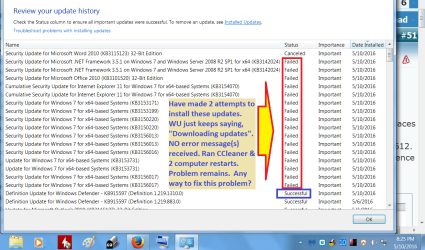
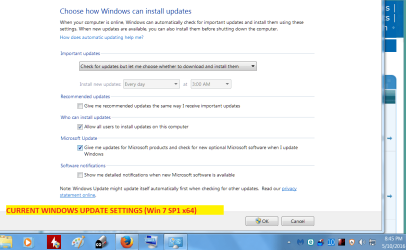
There were something like 14 - 16 important updates in today's batch. Most of them did NOT install. (Please see attached screenshots showing this + my current WU settings, at the bottom of this post).
NO error codes are being displayed. WU just keeps saying it is downloading updates. The 'download progress' remains at "0%" the entire time, however.

Resolutions attempted thus far:

1. Ran CCleaner, then tried to update again. No success.
2. Restarted computer 3 times, then attempted to update, without success.
3. UNCHECKED all updates except for 3, and tried updating just those 3.
Problem remains.
4. On the 3rd attempt, after waiting 15 minutes, I cancelled the download/installation.
5. Ran scans with ESET Smart Security (v9), MBAM Premier, and SAS. No issues were found.

My question: Is there an explanation for, & a resolution to, this problem?

The only potential explanation I could think of is the Windows Update servers are too busy???
(Don't recall having encountered this type of problem before).

Thank you for your for time and any help!
 

Attachments
  • WINDOWS UPDATE SETTINGS.png
    WINDOWS UPDATE SETTINGS.png
    46.8 KB · Views: 1
  • WINDOWS UPDATE FAILURE - 5-10-2016.png
    WINDOWS UPDATE FAILURE - 5-10-2016.png
    52.8 KB · Views: 1

My Computer My Computer

Computer type
PC/Desktop
Computer Manufacturer/Model Number
Dell Inspiron Desktop (refurbished)
OS
Win 7 Home Premium x64 SP1
CPU
Intel Core i3, 3.07 gHz
Motherboard
Dell
Memory
6 GB
Graphics Card(s)
ASUS VH198 (1440x900@60Hz) Intel Q965/Q963 Express Chipset F
Monitor(s) Displays
Asus
Hard Drives
Western Digital 1 TB SATA HDD (Internal)

WD 1-TB "My Passport Ultra" (external drive used for system images)
Keyboard
Azio KB505U wired, standard, large print 3-color backlit
Mouse
Logitech (wired)
Internet Speed
Download: up to 50 Mbps | Upload: 5 Mbps
Antivirus
MSE
Browser
Firefox (default) and IE11
Other Info
MBAM 3xx (lifetime license) |
SAS (on-demand) | FF w/NoScript & IE11 | uBlock Origin | POP Peeper Pro | Aeris Calendar | GWX Control Panel Monitor | CPUID

My Computer My Computer

Computer type
PC/Desktop
Computer Manufacturer/Model Number
Custom assembled by me :}
OS
Win-7-Pro64bit 7-H-Prem-64bit
CPU
i7-5930K 2nd i9-9940x both water blocked VRM's too
Motherboard
ASUS SABERTOOTH X99 2nd ASUS x299 Apex
Memory
Trident-z 3200C14 2nd Trident-z 3600C16
Graphics Card(s)
EVGA 1080ti ftw3 2nd Titan Xp both water blocked
Sound Card
Built-in Realtek
Monitor(s) Displays
1-AOC G2460PG 24"G-Sync 144Hz/ 2nd 1-ASUS VG248QE 24" 144Hz
Screen Resolution
1920 x 1080 144Hz
Hard Drives
2-Samsung M.2 Evo & Evo Plus
2-Samsung 850 EVO 500GB SSD's/ 3-2.5 W.D. Black 1tb-&3-1tb/3-3.5 WD Black 1tb hdd's
PSU
EVGA SuperNOVA 1000-P2 2nd 1200-P2
Case
2-Corsair Obsidian Series 450D Black ATX Mid Tower
Cooling
Custom water loops
Keyboard
Logitech G710+/ 2nd Logitech G910
Mouse
2-RedDragon M901 Perdition 16400 dpi Gaming mouse = wired
Internet Speed
Comcast Ping 19ms 89.31mbps download speed 6.12mbps upload
Antivirus
Malwarebytes Pro/ Superantispyware Pro
Browser
FireFox & Pale moon
Other Info
2nd ASUS X299 Apex/Intel i9-9940x with Custom water loop/7H-Prem-x64/Corsair 450D case/Ram Trident-z 3600C16 4x8gb / Samsung970Evo plus 500gb SSD/Dual ssd EZ swap evo/PSU EVGA SuperNova 1200w-P2 80+Platinum/GPU Titan Xp /8-ML-140 on push-pull on 2-280GTX rads
Hi TZ, and thank you for your reply!

I did as you said, and was able to successfully install that Net Framework version you mentioned (The list of installed updates shown says it installed successfully). I then restarted the computer, and tried to install the remaining 15 updates. Unfortunately, I'm still having the same problem trying to install them. As I'm writing this reply, the update process I started over 1 hour ago is still running, but the '% complete' is continuing to show 0%.

I even tried restarting the computer again and removed the check-marks from all but 4 of the remaining 15 updates, and tried to download/install just those 4. I also did yet another restart after that one, and attempted to install just 1 update. The problem still continues.

*When I look at the Net Framework listing in the Control Panel > Programs and Features, it shows the "Installed on" date as being January 14, 2015, and the version shown is 4.5.51209.

**I also noticed that on the WU page in the Control Panel, where it shows the date/time when updates were last checked for, it is still showing "Yesterday at 2:47 p.m." (U.S. EST). In addition, beneath that, it shows the date when updates were last installed as also being yesterday at 11 p.m. (or thereabouts). Obviously, the info is incorrect.

I don't know what else to do. There is obviously something very wrong here, but I have no idea WHAT it is, much less how to resolve this issue to get those updates installed. If you have any other ideas on how I can fix this problem, please let me know.
(I'm going to bed now, and will shut this machine down until I get up in a few hours).

Again, I appreciate your trying to help me!
 

My Computer My Computer

Computer type
PC/Desktop
Computer Manufacturer/Model Number
Dell Inspiron Desktop (refurbished)
OS
Win 7 Home Premium x64 SP1
CPU
Intel Core i3, 3.07 gHz
Motherboard
Dell
Memory
6 GB
Graphics Card(s)
ASUS VH198 (1440x900@60Hz) Intel Q965/Q963 Express Chipset F
Monitor(s) Displays
Asus
Hard Drives
Western Digital 1 TB SATA HDD (Internal)

WD 1-TB "My Passport Ultra" (external drive used for system images)
Keyboard
Azio KB505U wired, standard, large print 3-color backlit
Mouse
Logitech (wired)
Internet Speed
Download: up to 50 Mbps | Upload: 5 Mbps
Antivirus
MSE
Browser
Firefox (default) and IE11
Other Info
MBAM 3xx (lifetime license) |
SAS (on-demand) | FF w/NoScript & IE11 | uBlock Origin | POP Peeper Pro | Aeris Calendar | GWX Control Panel Monitor | CPUID
Make sure the date and time are showing correctly on your computer.
 

My Computer My Computer

Computer type
PC/Desktop
Computer Manufacturer/Model Number
Custom build by PC Specialist
OS
Windows 7 Home Premium 64
CPU
AMD Phenom II X4 955
Motherboard
Asus M4A78T-E
Memory
8GB Corsair XMS3 DDR3
Graphics Card(s)
Gigabyte Geforce GTX 960 2GB
Sound Card
SB Audigy
Monitor(s) Displays
BenQ 24"
Screen Resolution
1920 x 1080
Hard Drives
500GB Serial ATA
PSU
1010W Quiet Quad Rail
Case
Antec 900
Cooling
Fenrir
Keyboard
Corsair
Mouse
Logitech
Internet Speed
20mbps
Antivirus
MSE plus MBAM 2.x Free
Browser
Chrome
Other Info
Second desktop different spec but similar level.
Thanks for your suggestion, Seffrid.

System clock, date, time, etc are all correct. I just tried again to get those remaining 15 updates to download and install as mentioned in my OP. Unfortunately, the problem still continues.

Best regards,
 

My Computer My Computer

Computer type
PC/Desktop
Computer Manufacturer/Model Number
Dell Inspiron Desktop (refurbished)
OS
Win 7 Home Premium x64 SP1
CPU
Intel Core i3, 3.07 gHz
Motherboard
Dell
Memory
6 GB
Graphics Card(s)
ASUS VH198 (1440x900@60Hz) Intel Q965/Q963 Express Chipset F
Monitor(s) Displays
Asus
Hard Drives
Western Digital 1 TB SATA HDD (Internal)

WD 1-TB "My Passport Ultra" (external drive used for system images)
Keyboard
Azio KB505U wired, standard, large print 3-color backlit
Mouse
Logitech (wired)
Internet Speed
Download: up to 50 Mbps | Upload: 5 Mbps
Antivirus
MSE
Browser
Firefox (default) and IE11
Other Info
MBAM 3xx (lifetime license) |
SAS (on-demand) | FF w/NoScript & IE11 | uBlock Origin | POP Peeper Pro | Aeris Calendar | GWX Control Panel Monitor | CPUID
Have you tried installing them one at a time? Also, you seem to have a lot of duplicated updates in that list.

It's not uncommon these days for the update service to remain on 0% for some time when downloading, so I'd give it plenty of time and not interrupt the process by rebooting the machine other than when prompted to do so if, taken individually, the updates do start to install. I generally install my updates in batches of about 3 or 4 and it can take 10-20 minutes sometimes to get the process started although it can vary according to the time of day. As you say, the servers may be busy and my hunch is that some of the Windows 7 download hardware has been switched to Windows 10 which if true wouldn't help.

I hope you can get this resolved, if necessary by downloading and installing the updates manually from Miscrosoft rather than through the update service. Thereafter I would in any event recommend not installing the monthly updates as soon as they appear but instead waiting for a few days for any problem issues to be made known and fixed, preferably as advised by experts like Susan Bradley through her Patch Watch articles at Windows Secrets.
 

My Computer My Computer

Computer type
PC/Desktop
Computer Manufacturer/Model Number
Custom build by PC Specialist
OS
Windows 7 Home Premium 64
CPU
AMD Phenom II X4 955
Motherboard
Asus M4A78T-E
Memory
8GB Corsair XMS3 DDR3
Graphics Card(s)
Gigabyte Geforce GTX 960 2GB
Sound Card
SB Audigy
Monitor(s) Displays
BenQ 24"
Screen Resolution
1920 x 1080
Hard Drives
500GB Serial ATA
PSU
1010W Quiet Quad Rail
Case
Antec 900
Cooling
Fenrir
Keyboard
Corsair
Mouse
Logitech
Internet Speed
20mbps
Antivirus
MSE plus MBAM 2.x Free
Browser
Chrome
Other Info
Second desktop different spec but similar level.
Thanks again for the info, Seffrid!

[EDIT]: Windows Update is now showing there are 13 Important updates waiting to be downloaded/installed. Last night it said 15.

Those duplicate entries you referred to seem to be occurring because of the multiple update attempts I've made. I'm not tech-savvy at all. Age/health have taken their toll on me and make it difficult for me to understand and do things I once could.

I have previously tried to install only 4 updates at one time - without success. I've also tried to install only 1 update - again, unsuccessfully. (I did so because I recall reading something in the not-so-distant past about doing updates the way you described).

You mentioned that it is not uncommon these days for the 'update progress %' to remain at "0" for some time. How long is too long...1 hour, 2, etc?

I will restart this computer again and attempt another update - letting it just sit here for 2 hours. I would think that should be more than sufficient time for the 'update progress %' to change at least some.
Can you direct me to where I can find that Microsoft update site to see if I can download the remaining 15 updates from?

Thank you again.
 
Last edited:

My Computer My Computer

Computer type
PC/Desktop
Computer Manufacturer/Model Number
Dell Inspiron Desktop (refurbished)
OS
Win 7 Home Premium x64 SP1
CPU
Intel Core i3, 3.07 gHz
Motherboard
Dell
Memory
6 GB
Graphics Card(s)
ASUS VH198 (1440x900@60Hz) Intel Q965/Q963 Express Chipset F
Monitor(s) Displays
Asus
Hard Drives
Western Digital 1 TB SATA HDD (Internal)

WD 1-TB "My Passport Ultra" (external drive used for system images)
Keyboard
Azio KB505U wired, standard, large print 3-color backlit
Mouse
Logitech (wired)
Internet Speed
Download: up to 50 Mbps | Upload: 5 Mbps
Antivirus
MSE
Browser
Firefox (default) and IE11
Other Info
MBAM 3xx (lifetime license) |
SAS (on-demand) | FF w/NoScript & IE11 | uBlock Origin | POP Peeper Pro | Aeris Calendar | GWX Control Panel Monitor | CPUID

My Computer My Computer

Computer type
PC/Desktop
Computer Manufacturer/Model Number
Custom assembled by me :}
OS
Win-7-Pro64bit 7-H-Prem-64bit
CPU
i7-5930K 2nd i9-9940x both water blocked VRM's too
Motherboard
ASUS SABERTOOTH X99 2nd ASUS x299 Apex
Memory
Trident-z 3200C14 2nd Trident-z 3600C16
Graphics Card(s)
EVGA 1080ti ftw3 2nd Titan Xp both water blocked
Sound Card
Built-in Realtek
Monitor(s) Displays
1-AOC G2460PG 24"G-Sync 144Hz/ 2nd 1-ASUS VG248QE 24" 144Hz
Screen Resolution
1920 x 1080 144Hz
Hard Drives
2-Samsung M.2 Evo & Evo Plus
2-Samsung 850 EVO 500GB SSD's/ 3-2.5 W.D. Black 1tb-&3-1tb/3-3.5 WD Black 1tb hdd's
PSU
EVGA SuperNOVA 1000-P2 2nd 1200-P2
Case
2-Corsair Obsidian Series 450D Black ATX Mid Tower
Cooling
Custom water loops
Keyboard
Logitech G710+/ 2nd Logitech G910
Mouse
2-RedDragon M901 Perdition 16400 dpi Gaming mouse = wired
Internet Speed
Comcast Ping 19ms 89.31mbps download speed 6.12mbps upload
Antivirus
Malwarebytes Pro/ Superantispyware Pro
Browser
FireFox & Pale moon
Other Info
2nd ASUS X299 Apex/Intel i9-9940x with Custom water loop/7H-Prem-x64/Corsair 450D case/Ram Trident-z 3600C16 4x8gb / Samsung970Evo plus 500gb SSD/Dual ssd EZ swap evo/PSU EVGA SuperNova 1200w-P2 80+Platinum/GPU Titan Xp /8-ML-140 on push-pull on 2-280GTX rads
Morning TZ,

When I tried to run the sfc /scannow command in the Command Prompt window, it tells me I need Administrator privileges to run it. I am already logged-in under my Admin account.

[EDIT @ 10:15 a.m.]: I tried running the net start trustedinstaller from the Command Prompt as well. The system gave me an "Error 5" and "Access Denied" response. I have also tried running that Windows 'Fix it' tool, then restarted the computer and tried to download/install those 13 updates. Still no luck.

I do not normally post in more than 1 forum about the same issue. However, in this case since this problem is continuing......do you think I should also post about this issue in another forum as well (e.g. Bleeping Computer, MBAM)?

Much obliged again for your help.
 

My Computer My Computer

Computer type
PC/Desktop
Computer Manufacturer/Model Number
Dell Inspiron Desktop (refurbished)
OS
Win 7 Home Premium x64 SP1
CPU
Intel Core i3, 3.07 gHz
Motherboard
Dell
Memory
6 GB
Graphics Card(s)
ASUS VH198 (1440x900@60Hz) Intel Q965/Q963 Express Chipset F
Monitor(s) Displays
Asus
Hard Drives
Western Digital 1 TB SATA HDD (Internal)

WD 1-TB "My Passport Ultra" (external drive used for system images)
Keyboard
Azio KB505U wired, standard, large print 3-color backlit
Mouse
Logitech (wired)
Internet Speed
Download: up to 50 Mbps | Upload: 5 Mbps
Antivirus
MSE
Browser
Firefox (default) and IE11
Other Info
MBAM 3xx (lifetime license) |
SAS (on-demand) | FF w/NoScript & IE11 | uBlock Origin | POP Peeper Pro | Aeris Calendar | GWX Control Panel Monitor | CPUID
Hi,
The tutorial should of shown you need to right click the CMD or Command prompt listing and select Run as administrator when you open it.

Clearly you do have a user account permissions issue
Click the Start button and click on your users picture on the top right it might be a yellow flower
See what it says on the following page for your user account
user account admin.JPG
 

My Computer My Computer

Computer type
PC/Desktop
Computer Manufacturer/Model Number
Custom assembled by me :}
OS
Win-7-Pro64bit 7-H-Prem-64bit
CPU
i7-5930K 2nd i9-9940x both water blocked VRM's too
Motherboard
ASUS SABERTOOTH X99 2nd ASUS x299 Apex
Memory
Trident-z 3200C14 2nd Trident-z 3600C16
Graphics Card(s)
EVGA 1080ti ftw3 2nd Titan Xp both water blocked
Sound Card
Built-in Realtek
Monitor(s) Displays
1-AOC G2460PG 24"G-Sync 144Hz/ 2nd 1-ASUS VG248QE 24" 144Hz
Screen Resolution
1920 x 1080 144Hz
Hard Drives
2-Samsung M.2 Evo & Evo Plus
2-Samsung 850 EVO 500GB SSD's/ 3-2.5 W.D. Black 1tb-&3-1tb/3-3.5 WD Black 1tb hdd's
PSU
EVGA SuperNOVA 1000-P2 2nd 1200-P2
Case
2-Corsair Obsidian Series 450D Black ATX Mid Tower
Cooling
Custom water loops
Keyboard
Logitech G710+/ 2nd Logitech G910
Mouse
2-RedDragon M901 Perdition 16400 dpi Gaming mouse = wired
Internet Speed
Comcast Ping 19ms 89.31mbps download speed 6.12mbps upload
Antivirus
Malwarebytes Pro/ Superantispyware Pro
Browser
FireFox & Pale moon
Other Info
2nd ASUS X299 Apex/Intel i9-9940x with Custom water loop/7H-Prem-x64/Corsair 450D case/Ram Trident-z 3600C16 4x8gb / Samsung970Evo plus 500gb SSD/Dual ssd EZ swap evo/PSU EVGA SuperNova 1200w-P2 80+Platinum/GPU Titan Xp /8-ML-140 on push-pull on 2-280GTX rads
Don't feel lonely SPC 3rd. I cant install the updates either!
 

My Computer My Computer

Computer type
PC/Desktop
Computer Manufacturer/Model Number
Cybertron
OS
Windows 7 Home Premium 64 bit
CPU
Intel Core i7 6700K 4.00 GHz
Motherboard
ASUS PRIME H270-PRO LGA1151 DDR4 DP HDMI DVI M.2 USB 3.1 H27
Memory
Corsair Vengeance 16GB (2x8GB) DDR4 3000 (PC4-24000) C15 for
Graphics Card(s)
EVGA GeForce GTX 1050 Ti SC GAMING, 4GB GDDR5, DX12 OSD
Sound Card
Realtek High Definition Audio Device
Monitor(s) Displays
ASUS VS 239
Screen Resolution
1920x 1080
Hard Drives
1TB SATA3 7200RPM 64MB Cache
PSU
EVGA SuperNOVA 650 G3, 80 Plus Gold 650W, Fully Modular
Greetings again TZ,

The image you posted matches what my own shows (except the image is the same one as my avatar here). I DID finally manage to run the sfc /scannow command using that right-click on "Run as Administrator" you mentioned. When it finished, it said there were some file corruption(s) or something like that, and it had (supposedly) fixed them. (See screenshot attached below).

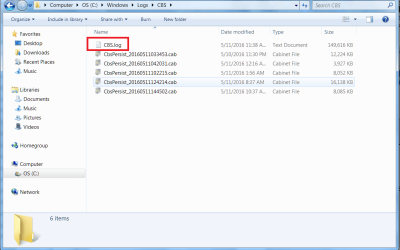
I tried to look at the text file it created (shown in the red rectangle) to see the details, but the system is denying access. (See image below of what's shown at C:\Windows\Logs\CBS\...). I tried right-clicking on the file (CBS.log) to see if there was some option to open it as an Administrator, but there is nothing like that being shown. I have no idea of how to view the file's contents.

I did a System Restore using the restore point dated May 7, 2016.
After the restore process completed & the computer restarted, I tried to download/install just 3 of the 13 'Important' updates which WU says are available. After 45 minutes, the 'update progress %' still continues to remain at 0%.

Since I'm not seeing anyone else post here about having the same problem that I am, and I've tried everything that's been asked of me here in this thread......it would seem there must be something else going-on.

[EDIT @ 1:26 p.m.]: I just now noticed someone else has posted here, indicating they are experiencing the same problem.

Do you think it would help if I presented this issue in another forum as well, like BC, MBAM, etc, to see if anyone there is having this problem, and whether there is a resolution for it?
As mentioned earlier, I've always tried to avoid posting in more than 1 forum about the same issue. Unfortunately, I'm becoming increasingly concerned about this situation, to which there doesn't seem to be resolution.

My thanks again for your time and trying to help!


Attachments

  • SFC SCANNOW RESULTS.png
    SFC SCANNOW RESULTS.png
    19.6 KB · Views: 0
  • SFC SCANNOW FILE LIST.png
    SFC SCANNOW FILE LIST.png
    41.9 KB · Views: 0

My Computer My Computer

Computer type
PC/Desktop
Computer Manufacturer/Model Number
Dell Inspiron Desktop (refurbished)
OS
Win 7 Home Premium x64 SP1
CPU
Intel Core i3, 3.07 gHz
Motherboard
Dell
Memory
6 GB
Graphics Card(s)
ASUS VH198 (1440x900@60Hz) Intel Q965/Q963 Express Chipset F
Monitor(s) Displays
Asus
Hard Drives
Western Digital 1 TB SATA HDD (Internal)

WD 1-TB "My Passport Ultra" (external drive used for system images)
Keyboard
Azio KB505U wired, standard, large print 3-color backlit
Mouse
Logitech (wired)
Internet Speed
Download: up to 50 Mbps | Upload: 5 Mbps
Antivirus
MSE
Browser
Firefox (default) and IE11
Other Info
MBAM 3xx (lifetime license) |
SAS (on-demand) | FF w/NoScript & IE11 | uBlock Origin | POP Peeper Pro | Aeris Calendar | GWX Control Panel Monitor | CPUID

My Computer My Computer

Computer type
PC/Desktop
Computer Manufacturer/Model Number
medionl/Aspire 6930G/acer x55a
OS
W7 home premium 32bit/W7HP 64bit/w10 tp insider ring
CPU
E5300 dual core
Motherboard
medion MS7366
Memory
3gb
Graphics Card(s)
Nvidia Geforce 7100 Nforce 630i
Monitor(s) Displays
avixc
Internet Speed
n (isp resticted to 72)
Antivirus
mse/pands
Browser
palemoon
Other Info
Belkin Fd7050 n USB using Railink RT2870 drivers, more upto date
Hi Torchwood,

Thanks for your reply.

Which log entries are you referring to...the Windows Update log in my OP, or something else?

Thanks again!
 

My Computer My Computer

Computer type
PC/Desktop
Computer Manufacturer/Model Number
Dell Inspiron Desktop (refurbished)
OS
Win 7 Home Premium x64 SP1
CPU
Intel Core i3, 3.07 gHz
Motherboard
Dell
Memory
6 GB
Graphics Card(s)
ASUS VH198 (1440x900@60Hz) Intel Q965/Q963 Express Chipset F
Monitor(s) Displays
Asus
Hard Drives
Western Digital 1 TB SATA HDD (Internal)

WD 1-TB "My Passport Ultra" (external drive used for system images)
Keyboard
Azio KB505U wired, standard, large print 3-color backlit
Mouse
Logitech (wired)
Internet Speed
Download: up to 50 Mbps | Upload: 5 Mbps
Antivirus
MSE
Browser
Firefox (default) and IE11
Other Info
MBAM 3xx (lifetime license) |
SAS (on-demand) | FF w/NoScript & IE11 | uBlock Origin | POP Peeper Pro | Aeris Calendar | GWX Control Panel Monitor | CPUID
the CBS log please

Roy
 

My Computer My Computer

Computer type
PC/Desktop
Computer Manufacturer/Model Number
medionl/Aspire 6930G/acer x55a
OS
W7 home premium 32bit/W7HP 64bit/w10 tp insider ring
CPU
E5300 dual core
Motherboard
medion MS7366
Memory
3gb
Graphics Card(s)
Nvidia Geforce 7100 Nforce 630i
Monitor(s) Displays
avixc
Internet Speed
n (isp resticted to 72)
Antivirus
mse/pands
Browser
palemoon
Other Info
Belkin Fd7050 n USB using Railink RT2870 drivers, more upto date
Hi Roy,

A couple of things here.

1. As mentioned in my reply #12 above, I am unable to open that CBS.log file to copy anything. The system displays a small "Access Denied" dialog box on top of a Notepad screen.

2. I downloaded that SURT application to my Desktop and ran it. It took considerable time for it to finish installing. Once it finished, I clicked on the button at the bottom right of the dialog box (which closed it), and nothing else happened. If it created any kind of log...I have no idea where to find it.

I then clicked on the program's icon on my Desktop to run it, and as I'm typing this, it just shows a small dialog box with a "Progress Bar" which says, "Searching for updates on this computer". It's still "searching" for over 40 minutes now.

I'm not understanding just what I'm supposed to do. Do I just let the program keep searching hour after hour, or cancel it?

Please advise. Thanks.
 

My Computer My Computer

Computer type
PC/Desktop
Computer Manufacturer/Model Number
Dell Inspiron Desktop (refurbished)
OS
Win 7 Home Premium x64 SP1
CPU
Intel Core i3, 3.07 gHz
Motherboard
Dell
Memory
6 GB
Graphics Card(s)
ASUS VH198 (1440x900@60Hz) Intel Q965/Q963 Express Chipset F
Monitor(s) Displays
Asus
Hard Drives
Western Digital 1 TB SATA HDD (Internal)

WD 1-TB "My Passport Ultra" (external drive used for system images)
Keyboard
Azio KB505U wired, standard, large print 3-color backlit
Mouse
Logitech (wired)
Internet Speed
Download: up to 50 Mbps | Upload: 5 Mbps
Antivirus
MSE
Browser
Firefox (default) and IE11
Other Info
MBAM 3xx (lifetime license) |
SAS (on-demand) | FF w/NoScript & IE11 | uBlock Origin | POP Peeper Pro | Aeris Calendar | GWX Control Panel Monitor | CPUID
Hi Pete,
Its in checksur.log, IM wondering if you can open it as you said you cant open CBS either.
Those 2 logs DO NOT usually have access restrictions.
Have you run an AV scan lately, if not please do so.


use the ESETon line version, and MBAM please enable rootkit detection in the dashboard.

Roy
 

My Computer My Computer

Computer type
PC/Desktop
Computer Manufacturer/Model Number
medionl/Aspire 6930G/acer x55a
OS
W7 home premium 32bit/W7HP 64bit/w10 tp insider ring
CPU
E5300 dual core
Motherboard
medion MS7366
Memory
3gb
Graphics Card(s)
Nvidia Geforce 7100 Nforce 630i
Monitor(s) Displays
avixc
Internet Speed
n (isp resticted to 72)
Antivirus
mse/pands
Browser
palemoon
Other Info
Belkin Fd7050 n USB using Railink RT2870 drivers, more upto date

My Computer My Computer

Computer type
PC/Desktop
Computer Manufacturer/Model Number
Custom assembled by me :}
OS
Win-7-Pro64bit 7-H-Prem-64bit
CPU
i7-5930K 2nd i9-9940x both water blocked VRM's too
Motherboard
ASUS SABERTOOTH X99 2nd ASUS x299 Apex
Memory
Trident-z 3200C14 2nd Trident-z 3600C16
Graphics Card(s)
EVGA 1080ti ftw3 2nd Titan Xp both water blocked
Sound Card
Built-in Realtek
Monitor(s) Displays
1-AOC G2460PG 24"G-Sync 144Hz/ 2nd 1-ASUS VG248QE 24" 144Hz
Screen Resolution
1920 x 1080 144Hz
Hard Drives
2-Samsung M.2 Evo & Evo Plus
2-Samsung 850 EVO 500GB SSD's/ 3-2.5 W.D. Black 1tb-&3-1tb/3-3.5 WD Black 1tb hdd's
PSU
EVGA SuperNOVA 1000-P2 2nd 1200-P2
Case
2-Corsair Obsidian Series 450D Black ATX Mid Tower
Cooling
Custom water loops
Keyboard
Logitech G710+/ 2nd Logitech G910
Mouse
2-RedDragon M901 Perdition 16400 dpi Gaming mouse = wired
Internet Speed
Comcast Ping 19ms 89.31mbps download speed 6.12mbps upload
Antivirus
Malwarebytes Pro/ Superantispyware Pro
Browser
FireFox & Pale moon
Other Info
2nd ASUS X299 Apex/Intel i9-9940x with Custom water loop/7H-Prem-x64/Corsair 450D case/Ram Trident-z 3600C16 4x8gb / Samsung970Evo plus 500gb SSD/Dual ssd EZ swap evo/PSU EVGA SuperNova 1200w-P2 80+Platinum/GPU Titan Xp /8-ML-140 on push-pull on 2-280GTX rads
Hi Roy,

I've pasted below the SURT logs you requested. I had no trouble opening them. It's just the CBS.log file I can't open because access is still being denied. Scans were run earlier with my ESET Smart Security, MBAM, and SAS. All were negative.

======BEGIN SURT LOGS========

Checking System Update Readiness.
Binary Version 6.1.7601.22471
Package Version 26.0
2016-05-11 14:02

Checking Windows Servicing Packages

Checking Package Manifests and Catalogs

Checking Package Watchlist

Checking Component Watchlist

Checking Packages

Checking Component Store

Summary:
Seconds executed: 905
No errors detected


=================================
Checking System Update Readiness.
Binary Version 6.1.7601.22471
Package Version 26.0
2016-05-11 14:02

Checking Windows Servicing Packages

Checking Package Manifests and Catalogs

Checking Package Watchlist

Checking Component Watchlist

Checking Packages

Checking Component Store

Summary:
Seconds executed: 905
No errors detected

=========END OF SURT LOGS===========

I will go ahead & click the [CANCEL] button on the SURT dialog box still open on my screen and 'searching for updates on this computer'. It's been going for well over an hour and isn't doing anything. I'll be offline between 3:45 p.m. (U.S. EST) and 5:00 p.m., as that time period is when daily updates and scans are done by ESS and MBAM.
(I'll still be notified of any replies you make via my PopPeeper program).

Will wait to hear back from you on how to proceed in getting those Windows Updates installed.
Thanks again!
 

My Computer My Computer

Computer type
PC/Desktop
Computer Manufacturer/Model Number
Dell Inspiron Desktop (refurbished)
OS
Win 7 Home Premium x64 SP1
CPU
Intel Core i3, 3.07 gHz
Motherboard
Dell
Memory
6 GB
Graphics Card(s)
ASUS VH198 (1440x900@60Hz) Intel Q965/Q963 Express Chipset F
Monitor(s) Displays
Asus
Hard Drives
Western Digital 1 TB SATA HDD (Internal)

WD 1-TB "My Passport Ultra" (external drive used for system images)
Keyboard
Azio KB505U wired, standard, large print 3-color backlit
Mouse
Logitech (wired)
Internet Speed
Download: up to 50 Mbps | Upload: 5 Mbps
Antivirus
MSE
Browser
Firefox (default) and IE11
Other Info
MBAM 3xx (lifetime license) |
SAS (on-demand) | FF w/NoScript & IE11 | uBlock Origin | POP Peeper Pro | Aeris Calendar | GWX Control Panel Monitor | CPUID
Hi Pete,
Its in checksur.log, IM wondering if you can open it as you said you cant open CBS either.
Those 2 logs DO NOT usually have access restrictions.
Have you run an AV scan lately, if not please do so.


use the ESETon line version, and MBAM please enable rootkit detection in the dashboard.

Roy

Hi Roy,

I ran an MBAM Rootkit scan around 2 a.m. yesterday morning and it was negative. Do you want me to run another one? If so, then it will be about 2 hours before it completes. Also, I already have the paid ESET Smart Security v9 installed on my computer. Scans with it have been negative.

Thanks.
 

My Computer My Computer

Computer type
PC/Desktop
Computer Manufacturer/Model Number
Dell Inspiron Desktop (refurbished)
OS
Win 7 Home Premium x64 SP1
CPU
Intel Core i3, 3.07 gHz
Motherboard
Dell
Memory
6 GB
Graphics Card(s)
ASUS VH198 (1440x900@60Hz) Intel Q965/Q963 Express Chipset F
Monitor(s) Displays
Asus
Hard Drives
Western Digital 1 TB SATA HDD (Internal)

WD 1-TB "My Passport Ultra" (external drive used for system images)
Keyboard
Azio KB505U wired, standard, large print 3-color backlit
Mouse
Logitech (wired)
Internet Speed
Download: up to 50 Mbps | Upload: 5 Mbps
Antivirus
MSE
Browser
Firefox (default) and IE11
Other Info
MBAM 3xx (lifetime license) |
SAS (on-demand) | FF w/NoScript & IE11 | uBlock Origin | POP Peeper Pro | Aeris Calendar | GWX Control Panel Monitor | CPUID
Back
Top