Make bootable iso from student d/l

How to Create a Bootable ISO from a Student Windows 7 Download


If you get the student d/l and have 3 files :


Here's how:

1. Rt click each file, Properties > Unblock>Apply>OK.
NOTE: Make sure read only boxes are clear.

2. Rt click and run as admin on the .exe. You will get a folder called expandedsetup on your dektop with these inside:

EXPANDEDSETUPCONTENTS-2009-10-22_061340.jpg
   Note

If you receive this error:

We are unable to create or save new files in the folder in which this application was downloaded. Please check the folder properties to make sure that you have security permission on the folder to write files and that the folder is not read-only.

Continue.


3. D/L this zip, extract it and copy/move oscdimg.exe into C:\Windows\system32.
View attachment oscdimg.zip
4. Assuming expandedsetup is on your Desktop:

Vista/7 users open an elevated command prompt ( rt click cmd and run as admin) and type :

Code:
Oscdimg.exe –u2 –b"C:\Users\your_username\Desktop\expandedSetup\boot\etfsboot.com" –h "C:\Users\your_username\Desktop\expandedSetup" C:\7.iso


XP users commands are:

Code:
cd /d C:\windows\system32


Code:
oscdimg -u2 -b"C:\Documents and Settings\USER\Desktop\expandedSetup\boot\etfsboot.com" -h "C:\Documents and Settings\USER\Desktop\expandedSetup" C:\7.iso


5. You can copy and paste the above into elevated cmd.

Vista/7 users- replace your_username with your actual username.

XP users - replace USER with your actual username

6. Then press enter. Xp users press enter after each of their two commands.

7. If the expandedsetup folder is not on your desktop, replace with appropriate paths.

   Tip
You may wish to copy the expandedsetup folder directly onto the root of C:

The paths will be shorter and the command will be:

Code:
Oscdimg.exe –u2 –bC:\expandedSetup\boot\etfsboot.com –h C:\expandedSetup C:\7.iso

If your folder is elsewhere, to get the paths easily, press shift and rt click on etfsboot.com - select copy as path ( paste into notepad )

Shift and rt click on expanded setup - select copy as path - paste into notepad ) Use those instead of the above.

The spacing needs to be exact.
   Warning
When the .iso is created you will get this message:

WARNING: This image contains UDF file system structures.

That is normal as you are creating the udf filesystem.


8. A) You can burn the .iso to dvd as an image with an isoburner.
View attachment isoburner.zip
OR

B) You can use the Microsoft DVD/USB tool to burn the .iso to dvd or to use the .iso to make a bootable flash drive. Download the tool:
View attachment Windows7-USB-DVD-tool.exe
   Tip
To make a copy of your Windows 7 ISO file:

1. Click the Start button, and click Windows 7 USB/DVD Download tool in the All Programs list to open the USB/DVD Download tool.
2. Click Browse and select the file in the Open dialog box.
3. Select USB to create a copy on a USB flash drive or DVD to create a copy on a DVD disk, then click Next.
4. If you are copying the file to a USB flash drive, select your USB device in the dropdown list and click Begin copying. If you are copying the file up to a DVD, click Begin burning.

Microsoft Store: Download Manager Help

   Note

Microsoft’s ISO Image for Windows 7 Now Available

There is additional information regarding the Windows 7 64-bit download process. For those customers of the Student Offer, who wish to install the 64-bit version of Windows 7, but are currently running a 32-bit Operating System, there is now an optional downloadable ISO file of Windows 7 64-bit to allow for install.

- If you have already purchased the 64-bit version of Windows 7 from the Windows 7 Student Offer Online Store, please contact Digital River at the following link: http://windows7.digitalriver.com/servlet/PromoServlet/promoID.46354000
· In the Web form select the Download Option in the drop down menu and include "64-bit Windows 7 Solution" in the first line of your problem description.


Have fun.


Last edited by a moderator:
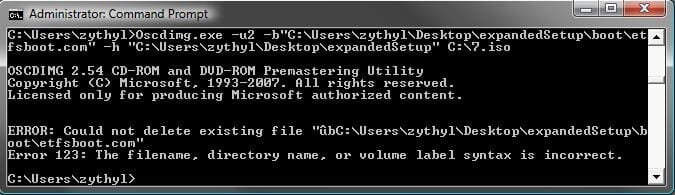
Oscdimg.exe –u2 –b"C:\Users\zythyl\Desktop\expandedSetup\boot\etfsboot.com" –h "C:\Users\zythyl\Desktop\expandedSetup" C:\7.iso

^^Is this the command your are running?

Yep, except I deleted all the quotation marks and put a space in between the "b" and "C"... other than that, it's identical.
Can you run the command as I have provided-unaltered to see if it works?

Here you go: :cry:
 

Attachments

  • error5.jpg
    error5.jpg
    27.2 KB · Views: 187

My Computer

Computer Manufacturer/Model Number
Custom-built
OS
Windows 7
CPU
E6850
Motherboard
Gigabyte P35-S3
Memory
4GB (2GB on Virtual XP)
Graphics Card(s)
nVidia GTX260
Sound Card
Onboard
Monitor(s) Displays
Samsung 22", Dell 17"
Screen Resolution
1680x1050, 1280x1024
Hard Drives
C:\Windows - 298GB
D:\zythyl - 1.81TB
F:\zythyl-backup - 596GB
G:\ Games / Programs - 931GB
PSU
Thermaltake Toughpower 750W
Case
CoolerMaster HAF
Cooling
Fans
Keyboard
Logitech G15
Mouse
Logitech G9
Internet Speed
10Mbps
Yep, except I deleted all the quotation marks and put a space in between the "b" and "C"... other than that, it's identical.
Can you run the command as I have provided-unaltered to see if it works?

Here you go: :cry:
hm...looks like there is something possibly wrong with the command. I will have to do some research or SIW2 ought to be able to make a correction (if needed) or otherwise guide you in a correct manner
 

My Computer

Computer Manufacturer/Model Number
Compal JFT02 (Custom Build Laptop)
OS
Windows 7 Home Premium x64 - Mac OS X 10.6.4 x64
CPU
Intel Core 2 Duo T9300 2.5 GHz
Motherboard
JFT02
Memory
4GB Kingston DDR2-800
Graphics Card(s)
NVIDIA Geforce 8600M GT (512MB Model)
Sound Card
Realtek HD Audio
Monitor(s) Displays
WUXGA Standard Laptop Display
Screen Resolution
1680*1050
Hard Drives
Toshiba 320GB 5400RPM Laptop HD
PSU
Standard Laptop Power Supply
Case
Standard Laptop Case
Cooling
Standard Laptop Cooling
Keyboard
Standard Laptop 105 Key-Keyboard
Mouse
Synaptics Touchpad
Internet Speed
Verizion Online DSL 3360/864 kbs (dl/up)
Ok...

I'll be lurking here in the meanwhile. :huh:
 

My Computer

Computer Manufacturer/Model Number
Custom-built
OS
Windows 7
CPU
E6850
Motherboard
Gigabyte P35-S3
Memory
4GB (2GB on Virtual XP)
Graphics Card(s)
nVidia GTX260
Sound Card
Onboard
Monitor(s) Displays
Samsung 22", Dell 17"
Screen Resolution
1680x1050, 1280x1024
Hard Drives
C:\Windows - 298GB
D:\zythyl - 1.81TB
F:\zythyl-backup - 596GB
G:\ Games / Programs - 931GB
PSU
Thermaltake Toughpower 750W
Case
CoolerMaster HAF
Cooling
Fans
Keyboard
Logitech G15
Mouse
Logitech G9
Internet Speed
10Mbps
Last edited:

My Computer

Computer Manufacturer/Model Number
Home built
OS
7 Pro.
CPU
AMD Phenom II X3 720
Motherboard
GeForce 8200
Memory
2x2GB Ballistix Tracer (red!)
Graphics Card(s)
XFX HD 5670 512MB
Sound Card
Onboard DTS
Monitor(s) Displays
40" Bravia, mmm
Screen Resolution
1360x768
Hard Drives
Sammy F3 1TB SATA II
PSU
Shittle standard
Case
SN78SH7
Cooling
Fancy Shittle jobber
Keyboard
M$ multimedia jobbie
Mouse
M$ optical
Internet Speed
8Mb Sky crap on BT line
Other Info
Stock speeds=FAIL
Windows 7 Pro 64bit Upgrade (Student Version)

My \expandedSetup\boot dir does not have the 'etfsboot.com' file. It does have 'bootsect.exe' so I pasted that into the command string and it worked. So if you are having problems with the string published here, check your expandedSetup\boot dir for the file you have. If you have bootsect.exe try:

oscdimg -bC:\expandedSetup\boot\bootsect.exe -h -u2 -m -lWIN_EN_DVD C:\expandedSetup\ C:\win7.iso

That worked for me.
 

My Computer

OS
Windows 7 Pro 64bit
An error

This is what I keep on getting when I try the command prompt thing.


Can't open boot sector file. The system can't find the specified file type.
What exactly does this mean? The string I entered didn't match up with the location?
 
Last edited:

My Computer

OS
Windows Vista Home Premium 32bit Upgrade to Windows 7 Pro 64bit

My Computer

Computer Manufacturer/Model Number
Custom-built
OS
Windows 7
CPU
E6850
Motherboard
Gigabyte P35-S3
Memory
4GB (2GB on Virtual XP)
Graphics Card(s)
nVidia GTX260
Sound Card
Onboard
Monitor(s) Displays
Samsung 22", Dell 17"
Screen Resolution
1680x1050, 1280x1024
Hard Drives
C:\Windows - 298GB
D:\zythyl - 1.81TB
F:\zythyl-backup - 596GB
G:\ Games / Programs - 931GB
PSU
Thermaltake Toughpower 750W
Case
CoolerMaster HAF
Cooling
Fans
Keyboard
Logitech G15
Mouse
Logitech G9
Internet Speed
10Mbps
Diff Error

Ok, got past that error. This one I have no idea what to do. It says it can't delete existing file. The filename, directory name, or volume label syntax is incorrect.
UPDATE!
Holy Potato sacks, I figured out my problem again. I'm on a roll. The problem was that I pasted it into the command prompt. Just to let you guys know, DO NOT paste it in the command prompt. You have to type it in MANUALLY or it will not work right.
 

My Computer

OS
Windows Vista Home Premium 32bit Upgrade to Windows 7 Pro 64bit
I've gotten everything to work and burned the .iso to a dvd. When i boot from the dvd it goes into the Starting Windows thing and loads and all, but when I get to the part with the blue and green background (where you can see your mouse for the first time) nothing ever loads. I can move my mouse around so I know my computer isn't freezing, but no menus or anythign come up.

Does anyone know have any idea what is causing this problem?

I do have the same problem an i wonder if anyone has fixed it alreday.

greetz
Microcube
 

My Computer

OS
XP
My mistake there is suppose to be no space between -bC:\User

Just there is suppose to be no space in etfsboot.com

I end up making my own line to use

oscdimg -bC:\Users\USERNAME\Desktop\expandedSetup\boot\etfsboot.com -h -u2 -m -lWIN_EN_DVD C:\Users\USERNAME\Desktop\expandedSetup\ C:\7.iso

That worked for me

Worked for me last night, THANKS to the ppl on the forum for all your help. I used Imgburn to burm my iso file, works perfectly.
 

My Computer

Computer Manufacturer/Model Number
Custom Build
OS
Win7
CPU
i7 860
Motherboard
Asus P7P55D Pro
Memory
8 gig OCZ DDR3 cas 7
Graphics Card(s)
Evga GTX 260 Core 216 sli
Sound Card
onboard
Monitor(s) Displays
Viewsonic
Hard Drives
OCZ Vertex 120 gb ssd
Seagate 7200 500 gb
PSU
Corsair 850 watt
Case
Antec 300
Cooling
Zalman CNPS 10X
Keyboard
Logitech
Mouse
Logitech
It worked for me...

Hi all - 1st post and wanted to chip in...

The instructions in the 1st post worked for me with exception of the oscdimg syntax. I had to use the what Audio posted from the second page of the thread.

oscdimg -bC:\Users\USERNAME\Desktop\expandedSetup\boot\etfsboot.com -h -u2 -m -lWIN_EN_DVD C:\Users\USERNAME\Desktop\expandedSetup\ C:\7.iso

The bolded parts are what you change. WIN_ED_DVD is just the label name I wanted. USERNAME you obviously change for your correct username.

I used imgburn with no additional settings needed - it booted perfectly. Thanks much to all who contributed and SIW2!
 

My Computer

OS
Win7
Hi again,

couldn't just anyone upload a working ISO file?

greetz Microcube
 

My Computer

OS
XP
Hi.

I'm having an issue with the size of the .iso and expandedSetup folders, mine appear to only be 199mb, which obviously isn't the correct size, I'm attempting to re-download the files from Digital River, but if the same thing happens again I'm completely stuck... any ideas?

EDIT:

I re-downloaded and now its 3.01gb as expected, for all those having the same issue, just re-download the files.
 
Last edited:

My Computer

OS
xp
Hi again,

couldn't just anyone upload a working ISO file?

greetz Microcube


That would be much easier, but uploading an ISO most likely violates MS's license terms. Thus, whomever does it violates those terms...as do folks who download it. Even if you were willing to do it, however, *where* would you upload it? Who would host it?

That said, I have heard folks throwing the "torrent" word around....but honestly, creating the ISO was fairly straightforward for most folks. Granted, others have been having a harder time...so I hope MS and digital river come up with a solution soon.
 

My Computer

Computer Manufacturer/Model Number
Shuttle (SFF) / SP35P2 Pro
OS
Win 7 Pro 64 Bit
CPU
Q6600
Motherboard
Shuttle
Memory
4GB
Graphics Card(s)
8800GT
Sound Card
On Board
Monitor(s) Displays
Samsung 22"
Screen Resolution
1680x1050
Hard Drives
WD 640 Boot
WD 640 Data
WD 500 external backup
PSU
Shuttle 450 Watt
Case
Shuttle
Cooling
Fans...lots of them
Keyboard
Creative Fatal1ty
Mouse
Logitech MX518
Internet Speed
Wicked Fast
Other Info
Capricorn
I'm runnig Windows 7 RC1 and
tried the OP syntax but it failed
then used the syntax in Audios post on page two
http://www.sevenforums.com/tutorials/30470-make-bootable-iso-student-d-l-2.html#post320454

and the result is below

C:\Windows\system32>oscdimg -bC:\Users\Jerry\Desktop\expandedSetup\boot\etfsboot
.com -h -u2 -m -lWIN_EN_DVD C:\Users\Jerry\Desktop\expandedSetup\ C:\7.iso
OSCDIMG 2.54 CD-ROM and DVD-ROM Premastering Utility
Copyright (C) Microsoft, 1993-2007. All rights reserved.
Licensed only for producing Microsoft authorized content.

Scanning source tree (500 files in 48 directories)
Scanning source tree complete (874 files in 201 directories)
Computing directory information complete
Image file is 2520809472 bytes
Writing 874 files in 201 directories to C:\7.iso
100% complete
Final image file is 2523011072 bytes
Done.

Then....
On Windows 7 RC1 after the file has made the iso located in C: directory. I right click on it and select "open with> image burner" and then i click burn which makes the bootable DVD.
 

My Computer

OS
Win7 RC
I haven't sifted through all the posts since about p15 but the following script worked for me to create the iso from windows xp pro


oscdimg -u2 -b"C:\Documents and Settings\USERNAME\Desktop\expandedSetup\boot\etfsboot.com" -h "C:\Documents and Settings\USERNAME\Desktop\expandedSetup" C:\7.iso

When I booted from the disk it appeared to hang for about 5 minutes before letting me choose the language and area settings. After this another period of about 5 mins where I thought it hung then the install began in earnest. 10 minutes later I'd registered and was busy installing all my other progs.

Hope this helps anyone else who is struggling and thank you to all those that have contributed to help those of us that are less tech savvy.

Cheers all...

Colo
 

My Computer

OS
xp
freezing

Hi, I have done everything prescribed successfully and now have a bootable jump drive. Once booted from the jump drive it loads the setup files and takes me to the windows 7 blue background, and after about 5 minutes freezes up. not sure what to do.

This thread has been uber helpful thanks to everyone.

This was a problem with my mother board and not the windows installation. I bought a new mother board and the setup worked beautifully.
 
Last edited:

My Computer

OS
windows Vista Ultimate
Windows 7 ISO Made Easy

I've found that the easiest (and free) way to make an ISO of Windows 7 from Digital River is with ImgBurn and the Windows 7 USB/DVD Download Tool.

Begin by running the executable that came with the Digital River download, because once you run the file it unpacks everything into a folder called 'expandedSetup.' Once this is done, run ImgBurn and select 'Crate image file from files/folders.' Click 'Browse for a folder' and select 'expandedSetup,' or simply drag 'expandedSetup' to the drop box. Below that is the 'Destination' field, so fill that out too.

This next part is important: Click the 'Advanced' tab on the right, then click the 'Bootable Disk' tab. Check 'Make Image Bootable,' and fill out the information to look like this: Emulation Type: None (Custom)
Boot Image: '...\expandedSetup\boot\efsboot.com'
Developer ID: Microsoft Corporation
Load Segment: 07C0
Sectors To Load: 8
Then click the large build icon in the lower left corner. It'll ask what to name the disk, I called mine 'Windows 7 Retail.' Once the image has been saved, run the Windows 7 USB DVD Download Tool and select your blank thumb drive (it will be formatted by this software, so back up what you need to if its not empty) and it will be written to the drive. This software also writes to DVD too, so that's another option if all you want is to boot to DVD.

That's it. No crazy command prompt commands or complicated tweaks necessary. I hope you found this helpful, and I apologize for not making it a proper tutorial, but for some reason I cannot seem to do that at the moment. Good luck with Windows 7.
 

My Computer

Computer Manufacturer/Model Number
Custom Build
OS
Windows 7
CPU
Intel Core 2 Quad Q9550 - 2.83 GHz
Motherboard
Gigabyte GA-EP45-DQ6
Memory
G.Skill 2GB (2x1GB) DDR2 1066
Graphics Card(s)
Nvidia GeForce 9800 GT
Sound Card
Integrated Realtek ALC889A Codec
Monitor(s) Displays
Westinghouse L2410NM
Screen Resolution
1920 x 1200
Hard Drives
Western Digital Caviar Blue 640 GB
Seagate Barracuda 1.5 TB
PSU
Rosewill RP600V2-S-SL 600 Watt
Case
Antec Nine Hundred
Cooling
Artic Colling Freezer 7 Pro
Keyboard
Saitek Eclipse PZ30AU
Mouse
Logitch Marble Mouse
Internet Speed
AT&T 1.5 Megabit
I made the iso but I can't find it anyone on my computer. Where is it suppose to be?
 

My Computer

OS
vista
Back
Top