Make bootable iso from student d/l

How to Create a Bootable ISO from a Student Windows 7 Download


If you get the student d/l and have 3 files :


Here's how:

1. Rt click each file, Properties > Unblock>Apply>OK.
NOTE: Make sure read only boxes are clear.

2. Rt click and run as admin on the .exe. You will get a folder called expandedsetup on your dektop with these inside:

EXPANDEDSETUPCONTENTS-2009-10-22_061340.jpg
   Note

If you receive this error:

We are unable to create or save new files in the folder in which this application was downloaded. Please check the folder properties to make sure that you have security permission on the folder to write files and that the folder is not read-only.

Continue.


3. D/L this zip, extract it and copy/move oscdimg.exe into C:\Windows\system32.
View attachment oscdimg.zip
4. Assuming expandedsetup is on your Desktop:

Vista/7 users open an elevated command prompt ( rt click cmd and run as admin) and type :

Code:
Oscdimg.exe –u2 –b"C:\Users\your_username\Desktop\expandedSetup\boot\etfsboot.com" –h "C:\Users\your_username\Desktop\expandedSetup" C:\7.iso


XP users commands are:

Code:
cd /d C:\windows\system32


Code:
oscdimg -u2 -b"C:\Documents and Settings\USER\Desktop\expandedSetup\boot\etfsboot.com" -h "C:\Documents and Settings\USER\Desktop\expandedSetup" C:\7.iso


5. You can copy and paste the above into elevated cmd.

Vista/7 users- replace your_username with your actual username.

XP users - replace USER with your actual username

6. Then press enter. Xp users press enter after each of their two commands.

7. If the expandedsetup folder is not on your desktop, replace with appropriate paths.

   Tip
You may wish to copy the expandedsetup folder directly onto the root of C:

The paths will be shorter and the command will be:

Code:
Oscdimg.exe –u2 –bC:\expandedSetup\boot\etfsboot.com –h C:\expandedSetup C:\7.iso

If your folder is elsewhere, to get the paths easily, press shift and rt click on etfsboot.com - select copy as path ( paste into notepad )

Shift and rt click on expanded setup - select copy as path - paste into notepad ) Use those instead of the above.

The spacing needs to be exact.
   Warning
When the .iso is created you will get this message:

WARNING: This image contains UDF file system structures.

That is normal as you are creating the udf filesystem.


8. A) You can burn the .iso to dvd as an image with an isoburner.
View attachment isoburner.zip
OR

B) You can use the Microsoft DVD/USB tool to burn the .iso to dvd or to use the .iso to make a bootable flash drive. Download the tool:
View attachment Windows7-USB-DVD-tool.exe
   Tip
To make a copy of your Windows 7 ISO file:

1. Click the Start button, and click Windows 7 USB/DVD Download tool in the All Programs list to open the USB/DVD Download tool.
2. Click Browse and select the file in the Open dialog box.
3. Select USB to create a copy on a USB flash drive or DVD to create a copy on a DVD disk, then click Next.
4. If you are copying the file to a USB flash drive, select your USB device in the dropdown list and click Begin copying. If you are copying the file up to a DVD, click Begin burning.

Microsoft Store: Download Manager Help

   Note

Microsoft’s ISO Image for Windows 7 Now Available

There is additional information regarding the Windows 7 64-bit download process. For those customers of the Student Offer, who wish to install the 64-bit version of Windows 7, but are currently running a 32-bit Operating System, there is now an optional downloadable ISO file of Windows 7 64-bit to allow for install.

- If you have already purchased the 64-bit version of Windows 7 from the Windows 7 Student Offer Online Store, please contact Digital River at the following link: http://windows7.digitalriver.com/servlet/PromoServlet/promoID.46354000
· In the Web form select the Download Option in the drop down menu and include "64-bit Windows 7 Solution" in the first line of your problem description.


Have fun.


Last edited by a moderator:
this blows. i was so close but now i'm stuck again. anyone know when the discs will arrive from microsoft?
 

My Computer

OS
vista 32 basic
Ugh, my ISO won't verify properly no matter what program I use. There isn't anyway I could use my 16gb USB drive is there?
 

My Computer

Computer Manufacturer/Model Number
Dell XPS M1530
OS
W7 64 Bit Home Premium
Graphics Card(s)
8600 M GT
Just wanted to say Thank you to SIW2 and Audio for the help with the oscdimg command line syntax. It worked perfect.
I put oscdimg.exe in c:\windows\system32.

Then ran C:\WINDOWS\system32>Oscdimg -bd:\win\expandedsetup\boot\etfsboot.com -h -u2 -m
-lWIN_EN_DVD d:\win7\expandedsetup\ c:7.iso

Burned the ISO to disk, rebooted with the DVD and Win7 installed fine.

A couple of minor observations/suggestions.
I started with a bare bones genuine properly licensed Windows XP Pro SP3 install. I then turned off paging, as the upgrade would make a folder "c:\windows.old" and there is no need for paging in it. Plus, I wanted to keep that small. I then used Norton's Ghost to make an image of the C: drive and burned that to a DVD for safe keeping.

I purchased the Win7 Pro 32-bit upgrade. The download from Digital River Inc. downloaded and expanded fine without any errors.

During the install of Win7, I only observed that it was installing Win7 Pro. I did not notice any other versions that I could install. As that is what I purchased, that was fine.

When it asked for the Product Key, I passed on that (I had read somewhere that some people where having problems with the Key's from Digital River) and just finished the install.

Install finished and I just had to upgrade some video and sound board drivers. Minor stuff, not unexpected.

Again, using Norton's Ghost, I made an image of the new Windows 7 C: drive BEFORE I entered the Product Key and authentication attempt....just in case.

After a restart, I then entered the Product Key and the authentication went fine. Windows is activated.

Lastly, I used Windows Disk Cleanup to get rid of the c:\Windows.old files as there wasn't anything in there I needed.

I would recommend others use some kind of disk imaging software. Saves a ton of time.

Anyway, kinda a long winded thanks again to you guys and others. Good job.
 

My Computer

Computer Manufacturer/Model Number
Dell Latitude D630
OS
Windows 7 Pro 32-bit Enterprise
CPU
Intel(R) Core(TM)2 Duo T9500 @2.6GHz
Memory
4GB
Graphics Card(s)
NVIDIA Quadro NVS 135M
Screen Resolution
1280X800
Hard Drives
150GB (78GB C: for OS) and (71GB D: for data)
Mouse
Logitech V45 wireless
Internet Speed
5MB Down 1 MB Up
Other Info
Good N wireless and bluetooth. Mostly a work laptop, but not to bad for gaming either. Has dual 9 cell battery, so can get many hours of use. Have two other desktops and another laptop. Seems everyone in the family "needs" their "own" system. :-)
windows freezing

From my previous post about it freezing after loading setup files, let it sit for 7-8 minutes and it finally asked what language, then it sits again but give it 5 minutes and the setup will start, my install seems perfect, thanks everyone for there help, you all should be getting paid by microsoft instead of us paying for their problems,

one thing i will have to get use to is the pinning programs on the taskbar, no more show desktop button :(
 

My Computer

OS
XP

My Computers

System One System Two

  • Computer type
    PC/Desktop
    OS
    7 X64
    CPU
    i5 8400
    Motherboard
    gigabyte b365m ds3h
    Memory
    2x8gb 3200mhz
    Hard Drives
    various
    PSU
    pure power 11 400w cm
    Case
    Coolermaster
    Cooling
    cryorig m9i
  • Computer type
    PC/Desktop
    OS
    7x64
    CPU
    g5400
    Motherboard
    ga b365m ds3h
    Memory
    8gb ddr4 2400
    PSU
    xfx pro 450w
Not compatible

I get a different error than I'm seeing from all of these posts.

I download the files and extract (with the desktop error), but when I click on the setup.exe file I get the following message:

The version of this file is not compatible with the version of Windows you're running. Check your systems information to see whether you need a 32bit or 64 bit version of the program, then contact the software publisher.

I'm currently running Vista home premium 32 bit, and my computer is capable of running 64 bit. The student upgrade I bought is for 64 bit. I've re-downloaded the file, tried throwing the files on a DVD for startup, all with no luck.

I'm totally stuck, I don't know what to do..:mad:
 

My Computer

Computer Manufacturer/Model Number
HP
OS
Windows 7 Home Premium
Memory
3.75
You are having trouble running a 64 bit setup.exe on a 32 bit operating system.

If you have the expandedsetup folder on your desktop - - make a bootable .iso, then burn to dvd, or make a bootable flash drive.

The easiest way - very very easy and free is to use vlite 1.1.6 to make and burn the bootable .iso for you.

See this link :

http://www.sevenforums.com/43886-post304.html
 

My Computers

System One System Two

  • Computer type
    PC/Desktop
    OS
    7 X64
    CPU
    i5 8400
    Motherboard
    gigabyte b365m ds3h
    Memory
    2x8gb 3200mhz
    Hard Drives
    various
    PSU
    pure power 11 400w cm
    Case
    Coolermaster
    Cooling
    cryorig m9i
  • Computer type
    PC/Desktop
    OS
    7x64
    CPU
    g5400
    Motherboard
    ga b365m ds3h
    Memory
    8gb ddr4 2400
    PSU
    xfx pro 450w
Sonic RecordNow has an option to your burn bootable, but never try it.
 

My Computer

Computer Manufacturer/Model Number
Lenovo ThinkPad T60
OS
Windows 7 Ultimate 64Bit
CPU
GenuineIntel Intel(R) Core(TM) DuoCore T2400 @ 1.83GHz
Motherboard
Intel(R) 82801G (ICH7 Family)
Memory
2.00 GB
Graphics Card(s)
Mobile Intel(R) 945 Express Chipset
Sound Card
SoundMAX Integrated Digital HD Audio
Monitor(s) Displays
ThinkPad Display
Screen Resolution
1400x1050
Hard Drives
100Gb SATA
Keyboard
Standard Keyboard
Mouse
HID-compliant Mouse
Internet Speed
Cable Broadband - 54Mbps
Other Info
Intel(R) PRO/1000 PL Network Connection
11a/b/g Wireless LAN Mini PCI Express Adapter
Okay, so I made the bootable iso dvd and booted up my system with the dvd. Everything was going fine and I was finally about to head to sleep when an error message pops up and says that it can't find the setup file or something, and I should make sure that no files are missing. I checked, and all 3,169.6 MB of data that I downloaded are on the iso file on the dvd. Anyone else get this? What do I do?
 

My Computer

OS
Microsoft XP
So, I made my d/l into a ISO, booted from dvd, blah blah blah. Now my product key is "invalid"! The program for 64 bit win 7 pro doesnt work on 32 bit xp, what gives? I guess I am unlucky, seems like everyone else got it to work. What should I do?

Did you type it in wrong? Perhaps PEBCAK?
 

My Computer

OS
Windows
I made the iso file, i put it on a disk, i rebooted. i have disk as priority over my HD in bios but it just boots bios. i burned two disks and put em in both my cd drives. i tried it in my laptop too, just boots from hard drive. when i look at the disk it shows the win7.iso file is that right?

Your saying you created a DVD with a single iso file? Wow.
 

My Computer

OS
Windows
I had some problems, but I finally got up to the product-key activation screen on the start up. However, windows tells me that my product-key is invalid? I copied it letter for letter, number for number -- it's a windows home premium 64-bit key. Edit: I just noticed that someone else is having a similar problem...wonderful.
 

My Computer

Computer Manufacturer/Model Number
Dell XPS M1530
OS
W7 64 Bit Home Premium
Graphics Card(s)
8600 M GT
Wow 24 hours later and people are still having issues. Just follow the instructions on page 1. Don't get creative, skip a step, or try 'your favorite ISO program'. Just follow the instructions and, like me, you'll be running Windows 7 off a clean boot/format install.

Please before you post "PLEASE HELP ITS BROKE!" try reading through this thread.
 

My Computer

OS
Windows
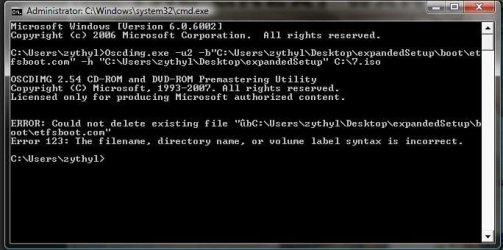
I got this error message, could you please help me (I didn't "unblock" as I don't know how...):

(see attachment)
 

Attachments

  • error.jpg
    error.jpg
    37.5 KB · Views: 123

My Computer

Computer Manufacturer/Model Number
Custom-built
OS
Windows 7
CPU
E6850
Motherboard
Gigabyte P35-S3
Memory
4GB (2GB on Virtual XP)
Graphics Card(s)
nVidia GTX260
Sound Card
Onboard
Monitor(s) Displays
Samsung 22", Dell 17"
Screen Resolution
1680x1050, 1280x1024
Hard Drives
C:\Windows - 298GB
D:\zythyl - 1.81TB
F:\zythyl-backup - 596GB
G:\ Games / Programs - 931GB
PSU
Thermaltake Toughpower 750W
Case
CoolerMaster HAF
Cooling
Fans
Keyboard
Logitech G15
Mouse
Logitech G9
Internet Speed
10Mbps
You're the most amazingly helpful person in the world Apollo ^^. Anyway, I see that this river "student-version" is really just a pain in the ass "upgrade version" because you have to have a previous version of vista installed for it to count as an upgrade,

"So to confirm, it seems like (in my case anyway), to install it, and with any future installs, you have to fully install a previous windows version first, then you can perform a clean install over the top."

I'll just re-install vista to the recovery partition, 10 gb or so and go from there. You shouldn't act like you aren't as annoyed as everyone else w/ the process.
 

My Computer

Computer Manufacturer/Model Number
Dell XPS M1530
OS
W7 64 Bit Home Premium
Graphics Card(s)
8600 M GT
so I followed all the directions but am still getting an error telling me that I have the wrong disc for the version of windows I am running when I try to boot from my usb flash drive. I used the windows tool to make the drive bootable, but it won't let me boot from it, and when I run it from windows it says it is the wrong disc. Any ideas?
 

My Computer

OS
windows
Okay, so I made the bootable iso dvd and booted up my system with the dvd. Everything was going fine and I was finally about to head to sleep when an error message pops up and says that it can't find the setup file or something, and I should make sure that no files are missing. I checked, and all 3,169.6 MB of data that I downloaded are on the iso file on the dvd. Anyone else get this? What do I do?


Oh well, I'm re-burning the image and going to try the new disc. If that doesn't work, I'll just re-download in the morning and try again with a completely new iso file.
 

My Computer

OS
Microsoft XP
I got this error message, could you please help me

The syntax is incorrect because you included " in your command. Remove those. Follow the first page, EXCEPT, replace the directories accordingly.

For example: If you have a separate partition, for instance, you used the E: drive instead of C: drive and you extracted the Windows 7 files there, then it would be: Oscdimg.exe –u2 –b E:\expandedSetup\boot\etfsboot.com –h E:\expandedSetup E:\7.iso

The reason why the quotes are there in the tutorial is because not everyone downloaded their files to the same location.
 

My Computer

OS
Win 7 64bit
Back
Top