
I ran Malwarebytes and it found several DLL as malware and it deleted them. But the downside is, now REGSVR32 is complaining the DLL's are MISSING.
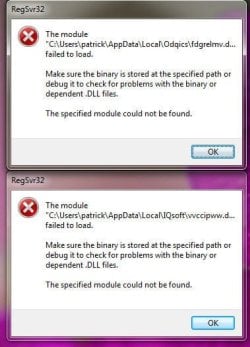
But at the first boot, I get 2 errors from REGSVR32 that it can not find "C:/User/xxx/AppData/Local/IQsoft/vvccipww.d.............. and that is all Windows listed in the window so I dont know the TOTAL name.
I see a DLL can be "unregistered" by using REGSVR32.EXE but since Windows 7 will not give me the entire name, and Malwarebytes has deleted the DLL, I dont how how.
Anyone know I can it get rid of these TWO error messages at every Boot?
error windows attached.
PS: Tried CCLEANER as suggested from 2014 post but did not work.
167615
But at the first boot, I get 2 errors from REGSVR32 that it can not find "C:/User/xxx/AppData/Local/IQsoft/vvccipww.d.............. and that is all Windows listed in the window so I dont know the TOTAL name.
I see a DLL can be "unregistered" by using REGSVR32.EXE but since Windows 7 will not give me the entire name, and Malwarebytes has deleted the DLL, I dont how how.
Anyone know I can it get rid of these TWO error messages at every Boot?
error windows attached.
PS: Tried CCLEANER as suggested from 2014 post but did not work.
167615
Attachments
My Computer
At a glance
windows 7 ultimate2 quads @ 2.43gb
- Computer Manufacturer/Model Number
- HP pavilion
- OS
- windows 7 ultimate
- CPU
- 2 quads @ 2.4
- Memory
- 3gb
- Monitor(s) Displays
- tv
- Hard Drives
- many vendors

