Hello,
so I've pulled all my hair out already trying to install Windows 7 on my Acer E1-510 laptop in UEFI mode.
The laptop came with Windows 8.1 preinstalled, and I've used that for quite a while before deciding to wipe it and clean install Windows 10.
The laptop does not have a CD/DVD drive thus I can only boot installation media from an USB drive.
The original installation was in UEFI mode, and in order to switch it to Legacy BIOS so I could install my Windows 10, I had to download an update for the BIOS which made such a switch available. It installed and ran fine for some time.
Afterwards I decided to switch over to mainly using Ubuntu. So I wiped the drive, saving only crucial data like photos and such to a backup USB drive. I have installed Ubuntu 16.04 in UEFI mode with GRUB2 as my bootloader. I swapped back to UEFI mode, and disabled Secure Boot.
Since some of my applications which I use are unavailable for Linux, I want to keep a Windows 7 x64 installation on a small partition in a dual-boot environment so I can reach for it if I feel the need for some of my applications.
So borrowed a friend's PC to clone my Windows 7 DVD to my USB drive in GPT format, so I can boot from UEFI. At first it was immediately giving a winload.efi missing error, the Setup couldn't boot, but when I re-imaged it to my USB drive it started to work.
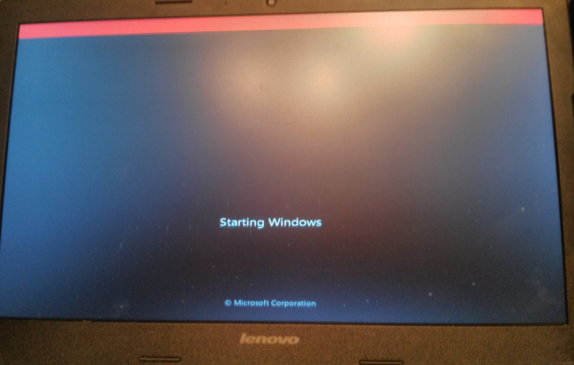
It shows up a progress bar saying "Windows is loading files" and then reaches the animated logo. As soon as the animated logo starts, the screen freezes and I get a red bar on top of my screen, along with my fans starting to spin full-speed.
I've tried booting the same USB on my friend's PC, and it gets to the entire installation without any issues, I've reached the point where I actually choose which partition to So basically - install to.
A quick Google Search about the red bar yielded me that Windows 7 doesn't support GOP, which from what I've read is the functionality to display an OEM logo while the Windows is booting. In Windows 8.1 / 10, I'd get an Acer logo with the white dots spinning around below it, suggesting Windows is starting up.
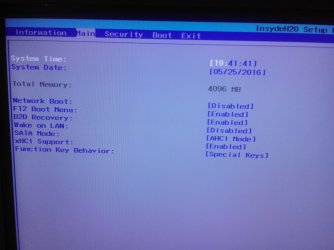
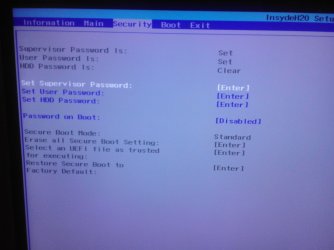
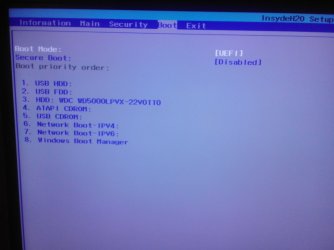
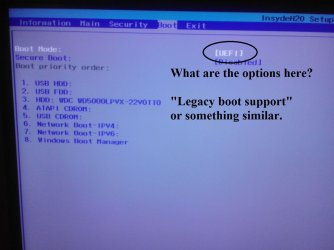
I've also read that to bypass that I need to enable CSM in my BIOS, however I could not find such an entry anywhere in the setup utility.
Is there something I am missing? I'd really prefer using Windows 7 to 8.1 or 10 because of the whole Metro layout. I also don't really want to wipe everything and recreate in Legacy mode, I'll consider it as a last resort option.
Thanks for all the help
so I've pulled all my hair out already trying to install Windows 7 on my Acer E1-510 laptop in UEFI mode.
The laptop came with Windows 8.1 preinstalled, and I've used that for quite a while before deciding to wipe it and clean install Windows 10.
The laptop does not have a CD/DVD drive thus I can only boot installation media from an USB drive.
The original installation was in UEFI mode, and in order to switch it to Legacy BIOS so I could install my Windows 10, I had to download an update for the BIOS which made such a switch available. It installed and ran fine for some time.
Afterwards I decided to switch over to mainly using Ubuntu. So I wiped the drive, saving only crucial data like photos and such to a backup USB drive. I have installed Ubuntu 16.04 in UEFI mode with GRUB2 as my bootloader. I swapped back to UEFI mode, and disabled Secure Boot.
Since some of my applications which I use are unavailable for Linux, I want to keep a Windows 7 x64 installation on a small partition in a dual-boot environment so I can reach for it if I feel the need for some of my applications.
So borrowed a friend's PC to clone my Windows 7 DVD to my USB drive in GPT format, so I can boot from UEFI. At first it was immediately giving a winload.efi missing error, the Setup couldn't boot, but when I re-imaged it to my USB drive it started to work.
It shows up a progress bar saying "Windows is loading files" and then reaches the animated logo. As soon as the animated logo starts, the screen freezes and I get a red bar on top of my screen, along with my fans starting to spin full-speed.
I've tried booting the same USB on my friend's PC, and it gets to the entire installation without any issues, I've reached the point where I actually choose which partition to So basically - install to.
A quick Google Search about the red bar yielded me that Windows 7 doesn't support GOP, which from what I've read is the functionality to display an OEM logo while the Windows is booting. In Windows 8.1 / 10, I'd get an Acer logo with the white dots spinning around below it, suggesting Windows is starting up.
I've also read that to bypass that I need to enable CSM in my BIOS, however I could not find such an entry anywhere in the setup utility.
Is there something I am missing? I'd really prefer using Windows 7 to 8.1 or 10 because of the whole Metro layout. I also don't really want to wipe everything and recreate in Legacy mode, I'll consider it as a last resort option.
Thanks for all the help
My Computer
At a glance
Ubuntu 16.04 x64Intel Celeron Dual Core N2820 2.17GHz4GB DDR3 1600MHzIntel HD Graphics
- Computer type
- Laptop
- Computer Manufacturer/Model Number
- Acer E1-510
- OS
- Ubuntu 16.04 x64
- CPU
- Intel Celeron Dual Core N2820 2.17GHz
- Motherboard
- InsydeH20
- Memory
- 4GB DDR3 1600MHz
- Graphics Card(s)
- Intel HD Graphics
- Hard Drives
- 500GB SATA 5400rpm
- Antivirus
- None, I know my browsing
- Browser
- Firefox