

- Local time
- 7:35 AM
- Messages
- 152
I am aware that this problem is not unique, and read dozens of posts on this forum, on Microsoft forums, and on the web before posting this.
This is a new Windows 7 Pro SP1 installation of two weeks ago, and am unable to shut down completely. At installation it worked fine and then one of the Microsoft updates messed it up and don't know how to correct it. Have been working on this problem for the past ten days, on and off but without success, so I am posting this with all the pertinent info.
What is happening is that at shutdown, the fan (only one is installed), the shut down button, and the USB hub & ports remain alive. The PSU is off.
This is definitely a Windows 7 problem because I also use Linux Xubuntu 14.04 and this shuts down without problems.
Hardware:
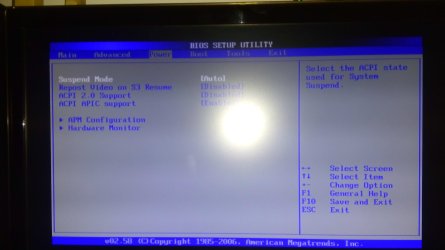
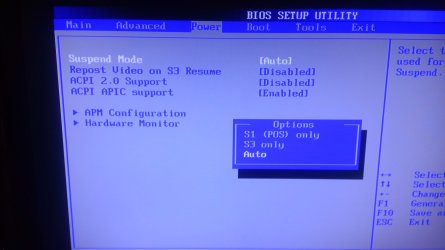
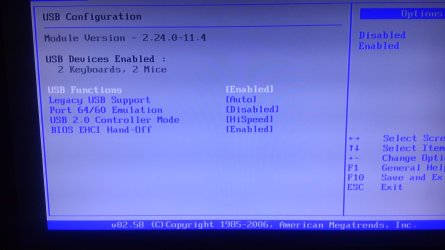
Starting with the motherboard BIOS, all settings are at default, with the exception of disabling the 3.5 floppy drive, and the boot on logo. Please see the three uploaded images for the BIOS default power settings.
Software:
1. Set Windows power options to 'balanced' default but disabled computer sleep and monitor shutdown.
2. Unchecked all power management settings in device manager. This includes all (11) HID compliant devices, IEEE 1394 Bus Host controller, (DWA-130 USB Wifi dongle) Wireless Microsoft 800 Keyboard, Logitech Mouse, and all (7) USB Root Hubs.
3. No errors in the Event Viewer, except a warning about WLAN shutting down successfully.
4. No driverless hardware in the Device manager, everything functions.
Perhaps someone can suggest some additional possibilities?
This is a new Windows 7 Pro SP1 installation of two weeks ago, and am unable to shut down completely. At installation it worked fine and then one of the Microsoft updates messed it up and don't know how to correct it. Have been working on this problem for the past ten days, on and off but without success, so I am posting this with all the pertinent info.
What is happening is that at shutdown, the fan (only one is installed), the shut down button, and the USB hub & ports remain alive. The PSU is off.
This is definitely a Windows 7 problem because I also use Linux Xubuntu 14.04 and this shuts down without problems.
Hardware:
Starting with the motherboard BIOS, all settings are at default, with the exception of disabling the 3.5 floppy drive, and the boot on logo. Please see the three uploaded images for the BIOS default power settings.
Software:
1. Set Windows power options to 'balanced' default but disabled computer sleep and monitor shutdown.
2. Unchecked all power management settings in device manager. This includes all (11) HID compliant devices, IEEE 1394 Bus Host controller, (DWA-130 USB Wifi dongle) Wireless Microsoft 800 Keyboard, Logitech Mouse, and all (7) USB Root Hubs.
3. No errors in the Event Viewer, except a warning about WLAN shutting down successfully.
4. No driverless hardware in the Device manager, everything functions.
Perhaps someone can suggest some additional possibilities?
Attachments
My Computer
At a glance
Microsoft Windows 10 Pro 64-bit8th generation Intel(R) Pentium G5600 3.9GHz16 GB DDR4 Kingston HyperXOn board Intel UHD Graphics 1GB shared
- Computer type
- PC/Desktop
- Computer Manufacturer/Model Number
- Custom built
- OS
- Microsoft Windows 10 Pro 64-bit
- CPU
- 8th generation Intel(R) Pentium G5600 3.9GHz
- Motherboard
- ASRock B360 Pro 4 8th Generation
- Memory
- 16 GB DDR4 Kingston HyperX
- Graphics Card(s)
- On board Intel UHD Graphics 1GB shared
- Sound Card
- On board Realtek HD ALC892
- Monitor(s) Displays
- LG 22 in LCD
- Screen Resolution
- 1536 x 864 x 32 bits (4294967296 colors) @ 59 Hz
- Hard Drives
- (1) SanDisk SDSSDHII120G ATA Device
(2) ST1000DM003-1SB10C ATA Device
(3) ST500DM002-1BD142 ATA Device
- PSU
- Antec 650 Watt PSU
- Case
- Antec mid size tower
- Cooling
- 120mm fan
- Keyboard
- Generic 105 keys
- Mouse
- Generic JeTech
- Internet Speed
- 50 megabits
- Antivirus
- Avast and daily Malwarebytes scan
- Browser
- Cyberfox 52.9.1


 . The USB hub was removed several days ago as I keep testing. Also tried High Power plan with modified settings, but so far nothing helped. The three power plans only differ by the default settings. The USB is always to be shut down.


