Solved Unable to shut down completely. some hardware is persistently stays on

ineuw

New member
Member
VIP
Local time
2:50 AM
Messages
152
I am aware that this problem is not unique, and read dozens of posts on this forum, on Microsoft forums, and on the web before posting this.

This is a new Windows 7 Pro SP1 installation of two weeks ago, and am unable to shut down completely. At installation it worked fine and then one of the Microsoft updates messed it up and don't know how to correct it. Have been working on this problem for the past ten days, on and off but without success, so I am posting this with all the pertinent info.

What is happening is that at shutdown, the fan (only one is installed), the shut down button, and the USB hub & ports remain alive. The PSU is off.

This is definitely a Windows 7 problem because I also use Linux Xubuntu 14.04 and this shuts down without problems.

Hardware:
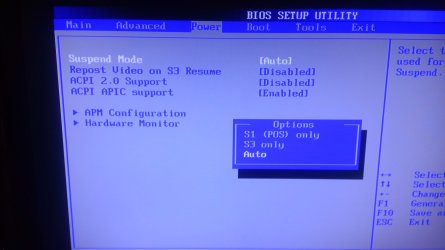
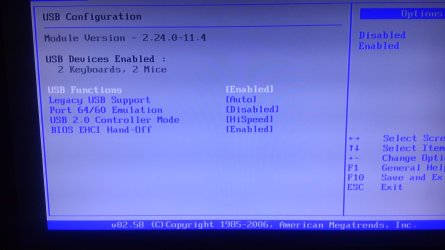
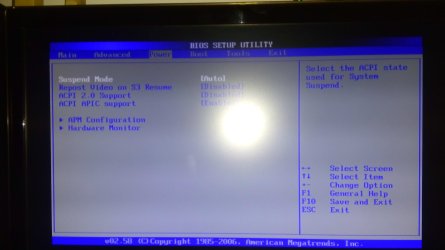
Starting with the motherboard BIOS, all settings are at default, with the exception of disabling the 3.5 floppy drive, and the boot on logo. Please see the three uploaded images for the BIOS default power settings.

Software:
1. Set Windows power options to 'balanced' default but disabled computer sleep and monitor shutdown.
2. Unchecked all power management settings in device manager. This includes all (11) HID compliant devices, IEEE 1394 Bus Host controller, (DWA-130 USB Wifi dongle) Wireless Microsoft 800 Keyboard, Logitech Mouse, and all (7) USB Root Hubs.
3. No errors in the Event Viewer, except a warning about WLAN shutting down successfully.
4. No driverless hardware in the Device manager, everything functions.

Perhaps someone can suggest some additional possibilities?
 

Attachments
  • 1 default power settings.jpg
    1 default power settings.jpg
    323.9 KB · Views: 2
  • 2 default power settings and suspend mode options.jpg
    2 default power settings and suspend mode options.jpg
    386.1 KB · Views: 1
  • 3 default usb settings.jpg
    3 default usb settings.jpg
    496.2 KB · Views: 1

My Computer My Computer

At a glance

Microsoft Windows 10 Pro 64-bit8th generation Intel(R) Pentium G5600 3.9GHz16 GB DDR4 Kingston HyperXOn board Intel UHD Graphics 1GB shared
Computer type
PC/Desktop
Computer Manufacturer/Model Number
Custom built
OS
Microsoft Windows 10 Pro 64-bit
CPU
8th generation Intel(R) Pentium G5600 3.9GHz
Motherboard
ASRock B360 Pro 4 8th Generation
Memory
16 GB DDR4 Kingston HyperX
Graphics Card(s)
On board Intel UHD Graphics 1GB shared
Sound Card
On board Realtek HD ALC892
Monitor(s) Displays
LG 22 in LCD
Screen Resolution
1536 x 864 x 32 bits (4294967296 colors) @ 59 Hz
Hard Drives
(1) SanDisk SDSSDHII120G ATA Device
(2) ST1000DM003-1SB10C ATA Device
(3) ST500DM002-1BD142 ATA Device
PSU
Antec 650 Watt PSU
Case
Antec mid size tower
Cooling
120mm fan
Keyboard
Generic 105 keys
Mouse
Generic JeTech
Internet Speed
50 megabits
Antivirus
Avast and daily Malwarebytes scan
Browser
Cyberfox 52.9.1
One thing, the fan can't be going if the PSU is off. Your PSU is still going if your fan is going. == If you think it is a Windows 7 problem, shut down the PC and boot again. Hold down the F8 key and that should bring you to a menu, "Last known good configuration". Select that and see if it helps. == Also you can try to stop everything running in the background. Check this tutorial. http://www.sevenforums.com/tutorials/2495-services-start-disable.html Let us know how things go.
 

My Computer My Computer

At a glance

Windows 7 Home Premium 32-Bit - Build 7600 SP1Intel Core i3-2120 3.30GhzKingston 4 GB DDR3 1333 mhzAMD Radeon HD6670
Computer type
PC/Desktop
Computer Manufacturer/Model Number
Custom Build
OS
Windows 7 Home Premium 32-Bit - Build 7600 SP1
CPU
Intel Core i3-2120 3.30Ghz
Motherboard
Asus P8Z68-V LX Intel Z68 Socket H2 ATX
Memory
Kingston 4 GB DDR3 1333 mhz
Graphics Card(s)
AMD Radeon HD6670
Sound Card
Sound Blaster Audigy SE 24-Bit
Monitor(s) Displays
Asus VE228
Screen Resolution
1440 X 900
Hard Drives
OCZ Vertex 3 120 GB Sata 3 SSD ==
Kingston SH103/S3 120 G Hyper X 120 GB SSD ==
Western Digital 500 GB Caviar Green 7200 RPM ==
PSU
Corsair CX600M == 600 Watt
Case
NZXT Apollo - Silver with Clear Side Panel
Cooling
Three 120 mm Fans
Keyboard
Microsoft Natural 4000
Mouse
Microsoft Custom Optical 3000
Internet Speed
AT&T Fiber Optic Wireless Network
Antivirus
Microsoft Security Essentials
Browser
Chrome
Other Info
120 mm Blue LED Fan -- Three Blue LED Lazer Light Sticks
suspect that the USB hub is still "active" unplug it,
or change the setting Allow the comp to turn it off.
(Hibernation mode enabled ????).
I tend to use High power and CHANGE what i >>>dont want<<< including sleep/Hibernation)

Roy
 

My Computer My Computer

At a glance

W7 home premium 32bit/W7HP 64bit/w10 tp insid...E5300 dual core3gbNvidia Geforce 7100 Nforce 630i
Computer type
PC/Desktop
Computer Manufacturer/Model Number
medionl/Aspire 6930G/acer x55a
OS
W7 home premium 32bit/W7HP 64bit/w10 tp insider ring
CPU
E5300 dual core
Motherboard
medion MS7366
Memory
3gb
Graphics Card(s)
Nvidia Geforce 7100 Nforce 630i
Monitor(s) Displays
avixc
Internet Speed
n (isp resticted to 72)
Antivirus
mse/pands
Browser
palemoon
Other Info
Belkin Fd7050 n USB using Railink RT2870 drivers, more upto date
bigmck, thanks for the reply. You are correct about the PSU. It's only 8 weeks old and it was so quiet that I had to disconnect the case fan to be sure that it's on. I am sure it's a Win7 problem because if it would be hardware, Linux would have the same problem. Also, this problem is so old (+7 days) that the "Last known good configuration" is the same as the regular boot configuration. Notwithstanding, I don't know which is the proper BIOS power settings (see my uploaded images)

My services are configured according to Black Viper's list. But there is one error in the Black Viper services list. The WiFi adapter service, "WLAN AutoConfig" should be set to automatic and not manual. I use WiFi for a desktop. The result was very nice. There Event Viewer was empty except one warning caused by Avast at shutdown. (When testing, before restart I clear the Even Viewer lists.)
 

My Computer My Computer

At a glance

Microsoft Windows 10 Pro 64-bit8th generation Intel(R) Pentium G5600 3.9GHz16 GB DDR4 Kingston HyperXOn board Intel UHD Graphics 1GB shared
Computer type
PC/Desktop
Computer Manufacturer/Model Number
Custom built
OS
Microsoft Windows 10 Pro 64-bit
CPU
8th generation Intel(R) Pentium G5600 3.9GHz
Motherboard
ASRock B360 Pro 4 8th Generation
Memory
16 GB DDR4 Kingston HyperX
Graphics Card(s)
On board Intel UHD Graphics 1GB shared
Sound Card
On board Realtek HD ALC892
Monitor(s) Displays
LG 22 in LCD
Screen Resolution
1536 x 864 x 32 bits (4294967296 colors) @ 59 Hz
Hard Drives
(1) SanDisk SDSSDHII120G ATA Device
(2) ST1000DM003-1SB10C ATA Device
(3) ST500DM002-1BD142 ATA Device
PSU
Antec 650 Watt PSU
Case
Antec mid size tower
Cooling
120mm fan
Keyboard
Generic 105 keys
Mouse
Generic JeTech
Internet Speed
50 megabits
Antivirus
Avast and daily Malwarebytes scan
Browser
Cyberfox 52.9.1
Hi torchwood, (personally I prefer Dr Who) :p. The USB hub was removed several days ago as I keep testing. Also tried High Power plan with modified settings, but so far nothing helped. The three power plans only differ by the default settings. The USB is always to be shut down.
 

My Computer My Computer

At a glance

Microsoft Windows 10 Pro 64-bit8th generation Intel(R) Pentium G5600 3.9GHz16 GB DDR4 Kingston HyperXOn board Intel UHD Graphics 1GB shared
Computer type
PC/Desktop
Computer Manufacturer/Model Number
Custom built
OS
Microsoft Windows 10 Pro 64-bit
CPU
8th generation Intel(R) Pentium G5600 3.9GHz
Motherboard
ASRock B360 Pro 4 8th Generation
Memory
16 GB DDR4 Kingston HyperX
Graphics Card(s)
On board Intel UHD Graphics 1GB shared
Sound Card
On board Realtek HD ALC892
Monitor(s) Displays
LG 22 in LCD
Screen Resolution
1536 x 864 x 32 bits (4294967296 colors) @ 59 Hz
Hard Drives
(1) SanDisk SDSSDHII120G ATA Device
(2) ST1000DM003-1SB10C ATA Device
(3) ST500DM002-1BD142 ATA Device
PSU
Antec 650 Watt PSU
Case
Antec mid size tower
Cooling
120mm fan
Keyboard
Generic 105 keys
Mouse
Generic JeTech
Internet Speed
50 megabits
Antivirus
Avast and daily Malwarebytes scan
Browser
Cyberfox 52.9.1
Boot in Safe Mode and see if you have the problem:
http://www.sevenforums.com/tutorials/69585-safe-mode.html

If a Windows Update caused the problem, you could start uninstalling updates to see if you can figure out which update caused the problem.

I create System Image backups, so i can quickly "undo things" and move forward to troubleshoot.
That's just an fyi, for future reference.
 

My Computer My Computer

At a glance

Multi-Boot W7_Pro_x64 W8.1_Pro_x64 W10_Pro_x6...AMD Athlon II x4 6206GB GSkill DDR2 800AMD 4670 GPU + AMD 4200 IGP
Computer type
PC/Desktop
Computer Manufacturer/Model Number
home built
OS
Multi-Boot W7_Pro_x64 W8.1_Pro_x64 W10_Pro_x64 +Linux_VMs +Chromium_VM
CPU
AMD Athlon II x4 620
Motherboard
Gigabyte GA-MA785G-UD3H
Memory
6GB GSkill DDR2 800
Graphics Card(s)
AMD 4670 GPU + AMD 4200 IGP
Sound Card
on board Realtek ALC889A
Monitor(s) Displays
RCA 40" LCD TV, Insignia 32" LCD TV, HP 15" LCD monitor
Screen Resolution
1680 x 1050
Hard Drives
OCZ Vertex 3 120GB,
Samsung F3 1TB (3),
Several others - WD, Seagate, Hitachi, ...
PSU
Corsair 500 W
Case
Rosewill mid tower
Cooling
CM 90mm rifle
Keyboard
Gyration wireless, Logitech wireless, Dell USB wired
Mouse
Gyration wireless, Logitech wireless, V7 USB wired
Internet Speed
Spectrum - 100Mbps D / 10Mbps U
Antivirus
Avast, MBAM3, EMET, WinPatrol
Browser
Pale Moon, Firefox, IE
Other Info
2 multi-boot PC's
Mainly HTPC/Office/Gen purpose (no gaming).
Trendnet USB KVM.
LG DVD burner/Blue Ray Player.
Tray system for removable SATA backup drives.

Not currently OCd, under-volted.
I use Hybrid sleep, rarely re-boot or shutdown.

Hauppauge HD-PVR, Avermedia PCIe TV Tuner, Hauppauge PCI TV Tuner.
I might have missed the detail, is the usb hub an AC-powered hub? If yes, I have the same problem until I put an ON/OFF toggle switch [froim Walmart] on the usb hub. If I turn the Walmart switch to off, the usb hub becomes like any other normal non-AC-powered usb hub and "powers down" when the computer powers down. Also, I noticed, even with the computer powered down, if the Walmart switch is ON, usb hub remains on [ac-powered], and all devices plugged into said usb hub also remains on.
ps: My Walmarts no longer carry these switches, you might have to go something like ACE Hardware.
 

My Computer My Computer

At a glance

Windows 7 Professional 64-bitDesktop i5; Acers i5 & i7desktop 16GB; 1 Acer 8GB & 1 Acer 16GB
Computer type
PC/Desktop
Computer Manufacturer/Model Number
Antec desktop; Acer Aspire laptops
OS
Windows 7 Professional 64-bit
CPU
Desktop i5; Acers i5 & i7
Memory
desktop 16GB; 1 Acer 8GB & 1 Acer 16GB
Hard Drives
1TB split into 2 equal partitions [OS and data] usable by RJS
Internet Speed
AT&T DSL
Browser
FF, GChrome, msIE
Other Info
Windows 7 Firewall, Emsisoft AM/AV, MSE [scan-only], SpywareBlaster, Ruiware/BillP combine
bigmck, thanks for the reply. You are correct about the PSU. It's only 8 weeks old and it was so quiet that I had to disconnect the case fan to be sure that it's on. I am sure it's a Win7 problem because if it would be hardware, Linux would have the same problem. Also, this problem is so old (+7 days) that the "Last known good configuration" is the same as the regular boot configuration. Notwithstanding, I don't know which is the proper BIOS power settings (see my uploaded images)

My services are configured according to Black Viper's list. But there is one error in the Black Viper services list. The WiFi adapter service, "WLAN AutoConfig" should be set to automatic and not manual. I use WiFi for a desktop. The result was very nice. There Event Viewer was empty except one warning caused by Avast at shutdown. (When testing, before restart I clear the Even Viewer lists.)

I don't know what Black Viper is, but you need to turn everything off that is running in the background and see if it shuts down. If it shuts down then, you turn them on one at a time and that way you can find the problem.
 

My Computer My Computer

At a glance

Windows 7 Home Premium 32-Bit - Build 7600 SP1Intel Core i3-2120 3.30GhzKingston 4 GB DDR3 1333 mhzAMD Radeon HD6670
Computer type
PC/Desktop
Computer Manufacturer/Model Number
Custom Build
OS
Windows 7 Home Premium 32-Bit - Build 7600 SP1
CPU
Intel Core i3-2120 3.30Ghz
Motherboard
Asus P8Z68-V LX Intel Z68 Socket H2 ATX
Memory
Kingston 4 GB DDR3 1333 mhz
Graphics Card(s)
AMD Radeon HD6670
Sound Card
Sound Blaster Audigy SE 24-Bit
Monitor(s) Displays
Asus VE228
Screen Resolution
1440 X 900
Hard Drives
OCZ Vertex 3 120 GB Sata 3 SSD ==
Kingston SH103/S3 120 G Hyper X 120 GB SSD ==
Western Digital 500 GB Caviar Green 7200 RPM ==
PSU
Corsair CX600M == 600 Watt
Case
NZXT Apollo - Silver with Clear Side Panel
Cooling
Three 120 mm Fans
Keyboard
Microsoft Natural 4000
Mouse
Microsoft Custom Optical 3000
Internet Speed
AT&T Fiber Optic Wireless Network
Antivirus
Microsoft Security Essentials
Browser
Chrome
Other Info
120 mm Blue LED Fan -- Three Blue LED Lazer Light Sticks
The problem was solved thirty minutes ago. It was one of the hidden devices in the Device Manager, something I didn't know existed until yesterday.

I attempted using Safe Mode several times, I can activate it, but it doesn't even shut down. It just hangs, so I abandoned that. I make a daily Macrium System mirror backup and restored Friday's version but Safe Mode doesn't shut down in that version either. No matter, this posted problem is solved.

The Black Wiper website is a source for a list of recommended Windows services at startup. It is listed in the tutorial link of your first post. The list display is very versatile. It permits the hiding of the columns so I selected the OS service names with their recommended state and created a windows batch file with the output going to a text file. From this output file, discovered which services don't exist and which are denied access, (the ones that were already running). This cleared the errors in the Event Viewer, except the warnings for two open Registry links. One for Avast, and the other is Google Drive.

I hope this helps someone in the forum .
 

My Computer My Computer

At a glance

Microsoft Windows 10 Pro 64-bit8th generation Intel(R) Pentium G5600 3.9GHz16 GB DDR4 Kingston HyperXOn board Intel UHD Graphics 1GB shared
Computer type
PC/Desktop
Computer Manufacturer/Model Number
Custom built
OS
Microsoft Windows 10 Pro 64-bit
CPU
8th generation Intel(R) Pentium G5600 3.9GHz
Motherboard
ASRock B360 Pro 4 8th Generation
Memory
16 GB DDR4 Kingston HyperX
Graphics Card(s)
On board Intel UHD Graphics 1GB shared
Sound Card
On board Realtek HD ALC892
Monitor(s) Displays
LG 22 in LCD
Screen Resolution
1536 x 864 x 32 bits (4294967296 colors) @ 59 Hz
Hard Drives
(1) SanDisk SDSSDHII120G ATA Device
(2) ST1000DM003-1SB10C ATA Device
(3) ST500DM002-1BD142 ATA Device
PSU
Antec 650 Watt PSU
Case
Antec mid size tower
Cooling
120mm fan
Keyboard
Generic 105 keys
Mouse
Generic JeTech
Internet Speed
50 megabits
Antivirus
Avast and daily Malwarebytes scan
Browser
Cyberfox 52.9.1
Hopefully understanding the usage of Macrium Reflect by the thread starter:
Over here, I use Wise AutoShutdown utility to "make" the computer shutdown when the backup has long since finished. Before I leave home, I turn off the printer and monitor.
 

My Computer My Computer

At a glance

Windows 7 Professional 64-bitDesktop i5; Acers i5 & i7desktop 16GB; 1 Acer 8GB & 1 Acer 16GB
Computer type
PC/Desktop
Computer Manufacturer/Model Number
Antec desktop; Acer Aspire laptops
OS
Windows 7 Professional 64-bit
CPU
Desktop i5; Acers i5 & i7
Memory
desktop 16GB; 1 Acer 8GB & 1 Acer 16GB
Hard Drives
1TB split into 2 equal partitions [OS and data] usable by RJS
Internet Speed
AT&T DSL
Browser
FF, GChrome, msIE
Other Info
Windows 7 Firewall, Emsisoft AM/AV, MSE [scan-only], SpywareBlaster, Ruiware/BillP combine
Back
Top