Solved 2TB Seagate Expansion light flashing but not recognised

funkychick7

New member
Local time
5:41 PM
Messages
21
Hello

I have a problem with my seagate 2tb external hard drive.
when i connect the usb, i can hear it whizzing and the light flashes, but nothing comes up on the computer.

i have tried changing cables and adapters with no luck.
ive tried changing usb ports with no luck

ive tried going into disk management and it doesnt show up there either.

ive also downloaded the sea tools after googling the problem but nothing shows up there.

i recently transfered everything from a computer i sold over to the hard drive. i wanted to transfer it over to a second backup hard drive today but with no luck.

on he last use of the hard drive i did disconnect with the remove hardware safely option.


anyone give any suggestions please...
 

My Computer My Computer

At a glance

windows 7 64 bit home premium
OS
windows 7 64 bit home premium
1. Does the computer read other USB drives or is it only this drive a problem?

2. Did you try connecting this expansion drive to another working computer?
 

My Computer My Computer

At a glance

Windows 7 Home Premium 32 bit
OS
Windows 7 Home Premium 32 bit
hi

yes the computer reads my other Buffalo 2tb drive

and i tried connecting the seqagate to a laptop but same problem

so im presuming its the hard drive at fault?
 

My Computer My Computer

At a glance

windows 7 64 bit home premium
OS
windows 7 64 bit home premium
OK, it is quite obviously a problem with the expansion drive. You said you had changed the adapter and so I take it it is not a power problem.

The only solution I can think of in this case is to remove the hard drive from its casing, connect it as a second internal drive on a desktop hoping that the problem is in the interface electronics and not the HDD itself.

But wait to see if others can come up with a less painful solution to try.

EDIT: If you have no requirement of recovering data, you may consider getting a replacement if your drive is still under warranty.
 

My Computer My Computer

At a glance

Windows 7 Home Premium 32 bit
OS
Windows 7 Home Premium 32 bit
ok will do
thankyou
 

My Computer My Computer

At a glance

windows 7 64 bit home premium
OS
windows 7 64 bit home premium
It does seem likely the external drive has died. I'd not try disassembling it, some of them don't have standard HDDs inside and have soldered on connections.
 

My Computer My Computer

At a glance

Windows 7 Ultimate X64 SP1Intel i5-2550K, Differing ~4.4-4.8GHz No buil...16GB G.Skill Sniper 1866MHz @ 2133MHz 2x8GBASUS GTX650TIB-DC2OC-2GD5, (650TI Boost)
Computer type
PC/Desktop
Computer Manufacturer/Model Number
Home Built Desktop By DataTech
OS
Windows 7 Ultimate X64 SP1
CPU
Intel i5-2550K, Differing ~4.4-4.8GHz No built in GPU
Motherboard
ASUS P8Z68-V PRO/GEN3
Memory
16GB G.Skill Sniper 1866MHz @ 2133MHz 2x8GB
Graphics Card(s)
ASUS GTX650TIB-DC2OC-2GD5, (650TI Boost)
Sound Card
Onboard Realtek 5-1
Monitor(s) Displays
Samsung P2570HD
Screen Resolution
1920x1080
Hard Drives
Samsung 840 Pro 256GB SSD for OS, 500GB Seagate Constellation (Enterprise drive) for Data
PSU
Corsair HX650W
Case
Inwin Dragon Rider
Cooling
Hyper 212 EVO w/two Noctua fans, push-pull, @1300 RPM
Keyboard
E-Z Eyes, bright yellow keys with large characters
Mouse
steelseries SENSEI Laser Pro Gaming
Internet Speed
48-51Mbs Mbs down, 11 Mbs up Xfinity Cable
Antivirus
Norton Internet Security 2013
Browser
IE 10, Opera, Pale Moon if needed
Other Info
4 case fans, LG BluRay-RE, ASUS DVD-RW, Mr. Fusion power supply, 1.21 gigawatts.
What Britton30 says may be true. May be not (with this drive). We do not know.

Can you please post the exact model no. of your Seagate Expansion drive?

Then may be someone who had actually skinned it out can tell what is inside and how connected. We can even try a google.

As I indicated, once you open it, you will void any warranty.

If it is out of warranty it shouldn't matter if you have to open it and see what best you can do unless someone comes up with a possible solution to try, without opening it.( Honestly I can't think of any.)

As I see it is a real difficult situation on which only you can decide.:)
 

My Computer My Computer

At a glance

Windows 7 Home Premium 32 bit
OS
Windows 7 Home Premium 32 bit
ok quick update..

i went ahead and opened it because it was out of waaranty anyway... followed a tutorial from youtube to see how to open it.

i bought a dock t see if it would work with that and same problem. just the light flashes but will not come up on my computer or disk management.

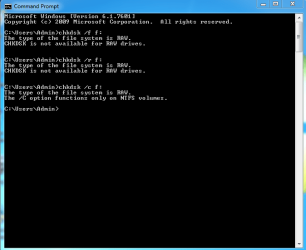
i followed another solution on youtube via the commandprompt. and it said chkdsk not available for RAW drives.
does this mean the hdd has become RAW?

another thing that i have tried is on device manager, i uninstalled all the hidden greyed out disk drives and restarted.
i then got "other devices - usb" with a yellow triangle next to it. i tried to update driver but it says it cant find the drivers.

went to seagete to download the drivers but when i open the driver helper it doesnt recognise it.

please see inserted pictures

model number is ST320005EXD101-RK
seagate expansion 2tb
 

Attachments

  • dsk.PNG
    dsk.PNG
    13.3 KB · Views: 60
  • dskmgr.PNG
    dskmgr.PNG
    10.5 KB · Views: 60
  • model number.PNG
    model number.PNG
    23.7 KB · Views: 4

My Computer My Computer

At a glance

windows 7 64 bit home premium
OS
windows 7 64 bit home premium
ok everyone.. good news... i have managed to get it working again...yayyyyyyyyyyyyy :D

can i post external links here so anyone needing help can see the solutions too?
 

My Computer My Computer

At a glance

windows 7 64 bit home premium
OS
windows 7 64 bit home premium
Hello! I think I have the same problem with my Seagate. My laptop was recognising the external drive until yesterday. Now it keeps showing an I/O error. Can you help me, please? What have you done to mke it working again?
 

My Computer My Computer

At a glance

-Windows 7 Ultimate x64
Computer type
Laptop
Computer Manufacturer/Model Number
Acer
OS
-Windows 7 Ultimate x64
Hello! I think I have the same problem with my Seagate. My laptop was recognising the external drive until yesterday. Now it keeps showing an I/O error. Can you help me, please? What have you done to mke it working again?


Hi

sory for the late reply, have been abroad..

here is a link i found and decided to go through each step.
it was somewhere in the middle of the page where it tells you about upper filters and lower filters. after this step, it still didnt work, but somehow i decided to restart the computer, the computer recogbised it had been chnged and wanted to fix the computer ( sorry dont know the technical term - think it was fixing the registery of somthing), but any way, after restarting, the computer installed the hardware and my harddrive was working again.

hope this page helps

en.kioskea.net/forum/affich-522124-external-usb-hard-drive-don-t-show-up
 

My Computer My Computer

At a glance

windows 7 64 bit home premium
OS
windows 7 64 bit home premium
Thanks for the reply! I'll try that too and I hope that it will work. Thank you for your help!
 

My Computer My Computer

At a glance

-Windows 7 Ultimate x64
Computer type
Laptop
Computer Manufacturer/Model Number
Acer
OS
-Windows 7 Ultimate x64
external drive blinking

Hello funkychick7

Could you explain how you solved your problem ? I have the same trouble and it seems my external drive shows RAW partition and windows shos not initialized and recovery software shows mbr has to be fixed ...
Is it only a power problem??? because when I turn off the PC it also turn off the external drive ?
Thanks
I don't want to loose my 2 To datas with 2 years of souvenirs
 

My Computer My Computer

At a glance

windows 7 proInstalled Memory (RAM): 11.99 GB
Computer type
PC/Desktop
Computer Manufacturer/Model Number
Gateway
OS
windows 7 pro
Motherboard
Processor: Intel(R) Core(TM) i7 CPU 920 @ 2.67GHz 4 @ 2668 M
Memory
Installed Memory (RAM): 11.99 GB
Hard Drives
Operating System:
Microsoft Windows 7 Professionnel
Service Pack 1
64 bits Operating System

Avg. Use: 0 MB
Peak Use: 1 MB
@funkychick7: Please post solution, i have the same problem.
 

My Computer My Computer

At a glance

Win 7 64-bit2.8GHz3GBIntel
Computer type
PC/Desktop
Computer Manufacturer/Model Number
HP
OS
Win 7 64-bit
CPU
2.8GHz
Memory
3GB
Graphics Card(s)
Intel
funnychick7

Hi ,
Could you please post the solution for the blinking light problem for Seagate Freeagent Hard drive?
 

My Computer My Computer

At a glance

WIndows 7 Professional 32 bit
Computer type
PC/Desktop
OS
WIndows 7 Professional 32 bit
Hello

first of all apologies to the other two users for me not replying, i had no idea and i didnt get any email either.. bt the solution link was posted couple posts above..

but here is it again

External USB Hard Drive don't show up ... [Solved]

I went through each solution and the one that worked for me was where it mentions lower filters and upper filters.
Althoughi did restart after deleting these, and after restarting, the computer repaired itself.

I am in another similar situation except the filter solution doesnt work with windows 8, so will try reading on the page.


Again here is the link
External USB Hard Drive don't show up ... [Solved]
 

My Computer My Computer

At a glance

windows 7 64 bit home premium
OS
windows 7 64 bit home premium
Hi funkchick7,

Did you find a solution for Win 8 problem? I'm stuck with same problem in W8.
Thanls
 

My Computer My Computer

At a glance

Windows 7 Home premium 64bit
Computer type
Laptop
Computer Manufacturer/Model Number
Sony
OS
Windows 7 Home premium 64bit
Hi

No i didnt find a solution. Ended up paying a little to recover as i really needed them (a family members data)

Sorry cant be more help
 

My Computer My Computer

At a glance

windows 7 64 bit home premium
OS
windows 7 64 bit home premium
Hi Funkychick7,

Could you tell me how you managed to solve the problem? I have the same problem with a 1tb seafgate.
 

My Computer My Computer

At a glance

windows 10 64 bit
Computer type
Laptop
Computer Manufacturer/Model Number
Dell
OS
windows 10 64 bit

My Computer My Computer

At a glance

windows 7 64 bit home premium
OS
windows 7 64 bit home premium
Back
Top