
Solved Can only access MS Office help files as an administrator

Yes, I do agree with you & using the methods that MS recommend for completely uninstalling Office 2007. To save you having to go back to my previous post & find that I have posted the website again here.

https://support.microsoft.com/en-au/kb/928218

Good luck & I will be very interested to hear whether that fixes the problem.
 

My Computer My Computer

At a glance

Windows 7 Home Premium 64 bit sp1Intel i5 3570 3.4Ghz Ivy Bridge SKT 1155 quad...G-Skill Rip Jaws 16Gb (8x2) DDR3 -1600 PC3 12...Gigabyte NVIDIA GT610 1Gb DDR3 810/1200 PCI-E...
Computer type
PC/Desktop
Computer Manufacturer/Model Number
Self built using existing case
OS
Windows 7 Home Premium 64 bit sp1
CPU
Intel i5 3570 3.4Ghz Ivy Bridge SKT 1155 quad core
Motherboard
Gigabyte Z77-HD3 SKT 1155 2xSata 3, 4x USB 3.0
Memory
G-Skill Rip Jaws 16Gb (8x2) DDR3 -1600 PC3 12800 CL 10 red
Graphics Card(s)
Gigabyte NVIDIA GT610 1Gb DDR3 810/1200 PCI-E 2.0 Silent
Sound Card
NVIDIA High Definition & Realtech High Definition Audio
Monitor(s) Displays
2 x Philips 226V4L 16:9 aspect ratio
Screen Resolution
1920 x 1080 HD
Hard Drives
Samsung 840 Pro 256gb SSD, SATA 3.
Hitachi Touro Portable 1tb, USB 3.0 HDD used for image b/ups.
PSU
Corsair VS450
Case
Codeng
Cooling
PSU fan & CPU fan
Keyboard
Logitech
Mouse
Logitech Wireless trackball M570
Internet Speed
Wireless 3G. 3mg down & 550kb up.
Antivirus
Bitdefender Internet Security 2020
Browser
Opera (Current Version) & Firefox
Other Info
MS Office 2013 Pro. Davis weather station software. MGE Nova 600 avr UPS.
If you want a quick and easy solution to the Office problem then try LibreOffice it is free and all the Microsoft Office stuff is compatible. I have it on three machines now that Microsoft have blocked me from activating 2007 and 2010 just because I have installed it on different drives even when drives have gone bad and I find it as good as if not better than the Microsoft stuff in some ways.

https://www.libreoffice.org/download/libreoffice-fresh/
 

My Computer My Computer

At a glance

Desk1 7 Home Prem / Desk2 10 Pro / Main lap A...Desk1 i5 3750K / Laptop i7 GTX 860M / Desk2 i...Desk1 8GB (1866) / Desk2 16GB (1333) / Laptop...Desk 1& 2NVidia GTX 650 & Laptops on board Intel
Computer type
PC/Desktop
Computer Manufacturer/Model Number
Own build (new) Desk1 / Asus ROG Win 7 / Desk2 1st build
OS
Desk1 7 Home Prem / Desk2 10 Pro / Main lap Asus ROG 10 Pro 2 laptop Toshiba 7 Pro Asus P2520 7 & 10
CPU
Desk1 i5 3750K / Laptop i7 GTX 860M / Desk2 i5 2500
Motherboard
Desk1 Asus P877-V / Desk2 Gigabyte H67 UD3H / Laptop ?
Memory
Desk1 8GB (1866) / Desk2 16GB (1333) / Laptop 8Gb DDR3
Graphics Card(s)
Desk 1& 2NVidia GTX 650 & Laptops on board Intel
Sound Card
Desk 1 & 2 -XONAR DG Realtek High Def audio Laptop
Monitor(s) Displays
Desk 1 Benq HD 2450 / Desk2 Philips 24" / Laptop 17.5"
Screen Resolution
1920x1080 D1 & D2 & Laptop 1
Hard Drives
Desk1 Samsung 120GB 830 SSD
Asus ROG 256GB 850 Pro SSD
Desk2 Samsung 840 256 SSD
Toshiba 120GB EVO
PSU
Desk 1 Corsair HX 1050/ Laptop ? / Desk 2 Corsair HX 650
Case
Desk 1 Cooler HAF XM ? Toshiba laptop / Desk2 Coolermaster
Cooling
Fans on all Desk1 -2 Desk2 - all Coolermasters 5 Laptop ?
Keyboard
Desk 1 MS Sidewinder X6 Desk 2 MS Sidewinder X 4
Mouse
Desk 1&2 - Gigabyte MS 900 gamer - laptop - Logitec wireless
Internet Speed
ADSL2+
Other Info
One other Desktop (tester) and spare Toshba laptop both with SSD's
Running Kaspersky 2016 ISS on all machines config'd identically
Logitec audio stereo systems on each machine (x3)
Canon MG5250MFC
Router/modem TP-Link running WPA2SK
A correction to my last post: The other standard user on my system can access either the internal help function or the online one. I thought it was only the online one because I set the online help option while installing MS Office, and then forgot I set it.
 

My Computer My Computer

At a glance

Windows 7 64 bitIntel Core i3 CPU M330 @2.13 GHz8 GBIntel Graphics Media Accelerator HD
Computer type
Laptop
Computer Manufacturer/Model Number
HP
OS
Windows 7 64 bit
CPU
Intel Core i3 CPU M330 @2.13 GHz
Memory
8 GB
Graphics Card(s)
Intel Graphics Media Accelerator HD
Sound Card
Intel
Monitor(s) Displays
Generic PnP monitor
Screen Resolution
1366 x 768
Hard Drives
ST9500420AS Internal 500 GB
Seagate External 110 GB
Seagate FreeAgent GoFlex External 1 TB
Keyboard
Microsoft
Mouse
Microsoft
Internet Speed
87 Mbps download speed, 12.16 Mbps upload speed
Antivirus
Microsoft Security Essentials
Browser
MS IE, Google Chrome, Mozilla Firefox, Apple Safari
Yes, I do agree with you & using the methods that MS recommend for completely uninstalling Office 2007. To save you having to go back to my previous post & find that I have posted the website again here.

https://support.microsoft.com/en-au/kb/928218

Good luck & I will be very interested to hear whether that fixes the problem.

It didn't. I manually uninstalled Office 2007 according to the instructions you sent. I followed the procedure exactly, although there was one file that couldn't be deleted because it was in use by QuickBooks, and one registry key specified that doesn't exist on my system. I even took notes of the registry keys I deleted. After reinstalling Office as the Administrator I ran Word and Excel in my account as a standard user. As before, I can't access the help function unless those programs are run as Administrator. If they're run as Administrator, I again see the "There was a problem sending a command to the program" error message when I open a file in Word or Excel. Again, the other standard user can easily access the help function without changing the program properties. Again, I couldn't find anything wrong with how the permissions are set in Word and Excel. I briefly reviewed the settings in the Word and Excel options for both user accounts, and could find no significant differences.

This is puzzling, and frustrating. Every time I think about it I wonder what can be causing one user account to be unable to access one feature of the programs, whereas the other user has unrestricted access to them.
 

My Computer My Computer

At a glance

Windows 7 64 bitIntel Core i3 CPU M330 @2.13 GHz8 GBIntel Graphics Media Accelerator HD
Computer type
Laptop
Computer Manufacturer/Model Number
HP
OS
Windows 7 64 bit
CPU
Intel Core i3 CPU M330 @2.13 GHz
Memory
8 GB
Graphics Card(s)
Intel Graphics Media Accelerator HD
Sound Card
Intel
Monitor(s) Displays
Generic PnP monitor
Screen Resolution
1366 x 768
Hard Drives
ST9500420AS Internal 500 GB
Seagate External 110 GB
Seagate FreeAgent GoFlex External 1 TB
Keyboard
Microsoft
Mouse
Microsoft
Internet Speed
87 Mbps download speed, 12.16 Mbps upload speed
Antivirus
Microsoft Security Essentials
Browser
MS IE, Google Chrome, Mozilla Firefox, Apple Safari
If you want a quick and easy solution to the Office problem then try LibreOffice it is free and all the Microsoft Office stuff is compatible. I have it on three machines now that Microsoft have blocked me from activating 2007 and 2010 just because I have installed it on different drives even when drives have gone bad and I find it as good as if not better than the Microsoft stuff in some ways.

https://www.libreoffice.org/download/libreoffice-fresh/

Thank you very much for that suggestion. I haven't given thought to using an alternative to MS Office. When I ran Linux on my system years ago I used LaTex as an alternative to MS Word or Wordperfect. I heard about OpenOffice but didn't use it. At the time I ran Windows on another partition, so I switched to using Word and WP when I needed to. I'm willing to use LibreOffice since it's compatible with MS Office. The fact that it's open source indicates that it's dependable and of good quality. Since the word "Libre" in French means free, as in liberated, I think the program was first developed in France; can you confirm that?

For now I'm concentrating on solving my problem with MS Word and MS Excel, since doing so may reveal something about my system that I need to at least be aware of. It's far from being a trivial problem.
 

My Computer My Computer

At a glance

Windows 7 64 bitIntel Core i3 CPU M330 @2.13 GHz8 GBIntel Graphics Media Accelerator HD
Computer type
Laptop
Computer Manufacturer/Model Number
HP
OS
Windows 7 64 bit
CPU
Intel Core i3 CPU M330 @2.13 GHz
Memory
8 GB
Graphics Card(s)
Intel Graphics Media Accelerator HD
Sound Card
Intel
Monitor(s) Displays
Generic PnP monitor
Screen Resolution
1366 x 768
Hard Drives
ST9500420AS Internal 500 GB
Seagate External 110 GB
Seagate FreeAgent GoFlex External 1 TB
Keyboard
Microsoft
Mouse
Microsoft
Internet Speed
87 Mbps download speed, 12.16 Mbps upload speed
Antivirus
Microsoft Security Essentials
Browser
MS IE, Google Chrome, Mozilla Firefox, Apple Safari
If the Standard user can access the Help files without any problems, then it would seem the problem is associated with your Amin Account set up.

You could try setting up an new User & set it up exactly the same as the one that works with the Help files. If this then works as expected you could then change it to an Administrators Account & if all is well you could delete the old Admin Account.

This Forum link might help you.

http://www.sevenforums.com/tutorials/7417-built-administrator-account-change-name.html
 

My Computer My Computer

At a glance

Windows 7 Home Premium 64 bit sp1Intel i5 3570 3.4Ghz Ivy Bridge SKT 1155 quad...G-Skill Rip Jaws 16Gb (8x2) DDR3 -1600 PC3 12...Gigabyte NVIDIA GT610 1Gb DDR3 810/1200 PCI-E...
Computer type
PC/Desktop
Computer Manufacturer/Model Number
Self built using existing case
OS
Windows 7 Home Premium 64 bit sp1
CPU
Intel i5 3570 3.4Ghz Ivy Bridge SKT 1155 quad core
Motherboard
Gigabyte Z77-HD3 SKT 1155 2xSata 3, 4x USB 3.0
Memory
G-Skill Rip Jaws 16Gb (8x2) DDR3 -1600 PC3 12800 CL 10 red
Graphics Card(s)
Gigabyte NVIDIA GT610 1Gb DDR3 810/1200 PCI-E 2.0 Silent
Sound Card
NVIDIA High Definition & Realtech High Definition Audio
Monitor(s) Displays
2 x Philips 226V4L 16:9 aspect ratio
Screen Resolution
1920 x 1080 HD
Hard Drives
Samsung 840 Pro 256gb SSD, SATA 3.
Hitachi Touro Portable 1tb, USB 3.0 HDD used for image b/ups.
PSU
Corsair VS450
Case
Codeng
Cooling
PSU fan & CPU fan
Keyboard
Logitech
Mouse
Logitech Wireless trackball M570
Internet Speed
Wireless 3G. 3mg down & 550kb up.
Antivirus
Bitdefender Internet Security 2020
Browser
Opera (Current Version) & Firefox
Other Info
MS Office 2013 Pro. Davis weather station software. MGE Nova 600 avr UPS.
What would be the point of creating a new user account the same as the one that can access the help files? Is it so it can replace my user account that can't access the help files? If so, is there a straightforward way to transfer all my user files to it? Would it involve renaming my user account?

Now that you mention it, there's something odd about the way my administrator account was set up. There are two user account folders for my user account. My user data files are in one c:\user folder and the other c:\user folder contains only appdata files. The display name for my account appears on neither of the two folders. I thought there can be only one user folder for each user account. Perhaps this has to do with why my user account can't access the help files, while the other user account can.
 

My Computer My Computer

At a glance

Windows 7 64 bitIntel Core i3 CPU M330 @2.13 GHz8 GBIntel Graphics Media Accelerator HD
Computer type
Laptop
Computer Manufacturer/Model Number
HP
OS
Windows 7 64 bit
CPU
Intel Core i3 CPU M330 @2.13 GHz
Memory
8 GB
Graphics Card(s)
Intel Graphics Media Accelerator HD
Sound Card
Intel
Monitor(s) Displays
Generic PnP monitor
Screen Resolution
1366 x 768
Hard Drives
ST9500420AS Internal 500 GB
Seagate External 110 GB
Seagate FreeAgent GoFlex External 1 TB
Keyboard
Microsoft
Mouse
Microsoft
Internet Speed
87 Mbps download speed, 12.16 Mbps upload speed
Antivirus
Microsoft Security Essentials
Browser
MS IE, Google Chrome, Mozilla Firefox, Apple Safari
Are you saying one of the Admin user accounts works & the other doesn't. Is that actually the case. If so can you delete the one that does not work.

Find out which of user accounts works properly & what name it is using. Then open Control Panel & select User Accounts & both accounts should be shown there. You should then be able to change the account type of the wrong Admin account, so it's no longer an Admin account, keeping your account that works. You should then be able to delete the old account.
 

My Computer My Computer

At a glance

Windows 7 Home Premium 64 bit sp1Intel i5 3570 3.4Ghz Ivy Bridge SKT 1155 quad...G-Skill Rip Jaws 16Gb (8x2) DDR3 -1600 PC3 12...Gigabyte NVIDIA GT610 1Gb DDR3 810/1200 PCI-E...
Computer type
PC/Desktop
Computer Manufacturer/Model Number
Self built using existing case
OS
Windows 7 Home Premium 64 bit sp1
CPU
Intel i5 3570 3.4Ghz Ivy Bridge SKT 1155 quad core
Motherboard
Gigabyte Z77-HD3 SKT 1155 2xSata 3, 4x USB 3.0
Memory
G-Skill Rip Jaws 16Gb (8x2) DDR3 -1600 PC3 12800 CL 10 red
Graphics Card(s)
Gigabyte NVIDIA GT610 1Gb DDR3 810/1200 PCI-E 2.0 Silent
Sound Card
NVIDIA High Definition & Realtech High Definition Audio
Monitor(s) Displays
2 x Philips 226V4L 16:9 aspect ratio
Screen Resolution
1920 x 1080 HD
Hard Drives
Samsung 840 Pro 256gb SSD, SATA 3.
Hitachi Touro Portable 1tb, USB 3.0 HDD used for image b/ups.
PSU
Corsair VS450
Case
Codeng
Cooling
PSU fan & CPU fan
Keyboard
Logitech
Mouse
Logitech Wireless trackball M570
Internet Speed
Wireless 3G. 3mg down & 550kb up.
Antivirus
Bitdefender Internet Security 2020
Browser
Opera (Current Version) & Firefox
Other Info
MS Office 2013 Pro. Davis weather station software. MGE Nova 600 avr UPS.
The admin user account that doesn't work is my main user account, and I can't delete that account without losing most if not all of the important data on my system. I hardly use the user account that can access the help files. What I need is a trouble-free and efficient way to transfer that data in the main user account to a new one, so that any defects in my current user account won't be present in the new one. Personalization settings like custom wallpaper will be retained.

I changed my main user account again to Administrator from Standard User, to see if it would make any difference in the help file access, and also because as an admin user I have certain privileges I didn't have as a standard user. It didn't help me to access the help files.
 

My Computer My Computer

At a glance

Windows 7 64 bitIntel Core i3 CPU M330 @2.13 GHz8 GBIntel Graphics Media Accelerator HD
Computer type
Laptop
Computer Manufacturer/Model Number
HP
OS
Windows 7 64 bit
CPU
Intel Core i3 CPU M330 @2.13 GHz
Memory
8 GB
Graphics Card(s)
Intel Graphics Media Accelerator HD
Sound Card
Intel
Monitor(s) Displays
Generic PnP monitor
Screen Resolution
1366 x 768
Hard Drives
ST9500420AS Internal 500 GB
Seagate External 110 GB
Seagate FreeAgent GoFlex External 1 TB
Keyboard
Microsoft
Mouse
Microsoft
Internet Speed
87 Mbps download speed, 12.16 Mbps upload speed
Antivirus
Microsoft Security Essentials
Browser
MS IE, Google Chrome, Mozilla Firefox, Apple Safari
Have a look at this YouTube video that explains how to transfer user account files.

https://www.youtube.com/watch?v=MT0W3QfOY90

The only problem I can see is that when you copy all the files etc. over to a new account from your existing Admin Account that you will also transfer the problem as well. Try it & see what happens.
 

My Computer My Computer

At a glance

Windows 7 Home Premium 64 bit sp1Intel i5 3570 3.4Ghz Ivy Bridge SKT 1155 quad...G-Skill Rip Jaws 16Gb (8x2) DDR3 -1600 PC3 12...Gigabyte NVIDIA GT610 1Gb DDR3 810/1200 PCI-E...
Computer type
PC/Desktop
Computer Manufacturer/Model Number
Self built using existing case
OS
Windows 7 Home Premium 64 bit sp1
CPU
Intel i5 3570 3.4Ghz Ivy Bridge SKT 1155 quad core
Motherboard
Gigabyte Z77-HD3 SKT 1155 2xSata 3, 4x USB 3.0
Memory
G-Skill Rip Jaws 16Gb (8x2) DDR3 -1600 PC3 12800 CL 10 red
Graphics Card(s)
Gigabyte NVIDIA GT610 1Gb DDR3 810/1200 PCI-E 2.0 Silent
Sound Card
NVIDIA High Definition & Realtech High Definition Audio
Monitor(s) Displays
2 x Philips 226V4L 16:9 aspect ratio
Screen Resolution
1920 x 1080 HD
Hard Drives
Samsung 840 Pro 256gb SSD, SATA 3.
Hitachi Touro Portable 1tb, USB 3.0 HDD used for image b/ups.
PSU
Corsair VS450
Case
Codeng
Cooling
PSU fan & CPU fan
Keyboard
Logitech
Mouse
Logitech Wireless trackball M570
Internet Speed
Wireless 3G. 3mg down & 550kb up.
Antivirus
Bitdefender Internet Security 2020
Browser
Opera (Current Version) & Firefox
Other Info
MS Office 2013 Pro. Davis weather station software. MGE Nova 600 avr UPS.
I watched the video at the link you sent me. The procedure for copying files folders from the old to the new profile, and then deleting the old profile, is straightforward. Yet it may not be so easy to implement in my case. In the video example there are two folders worth of data to copy; in my main, i.e. admin user folder there are nearly 50 GB distributed between three \users folders. I can copy the contents of two of the folders to the third folder and then delete the two that don't have data copied to them, but I'm concerned that overwriting data in the folder receiving the copied data will distort the original data. It's not a task I'm eager to take on without help.

As I said above, the data in my admin user account is distributed between three \users folders. Two of the folders have only the \appdata folder and its subfolders. In the third folder is the \appdata folder and subfolders, and the user data files in various folders, that I use. The Microsoft help files are in two of the \users\appdata\Local folders. I thought, "what if MS Excel and Word are confused by having to look in two help folders instead of one?" To test that theory I renamed the help folder in one of the Local folders and copied the help folder from the other Local folder into it. It didn't enable access to the help files in the admin user account. Access to the online help in the other user account and the Administrator account was unchanged.

I have the feeling that if I combine the data from all three \users folders into the one original folder, it'll solve the problem, but I don't know how. Is it safe to combine appdata folders in the one folder that remains?
 
Last edited:

My Computer My Computer

At a glance

Windows 7 64 bitIntel Core i3 CPU M330 @2.13 GHz8 GBIntel Graphics Media Accelerator HD
Computer type
Laptop
Computer Manufacturer/Model Number
HP
OS
Windows 7 64 bit
CPU
Intel Core i3 CPU M330 @2.13 GHz
Memory
8 GB
Graphics Card(s)
Intel Graphics Media Accelerator HD
Sound Card
Intel
Monitor(s) Displays
Generic PnP monitor
Screen Resolution
1366 x 768
Hard Drives
ST9500420AS Internal 500 GB
Seagate External 110 GB
Seagate FreeAgent GoFlex External 1 TB
Keyboard
Microsoft
Mouse
Microsoft
Internet Speed
87 Mbps download speed, 12.16 Mbps upload speed
Antivirus
Microsoft Security Essentials
Browser
MS IE, Google Chrome, Mozilla Firefox, Apple Safari
If you want a quick and easy solution to the Office problem then try LibreOffice it is free and all the Microsoft Office stuff is compatible. I have it on three machines now that Microsoft have blocked me from activating 2007 and 2010 just because I have installed it on different drives even when drives have gone bad and I find it as good as if not better than the Microsoft stuff in some ways.

https://www.libreoffice.org/download/libreoffice-fresh/

Thank you very much for that suggestion. I haven't given thought to using an alternative to MS Office. When I ran Linux on my system years ago I used LaTex as an alternative to MS Word or Wordperfect. I heard about OpenOffice but didn't use it. At the time I ran Windows on another partition, so I switched to using Word and WP when I needed to. I'm willing to use LibreOffice since it's compatible with MS Office. The fact that it's open source indicates that it's dependable and of good quality. Since the word "Libre" in French means free, as in liberated, I think the program was first developed in France; can you confirm that?

For now I'm concentrating on solving my problem with MS Word and MS Excel, since doing so may reveal something about my system that I need to at least be aware of. It's far from being a trivial problem.
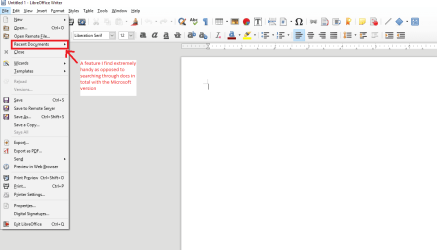
Sorry late reply I can't say where it originated but I can say I find every bit as good and with some features betters than the Microsoft 2007 and 2010 at least see my pic for my favourite feature
 

Attachments

  • LIBRE.PNG
    LIBRE.PNG
    26.6 KB · Views: 1

My Computer My Computer

At a glance

Desk1 7 Home Prem / Desk2 10 Pro / Main lap A...Desk1 i5 3750K / Laptop i7 GTX 860M / Desk2 i...Desk1 8GB (1866) / Desk2 16GB (1333) / Laptop...Desk 1& 2NVidia GTX 650 & Laptops on board Intel
Computer type
PC/Desktop
Computer Manufacturer/Model Number
Own build (new) Desk1 / Asus ROG Win 7 / Desk2 1st build
OS
Desk1 7 Home Prem / Desk2 10 Pro / Main lap Asus ROG 10 Pro 2 laptop Toshiba 7 Pro Asus P2520 7 & 10
CPU
Desk1 i5 3750K / Laptop i7 GTX 860M / Desk2 i5 2500
Motherboard
Desk1 Asus P877-V / Desk2 Gigabyte H67 UD3H / Laptop ?
Memory
Desk1 8GB (1866) / Desk2 16GB (1333) / Laptop 8Gb DDR3
Graphics Card(s)
Desk 1& 2NVidia GTX 650 & Laptops on board Intel
Sound Card
Desk 1 & 2 -XONAR DG Realtek High Def audio Laptop
Monitor(s) Displays
Desk 1 Benq HD 2450 / Desk2 Philips 24" / Laptop 17.5"
Screen Resolution
1920x1080 D1 & D2 & Laptop 1
Hard Drives
Desk1 Samsung 120GB 830 SSD
Asus ROG 256GB 850 Pro SSD
Desk2 Samsung 840 256 SSD
Toshiba 120GB EVO
PSU
Desk 1 Corsair HX 1050/ Laptop ? / Desk 2 Corsair HX 650
Case
Desk 1 Cooler HAF XM ? Toshiba laptop / Desk2 Coolermaster
Cooling
Fans on all Desk1 -2 Desk2 - all Coolermasters 5 Laptop ?
Keyboard
Desk 1 MS Sidewinder X6 Desk 2 MS Sidewinder X 4
Mouse
Desk 1&2 - Gigabyte MS 900 gamer - laptop - Logitec wireless
Internet Speed
ADSL2+
Other Info
One other Desktop (tester) and spare Toshba laptop both with SSD's
Running Kaspersky 2016 ISS on all machines config'd identically
Logitec audio stereo systems on each machine (x3)
Canon MG5250MFC
Router/modem TP-Link running WPA2SK
Additional information about my admin user configuration:

When programs were installed on my system, I installed them as the admin user. The programs copied data during installation into either one of the two user folders under appdata\local. That's how there came to be more than one appdata folder. The user data, such as Word docs and spreadsheets, has always been stored in the older of the two folders.

The system has operated fine with this configuration, aside from the problem with access to the Office help files, so it's not clear whether this is the cause of that problem or not. It just seems like it would be because no other user account, including the other actual user account, has this abnormality.
 

My Computer My Computer

At a glance

Windows 7 64 bitIntel Core i3 CPU M330 @2.13 GHz8 GBIntel Graphics Media Accelerator HD
Computer type
Laptop
Computer Manufacturer/Model Number
HP
OS
Windows 7 64 bit
CPU
Intel Core i3 CPU M330 @2.13 GHz
Memory
8 GB
Graphics Card(s)
Intel Graphics Media Accelerator HD
Sound Card
Intel
Monitor(s) Displays
Generic PnP monitor
Screen Resolution
1366 x 768
Hard Drives
ST9500420AS Internal 500 GB
Seagate External 110 GB
Seagate FreeAgent GoFlex External 1 TB
Keyboard
Microsoft
Mouse
Microsoft
Internet Speed
87 Mbps download speed, 12.16 Mbps upload speed
Antivirus
Microsoft Security Essentials
Browser
MS IE, Google Chrome, Mozilla Firefox, Apple Safari
The most important thing to do before you make any changes to your stored data is to have a back up copy.

The only problem I can see with combining the folders would be if there are any duplicated names. This can easily be overcome by just renaming them.

Have a look at how the other users data folders are set up. That is, the users account that doesn't have the Help file problem & use that as a guide for combining & naming, if necessary, your folders etc..

Once you get all the data folders sorted out & hopefully the Help files problem fixed you could delete the old Admin account.
 

My Computer My Computer

At a glance

Windows 7 Home Premium 64 bit sp1Intel i5 3570 3.4Ghz Ivy Bridge SKT 1155 quad...G-Skill Rip Jaws 16Gb (8x2) DDR3 -1600 PC3 12...Gigabyte NVIDIA GT610 1Gb DDR3 810/1200 PCI-E...
Computer type
PC/Desktop
Computer Manufacturer/Model Number
Self built using existing case
OS
Windows 7 Home Premium 64 bit sp1
CPU
Intel i5 3570 3.4Ghz Ivy Bridge SKT 1155 quad core
Motherboard
Gigabyte Z77-HD3 SKT 1155 2xSata 3, 4x USB 3.0
Memory
G-Skill Rip Jaws 16Gb (8x2) DDR3 -1600 PC3 12800 CL 10 red
Graphics Card(s)
Gigabyte NVIDIA GT610 1Gb DDR3 810/1200 PCI-E 2.0 Silent
Sound Card
NVIDIA High Definition & Realtech High Definition Audio
Monitor(s) Displays
2 x Philips 226V4L 16:9 aspect ratio
Screen Resolution
1920 x 1080 HD
Hard Drives
Samsung 840 Pro 256gb SSD, SATA 3.
Hitachi Touro Portable 1tb, USB 3.0 HDD used for image b/ups.
PSU
Corsair VS450
Case
Codeng
Cooling
PSU fan & CPU fan
Keyboard
Logitech
Mouse
Logitech Wireless trackball M570
Internet Speed
Wireless 3G. 3mg down & 550kb up.
Antivirus
Bitdefender Internet Security 2020
Browser
Opera (Current Version) & Firefox
Other Info
MS Office 2013 Pro. Davis weather station software. MGE Nova 600 avr UPS.
The backup copy won't be a problem. I'd make a backup image of my hard disk before combining the appdata folders and deleting one of the appdata folders.

I'm reluctant to do that, however. There are many duplications of folders I'd have to rename. I also haven't seen evidence in what you sent me or told me that I'd no longer have the problem with the help file access once I combine folders. It seems logical that that would solve the problem but it's not conclusive. What if it has more to do with files in the Windows folder? The solution to the problem may be more complicated than simply combining files, which leads me to believe that a Microsoft technician, or even a Microsoft power user would know best how to solve it. They may know of another way to access the help files.

What I want most to avoid is to do all the work of combining files, only to find out that it makes no difference in my ability to access help files, for the sake of one user account.

I downloaded and installed the MS Office Help tab add-in as a workaround for the time being. I still can't use the online help feature while in Word or Excel but I can use certain features like a link to the online MS community.

If I don't find a quicker way of solving this, I'll probably have to create a new admin user account to replace the one I have. That'll involve the most work, but will ensure that I'll have the same access to the help files as the other user account. I'll keep this forum informed of my progress. Thanks again for your help. Progress has been made; how much, I don't know.
 

My Computer My Computer

At a glance

Windows 7 64 bitIntel Core i3 CPU M330 @2.13 GHz8 GBIntel Graphics Media Accelerator HD
Computer type
Laptop
Computer Manufacturer/Model Number
HP
OS
Windows 7 64 bit
CPU
Intel Core i3 CPU M330 @2.13 GHz
Memory
8 GB
Graphics Card(s)
Intel Graphics Media Accelerator HD
Sound Card
Intel
Monitor(s) Displays
Generic PnP monitor
Screen Resolution
1366 x 768
Hard Drives
ST9500420AS Internal 500 GB
Seagate External 110 GB
Seagate FreeAgent GoFlex External 1 TB
Keyboard
Microsoft
Mouse
Microsoft
Internet Speed
87 Mbps download speed, 12.16 Mbps upload speed
Antivirus
Microsoft Security Essentials
Browser
MS IE, Google Chrome, Mozilla Firefox, Apple Safari
I really don't know if combining the folders as you have suggested would solve the problem & the only way to find out is to experiment & see.

Does the user that does not have the Help files problem have access to the same Office folders that you have?. If they do then it would seem likely that combining the folders would solve the problem.

Also if the "no problems" user has access to all the folders, perhaps you could copy their folder arrangement & paste it into your Admin account & delete your folder arrangement. This is only a suggestion & may save you a lot of work.

I am sorry I cannot provide more help, as I have never come across this problem with Office.
 

My Computer My Computer

At a glance

Windows 7 Home Premium 64 bit sp1Intel i5 3570 3.4Ghz Ivy Bridge SKT 1155 quad...G-Skill Rip Jaws 16Gb (8x2) DDR3 -1600 PC3 12...Gigabyte NVIDIA GT610 1Gb DDR3 810/1200 PCI-E...
Computer type
PC/Desktop
Computer Manufacturer/Model Number
Self built using existing case
OS
Windows 7 Home Premium 64 bit sp1
CPU
Intel i5 3570 3.4Ghz Ivy Bridge SKT 1155 quad core
Motherboard
Gigabyte Z77-HD3 SKT 1155 2xSata 3, 4x USB 3.0
Memory
G-Skill Rip Jaws 16Gb (8x2) DDR3 -1600 PC3 12800 CL 10 red
Graphics Card(s)
Gigabyte NVIDIA GT610 1Gb DDR3 810/1200 PCI-E 2.0 Silent
Sound Card
NVIDIA High Definition & Realtech High Definition Audio
Monitor(s) Displays
2 x Philips 226V4L 16:9 aspect ratio
Screen Resolution
1920 x 1080 HD
Hard Drives
Samsung 840 Pro 256gb SSD, SATA 3.
Hitachi Touro Portable 1tb, USB 3.0 HDD used for image b/ups.
PSU
Corsair VS450
Case
Codeng
Cooling
PSU fan & CPU fan
Keyboard
Logitech
Mouse
Logitech Wireless trackball M570
Internet Speed
Wireless 3G. 3mg down & 550kb up.
Antivirus
Bitdefender Internet Security 2020
Browser
Opera (Current Version) & Firefox
Other Info
MS Office 2013 Pro. Davis weather station software. MGE Nova 600 avr UPS.
Hello Ranger and townsbg,

It took a while, but I at last found a solution that didn't involve taking my system apart. Here's a summary of what I did:

1) copied help files from one user account in AppData\local to the same folder in two other user accounts.

2) renamed the Microsoft help folders in the AppData \ local folders for those three users.

Neither of those methods worked, so I tried this third way, which did, after discovering that MSIE 11 hung immediately when starting and terminated after about 30 seconds.

3) Uninstalled MSIE 11, which reverted to MSIE 10. I still couldn't access the help files. I then uninstalled MSIE 10 (it took over an hour for the MSIE 11 update to be removed). MSIE then ran as v. 9.

I'll be glad to know what you think about why the help feature worked for two users and not for the other, the primary user. I'm just glad the help function works completely now without having to sacrifice more than a little functionality in MSIE. You can read posts from other Windows users who have had this problem @ http://answers.microsoft.com/en-us/...s/4ea80016-f8fe-4912-9518-892d79c2b28e?page=3.

Again thanks for your help with this. The path to finding the solution was long but necessary. You steered me in the right direction.
 

My Computer My Computer

At a glance

Windows 7 64 bitIntel Core i3 CPU M330 @2.13 GHz8 GBIntel Graphics Media Accelerator HD
Computer type
Laptop
Computer Manufacturer/Model Number
HP
OS
Windows 7 64 bit
CPU
Intel Core i3 CPU M330 @2.13 GHz
Memory
8 GB
Graphics Card(s)
Intel Graphics Media Accelerator HD
Sound Card
Intel
Monitor(s) Displays
Generic PnP monitor
Screen Resolution
1366 x 768
Hard Drives
ST9500420AS Internal 500 GB
Seagate External 110 GB
Seagate FreeAgent GoFlex External 1 TB
Keyboard
Microsoft
Mouse
Microsoft
Internet Speed
87 Mbps download speed, 12.16 Mbps upload speed
Antivirus
Microsoft Security Essentials
Browser
MS IE, Google Chrome, Mozilla Firefox, Apple Safari
Well done. There is no doubt perseverance wins out in the end. Thanks for getting back with your solution.

I suppose you are referring to Microsoft Internet Explorer when you mention MSIE. The only problem I can see is that versions other than IE 11 are not very secure, so it might be worth reinstalling IE 11 again & see if it causes the same problem.

I can't offer any solution as to why you had this problem with some users & not others.
 

My Computer My Computer

At a glance

Windows 7 Home Premium 64 bit sp1Intel i5 3570 3.4Ghz Ivy Bridge SKT 1155 quad...G-Skill Rip Jaws 16Gb (8x2) DDR3 -1600 PC3 12...Gigabyte NVIDIA GT610 1Gb DDR3 810/1200 PCI-E...
Computer type
PC/Desktop
Computer Manufacturer/Model Number
Self built using existing case
OS
Windows 7 Home Premium 64 bit sp1
CPU
Intel i5 3570 3.4Ghz Ivy Bridge SKT 1155 quad core
Motherboard
Gigabyte Z77-HD3 SKT 1155 2xSata 3, 4x USB 3.0
Memory
G-Skill Rip Jaws 16Gb (8x2) DDR3 -1600 PC3 12800 CL 10 red
Graphics Card(s)
Gigabyte NVIDIA GT610 1Gb DDR3 810/1200 PCI-E 2.0 Silent
Sound Card
NVIDIA High Definition & Realtech High Definition Audio
Monitor(s) Displays
2 x Philips 226V4L 16:9 aspect ratio
Screen Resolution
1920 x 1080 HD
Hard Drives
Samsung 840 Pro 256gb SSD, SATA 3.
Hitachi Touro Portable 1tb, USB 3.0 HDD used for image b/ups.
PSU
Corsair VS450
Case
Codeng
Cooling
PSU fan & CPU fan
Keyboard
Logitech
Mouse
Logitech Wireless trackball M570
Internet Speed
Wireless 3G. 3mg down & 550kb up.
Antivirus
Bitdefender Internet Security 2020
Browser
Opera (Current Version) & Firefox
Other Info
MS Office 2013 Pro. Davis weather station software. MGE Nova 600 avr UPS.
Back
Top