Preview thumbails on VLC Player ?

jk22

New member
Member
VIP
Local time
4:08 AM
Messages
115
Hey guys,

Is it possible to view thumbails on vlc player on each frame like we can view on youtube.

Regards.
 

My Computer My Computer

At a glance

Windows 10 Pro 64-bitIntel Core i7 5600U @ 2.60GHz Broadwell-U 14n...8.00GB Dual-Channel DDR3 @ 798MHz (11-11-11-28)Intel HD Graphics 5500
Computer type
Laptop
Computer Manufacturer/Model Number
Lenovo ThinkPad X1 Carbon
OS
Windows 10 Pro 64-bit
CPU
Intel Core i7 5600U @ 2.60GHz Broadwell-U 14nm Technology
Motherboard
LENOVO 20BTS0Y500 (U3E1)
Memory
8.00GB Dual-Channel DDR3 @ 798MHz (11-11-11-28)
Graphics Card(s)
Intel HD Graphics 5500
Sound Card
Speaker/HP (Realtek High Definition Audio)
Monitor(s) Displays
Generic PnP Monitor on Intel HD Graphics 5500
Screen Resolution
1920 x 1080 x 32 bits per pixel
Hard Drives
SAMSUNG MZHPV256HDGL-000L1 (256 GB SSD)
Keyboard
Standard PS/2 Keyboard
Mouse
Logitech G102 Prodigy Gaming Mouse
Internet Speed
10 Mbps
Antivirus
Comodo Firewall 11.0.0.6606
Browser
Google Chrome and Firefox
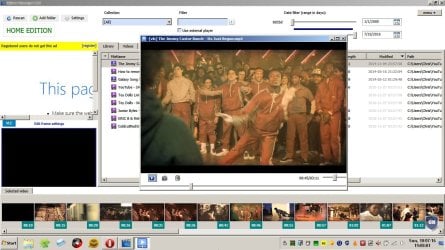
The only way that I've ever been able to see VLC thumbnails was to use another video manager application that can create a specified number of thumbnails that are displayed and you can jump to the point in the video by clicking the thumbnail. I don't think that's what you need!

I have to ask - Why do you need VLC? Personally I prefer PotPlayer with MadVR plugin.

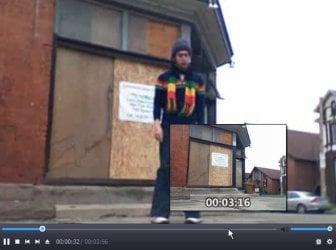
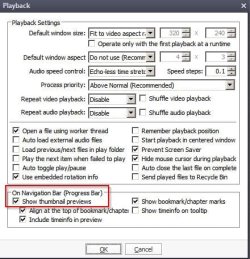
Anyway it's possible to see thumbnails when clicking on the timeline at any point. Needs to be configued in PotPlayer's options.

PotPlayer.jpg

Another member here - dsperber suggested thati should use PotPlayer and I much prefer it over VLC although configuration might be an issue along with knowing where to download the English language version.

If you want to stick with VLC there's an application that can generate a user defined number of thumbnails and open the video in VLC at the same point as the thumbnail but I do not recommend it.

VLC Video Manager.jpg
 

My Computer My Computer

At a glance

Microsoft Windows 7 Home Premium 64-bit 7601 ...AMD C-60 APU with Radeon(tm) HD Graphics4.00 GBAMD Radeon HD 6290 Graphics
Computer type
Laptop
Computer Manufacturer/Model Number
ASUS
OS
Microsoft Windows 7 Home Premium 64-bit 7601 Multiprocessor Free Service Pack 1
CPU
AMD C-60 APU with Radeon(tm) HD Graphics
Motherboard
ASUSTeK COMPUTER INC. X501U
Memory
4.00 GB
Graphics Card(s)
AMD Radeon HD 6290 Graphics
Sound Card
(1) AMD High Definition Audio Device (2) Realtek High Defi
Screen Resolution
1366 x 768 x 32 bits (4294967296 colors) @ 60 Hz
Hard Drives
Hitachi HTS545050A7E380 SATA Disk Device
Antivirus
Comodo CIS & FW, SecureAplus App Whitelisting, Threatfire
Browser
Cyberfox 64bit, Opera 64bit, Airfox
Other Info
Spy-The-Spy, HitmanPro.Alert, Norton Connect Safe, MJRegWatcher, BitDefender TrafficLight, Voodoo Shield, Zemana AntiMalware
The only way that I've ever been able to see VLC thumbnails was to use another video manager application that can create a specified number of thumbnails that are displayed and you can jump to the point in the video by clicking the thumbnail. I don't think that's what you need!

I have to ask - Why do you need VLC? Personally I prefer PotPlayer with MadVR plugin.

Anyway it's possible to see thumbnails when clicking on the timeline at any point. Needs to be configued in PotPlayer's options.


Another member here - dsperber suggested thati should use PotPlayer and I much prefer it over VLC although configuration might be an issue along with knowing where to download the English language version.

If you want to stick with VLC there's an application that can generate a user defined number of thumbnails and open the video in VLC at the same point as the thumbnail but I do not recommend it.


I prefer VLC instead of any other media player. Can you tell me if there is any option or plugin to activate timeline thumbail.
 

My Computer My Computer

At a glance

Windows 10 Pro 64-bitIntel Core i7 5600U @ 2.60GHz Broadwell-U 14n...8.00GB Dual-Channel DDR3 @ 798MHz (11-11-11-28)Intel HD Graphics 5500
Computer type
Laptop
Computer Manufacturer/Model Number
Lenovo ThinkPad X1 Carbon
OS
Windows 10 Pro 64-bit
CPU
Intel Core i7 5600U @ 2.60GHz Broadwell-U 14nm Technology
Motherboard
LENOVO 20BTS0Y500 (U3E1)
Memory
8.00GB Dual-Channel DDR3 @ 798MHz (11-11-11-28)
Graphics Card(s)
Intel HD Graphics 5500
Sound Card
Speaker/HP (Realtek High Definition Audio)
Monitor(s) Displays
Generic PnP Monitor on Intel HD Graphics 5500
Screen Resolution
1920 x 1080 x 32 bits per pixel
Hard Drives
SAMSUNG MZHPV256HDGL-000L1 (256 GB SSD)
Keyboard
Standard PS/2 Keyboard
Mouse
Logitech G102 Prodigy Gaming Mouse
Internet Speed
10 Mbps
Antivirus
Comodo Firewall 11.0.0.6606
Browser
Google Chrome and Firefox
I've looked and did not find such a plugin. It's been discussed on VLC Forum and it's also been explained why it's not possible.
 

My Computer My Computer

At a glance

Microsoft Windows 7 Home Premium 64-bit 7601 ...AMD C-60 APU with Radeon(tm) HD Graphics4.00 GBAMD Radeon HD 6290 Graphics
Computer type
Laptop
Computer Manufacturer/Model Number
ASUS
OS
Microsoft Windows 7 Home Premium 64-bit 7601 Multiprocessor Free Service Pack 1
CPU
AMD C-60 APU with Radeon(tm) HD Graphics
Motherboard
ASUSTeK COMPUTER INC. X501U
Memory
4.00 GB
Graphics Card(s)
AMD Radeon HD 6290 Graphics
Sound Card
(1) AMD High Definition Audio Device (2) Realtek High Defi
Screen Resolution
1366 x 768 x 32 bits (4294967296 colors) @ 60 Hz
Hard Drives
Hitachi HTS545050A7E380 SATA Disk Device
Antivirus
Comodo CIS & FW, SecureAplus App Whitelisting, Threatfire
Browser
Cyberfox 64bit, Opera 64bit, Airfox
Other Info
Spy-The-Spy, HitmanPro.Alert, Norton Connect Safe, MJRegWatcher, BitDefender TrafficLight, Voodoo Shield, Zemana AntiMalware
I've looked and did not find such a plugin. It's been discussed on VLC Forum and it's also been explained why it's not possible.

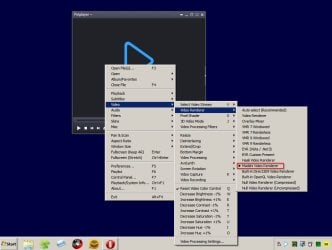
How to use MadVR plugin with PotPlayer.
 

My Computer My Computer

At a glance

Windows 10 Pro 64-bitIntel Core i7 5600U @ 2.60GHz Broadwell-U 14n...8.00GB Dual-Channel DDR3 @ 798MHz (11-11-11-28)Intel HD Graphics 5500
Computer type
Laptop
Computer Manufacturer/Model Number
Lenovo ThinkPad X1 Carbon
OS
Windows 10 Pro 64-bit
CPU
Intel Core i7 5600U @ 2.60GHz Broadwell-U 14nm Technology
Motherboard
LENOVO 20BTS0Y500 (U3E1)
Memory
8.00GB Dual-Channel DDR3 @ 798MHz (11-11-11-28)
Graphics Card(s)
Intel HD Graphics 5500
Sound Card
Speaker/HP (Realtek High Definition Audio)
Monitor(s) Displays
Generic PnP Monitor on Intel HD Graphics 5500
Screen Resolution
1920 x 1080 x 32 bits per pixel
Hard Drives
SAMSUNG MZHPV256HDGL-000L1 (256 GB SSD)
Keyboard
Standard PS/2 Keyboard
Mouse
Logitech G102 Prodigy Gaming Mouse
Internet Speed
10 Mbps
Antivirus
Comodo Firewall 11.0.0.6606
Browser
Google Chrome and Firefox
You don't need MadVR for timeline thumbnails. If you tried PotPlayer you'll need a settings configuration file.

Anyway for timeline thumbnails adjust playback settings:

Playback.jpg

RE: MadVR.

Download MadVr.zip and extract the files into a folder. madVR

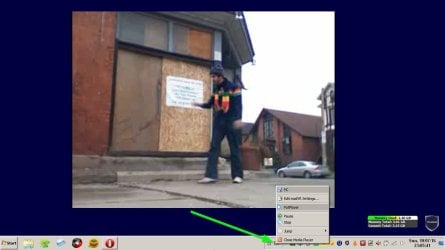
(you can't delete the folder later); right click Install.bat and run as administrator; run madHcCtrl.exe to access your settings. You can click the system tray icon. Default settings usually attempt to achieve the best playback quality.

MadVR 2.jpg

Then choose madVR as the video renderer in PotPlayer.

MadVR 1.jpg

I choose to "Sharpen" video.

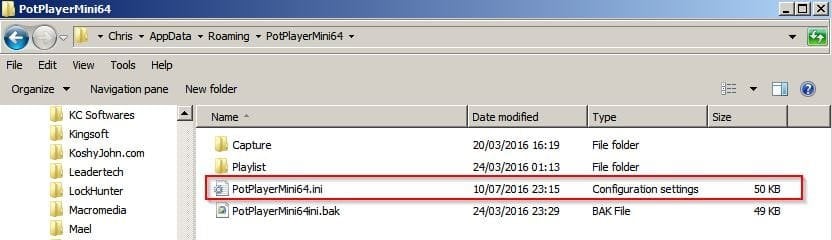
If you happen to have installed PotPlayer64 bit version and MadVR then you could if you like copy this settings configuration file:


Copy it to: C:\Users\Username\AppData\Roaming\PotPlayerMini64

-PotPlayerMini64.jpg
 

My Computer My Computer

At a glance

Microsoft Windows 7 Home Premium 64-bit 7601 ...AMD C-60 APU with Radeon(tm) HD Graphics4.00 GBAMD Radeon HD 6290 Graphics
Computer type
Laptop
Computer Manufacturer/Model Number
ASUS
OS
Microsoft Windows 7 Home Premium 64-bit 7601 Multiprocessor Free Service Pack 1
CPU
AMD C-60 APU with Radeon(tm) HD Graphics
Motherboard
ASUSTeK COMPUTER INC. X501U
Memory
4.00 GB
Graphics Card(s)
AMD Radeon HD 6290 Graphics
Sound Card
(1) AMD High Definition Audio Device (2) Realtek High Defi
Screen Resolution
1366 x 768 x 32 bits (4294967296 colors) @ 60 Hz
Hard Drives
Hitachi HTS545050A7E380 SATA Disk Device
Antivirus
Comodo CIS & FW, SecureAplus App Whitelisting, Threatfire
Browser
Cyberfox 64bit, Opera 64bit, Airfox
Other Info
Spy-The-Spy, HitmanPro.Alert, Norton Connect Safe, MJRegWatcher, BitDefender TrafficLight, Voodoo Shield, Zemana AntiMalware
I've used VLC in the past, (and there's no plugin to show mouseover thumbs in its timeline; and it was one of the reasons I turned into KMPlayer which has ALL that VLC has and it shows the thumbs you like, by default!, no need of any plugin.
So, that's my recommendation: KMPlayer?Multimedia Player
(I understand that's not easy to change applications we're used to;
because we have to go through the learning curve all over again! well,
KMPlayer (Korean Media Player) is very easy to master quickly.
The basics, are all in front of you; the advanced features, you can learn little-by-little,
as far as you need of them.
So think not twice.
 
Last edited:

My Computer My Computer

At a glance

Windows 7 x64
Computer type
PC/Desktop
OS
Windows 7 x64
Doesn't KMPlayer come bundled with adware/ junkware?
 

My Computer My Computer

At a glance

Microsoft Windows 7 Home Premium 64-bit 7601 ...AMD C-60 APU with Radeon(tm) HD Graphics4.00 GBAMD Radeon HD 6290 Graphics
Computer type
Laptop
Computer Manufacturer/Model Number
ASUS
OS
Microsoft Windows 7 Home Premium 64-bit 7601 Multiprocessor Free Service Pack 1
CPU
AMD C-60 APU with Radeon(tm) HD Graphics
Motherboard
ASUSTeK COMPUTER INC. X501U
Memory
4.00 GB
Graphics Card(s)
AMD Radeon HD 6290 Graphics
Sound Card
(1) AMD High Definition Audio Device (2) Realtek High Defi
Screen Resolution
1366 x 768 x 32 bits (4294967296 colors) @ 60 Hz
Hard Drives
Hitachi HTS545050A7E380 SATA Disk Device
Antivirus
Comodo CIS & FW, SecureAplus App Whitelisting, Threatfire
Browser
Cyberfox 64bit, Opera 64bit, Airfox
Other Info
Spy-The-Spy, HitmanPro.Alert, Norton Connect Safe, MJRegWatcher, BitDefender TrafficLight, Voodoo Shield, Zemana AntiMalware
Doesn't KMPlayer come bundled with adware/ junkware?

Sorry for belated answer.
There's an Adware so called "BOX": a "window-sidebar" opened next to the player's main window.
It contains updates and recomendations of new Films, videos, etc.
But, it is easily removed following easy instructions found if google "kmplayer box remove".
Either:
1) Block "kmplayer" in your Firewallaccess to internet;
2) Carefully, Edit your hosts file, located in c:/windows/system32/drivers/etc/host
and add :
127.0.0.1 player.kmpmedia.net
this will prevent the kmplayer to connect to the internet and no sidebar will appear!
3) Go to: Control pannel => Internet Options => Security -> Restriction sites,
clic on "Sites" and ADD: player.kmpmedia.net or/and kmplayer.com

and... Goodbye "BOX" !!!
 
Last edited:

My Computer My Computer

At a glance

Windows 7 x64
Computer type
PC/Desktop
OS
Windows 7 x64
Doesn't KMPlayer come bundled with adware/ junkware?

Sorry for belated answer.
There's an Adware so called "BOX": a "window-sidebar" opened next to the player's main window.
It contains updates and recomendations of new Films, videos, etc.
But, it is easily removed following easy instructions found if google "kmplayer box remove".
Either:
1) Block "kmplayer" in your Firewallaccess to internet;
2) Carefully, Edit your hosts file, located in c:/windows/system32/drivers/etc/host
and add :
127.0.0.1 player.kmpmedia.net
this will prevent the kmplayer to connect to the internet and no sidebar will appear!
3) Go to: Control pannel => Internet Options => Security -> Restriction sites,
clic on "Sites" and ADD: player.kmpmedia.net or/and kmplayer.com

and... Goodbye "BOX" !!!

Is it possible if you can send me .reg file of disabling box from computer.
 

My Computer My Computer

At a glance

Windows 10 Pro 64-bitIntel Core i7 5600U @ 2.60GHz Broadwell-U 14n...8.00GB Dual-Channel DDR3 @ 798MHz (11-11-11-28)Intel HD Graphics 5500
Computer type
Laptop
Computer Manufacturer/Model Number
Lenovo ThinkPad X1 Carbon
OS
Windows 10 Pro 64-bit
CPU
Intel Core i7 5600U @ 2.60GHz Broadwell-U 14nm Technology
Motherboard
LENOVO 20BTS0Y500 (U3E1)
Memory
8.00GB Dual-Channel DDR3 @ 798MHz (11-11-11-28)
Graphics Card(s)
Intel HD Graphics 5500
Sound Card
Speaker/HP (Realtek High Definition Audio)
Monitor(s) Displays
Generic PnP Monitor on Intel HD Graphics 5500
Screen Resolution
1920 x 1080 x 32 bits per pixel
Hard Drives
SAMSUNG MZHPV256HDGL-000L1 (256 GB SSD)
Keyboard
Standard PS/2 Keyboard
Mouse
Logitech G102 Prodigy Gaming Mouse
Internet Speed
10 Mbps
Antivirus
Comodo Firewall 11.0.0.6606
Browser
Google Chrome and Firefox
Old post contains this image:

348068d1422558735-ms-security-essentials-kmplayer.jpg

I believe it was bundled with OpenCandy at the time. Current version of KMPlayer scans with one false postive detection on VirusTotal. However past activity by the manufacturer has been shady:

https://www.virustotal.com/en/domain/cdn.kmplayer.com/information/

Also see: Best Free Media Player | Gizmo's Freeware

Warning: Uncheck Grid Network box in components to install wizard to avoid Pandora TV service. Contains OpenCandy and bundled Ask Toolbar. Take caution to hit the "Decline" button after deselecting the Ask toolbar components to avoid Ask being installed.

So there's nothing really nasty but a user could still end up with unwanted extras if not paying attention when installing:

Here's a batch file that will run installers and avoid OpenCandy on installation:

http://www.sevenforums.com/software...her-than-imgburn-post3098192.html#post3098192

Or download a clean KMPlayer installer file from https://ninite.com/
 

My Computer My Computer

At a glance

Microsoft Windows 7 Home Premium 64-bit 7601 ...AMD C-60 APU with Radeon(tm) HD Graphics4.00 GBAMD Radeon HD 6290 Graphics
Computer type
Laptop
Computer Manufacturer/Model Number
ASUS
OS
Microsoft Windows 7 Home Premium 64-bit 7601 Multiprocessor Free Service Pack 1
CPU
AMD C-60 APU with Radeon(tm) HD Graphics
Motherboard
ASUSTeK COMPUTER INC. X501U
Memory
4.00 GB
Graphics Card(s)
AMD Radeon HD 6290 Graphics
Sound Card
(1) AMD High Definition Audio Device (2) Realtek High Defi
Screen Resolution
1366 x 768 x 32 bits (4294967296 colors) @ 60 Hz
Hard Drives
Hitachi HTS545050A7E380 SATA Disk Device
Antivirus
Comodo CIS & FW, SecureAplus App Whitelisting, Threatfire
Browser
Cyberfox 64bit, Opera 64bit, Airfox
Other Info
Spy-The-Spy, HitmanPro.Alert, Norton Connect Safe, MJRegWatcher, BitDefender TrafficLight, Voodoo Shield, Zemana AntiMalware
Doesn't KMPlayer come bundled with adware/ junkware?

Sorry for belated answer.
There's an Adware so called "BOX": a "window-sidebar" opened next to the player's main window.
It contains updates and recomendations of new Films, videos, etc.
But, it is easily removed following easy instructions found if google "kmplayer box remove".
Either:
1) Block "kmplayer" in your Firewallaccess to internet;
2) Carefully, Edit your hosts file, located in c:/windows/system32/drivers/etc/host
and add :
127.0.0.1 player.kmpmedia.net
this will prevent the kmplayer to connect to the internet and no sidebar will appear!
3) Go to: Control pannel => Internet Options => Security -> Restriction sites,
clic on "Sites" and ADD: player.kmpmedia.net or/and kmplayer.com

and... Goodbye "BOX" !!!

Is it possible if you can send me .reg file of disabling box from computer.

I never mentioned any .reg file.
I offered 3 solutions to what you want. Myself, I have used the No#.3 :
-> Go to: Control pannel => Internet Options => Security -> Restriction sites,
clic on "Sites" and ADD: player.kmpmedia.net or/and kmplayer.com
In 30sec you're done. The "box" is disabled.!
That's all.
 

My Computer My Computer

At a glance

Windows 7 x64
Computer type
PC/Desktop
OS
Windows 7 x64
@ Callender
I was using KMPlayer v3.9 untill yesterday (I use to choose NOT to update to the latest version of any program).
I downloaded it from the official home site: No indication of such a "virus" activity from my activated Kaspersky Internet Security. Od course, I agree that, since many programs contain - in their installer - extra software, like Pandore tv services, or, Ask Toolbar, etc., I always pay CLOSE ATTENTION DURING installation od any new, or updated app, and press the "Decline", or, "Don't Agree" buttons when needed.
The easy tactic of clicking blindly all the "Continue" / "Next" / "Yes, I agree", comes with risks.
If such extra, unwanted software has already been installed, usually, a visit to The Controll Panel Installed programs and uninstall any "intruder" or mis-installed will solve the issue.
Well, yesterday, I decided to update KMPlayer to the newest version 4.1.1.5 and so I did from the official home.
No virus detected. And, yes, I remember I declined to an extra installation (I can't remember what was).
After installation I noticed that some of the .mp4 files could not be played properly: only the sound was listened but instead of the video, the screen was showing the info of the file played!!! I was troubled.
I was about to uninstall it and return to my previous version, but them I thought that it might be of some codec missing or, in conflict.
So, I decided to install the "Mega Codec Pack" (I do this once or twice a year); it also contains the Media Player Classic (also a good one).
After the custom installation of the Codec PAck, the KMPlayer plays ALL the video files just FiNE.!
That's all. Hope this helped.
 

My Computer My Computer

At a glance

Windows 7 x64
Computer type
PC/Desktop
OS
Windows 7 x64
@ Callender
I was using KMPlayer v3.9 untill yesterday (I use to choose NOT to update to the latest version of any program).
I downloaded it from the official home site: No indication of such a "virus" activity from my activated Kaspersky Internet Security. Od course, I agree that, since many programs contain - in their installer - extra software, like Pandore tv services, or, Ask Toolbar, etc., I always pay CLOSE ATTENTION DURING installation od any new, or updated app, and press the "Decline", or, "Don't Agree" buttons when needed.
The easy tactic of clicking blindly all the "Continue" / "Next" / "Yes, I agree", comes with risks.
If such extra, unwanted software has already been installed, usually, a visit to The Controll Panel Installed programs and uninstall any "intruder" or mis-installed will solve the issue.
Well, yesterday, I decided to update KMPlayer to the newest version 4.1.1.5 and so I did from the official home.
No virus detected. And, yes, I remember I declined to an extra installation (I can't remember what was).
After installation I noticed that some of the .mp4 files could not be played properly: only the sound was listened but instead of the video, the screen was showing the info of the file played!!! I was troubled.
I was about to uninstall it and return to my previous version, but them I thought that it might be of some codec missing or, in conflict.
So, I decided to install the "Mega Codec Pack" (I do this once or twice a year); it also contains the Media Player Classic (also a good one).
After the custom installation of the Codec PAck, the KMPlayer plays ALL the video files just FiNE.!
That's all. Hope this helped.

What do you think about GOM Player ?
 

My Computer My Computer

At a glance

Windows 10 Pro 64-bitIntel Core i7 5600U @ 2.60GHz Broadwell-U 14n...8.00GB Dual-Channel DDR3 @ 798MHz (11-11-11-28)Intel HD Graphics 5500
Computer type
Laptop
Computer Manufacturer/Model Number
Lenovo ThinkPad X1 Carbon
OS
Windows 10 Pro 64-bit
CPU
Intel Core i7 5600U @ 2.60GHz Broadwell-U 14nm Technology
Motherboard
LENOVO 20BTS0Y500 (U3E1)
Memory
8.00GB Dual-Channel DDR3 @ 798MHz (11-11-11-28)
Graphics Card(s)
Intel HD Graphics 5500
Sound Card
Speaker/HP (Realtek High Definition Audio)
Monitor(s) Displays
Generic PnP Monitor on Intel HD Graphics 5500
Screen Resolution
1920 x 1080 x 32 bits per pixel
Hard Drives
SAMSUNG MZHPV256HDGL-000L1 (256 GB SSD)
Keyboard
Standard PS/2 Keyboard
Mouse
Logitech G102 Prodigy Gaming Mouse
Internet Speed
10 Mbps
Antivirus
Comodo Firewall 11.0.0.6606
Browser
Google Chrome and Firefox
What do you think about GOM Player ?

I have it installed on my system too. But, ...
Look! One person, can use only ONE APP for ONE JOB (may be, two). That's it!
It takes TIME to REALLY KNOW an application and use it to its FULL potency!
And the needs of each one of us, the users, vary a lot...
One app, may have its "forte" in doing "exellent" a few things, and doing just fine, some others...
Another app, have different "Ups and Downs / Plus and Minuses".
So, as you can see, EACH USER is the "measure" - the criteria -
of what app is "good enough" FOR HIM, and HIM ONLY.!

Since you've asked, I mostly Use KMPlayer and (secondly) GOM for videos;
MediaPlayer Classic and (the oldie but always goodie) WinAmp foe Audio.
If I need to work some APE, FLAC files, I use MediaMonkey.
But I don't know and I don't use ALL of the offered characteristics of all of these players.
NOBODY DOES!!! Each one uses what the most uses! That's all.
So, try a couple of them, for what you need to use them for...
It will take you some time to LEARN them: travel the menus/submenus to have a quick view of what it's offered and where it is... IF you can find a "Quick guide/manual" for each of them, look at the contents and see if it has the things you want to use it for... and there you are, my friend...
Thus, you'll see what suits you best and which delivers your job done easier and quicker.
Bye.
 

My Computer My Computer

At a glance

Windows 7 x64
Computer type
PC/Desktop
OS
Windows 7 x64

My Computer My Computer

At a glance

Microsoft Windows 7 Home Premium 64-bit 7601 ...AMD C-60 APU with Radeon(tm) HD Graphics4.00 GBAMD Radeon HD 6290 Graphics
Computer type
Laptop
Computer Manufacturer/Model Number
ASUS
OS
Microsoft Windows 7 Home Premium 64-bit 7601 Multiprocessor Free Service Pack 1
CPU
AMD C-60 APU with Radeon(tm) HD Graphics
Motherboard
ASUSTeK COMPUTER INC. X501U
Memory
4.00 GB
Graphics Card(s)
AMD Radeon HD 6290 Graphics
Sound Card
(1) AMD High Definition Audio Device (2) Realtek High Defi
Screen Resolution
1366 x 768 x 32 bits (4294967296 colors) @ 60 Hz
Hard Drives
Hitachi HTS545050A7E380 SATA Disk Device
Antivirus
Comodo CIS & FW, SecureAplus App Whitelisting, Threatfire
Browser
Cyberfox 64bit, Opera 64bit, Airfox
Other Info
Spy-The-Spy, HitmanPro.Alert, Norton Connect Safe, MJRegWatcher, BitDefender TrafficLight, Voodoo Shield, Zemana AntiMalware
GOM Media Player also used to come bundled with unwanted extras. Some of us noticed:

http://www.sevenforums.com/system-s...ur-system-danger-post2774859.html#post2774859

I don't know if it still bundles extras.

I use an older than the latest version of GOM. And ,as I said above, I only update codecs through MegaCodecPAck twice a year, and I'm fine!
I can't remember IF it came bundled with unwanted software; but, I always try to be careful during installation not to press all the "Accept and Next.Continue" buttons.

The Link you provided for "DisallowRun" and "Blocking Toolbar Installation" I found it VERY useful to know, just in case. Big Thanks.
 

My Computer My Computer

At a glance

Windows 7 x64
Computer type
PC/Desktop
OS
Windows 7 x64
No worries. There's nothing wrong with GOM or KMPlayer. Like you said, pay attention on install. It seems that maybe they've cleaned up their installers. The developer of KMPlayer is working on another project and is no longer involved with KMPlayer.
 

My Computer My Computer

At a glance

Microsoft Windows 7 Home Premium 64-bit 7601 ...AMD C-60 APU with Radeon(tm) HD Graphics4.00 GBAMD Radeon HD 6290 Graphics
Computer type
Laptop
Computer Manufacturer/Model Number
ASUS
OS
Microsoft Windows 7 Home Premium 64-bit 7601 Multiprocessor Free Service Pack 1
CPU
AMD C-60 APU with Radeon(tm) HD Graphics
Motherboard
ASUSTeK COMPUTER INC. X501U
Memory
4.00 GB
Graphics Card(s)
AMD Radeon HD 6290 Graphics
Sound Card
(1) AMD High Definition Audio Device (2) Realtek High Defi
Screen Resolution
1366 x 768 x 32 bits (4294967296 colors) @ 60 Hz
Hard Drives
Hitachi HTS545050A7E380 SATA Disk Device
Antivirus
Comodo CIS & FW, SecureAplus App Whitelisting, Threatfire
Browser
Cyberfox 64bit, Opera 64bit, Airfox
Other Info
Spy-The-Spy, HitmanPro.Alert, Norton Connect Safe, MJRegWatcher, BitDefender TrafficLight, Voodoo Shield, Zemana AntiMalware
The Link you provided for "DisallowRun" and "Blocking Toolbar Installation" I found it VERY useful to know, just in case. Big Thanks.

Forget that. This works better:

http://www.sevenforums.com/system-s...lications-toolbar-installers.html#post2852462

Also check the batch file here:

http://www.sevenforums.com/software...bin-cue-other-than-imgburn-2.html#post3098192

You can run an open candy bundled installer just by dropping the installer on rthe window that opens when you run the batch file.
 

My Computer My Computer

At a glance

Microsoft Windows 7 Home Premium 64-bit 7601 ...AMD C-60 APU with Radeon(tm) HD Graphics4.00 GBAMD Radeon HD 6290 Graphics
Computer type
Laptop
Computer Manufacturer/Model Number
ASUS
OS
Microsoft Windows 7 Home Premium 64-bit 7601 Multiprocessor Free Service Pack 1
CPU
AMD C-60 APU with Radeon(tm) HD Graphics
Motherboard
ASUSTeK COMPUTER INC. X501U
Memory
4.00 GB
Graphics Card(s)
AMD Radeon HD 6290 Graphics
Sound Card
(1) AMD High Definition Audio Device (2) Realtek High Defi
Screen Resolution
1366 x 768 x 32 bits (4294967296 colors) @ 60 Hz
Hard Drives
Hitachi HTS545050A7E380 SATA Disk Device
Antivirus
Comodo CIS & FW, SecureAplus App Whitelisting, Threatfire
Browser
Cyberfox 64bit, Opera 64bit, Airfox
Other Info
Spy-The-Spy, HitmanPro.Alert, Norton Connect Safe, MJRegWatcher, BitDefender TrafficLight, Voodoo Shield, Zemana AntiMalware
Another method that doesn't need software although it might be confusing if a command window appears then vanishes when a blocked process attempts to run. There will be no message displayed as before:

Block process 2.jpg

So if you create a key with the process name under Image File Execution Options and create a new string value named Debugger with Value Data "C:\windows\system32\cmd.exe /c exit 0" then what happens is that any time the named process attempts to run the debugger will be launched in it's place. In this case a command window simply opens then exits. The process will not run.
 

My Computer My Computer

At a glance

Microsoft Windows 7 Home Premium 64-bit 7601 ...AMD C-60 APU with Radeon(tm) HD Graphics4.00 GBAMD Radeon HD 6290 Graphics
Computer type
Laptop
Computer Manufacturer/Model Number
ASUS
OS
Microsoft Windows 7 Home Premium 64-bit 7601 Multiprocessor Free Service Pack 1
CPU
AMD C-60 APU with Radeon(tm) HD Graphics
Motherboard
ASUSTeK COMPUTER INC. X501U
Memory
4.00 GB
Graphics Card(s)
AMD Radeon HD 6290 Graphics
Sound Card
(1) AMD High Definition Audio Device (2) Realtek High Defi
Screen Resolution
1366 x 768 x 32 bits (4294967296 colors) @ 60 Hz
Hard Drives
Hitachi HTS545050A7E380 SATA Disk Device
Antivirus
Comodo CIS & FW, SecureAplus App Whitelisting, Threatfire
Browser
Cyberfox 64bit, Opera 64bit, Airfox
Other Info
Spy-The-Spy, HitmanPro.Alert, Norton Connect Safe, MJRegWatcher, BitDefender TrafficLight, Voodoo Shield, Zemana AntiMalware
Back
Top