
Windows doesn't detect wireless card in laptop - possibly broken.

g0aky

New member
Local time
5:22 AM
Messages
16
Windows doesn't detect wireless card in laptop UPDATED: still broken

I have an older Medion akoya p6618 laptop running W7 x86. The option for wireless in windows has vanished, like the pc doesn't have a wireless card, just as it would appear on a normal desktop pc - only LAN. It works fine with cable. Device manager shows no wireless option either. I have tried system restore, then formatting and dl'ing wlan and lan drivers from the medion website. Same problem. When i try to enable wifi using the Fn keyboard shortcut, nothing happens. The little led does not turn on.

At this point I'm feeling like card is just broken and that it is a hardware issue. What do you think? I'm considering buying a dongle like this one (TP-LINK TL-WN725N Netværksadapter USB 2.0 | Model: TL-WN725N | pc-lager.dk). Would this thing enable me to have wifi?

Any help is appreciated.

EDIT: I forgot to mention that when I did a system restore it worked temporarily and I had internet access, but after a restart it stopped working. In the past it was hit or miss whether or not it would work, so again I'm leaning towards a hardware issue. Maybe there are some things I missed, though.
 
Last edited:

My Computer My Computer

At a glance

64bit Windows 7i5 2500kripjaws x 8gb6950 2 gb
Computer type
PC/Desktop
OS
64bit Windows 7
CPU
i5 2500k
Motherboard
asus p8p67-m pro
Memory
ripjaws x 8gb
Graphics Card(s)
6950 2 gb
Hard Drives
samsung 840 evo ssd 250gb
wd 1 tb hdd
Hiyya Goaky mate try the drivers from here see what happens MEDION UK - Product information

Mind you depending on the age it could be the card has gone south:(
 

My Computer My Computer

At a glance

Desk1 7 Home Prem / Desk2 10 Pro / Main lap A...Desk1 i5 3750K / Laptop i7 GTX 860M / Desk2 i...Desk1 8GB (1866) / Desk2 16GB (1333) / Laptop...Desk 1& 2NVidia GTX 650 & Laptops on board Intel
Computer type
PC/Desktop
Computer Manufacturer/Model Number
Own build (new) Desk1 / Asus ROG Win 7 / Desk2 1st build
OS
Desk1 7 Home Prem / Desk2 10 Pro / Main lap Asus ROG 10 Pro 2 laptop Toshiba 7 Pro Asus P2520 7 & 10
CPU
Desk1 i5 3750K / Laptop i7 GTX 860M / Desk2 i5 2500
Motherboard
Desk1 Asus P877-V / Desk2 Gigabyte H67 UD3H / Laptop ?
Memory
Desk1 8GB (1866) / Desk2 16GB (1333) / Laptop 8Gb DDR3
Graphics Card(s)
Desk 1& 2NVidia GTX 650 & Laptops on board Intel
Sound Card
Desk 1 & 2 -XONAR DG Realtek High Def audio Laptop
Monitor(s) Displays
Desk 1 Benq HD 2450 / Desk2 Philips 24" / Laptop 17.5"
Screen Resolution
1920x1080 D1 & D2 & Laptop 1
Hard Drives
Desk1 Samsung 120GB 830 SSD
Asus ROG 256GB 850 Pro SSD
Desk2 Samsung 840 256 SSD
Toshiba 120GB EVO
PSU
Desk 1 Corsair HX 1050/ Laptop ? / Desk 2 Corsair HX 650
Case
Desk 1 Cooler HAF XM ? Toshiba laptop / Desk2 Coolermaster
Cooling
Fans on all Desk1 -2 Desk2 - all Coolermasters 5 Laptop ?
Keyboard
Desk 1 MS Sidewinder X6 Desk 2 MS Sidewinder X 4
Mouse
Desk 1&2 - Gigabyte MS 900 gamer - laptop - Logitec wireless
Internet Speed
ADSL2+
Other Info
One other Desktop (tester) and spare Toshba laptop both with SSD's
Running Kaspersky 2016 ISS on all machines config'd identically
Logitec audio stereo systems on each machine (x3)
Canon MG5250MFC
Router/modem TP-Link running WPA2SK
I did already try that. Specifically I chose:

WLAN DRIVER P 661X
(AZUREWAVE AW766)
Version: 3.00.03 - Win 7 32bit/Win 7 64bit

I'm guessing that's the only relevant driver since the other WLAN ones are not supported on my version of windows. Tried the LAN driver as well.

If it's a hardware issue, can I just get a dongle like the one in the OP and use that for wireless connection or would you recommend a pci card?
 

My Computer My Computer

At a glance

64bit Windows 7i5 2500kripjaws x 8gb6950 2 gb
Computer type
PC/Desktop
OS
64bit Windows 7
CPU
i5 2500k
Motherboard
asus p8p67-m pro
Memory
ripjaws x 8gb
Graphics Card(s)
6950 2 gb
Hard Drives
samsung 840 evo ssd 250gb
wd 1 tb hdd
Have you go to device manager, to check on the indication on Networks adapter for any errors & do refresh.

Click on the wired icon on the right side of the taskbar.
Click on "Network and Sharing center"
On the left panel, select "Change adapter settings".

Do be aware that some USB dongle may rely on the laptop wireless adapter.
Bought 1 and in the end i cannot disable the wireless adapter on the laptop.
 

My Computer My Computer

At a glance

Windows 7 x64
Computer type
Laptop
Computer Manufacturer/Model Number
Toshiba L630 and L735
OS
Windows 7 x64
Hard Drives
240 GB SSD
Have you go to device manager, to check on the indication on Networks adapter for any errors & do refresh.

Click on the wired icon on the right side of the taskbar.
Click on "Network and Sharing center"
On the left panel, select "Change adapter settings".

Do be aware that some USB dongle may rely on the laptop wireless adapter.
Bought 1 and in the end i cannot disable the wireless adapter on the laptop.

Yes, I've checked those things. The adapter does not show up at all, no errors or anything. It's like someone took out the wireless network capability of the pc.

This picture is from my desktop pc, but this is essentially what I'm dealing with. It just doesn't show up.
If you want a picture like this from my laptop, let me know. The only thing that would be different is the type of controller.
e36d9a3df0.png
 

My Computer My Computer

At a glance

64bit Windows 7i5 2500kripjaws x 8gb6950 2 gb
Computer type
PC/Desktop
OS
64bit Windows 7
CPU
i5 2500k
Motherboard
asus p8p67-m pro
Memory
ripjaws x 8gb
Graphics Card(s)
6950 2 gb
Hard Drives
samsung 840 evo ssd 250gb
wd 1 tb hdd
Have a look at the other Devices its showing as a problem.

Roy
 

My Computer My Computer

At a glance

W7 home premium 32bit/W7HP 64bit/w10 tp insid...E5300 dual core3gbNvidia Geforce 7100 Nforce 630i
Computer type
PC/Desktop
Computer Manufacturer/Model Number
medionl/Aspire 6930G/acer x55a
OS
W7 home premium 32bit/W7HP 64bit/w10 tp insider ring
CPU
E5300 dual core
Motherboard
medion MS7366
Memory
3gb
Graphics Card(s)
Nvidia Geforce 7100 Nforce 630i
Monitor(s) Displays
avixc
Internet Speed
n (isp resticted to 72)
Antivirus
mse/pands
Browser
palemoon
Other Info
Belkin Fd7050 n USB using Railink RT2870 drivers, more upto date
EDIT: I forgot to mention that when I did a system restore it worked temporarily and I had internet access, but after a restart it stopped working. In the past it was hit or miss whether or not it would work, so again I'm leaning towards a hardware issue. Maybe there are some things I missed, though.


If possible, redo the system restore.
If the restore is not available, try the older system restore point.

This purpose is to see at which point the wireless had disappeared.

If the system restore do have wireless, do not restart, yet.

Go thru all the device manager, especially the wireless adapter.
Then tab by tab to check the for the driver (check the name of the driver, as most probably where is the location of this driver).

Do create a system restore at this point, if the system restore is the older system restore point.

In this way, you can look thru what you have missed.
Do take note on what you had done and review it.
In this way you can repeat the system restore where the wireless is available.

In other word, create a system restore in case the wireless have disappear again.

DO NOTE:
Create a system restore and run anti-virus &or such as SUPERAntiSpyware.

There may have a possible virus/ malware deleted that driver, and other files, etc.

-------------------------------
The following involve registry, if unfamilar, don't do it.
For Registry, do export it and rename the .reg to .txt
When the wireless disappear, export to .reg and rename to .txt
I did had a little program to detect any difference between 2 text file of the registry.txt

-------------------------------

You can select which part to do first.
 

My Computer My Computer

At a glance

Windows 7 x64
Computer type
Laptop
Computer Manufacturer/Model Number
Toshiba L630 and L735
OS
Windows 7 x64
Hard Drives
240 GB SSD
I stopped being lazy and booted up the laptop once again and now it actually somewhat shows a sign of life. The wifi adapter shows up in device manager now. The little blue wireless LED is on now as well. Please ignore the previous image of the settings on my desktop. Prior to this post I could not see the adapter in the device manager, though. Still no internet.

JBkgtd2.png


Is there another driver I should try based on this message?

EDIT:
@Eric3742 I wrote in the original post that I also formatted the HDD after system restore not having worked. I am currently on a completely clean installation of Windows 7.

Let me know if you need other info!
 

My Computer My Computer

At a glance

64bit Windows 7i5 2500kripjaws x 8gb6950 2 gb
Computer type
PC/Desktop
OS
64bit Windows 7
CPU
i5 2500k
Motherboard
asus p8p67-m pro
Memory
ripjaws x 8gb
Graphics Card(s)
6950 2 gb
Hard Drives
samsung 840 evo ssd 250gb
wd 1 tb hdd
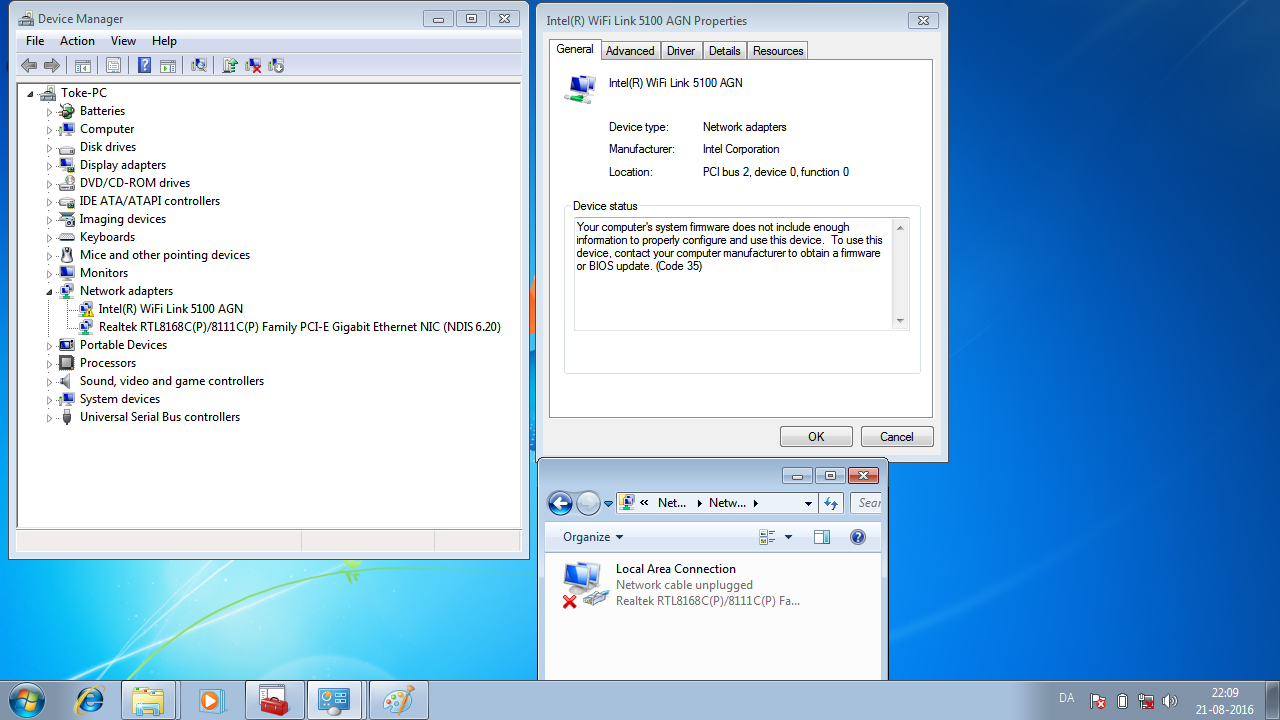
Interesting screenshot.
I have the same wifi adapter on my system.
However i have an additional tab for power management.
Currently using
Intel driver 14.3.2.1 dated 22/01/2012

The error message leads me more towards your motherboerd chipset driver being out of date, or WiFi being turned off in the Bios.

Roy

driver link for Mobo
https://www.google.co.uk/url?sa=t&r...u4/41/&usg=AFQjCNGHd48wqpUBHCF7AWRcdeKqAHMz7A
 

My Computer My Computer

At a glance

W7 home premium 32bit/W7HP 64bit/w10 tp insid...E5300 dual core3gbNvidia Geforce 7100 Nforce 630i
Computer type
PC/Desktop
Computer Manufacturer/Model Number
medionl/Aspire 6930G/acer x55a
OS
W7 home premium 32bit/W7HP 64bit/w10 tp insider ring
CPU
E5300 dual core
Motherboard
medion MS7366
Memory
3gb
Graphics Card(s)
Nvidia Geforce 7100 Nforce 630i
Monitor(s) Displays
avixc
Internet Speed
n (isp resticted to 72)
Antivirus
mse/pands
Browser
palemoon
Other Info
Belkin Fd7050 n USB using Railink RT2870 drivers, more upto date

My Computer My Computer

At a glance

W7 home premium 32bit/W7HP 64bit/w10 tp insid...E5300 dual core3gbNvidia Geforce 7100 Nforce 630i
Computer type
PC/Desktop
Computer Manufacturer/Model Number
medionl/Aspire 6930G/acer x55a
OS
W7 home premium 32bit/W7HP 64bit/w10 tp insider ring
CPU
E5300 dual core
Motherboard
medion MS7366
Memory
3gb
Graphics Card(s)
Nvidia Geforce 7100 Nforce 630i
Monitor(s) Displays
avixc
Internet Speed
n (isp resticted to 72)
Antivirus
mse/pands
Browser
palemoon
Other Info
Belkin Fd7050 n USB using Railink RT2870 drivers, more upto date
Interesting screenshot.
I have the same wifi adapter on my system.
However i have an additional tab for power management.
Currently using
Intel driver 14.3.2.1 dated 22/01/2012

The error message leads me more towards your motherboerd chipset driver being out of date, or WiFi being turned off in the Bios.

Roy

driver link for Mobo
https://www.google.co.uk/url?sa=t&r...u4/41/&usg=AFQjCNGHd48wqpUBHCF7AWRcdeKqAHMz7A

I'm not sure I follow. Do you want me to try one of those drivers? I don't have that particular motherboard.
 

My Computer My Computer

At a glance

64bit Windows 7i5 2500kripjaws x 8gb6950 2 gb
Computer type
PC/Desktop
OS
64bit Windows 7
CPU
i5 2500k
Motherboard
asus p8p67-m pro
Memory
ripjaws x 8gb
Graphics Card(s)
6950 2 gb
Hard Drives
samsung 840 evo ssd 250gb
wd 1 tb hdd

My Computer My Computer

At a glance

64bit Windows 7i5 2500kripjaws x 8gb6950 2 gb
Computer type
PC/Desktop
OS
64bit Windows 7
CPU
i5 2500k
Motherboard
asus p8p67-m pro
Memory
ripjaws x 8gb
Graphics Card(s)
6950 2 gb
Hard Drives
samsung 840 evo ssd 250gb
wd 1 tb hdd
It actually works now after installing the chipset driver. That is unbelievable to me. Thanks so much torchwood and everyone else here.
Prior to formatting there were times where it would work temporarily after a system restore etc, but the adapter in windows would disappear soon after, and so it was hit or miss whether or not it would work when I booted. I'm thinking it might break again and if so I'll have to come back here. Mind if I keep the thread unsolved for a few days to confirm that it is in fact fixed for good?

Again, thank you everyone. Can't believe if it was just a driver problem. :o
 

My Computer My Computer

At a glance

64bit Windows 7i5 2500kripjaws x 8gb6950 2 gb
Computer type
PC/Desktop
OS
64bit Windows 7
CPU
i5 2500k
Motherboard
asus p8p67-m pro
Memory
ripjaws x 8gb
Graphics Card(s)
6950 2 gb
Hard Drives
samsung 840 evo ssd 250gb
wd 1 tb hdd
Hmm well it looked like a driver problem first up and just as a general rule when ever I have issues with say network., USB ports etc I always redo the chipset because unless I have it terribly wrong it deals with info form place to place in the machine ie like the old north and south bridges did.
But well done :)
 

My Computer My Computer

At a glance

Desk1 7 Home Prem / Desk2 10 Pro / Main lap A...Desk1 i5 3750K / Laptop i7 GTX 860M / Desk2 i...Desk1 8GB (1866) / Desk2 16GB (1333) / Laptop...Desk 1& 2NVidia GTX 650 & Laptops on board Intel
Computer type
PC/Desktop
Computer Manufacturer/Model Number
Own build (new) Desk1 / Asus ROG Win 7 / Desk2 1st build
OS
Desk1 7 Home Prem / Desk2 10 Pro / Main lap Asus ROG 10 Pro 2 laptop Toshiba 7 Pro Asus P2520 7 & 10
CPU
Desk1 i5 3750K / Laptop i7 GTX 860M / Desk2 i5 2500
Motherboard
Desk1 Asus P877-V / Desk2 Gigabyte H67 UD3H / Laptop ?
Memory
Desk1 8GB (1866) / Desk2 16GB (1333) / Laptop 8Gb DDR3
Graphics Card(s)
Desk 1& 2NVidia GTX 650 & Laptops on board Intel
Sound Card
Desk 1 & 2 -XONAR DG Realtek High Def audio Laptop
Monitor(s) Displays
Desk 1 Benq HD 2450 / Desk2 Philips 24" / Laptop 17.5"
Screen Resolution
1920x1080 D1 & D2 & Laptop 1
Hard Drives
Desk1 Samsung 120GB 830 SSD
Asus ROG 256GB 850 Pro SSD
Desk2 Samsung 840 256 SSD
Toshiba 120GB EVO
PSU
Desk 1 Corsair HX 1050/ Laptop ? / Desk 2 Corsair HX 650
Case
Desk 1 Cooler HAF XM ? Toshiba laptop / Desk2 Coolermaster
Cooling
Fans on all Desk1 -2 Desk2 - all Coolermasters 5 Laptop ?
Keyboard
Desk 1 MS Sidewinder X6 Desk 2 MS Sidewinder X 4
Mouse
Desk 1&2 - Gigabyte MS 900 gamer - laptop - Logitec wireless
Internet Speed
ADSL2+
Other Info
One other Desktop (tester) and spare Toshba laptop both with SSD's
Running Kaspersky 2016 ISS on all machines config'd identically
Logitec audio stereo systems on each machine (x3)
Canon MG5250MFC
Router/modem TP-Link running WPA2SK
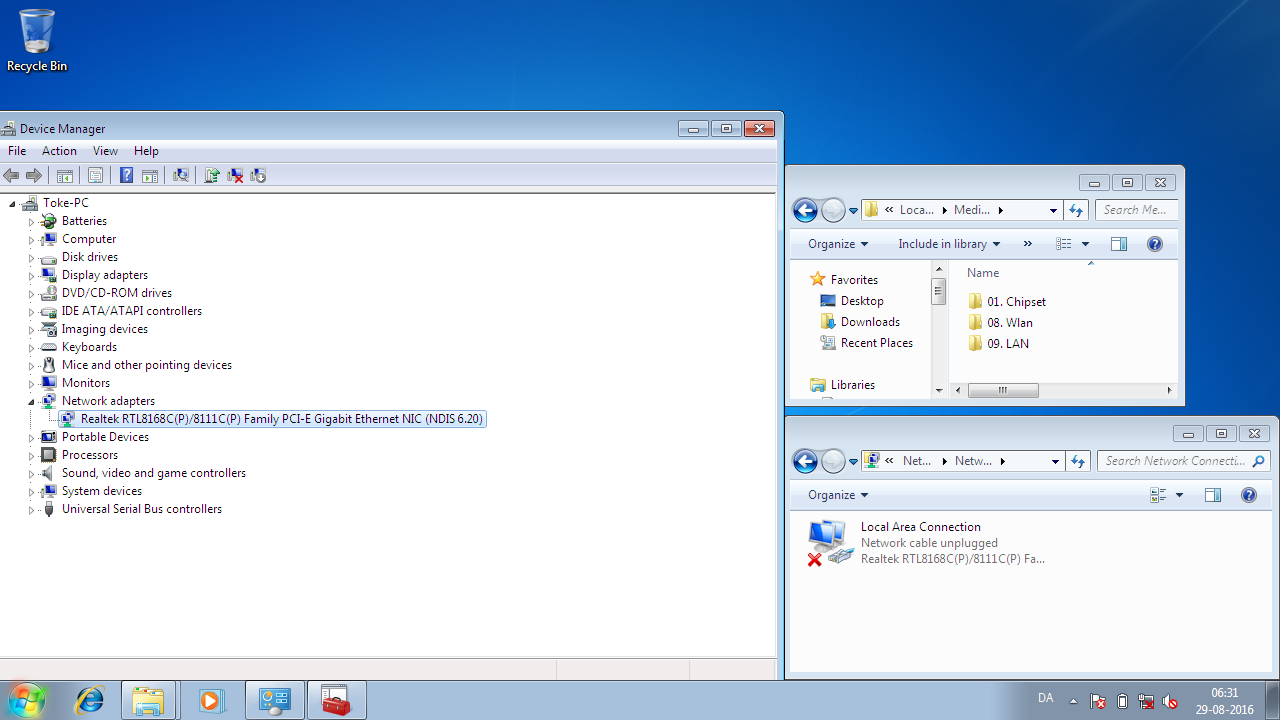
It seems the problem has not been solved after all. This is what it looks like once again. I am tempted to think it was a coincidence that it worked after installing the chipset driver. This is what I was concerned about in my previous post. Sometimes it just works for a while, but most of the time I get this. The little blue LED will not turn on using the Fn shortcut.

Do you believe I would be able to connect to the net with a usb dongle, as I previously asked about, with it looking like it does in the screenshot? What about investing in a new network card or a new computer all together? I am of course open to suggestions about other things I can try to get it to work.

For newcomers to the thread, this is an old laptop and not the system under My System Spec. See the OP for specs.

jzybnyD.png
 

My Computer My Computer

At a glance

64bit Windows 7i5 2500kripjaws x 8gb6950 2 gb
Computer type
PC/Desktop
OS
64bit Windows 7
CPU
i5 2500k
Motherboard
asus p8p67-m pro
Memory
ripjaws x 8gb
Graphics Card(s)
6950 2 gb
Hard Drives
samsung 840 evo ssd 250gb
wd 1 tb hdd
Well you could try the dongle but personally I prefer a dedicated USB connected modem - works just like a dongle does. The only thing i find with my own travel set up is that the modem is Australian based and overseas like right now I have to rely on the wireless service at wherever I am staying.
 

My Computer My Computer

At a glance

Desk1 7 Home Prem / Desk2 10 Pro / Main lap A...Desk1 i5 3750K / Laptop i7 GTX 860M / Desk2 i...Desk1 8GB (1866) / Desk2 16GB (1333) / Laptop...Desk 1& 2NVidia GTX 650 & Laptops on board Intel
Computer type
PC/Desktop
Computer Manufacturer/Model Number
Own build (new) Desk1 / Asus ROG Win 7 / Desk2 1st build
OS
Desk1 7 Home Prem / Desk2 10 Pro / Main lap Asus ROG 10 Pro 2 laptop Toshiba 7 Pro Asus P2520 7 & 10
CPU
Desk1 i5 3750K / Laptop i7 GTX 860M / Desk2 i5 2500
Motherboard
Desk1 Asus P877-V / Desk2 Gigabyte H67 UD3H / Laptop ?
Memory
Desk1 8GB (1866) / Desk2 16GB (1333) / Laptop 8Gb DDR3
Graphics Card(s)
Desk 1& 2NVidia GTX 650 & Laptops on board Intel
Sound Card
Desk 1 & 2 -XONAR DG Realtek High Def audio Laptop
Monitor(s) Displays
Desk 1 Benq HD 2450 / Desk2 Philips 24" / Laptop 17.5"
Screen Resolution
1920x1080 D1 & D2 & Laptop 1
Hard Drives
Desk1 Samsung 120GB 830 SSD
Asus ROG 256GB 850 Pro SSD
Desk2 Samsung 840 256 SSD
Toshiba 120GB EVO
PSU
Desk 1 Corsair HX 1050/ Laptop ? / Desk 2 Corsair HX 650
Case
Desk 1 Cooler HAF XM ? Toshiba laptop / Desk2 Coolermaster
Cooling
Fans on all Desk1 -2 Desk2 - all Coolermasters 5 Laptop ?
Keyboard
Desk 1 MS Sidewinder X6 Desk 2 MS Sidewinder X 4
Mouse
Desk 1&2 - Gigabyte MS 900 gamer - laptop - Logitec wireless
Internet Speed
ADSL2+
Other Info
One other Desktop (tester) and spare Toshba laptop both with SSD's
Running Kaspersky 2016 ISS on all machines config'd identically
Logitec audio stereo systems on each machine (x3)
Canon MG5250MFC
Router/modem TP-Link running WPA2SK
Back
Top