
Windows Media Center Updates - Enable or Disable Waking Computer

How to Enable or Disable Windows Media Center Updates to Wake Up the Computer

   Information
This will show you how to enable or disable the Windows Media Center (mcupdate) task from waking up the computer from sleep when it checks for Media Center updates in Windows 7 and Vista.

If disabled, the mcupdate task will still check for Media Center updates if the computer is running, but will not wake the computer to do so.

You will need to be logged in as an administrator to be able to do this tutorial.
   Note
The N and KN editions of Windows 7 have all the features that normally come with each individual Windows 7 edition, except for Windows Media Player 12 and related programs, such as Windows Media Center or Windows DVD Maker.

The N editions of Windows 7 allow you to choose your own media player and software required to manage and play CDs, DVDs, and other digital media files. If you choose to use Windows Media Player 12, downloading it, along with related software, is free.
Download Media Feature Pack for Windows 7 N with Service Pack 1 and Windows 7 KN with Service Pack 1 (KB968211) from Official Microsoft Download Center


Here's How:
1. Open the Start Menu, then type taskschd.msc in the search box and press Enter.

2. If prompted by UAC, then click on Yes (Windows 7) or Continue (Vista).

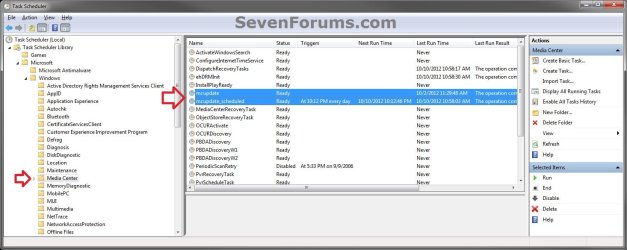
3. In the left pane of Task Scheduler, double click on (to expand) Task Scheduler Library, Microsoft, Windows, then select Media Center. (see screenshot below)

NOTE: If the Task Scheduler Library tree (left pane) is not available in the Task Scheduler, then click on View (menu bar), Customize, check the Console Tree box, and click on OK.
Step-1.jpg


4. In the middle pane, double click on mcupdate. (see screenshot above)

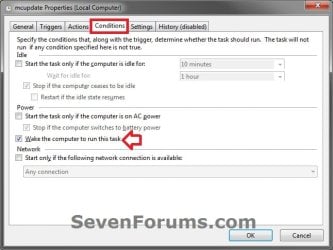
5. Click on the Conditions tab, and do step 6 or 7 below for what you would like to do. (see screenshot below)
Step-2.jpg
6. To Enable Waking the Computer to Run Windows Media Center Updates
A) Check the Wake the computer to run this task box, and click on OK. (see screenshot above)

B) Go to step 8.
7. To Disable Waking the Computer to Run Windows Media Center Updates
A) Uncheck the Wake the computer to run this task box, and click on OK. (see screenshot below step 5)


8. Repeat step 4 above, but double click on mcupdate_scheduled instead.

9. When finished, you can close Task Scheduler if you like.
That's it,
Shawn


Last edited:
I'm glad it could Michael. :)

Yeah, it would be nice to have a clearer and easier to understand log for stuff like this for the everyday user.
 

My Computer My Computer

At a glance

64-bit Windows 11 Pro for WorkstationsIntel i7-8700K OC'd to 5 GHz64 GB (4x16GB) G.SKILL TridentZ RGB DDR4 3600...ASUS ROG-STRIX-GTX1080TI-O11G-GAMING
Computer type
PC/Desktop
Computer Manufacturer/Model Number
Self built custom
OS
64-bit Windows 11 Pro for Workstations
CPU
Intel i7-8700K OC'd to 5 GHz
Motherboard
ASUS ROG Maximus XI Formula Z390
Memory
64 GB (4x16GB) G.SKILL TridentZ RGB DDR4 3600 MHz
Graphics Card(s)
ASUS ROG-STRIX-GTX1080TI-O11G-GAMING
Sound Card
Integrated
Monitor(s) Displays
2 x Samsung Odyssey G7 27"
Screen Resolution
2560x1440
Hard Drives
1TB Samsung 990 PRO M.2,
4TB Samsung 990 PRO PRO M.2,
TerraMaster F8 SSD Plus NAS
PSU
Seasonic Prime Titanium 850W
Case
Thermaltake Core P3
Cooling
Corsair Hydro H115i
Keyboard
Logitech wireless K800
Mouse
Logitech MX Master 4
Internet Speed
2 Gb/s Download and 100 Mb/s Upload
Antivirus
Malwarebyte Anti-Malware Premium
Browser
Google Chrome
Other Info
Logitech Z625 speaker system,
Logitech BRIO 4K Pro webcam,
HP Color LaserJet Pro MFP M477fdn,
APC SMART-UPS RT 1000 XL - SURT1000XLI,
Galaxy S23 Plus phone
Thanks for replying, Brink. MS should have one comprehensive troubleshooter that will run on your system that will run through and check all this stuff, and tell you what is going on and how to fix it--probably too complex to have it fixed automatically. They do have such troubleshooters for other things--maybe they have this one, but I haven't seen it yet.

For me, finding this tutorial was at the end of the process, because it took so much just to figure out that the Media Player was the problem--and then it turned out that the program itself was inscrutable about how to change the update choices. So this page would not have helped me initially, yet it was very helpful once I understood that WMP was the problem.

MS keeps trying to make Windows easier for the non-technical user, but the program itself is so highly complex that the user is at a loss when something doesn't work as it should.

BTW, you might want to add that bit to the tutorial about how to get into the checkboxes on the Conditions tab. That was the next question I was about to ask until I understood finally what perkinw was saying. Could be a little clearer than he/she said it, but should be in the tutorial. ...Or perhaps this extra step is only the case for Windows 10.

Michael
 

My Computer My Computer

At a glance

Win 7 x64 ProIntel Core i74 GB
Computer type
Laptop
Computer Manufacturer/Model Number
Toshiba
OS
Win 7 x64 Pro
CPU
Intel Core i7
Memory
4 GB
Browser
IE; Chrome
BTW, you might want to add that bit to the tutorial about how to get into the checkboxes on the Conditions tab. That was the next question I was about to ask until I understood finally what perkinw was saying. Could be a little clearer than he/she said it, but should be in the tutorial. ...Or perhaps this extra step is only the case for Windows 10.

Michael

It's already there as step 4 if that's what you were referring to.
 

My Computer My Computer

At a glance

64-bit Windows 11 Pro for WorkstationsIntel i7-8700K OC'd to 5 GHz64 GB (4x16GB) G.SKILL TridentZ RGB DDR4 3600...ASUS ROG-STRIX-GTX1080TI-O11G-GAMING
Computer type
PC/Desktop
Computer Manufacturer/Model Number
Self built custom
OS
64-bit Windows 11 Pro for Workstations
CPU
Intel i7-8700K OC'd to 5 GHz
Motherboard
ASUS ROG Maximus XI Formula Z390
Memory
64 GB (4x16GB) G.SKILL TridentZ RGB DDR4 3600 MHz
Graphics Card(s)
ASUS ROG-STRIX-GTX1080TI-O11G-GAMING
Sound Card
Integrated
Monitor(s) Displays
2 x Samsung Odyssey G7 27"
Screen Resolution
2560x1440
Hard Drives
1TB Samsung 990 PRO M.2,
4TB Samsung 990 PRO PRO M.2,
TerraMaster F8 SSD Plus NAS
PSU
Seasonic Prime Titanium 850W
Case
Thermaltake Core P3
Cooling
Corsair Hydro H115i
Keyboard
Logitech wireless K800
Mouse
Logitech MX Master 4
Internet Speed
2 Gb/s Download and 100 Mb/s Upload
Antivirus
Malwarebyte Anti-Malware Premium
Browser
Google Chrome
Other Info
Logitech Z625 speaker system,
Logitech BRIO 4K Pro webcam,
HP Color LaserJet Pro MFP M477fdn,
APC SMART-UPS RT 1000 XL - SURT1000XLI,
Galaxy S23 Plus phone
My apologies. I missed that it says "double click" in Step 4. Maybe I would have caught it if those two words had been highlighted with bold or underline. (Even going back, I looked for the "double click in #s 5 & 6.) But trying to digest what to do, I read through the whole tutorial first. Perhaps I read it too fast. After reading, I clicked on "mcupdate" first, and the tabs for that item appeared immediately below it. I chose the Conditions tab, and saw that the choices were grayed out. If I had selected BOTH "mcupdate" and "mcupdate_scheduled" simultaneously, as you stated, then with two items selected, the tabs do not appear below. The confusion might not have occured.

Apparently there are many more ways to get things wrong than chances to get them right.

Michael
 

My Computer My Computer

At a glance

Win 7 x64 ProIntel Core i74 GB
Computer type
Laptop
Computer Manufacturer/Model Number
Toshiba
OS
Win 7 x64 Pro
CPU
Intel Core i7
Memory
4 GB
Browser
IE; Chrome
No worries. I just wanted to make sure what you mentioned was in there. :)
 

My Computer My Computer

At a glance

64-bit Windows 11 Pro for WorkstationsIntel i7-8700K OC'd to 5 GHz64 GB (4x16GB) G.SKILL TridentZ RGB DDR4 3600...ASUS ROG-STRIX-GTX1080TI-O11G-GAMING
Computer type
PC/Desktop
Computer Manufacturer/Model Number
Self built custom
OS
64-bit Windows 11 Pro for Workstations
CPU
Intel i7-8700K OC'd to 5 GHz
Motherboard
ASUS ROG Maximus XI Formula Z390
Memory
64 GB (4x16GB) G.SKILL TridentZ RGB DDR4 3600 MHz
Graphics Card(s)
ASUS ROG-STRIX-GTX1080TI-O11G-GAMING
Sound Card
Integrated
Monitor(s) Displays
2 x Samsung Odyssey G7 27"
Screen Resolution
2560x1440
Hard Drives
1TB Samsung 990 PRO M.2,
4TB Samsung 990 PRO PRO M.2,
TerraMaster F8 SSD Plus NAS
PSU
Seasonic Prime Titanium 850W
Case
Thermaltake Core P3
Cooling
Corsair Hydro H115i
Keyboard
Logitech wireless K800
Mouse
Logitech MX Master 4
Internet Speed
2 Gb/s Download and 100 Mb/s Upload
Antivirus
Malwarebyte Anti-Malware Premium
Browser
Google Chrome
Other Info
Logitech Z625 speaker system,
Logitech BRIO 4K Pro webcam,
HP Color LaserJet Pro MFP M477fdn,
APC SMART-UPS RT 1000 XL - SURT1000XLI,
Galaxy S23 Plus phone
I came back to this because it is interesting how careful one has to be in understanding the instructions, and also in writing them. perkinw apparently did the same thing I did: selected only one item, at which point the tabs appeared below, including Conditions. But then we both saw that the boxes were "grayed out". In your screenshot, both items are selected, therefore no tabs appear below them. Missing this very minor difference meant we did not grasp the importance of the "double click" on a single item in order to get to a box where changes could be made. It became easy to gloss over that.

But if the tabs appear and one can see the check-marks, why does MS even require this extra step anyway,...or at least advise at the top to double-click to make changes?

Sorry for my annoyance. I guess it's fruitless that I keep expecting a more perfect world. :o
 
Last edited:

My Computer My Computer

At a glance

Win 7 x64 ProIntel Core i74 GB
Computer type
Laptop
Computer Manufacturer/Model Number
Toshiba
OS
Win 7 x64 Pro
CPU
Intel Core i7
Memory
4 GB
Browser
IE; Chrome
I'm having a problem with these directions. At step 4 or 5, I can not edit the tick boxes as it seems that I do not have editing privileges. Maybe some security system is blocking my requests. :confused:

Late reply, but any suggestions?
 

My Computer My Computer

At a glance

Windows 7 Ultimate x64AMD FX 8350 Eight Core ProcessorPatriot Viper 8GB 2 4GB Kit DDR3MSI Gaming GeForce GTX 1050
Computer type
PC/Desktop
Computer Manufacturer/Model Number
custom build
OS
Windows 7 Ultimate x64
CPU
AMD FX 8350 Eight Core Processor
Motherboard
MSI 970A G43 Plus
Memory
Patriot Viper 8GB 2 4GB Kit DDR3
Graphics Card(s)
MSI Gaming GeForce GTX 1050
Monitor(s) Displays
(2) ASUS VN248
Hard Drives
SSD (main), HDD (media storage)
Case
Apevia X-SNIPER2-GN ATX Mid Tower
Cooling
Air
Keyboard
VELOCIFIRE TKL01 Mechanical
Mouse
HIRALIY F300
I'm having a problem with these directions. At step 4 or 5, I can not edit the tick boxes as it seems that I do not have editing privileges. Maybe some security system is blocking my requests. :confused:

Late reply, but any suggestions?

Hello Ryanator, and welcome to Seven Forums. :-)

Are you logged in to an administrator account?
 

My Computer My Computer

At a glance

64-bit Windows 11 Pro for WorkstationsIntel i7-8700K OC'd to 5 GHz64 GB (4x16GB) G.SKILL TridentZ RGB DDR4 3600...ASUS ROG-STRIX-GTX1080TI-O11G-GAMING
Computer type
PC/Desktop
Computer Manufacturer/Model Number
Self built custom
OS
64-bit Windows 11 Pro for Workstations
CPU
Intel i7-8700K OC'd to 5 GHz
Motherboard
ASUS ROG Maximus XI Formula Z390
Memory
64 GB (4x16GB) G.SKILL TridentZ RGB DDR4 3600 MHz
Graphics Card(s)
ASUS ROG-STRIX-GTX1080TI-O11G-GAMING
Sound Card
Integrated
Monitor(s) Displays
2 x Samsung Odyssey G7 27"
Screen Resolution
2560x1440
Hard Drives
1TB Samsung 990 PRO M.2,
4TB Samsung 990 PRO PRO M.2,
TerraMaster F8 SSD Plus NAS
PSU
Seasonic Prime Titanium 850W
Case
Thermaltake Core P3
Cooling
Corsair Hydro H115i
Keyboard
Logitech wireless K800
Mouse
Logitech MX Master 4
Internet Speed
2 Gb/s Download and 100 Mb/s Upload
Antivirus
Malwarebyte Anti-Malware Premium
Browser
Google Chrome
Other Info
Logitech Z625 speaker system,
Logitech BRIO 4K Pro webcam,
HP Color LaserJet Pro MFP M477fdn,
APC SMART-UPS RT 1000 XL - SURT1000XLI,
Galaxy S23 Plus phone
Back
Top