
Windows Media Center Updates - Enable or Disable Waking Computer

How to Enable or Disable Windows Media Center Updates to Wake Up the Computer

   Information
This will show you how to enable or disable the Windows Media Center (mcupdate) task from waking up the computer from sleep when it checks for Media Center updates in Windows 7 and Vista.

If disabled, the mcupdate task will still check for Media Center updates if the computer is running, but will not wake the computer to do so.

You will need to be logged in as an administrator to be able to do this tutorial.
   Note
The N and KN editions of Windows 7 have all the features that normally come with each individual Windows 7 edition, except for Windows Media Player 12 and related programs, such as Windows Media Center or Windows DVD Maker.

The N editions of Windows 7 allow you to choose your own media player and software required to manage and play CDs, DVDs, and other digital media files. If you choose to use Windows Media Player 12, downloading it, along with related software, is free.
Download Media Feature Pack for Windows 7 N with Service Pack 1 and Windows 7 KN with Service Pack 1 (KB968211) from Official Microsoft Download Center


Here's How:
1. Open the Start Menu, then type taskschd.msc in the search box and press Enter.

2. If prompted by UAC, then click on Yes (Windows 7) or Continue (Vista).

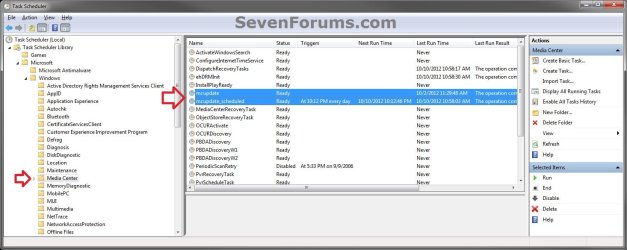
3. In the left pane of Task Scheduler, double click on (to expand) Task Scheduler Library, Microsoft, Windows, then select Media Center. (see screenshot below)

NOTE: If the Task Scheduler Library tree (left pane) is not available in the Task Scheduler, then click on View (menu bar), Customize, check the Console Tree box, and click on OK.
Step-1.jpg


4. In the middle pane, double click on mcupdate. (see screenshot above)

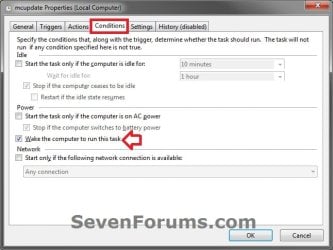
5. Click on the Conditions tab, and do step 6 or 7 below for what you would like to do. (see screenshot below)
Step-2.jpg
6. To Enable Waking the Computer to Run Windows Media Center Updates
A) Check the Wake the computer to run this task box, and click on OK. (see screenshot above)

B) Go to step 8.
7. To Disable Waking the Computer to Run Windows Media Center Updates
A) Uncheck the Wake the computer to run this task box, and click on OK. (see screenshot below step 5)


8. Repeat step 4 above, but double click on mcupdate_scheduled instead.

9. When finished, you can close Task Scheduler if you like.
That's it,
Shawn


Last edited:
you are a god send

Thank you very much for this thread. It has helped me a lot!
Cheers
 

My Computer My Computer

Computer Manufacturer/Model Number
packard bell g5800
OS
windows 7 64 bit
CPU
i7 870
Motherboard
packard bell
Memory
12gig ddr3
Graphics Card(s)
firepro v4800
Monitor(s) Displays
hazro 27inch
Screen Resolution
2550x1550
Hard Drives
corsair ssd 250gig
seagate 500gig
packard bell 1tb
You're most welcome ThinkTank, and welcome to Seven Forums. :)
 

My Computer My Computer

Computer type
PC/Desktop
Computer Manufacturer/Model Number
Self built custom
OS
64-bit Windows 11 Pro for Workstations
CPU
Intel i7-8700K OC'd to 5 GHz
Motherboard
ASUS ROG Maximus XI Formula Z390
Memory
64 GB (4x16GB) G.SKILL TridentZ RGB DDR4 3600 MHz
Graphics Card(s)
ASUS ROG-STRIX-GTX1080TI-O11G-GAMING
Sound Card
Integrated
Monitor(s) Displays
2 x Samsung Odyssey G7 27"
Screen Resolution
2560x1440
Hard Drives
1TB Samsung 990 PRO M.2,
4TB Samsung 990 PRO PRO M.2,
TerraMaster F8 SSD Plus NAS
PSU
Seasonic Prime Titanium 850W
Case
Thermaltake Core P3
Cooling
Corsair Hydro H115i
Keyboard
Logitech wireless K800
Mouse
Logitech MX Master 4
Internet Speed
2 Gb/s Download and 100 Mb/s Upload
Antivirus
Malwarebyte Anti-Malware Premium
Browser
Google Chrome
Other Info
Logitech Z625 speaker system,
Logitech BRIO 4K Pro webcam,
HP Color LaserJet Pro MFP M477fdn,
APC SMART-UPS RT 1000 XL - SURT1000XLI,
Galaxy S23 Plus phone
Thanks so much for this fix. One small addition:

If the Library Tree is not visible in the Task Scheduler, select View, Customize, and then add checkbox to Console Tree.
 

My Computer My Computer

Computer Manufacturer/Model Number
Dell Studio XPS 1640
OS
Windows 7 Ultimate x64
CPU
Intel DuoCore P8600 @ 2.40 GHz
Memory
6.0 GB
Thank you Madtown, and welcome to Seven Forums.

Addition added.
 

My Computer My Computer

Computer type
PC/Desktop
Computer Manufacturer/Model Number
Self built custom
OS
64-bit Windows 11 Pro for Workstations
CPU
Intel i7-8700K OC'd to 5 GHz
Motherboard
ASUS ROG Maximus XI Formula Z390
Memory
64 GB (4x16GB) G.SKILL TridentZ RGB DDR4 3600 MHz
Graphics Card(s)
ASUS ROG-STRIX-GTX1080TI-O11G-GAMING
Sound Card
Integrated
Monitor(s) Displays
2 x Samsung Odyssey G7 27"
Screen Resolution
2560x1440
Hard Drives
1TB Samsung 990 PRO M.2,
4TB Samsung 990 PRO PRO M.2,
TerraMaster F8 SSD Plus NAS
PSU
Seasonic Prime Titanium 850W
Case
Thermaltake Core P3
Cooling
Corsair Hydro H115i
Keyboard
Logitech wireless K800
Mouse
Logitech MX Master 4
Internet Speed
2 Gb/s Download and 100 Mb/s Upload
Antivirus
Malwarebyte Anti-Malware Premium
Browser
Google Chrome
Other Info
Logitech Z625 speaker system,
Logitech BRIO 4K Pro webcam,
HP Color LaserJet Pro MFP M477fdn,
APC SMART-UPS RT 1000 XL - SURT1000XLI,
Galaxy S23 Plus phone
Thank you Brink (Shawn) for the excellent write up. Between your post and someone's trick on "powercfg -lastwake" I figured what was waking up my computer on its own. I register for an account just to say Thank you.
 

My Computer My Computer

OS
Win 7 ult x644
You're most welcome Lettcco, and welcome to Seven Forums. :)
 

My Computer My Computer

Computer type
PC/Desktop
Computer Manufacturer/Model Number
Self built custom
OS
64-bit Windows 11 Pro for Workstations
CPU
Intel i7-8700K OC'd to 5 GHz
Motherboard
ASUS ROG Maximus XI Formula Z390
Memory
64 GB (4x16GB) G.SKILL TridentZ RGB DDR4 3600 MHz
Graphics Card(s)
ASUS ROG-STRIX-GTX1080TI-O11G-GAMING
Sound Card
Integrated
Monitor(s) Displays
2 x Samsung Odyssey G7 27"
Screen Resolution
2560x1440
Hard Drives
1TB Samsung 990 PRO M.2,
4TB Samsung 990 PRO PRO M.2,
TerraMaster F8 SSD Plus NAS
PSU
Seasonic Prime Titanium 850W
Case
Thermaltake Core P3
Cooling
Corsair Hydro H115i
Keyboard
Logitech wireless K800
Mouse
Logitech MX Master 4
Internet Speed
2 Gb/s Download and 100 Mb/s Upload
Antivirus
Malwarebyte Anti-Malware Premium
Browser
Google Chrome
Other Info
Logitech Z625 speaker system,
Logitech BRIO 4K Pro webcam,
HP Color LaserJet Pro MFP M477fdn,
APC SMART-UPS RT 1000 XL - SURT1000XLI,
Galaxy S23 Plus phone
Hi, I checked my system to find out why it is waking up and this appears to be the problem EXCEPT... the "wake computer to run this task" box is unchecked already. As far as I am aware I am the administrator as it is the only account on the PC and I assume it wouldn't show me the options or at least they'd be greyed out but with the box checked.

So slightly confused as to why this task runs and wakes the computer even though the box is unchecked... any other ways around this?

Cheers.
 

My Computer My Computer

OS
Windows 7 Home Premium 64bit
How many task entries do you have for Media Center? My pc actually had two, one was set as you describe but the other was set to wake the pc.
 

My Computer My Computer

Computer Manufacturer/Model Number
BYO
OS
Windows 7 Home Premium *upgrade*
CPU
AMD A6-3670K
Motherboard
MSI A55M-P33
Memory
4GB DDR3-1333
Graphics Card(s)
Onboard AMD Radeon HD6530D
Sound Card
none
Monitor(s) Displays
Spectre 23"
Screen Resolution
1080p
Hard Drives
500GB W/D
PSU
Ultra 450W
Case
Ultra ULT40278 XT MicroATX Tower
Cooling
1 120mm front, 1 92mm rear
Keyboard
generic ps/2
Mouse
generic ps/2
Internet Speed
DSL 768kbps
Hello bg17, and welcome to Seven Forums.

What other task for Media Center did you have that was set to wake the PC?
 

My Computer My Computer

Computer type
PC/Desktop
Computer Manufacturer/Model Number
Self built custom
OS
64-bit Windows 11 Pro for Workstations
CPU
Intel i7-8700K OC'd to 5 GHz
Motherboard
ASUS ROG Maximus XI Formula Z390
Memory
64 GB (4x16GB) G.SKILL TridentZ RGB DDR4 3600 MHz
Graphics Card(s)
ASUS ROG-STRIX-GTX1080TI-O11G-GAMING
Sound Card
Integrated
Monitor(s) Displays
2 x Samsung Odyssey G7 27"
Screen Resolution
2560x1440
Hard Drives
1TB Samsung 990 PRO M.2,
4TB Samsung 990 PRO PRO M.2,
TerraMaster F8 SSD Plus NAS
PSU
Seasonic Prime Titanium 850W
Case
Thermaltake Core P3
Cooling
Corsair Hydro H115i
Keyboard
Logitech wireless K800
Mouse
Logitech MX Master 4
Internet Speed
2 Gb/s Download and 100 Mb/s Upload
Antivirus
Malwarebyte Anti-Malware Premium
Browser
Google Chrome
Other Info
Logitech Z625 speaker system,
Logitech BRIO 4K Pro webcam,
HP Color LaserJet Pro MFP M477fdn,
APC SMART-UPS RT 1000 XL - SURT1000XLI,
Galaxy S23 Plus phone
Hi, I checked my system to find out why it is waking up and this appears to be the problem EXCEPT... the "wake computer to run this task" box is unchecked already. As far as I am aware I am the administrator as it is the only account on the PC and I assume it wouldn't show me the options or at least they'd be greyed out but with the box checked.

So slightly confused as to why this task runs and wakes the computer even though the box is unchecked... any other ways around this?

Cheers.

Hello Jupitergirl, and welcome to Seven Forums.

Could you also post back with what it had for this wake source in Event Viewer? :)

http://www.sevenforums.com/tutorials/179257-wake-source-read-event-viewer-log.html
 

My Computer My Computer

Computer type
PC/Desktop
Computer Manufacturer/Model Number
Self built custom
OS
64-bit Windows 11 Pro for Workstations
CPU
Intel i7-8700K OC'd to 5 GHz
Motherboard
ASUS ROG Maximus XI Formula Z390
Memory
64 GB (4x16GB) G.SKILL TridentZ RGB DDR4 3600 MHz
Graphics Card(s)
ASUS ROG-STRIX-GTX1080TI-O11G-GAMING
Sound Card
Integrated
Monitor(s) Displays
2 x Samsung Odyssey G7 27"
Screen Resolution
2560x1440
Hard Drives
1TB Samsung 990 PRO M.2,
4TB Samsung 990 PRO PRO M.2,
TerraMaster F8 SSD Plus NAS
PSU
Seasonic Prime Titanium 850W
Case
Thermaltake Core P3
Cooling
Corsair Hydro H115i
Keyboard
Logitech wireless K800
Mouse
Logitech MX Master 4
Internet Speed
2 Gb/s Download and 100 Mb/s Upload
Antivirus
Malwarebyte Anti-Malware Premium
Browser
Google Chrome
Other Info
Logitech Z625 speaker system,
Logitech BRIO 4K Pro webcam,
HP Color LaserJet Pro MFP M477fdn,
APC SMART-UPS RT 1000 XL - SURT1000XLI,
Galaxy S23 Plus phone
Not at that pc now (at work), but I had an entry that was just "mcupdate" and another that was "mcupdate_scheduled". Not sure now if "_scheduled" was within a "mcupdate" folder, but it looked like two separate entries to me.
 

My Computer My Computer

Computer Manufacturer/Model Number
BYO
OS
Windows 7 Home Premium *upgrade*
CPU
AMD A6-3670K
Motherboard
MSI A55M-P33
Memory
4GB DDR3-1333
Graphics Card(s)
Onboard AMD Radeon HD6530D
Sound Card
none
Monitor(s) Displays
Spectre 23"
Screen Resolution
1080p
Hard Drives
500GB W/D
PSU
Ultra 450W
Case
Ultra ULT40278 XT MicroATX Tower
Cooling
1 120mm front, 1 92mm rear
Keyboard
generic ps/2
Mouse
generic ps/2
Internet Speed
DSL 768kbps
Thank you bg17. Looks like Microsoft added another task for it in some update. Tutorial has been updated for this one.


Jupitergirl,

Please try the tutorial again with the update (step 8) for the other mcupdate_scheduled task. :)
 

My Computer My Computer

Computer type
PC/Desktop
Computer Manufacturer/Model Number
Self built custom
OS
64-bit Windows 11 Pro for Workstations
CPU
Intel i7-8700K OC'd to 5 GHz
Motherboard
ASUS ROG Maximus XI Formula Z390
Memory
64 GB (4x16GB) G.SKILL TridentZ RGB DDR4 3600 MHz
Graphics Card(s)
ASUS ROG-STRIX-GTX1080TI-O11G-GAMING
Sound Card
Integrated
Monitor(s) Displays
2 x Samsung Odyssey G7 27"
Screen Resolution
2560x1440
Hard Drives
1TB Samsung 990 PRO M.2,
4TB Samsung 990 PRO PRO M.2,
TerraMaster F8 SSD Plus NAS
PSU
Seasonic Prime Titanium 850W
Case
Thermaltake Core P3
Cooling
Corsair Hydro H115i
Keyboard
Logitech wireless K800
Mouse
Logitech MX Master 4
Internet Speed
2 Gb/s Download and 100 Mb/s Upload
Antivirus
Malwarebyte Anti-Malware Premium
Browser
Google Chrome
Other Info
Logitech Z625 speaker system,
Logitech BRIO 4K Pro webcam,
HP Color LaserJet Pro MFP M477fdn,
APC SMART-UPS RT 1000 XL - SURT1000XLI,
Galaxy S23 Plus phone
Hi Brink and bg17,

Yes, this was the problem: mcupdate_scheduled. I have now unticked the wake if asleep box - so hopefully problem solved!!

Thank you both for your help :D
 

My Computer My Computer

OS
Windows 7 Home Premium 64bit
That's great news. I'm glad it worked for you. :)
 

My Computer My Computer

Computer type
PC/Desktop
Computer Manufacturer/Model Number
Self built custom
OS
64-bit Windows 11 Pro for Workstations
CPU
Intel i7-8700K OC'd to 5 GHz
Motherboard
ASUS ROG Maximus XI Formula Z390
Memory
64 GB (4x16GB) G.SKILL TridentZ RGB DDR4 3600 MHz
Graphics Card(s)
ASUS ROG-STRIX-GTX1080TI-O11G-GAMING
Sound Card
Integrated
Monitor(s) Displays
2 x Samsung Odyssey G7 27"
Screen Resolution
2560x1440
Hard Drives
1TB Samsung 990 PRO M.2,
4TB Samsung 990 PRO PRO M.2,
TerraMaster F8 SSD Plus NAS
PSU
Seasonic Prime Titanium 850W
Case
Thermaltake Core P3
Cooling
Corsair Hydro H115i
Keyboard
Logitech wireless K800
Mouse
Logitech MX Master 4
Internet Speed
2 Gb/s Download and 100 Mb/s Upload
Antivirus
Malwarebyte Anti-Malware Premium
Browser
Google Chrome
Other Info
Logitech Z625 speaker system,
Logitech BRIO 4K Pro webcam,
HP Color LaserJet Pro MFP M477fdn,
APC SMART-UPS RT 1000 XL - SURT1000XLI,
Galaxy S23 Plus phone
I get to the last step but...

...but the check boxes are grayed out. The box labeled "wake the computer to run this task" is indeed checked, but I cannot uncheck it! I am logged in as a user with administrative privileges on Windows 7 Home edition. Anyone else having this problem?
 

My Computer My Computer

Computer type
PC/Desktop
Computer Manufacturer/Model Number
Dell Studio MT
OS
Microsoft Windows 7 Professional 64-bit 7601 Multiprocessor Free Service Pack 1
CPU
Intel(R) Core(TM) i7-4790 CPU @ 3.60GHz
Motherboard
Dell Inc. 0KWVT8
Memory
24.00 GB
Graphics Card(s)
AMD Radeon(TM) R9 270
Sound Card
(1) AMD High Definition Audio Device (2) Realtek High Defi
Monitor(s) Displays
Sun CRT
Screen Resolution
1920 x 1200 x 32 bits (4294967296 colors) @ 60 Hz
Hard Drives
(1) Crucial_ CT256MX100SSD1 SCSI Disk Device (2) Intel Raid 1 Volume SCSI Disk Device (3) SK hynix SC210 mSAT SCSI Disk Device (4) CF/MD Card (5) MS/Pro/Duo Card (6) SD/mini-MMC/RS Card (7) SM/xD Card
Never mind, I figured it out. Double click mcupdate_shceduled and then select the Conditions tab. The boxes are checkable and uncheckable.
 

My Computer My Computer

Computer type
PC/Desktop
Computer Manufacturer/Model Number
Dell Studio MT
OS
Microsoft Windows 7 Professional 64-bit 7601 Multiprocessor Free Service Pack 1
CPU
Intel(R) Core(TM) i7-4790 CPU @ 3.60GHz
Motherboard
Dell Inc. 0KWVT8
Memory
24.00 GB
Graphics Card(s)
AMD Radeon(TM) R9 270
Sound Card
(1) AMD High Definition Audio Device (2) Realtek High Defi
Monitor(s) Displays
Sun CRT
Screen Resolution
1920 x 1200 x 32 bits (4294967296 colors) @ 60 Hz
Hard Drives
(1) Crucial_ CT256MX100SSD1 SCSI Disk Device (2) Intel Raid 1 Volume SCSI Disk Device (3) SK hynix SC210 mSAT SCSI Disk Device (4) CF/MD Card (5) MS/Pro/Duo Card (6) SD/mini-MMC/RS Card (7) SM/xD Card
Hi Brink,

U R the Man (Alien?) - mcupdate_scheduled was waking my PC.

Thanks again for yet another assist :D
 

My Computer My Computer

Computer type
PC/Desktop
Computer Manufacturer/Model Number
Dell XPS 435MT
OS
Windows 7 Ultimate x64
CPU
Intel Core i7-950
Motherboard
Dell 0R849J
Memory
Elpida DDR3 12 Gb 1066
Graphics Card(s)
EVGA nVidia GeForce GTX 760 2GB GDDR5
Sound Card
Syba PCI-e VIA VT1723 Envy24DT
Monitor(s) Displays
Dell 3007WFP-HC, Nixeus Vue 30
Screen Resolution
1920 x 1200
Hard Drives
Crucial M500 240GB
1TB Seagate Barracuda
PSU
Corsair CX500M
Keyboard
Logitech MX 5500 combo
Mouse
Logitech MX 5500
Internet Speed
300Mbps
Antivirus
MSE
Browser
IE11 & Chrome
Other Info
MBAM Premium
You're most welcome newpgm. I'm glad it could help. :)
 

My Computer My Computer

Computer type
PC/Desktop
Computer Manufacturer/Model Number
Self built custom
OS
64-bit Windows 11 Pro for Workstations
CPU
Intel i7-8700K OC'd to 5 GHz
Motherboard
ASUS ROG Maximus XI Formula Z390
Memory
64 GB (4x16GB) G.SKILL TridentZ RGB DDR4 3600 MHz
Graphics Card(s)
ASUS ROG-STRIX-GTX1080TI-O11G-GAMING
Sound Card
Integrated
Monitor(s) Displays
2 x Samsung Odyssey G7 27"
Screen Resolution
2560x1440
Hard Drives
1TB Samsung 990 PRO M.2,
4TB Samsung 990 PRO PRO M.2,
TerraMaster F8 SSD Plus NAS
PSU
Seasonic Prime Titanium 850W
Case
Thermaltake Core P3
Cooling
Corsair Hydro H115i
Keyboard
Logitech wireless K800
Mouse
Logitech MX Master 4
Internet Speed
2 Gb/s Download and 100 Mb/s Upload
Antivirus
Malwarebyte Anti-Malware Premium
Browser
Google Chrome
Other Info
Logitech Z625 speaker system,
Logitech BRIO 4K Pro webcam,
HP Color LaserJet Pro MFP M477fdn,
APC SMART-UPS RT 1000 XL - SURT1000XLI,
Galaxy S23 Plus phone
Nearly 6 years after this was first posted, it is still very useful. That is one thing among many I really like about Brink's tutorials. Short and to the point, not a lot of excess.

In my case, my wife's computer had been driving me crazy by waking periodically from sleep, for no apparent reason. Recently upgraded to Win 10--but I think this has actually been going on much longer. Following suggestion in another tutorial, I looked at the Event Viewer and filtered the Windows System log for "Power troubleshooter" and it was only then that I realized that all the wake events that were intentional had "USB Root Hub" as the wake source. That's because these were mouse movements or key presses--on these devices (but the device was recorded here as the USB hub rather than the actual device.)

However, the ones that were not intentional all said "unknown". The mystery deepened further when I saw that these were all at 10:02:30 PM, which seemed like a clue--but not every night,...which was not noticed by me at first because the computer was often awake at that time. Also, at first I did not know how to track down the source.

One problem with Windows is that there are so many places one has to check or things to try to get to an answer. Could Microsoft have made it any harder to figure out the cause of some issues? Finally when I tried "powercfg -waketimers" with the Command Prompt, I was led towards the answer: "Reason: Windows will execute 'NT TASK\Microsoft\Windows\Media Center\mcupdate_scheduled' scheduled task that requested waking the computer."

Eureka! Is this actually Windows Media Center--the program that I understood was supposed to be uninstalled by a Windows 10 upgrade, that was waking up the computer? But wait,...one might miss that Windows Media Center is not on the system--Windows Media Player is. Isn't that the same program??? At last--that should be simple. I opened Windows Media Player and looked for a place to deselect when to do updates. No dice. Should have been simple, but I could not find this choice anywhere in the program options.

Okay, I was finally led to check the Task Scheduler (not obvious to most users),...but even then it wasn't easy. First I had looked at the Update Orchestrator, based on a GHacks post, but my issue wasn't there;...in fact, there is an item, also under Task Scheduler Library/Microsoft/Windows, called Media Center (a program which no longer exists in Windows 10). Then you have to find both "mcupdate" and "mcupdate_scheduled", and even after that the boxes that show "Wake the computer to run this task" are grayed out. Many thanks to perkinw above for the seemingly minor but completely significant clue that you need to DOUBLE-CLICK the item to find a new window with boxes you can actually check or uncheck!!!

This is all what has become par for the course in making Windows work properly. What about the poor user? ...Will the day ever return when we can spend more time actually using a computer than figuring out how to deal with all the issues that arise, and how to make the computer operate the way we want?

Michael
 

My Computer My Computer

Computer type
Laptop
Computer Manufacturer/Model Number
Toshiba
OS
Win 7 x64 Pro
CPU
Intel Core i7
Memory
4 GB
Browser
IE; Chrome
Back
Top