
Crashes and BSoD with new build

Skyl3r

New member
Local time
11:18 AM
Messages
16
Hello all,

I've just put together a new computer. The specs are as follows:
Motherboard: SuperMicro H8SGL-F
Processor: AMD Opteron 6276 @ 2.6GHz
Memory: 16GB Crucial Ballistix Sport 16GB 2x8GB @ 1600MHz
GPU: XFX R9 390X 8vr6
SSD: OCZ Agility4 60GB SSD
PSU: CX600


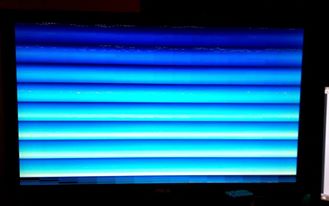
So, the problem I'm getting is that at random times the computer will freeze briefly and then the screen will become distorted into horizontal bars. As seen in the picture below.
QZ3d2I2.jpg


So the short history of debugging and problem finding so far was like this:

I initially found a problem when I booted up after a clean install; began trying to install AMD Crimson drivers for the GPU and got a BSoD towards the end of the installation when installing "AMD Evolved Gaming". The BSoD was titled "MEMORY_MANAGEMENT."
I rebooted and attempted the installation again and it went through fine. Shortly after this I continued getting BSoDs all with "MEMORY_MANAGEMENT" errors. So I used DDU to uninstall and then reinstall GPU drivers. I swapped out the ram and back in one stick at a time.

Now after reinstalling windows several times and reinstalling the GPU drivers more times than I care to think about; I do not get BSoDs anymore. I only get the horizontal bar crash as seen above.

The crash never has happened immediately upon boot. It happens after 15 minutes to an hour.

I've run FurMark and Prime95 for 10 minutes each with no crash. I ran CompuBench and got a crash at the Bitcoin benchmark; but I ran it again with no crash.

I've monitored the GPU, CPU and NB temperatures all the while. The CPU has not gone above 55C and the GPU is set to throttle at 75C and this is working properly. The NB was heating up quite a bit at first (I saw it at 80C at one point), so I put a fan on it and it's now at a much happier 54-56C.

I ran one pass on Memtest86, and got no errors. I figured that with crashes occuring this frequently, if the RAM was the issue, it would have found an error on the first pass.

I've found that if I run FurMark for ~5 minutes, then immediately close it and open another application like Steam; the system will crash with the horizontal bars like above.

If I leave the computer just sitting on for ~20 minutes it will crash with horizontal bars like above. 20 minutes is a very rough estimate. Sometimes it seems fine for 30-45 minutes and sometimes it's much closer to 15 minutes.


I appreciate any input. I've been beating my head against the wall with this one :)
 

My Computer My Computer

At a glance

Windows 7 Pro 64-bitOpteron 6276Ballistix Sport 16GB 2x8 @ 1600MHzXFX R9 390x 8vr6
Computer type
PC/Desktop
Computer Manufacturer/Model Number
Custom
OS
Windows 7 Pro 64-bit
CPU
Opteron 6276
Motherboard
SuperMicro H8SGL-F
Memory
Ballistix Sport 16GB 2x8 @ 1600MHz
Graphics Card(s)
XFX R9 390x 8vr6
Hard Drives
OCZ Agility 4 60GB SSD
Antivirus
none
Browser
Chrome
Could be many things. I would guess / say that is related to your GPU.
From Super Micro I found the data sheet Super Micro Computer, Inc. - Aplus Products | Motherboards | H8SGL-F
Is your BIOS up to date?
As your MB can use ECC and No ECC memory, is it configured correctly at BIOS?
I've seen that the MB has an internal GPU. Try to remove the XFX R9 390X 8vr6 and work with the Integrated Matrox G200 Graphics IG.
 

My Computers My Computers

  • At a glance

    Windows 7 HP 64i5 6600K - 800MHz to 4200MHz4+4G GSkill DDR4 3000IG - Intel 530
    Computer type
    PC/Desktop
    Computer Manufacturer/Model Number
    custom build
    OS
    Windows 7 HP 64
    CPU
    i5 6600K - 800MHz to 4200MHz
    Motherboard
    GA-Z170-HD3P
    Memory
    4+4G GSkill DDR4 3000
    Graphics Card(s)
    IG - Intel 530
    Monitor(s) Displays
    Samsung 226BW
    Screen Resolution
    1680x1050
    Hard Drives
    (1) -1 SM951 – 128GB M.2 AHCI PCIe SSD drive for Windows 7 and Lubuntu
    (2) -1 WD SATA 3 - 1T for Data
    (3) -1 WD SATA 3 - 1T for backup
    PSU
    Thermaltake 450W TR2 gold
    Keyboard
    Old and good Chicony mechanical keyboard
    Mouse
    Logitech mX performance - 9 buttons (had to disable some)
    Internet Speed
    500Mb/s
    Browser
    Firefox 64
    Other Info
    TinyWall firewall
  • At a glance

    Windows 7 Proi7-4500U 800MHz to 3.0GHz(4+4)G DDR3 1600IG intel 4400 + NVIDIA GeForce GT 745M
    Computer type
    Laptop
    System Manufacturer/Model Number
    Asus Q550LF
    OS
    Windows 7 Pro
    CPU
    i7-4500U 800MHz to 3.0GHz
    Motherboard
    Asus Q550LF
    Memory
    (4+4)G DDR3 1600
    Graphics Card(s)
    IG intel 4400 + NVIDIA GeForce GT 745M
    Sound Card
    Realtek
    Monitor(s) Displays
    LG Display LP156WF4-SPH1
    Screen Resolution
    1920 x 1080
    Hard Drives
    BX500 120G SSD for Windows and programs +
    1T HDD for data
    Internet Speed
    500 Mb/s
    Browser
    Firefox
    Other Info
    TinyWall firewall
Could be many things. I would guess / say that is related to your GPU.
From Super Micro I found the data sheet Super Micro Computer, Inc. - Aplus Products | Motherboards | H8SGL-F
Is your BIOS up to date?
As your MB can use ECC and No ECC memory, is it configured correctly at BIOS?
I've seen that the MB has an internal GPU. Try to remove the XFX R9 390X 8vr6 and work with the Integrated Matrox G200 Graphics IG.

Hello,

Thanks for the response!

My BIOS are one version behind (3.5) the most recent release (3.5a), as I heard there are stability issues with the latest version.

I have gone in BIOS and disabled ECC. I'm not sure if it auto adjusts for 1.5v of non-ecc RAM, but as I understand it, this wouldn't be a problem in any case as 1.5V ram should be okay at 1.35v.

Along the lines of the motherboard, I've also changed several of the jumpers.
I received bluescreen regarding BMC, so I disabled the BMC via jumper.
I disabled onboard graphics via jumper.
I enabled I2C to PCIe via jumper.

None of these things seemed to play a role in the crashing.

I will try the integrated graphics today and report back on my findings.
Again, I appreciate the response!
 

My Computer My Computer

At a glance

Windows 7 Pro 64-bitOpteron 6276Ballistix Sport 16GB 2x8 @ 1600MHzXFX R9 390x 8vr6
Computer type
PC/Desktop
Computer Manufacturer/Model Number
Custom
OS
Windows 7 Pro 64-bit
CPU
Opteron 6276
Motherboard
SuperMicro H8SGL-F
Memory
Ballistix Sport 16GB 2x8 @ 1600MHz
Graphics Card(s)
XFX R9 390x 8vr6
Hard Drives
OCZ Agility 4 60GB SSD
Antivirus
none
Browser
Chrome
I got no crashes when using integrated graphics.

On a side note, I also tried new RAM and a new CPU. Neither of these things helped at all.
 

My Computer My Computer

At a glance

Windows 7 Pro 64-bitOpteron 6276Ballistix Sport 16GB 2x8 @ 1600MHzXFX R9 390x 8vr6
Computer type
PC/Desktop
Computer Manufacturer/Model Number
Custom
OS
Windows 7 Pro 64-bit
CPU
Opteron 6276
Motherboard
SuperMicro H8SGL-F
Memory
Ballistix Sport 16GB 2x8 @ 1600MHz
Graphics Card(s)
XFX R9 390x 8vr6
Hard Drives
OCZ Agility 4 60GB SSD
Antivirus
none
Browser
Chrome
I got no crashes when using integrated graphics.

On a side note, I also tried new RAM and a new CPU. Neither of these things helped at all.

That's good news. So the problem seams related to the graphics card. It can be hardware or software.
As your MB is quite old, the question is: For what you're going to use it for? Can it stay with the IG or you need a fast graphics card?
 

My Computers My Computers

  • At a glance

    Windows 7 HP 64i5 6600K - 800MHz to 4200MHz4+4G GSkill DDR4 3000IG - Intel 530
    Computer type
    PC/Desktop
    Computer Manufacturer/Model Number
    custom build
    OS
    Windows 7 HP 64
    CPU
    i5 6600K - 800MHz to 4200MHz
    Motherboard
    GA-Z170-HD3P
    Memory
    4+4G GSkill DDR4 3000
    Graphics Card(s)
    IG - Intel 530
    Monitor(s) Displays
    Samsung 226BW
    Screen Resolution
    1680x1050
    Hard Drives
    (1) -1 SM951 – 128GB M.2 AHCI PCIe SSD drive for Windows 7 and Lubuntu
    (2) -1 WD SATA 3 - 1T for Data
    (3) -1 WD SATA 3 - 1T for backup
    PSU
    Thermaltake 450W TR2 gold
    Keyboard
    Old and good Chicony mechanical keyboard
    Mouse
    Logitech mX performance - 9 buttons (had to disable some)
    Internet Speed
    500Mb/s
    Browser
    Firefox 64
    Other Info
    TinyWall firewall
  • At a glance

    Windows 7 Proi7-4500U 800MHz to 3.0GHz(4+4)G DDR3 1600IG intel 4400 + NVIDIA GeForce GT 745M
    Computer type
    Laptop
    System Manufacturer/Model Number
    Asus Q550LF
    OS
    Windows 7 Pro
    CPU
    i7-4500U 800MHz to 3.0GHz
    Motherboard
    Asus Q550LF
    Memory
    (4+4)G DDR3 1600
    Graphics Card(s)
    IG intel 4400 + NVIDIA GeForce GT 745M
    Sound Card
    Realtek
    Monitor(s) Displays
    LG Display LP156WF4-SPH1
    Screen Resolution
    1920 x 1080
    Hard Drives
    BX500 120G SSD for Windows and programs +
    1T HDD for data
    Internet Speed
    500 Mb/s
    Browser
    Firefox
    Other Info
    TinyWall firewall
I got no crashes when using integrated graphics.

On a side note, I also tried new RAM and a new CPU. Neither of these things helped at all.

That's good news. So the problem seams related to the graphics card. It can be hardware or software.
As your MB is quite old, the question is: For what you're going to use it for? Can it stay with the IG or you need a fast graphics card?

No, I'll need the GPU or at least a GPU. So my understanding from talking to several people is that the possible problems and how I can test are:

  • GPU is faulty - Try replacing it... (Worst case scenario... :( )
  • Motherboard is faulty - Verify the problem isn't anything else
  • PSU is faulty/not strong enough - Try replacing it. I'll try this today
  • IRQ Conflicts - Check Device Manager
  • Drivers - No idea.

Are there any additional things I could check that might be easier?
 

My Computer My Computer

At a glance

Windows 7 Pro 64-bitOpteron 6276Ballistix Sport 16GB 2x8 @ 1600MHzXFX R9 390x 8vr6
Computer type
PC/Desktop
Computer Manufacturer/Model Number
Custom
OS
Windows 7 Pro 64-bit
CPU
Opteron 6276
Motherboard
SuperMicro H8SGL-F
Memory
Ballistix Sport 16GB 2x8 @ 1600MHz
Graphics Card(s)
XFX R9 390x 8vr6
Hard Drives
OCZ Agility 4 60GB SSD
Antivirus
none
Browser
Chrome
For IRQ Conflicts use System information %windir%\system32\msinfo32.exe
Your SuperMicro H8SGL-F has PCIe 2.0 and your Graphics is PCIe 3.0
 
Last edited:

My Computers My Computers

  • At a glance

    Windows 7 HP 64i5 6600K - 800MHz to 4200MHz4+4G GSkill DDR4 3000IG - Intel 530
    Computer type
    PC/Desktop
    Computer Manufacturer/Model Number
    custom build
    OS
    Windows 7 HP 64
    CPU
    i5 6600K - 800MHz to 4200MHz
    Motherboard
    GA-Z170-HD3P
    Memory
    4+4G GSkill DDR4 3000
    Graphics Card(s)
    IG - Intel 530
    Monitor(s) Displays
    Samsung 226BW
    Screen Resolution
    1680x1050
    Hard Drives
    (1) -1 SM951 – 128GB M.2 AHCI PCIe SSD drive for Windows 7 and Lubuntu
    (2) -1 WD SATA 3 - 1T for Data
    (3) -1 WD SATA 3 - 1T for backup
    PSU
    Thermaltake 450W TR2 gold
    Keyboard
    Old and good Chicony mechanical keyboard
    Mouse
    Logitech mX performance - 9 buttons (had to disable some)
    Internet Speed
    500Mb/s
    Browser
    Firefox 64
    Other Info
    TinyWall firewall
  • At a glance

    Windows 7 Proi7-4500U 800MHz to 3.0GHz(4+4)G DDR3 1600IG intel 4400 + NVIDIA GeForce GT 745M
    Computer type
    Laptop
    System Manufacturer/Model Number
    Asus Q550LF
    OS
    Windows 7 Pro
    CPU
    i7-4500U 800MHz to 3.0GHz
    Motherboard
    Asus Q550LF
    Memory
    (4+4)G DDR3 1600
    Graphics Card(s)
    IG intel 4400 + NVIDIA GeForce GT 745M
    Sound Card
    Realtek
    Monitor(s) Displays
    LG Display LP156WF4-SPH1
    Screen Resolution
    1920 x 1080
    Hard Drives
    BX500 120G SSD for Windows and programs +
    1T HDD for data
    Internet Speed
    500 Mb/s
    Browser
    Firefox
    Other Info
    TinyWall firewall
For IRG Conflicts use System information %windir%\system32\msinfo32.exe
Your SuperMicro H8SGL-F has PCIe 2.0 and your Graphics is PCIe 3.0

Okay, thanks! I'll use msinfo32.

I'm not sure if you're indicating that's a problem. PCIe 3.0 cards are backwards compatible with 2.0. The speed difference isn't even significant. It's like 1-2% difference in performance.
 

My Computer My Computer

At a glance

Windows 7 Pro 64-bitOpteron 6276Ballistix Sport 16GB 2x8 @ 1600MHzXFX R9 390x 8vr6
Computer type
PC/Desktop
Computer Manufacturer/Model Number
Custom
OS
Windows 7 Pro 64-bit
CPU
Opteron 6276
Motherboard
SuperMicro H8SGL-F
Memory
Ballistix Sport 16GB 2x8 @ 1600MHz
Graphics Card(s)
XFX R9 390x 8vr6
Hard Drives
OCZ Agility 4 60GB SSD
Antivirus
none
Browser
Chrome
I think that if you have a PCIe 2.0 graphics card that you place on a PCIe 3.0 slot would be OK. But to place a fast device on a slower lane, I'm not sure. You should contact the graphics manufacturer.
 

My Computers My Computers

  • At a glance

    Windows 7 HP 64i5 6600K - 800MHz to 4200MHz4+4G GSkill DDR4 3000IG - Intel 530
    Computer type
    PC/Desktop
    Computer Manufacturer/Model Number
    custom build
    OS
    Windows 7 HP 64
    CPU
    i5 6600K - 800MHz to 4200MHz
    Motherboard
    GA-Z170-HD3P
    Memory
    4+4G GSkill DDR4 3000
    Graphics Card(s)
    IG - Intel 530
    Monitor(s) Displays
    Samsung 226BW
    Screen Resolution
    1680x1050
    Hard Drives
    (1) -1 SM951 – 128GB M.2 AHCI PCIe SSD drive for Windows 7 and Lubuntu
    (2) -1 WD SATA 3 - 1T for Data
    (3) -1 WD SATA 3 - 1T for backup
    PSU
    Thermaltake 450W TR2 gold
    Keyboard
    Old and good Chicony mechanical keyboard
    Mouse
    Logitech mX performance - 9 buttons (had to disable some)
    Internet Speed
    500Mb/s
    Browser
    Firefox 64
    Other Info
    TinyWall firewall
  • At a glance

    Windows 7 Proi7-4500U 800MHz to 3.0GHz(4+4)G DDR3 1600IG intel 4400 + NVIDIA GeForce GT 745M
    Computer type
    Laptop
    System Manufacturer/Model Number
    Asus Q550LF
    OS
    Windows 7 Pro
    CPU
    i7-4500U 800MHz to 3.0GHz
    Motherboard
    Asus Q550LF
    Memory
    (4+4)G DDR3 1600
    Graphics Card(s)
    IG intel 4400 + NVIDIA GeForce GT 745M
    Sound Card
    Realtek
    Monitor(s) Displays
    LG Display LP156WF4-SPH1
    Screen Resolution
    1920 x 1080
    Hard Drives
    BX500 120G SSD for Windows and programs +
    1T HDD for data
    Internet Speed
    500 Mb/s
    Browser
    Firefox
    Other Info
    TinyWall firewall
I think that if you have a PCIe 2.0 graphics card that you place on a PCIe 3.0 slot would be OK. But to place a fast device on a slower lane, I'm not sure. You should contact the graphics manufacturer.

I appreciate the concern, but PCIe 3.0 cards absolutely work in PCIe 2.0 slots.
The device is simply throttled down to PCIe 2.0 speeds; which as PugetSystem's research shows, is not actually much of a throttle at all.
 

My Computer My Computer

At a glance

Windows 7 Pro 64-bitOpteron 6276Ballistix Sport 16GB 2x8 @ 1600MHzXFX R9 390x 8vr6
Computer type
PC/Desktop
Computer Manufacturer/Model Number
Custom
OS
Windows 7 Pro 64-bit
CPU
Opteron 6276
Motherboard
SuperMicro H8SGL-F
Memory
Ballistix Sport 16GB 2x8 @ 1600MHz
Graphics Card(s)
XFX R9 390x 8vr6
Hard Drives
OCZ Agility 4 60GB SSD
Antivirus
none
Browser
Chrome
Hi
Yep I sure I'm using a pci-e 3.0 gpu in a pci-e 2.0 slot on my Acer mother board
Expansion Slots
1 x PCI Express x16 (2.0)
1 x PCI Express x1
Unless a EVGA GTX980 hybrid is not pci-e 3.0 :)
 

My Computer My Computer

At a glance

Win-7-Pro64bit 7-H-Prem-64biti7-5930K 2nd i9-9940x both water blocked VRM'...Trident-z 3200C14 2nd Trident-z 3600C16EVGA 1080ti ftw3 2nd Titan Xp both water blocked
Computer type
PC/Desktop
Computer Manufacturer/Model Number
Custom assembled by me :}
OS
Win-7-Pro64bit 7-H-Prem-64bit
CPU
i7-5930K 2nd i9-9940x both water blocked VRM's too
Motherboard
ASUS SABERTOOTH X99 2nd ASUS x299 Apex
Memory
Trident-z 3200C14 2nd Trident-z 3600C16
Graphics Card(s)
EVGA 1080ti ftw3 2nd Titan Xp both water blocked
Sound Card
Built-in Realtek
Monitor(s) Displays
1-AOC G2460PG 24"G-Sync 144Hz/ 2nd 1-ASUS VG248QE 24" 144Hz
Screen Resolution
1920 x 1080 144Hz
Hard Drives
2-Samsung M.2 Evo & Evo Plus
2-Samsung 850 EVO 500GB SSD's/ 3-2.5 W.D. Black 1tb-&3-1tb/3-3.5 WD Black 1tb hdd's
PSU
EVGA SuperNOVA 1000-P2 2nd 1200-P2
Case
2-Corsair Obsidian Series 450D Black ATX Mid Tower
Cooling
Custom water loops
Keyboard
Logitech G710+/ 2nd Logitech G910
Mouse
2-RedDragon M901 Perdition 16400 dpi Gaming mouse = wired
Internet Speed
Comcast Ping 19ms 89.31mbps download speed 6.12mbps upload
Antivirus
Malwarebytes Pro/ Superantispyware Pro
Browser
FireFox & Pale moon
Other Info
2nd ASUS X299 Apex/Intel i9-9940x with Custom water loop/7H-Prem-x64/Corsair 450D case/Ram Trident-z 3600C16 4x8gb / Samsung970Evo plus 500gb SSD/Dual ssd EZ swap evo/PSU EVGA SuperNova 1200w-P2 80+Platinum/GPU Titan Xp /8-ML-140 on push-pull on 2-280GTX rads
Hi,
XFX R9 390x 8vr6 does seem to say it requires a 750w psu is that what you have your system spec's don't list that part ?
 

My Computer My Computer

At a glance

Win-7-Pro64bit 7-H-Prem-64biti7-5930K 2nd i9-9940x both water blocked VRM'...Trident-z 3200C14 2nd Trident-z 3600C16EVGA 1080ti ftw3 2nd Titan Xp both water blocked
Computer type
PC/Desktop
Computer Manufacturer/Model Number
Custom assembled by me :}
OS
Win-7-Pro64bit 7-H-Prem-64bit
CPU
i7-5930K 2nd i9-9940x both water blocked VRM's too
Motherboard
ASUS SABERTOOTH X99 2nd ASUS x299 Apex
Memory
Trident-z 3200C14 2nd Trident-z 3600C16
Graphics Card(s)
EVGA 1080ti ftw3 2nd Titan Xp both water blocked
Sound Card
Built-in Realtek
Monitor(s) Displays
1-AOC G2460PG 24"G-Sync 144Hz/ 2nd 1-ASUS VG248QE 24" 144Hz
Screen Resolution
1920 x 1080 144Hz
Hard Drives
2-Samsung M.2 Evo & Evo Plus
2-Samsung 850 EVO 500GB SSD's/ 3-2.5 W.D. Black 1tb-&3-1tb/3-3.5 WD Black 1tb hdd's
PSU
EVGA SuperNOVA 1000-P2 2nd 1200-P2
Case
2-Corsair Obsidian Series 450D Black ATX Mid Tower
Cooling
Custom water loops
Keyboard
Logitech G710+/ 2nd Logitech G910
Mouse
2-RedDragon M901 Perdition 16400 dpi Gaming mouse = wired
Internet Speed
Comcast Ping 19ms 89.31mbps download speed 6.12mbps upload
Antivirus
Malwarebytes Pro/ Superantispyware Pro
Browser
FireFox & Pale moon
Other Info
2nd ASUS X299 Apex/Intel i9-9940x with Custom water loop/7H-Prem-x64/Corsair 450D case/Ram Trident-z 3600C16 4x8gb / Samsung970Evo plus 500gb SSD/Dual ssd EZ swap evo/PSU EVGA SuperNova 1200w-P2 80+Platinum/GPU Titan Xp /8-ML-140 on push-pull on 2-280GTX rads
Hi,
XFX R9 390x 8vr6 does seem to say it requires a 750w psu is that what you have your system spec's don't list that part ?

Sorry, I didn't realize I didn't include PSU on my list of parts.
I have a Corsair CX600. It's a 600w PSU. I think 750w is more than I would need for this system by 150w. But all the same, I'm gonna pick up a new PSU today and give it a whirl.

I did some research and it looks like the avg. power consumption of my CPU is around 90w and avg. of the 390x is 320w and it peaks at 450w.
So the very highest I should be getting is like 550w if I'm stress testing everything.
That said, I have no idea how efficient this PSU is or if it's working or if I'm overdrawing it. So I am gonna upgrade it to see if that fixes everything.
 

My Computer My Computer

At a glance

Windows 7 Pro 64-bitOpteron 6276Ballistix Sport 16GB 2x8 @ 1600MHzXFX R9 390x 8vr6
Computer type
PC/Desktop
Computer Manufacturer/Model Number
Custom
OS
Windows 7 Pro 64-bit
CPU
Opteron 6276
Motherboard
SuperMicro H8SGL-F
Memory
Ballistix Sport 16GB 2x8 @ 1600MHz
Graphics Card(s)
XFX R9 390x 8vr6
Hard Drives
OCZ Agility 4 60GB SSD
Antivirus
none
Browser
Chrome
Thank you for the information. Now it's up to you, (maybe with a little help) to find the best solution to have your graphics working. As I don't know much about graphics cards, I won't be able to help you further.
 

My Computers My Computers

  • At a glance

    Windows 7 HP 64i5 6600K - 800MHz to 4200MHz4+4G GSkill DDR4 3000IG - Intel 530
    Computer type
    PC/Desktop
    Computer Manufacturer/Model Number
    custom build
    OS
    Windows 7 HP 64
    CPU
    i5 6600K - 800MHz to 4200MHz
    Motherboard
    GA-Z170-HD3P
    Memory
    4+4G GSkill DDR4 3000
    Graphics Card(s)
    IG - Intel 530
    Monitor(s) Displays
    Samsung 226BW
    Screen Resolution
    1680x1050
    Hard Drives
    (1) -1 SM951 – 128GB M.2 AHCI PCIe SSD drive for Windows 7 and Lubuntu
    (2) -1 WD SATA 3 - 1T for Data
    (3) -1 WD SATA 3 - 1T for backup
    PSU
    Thermaltake 450W TR2 gold
    Keyboard
    Old and good Chicony mechanical keyboard
    Mouse
    Logitech mX performance - 9 buttons (had to disable some)
    Internet Speed
    500Mb/s
    Browser
    Firefox 64
    Other Info
    TinyWall firewall
  • At a glance

    Windows 7 Proi7-4500U 800MHz to 3.0GHz(4+4)G DDR3 1600IG intel 4400 + NVIDIA GeForce GT 745M
    Computer type
    Laptop
    System Manufacturer/Model Number
    Asus Q550LF
    OS
    Windows 7 Pro
    CPU
    i7-4500U 800MHz to 3.0GHz
    Motherboard
    Asus Q550LF
    Memory
    (4+4)G DDR3 1600
    Graphics Card(s)
    IG intel 4400 + NVIDIA GeForce GT 745M
    Sound Card
    Realtek
    Monitor(s) Displays
    LG Display LP156WF4-SPH1
    Screen Resolution
    1920 x 1080
    Hard Drives
    BX500 120G SSD for Windows and programs +
    1T HDD for data
    Internet Speed
    500 Mb/s
    Browser
    Firefox
    Other Info
    TinyWall firewall
Hi,
It should I saw on Newegg for that exact gpu it does have a recommended 750w requirement
These R9 cards are power hungry I've read many times
Not sure the Corsair CX isn't a very high end psu either Bronze series in all
Try to go gold at minimum evga has some good ones.
 
Last edited:

My Computer My Computer

At a glance

Win-7-Pro64bit 7-H-Prem-64biti7-5930K 2nd i9-9940x both water blocked VRM'...Trident-z 3200C14 2nd Trident-z 3600C16EVGA 1080ti ftw3 2nd Titan Xp both water blocked
Computer type
PC/Desktop
Computer Manufacturer/Model Number
Custom assembled by me :}
OS
Win-7-Pro64bit 7-H-Prem-64bit
CPU
i7-5930K 2nd i9-9940x both water blocked VRM's too
Motherboard
ASUS SABERTOOTH X99 2nd ASUS x299 Apex
Memory
Trident-z 3200C14 2nd Trident-z 3600C16
Graphics Card(s)
EVGA 1080ti ftw3 2nd Titan Xp both water blocked
Sound Card
Built-in Realtek
Monitor(s) Displays
1-AOC G2460PG 24"G-Sync 144Hz/ 2nd 1-ASUS VG248QE 24" 144Hz
Screen Resolution
1920 x 1080 144Hz
Hard Drives
2-Samsung M.2 Evo & Evo Plus
2-Samsung 850 EVO 500GB SSD's/ 3-2.5 W.D. Black 1tb-&3-1tb/3-3.5 WD Black 1tb hdd's
PSU
EVGA SuperNOVA 1000-P2 2nd 1200-P2
Case
2-Corsair Obsidian Series 450D Black ATX Mid Tower
Cooling
Custom water loops
Keyboard
Logitech G710+/ 2nd Logitech G910
Mouse
2-RedDragon M901 Perdition 16400 dpi Gaming mouse = wired
Internet Speed
Comcast Ping 19ms 89.31mbps download speed 6.12mbps upload
Antivirus
Malwarebytes Pro/ Superantispyware Pro
Browser
FireFox & Pale moon
Other Info
2nd ASUS X299 Apex/Intel i9-9940x with Custom water loop/7H-Prem-x64/Corsair 450D case/Ram Trident-z 3600C16 4x8gb / Samsung970Evo plus 500gb SSD/Dual ssd EZ swap evo/PSU EVGA SuperNova 1200w-P2 80+Platinum/GPU Titan Xp /8-ML-140 on push-pull on 2-280GTX rads
Hi,
It should I saw on Newegg for that exact gpu it does have a recommended 750w requirement
These R9 cards are power hungry I've read many times
Not sure the Corsair CX is a very high end psu either Bronze series in all
Try to go gold at minimum evga has some good ones.

Yeah, I was told off on Overclock.net for my choice of PSU. I'm gonna get a SuperNova G2 850w. They're supposedly very good quality.
I'll be happy if this fixes it!
 

My Computer My Computer

At a glance

Windows 7 Pro 64-bitOpteron 6276Ballistix Sport 16GB 2x8 @ 1600MHzXFX R9 390x 8vr6
Computer type
PC/Desktop
Computer Manufacturer/Model Number
Custom
OS
Windows 7 Pro 64-bit
CPU
Opteron 6276
Motherboard
SuperMicro H8SGL-F
Memory
Ballistix Sport 16GB 2x8 @ 1600MHz
Graphics Card(s)
XFX R9 390x 8vr6
Hard Drives
OCZ Agility 4 60GB SSD
Antivirus
none
Browser
Chrome
Hi,
G2 is a good choice :)
I have a P2 850 it's great.

EVGA has awesome wiring all of it but especially to the gpu
Corsair cuts corners and pigtails the additional wire leads on really all of their wiring
EVGA has all direct cables and separate wiring going directly to the object it's powering = No Pigtailing going on :D
 

My Computer My Computer

At a glance

Win-7-Pro64bit 7-H-Prem-64biti7-5930K 2nd i9-9940x both water blocked VRM'...Trident-z 3200C14 2nd Trident-z 3600C16EVGA 1080ti ftw3 2nd Titan Xp both water blocked
Computer type
PC/Desktop
Computer Manufacturer/Model Number
Custom assembled by me :}
OS
Win-7-Pro64bit 7-H-Prem-64bit
CPU
i7-5930K 2nd i9-9940x both water blocked VRM's too
Motherboard
ASUS SABERTOOTH X99 2nd ASUS x299 Apex
Memory
Trident-z 3200C14 2nd Trident-z 3600C16
Graphics Card(s)
EVGA 1080ti ftw3 2nd Titan Xp both water blocked
Sound Card
Built-in Realtek
Monitor(s) Displays
1-AOC G2460PG 24"G-Sync 144Hz/ 2nd 1-ASUS VG248QE 24" 144Hz
Screen Resolution
1920 x 1080 144Hz
Hard Drives
2-Samsung M.2 Evo & Evo Plus
2-Samsung 850 EVO 500GB SSD's/ 3-2.5 W.D. Black 1tb-&3-1tb/3-3.5 WD Black 1tb hdd's
PSU
EVGA SuperNOVA 1000-P2 2nd 1200-P2
Case
2-Corsair Obsidian Series 450D Black ATX Mid Tower
Cooling
Custom water loops
Keyboard
Logitech G710+/ 2nd Logitech G910
Mouse
2-RedDragon M901 Perdition 16400 dpi Gaming mouse = wired
Internet Speed
Comcast Ping 19ms 89.31mbps download speed 6.12mbps upload
Antivirus
Malwarebytes Pro/ Superantispyware Pro
Browser
FireFox & Pale moon
Other Info
2nd ASUS X299 Apex/Intel i9-9940x with Custom water loop/7H-Prem-x64/Corsair 450D case/Ram Trident-z 3600C16 4x8gb / Samsung970Evo plus 500gb SSD/Dual ssd EZ swap evo/PSU EVGA SuperNova 1200w-P2 80+Platinum/GPU Titan Xp /8-ML-140 on push-pull on 2-280GTX rads
Hi,
G2 is a good choice :)
I have a P2 850 it's great.

EVGA has awesome wiring all of it but especially to the gpu
Corsair cuts corners and pigtails the additional wire leads on really all of their wiring
EVGA has all direct cables and separate wiring going directly to the object it's powering = No Pigtailing going on :D

Great to hear, and somewhat reassuring! I'll report back in a couple hours whether this worked or not.
 

My Computer My Computer

At a glance

Windows 7 Pro 64-bitOpteron 6276Ballistix Sport 16GB 2x8 @ 1600MHzXFX R9 390x 8vr6
Computer type
PC/Desktop
Computer Manufacturer/Model Number
Custom
OS
Windows 7 Pro 64-bit
CPU
Opteron 6276
Motherboard
SuperMicro H8SGL-F
Memory
Ballistix Sport 16GB 2x8 @ 1600MHz
Graphics Card(s)
XFX R9 390x 8vr6
Hard Drives
OCZ Agility 4 60GB SSD
Antivirus
none
Browser
Chrome
Hi,
Plan on ditching all of the Corsair wiring now and using the good stuff :)
 

My Computer My Computer

At a glance

Win-7-Pro64bit 7-H-Prem-64biti7-5930K 2nd i9-9940x both water blocked VRM'...Trident-z 3200C14 2nd Trident-z 3600C16EVGA 1080ti ftw3 2nd Titan Xp both water blocked
Computer type
PC/Desktop
Computer Manufacturer/Model Number
Custom assembled by me :}
OS
Win-7-Pro64bit 7-H-Prem-64bit
CPU
i7-5930K 2nd i9-9940x both water blocked VRM's too
Motherboard
ASUS SABERTOOTH X99 2nd ASUS x299 Apex
Memory
Trident-z 3200C14 2nd Trident-z 3600C16
Graphics Card(s)
EVGA 1080ti ftw3 2nd Titan Xp both water blocked
Sound Card
Built-in Realtek
Monitor(s) Displays
1-AOC G2460PG 24"G-Sync 144Hz/ 2nd 1-ASUS VG248QE 24" 144Hz
Screen Resolution
1920 x 1080 144Hz
Hard Drives
2-Samsung M.2 Evo & Evo Plus
2-Samsung 850 EVO 500GB SSD's/ 3-2.5 W.D. Black 1tb-&3-1tb/3-3.5 WD Black 1tb hdd's
PSU
EVGA SuperNOVA 1000-P2 2nd 1200-P2
Case
2-Corsair Obsidian Series 450D Black ATX Mid Tower
Cooling
Custom water loops
Keyboard
Logitech G710+/ 2nd Logitech G910
Mouse
2-RedDragon M901 Perdition 16400 dpi Gaming mouse = wired
Internet Speed
Comcast Ping 19ms 89.31mbps download speed 6.12mbps upload
Antivirus
Malwarebytes Pro/ Superantispyware Pro
Browser
FireFox & Pale moon
Other Info
2nd ASUS X299 Apex/Intel i9-9940x with Custom water loop/7H-Prem-x64/Corsair 450D case/Ram Trident-z 3600C16 4x8gb / Samsung970Evo plus 500gb SSD/Dual ssd EZ swap evo/PSU EVGA SuperNova 1200w-P2 80+Platinum/GPU Titan Xp /8-ML-140 on push-pull on 2-280GTX rads
Hi,
Plan on ditching all of the Corsair wiring now and using the good stuff :)

The CX600 is not modular, so I really have no choice in the matter :)
 

My Computer My Computer

At a glance

Windows 7 Pro 64-bitOpteron 6276Ballistix Sport 16GB 2x8 @ 1600MHzXFX R9 390x 8vr6
Computer type
PC/Desktop
Computer Manufacturer/Model Number
Custom
OS
Windows 7 Pro 64-bit
CPU
Opteron 6276
Motherboard
SuperMicro H8SGL-F
Memory
Ballistix Sport 16GB 2x8 @ 1600MHz
Graphics Card(s)
XFX R9 390x 8vr6
Hard Drives
OCZ Agility 4 60GB SSD
Antivirus
none
Browser
Chrome
Back
Top