Cannot access certain sites, only with phone or VPN

Niklazo

New member
Local time
10:07 PM
Messages
2
So I've been having this problem for a while now, I'm going to use steamcommunity.com as an example.

I cannot get the page to load on neither Chrome or in steam (not the store page either), i know the page is up and I can even access it on my phone or if I use a VPN.

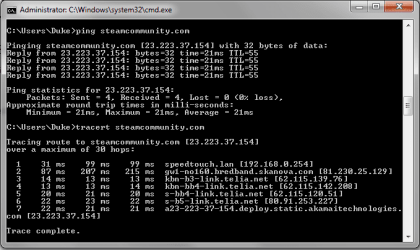
I added two attachments, 1 being how it looks in Chrome and the other showing that I can ping and tracert the site without problem, so I would assume that the problem is my computer.

Feel free to throw advice at me since I'm sick of having this problem.

I'm using Win 7 x64 and the latest version of Google Chrome as well as the latest version of Steam.
 

Attachments

  • steamcommunityweb.png
    steamcommunityweb.png
    17 KB · Views: 0
  • steamcommunity.png
    steamcommunity.png
    13 KB · Views: 12

My Computer My Computer

At a glance

Windows 7 Home Premium x64
Computer type
PC/Desktop
OS
Windows 7 Home Premium x64

My Computer My Computer

At a glance

Microsoft Windows 7 Home Premium 64-bit 7601 ...AMD C-60 APU with Radeon(tm) HD Graphics4.00 GBAMD Radeon HD 6290 Graphics
Computer type
Laptop
Computer Manufacturer/Model Number
ASUS
OS
Microsoft Windows 7 Home Premium 64-bit 7601 Multiprocessor Free Service Pack 1
CPU
AMD C-60 APU with Radeon(tm) HD Graphics
Motherboard
ASUSTeK COMPUTER INC. X501U
Memory
4.00 GB
Graphics Card(s)
AMD Radeon HD 6290 Graphics
Sound Card
(1) AMD High Definition Audio Device (2) Realtek High Defi
Screen Resolution
1366 x 768 x 32 bits (4294967296 colors) @ 60 Hz
Hard Drives
Hitachi HTS545050A7E380 SATA Disk Device
Antivirus
Comodo CIS & FW, SecureAplus App Whitelisting, Threatfire
Browser
Cyberfox 64bit, Opera 64bit, Airfox
Other Info
Spy-The-Spy, HitmanPro.Alert, Norton Connect Safe, MJRegWatcher, BitDefender TrafficLight, Voodoo Shield, Zemana AntiMalware
These problems are mostly being "lost in connection" by your ISP.

This do happen in my ISP.
One wrote in to Starhub Community Forum and said that a website is having problem in connection.
But someone replied that he had no issue.
Then i checked on this website, and did confirm unable to access.
But when i login to my VPN, website appear very fast on to my laptop.
But much later period /days, there is no longer a problem, as can be access.

So i would say that this problem may lies in your ISP.
Nothing much can be done.
 

My Computer My Computer

At a glance

Windows 7 x64
Computer type
Laptop
Computer Manufacturer/Model Number
Toshiba L630 and L735
OS
Windows 7 x64
Hard Drives
240 GB SSD
These problems are mostly being "lost in connection" by your ISP.

This do happen in my ISP.
One wrote in to Starhub Community Forum and said that a website is having problem in connection.
But someone replied that he had no issue.
Then i checked on this website, and did confirm unable to access.
But when i login to my VPN, website appear very fast on to my laptop.
But much later period /days, there is no longer a problem, as can be access.

So i would say that this problem may lies in your ISP.
Nothing much can be done.

But it works when I have my phone connected to the same router (but with wireless), so it can't be with the ISP, right?
 

My Computer My Computer

At a glance

Windows 7 Home Premium x64
Computer type
PC/Desktop
OS
Windows 7 Home Premium x64
But it works when I have my phone connected to the same router (but with wireless), so it can't be with the ISP, right?


Yes, i know that wireless is able to access.
Forgot to mention this.

That is why i add this "lost in connection"

Although i am not geek &or expert in this subject.

Put it clearer,

VPN has no problem, as you and i would able to confirm.
So what really is the problem.
I chose this Pure VPN as it is a partner to my ISP Starhub.
This, i play safe as not to be block by my ISP or any other connecting.

Taking example as i had mentioned, some users who is using the same ISP have no issue, but why some users unable to access.
This is hard to understand, but then it is not important, so i stop research on this subject at that time.

Who control the internet.
 

My Computer My Computer

At a glance

Windows 7 x64
Computer type
Laptop
Computer Manufacturer/Model Number
Toshiba L630 and L735
OS
Windows 7 x64
Hard Drives
240 GB SSD
But it works when I have my phone connected to the same router (but with wireless), so it can't be with the ISP, right?

Read this post again:

http://www.sevenforums.com/browsers...me-unresponsive-all-browsers.html#post3180374

In this screenshot:

376458d1448127119-pages-take-long-time-unresponsive-all-browsers-dns-server.jpg

If you've got "Obtain DNS Server Address Automatically" selected - then it's configured to use the default as provided by your ISP.

Try changing it and rebooting including switching router on/ off.

You phone doesn't use the same DNS lookup provider as your computer.
 

My Computer My Computer

At a glance

Microsoft Windows 7 Home Premium 64-bit 7601 ...AMD C-60 APU with Radeon(tm) HD Graphics4.00 GBAMD Radeon HD 6290 Graphics
Computer type
Laptop
Computer Manufacturer/Model Number
ASUS
OS
Microsoft Windows 7 Home Premium 64-bit 7601 Multiprocessor Free Service Pack 1
CPU
AMD C-60 APU with Radeon(tm) HD Graphics
Motherboard
ASUSTeK COMPUTER INC. X501U
Memory
4.00 GB
Graphics Card(s)
AMD Radeon HD 6290 Graphics
Sound Card
(1) AMD High Definition Audio Device (2) Realtek High Defi
Screen Resolution
1366 x 768 x 32 bits (4294967296 colors) @ 60 Hz
Hard Drives
Hitachi HTS545050A7E380 SATA Disk Device
Antivirus
Comodo CIS & FW, SecureAplus App Whitelisting, Threatfire
Browser
Cyberfox 64bit, Opera 64bit, Airfox
Other Info
Spy-The-Spy, HitmanPro.Alert, Norton Connect Safe, MJRegWatcher, BitDefender TrafficLight, Voodoo Shield, Zemana AntiMalware
Back
Top