Make bootable iso from student d/l

How to Create a Bootable ISO from a Student Windows 7 Download


If you get the student d/l and have 3 files :


Here's how:

1. Rt click each file, Properties > Unblock>Apply>OK.
NOTE: Make sure read only boxes are clear.

2. Rt click and run as admin on the .exe. You will get a folder called expandedsetup on your dektop with these inside:

EXPANDEDSETUPCONTENTS-2009-10-22_061340.jpg
   Note

If you receive this error:

We are unable to create or save new files in the folder in which this application was downloaded. Please check the folder properties to make sure that you have security permission on the folder to write files and that the folder is not read-only.

Continue.


3. D/L this zip, extract it and copy/move oscdimg.exe into C:\Windows\system32.
View attachment oscdimg.zip
4. Assuming expandedsetup is on your Desktop:

Vista/7 users open an elevated command prompt ( rt click cmd and run as admin) and type :

Code:
Oscdimg.exe –u2 –b"C:\Users\your_username\Desktop\expandedSetup\boot\etfsboot.com" –h "C:\Users\your_username\Desktop\expandedSetup" C:\7.iso


XP users commands are:

Code:
cd /d C:\windows\system32


Code:
oscdimg -u2 -b"C:\Documents and Settings\USER\Desktop\expandedSetup\boot\etfsboot.com" -h "C:\Documents and Settings\USER\Desktop\expandedSetup" C:\7.iso


5. You can copy and paste the above into elevated cmd.

Vista/7 users- replace your_username with your actual username.

XP users - replace USER with your actual username

6. Then press enter. Xp users press enter after each of their two commands.

7. If the expandedsetup folder is not on your desktop, replace with appropriate paths.

   Tip
You may wish to copy the expandedsetup folder directly onto the root of C:

The paths will be shorter and the command will be:

Code:
Oscdimg.exe –u2 –bC:\expandedSetup\boot\etfsboot.com –h C:\expandedSetup C:\7.iso

If your folder is elsewhere, to get the paths easily, press shift and rt click on etfsboot.com - select copy as path ( paste into notepad )

Shift and rt click on expanded setup - select copy as path - paste into notepad ) Use those instead of the above.

The spacing needs to be exact.
   Warning
When the .iso is created you will get this message:

WARNING: This image contains UDF file system structures.

That is normal as you are creating the udf filesystem.


8. A) You can burn the .iso to dvd as an image with an isoburner.
View attachment isoburner.zip
OR

B) You can use the Microsoft DVD/USB tool to burn the .iso to dvd or to use the .iso to make a bootable flash drive. Download the tool:
View attachment Windows7-USB-DVD-tool.exe
   Tip
To make a copy of your Windows 7 ISO file:

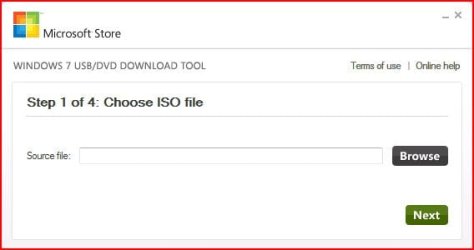
1. Click the Start button, and click Windows 7 USB/DVD Download tool in the All Programs list to open the USB/DVD Download tool.
2. Click Browse and select the file in the Open dialog box.
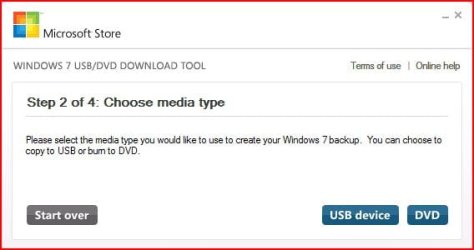
3. Select USB to create a copy on a USB flash drive or DVD to create a copy on a DVD disk, then click Next.
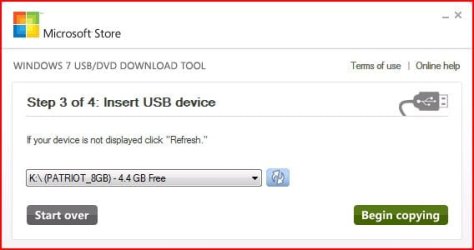
4. If you are copying the file to a USB flash drive, select your USB device in the dropdown list and click Begin copying. If you are copying the file up to a DVD, click Begin burning.

Microsoft Store: Download Manager Help

   Note

Microsoft’s ISO Image for Windows 7 Now Available

There is additional information regarding the Windows 7 64-bit download process. For those customers of the Student Offer, who wish to install the 64-bit version of Windows 7, but are currently running a 32-bit Operating System, there is now an optional downloadable ISO file of Windows 7 64-bit to allow for install.

- If you have already purchased the 64-bit version of Windows 7 from the Windows 7 Student Offer Online Store, please contact Digital River at the following link: http://windows7.digitalriver.com/servlet/PromoServlet/promoID.46354000
· In the Web form select the Download Option in the drop down menu and include "64-bit Windows 7 Solution" in the first line of your problem description.


Have fun.


Last edited by a moderator:
Thanks for posting that - now nobody can say it's not legit - not on this thread , anyway.;)


LOL Zi,

Don't drop out - keep manning the fort :D
Will do..hopefully the fort won't *crumble*

Hopefully they don't take the battle over here...that exact post above is what they are calling "illegitimate"

...even after posting yesterday about how I CALLED MS AND THEY WALKED ME THROUGH THOSE STEPS EXACTLY!!!
 

My Computers

System One System Two

  • Computer type
    PC/Desktop
    OS
    7 X64
    CPU
    i5 8400
    Motherboard
    gigabyte b365m ds3h
    Memory
    2x8gb 3200mhz
    Hard Drives
    various
    PSU
    pure power 11 400w cm
    Case
    Coolermaster
    Cooling
    cryorig m9i
  • Computer type
    PC/Desktop
    OS
    7x64
    CPU
    g5400
    Motherboard
    ga b365m ds3h
    Memory
    8gb ddr4 2400
    PSU
    xfx pro 450w
The clean install thread Brink made is virtually at war within itself. People keep saying that you can install upgrades to virgin discs while others insist this isn't possible while OTHERS insist that the latter is true but it isn't a big deal because of what Paulm Thurott posted while others are now harping about the legtimacy of it.

It is just a mess...a mess...

I contribute in both forums and there was a lot of confusion and madness before the launch... even between experts like Paul Thurrot and Harold Wong (a MS employee and blogger)... Wong was Wrong...LOL
Harold Wong's Blog Site : Rebuttal to “Windows Weekly with Paul Thurrott - Weekly 121: Wong Was Wrong”
and here
The TWiT Netcast Network with Leo Laporte

We all need to stay the course, things will smooth out in time. LOL!
 

My Computer

Computer Manufacturer/Model Number
Homebrew PC - "Alpha_Dawg"
OS
Windows 7 Ultimate 64 bit Steve Ballmer Signature Edition
CPU
Intel Core 2 Quad - Q9550 - 2.83GHz stock - OC'd to 3.6GHz
Motherboard
Gigabyte EP45-UD3P
Memory
4GB DDR2 800MHz (PC6400) OCZ Reaper
Graphics Card(s)
Nvidia GE Force 8800 GTS
Sound Card
Asus Xonar DX
Monitor(s) Displays
Samsung SyncMaster 2333HD
Screen Resolution
1920 x 1080
Hard Drives
WD Caviar Black 750GB - 7200RPM - 32MB cache
WD Caviar Green 1.5TB - 5400RPM - 64MB cache
WD Caviar Green 2.0TB - 5400RPM - 64MB cache
PSU
PC Power & Cooling Silencer 750
Case
Gigabyte 3D Aurora
Cooling
Case is Air - 5ea. 120mm fans (mix of Arctic and Xigmatec)
Keyboard
MS Natural Wireless KB
Mouse
MS Wireless Mouse
Internet Speed
50 mbps down/5 mbps up
Other Info
AVerMedia - AVerTVHD G2 Dual Tuner Card
Hello,

So I've followed all directions to the letter. Ive made the ISO using the cmd code, successfully.

I'm at the point where I'm trying to burn the 7.iso image to a DVD. Using Vlite 1.1.6, I get a hardware error and the write fails. What other ways can I try to burn to a DVD? There is nothing wrong with my DVD-RW, I tried to burn a few songs to it and it worked just fine, but burning the ISO image to it just isn't working, it starts "closing track" immediately.

Does this FreeISOBurner program work?

I haven't tried the USB option yet, I only have USB's that have 1gb space. But I think I'll have to go out and get a bigger one today if all else fails. This is very frustrating!
 

My Computer

Computer Manufacturer/Model Number
HP
OS
Windows 7 Home Premium
Memory
3.75
Hi Steve,

Try the isoburner linked to the tutorial - it's only tiny and works very well - unzip it - you don't need to install - rt click and run as admin on the .exe.


Set the speed at 4x - see if that does the job.

Let us know how you get on.
 

My Computers

System One System Two

  • Computer type
    PC/Desktop
    OS
    7 X64
    CPU
    i5 8400
    Motherboard
    gigabyte b365m ds3h
    Memory
    2x8gb 3200mhz
    Hard Drives
    various
    PSU
    pure power 11 400w cm
    Case
    Coolermaster
    Cooling
    cryorig m9i
  • Computer type
    PC/Desktop
    OS
    7x64
    CPU
    g5400
    Motherboard
    ga b365m ds3h
    Memory
    8gb ddr4 2400
    PSU
    xfx pro 450w
Joined the forums to say thanks SIW2! I spent two days messing with it and wasted an hour and a half on the phone with Microsoft's tech support before I found this forum and your post. Worked like a charm the very first time.

Thanks a lot!
 

My Computer

Computer Manufacturer/Model Number
Custom build
OS
Windows 7 Home Premium
CPU
AMD Phenom II
Motherboard
Gigabyte GA-MA770T-UD3P
Memory
OCZ Gold 4GB DDR3
Graphics Card(s)
EVGA GeForce GTS 250
Sound Card
Onboard
Hard Drives
Western Digital Caviar Blue 320GB 16MB Cache
PSU
Rosewill 600W ATX 12V
Case
Rosewill Wind Knight Gaming ATX Mid-Tower
Cooling
2 120mm Fans
Internet Speed
Cable Broadband

My Computer

Computer Manufacturer/Model Number
Homebrew PC - "Alpha_Dawg"
OS
Windows 7 Ultimate 64 bit Steve Ballmer Signature Edition
CPU
Intel Core 2 Quad - Q9550 - 2.83GHz stock - OC'd to 3.6GHz
Motherboard
Gigabyte EP45-UD3P
Memory
4GB DDR2 800MHz (PC6400) OCZ Reaper
Graphics Card(s)
Nvidia GE Force 8800 GTS
Sound Card
Asus Xonar DX
Monitor(s) Displays
Samsung SyncMaster 2333HD
Screen Resolution
1920 x 1080
Hard Drives
WD Caviar Black 750GB - 7200RPM - 32MB cache
WD Caviar Green 1.5TB - 5400RPM - 64MB cache
WD Caviar Green 2.0TB - 5400RPM - 64MB cache
PSU
PC Power & Cooling Silencer 750
Case
Gigabyte 3D Aurora
Cooling
Case is Air - 5ea. 120mm fans (mix of Arctic and Xigmatec)
Keyboard
MS Natural Wireless KB
Mouse
MS Wireless Mouse
Internet Speed
50 mbps down/5 mbps up
Other Info
AVerMedia - AVerTVHD G2 Dual Tuner Card
Damn Digital River

I downloaded the 64 bit from Digital River as well and am using Windows XP Pro (32 bit). The problem that I am having is that I get that error message but it does not unpack anything. The error pops up right away and no files are created. This means I cannot even create the image.

Spoke to JD at digital river and he said if it did not install that I would have to talk to the tech support and gave me what was supposedly Digital River's Tech support. Lying agent actually gave me Microsoft's number and they were closed.

I called today and spoke to Snigdha for over an hour. She had me do the following steps:

- Checked properties of file - They are not read only
- Checked the user accounts - Admin and guest only
- tried launching again, same error
- Tried from another location - Already done, same error
- Redownload - Already done. Downloaded 3 times already

No luck. She also remote connected to my computer to take a look and was not able to do anything at all to resolve the issue.

She setup a callback for tomorrow since their research team is overwhelmed and had no callbacks available for today. Has anyone been able to fix this issue?
 

My Computer

OS
Win XP 32 bit
Hi Jenna,

Thanks for posting back your result.

I am happy you are up and running - enjoy:D


Joined the forums to say thanks SIW2! I spent two days messing with it and wasted an hour and a half on the phone with Microsoft's tech support before I found this forum and your post. Worked like a charm the very first time.

Thanks a lot!
 

My Computers

System One System Two

  • Computer type
    PC/Desktop
    OS
    7 X64
    CPU
    i5 8400
    Motherboard
    gigabyte b365m ds3h
    Memory
    2x8gb 3200mhz
    Hard Drives
    various
    PSU
    pure power 11 400w cm
    Case
    Coolermaster
    Cooling
    cryorig m9i
  • Computer type
    PC/Desktop
    OS
    7x64
    CPU
    g5400
    Motherboard
    ga b365m ds3h
    Memory
    8gb ddr4 2400
    PSU
    xfx pro 450w
Still, no luck. This time around I get another (unknown) Hardware error - see screenshot.

I was asked if I wanted to Erase media before starting, but it was a brand new, blank disc right out of the package. I'm using TDK DVD-RW 4x speed with 4.7g

I dont suppose it matters what kind of DVD you use? Maybe it does.:mad:


Image1.jpg


Hi Steve,

Try the isoburner linked to the tutorial - it's only tiny and works very well - unzip it - you don't need to install - rt click and run as admin on the .exe.


Set the speed at 4x - see if that does the job.

Let us know how you get on.
 
Last edited:

My Computer

Computer Manufacturer/Model Number
HP
OS
Windows 7 Home Premium
Memory
3.75

My Computers

System One System Two

  • Computer type
    PC/Desktop
    OS
    7 X64
    CPU
    i5 8400
    Motherboard
    gigabyte b365m ds3h
    Memory
    2x8gb 3200mhz
    Hard Drives
    various
    PSU
    pure power 11 400w cm
    Case
    Coolermaster
    Cooling
    cryorig m9i
  • Computer type
    PC/Desktop
    OS
    7x64
    CPU
    g5400
    Motherboard
    ga b365m ds3h
    Memory
    8gb ddr4 2400
    PSU
    xfx pro 450w
Are you on Vista/7 now - same bit version as the 7 iso you want to use?

If so, you could install from a virtual dvd drive - I usually do.

Or, maybe your dvddrive doesn't support DVD-RW ? Have you used them before with that dvd drive?


Still, no luck. This time around I get another (unknown) Hardware error - see screenshot.

I was asked if I wanted to Erase media before starting, but it was a brand new, blank disc right out of the package. I'm using TDK DVD-RW 4x speed with 4.7g

I dont suppose it matters what kind of DVD you use? Maybe it does.:mad:


Hi Steve,

Try the isoburner linked to the tutorial - it's only tiny and works very well - unzip it - you don't need to install - rt click and run as admin on the .exe.


Set the speed at 4x - see if that does the job.

Let us know how you get on.
 

My Computers

System One System Two

  • Computer type
    PC/Desktop
    OS
    7 X64
    CPU
    i5 8400
    Motherboard
    gigabyte b365m ds3h
    Memory
    2x8gb 3200mhz
    Hard Drives
    various
    PSU
    pure power 11 400w cm
    Case
    Coolermaster
    Cooling
    cryorig m9i
  • Computer type
    PC/Desktop
    OS
    7x64
    CPU
    g5400
    Motherboard
    ga b365m ds3h
    Memory
    8gb ddr4 2400
    PSU
    xfx pro 450w
Hi Yane,

Sorry to hear that - very annoying for you.

Obvious question really - could you d/l to another machine - borrow somebody's for a few mins. Or copy your 3 files to another machine and create the .iso there ?

I downloaded the 64 bit from Digital River as well and am using Windows XP Pro (32 bit). The problem that I am having is that I get that error message but it does not unpack anything. The error pops up right away and no files are created. This means I cannot even create the image.

Spoke to JD at digital river and he said if it did not install that I would have to talk to the tech support and gave me what was supposedly Digital River's Tech support. Lying agent actually gave me Microsoft's number and they were closed.

I called today and spoke to Snigdha for over an hour. She had me do the following steps:

- Checked properties of file - They are not read only
- Checked the user accounts - Admin and guest only
- tried launching again, same error
- Tried from another location - Already done, same error
- Redownload - Already done. Downloaded 3 times already

No luck. She also remote connected to my computer to take a look and was not able to do anything at all to resolve the issue.

She setup a callback for tomorrow since their research team is overwhelmed and had no callbacks available for today. Has anyone been able to fix this issue?
 

My Computers

System One System Two

  • Computer type
    PC/Desktop
    OS
    7 X64
    CPU
    i5 8400
    Motherboard
    gigabyte b365m ds3h
    Memory
    2x8gb 3200mhz
    Hard Drives
    various
    PSU
    pure power 11 400w cm
    Case
    Coolermaster
    Cooling
    cryorig m9i
  • Computer type
    PC/Desktop
    OS
    7x64
    CPU
    g5400
    Motherboard
    ga b365m ds3h
    Memory
    8gb ddr4 2400
    PSU
    xfx pro 450w
No, that's why I have to do a clean instal. I'm on vista home premium 32 bit upgrading to 7 student license 64bit.

I've used the DVDRW before, no problems. I'm wondering if Ive done something wrong with the creation of the ISO, but I've followed your directions to the letter.

I guess I'll try the USB now.
 

My Computer

Computer Manufacturer/Model Number
HP
OS
Windows 7 Home Premium
Memory
3.75
The programs complain of a hardware problem - not an invalid .iso curious error.

Try the MS tool to create a bootable usb flash drive.

You can check the .iso is ok if you like with PowerIso. The free( unregistered ) version is not time limited and lets you do a lot.

Pick up the .iso and see what it says.

Just click where it says Download - you will get the free ( unregistered version )


PowerISO - Create, Edit, Compress, Encrypt, Split, Mount, Extract ISO file, ISO/BIN converter, Virtual Drive
 

My Computers

System One System Two

  • Computer type
    PC/Desktop
    OS
    7 X64
    CPU
    i5 8400
    Motherboard
    gigabyte b365m ds3h
    Memory
    2x8gb 3200mhz
    Hard Drives
    various
    PSU
    pure power 11 400w cm
    Case
    Coolermaster
    Cooling
    cryorig m9i
  • Computer type
    PC/Desktop
    OS
    7x64
    CPU
    g5400
    Motherboard
    ga b365m ds3h
    Memory
    8gb ddr4 2400
    PSU
    xfx pro 450w
No, that's why I have to do a clean instal. I'm on vista home premium 32 bit upgrading to 7 student license 64bit.

I've used the DVDRW before, no problems. I'm wondering if Ive done something wrong with the creation of the ISO, but I've followed your directions to the letter.

I guess I'll try the USB now.

I believe yoo need to unpack the 64 bit on a 64 bit machine... SIW2?

MS has a tool to use to create a boot disk or boot usb, but you need the .iso file. Microsoft Store: Download Manager Help
 

My Computer

Computer Manufacturer/Model Number
Homebrew PC - "Alpha_Dawg"
OS
Windows 7 Ultimate 64 bit Steve Ballmer Signature Edition
CPU
Intel Core 2 Quad - Q9550 - 2.83GHz stock - OC'd to 3.6GHz
Motherboard
Gigabyte EP45-UD3P
Memory
4GB DDR2 800MHz (PC6400) OCZ Reaper
Graphics Card(s)
Nvidia GE Force 8800 GTS
Sound Card
Asus Xonar DX
Monitor(s) Displays
Samsung SyncMaster 2333HD
Screen Resolution
1920 x 1080
Hard Drives
WD Caviar Black 750GB - 7200RPM - 32MB cache
WD Caviar Green 1.5TB - 5400RPM - 64MB cache
WD Caviar Green 2.0TB - 5400RPM - 64MB cache
PSU
PC Power & Cooling Silencer 750
Case
Gigabyte 3D Aurora
Cooling
Case is Air - 5ea. 120mm fans (mix of Arctic and Xigmatec)
Keyboard
MS Natural Wireless KB
Mouse
MS Wireless Mouse
Internet Speed
50 mbps down/5 mbps up
Other Info
AVerMedia - AVerTVHD G2 Dual Tuner Card
Thanks Darryl,

I believe yoo need to unpack the 64 bit on a 64 bit machine..

If you see the tutorial - the error message you get can be ignored.

The MS Tool is already in the tutorial .
 

My Computers

System One System Two

  • Computer type
    PC/Desktop
    OS
    7 X64
    CPU
    i5 8400
    Motherboard
    gigabyte b365m ds3h
    Memory
    2x8gb 3200mhz
    Hard Drives
    various
    PSU
    pure power 11 400w cm
    Case
    Coolermaster
    Cooling
    cryorig m9i
  • Computer type
    PC/Desktop
    OS
    7x64
    CPU
    g5400
    Motherboard
    ga b365m ds3h
    Memory
    8gb ddr4 2400
    PSU
    xfx pro 450w

Attachments

  • USB DVD DL TOOL_1.JPG
    USB DVD DL TOOL_1.JPG
    20.5 KB · Views: 109
  • USB DVD DL TOOL_2.JPG
    USB DVD DL TOOL_2.JPG
    25.4 KB · Views: 93
Last edited:

My Computer

Computer Manufacturer/Model Number
Homebrew PC - "Alpha_Dawg"
OS
Windows 7 Ultimate 64 bit Steve Ballmer Signature Edition
CPU
Intel Core 2 Quad - Q9550 - 2.83GHz stock - OC'd to 3.6GHz
Motherboard
Gigabyte EP45-UD3P
Memory
4GB DDR2 800MHz (PC6400) OCZ Reaper
Graphics Card(s)
Nvidia GE Force 8800 GTS
Sound Card
Asus Xonar DX
Monitor(s) Displays
Samsung SyncMaster 2333HD
Screen Resolution
1920 x 1080
Hard Drives
WD Caviar Black 750GB - 7200RPM - 32MB cache
WD Caviar Green 1.5TB - 5400RPM - 64MB cache
WD Caviar Green 2.0TB - 5400RPM - 64MB cache
PSU
PC Power & Cooling Silencer 750
Case
Gigabyte 3D Aurora
Cooling
Case is Air - 5ea. 120mm fans (mix of Arctic and Xigmatec)
Keyboard
MS Natural Wireless KB
Mouse
MS Wireless Mouse
Internet Speed
50 mbps down/5 mbps up
Other Info
AVerMedia - AVerTVHD G2 Dual Tuner Card
Yes, I have the app.

I haven't tried the usb yet.

Let us know how it goes.
 

My Computers

System One System Two

  • Computer type
    PC/Desktop
    OS
    7 X64
    CPU
    i5 8400
    Motherboard
    gigabyte b365m ds3h
    Memory
    2x8gb 3200mhz
    Hard Drives
    various
    PSU
    pure power 11 400w cm
    Case
    Coolermaster
    Cooling
    cryorig m9i
  • Computer type
    PC/Desktop
    OS
    7x64
    CPU
    g5400
    Motherboard
    ga b365m ds3h
    Memory
    8gb ddr4 2400
    PSU
    xfx pro 450w
Yes, I have the app.

I haven't tried the usb yet.

Let us know how it goes.

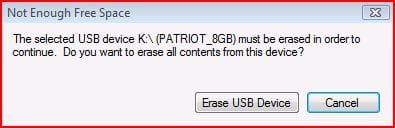
bootable DVD portion ran fine, however even though support page claims all you need is 4GB free and I have 4.4GB free I errored out... see below:

I cant sacrifice the data on this baby as its my day to day flash drive... or maybe I will just temporarily move files to HDD to test... Hmmmm
 

Attachments

  • USB DVD DL TOOL_USB1.JPG
    USB DVD DL TOOL_USB1.JPG
    24.4 KB · Views: 82
  • USB DVD DL TOOL_USB2.JPG
    USB DVD DL TOOL_USB2.JPG
    16.6 KB · Views: 84

My Computer

Computer Manufacturer/Model Number
Homebrew PC - "Alpha_Dawg"
OS
Windows 7 Ultimate 64 bit Steve Ballmer Signature Edition
CPU
Intel Core 2 Quad - Q9550 - 2.83GHz stock - OC'd to 3.6GHz
Motherboard
Gigabyte EP45-UD3P
Memory
4GB DDR2 800MHz (PC6400) OCZ Reaper
Graphics Card(s)
Nvidia GE Force 8800 GTS
Sound Card
Asus Xonar DX
Monitor(s) Displays
Samsung SyncMaster 2333HD
Screen Resolution
1920 x 1080
Hard Drives
WD Caviar Black 750GB - 7200RPM - 32MB cache
WD Caviar Green 1.5TB - 5400RPM - 64MB cache
WD Caviar Green 2.0TB - 5400RPM - 64MB cache
PSU
PC Power & Cooling Silencer 750
Case
Gigabyte 3D Aurora
Cooling
Case is Air - 5ea. 120mm fans (mix of Arctic and Xigmatec)
Keyboard
MS Natural Wireless KB
Mouse
MS Wireless Mouse
Internet Speed
50 mbps down/5 mbps up
Other Info
AVerMedia - AVerTVHD G2 Dual Tuner Card
SIW2,

I have not tried that yet. Doing so now. I will see if I can download on another computer and burn a bootable cd
 

My Computer

OS
Win XP 32 bit
Back
Top