
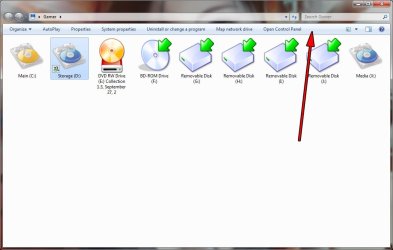
How can I disable this explorer bar?

DaveX

New member
Local time
5:16 PM
Messages
13
How can I get rid of this bar? I don't need it! I want to smash it!
 

Attachments

  • annoying.jpg
    annoying.jpg
    60 KB · Views: 343

My Computer My Computer

At a glance

Windows 7 Ultimate x64Cor 2 Duo e67002GB CorsairEVGA Nvdia 8800 GTX
OS
Windows 7 Ultimate x64
CPU
Cor 2 Duo e6700
Motherboard
EVGA 122-CK-NF68-AR LGA 775 NVIDIA nForce 680i SLI ATX
Memory
2GB Corsair
Graphics Card(s)
EVGA Nvdia 8800 GTX
Hard Drives
2x 250GB 7200 RPM
I do not think that can be done.
Cant see why anyone would wanna smash it, it is useful.

I never use it and all the exact same options can be access simply by pressing ALT. Hate it being in my face.
 

My Computer My Computer

At a glance

Windows 7 Ultimate x64Cor 2 Duo e67002GB CorsairEVGA Nvdia 8800 GTX
OS
Windows 7 Ultimate x64
CPU
Cor 2 Duo e6700
Motherboard
EVGA 122-CK-NF68-AR LGA 775 NVIDIA nForce 680i SLI ATX
Memory
2GB Corsair
Graphics Card(s)
EVGA Nvdia 8800 GTX
Hard Drives
2x 250GB 7200 RPM
Yes, I would like to know too if this bar can be disabled!
 

My Computer My Computer

At a glance

Win7 64 bit
OS
Win7 64 bit
FolderBand Auto-Hide

Location: Shellstyle.dll\UIFILE\1.txt

Insert Next Line:
<if mousefocused="false" mousewithin="false"><Element padding="rect(0rp,0rp,0rp,-28rp)"/></if>
 

My Computer My Computer

At a glance

windows 7 Ultimate x64 and Vista Ultimate x64Q94004Gb PC1280 buss 1600MHzGTX 285 GA
Computer Manufacturer/Model Number
Desktop
OS
windows 7 Ultimate x64 and Vista Ultimate x64
CPU
Q9400
Motherboard
GA-EP45T-UD3R
Memory
4Gb PC1280 buss 1600MHz
Graphics Card(s)
GTX 285 GA
Sound Card
onboart
Monitor(s) Displays
samsung LED wide 24inh
Hard Drives
Samsung 1Tb
FolderBand Auto-Hide

Location: Shellstyle.dll\UIFILE\1.txt

Insert Next Line:
<if mousefocused="false" mousewithin="false"><Element padding="rect(0rp,0rp,0rp,-28rp)"/></if>

Uhm, what?
 

My Computer My Computer

At a glance

Windows 7 Ultimate x64Cor 2 Duo e67002GB CorsairEVGA Nvdia 8800 GTX
OS
Windows 7 Ultimate x64
CPU
Cor 2 Duo e6700
Motherboard
EVGA 122-CK-NF68-AR LGA 775 NVIDIA nForce 680i SLI ATX
Memory
2GB Corsair
Graphics Card(s)
EVGA Nvdia 8800 GTX
Hard Drives
2x 250GB 7200 RPM
For disable FolderBand:
Open the Shellstyle.dll with Restorator or Reshacker
Extract the UIFile/1
Open the 1.txt and look for
<style resid="FolderBandStyle">
Insert in the next line

<Element padding="rect(0rp,0rp,0rp,-32rp)"/>

Save and replace this in the shellstyle.dll.
 

My Computer My Computer

At a glance

Win 7
OS
Win 7
<if mousefocused="false" mousewithin="false"><Element padding="rect(0rp,0rp,0rp,-28rp)"/></if>

not working :(
 

My Computer My Computer

At a glance

Windows 7
OS
Windows 7
what about for 64bit versons of win7? the dll cannot be compiled as 32bit....
 

My Computer My Computer

At a glance

Windows 7 Enterprise x64
OS
Windows 7 Enterprise x64
what about for 64bit versons of Windows 7? the dll cannot be compiled as 32bit....

nevermind, answered my own question...

found this link:[VP} - Msgboard: XP 64 Shell32.dll queries

which said use Restorator 2007. Trial worked to recompile in x64.

However i just used

Code:
<Element 

padding="rect(0rp,0rp,0rp,-32rp)"

/>

As the mouseover code caused weird problems when you hover to show the bar, then hover slightly below the bar, it would jump all around...

This bar is useless to me so i just hid it completely...

If you want the complied DLL let me know.
 

My Computer My Computer

At a glance

Windows 7 Enterprise x64
OS
Windows 7 Enterprise x64
How do you replace the file with the new one?
 

My Computer My Computer

At a glance

Windows 7 Ultimate x64Cor 2 Duo e67002GB CorsairEVGA Nvdia 8800 GTX
OS
Windows 7 Ultimate x64
CPU
Cor 2 Duo e6700
Motherboard
EVGA 122-CK-NF68-AR LGA 775 NVIDIA nForce 680i SLI ATX
Memory
2GB Corsair
Graphics Card(s)
EVGA Nvdia 8800 GTX
Hard Drives
2x 250GB 7200 RPM
How do you replace the file with the new one?

PM'd

But replace shellstyle.dll in the "C:\Windows\Resources\Themes\Aero\Shell\NormalColor" directory.

run CMD as administrator

tskill explorer [press enter]
explorer [press enter]
exit [press enter]

open my computer, organize bar should be gone.
 

My Computer My Computer

At a glance

Windows 7 Enterprise x64
OS
Windows 7 Enterprise x64
For disable FolderBand:
Open the Shellstyle.dll with Restorator or Reshacker
Extract the UIFile/1
Open the 1.txt and look for
<style resid="FolderBandStyle">
Insert in the next line

<Element padding="rect(0rp,0rp,0rp,-32rp)"/>

Save and replace this in the shellstyle.dll.

Hello,

I've followed instructions above and it works great !
But only for classic interface - if I switch to win7 basic or win7 aero - stupid explorer bar is back again.
Any ideas how to fix that ?

thanks
Vilius
 
Last edited:

My Computer My Computer

At a glance

XP
OS
XP
Hey,

Could anyone upload the edited .dll so that I don't have to install Resource Hacker etc.
I run Windows 7 64bit by the way.

Thanks!
 

My Computer My Computer

At a glance

Vista and Seven
OS
Vista and Seven
Thank you for this tweak. I really hated that bar.
 

My Computer My Computer

At a glance

Windows 7
OS
Windows 7
Hey,

Could anyone upload the edited .dll so that I don't have to install Resource Hacker etc.
I run Windows 7 64bit by the way.

Thanks!

You can email me: *Removed*
Thanks!
 
Last edited:

My Computer My Computer

At a glance

Vista and Seven
OS
Vista and Seven

My Computer My Computer

At a glance

Windows 7 64-bit Windows 7 32-bitIntel Core 2 Solo (1.4 GHz)4 GB DDR3 SDRAM - 1066 MHz SO DIMM 204-pinIntel GMA 4500MHD Dynamic Video Memory Techno...
Computer Manufacturer/Model Number
acer timeline 3810t
OS
Windows 7 64-bit Windows 7 32-bit
CPU
Intel Core 2 Solo (1.4 GHz)
Memory
4 GB DDR3 SDRAM - 1066 MHz SO DIMM 204-pin
Graphics Card(s)
Intel GMA 4500MHD Dynamic Video Memory Technology 5.0
Monitor(s) Displays
Widescreen 13.3 in TFT active matrix
Hard Drives
# 250 GB - Serial ATA-150 - 5400 rpm
Case
# Ultraportable (Under 4 lbs.) , Budget
Back
Top