Solved Security Prompts for Internet Shortcuts (in Favorites Folder)

XLR8TX

New member
Member
Local time
4:49 PM
Messages
53
Location
Houston, TX
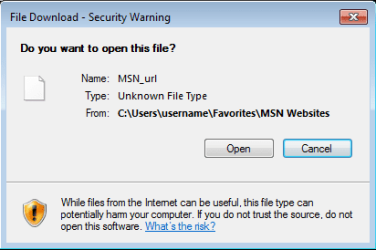
Hello. When I use IE 11 (I also use chrome) I like to open the favorites folder. I find it easier to search, modify titles and access web pages from there. Today, when I clicked on any of the shortcuts, I got this prompt:

File Download - Security Warning

Do you want to open this file?

Unkown File Type

"While files from the internet can be useful, this file type can potentially harm your computer. If you do not trust the source, do not open this software."


All of the files in the folder are internet shortcuts (.url) so why does the prompt say "Unkown File Type".

I changed the default program association for .url files from Internet Browser to IE and even then I still had to change the default program to IE in the folder menu for the shortcuts to open without a security prompt. However, now all of the original web page icons have been replaced with a generic IE icon.

I just want to know what caused this. I recently installed the windows updates for September. Could that be the cause?

Thanks in advance for any help or info.
 
Last edited:

My Computer My Computer

At a glance

Windows 7 Home Premium 64bit
Computer type
Laptop
Computer Manufacturer/Model Number
Gateway
OS
Windows 7 Home Premium 64bit
Anyone?

I understand that my issue is not as important compared to others but I would like to resolve this problem.

Thanks again.
 

My Computer My Computer

At a glance

Windows 7 Home Premium 64bit
Computer type
Laptop
Computer Manufacturer/Model Number
Gateway
OS
Windows 7 Home Premium 64bit
Moving the affected files off to a non-NTFS partition and back again tends to resolve this.
 

My Computer My Computer

At a glance

Windows 10, Windows 8.1 Pro, Windows 7 Profes...
Computer type
PC/Desktop
OS
Windows 10, Windows 8.1 Pro, Windows 7 Professional, OS X El Capitan
Question

Moving the affected files off to a non-NTFS partition and back again tends to resolve this.

Thanks for your time.

If I moved the folder to a exFAT or FAT32 flash drive then back, would that maybe work?

Also, why do you think this happened?
 

My Computer My Computer

At a glance

Windows 7 Home Premium 64bit
Computer type
Laptop
Computer Manufacturer/Model Number
Gateway
OS
Windows 7 Home Premium 64bit
If I moved the folder to a exFAT or FAT32 flash drive then back, would that maybe work?
Yes, the whole folder if you must. Just move the data onto a file system that doesn’t support ADS or Integrity Labels.

Also, why do you think this happened?
I haven’t personally found this as a problematic issue and so I haven’t yet put myself through the trouble of figuring out exactly why and when this occurs. Just know that this behaviour is very common and it relatives to the fact that IE runs as an untrusted program and so the files it creates will be so too.
 

My Computer My Computer

At a glance

Windows 10, Windows 8.1 Pro, Windows 7 Profes...
Computer type
PC/Desktop
OS
Windows 10, Windows 8.1 Pro, Windows 7 Professional, OS X El Capitan
Thanks again for your time.

I'll try that.

I've had this computer for over 5 years and have never encountered this problem before. It just struck me as odd.
 

My Computer My Computer

At a glance

Windows 7 Home Premium 64bit
Computer type
Laptop
Computer Manufacturer/Model Number
Gateway
OS
Windows 7 Home Premium 64bit
That's a good suggestion there Pyprohly, I'm not sure I would of thought of that. Strange though that IE would throw a file download warning when opening URL shortcuts.

There are two at the top of this search that offer some insight. In the first Nocturnal YL's second answer about copying not moving the favorites folder is like Pyprohly's tip but nocturnal says its only temporary. You may have to try Will Bosacker's solution in the first because I'm not sure you would want to reduce your security level by making that one setting in advance options enabled, as shown in the second link: IE would throw a file download warning when opening a URL shortcuts.

I'm not having a problem with it either, XLR, have you been keeping up with the large (for me 52MB average) monthly IE updates, have you had any problems doing any updates? IE hasn't been the same ever since the SSL security mess a couple of years ago.

Related:
Mandatory Integrity Control
 

My Computer My Computer

At a glance

Originally Win 7 Hm Prem x64 Ver 6.1.7600 Bui...Intel i3 530 2.93GHz, 2933MHz 2 Cores 4 Logic...6GB of 1,333MHz DDR3 SDRAM32MB Intel Graphics Media Accelerator HD IGChip
Computer type
PC/Desktop
Computer Manufacturer/Model Number
Gateway DX4831-01e (Mid-Tower Desktop)
OS
Originally Win 7 Hm Prem x64 Ver 6.1.7600 Build 7601-SP1 | Upgraded to Windows 10 December 14, 2019
CPU
Intel i3 530 2.93GHz, 2933MHz 2 Cores 4 Logical Processors
Motherboard
Gateway H57M01 133 megahertz
Memory
6GB of 1,333MHz DDR3 SDRAM
Graphics Card(s)
32MB Intel Graphics Media Accelerator HD IGChip
Sound Card
Realtek High Definition Audio
Monitor(s) Displays
Gateway HX2000 20inch TFT active matrix TN
Screen Resolution
1600 x 900 x 59 hertz
Hard Drives
WDC WD10EADS-00M2B0 [HDD] (1000.20 GB) -- drive 0,
HL-DT-ST DVDRAM GH41N [CD-ROM dr]
Four card readers, and Four USB 2.0
PSU
300watts.
Case
Mid-Tower Desktop
Cooling
Stock from Gateway
Keyboard
Natural Ergonomic Keyboard 4000, see Other Info
Mouse
Orig. Gateway wore out now using Insignia USB wired optical
Internet Speed
Vz FIOS 10ms png 57.64Mbps down 65.53Mbps up Speedtest.org
Antivirus
Zamana Anti-logger with Anti-malware, MSE, Windows Firewall,
Browser
IE11.0.9600.19399-Upd ver11.0.135, Firefox 68.0.1 x64
Other Info
System Specs by Belarc.

BIOS: American Megatrends Inc. P01-A0 11/17/2009

Replaced the MS 'Natural' Standard PS/2 Enhanced 101-102 Keyboard with a new Natural Ergonomic Keyboard 4000 on August 1st 2014.

Canon Pixma MG3222 Printer.

Updated to IE11 on 12102015 | Fios Quantum Router g1100

Additional AV: SpywareBlaster, manual Mbam, SAS
Moving the affected files off to a non-NTFS partition and back again tends to resolve this.

Well I finally had some Some to tinker with my laptop. Unfortunately your suggestion did not work.
 

My Computer My Computer

At a glance

Windows 7 Home Premium 64bit
Computer type
Laptop
Computer Manufacturer/Model Number
Gateway
OS
Windows 7 Home Premium 64bit
That's a good suggestion there Pyprohly, I'm not sure I would of thought of that. Strange though that IE would throw a file download warning when opening URL shortcuts.

There are two at the top of this search that offer some insight. In the first Nocturnal YL's second answer about copying not moving the favorites folder is like Pyprohly's tip but nocturnal says its only temporary. You may have to try Will Bosacker's solution in the first because I'm not sure you would want to reduce your security level by making that one setting in advance options enabled, as shown in the second link: IE would throw a file download warning when opening a URL shortcuts.

I'm not having a problem with it either, XLR, have you been keeping up with the large (for me 52MB average) monthly IE updates, have you had any problems doing any updates? IE hasn't been the same ever since the SSL security mess a couple of years ago.

Related:
Mandatory Integrity Control

Anak, thanks for the info and links. It is much appreciated.

I'll have some time to try that stuff this weekend.

I have been keeping up with updates and have not had any problems with that.
 

My Computer My Computer

At a glance

Windows 7 Home Premium 64bit
Computer type
Laptop
Computer Manufacturer/Model Number
Gateway
OS
Windows 7 Home Premium 64bit
Moving the affected files off to a non-NTFS partition and back again tends to resolve this.

Well I finally had some Some to tinker with my laptop. Unfortunately your suggestion did not work.
I know why. I seem to have missed a small detail. Sorry for wasting your time. I should provide more insight into what’s going on here…

We are dealing with the Integrity Label-ed case of security prompts, clearly.

When a shortcut (.lnk) or .url file has a Low Mandatory Integrity Label, Windows will prompt consent from the user when the shortcut is invoked—as already observed.

Because only NTFS supports these Integrity Labels on files, naturally, moving those files off to a non-NTFS file system will strip the file’s Integrity Label and it will not return even if the file is moved back. This was the basis of logic behind my initial suggestion.

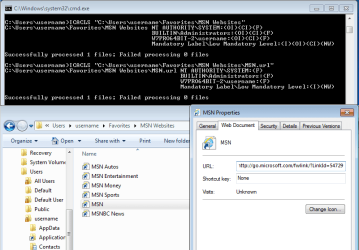
But as it turns out, none of the shortcuts in the Favorites folder themselves actually carry a Integrity Label. What’s happening is, they are inheriting a Low Mandatory Integrity Label from the Favorites folder. Because IE runs with low integrity, the files associated with it will also be of low integrity, and therefore if IE is to write these files to the Favorites folder the Favorites folder must also bear a Low Mandatory Integrity Label.

Running the command (which applies an explicit Medium Mandatory Integrity Label to an item)
Code:
icacls "C:\path\to\file.lnk" /setintegritylevel m
on a shortcut will override any inherited Integrity Level setting, effectively ridding any security prompt from that shortcut for good. However, I usually advise against this because explicitly set Integrity Levels are difficult to remove once they are applied.

Also, changing or removing the propagating Low Mandatory Integrity Label from the Favorites folder in order to rid all of the shortcuts’ security prompts is a bad idea. In doing so, IE may have trouble writing to this location.


XLR8TX, the security prompt you see is ordinary behaviour and I recommend you don’t try and change it.
 
Last edited:

My Computer My Computer

At a glance

Windows 10, Windows 8.1 Pro, Windows 7 Profes...
Computer type
PC/Desktop
OS
Windows 10, Windows 8.1 Pro, Windows 7 Professional, OS X El Capitan
XLR8TX, the security prompt you see is ordinary behaviour and I recommend you don’t try and change it.

"Ordinary behaviour"? No sir.

Like I said before, I've had this PC for over 5 years (while using the favorites folder in the same manner) and have never had this issue.

Thanks again for your time.
 

My Computer My Computer

At a glance

Windows 7 Home Premium 64bit
Computer type
Laptop
Computer Manufacturer/Model Number
Gateway
OS
Windows 7 Home Premium 64bit
I hope I don't muddy the water's here,

Pyprohly, your cmd is similar to poster Bosacker's answer here, except he wants to send it to the desktop and has a couple more switches the (OI) & (CI), and your path\to\file.lnk, is that where the favorites folder is located, like mine is located at C:\Users\my user name\Favorites?

Would I be correct in thinking your cmd would follow that path and set the integrity label for that path to .lnk's, while Bosacker's path is to the desktop where his links are and that causes the difference?

Yours:
Code:
icacls “C:\path\to\file.lnk” /setintegritylevel m
Bosacker's:
Code:
ICACLS "C:\Users\<username goes here>\Desktop" /Setintegritylevel (OI)(CI)M
XLR, stay with Pyprohly's guidance.
 

My Computer My Computer

At a glance

Originally Win 7 Hm Prem x64 Ver 6.1.7600 Bui...Intel i3 530 2.93GHz, 2933MHz 2 Cores 4 Logic...6GB of 1,333MHz DDR3 SDRAM32MB Intel Graphics Media Accelerator HD IGChip
Computer type
PC/Desktop
Computer Manufacturer/Model Number
Gateway DX4831-01e (Mid-Tower Desktop)
OS
Originally Win 7 Hm Prem x64 Ver 6.1.7600 Build 7601-SP1 | Upgraded to Windows 10 December 14, 2019
CPU
Intel i3 530 2.93GHz, 2933MHz 2 Cores 4 Logical Processors
Motherboard
Gateway H57M01 133 megahertz
Memory
6GB of 1,333MHz DDR3 SDRAM
Graphics Card(s)
32MB Intel Graphics Media Accelerator HD IGChip
Sound Card
Realtek High Definition Audio
Monitor(s) Displays
Gateway HX2000 20inch TFT active matrix TN
Screen Resolution
1600 x 900 x 59 hertz
Hard Drives
WDC WD10EADS-00M2B0 [HDD] (1000.20 GB) -- drive 0,
HL-DT-ST DVDRAM GH41N [CD-ROM dr]
Four card readers, and Four USB 2.0
PSU
300watts.
Case
Mid-Tower Desktop
Cooling
Stock from Gateway
Keyboard
Natural Ergonomic Keyboard 4000, see Other Info
Mouse
Orig. Gateway wore out now using Insignia USB wired optical
Internet Speed
Vz FIOS 10ms png 57.64Mbps down 65.53Mbps up Speedtest.org
Antivirus
Zamana Anti-logger with Anti-malware, MSE, Windows Firewall,
Browser
IE11.0.9600.19399-Upd ver11.0.135, Firefox 68.0.1 x64
Other Info
System Specs by Belarc.

BIOS: American Megatrends Inc. P01-A0 11/17/2009

Replaced the MS 'Natural' Standard PS/2 Enhanced 101-102 Keyboard with a new Natural Ergonomic Keyboard 4000 on August 1st 2014.

Canon Pixma MG3222 Printer.

Updated to IE11 on 12102015 | Fios Quantum Router g1100

Additional AV: SpywareBlaster, manual Mbam, SAS
XLR8TX, the security prompt you see is ordinary behaviour and I recommend you don’t try and change it.

"Ordinary behaviour"? No sir.
“Ordinary”, as in if every member on this forum browsed to their Favorites folder right now and tried to open a shortcut there they’d receive the same security prompt you and I see. It’s supposed to occur, it’s default behaviour, and therefore ordinary.

If you’ve never seen this prompt in 5 years I cannot explain why.

Would I be correct in thinking your cmd would follow that path and set the integrity label for that path to .lnk's, while Bosacker's path is to the desktop where his links are and that causes the difference?
These commands are not the same. The intention behind each is different. My command says to apply a Medium Mandatory Integrity Label to a single, specific file “file.lnk” located in “C:\path\to”, while Bosacker’s applies a Medium Mandatory Integrity Label to the folder “C:\Users\<username goes here>\Desktop” and the Integrity Label is set to propagate to all child files and folders within this folder.

Bosacker’s issue involved shortcuts that strictly reside outside the Favorites folder. Consequently, my initial suggestion here of moving the shortcuts off to another file system and back again would have aided his problem and would have been the optimal thing to do, instead of running the Icacls command he did and set a quasi-permanent Integrity Label onto his Desktop folder.
 

My Computer My Computer

At a glance

Windows 10, Windows 8.1 Pro, Windows 7 Profes...
Computer type
PC/Desktop
OS
Windows 10, Windows 8.1 Pro, Windows 7 Professional, OS X El Capitan
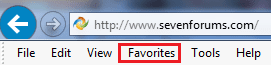
Hmmm...May be I have a wrong security setting; If you're talking about the Favorites Folder in the Menu bar of IE, I can open any link in there and I do not receive that warning. :zip:
IEFavs.png

Thanks for the clarification Pyprohly!
 

My Computer My Computer

At a glance

Originally Win 7 Hm Prem x64 Ver 6.1.7600 Bui...Intel i3 530 2.93GHz, 2933MHz 2 Cores 4 Logic...6GB of 1,333MHz DDR3 SDRAM32MB Intel Graphics Media Accelerator HD IGChip
Computer type
PC/Desktop
Computer Manufacturer/Model Number
Gateway DX4831-01e (Mid-Tower Desktop)
OS
Originally Win 7 Hm Prem x64 Ver 6.1.7600 Build 7601-SP1 | Upgraded to Windows 10 December 14, 2019
CPU
Intel i3 530 2.93GHz, 2933MHz 2 Cores 4 Logical Processors
Motherboard
Gateway H57M01 133 megahertz
Memory
6GB of 1,333MHz DDR3 SDRAM
Graphics Card(s)
32MB Intel Graphics Media Accelerator HD IGChip
Sound Card
Realtek High Definition Audio
Monitor(s) Displays
Gateway HX2000 20inch TFT active matrix TN
Screen Resolution
1600 x 900 x 59 hertz
Hard Drives
WDC WD10EADS-00M2B0 [HDD] (1000.20 GB) -- drive 0,
HL-DT-ST DVDRAM GH41N [CD-ROM dr]
Four card readers, and Four USB 2.0
PSU
300watts.
Case
Mid-Tower Desktop
Cooling
Stock from Gateway
Keyboard
Natural Ergonomic Keyboard 4000, see Other Info
Mouse
Orig. Gateway wore out now using Insignia USB wired optical
Internet Speed
Vz FIOS 10ms png 57.64Mbps down 65.53Mbps up Speedtest.org
Antivirus
Zamana Anti-logger with Anti-malware, MSE, Windows Firewall,
Browser
IE11.0.9600.19399-Upd ver11.0.135, Firefox 68.0.1 x64
Other Info
System Specs by Belarc.

BIOS: American Megatrends Inc. P01-A0 11/17/2009

Replaced the MS 'Natural' Standard PS/2 Enhanced 101-102 Keyboard with a new Natural Ergonomic Keyboard 4000 on August 1st 2014.

Canon Pixma MG3222 Printer.

Updated to IE11 on 12102015 | Fios Quantum Router g1100

Additional AV: SpywareBlaster, manual Mbam, SAS
Hmmm...May be I have a wrong security setting; If you're talking about the Favorites Folder in the Menu bar of IE, I can open any link in there and I do not receive that warning.
We’re talking about shortcuts in the physical Favorites folder, “%userprofile%\Favorites”. Invoking any shortcut under this hierarchy through Explorer will yield a security prompt due to the folder emitting a Low Mandatory Integrity Label to all child files and folders.
 

My Computer My Computer

At a glance

Windows 10, Windows 8.1 Pro, Windows 7 Profes...
Computer type
PC/Desktop
OS
Windows 10, Windows 8.1 Pro, Windows 7 Professional, OS X El Capitan
Culprit Identified

After conferring with a few folks on the Microsoft Community forums, we have determined that the culprit of this new prompt behavior is a recent Windows update as I had originally speculated in the first post.

It is this IE update in particular that precipitated these security prompts to be generated:

Cumulative Security Update for Internet Explorer 11 for Windows 7 for x64-based Systems (KB3185319)
 

My Computer My Computer

At a glance

Windows 7 Home Premium 64bit
Computer type
Laptop
Computer Manufacturer/Model Number
Gateway
OS
Windows 7 Home Premium 64bit
Hmmm...May be I have a wrong security setting; If you're talking about the Favorites Folder in the Menu bar of IE, I can open any link in there and I do not receive that warning.
We’re talking about shortcuts in the physical Favorites folder, “%userprofile%\Favorites”. Invoking any shortcut under this hierarchy through Explorer will yield a security prompt due to the folder emitting a Low Mandatory Integrity Label to all child files and folders.
Okay, after going there and trying my shortcuts I too have the same behaviour.

After conferring with a few folks on the Microsoft Community forums, we have determined that the culprit of this new prompt behavior is a recent Windows update as I had originally speculated in the first post.

It is this IE update in particular that precipitated these security prompts to be generated:

Cumulative Security Update for Internet Explorer 11 for Windows 7 for x64-based Systems (KB3185319)
Any word if microsoft will change it or do they believe it is a security enhancement and will let it alone?
 

My Computer My Computer

At a glance

Originally Win 7 Hm Prem x64 Ver 6.1.7600 Bui...Intel i3 530 2.93GHz, 2933MHz 2 Cores 4 Logic...6GB of 1,333MHz DDR3 SDRAM32MB Intel Graphics Media Accelerator HD IGChip
Computer type
PC/Desktop
Computer Manufacturer/Model Number
Gateway DX4831-01e (Mid-Tower Desktop)
OS
Originally Win 7 Hm Prem x64 Ver 6.1.7600 Build 7601-SP1 | Upgraded to Windows 10 December 14, 2019
CPU
Intel i3 530 2.93GHz, 2933MHz 2 Cores 4 Logical Processors
Motherboard
Gateway H57M01 133 megahertz
Memory
6GB of 1,333MHz DDR3 SDRAM
Graphics Card(s)
32MB Intel Graphics Media Accelerator HD IGChip
Sound Card
Realtek High Definition Audio
Monitor(s) Displays
Gateway HX2000 20inch TFT active matrix TN
Screen Resolution
1600 x 900 x 59 hertz
Hard Drives
WDC WD10EADS-00M2B0 [HDD] (1000.20 GB) -- drive 0,
HL-DT-ST DVDRAM GH41N [CD-ROM dr]
Four card readers, and Four USB 2.0
PSU
300watts.
Case
Mid-Tower Desktop
Cooling
Stock from Gateway
Keyboard
Natural Ergonomic Keyboard 4000, see Other Info
Mouse
Orig. Gateway wore out now using Insignia USB wired optical
Internet Speed
Vz FIOS 10ms png 57.64Mbps down 65.53Mbps up Speedtest.org
Antivirus
Zamana Anti-logger with Anti-malware, MSE, Windows Firewall,
Browser
IE11.0.9600.19399-Upd ver11.0.135, Firefox 68.0.1 x64
Other Info
System Specs by Belarc.

BIOS: American Megatrends Inc. P01-A0 11/17/2009

Replaced the MS 'Natural' Standard PS/2 Enhanced 101-102 Keyboard with a new Natural Ergonomic Keyboard 4000 on August 1st 2014.

Canon Pixma MG3222 Printer.

Updated to IE11 on 12102015 | Fios Quantum Router g1100

Additional AV: SpywareBlaster, manual Mbam, SAS
After conferring with a few folks on the Microsoft Community forums, we have determined that the culprit of this new prompt behavior is a recent Windows update as I had originally speculated in the first post.

It is this IE update in particular that precipitated these security prompts to be generated:

Cumulative Security Update for Internet Explorer 11 for Windows 7 for x64-based Systems (KB3185319)
Any word if microsoft will change it or do they believe it is a security enhancement and will let it alone?

My guess is that MS is probably done fiddling with W7. Unless an update causes serious issues they will probably just leave it as is.

Too bad, since I'm accustomed to my old browsing habits.

KB3185319 :ar: https://support.microsoft.com/en-us/kb/3185319
 

My Computer My Computer

At a glance

Windows 7 Home Premium 64bit
Computer type
Laptop
Computer Manufacturer/Model Number
Gateway
OS
Windows 7 Home Premium 64bit
XLR8TX, the security prompt you see is ordinary behaviour and I recommend you don’t try and change it.

"Ordinary behaviour"? No sir.
“Ordinary”, as in if every member on this forum browsed to their Favorites folder right now and tried to open a shortcut there they’d receive the same security prompt you and I see. It’s supposed to occur, it’s default behaviour, and therefore ordinary.

If you’ve never seen this prompt in 5 years I cannot explain why...........
I've never seen that warning when opening a shortcut from the Favorites folder by double clicking on it from within the Windows (file) Explorer. I also don't see any warning when I drag/drop one of these shortcuts into a non-default browser like Chrome. I checks several W7 computers and no such warning appears.

I don't get the warning on a fresh install of W7 pro 64bit inside a VM:
(tested with the default IE8 and with IE11 - before and after installing KB3185319)

Before KB3185319
1-before-KB3185319.PNG

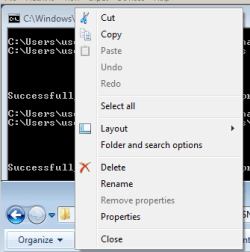
As an aside, if I get to the shortcut's Properties via Organize > Properties...
Before KB3185319
2-before-KB3185319.PNG

...I see this warning:
Before KB3185319
3-before-KB3185319.PNG


After KB3185319
4-after-KB3185319.PNG

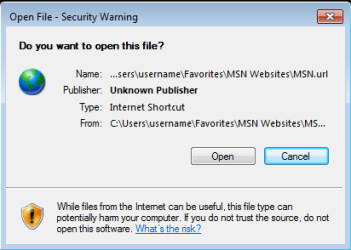
Double clicking on the MSN shortcut from within the Windows (file) Explorer:
After KB3185319
5-after-KB3185319.PNG
 
Last edited:

My Computer My Computer

At a glance

W7 Pro SP1 64biti78GBIntel HD Graphics
Computer type
Laptop
Computer Manufacturer/Model Number
Employer provided Dell Latitude
OS
W7 Pro SP1 64bit
CPU
i7
Memory
8GB
Graphics Card(s)
Intel HD Graphics
Hard Drives
crappy SSD
Antivirus
Employer mandated Symantec Endpoint Protection
Browser
Pale Moon 64bit, IE11 64bit & Chrome 64bit
UsernameIssues, Excellent Info.

After conversing with other users on several forums, I knew those prompts were not there before for most if not all users.

Do you know of any workaround for this?
 

My Computer My Computer

At a glance

Windows 7 Home Premium 64bit
Computer type
Laptop
Computer Manufacturer/Model Number
Gateway
OS
Windows 7 Home Premium 64bit
Back
Top